



Serend Animations
Add beautiful scroll animations to Gutenberg blocks with a simple dropdown. Lightweight, GDPR-friendly, no third-party dependencies!

Consider an alternative
Serend Animations shows warning signs in 2026 — compare the alternatives below before installing. It runs on 50+ sites and was last updated 1 year ago, and scores 34/100 on our health check.
- Small user base (50+ active installs)
- Very few reviews so far
- No update in over a year
- Only tested up to WordPress 6.8 (latest is 7.1)
How does it stack up?
Side-by-side on installs, updates, ratings & support

Daily downloads
Download spikes usually follow a new release — each site that auto-updates counts as a download.
Rankings
Where Serend Animations stands todayWordPress.org search rankings
Live position in the plugin search, top 100| Keyword | Position |
|---|---|
| animations | >100 |
| blocks | >100 |
| effects | >100 |
| gutenberg | >100 |
| scroll | >100 |
Version adoption
Share of active sites per release.
About Serend Animations
From the official readme · v1.0.3Description
Serend Animations makes it incredibly easy to add stunning scroll animations to any Gutenberg block. Choose an animation type, select a direction with intuitive arrow buttons, optionally enable slow motion, and watch your content come to life as visitors scroll through your page.
NEW in v1.0.3: Visual direction picker with arrow buttons! All animation types now support all 4 directions (top, right, bottom, left), plus a universal Slow Motion toggle for dramatic effects.
Why choose Serend Animations?
- Visual Direction Control: Intuitive arrow buttons to select animation direction – no more guessing!
- 20 Animation Variants: 5 animation types × 4 directions = endless creative possibilities
- Slow Motion Toggle: Make any animation 1.5x slower for more dramatic effects
- Ultra Lightweight: Pure CSS animations with minimal JavaScript – only 8KB total
- GDPR Friendly: No tracking, no cookies, no external connections – 100% privacy compliant
- Zero Dependencies: No jQuery, no third-party libraries, no external CDNs
- Lightning Fast: GPU-accelerated CSS animations with Intersection Observer
- Security First: Clean code, no external requests, WordPress security standards
- Accessibility Ready: Respects user motion preferences automatically
- White Label Ready: Clean frontend code without plugin branding or bloat
Features
- 5 Animation Types with 4 Directions Each: 20 beautiful animation variants to choose from
- Visual Direction Picker: Intuitive arrow buttons to select animation direction (top, right, bottom, left)
- Slow Motion Toggle: Make any animation 1.5x slower for more dramatic effects
- Staggered Animations: Use the delay slider to create cascading animation effects
- One-Click Integration: No code required – just select an animation and direction
- Performance Optimized: Uses native Intersection Observer API for smooth performance
- Works with All Blocks: Compatible with every Gutenberg block
- Clean Code: Pure CSS + vanilla JavaScript – no bloat, no dependencies
How It Works
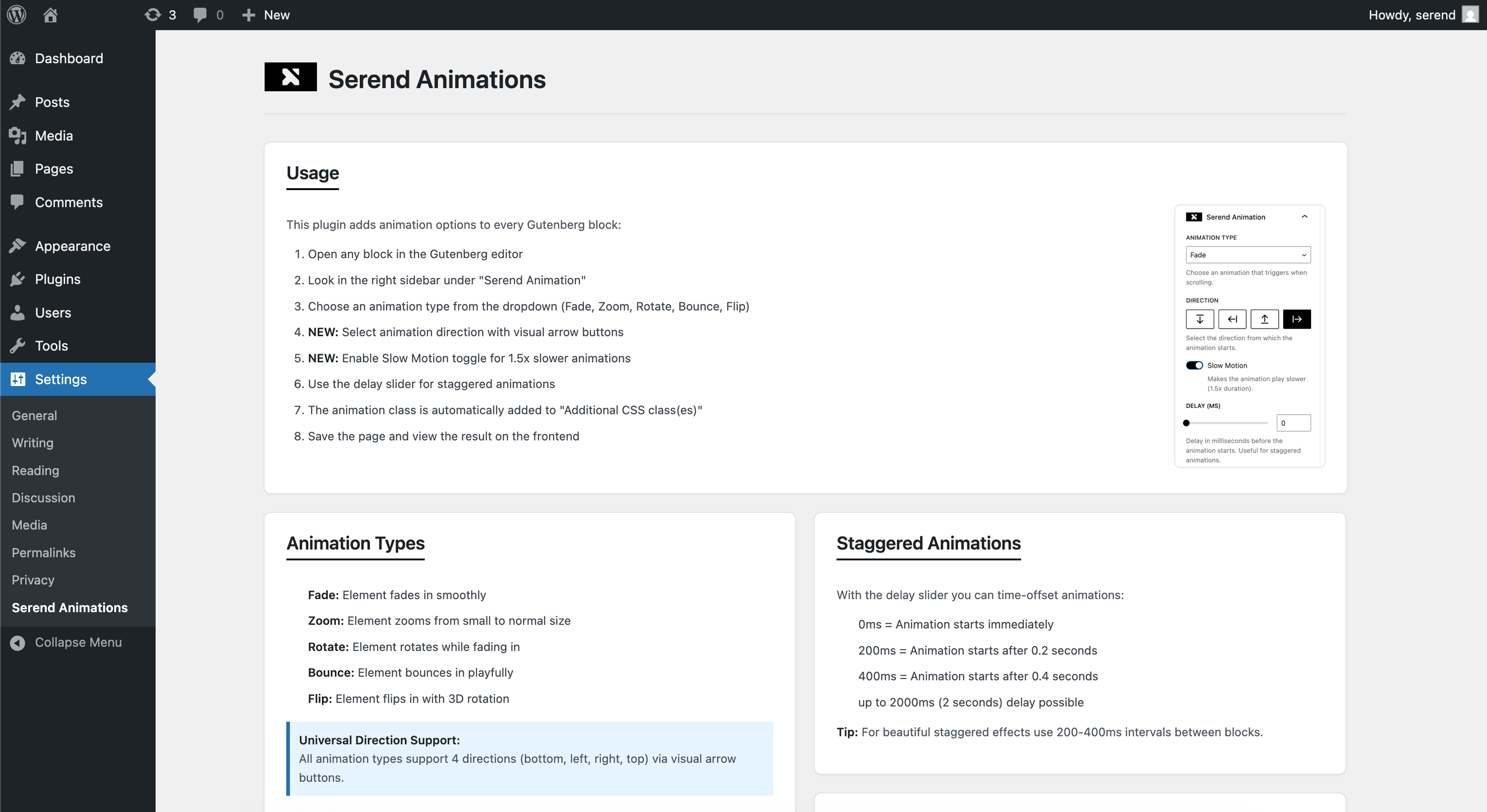
- Open any block in the Gutenberg editor
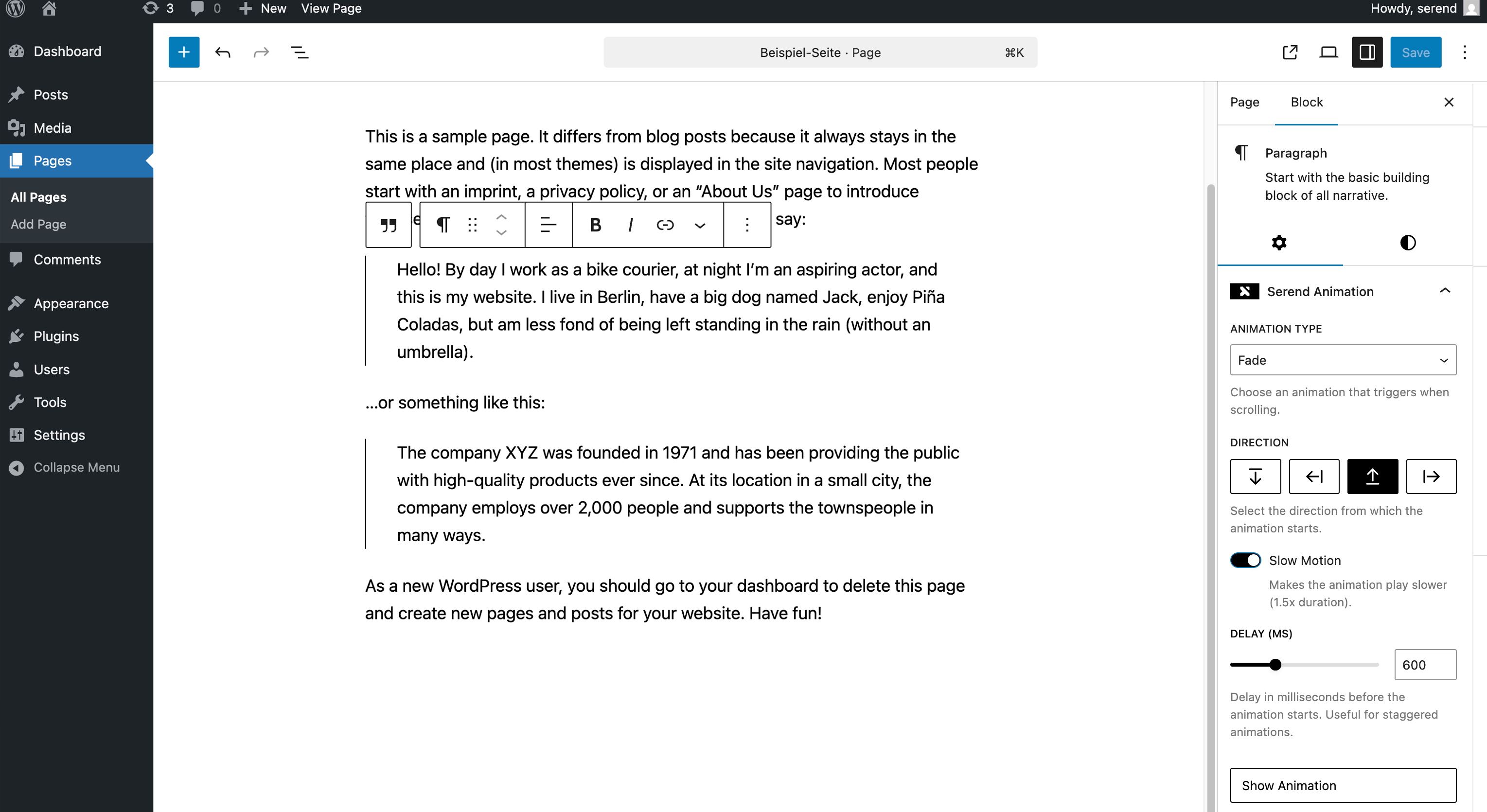
- Look for “Serend Animation” in the block inspector panel
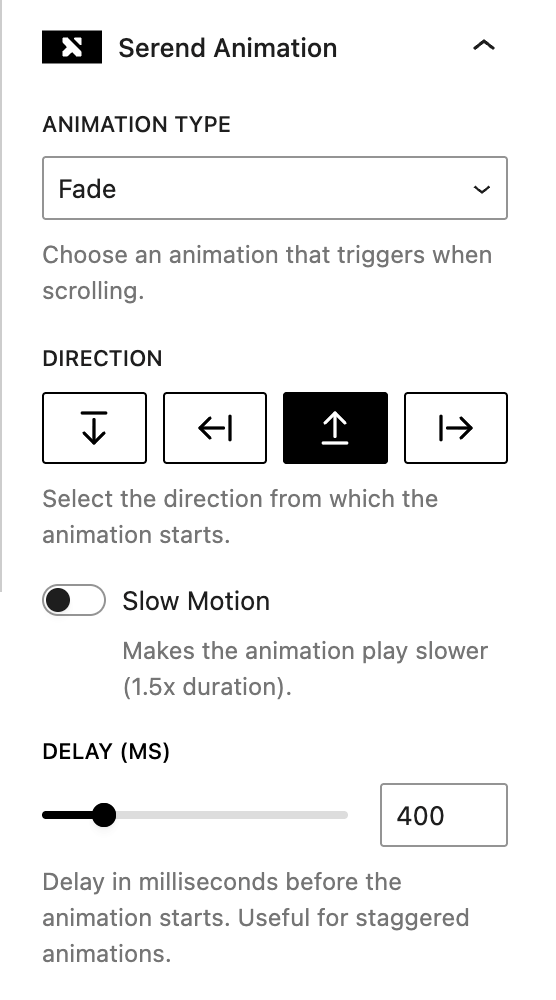
- Choose an animation type (Fade, Zoom, Rotate, Bounce, or Flip)
- Select a direction using the visual arrow buttons
- Optionally enable “Slow Motion” for a more dramatic effect
- Optionally set a delay for staggered effects
- Click “Show Animation” to preview in the editor
- Save and view your animated content on the frontend
Animation Types
Each animation type supports 4 directions (top, right, bottom, left):
- Fade: Elements gracefully fade in while sliding from the selected direction
- Zoom: Elements scale up from smaller size while moving from the selected direction
- Rotate: Elements rotate while scaling and moving from the selected direction
- Bounce: Elements bounce in with elastic effect from the selected direction
- Flip: Elements flip in with 3D rotation (X-axis for top/bottom, Y-axis for left/right)
Plus, every animation can be made slower with the “Slow Motion” toggle for more dramatic effects!
Perfect For
- GDPR-Compliant Websites: No tracking, no cookies, no privacy concerns
- Performance-Critical Sites: Lightweight and fast-loading
- Agency & Developer Projects: White label ready, clean code with no plugin branding
- Landing Pages: Engaging animations without the bloat
- Portfolio Websites: Showcase your work with beautiful effects
- Business Sites: Stand out without compromising on speed or privacy
- Blog Posts: Dynamic content reveals that respect user preferences
- Client Projects: Safe, reliable animations with zero maintenance overhead
Developer Friendly
- Pure CSS + Vanilla JS: No jQuery or framework dependencies
- WordPress Coding Standards: Clean, secure, and maintainable code
- Zero External Calls: No CDNs, APIs, or third-party services
- White Label Frontend: No plugin branding or comments in generated HTML/CSS
- Lightweight Footprint: Only 8KB total – smaller than most images
- Extensible Architecture: Easy to customize with your own CSS
- Debug Mode: Built-in tools for development and troubleshooting (enable via Settings → Serend Animations)
- GDPR Compliant: No data collection, tracking, or external connections
- Security Focused: Follows WordPress security best practices
Additional Information
Minimum Requirements
- WordPress 6.0 or higher
- PHP 7.4 or higher
- Modern browser with JavaScript enabled
Contributing
This plugin is open source. Contributions are welcome.
Installation
- Upload the plugin files to
/wp-content/plugins/serend-animations/directory, or install through the WordPress plugins screen - Activate the plugin through the ‘Plugins’ screen in WordPress
- Start adding animations to your Gutenberg blocks via the block inspector panel
Changelog
Major feature update! Visual direction picker with arrow buttons for ALL animations, universal Slow Motion toggle, and 20 animation variants (5 types × 4 directions). Much more flexible and intuitive animation control. Highly recommended update!
1.0.3
- NEW: Visual direction picker with arrow buttons for all animations
- NEW: Slow Motion toggle – make any animation 1.5x slower
- NEW: All animation types now support all 4 directions (top, right, bottom, left)
- NEW: 20 animation variants total (5 types × 4 directions)
- Simplified UI – cleaner animation type dropdown
- Direction selection moved from dropdown to intuitive button grid
- Delay changes no longer trigger editor preview (frontend-only)
- Fixed scroll-fade-in-top and other directional variants not animating
- Frontend JavaScript now uses future-proof attribute selectors
- Better CSS organization with clear section comments
- Universal animation-slow modifier class
- Enhanced editor preview with all directional keyframes
- Improved class management for slow modifier and directions
1.0.2
- Added live animation preview in Gutenberg editor with “Show Animation” button
- Automatic animation preview when selecting or changing animations
- Automatic preview when changing delay values
- Full support for all third-party blocks (Yoast SEO, Rank Math, WooCommerce, etc.)
- Fixed animation class cleanup – no more orphaned fragments
- Fixed correct animation detection for compound classes
- Elements now remain visible in editor while supporting previews
- Animation dropdown now shows correct selection
- All Fade In variants now work correctly
- Improved className management with better filtering
- Production-ready code (removed debug logs)
- Better iframe handling for modern WordPress editor
1.0.1
- Improved code structure and organization
- Separated OOP and functional code into proper files
- Moved plugin functions to includes/ directory following WordPress standards
- Enhanced JavaScript code formatting and WordPress compliance
- Reduced JavaScript linting errors by 85% (from 500+ to 78 errors)
- WordPress Coding Standards compliance improvements
- Better separation of concerns between classes and functions
- Added proper Doc-Comments for all functions and classes
- Implemented Yoda Conditions for better code safety
1.0.0
- Initial release
- 8 animation types: Fade In (bottom, left, right), Fade In Slow, Zoom In, Rotate In, Bounce In, Flip In
- Delay slider for staggered animations (0-2000ms)
- Intersection Observer for performance
- Accessibility support with prefers-reduced-motion
- Debug mode with settings panel (Settings → Serend Animations)
- Visual debug overlay for administrators
- WordPress 6.6 compatibility
- Full internationalization support
Screenshots
For developers
Is this your plugin? Show off the numbers.
Add a live badge to your site, docs or GitHub README. It updates on its own — no account needed.
Best Serend Animations alternatives
All animations plugins →




FAQ
Serend Animations: quick answers
Straight answers, pulled from live WordPress.org data.
Live data from WordPress.org · checked Nov 16, 2026
Is Serend Animations free?
Yes. Serend Animations is free to download and use from the official WordPress.org plugin directory.
Is Serend Animations safe to use in 2026?
Serend Animations shows warning signs in 2026 — compare the alternatives below before installing. It runs on 50+ sites and was last updated 1 year ago, and scores 34/100 on our health check.
How many websites use Serend Animations?
Serend Animations is active on 50+ WordPress websites and has been downloaded 858 times since it launched in September 2025. It was downloaded 94 times in the last 30 days.
Does Serend Animations work with WordPress 7.1?
Serend Animations is officially tested up to WordPress 6.8.12, while the latest release is 7.1.4. It may still work, but try it on a staging site first.
What PHP version does Serend Animations need?
Serend Animations requires PHP 7.4 or higher. Most hosts run PHP 8.x today, so it works on any modern WordPress hosting.
When was Serend Animations last updated?
The latest version, 1.0.3, was released on November 6, 2025 (1 year ago).
Who makes Serend Animations?
Serend Animations is developed and maintained by serend.
What are the best alternatives to Serend Animations?
The most popular alternatives to Serend Animations are Superb Addons: Blocks, Patt… (80K+ installs), View Transitions (10K+ installs) and Crelly Slider (10K+ installs).
Powered by PageForge
Want thousands of pages that rank like these? Build them in an afternoon.
This directory runs on the same engine as PageForge. Turn any spreadsheet, CSV or API into thousands of fast, SEO-ready WordPress pages — with schema, internal links and AI-written copy baked in.
- CSV, Google Sheets & API data sources
- AI content, schema & internal links per page
- Works with Elementor, Gutenberg, Yoast & Rank Math
- Free on WordPress.org — no credit card


