


Scriberry
Scriberry writes your blog posts in your brand's voice and publishes the ones you approved — on the dates you picked. SEO and GEO.

Solid choice
Scriberry is a solid plugin choice in 2026, with a few things worth checking first. Was last updated 2 weeks ago, and scores 64/100 on our health check.
- Actively developed — last update 2 weeks ago
- Tested with the latest WordPress (7.1)
- Small user base (<10 active installs)
- Very few reviews so far
How does it stack up?
Side-by-side on installs, updates, ratings & support



Daily downloads
Download spikes usually follow a new release — each site that auto-updates counts as a download.
Rankings
Where Scriberry stands todayWordPress.org search rankings
Live position in the plugin search, top 100| Keyword | Position |
|---|---|
| ai blog | >100 |
| content automation | >100 |
| content scheduling | >100 |
| seo | >100 |
About Scriberry
From the official readme · v2026.2.0Description
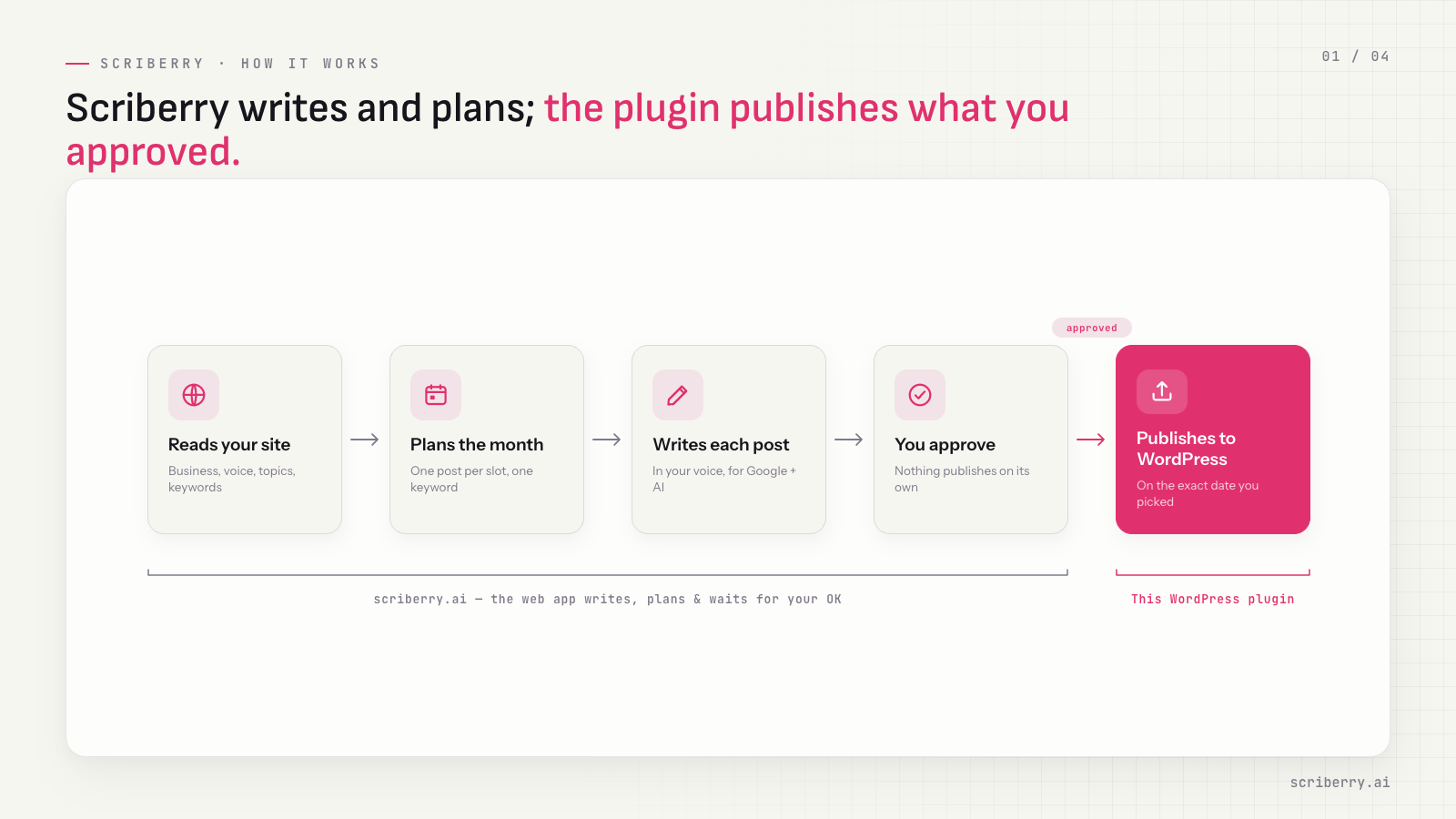
Scriberry is a web app that writes the posts for your business blog. This plugin is the last step — when you approve a post in Scriberry, the plugin publishes it on your WordPress on the date you picked. No logging into the dashboard on publish day, no copy-pasting drafts, no calendar reminders.
Scriberry publishes only what you have already approved. Each post is written in your site’s voice, because Scriberry reads your site first — your business, your tone, your topics, your language — before it writes a word.
Scriberry writes for both fronts of search: Google and Bing on one side, ChatGPT, Perplexity, Gemini, and Claude on the other. Being cited inside an AI answer is the new front door to your site, and Scriberry treats it as a first-class outcome. The slow, compounding kind of SEO — one post a week, on the keywords you chose, in the voice your readers already recognise.
What Scriberry does for your blog
- Reads your website to learn your business, your voice, your topics, and your keywords.
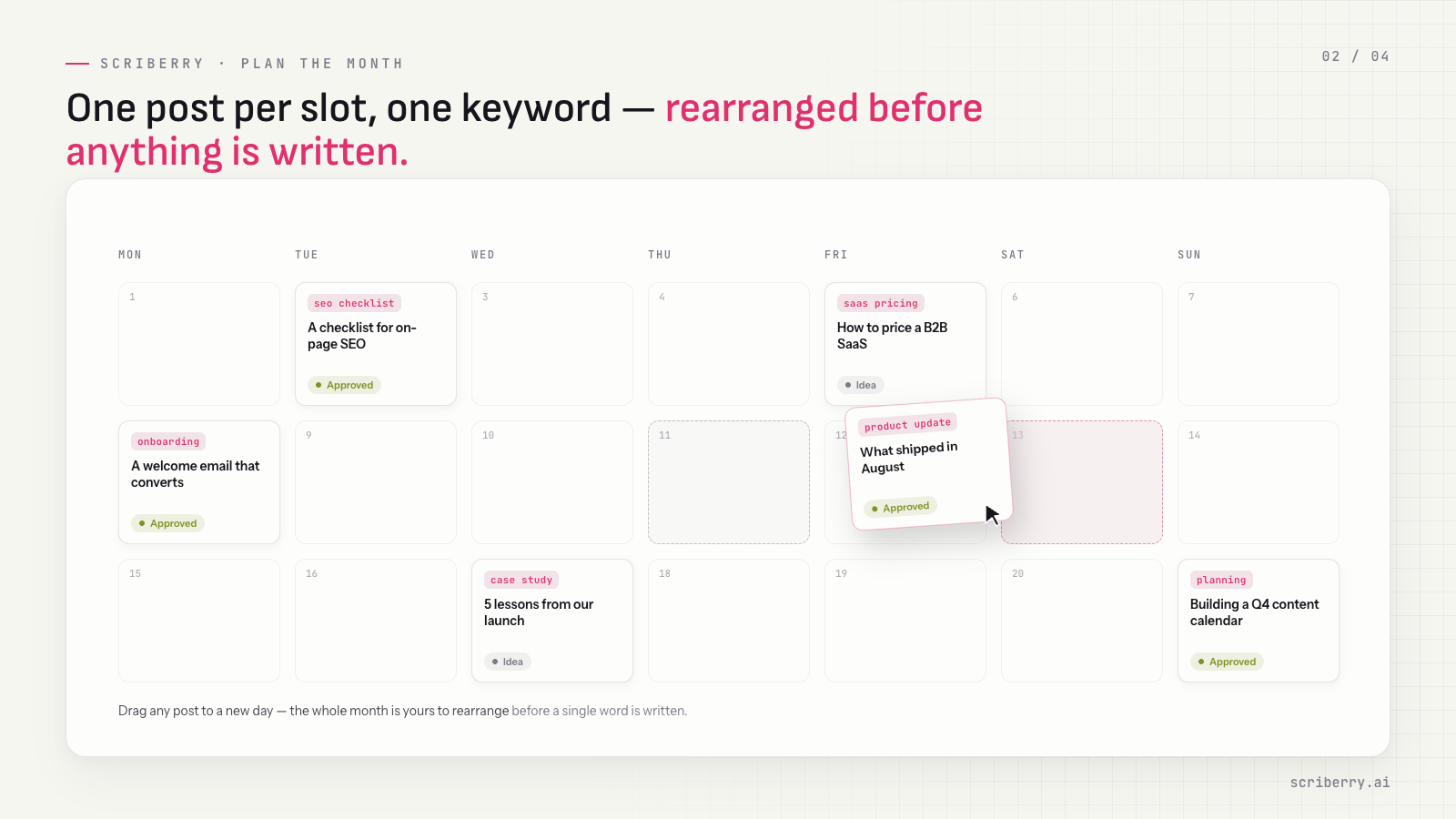
- Suggests post ideas for the upcoming month — one per planned publication slot, against a specific keyword.
- Proposes a publication schedule you can rearrange before anything is written.
- Writes each post in your voice, with images, against the keyword for that slot.
- Shows an SEO score on every draft and lets you request AI-assisted edits — a paragraph, a section, an image — until it reads right.
- Publishes the approved post to your WordPress on the date you picked.
What this plugin does
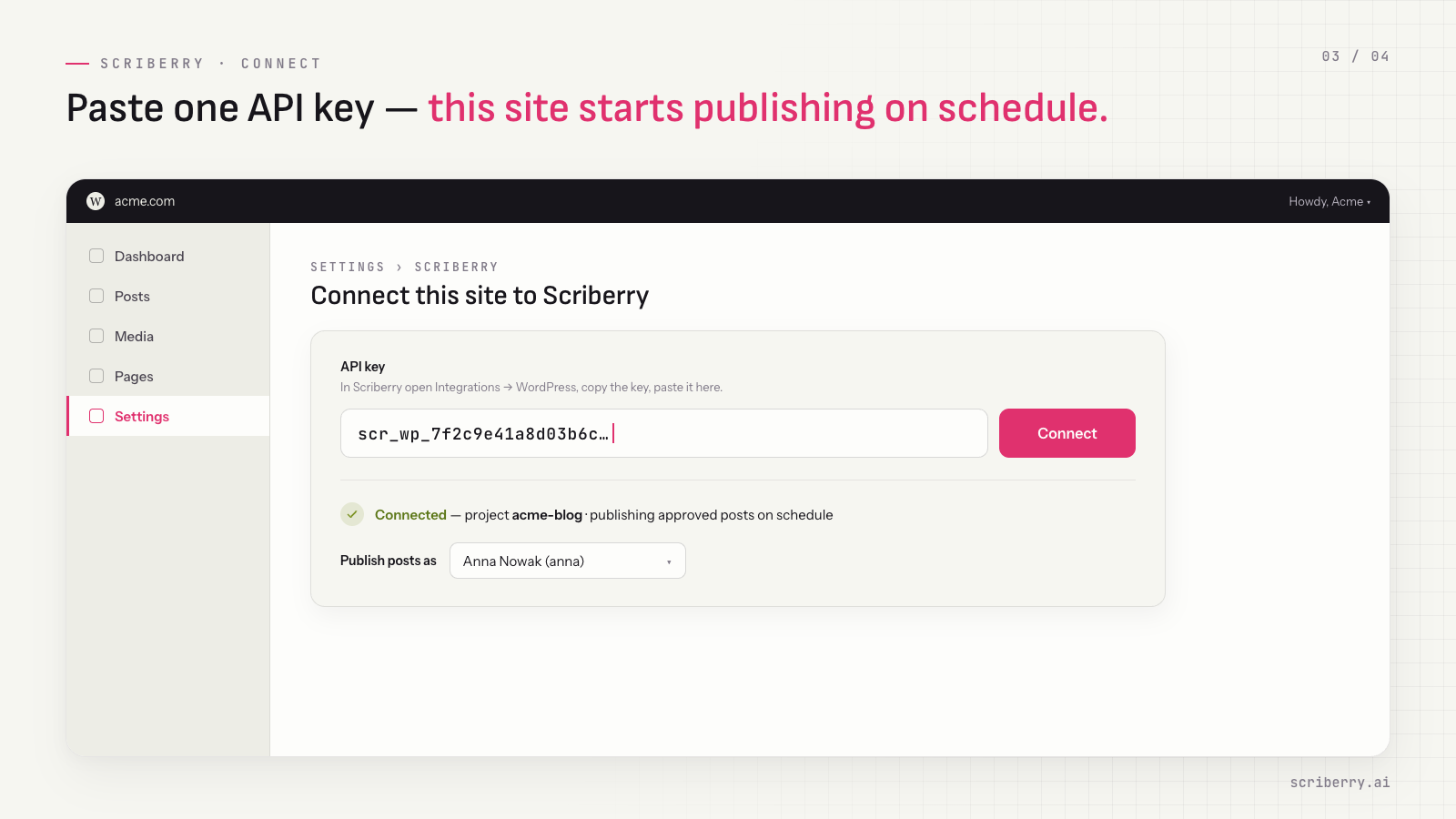
- Connects your WordPress to one Scriberry project with an API key you paste once.
- Checks Scriberry hourly for posts due today.
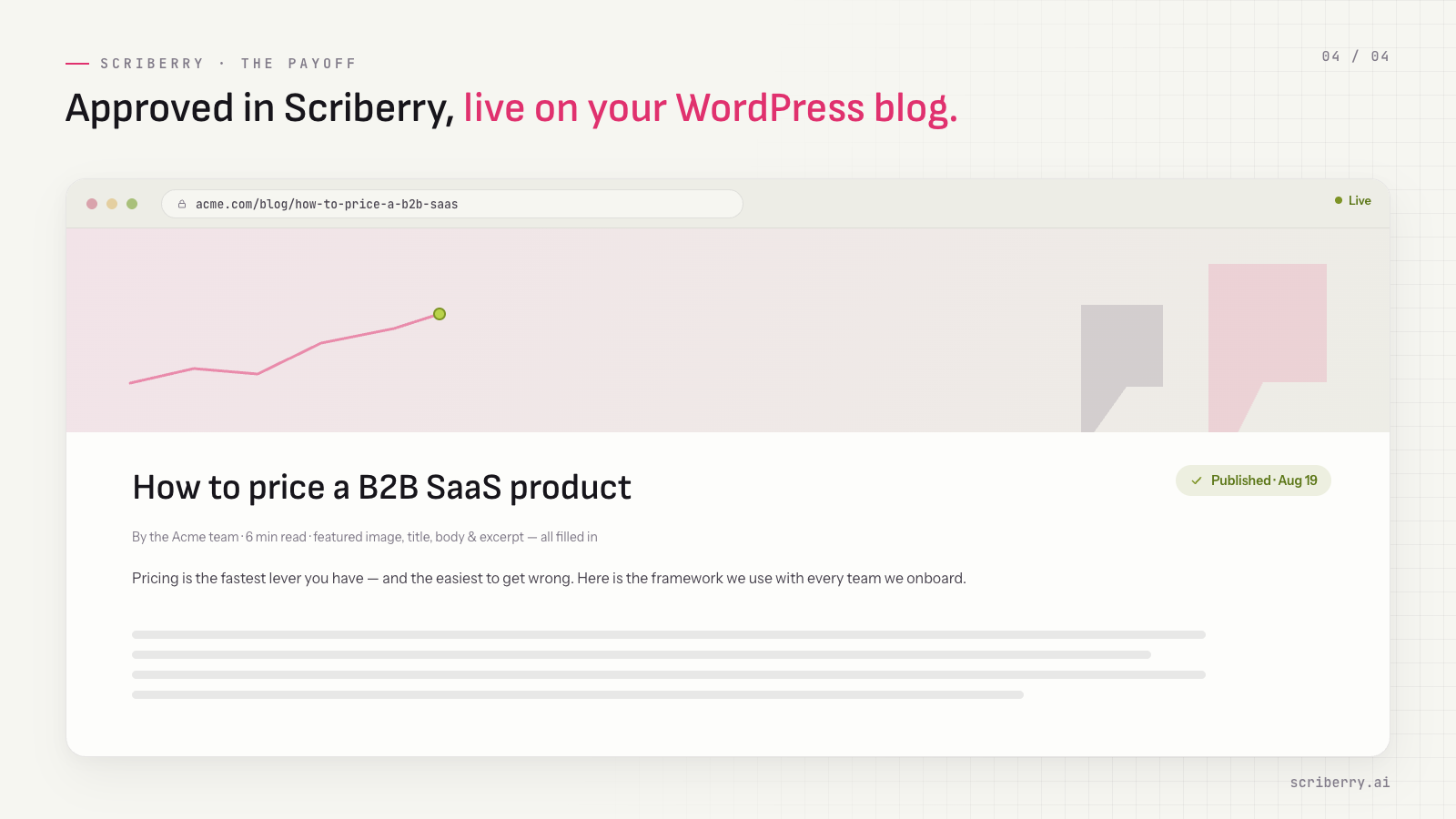
- Publishes approved posts as standard WordPress posts — title, body, excerpt, featured image, and the author you choose.
- Runs in the background through WP-Cron. No webhook to set up, no inbound traffic to your site.
- Talks to Scriberry over HTTPS only. Outbound traffic from your WordPress — nothing reaches into your admin from the outside.
You’ll need a Scriberry account
Sign up at https://scriberry.ai. The first three posts are written as a demo before you decide whether to keep publishing — no subscription required to see what Scriberry produces for your site.
If you keep going, one monthly subscription covers every site under your account, billed together on a single date. Add a second WordPress site later and it joins the same monthly bill on a prorated basis.
Privacy
This plugin relies on Scriberry, a third-party service operated at https://scriberry.ai. To publish your approved posts, the plugin sends and receives data over HTTPS to api.scriberry.ai. Using it requires a Scriberry account, and your use of that service is governed by its terms and privacy policy:
- Terms of Service: https://scriberry.ai/terms
- Privacy Policy: https://scriberry.ai/privacy
What crosses the wire:
- Outbound — your project’s API key (it authenticates every request), an hourly request for posts due today, and a snapshot of your blog’s tag and category lists so Scriberry can pick relevant tags and a category for each post.
- Inbound — titles, bodies, excerpts, and featured images for posts you have already approved in Scriberry.
The plugin does not send any data about your site’s visitors or administrators, and it does not register any public endpoints on your WordPress.
Installation
- Install and activate the plugin from the WordPress plugin directory, or upload the plugin folder to
/wp-content/plugins/. - Open Settings → Scriberry in your WordPress admin.
- Sign in at https://scriberry.ai, open the project you want to connect, go to Integrations → WordPress, and copy the API key.
- Paste the key into the plugin’s settings page, check the user posts are published as (it starts as you), and click Connect.
From here on, the plugin checks hourly for posts scheduled on your Scriberry project and publishes them on the dates you approved. Nothing needs to be exposed publicly — the plugin only makes outbound HTTPS requests, which means it works on shared hosting and behind a firewall without any extra configuration.
Frequently asked questions
Does the plugin publish anything I haven’t approved?
No. The plugin only publishes posts you have explicitly approved in the Scriberry dashboard, on the dates you picked. If you don’t approve a draft, it never reaches WordPress.
Where does Scriberry get my brand’s voice from?
From your own site. Scriberry reads the pages you already publish — your “about” page, your existing posts, your product copy — and uses what it finds as the model for everything it writes. You don’t have to describe your tone in a prompt. You can review and edit the extracted voice profile before any post is written.
Will it also help me get cited by ChatGPT, Perplexity, and Gemini?
Yes. Scriberry writes for Generative Engine Optimization (GEO) alongside classical SEO. Posts are structured and worded so that AI answer engines can quote them as sources, not only so that Google can rank them. Citations in those answers are quickly becoming a meaningful share of where new readers find a site.
Can I edit a post after it’s been published?
Yes. Once a post is in WordPress, it’s a normal WordPress post — edit, unpublish, or delete it like any other.
Does it work with my theme and SEO plugin?
Yes. Posts are created as standard WordPress posts with title, content, featured image, and excerpt filled in, so your theme renders them like any other post and SEO plugins (Yoast, Rank Math, All in One SEO) read them the same way.
What if my site is down when a post is scheduled?
The plugin checks hourly. If one run is missed, the next successful run picks up the post and publishes it.
Does the plugin need an inbound webhook or open port?
No. All traffic is outbound HTTPS from your WordPress to Scriberry. Nothing inbound is required, and the plugin does not register any public endpoints on your site.
How much does Scriberry cost?
The demo — three full posts written for your site — is included before any subscription. After that, one monthly subscription covers every project on your account; the price scales with how many sites you publish to. Current pricing lives at https://scriberry.ai.
Can I run Scriberry on more than one WordPress site?
Yes. One Scriberry account can hold many projects, one per website. Install this plugin on each WordPress site and pair it with its own project using a separate code. All sites are billed together on the same monthly date.
Changelog
Required update: earlier versions can no longer sync with Scriberry. Category mapping is removed; Scriberry picks categories automatically. You can now choose the author of published posts.
2026.2.0
- Scriberry now picks each post’s category from your blog’s categories, just like tags. Topic-to-category mapping is gone: pasting the key is the whole setup. Posts without a fitting category land in your WordPress default category.
- New required setting: the author of published posts, prefilled with the administrator who activated the plugin.
- Images inside the post body are now served from your Media Library instead of Scriberry’s servers.
- Deleting the plugin removes its settings, including the API key.
- Talks to the new Scriberry connector API. Earlier plugin versions stop syncing — update to keep publishing.
2026.1.0
- Initial release. Pairing with a Scriberry project via a one-time code. Hourly WP-Cron sync of approved posts. Publishes posts with title, body, excerpt, and featured image.
Screenshots
For developers
Is this your plugin? Show off the numbers.
Add a live badge to your site, docs or GitHub README. It updates on its own — no account needed.
Best Scriberry alternatives
All ai blog plugins →


FAQ
Scriberry: quick answers
Straight answers, pulled from live WordPress.org data.
Live data from WordPress.org · checked Oct 19, 2026
Is Scriberry free?
Yes. Scriberry is free to download and use from the official WordPress.org plugin directory.
Is Scriberry safe to use in 2026?
Scriberry is a solid plugin choice in 2026, with a few things worth checking first. Was last updated 2 weeks ago, and scores 64/100 on our health check.
How many websites use Scriberry?
Scriberry is active on <10 WordPress websites and has been downloaded 245 times since it launched in August 2026. It was downloaded 136 times in the last 30 days.
Does Scriberry work with WordPress 7.1?
Yes. The developer has tested Scriberry up to WordPress 7.1.3, the latest release. It requires WordPress 5.6 or newer.
What PHP version does Scriberry need?
Scriberry requires PHP 7.4 or higher. Most hosts run PHP 8.x today, so it works on any modern WordPress hosting.
When was Scriberry last updated?
The latest version, 2026.2.0, was released on October 8, 2026 (2 weeks ago).
Who makes Scriberry?
Scriberry is developed and maintained by scriberry.
What are the best alternatives to Scriberry?
The most popular alternatives to Scriberry are Outrank (1K+ installs), Lovarank (10+ installs) and Roki (<10 installs).
Powered by PageForge
Want thousands of pages that rank like these? Build them in an afternoon.
This directory runs on the same engine as PageForge. Turn any spreadsheet, CSV or API into thousands of fast, SEO-ready WordPress pages — with schema, internal links and AI-written copy baked in.
- CSV, Google Sheets & API data sources
- AI content, schema & internal links per page
- Works with Elementor, Gutenberg, Yoast & Rank Math
- Free on WordPress.org — no credit card


