



SazKit – Product Gallery for WooCommerce
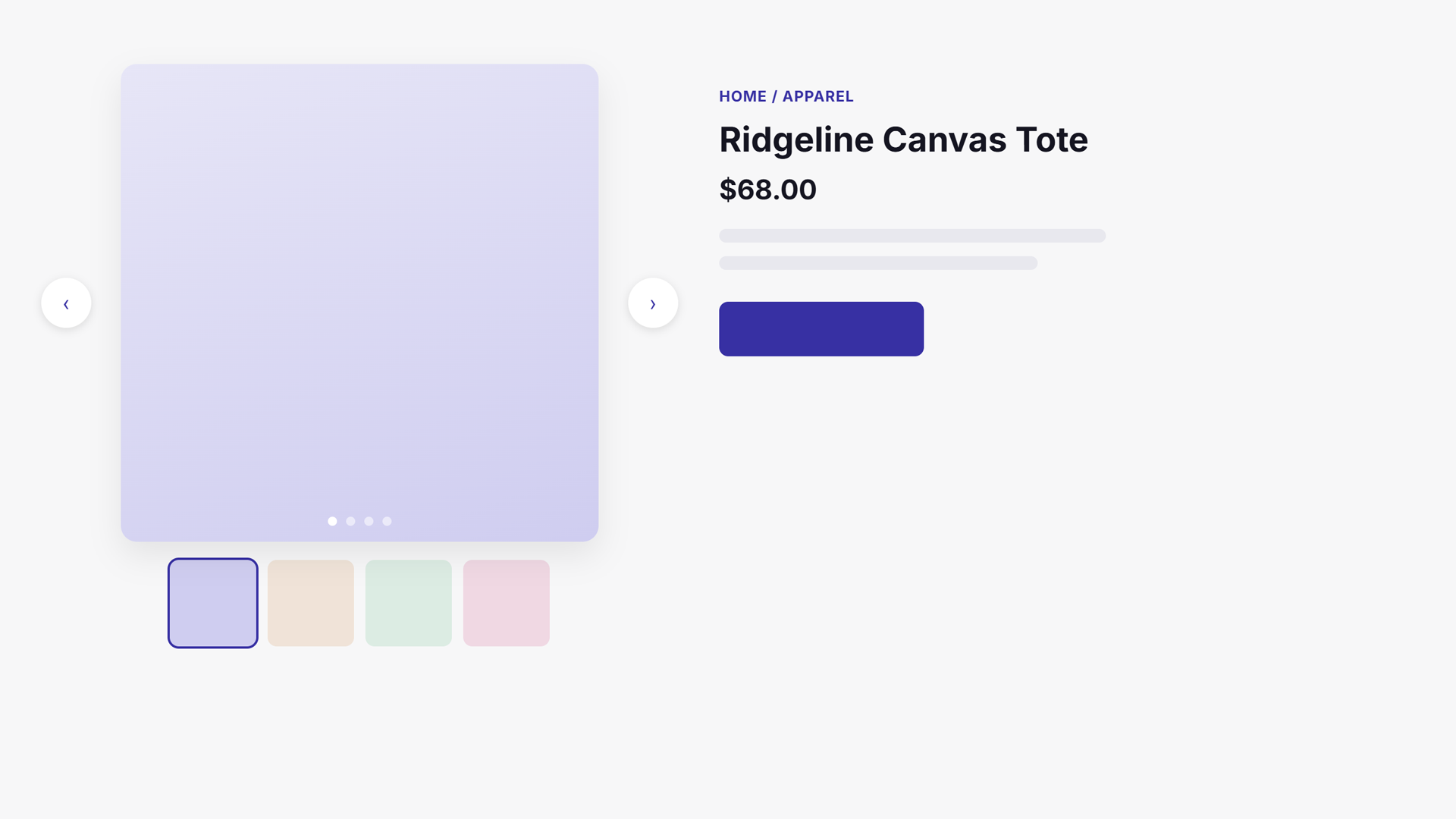
Replaces the default WooCommerce single-product gallery with a Swiper slider — arrows, dots, and an optional synced thumbnail navigation.

Use with caution
SazKit works, but test it on a staging site before relying on it in 2026. Was last updated 1 month ago, and scores 60/100 on our health check.
- Tested with the latest WordPress (7.1)
- Small user base (<10 active installs)
- Very few reviews so far
How does it stack up?
Side-by-side on installs, updates, ratings & support



Daily downloads
Download spikes usually follow a new release — each site that auto-updates counts as a download.
Rankings
Where SazKit stands todayWordPress.org search rankings
Live position in the plugin search, top 100| Keyword | Position |
|---|---|
| carousel | >100 |
| product gallery | >100 |
| slider | >100 |
| swiper | #84 |
| woocommerce | >100 |
About SazKit – Product Gallery for WooCommerce
From the official readme · v1.0.7Description
SazKit – Product Gallery for WooCommerce swaps the default WooCommerce single-product image gallery (FlexSlider + zoom) for a clean Swiper slider.
Features:
- Main slider with arrow and dot navigation, fade transition, and adaptive height.
- Optional synced thumbnail navigation slider below the main image.
- Full-screen lightbox with keyboard navigation, focus trapping, and click-to-magnify.
- Hover zoom (inner magnify) on the main image for desktop pointers.
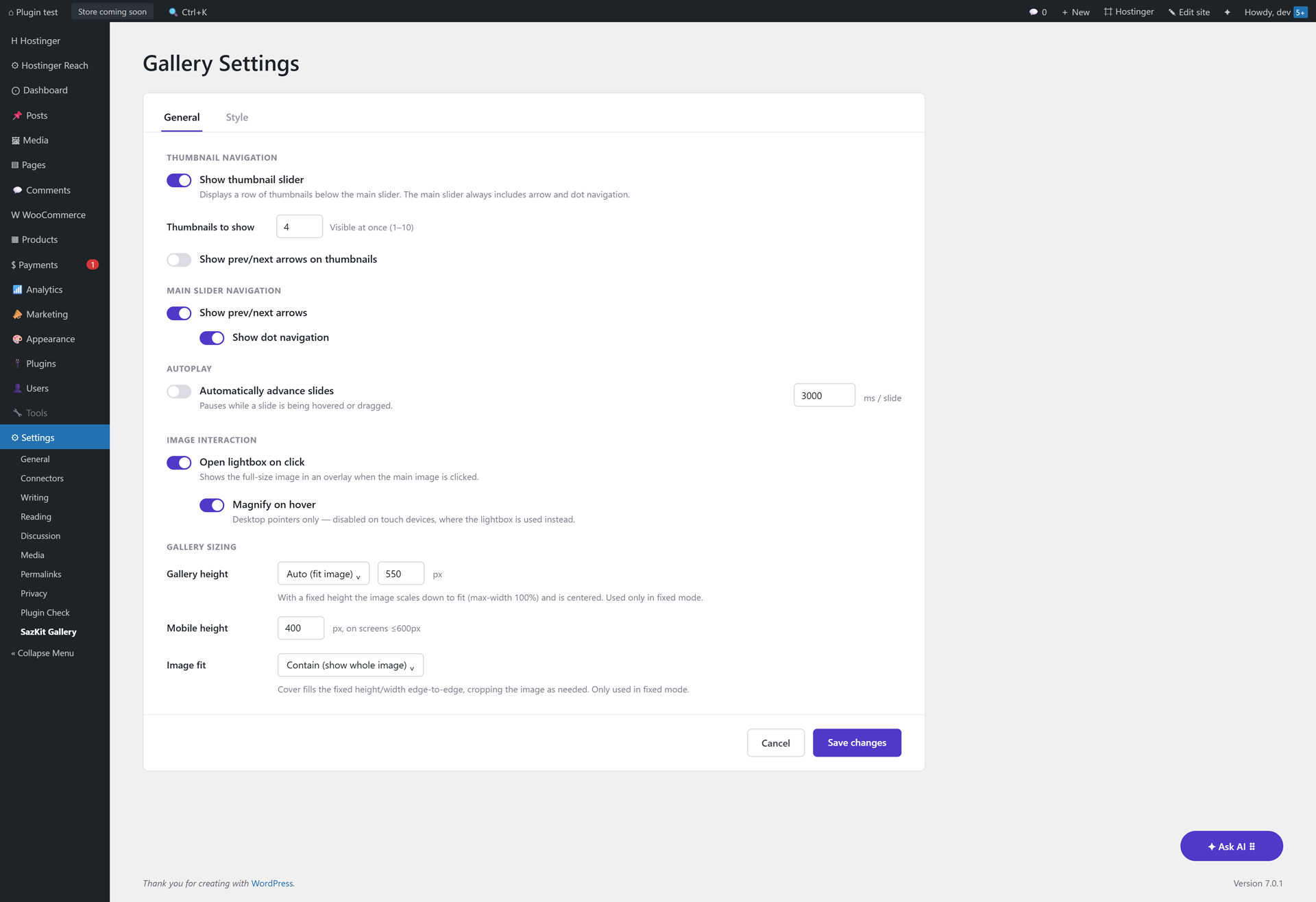
- Configurable gallery height — a fixed pixel height (default 550px) that scales images down and centers them, or auto height that fits each image.
- Image fit for fixed-height mode — Contain (show the whole image) or Cover (fill and crop edge-to-edge).
- Optional forced gallery width on desktop (a customizable percentage) to override theme/page-builder layout conflicts.
- Configurable thumbnail count (1–10 visible at once).
- Toggle arrows and dots independently on the main slider.
- Optional arrows on the thumbnail slider.
- Autoplay for the main slider with a configurable interval (pauses on hover/focus).
- Tabbed settings screen: General and Style.
- Style tab: pick the arrow color and dot color with the native color picker.
- Variation support — the main image updates when a variation with its own image is selected.
- RTL aware.
- Uses your site’s existing Swiper assets if a theme or another plugin already registers them; otherwise it loads its own bundled copy.
- HPOS (High-Performance Order Storage) compatible.
- Developer friendly: filter hooks for the image IDs, image sizes, and Swiper arguments.
Filter hooks
sazkit_settings— filter merged plugin settings at runtime.sazkit_gallery_image_ids— filter the attachment IDs used in the gallery.sazkit_main_image_size/sazkit_thumb_image_size— filter the registered image sizes.sazkit_swiper_main_args/sazkit_swiper_thumbs_args— filter the Swiper configuration.sazkit_swiper_handles— override the detected Swiper script/style handles.sazkit_zoom_level— filter the hover-zoom magnification factor (default2.0).sazkit_slide_badges— filter to add badge overlays (e.g. Sale/New ribbons) to a gallery slide.sazkit_before_main_slides/sazkit_after_main_slides— actions for add-ons to inject extra.sazkit-slideelements (e.g. video) into the main slider.sazkit_before_thumb_slides/sazkit_after_thumb_slides— matching actions for the thumbnail slider, to keep both sliders’ indexes in sync.sazkit_gallery_wrapper_classes— filter to add extra classes to the gallery wrapper (e.g. add-on layout classes).sazkit_disable_main_slider— filter to skip Swiper initialization entirely, for add-ons rendering their own layout (e.g. a grid).sazkit_main_image_attrs/sazkit_thumb_image_attrs— filter the<img>attributes per slide (e.g. lazy-loading control).-
sazkit_main_image_html/sazkit_thumb_image_html— filter the final<img>HTML per slide (e.g. to wrap it in a<picture>element for WebP/AVIF).render_gallery_for_product( WC_Product $product ) and
enqueue_gallery_assets()are public methods add-ons can call directly to render/enqueue the gallery for an arbitrary product outside the single product page (e.g. a shortcode or block). -
sazkit_settings_nav_tabs— action to add extra tab links to the settings page’s nav (so an add-on doesn’t need its own separate admin menu item). sazkit_settings_panels— action to render extra tab panel(s) inside the settings card, after the built-in General/Style tabs’ own<form>closes. Forms can’t nest, so add-on panels needing to save fields must wrap themselves in their own<form>with their own save button — the built-in Cancel/Save changes footer only submits the General/Style tab and hides itself automatically while a non-native tab is active. Panels should use the same.sazkit-tab-panel/#sazkit-tab-{slug}markup convention as the built-in tabs so the shared tab-switching JS shows/hides them correctly.
The gallery wrapper also fires two jQuery events add-ons can listen for: sazkit:zoom (hover zoom activated on a slide) and sazkit:lightbox-open (the lightbox opened for a slide), both passed the attachment ID.
Third-Party Libraries
This plugin bundles the Swiper library (v11.2.10) by Vladimir Kharlampidi, licensed under the MIT license. See https://swiperjs.com.
Installation
- Upload the
sazkit-product-gallery-for-woocommercefolder to/wp-content/plugins/, or install it through the Plugins screen in WordPress. - Activate the plugin through the Plugins screen.
- Make sure WooCommerce is active.
- Visit Settings → SazKit Gallery to configure the gallery under the General and Style tabs.
Frequently asked questions
Does this require WooCommerce?
Yes. WooCommerce 8.0 or newer must be active. The plugin does nothing on its own.
Is it compatible with variable products?
Yes. When a variation with its own image is selected, the first slide updates to that image and returns to the original when the selection is reset.
Is it multilingual / WPML ready?
Yes. All plugin strings are internationalized, and a translation template (languages/sazkit-product-gallery-for-woocommerce.pot) is included. Product images and titles themselves are WooCommerce data, so WPML/Polylang translate them automatically — no extra configuration is required.
Can I keep my theme’s Swiper version?
Yes. If your theme or another plugin already registers a Swiper script/style handle, this plugin uses it instead of loading a second copy.
Changelog
Fixes a bug (relevant if using the Pro add-on's 360°/before-after slide as the gallery's first slide on a variable product) where selecting a variation could overwrite that slide's images with the variation's own image.
1.0.7
- Fixed the variation-image swap (a product’s main slide updating when a shopper selects a variation with its own image) incorrectly targeting an add-on’s 360° spin or before/after comparison slide when one was configured as the gallery’s first slide. A comparison slide holds two images, so this could overwrite both with the same variation image. The swap now only ever targets an actual product-image slide.
- Fixed that same fix causing the slider to auto-navigate away from a deliberately-placed first-slide video/360°/comparison slide the moment a variation resolved (which happens automatically on page load whenever a variation is pre-selected) — it no longer jumps the slider away from that slide, while still applying the variation’s own image to the correct slide underneath it.
- The Style tab’s “Gallery height” setting now auto-selects a matching “Image fit” when changed (Cover for Fixed height, Contain for Auto), since Image fit only applies in fixed mode and the two commonly pair up. Still editable afterward if a different combination is wanted.
- Registered a new 200×200 thumbnail size and switched the gallery’s thumbnail strip to use it instead of WooCommerce’s own 100×100
woocommerce_gallery_thumbnail, which looked blurry once scaled up by the CSS (e.g. showing 4 thumbnails at once). Thesazkit_thumb_image_sizefilter still works for further customization. Note: this only affects images uploaded/cropped after updating — existing product images need a thumbnail regeneration (e.g. via WP-CLIwp media regenerateor a “Regenerate Thumbnails” plugin) to pick up the new size. - Added a “Force gallery width on desktop” option (Style tab → Gallery sizing) — an escape hatch for themes/page builders whose own layout CSS conflicts with the gallery’s width, letting you pin it to an explicit percentage (default 48%, matching WooCommerce’s own classic-theme default) above the 600px mobile breakpoint. Off by default; doesn’t apply on block themes, which already control the gallery’s width via the product-image-gallery block’s own layout.
1.0.6
- Renamed the plugin folder and main file to match the slug assigned by WordPress.org during review (
sazkit-product-gallery-for-woocommerce), resolving a Text-Domain/slug mismatch flagged by Plugin Check. The Text Domain and all translation strings now correctly match the assigned slug. Also removed a stray.claudedirectory (an AI-assistant config folder) that had been flagged as not belonging in a production plugin.
1.0.5
- Removed the Custom CSS field from the Style tab. Per the WordPress.org plugin review team’s policy against plugins accepting arbitrary user-supplied CSS/JS/PHP for output, the free-form textarea (previously piped straight into
wp_add_inline_style) has been removed entirely. The Style tab still offers the arrow/dot color pickers. - Renamed the main class from
SazKit_GallerytoSazkit_Galleryto resolve a plugin-review prefix-consistency flag (the capitalized “K” didn’t match the lowercasesazkit_prefix used everywhere else — hook names, filters, the option key). No functional change; only affects code that referenced the class name directly (e.g. the Pro add-on, updated to match).
1.0.4
- Changed the Text Domain to
sazkit-product-gallery-for-woocommerce(wassazkit-gallery) and updated every translation string to match. The admin menu slug, enqueued script/style handles, and the.sazkit-galleryCSS class are unchanged — only the translation domain moved.
1.0.3
- Fixed the arrow icons still losing their
positionto a theme’s own!importantrule even after 1.0.2’s hardening: when both sides declare a property!important, it comes down to plain specificity, and a theme selector likebutton:not(.fa):not(.close-style)::beforeout-specifies a doubled class. The affected rules (main/thumbnail/lightbox arrow icons) now triple the class instead of doubling it, which reliably exceeds that kind of theme selector regardless of load order.
1.0.2
- Hardened the gallery’s structural CSS (layout, image sizing, arrows, dots, thumbnails, and the lightbox overlay) with
!importanton every property that would visibly break if a theme’s own generic styling overrode it — not just the arrow icons fixed in 1.0.1. Purely cosmetic details are left as-is; this only covers things that would otherwise stop working correctly.
Screenshots
For developers
Is this your plugin? Show off the numbers.
Add a live badge to your site, docs or GitHub README. It updates on its own — no account needed.
Best SazKit alternatives
All carousel plugins →




FAQ
SazKit: quick answers
Straight answers, pulled from live WordPress.org data.
Live data from WordPress.org · checked Sep 28, 2026
Is SazKit free?
Yes. SazKit is free to download and use from the official WordPress.org plugin directory.
Is SazKit safe to use in 2026?
SazKit works, but test it on a staging site before relying on it in 2026. Was last updated 1 month ago, and scores 60/100 on our health check.
How many websites use SazKit?
SazKit is active on <10 WordPress websites and has been downloaded 225 times since it launched in July 2026. It was downloaded 56 times in the last 30 days.
Does SazKit work with WordPress 7.1?
Yes. The developer has tested SazKit up to WordPress 7.1.2, the latest release. It requires WordPress 6.2 or newer.
What PHP version does SazKit need?
SazKit requires PHP 8.0 or higher. Most hosts run PHP 8.x today, so it works on any modern WordPress hosting.
When was SazKit last updated?
The latest version, 1.0.7, was released on August 22, 2026 (1 month ago).
Who makes SazKit?
SazKit is developed and maintained by Sazkit.
What are the best alternatives to SazKit?
The most popular alternatives to SazKit are Shortcodes Ultimate (400K+ installs), Carousel, Slider, Photo Gal… (70K+ installs) and Carousel Slider Block for G… (50K+ installs).
Powered by PageForge
Want thousands of pages that rank like these? Build them in an afternoon.
This directory runs on the same engine as PageForge. Turn any spreadsheet, CSV or API into thousands of fast, SEO-ready WordPress pages — with schema, internal links and AI-written copy baked in.
- CSV, Google Sheets & API data sources
- AI content, schema & internal links per page
- Works with Elementor, Gutenberg, Yoast & Rank Math
- Free on WordPress.org — no credit card


