


Save & Continue for Contact Form 7
Reduce form abandonment and improve user experience with Save & Continue for Contact Form 7. This essential plugin allows visitors to save their form progress and return later to complete lengthy or complex forms.

Consider an alternative
Save & Continue for Contact For… shows warning signs in 2026 — compare the alternatives below before installing. It runs on 10+ sites and was last updated 3 months ago, and scores 39/100 on our health check.
- Small user base (10+ active installs)
- Very few reviews so far
- Only tested up to WordPress 6.8 (latest is 7.1)
How does it stack up?
Side-by-side on installs, updates, ratings & support


Daily downloads
Download spikes usually follow a new release — each site that auto-updates counts as a download.
Rankings
Where Save & Continue for Contact… stands todayWordPress.org search rankings
Live position in the plugin search, top 100| Keyword | Position |
|---|---|
| cf7 | >100 |
| contact form 7 | >100 |
| continue later | #30 |
| persistent form | #62 |
| save form | >100 |
Version adoption
Share of active sites per release.
About Save & Continue for Contact Form 7
From the official readme · v1.2.3Description
Reduce form abandonment and improve user experience with Save & Continue for Contact Form 7. This essential plugin allows visitors to save their form progress and return later to complete lengthy or complex forms.
Perfect for:
* Job application forms
* Registration forms
* Survey and feedback forms
* Multi-step contact forms
* Any form requiring research or document gathering
🚀 Key Features
- Automatic Draft Saving – Forms save automatically as users type
- Secure Resume Links – Unique tokenized URLs for returning users
- Email Resume Option – Send resume links directly to user’s email
- Browser Storage Backup – LocalStorage fallback for reliability
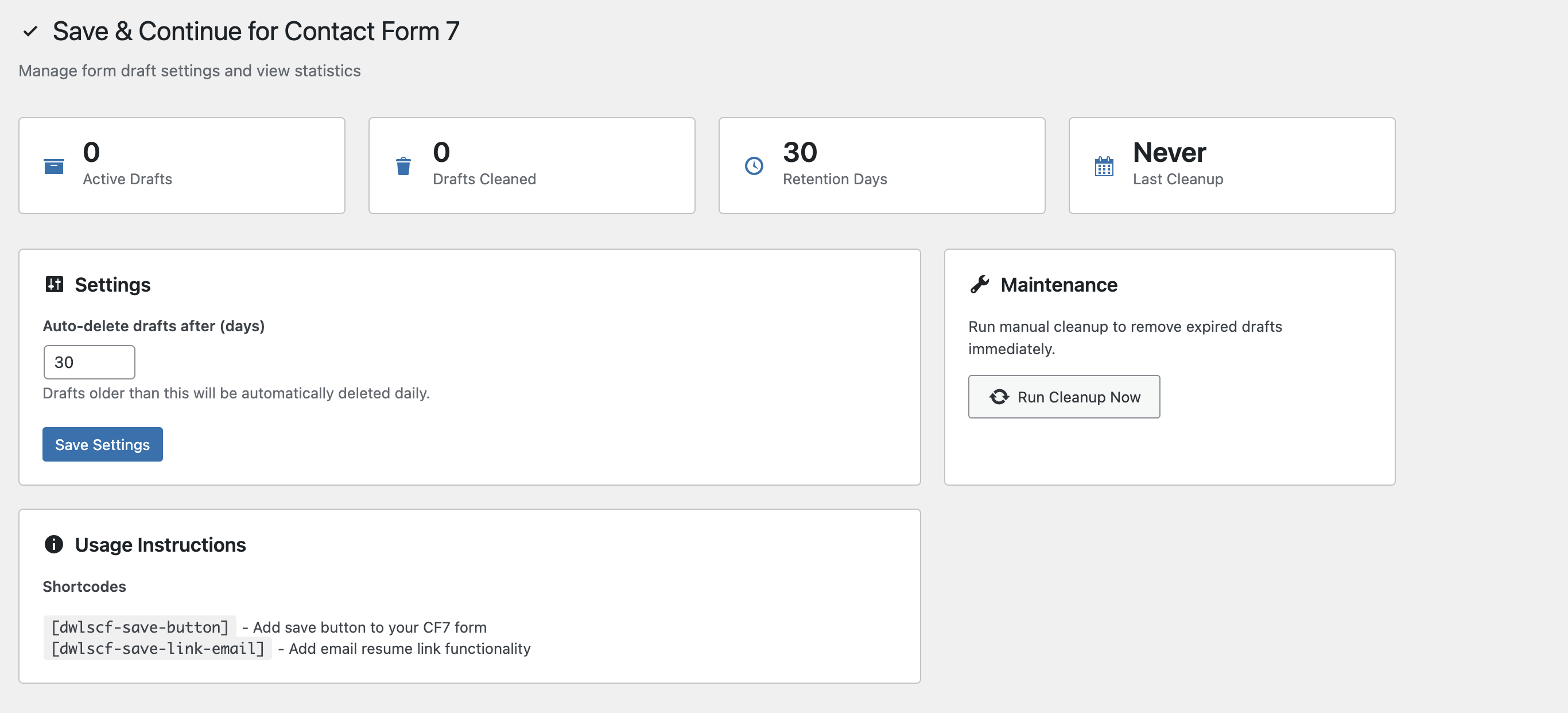
- Admin Dashboard – Manage draft retention and cleanup settings
- Security First – Rate limiting, nonce protection, and input sanitization
- Lightweight & Fast – Minimal impact on site performance
- Mobile Friendly – Works seamlessly on all devices
Support
For support, feature requests, or bug reports:
* Visit the WordPress.org support forum
* Check our documentation
Privacy
This plugin stores form data temporarily in your WordPress database and user’s browser localStorage. No data is sent to external services. Users can request deletion of their saved drafts by contacting site administrators.
Requirements
- WordPress 6.2 or higher
- PHP 7.2 or higher
- Contact Form 7 plugin (active)
- Modern browser with JavaScript enabled
Installation
Automatic Installation
- Go to Plugins → Add New in your WordPress admin
- Search for “Save Continue Contact Form 7”
- Click Install Now and then Activate
- Configure settings under Settings → Dwlscf Save & Continue
Manual Installation
- Download the plugin zip file
- Upload to
/wp-content/plugins/and extract - Activate through the Plugins menu
- Configure settings under Settings → Dwlscf Save & Continue
Setup Instructions
- Edit your Contact Form 7 form
- Add
[dwlscf-save-button]shortcode where you want the save button - Optionally add
[dwlscf-save-link-email]for email resume functionality - Save your form and test the functionality
Shortcode Options
[dwlscf-save-button label="Custom Button Text"][dwlscf-save-link-email]– Email resume link form
Frequently asked questions
How does the save and continue feature work?
When users fill out a form, their progress is automatically saved. They receive a unique resume link to continue later. The form data is securely stored and automatically restored when they return.
Where is the form data stored?
Form data is stored in your WordPress database using the options table with unique tokens. A backup copy is also saved in the user’s browser localStorage for additional reliability.
Is the plugin secure?
Yes! Version 1.2.0 includes comprehensive security measures: SQL injection prevention, XSS protection, CSRF protection, rate limiting, and secure token validation. All data is properly sanitized and validated.
How long are drafts kept?
You can configure the retention period in Settings → Dwlscf Save & Continue. Default is 30 days. Expired drafts are automatically cleaned up daily, or you can run manual cleanup.
Does it work with all Contact Form 7 field types?
Yes, it supports text fields, textareas, dropdowns, checkboxes, radio buttons, and multi-select fields. File uploads and password fields are excluded for security.
Will it slow down my website?
No, the plugin is lightweight and only loads on pages with Contact Form 7 forms. It uses debounced saving to minimize server requests.
Can users email themselves the resume link?
Yes, add the [dwlscf-save-link-email] shortcode to enable this feature. It includes rate limiting to prevent abuse.
Is it compatible with other CF7 plugins?
Yes, it’s designed to work alongside other Contact Form 7 extensions without conflicts.
Does it work on mobile devices?
Absolutely! The plugin is fully responsive and works seamlessly on all devices and screen sizes.
Changelog
CRITICAL SECURITY UPDATE: This version fixes multiple security vulnerabilities including SQL injection and XSS. Update immediately for enhanced security and performance.
1.2.3
- FIX: Critical bug – missing load-handler.js file causing 404 console errors on CF7 forms
- FIX: Critical bug – JavaScript nonce validation regex too restrictive, rejecting valid WordPress nonces and blocking all AJAX draft saving (changed from
/^[a-f0-9]{10}$/to/^[a-z0-9]{10}$/) - FIX: Missing
wp_unslash()in load draft AJAX handler for WordPress coding standards compliance - NEW: Implemented draft restoration JavaScript (load-handler.js) to auto-populate form fields when resuming via token URL
1.2.2
- IMPROVEMENT: Enhanced code documentation and readability
- FIX: Minor performance optimizations
- MAINTENANCE: Updated compatibility testing
- **Fix data pool cache overflow.
1.2.1
- IMPROVEMENT: Improve settings page
1.2.0 – Security & Performance Update
- SECURITY: Fixed SQL injection vulnerabilities with prepared statements
- SECURITY: Enhanced XSS protection with proper input validation and safe DOM manipulation
- SECURITY: Strengthened authentication with rate limiting (10 requests/minute) and nonce verification
- SECURITY: Added CSRF protection with enhanced validation
- SECURITY: Upgraded cryptography from MD5 to SHA-256
- SECURITY: Implemented strict token format validation (12 chars alphanumeric)
- IMPROVEMENT: Comprehensive input sanitization across all components
- IMPROVEMENT: Enhanced error handling and user feedback
1.1.0 – Stability & Performance
- NEW: Token-specific nonces for enhanced security
- NEW: Rate limiting for email resume functionality
- IMPROVEMENT: Debounced AJAX requests to reduce server load
- IMPROVEMENT: Smarter payload handling to prevent redundant saves
- IMPROVEMENT: Conditional asset loading (only on CF7 pages)
- FIX: Reliable scheduled cleanup execution
- FIX: Proper asset path resolution
- FIX: Aligned uninstall hooks with cleanup events
1.0.2 – Bug Fixes
- FIX: Removed debug error logging
- IMPROVEMENT: Code cleanup and optimization
Screenshots
For developers
Is this your plugin? Show off the numbers.
Add a live badge to your site, docs or GitHub README. It updates on its own — no account needed.
Best Save & Continue for Contact F… alternatives
All cf7 plugins →





FAQ
Save & Continue for Contact Form 7: quick answers
Straight answers, pulled from live WordPress.org data.
Live data from WordPress.org · checked Oct 6, 2026
Is Save & Continue for Contact For… free?
Yes. Save & Continue for Contact For… is free to download and use from the official WordPress.org plugin directory.
Is Save & Continue for Contact For… safe to use in 2026?
Save & Continue for Contact For… shows warning signs in 2026 — compare the alternatives below before installing. It runs on 10+ sites and was last updated 3 months ago, and scores 39/100 on our health check.
How many websites use Save & Continue for Contact For…?
Save & Continue for Contact For… is active on 10+ WordPress websites and has been downloaded 2,321 times since it launched in May 2025. It was downloaded 179 times in the last 30 days.
Does Save & Continue for Contact For… work with WordPress 7.1?
Save & Continue for Contact For… is officially tested up to WordPress 6.8.11, while the latest release is 7.1.3. It may still work, but try it on a staging site first.
What PHP version does Save & Continue for Contact For… need?
Save & Continue for Contact For… requires PHP 7.2 or higher. Most hosts run PHP 8.x today, so it works on any modern WordPress hosting.
When was Save & Continue for Contact For… last updated?
The latest version, 1.2.3, was released on July 10, 2026 (3 months ago).
Who makes Save & Continue for Contact For…?
Save & Continue for Contact For… is developed and maintained by Maidul.
What are the best alternatives to Save & Continue for Contact For…?
The most popular alternatives to Save & Continue for Contact For… are Database Addon for Contact… (600K+ installs), GSheetConnector (40K+ installs) and CF7 to Webhook (30K+ installs).
Powered by PageForge
Want thousands of pages that rank like these? Build them in an afternoon.
This directory runs on the same engine as PageForge. Turn any spreadsheet, CSV or API into thousands of fast, SEO-ready WordPress pages — with schema, internal links and AI-written copy baked in.
- CSV, Google Sheets & API data sources
- AI content, schema & internal links per page
- Works with Elementor, Gutenberg, Yoast & Rank Math
- Free on WordPress.org — no credit card


