



Apply Button Scroll to Top for JetSmartFilters
Adds smooth scroll-to-top functionality to JetSmartFilters apply button widget in Elementor.

Consider an alternative
Apply Button Scroll to Top for… shows warning signs in 2026 — compare the alternatives below before installing. It runs on 100+ sites and was last updated 10 months ago, and scores 40/100 on our health check.
- Small user base (100+ active installs)
- Very few reviews so far
- Only tested up to WordPress 6.9 (latest is 7.1)
How does it stack up?
Side-by-side on installs, updates, ratings & support



Daily downloads
Download spikes usually follow a new release — each site that auto-updates counts as a download.
Rankings
Where Apply Button Scroll to Top… stands todayWordPress.org search rankings
Live position in the plugin search, top 100| Keyword | Position |
|---|---|
| elementor | >100 |
| filters | >100 |
| jetsmartfilters | #3 |
| scroll | >100 |
| ux | >100 |
Version adoption
Share of active sites per release.
About Apply Button Scroll to Top for JetSmart…
From the official readme · v1.1.2Description
This plugin extends the JetSmartFilters Apply Button widget in Elementor by adding configurable scroll behavior when the apply button is clicked.
When users apply filters, the page can automatically scroll to show the filtered results, improving the user experience by ensuring users see the updated content immediately.
The plugin integrates seamlessly with Elementor’s widget controls and requires no coding to configure.
Features
- Add scroll-to-top functionality to JetSmartFilters apply button widgets
- Multiple scroll modes: Auto-detect, Window Top, Query ID, or Custom Target
- Auto-detection intelligently finds the listing grid based on JetSmartFilters configuration
- Smooth scrolling animation for better UX
- No alteration to JetSmartFilters or Elementor core functionality
- Per-widget configuration via Elementor’s interface
- Lightweight JavaScript implementation
License
This program is free software; you can redistribute it and/or modify it under the terms of the GNU General Public License as published by the Free Software Foundation; either version 3 of the License, or (at your option) any later version.
This program is distributed in the hope that it will be useful, but WITHOUT ANY WARRANTY; without even the implied warranty of MERCHANTABILITY or FITNESS FOR A PARTICULAR PURPOSE. See the GNU General Public License for more details.
You should have received a copy of the GNU General Public License along with this program; if not, see http://www.gnu.org/licenses/gpl-3.0.html.
Logo – up by nakals from Noun Project (CC BY 3.0)
Installation
- Upload the entire “runthings-jsf-apply-button-scroll-to-top” folder to the /wp-content/plugins/ directory.
- Activate the plugin through the ‘Plugins’ menu in WordPress.
- Edit any page with Elementor that contains a JetSmartFilters Apply Button widget.
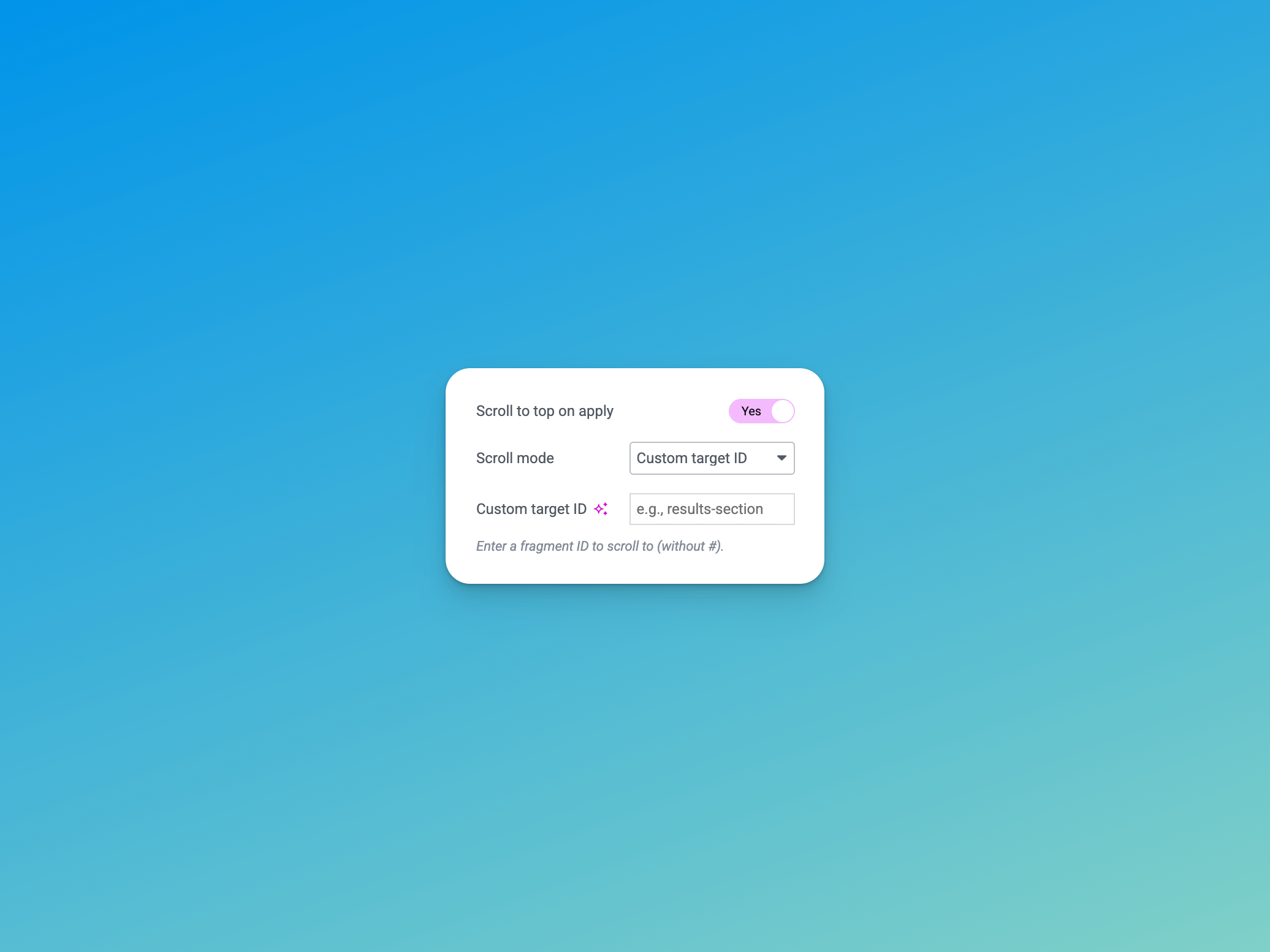
- Select the Apply Button widget and look for the “Scroll to top on apply” control in the widget settings.
- Enable the feature and configure your preferred scroll mode.
Frequently asked questions
How do I enable scroll functionality?
Edit your page in Elementor, select the JetSmartFilters Apply Button widget, and toggle on “Scroll to top on apply” in the widget settings. Choose your preferred scroll mode.
What scroll modes are available?
Auto detect: Automatically detects the target based on Query ID or content provider Window top: Always scrolls to the top of the page Query ID: Scrolls to the element with the ID matching this apply button’s Query ID Custom target ID: Scrolls to a specific element ID you specify
How does Auto mode work?
Auto mode intelligently cascades through detection methods: 1. First tries to use the Query ID if configured 2. Then attempts to find the listing grid based on the content provider (e.g., jet-engine) 3. Falls back to scrolling to window top if no target is found
Does this work with AJAX filtering?
Yes, the plugin works with both AJAX and page reload apply types in JetSmartFilters.
Does this change any JetSmartFilters functionality?
No, this plugin only adds scroll behavior. All JetSmartFilters functionality remains unchanged.
Can I use different scroll settings for different apply buttons?
Yes, each Apply Button widget can have its own scroll configuration.
What user capabilities are required?
Only users who can edit pages in Elementor will see the configuration options. The scroll functionality works for all site visitors.
I have a feature idea / I’ve found a bug
You can post ideas or contribute to the project over at the GitHub repository, which can be found at https://github.com/runthings-dev/runthings-jsf-apply-button-scroll-to-top
Changelog
Bump tested up to 6.9
1.1.2 – 16th December 2025
- Bump tested up to 6.9
1.1.1 – 16th December 2025
- Bump tested up to 6.9
1.1.0 – 21st November 2025
- Enhanced auto-detection to support all JetSmartFilters content providers
- Added proper sanitization and escaping for user input
1.0.0 – 19th November 2025
- Initial release
- Multiple scroll modes: Auto detect, Window top, Query ID, Custom target ID
- Auto-detection of listing grids based on JetSmartFilters configuration
- Smooth scroll animation
- Per-widget configuration in Elementor
- Support for jet-engine and jet-woo-builder content providers
- Intelligent fallback behavior when targets are not found
- Lightweight implementation with no dependencies beyond required plugins
Screenshots

For developers
Is this your plugin? Show off the numbers.
Add a live badge to your site, docs or GitHub README. It updates on its own — no account needed.
Best Apply Button Scroll to Top fo… alternatives
All elementor plugins →





FAQ
Apply Button Scroll to Top for JetS…: quick answers
Straight answers, pulled from live WordPress.org data.
Live data from WordPress.org · checked Oct 10, 2026
Is Apply Button Scroll to Top for… free?
Yes. Apply Button Scroll to Top for… is free to download and use from the official WordPress.org plugin directory.
Is Apply Button Scroll to Top for… safe to use in 2026?
Apply Button Scroll to Top for… shows warning signs in 2026 — compare the alternatives below before installing. It runs on 100+ sites and was last updated 10 months ago, and scores 40/100 on our health check.
How many websites use Apply Button Scroll to Top for…?
Apply Button Scroll to Top for… is active on 100+ WordPress websites and has been downloaded 1,540 times since it launched in November 2025. It was downloaded 120 times in the last 30 days.
Does Apply Button Scroll to Top for… work with WordPress 7.1?
Apply Button Scroll to Top for… is officially tested up to WordPress 6.9.10, while the latest release is 7.1.3. It may still work, but try it on a staging site first.
What PHP version does Apply Button Scroll to Top for… need?
Apply Button Scroll to Top for… requires PHP 8.0 or higher. Most hosts run PHP 8.x today, so it works on any modern WordPress hosting.
When was Apply Button Scroll to Top for… last updated?
The latest version, 1.1.2, was released on December 17, 2025 (10 months ago).
Who makes Apply Button Scroll to Top for…?
Apply Button Scroll to Top for… is developed and maintained by runthings.dev.
What are the best alternatives to Apply Button Scroll to Top for…?
The most popular alternatives to Apply Button Scroll to Top for… are Ultimate Addons for Element… (2M+ installs), Essential Addons for Elemen… (1M+ installs) and Royal Addons for Elementor (600K+ installs).
Powered by PageForge
Want thousands of pages that rank like these? Build them in an afternoon.
This directory runs on the same engine as PageForge. Turn any spreadsheet, CSV or API into thousands of fast, SEO-ready WordPress pages — with schema, internal links and AI-written copy baked in.
- CSV, Google Sheets & API data sources
- AI content, schema & internal links per page
- Works with Elementor, Gutenberg, Yoast & Rank Math
- Free on WordPress.org — no credit card


