


Robo Gallery – Photo & Image Slider
Robo Gallery is a powerful image gallery and photo gallery plugin with advanced features to create responsive galleries with a beautiful lightbox

Safe pick
Yes — Robo Gallery is a safe, well-maintained plugin to use in 2026. It runs on 40K+ sites, is rated 4.3/5 and was last updated 3 weeks ago, and scores 92/100 on our health check.
- Proven at scale on 40K+ active sites
- Actively developed — last update 3 weeks ago
- Tested with the latest WordPress (7.1)
- Responsive support — 100% of recent threads resolved
- Momentum — downloads up 307.4% vs the previous 30 days
How does it stack up?
Side-by-side on installs, updates, ratings & support



Daily downloads
Download spikes usually follow a new release — each site that auto-updates counts as a download.
Rankings
Where Robo Gallery stands todayWordPress.org search rankings
Live position in the plugin search, top 100| Keyword | Position |
|---|---|
| gallery | #8 |
| image gallery | #7 |
| photo gallery | #8 |
| responsive gallery | #5 |
| wordpress gallery plugin | #5 |
Version adoption
Share of active sites per release.
Rating breakdown
★★★★★★★★★★ 4.3 from 405 reviews
About Robo Gallery – Photo & Image Slider
From the official readme · v5.1.6Description
A gallery on your website is more than just a visual element – it plays an important role in how images are presented and how users interact with your content. If you are looking for a fast, lightweight, and easy-to-use image gallery plugin with a clean, modern, and customizable design, this plugin provides a practical solution. It allows you to create image galleries that adapt to different layouts, integrate smoothly with your website’s style, and maintain stable performance across devices.
🖼️ Explore New Demos 2025 | View Classic Demos | Upgrade to Pro 💎
🏆 Benefits of Robo Gallery v5
-
Advanced Grid Layouts 🎨
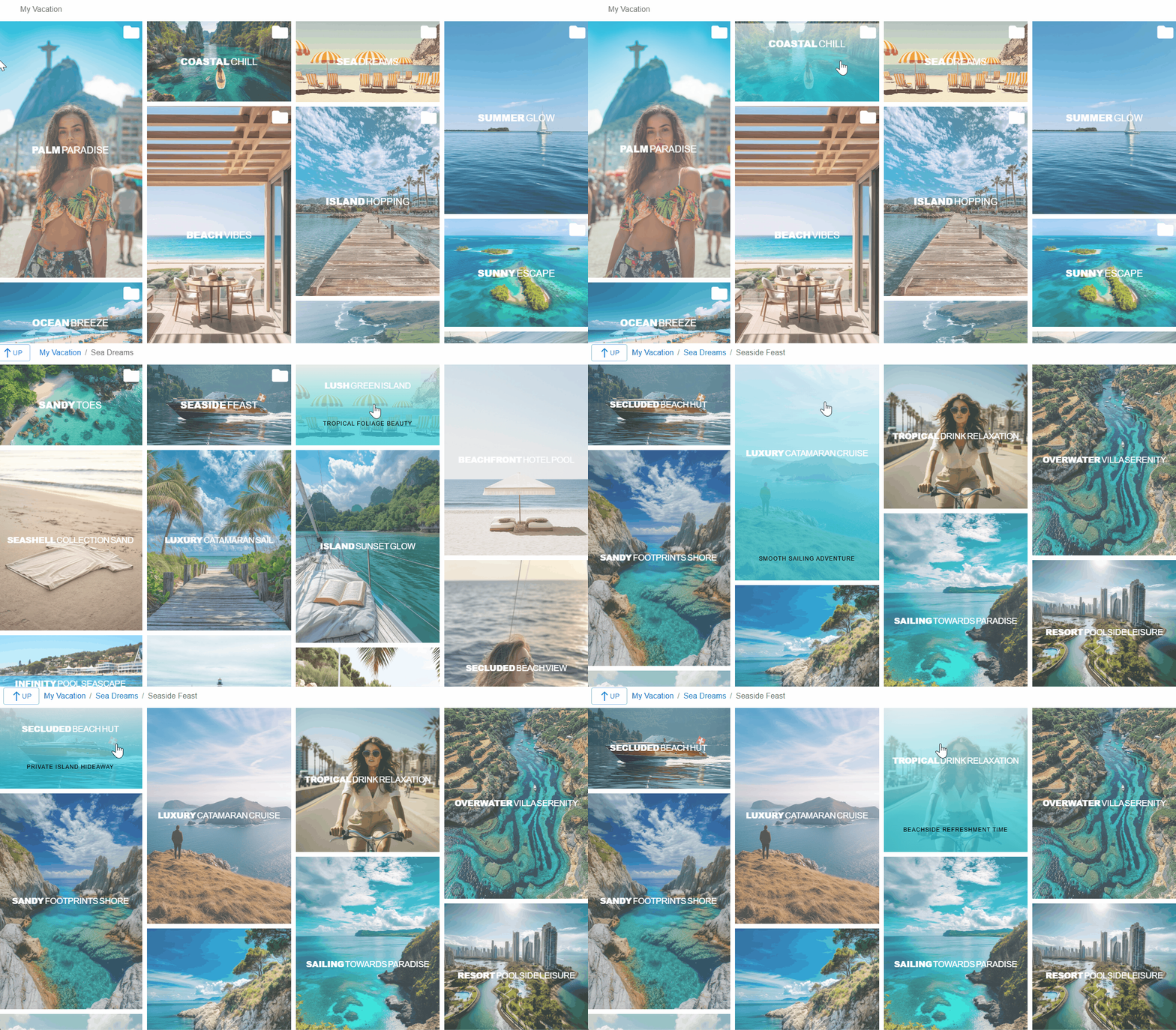
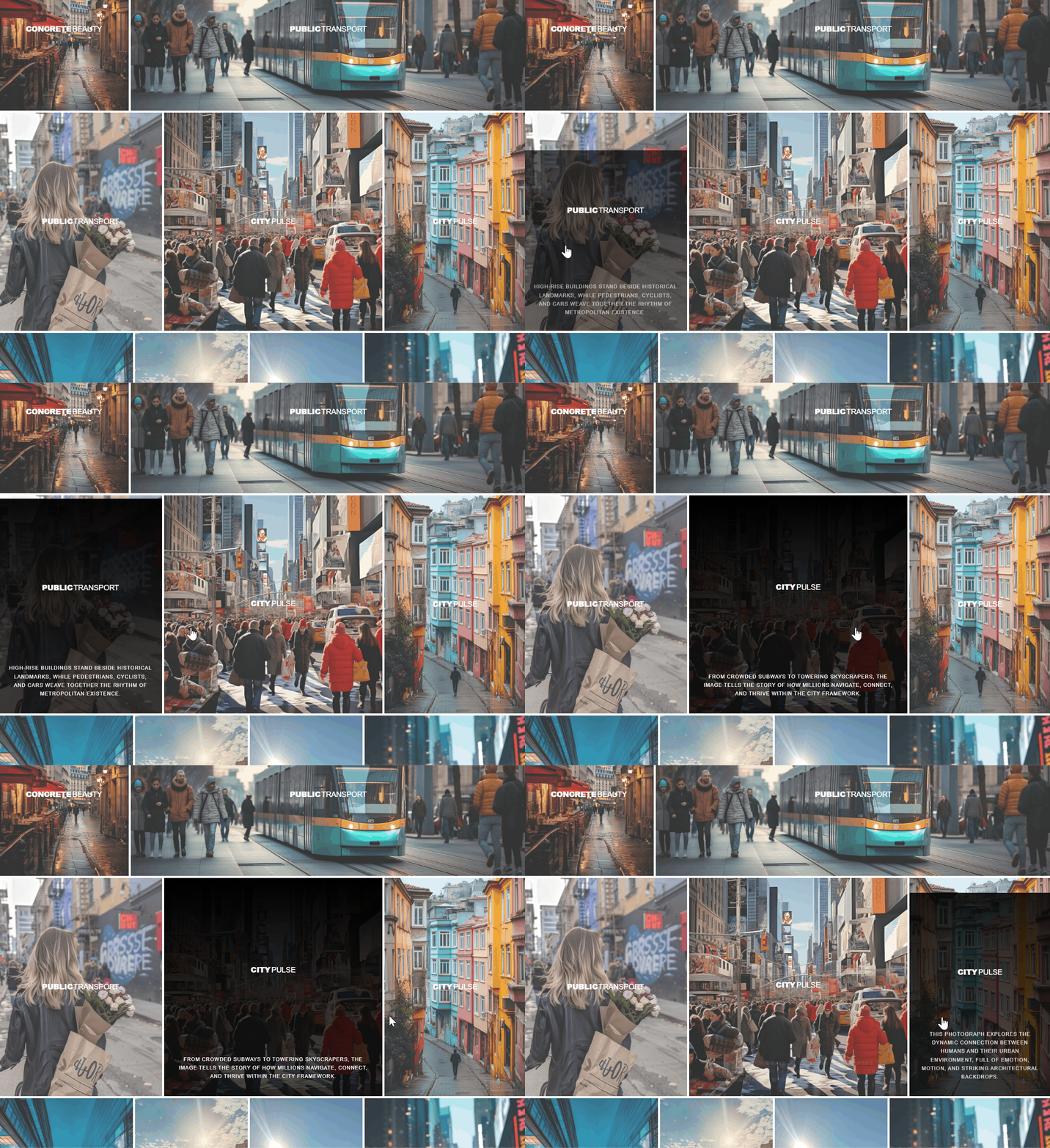
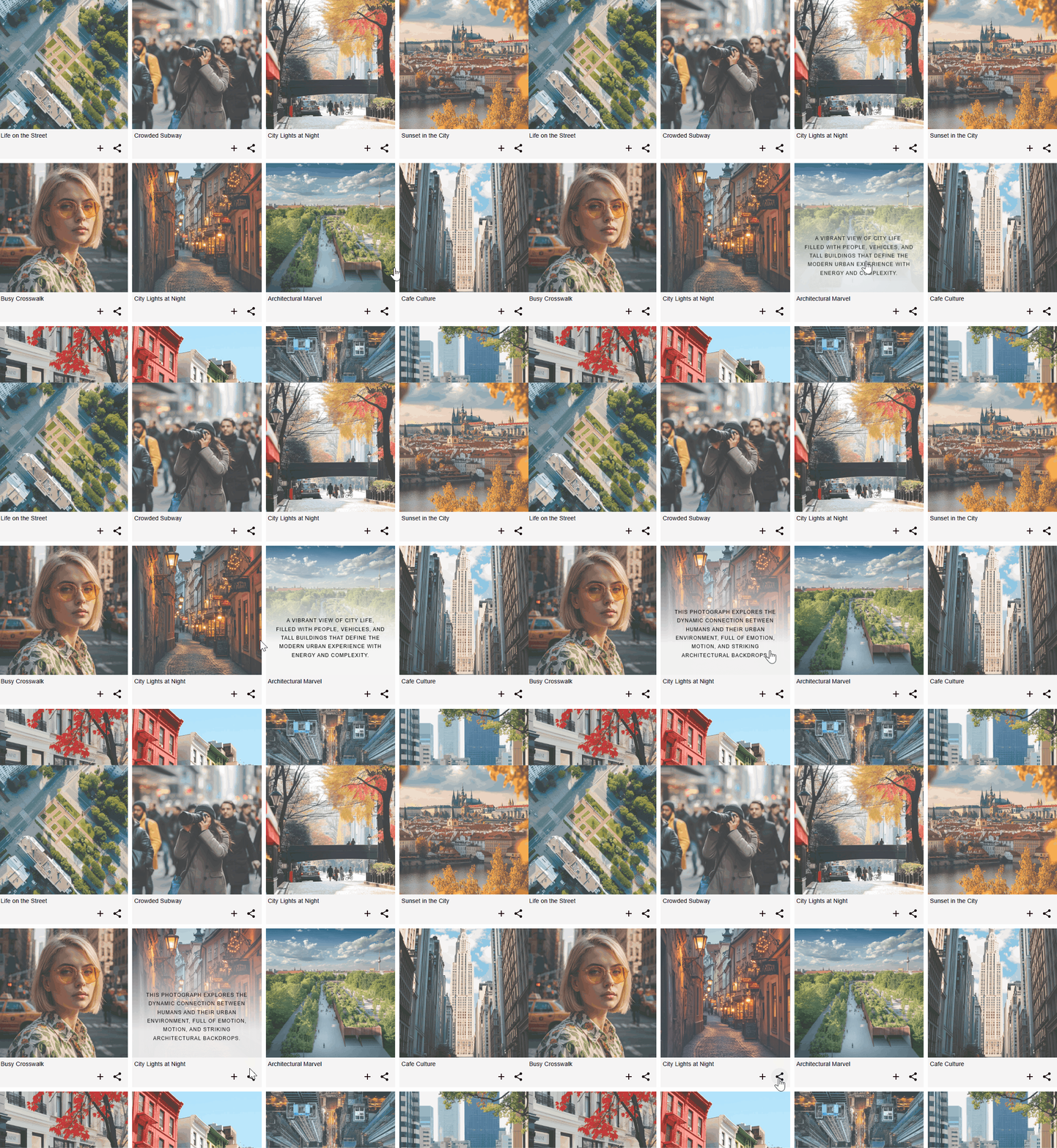
Work with flexible grid layouts using the Fusion Grid, designed to support different gallery structures and visual styles. Choose from horizontal masonry and vertical masonry for dynamic image placement, a redesigned mosaic layout, or a justify gallery for consistent image alignment. The enhanced polaroid mode includes an extended content panel that supports image descriptions, action buttons, and social sharing elements, allowing you to build a structured and visually engaging photo gallery.
-
Mobile-Friendly Layouts 📱
The grid system includes dynamic layout modes that automatically adapt image galleries for a responsive experience across different devices, including desktops, tablets, and smartphones. Hover animations are adjusted to maintain smooth interaction and consistent behavior on various screen sizes. Layouts, hover effects, and the lightbox are configured to work reliably on mobile devices, supporting high-resolution images on Retina and Ultra HD displays, including large image sizes.
-
Advanced Navigation & Links 🔗
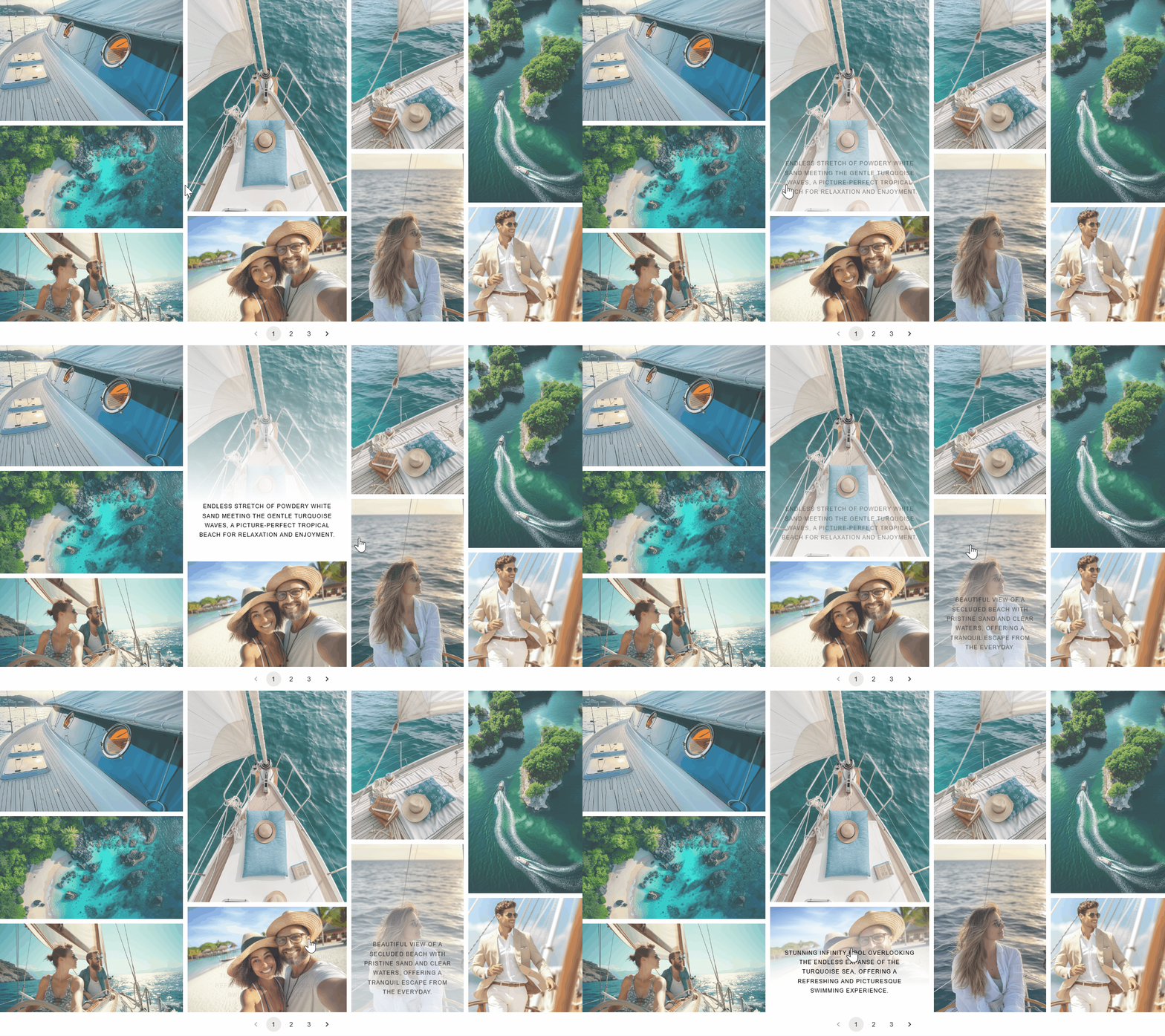
Use flexible navigation and linking options to control how users browse your gallery. Choose between “Load More” pagination, classic multi-page pagination, or infinite lazy loading for progressive image loading. Improve navigation with breadcrumbs, search, and tag-based filtering. You can create albums and cover galleries, combine linked images, lightbox images, and videos within a single gallery, and assign custom links to individual images to direct visitors to specific pages or external resources.
-
Lightbox Features ⚡
The lightbox includes fullscreen and slideshow modes to support comfortable image viewing. It provides options for social sharing, zoom, and download, and can display image titles and descriptions, helping users interact more effectively with photo and image galleries.
-
Unlimited Albums 📁
Create albums with multiple nesting levels to organize galleries in a structured way. You can build cover galleries that contain only albums, organize content using nested albums, and include photos, linked images, and videos. This allows you to combine different media types within image galleries while keeping content clearly organized.
-
Social Sharing Options 🌟
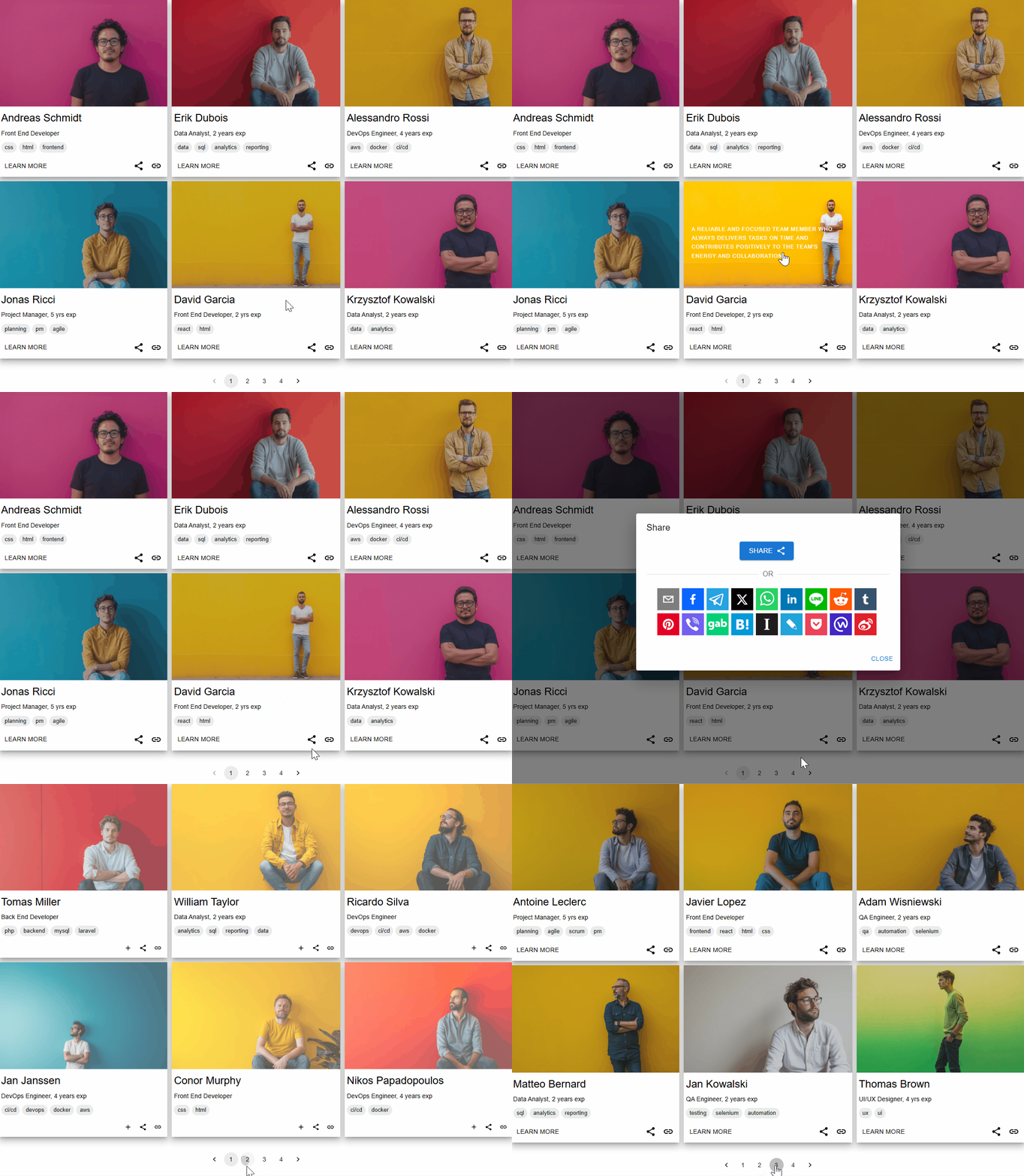
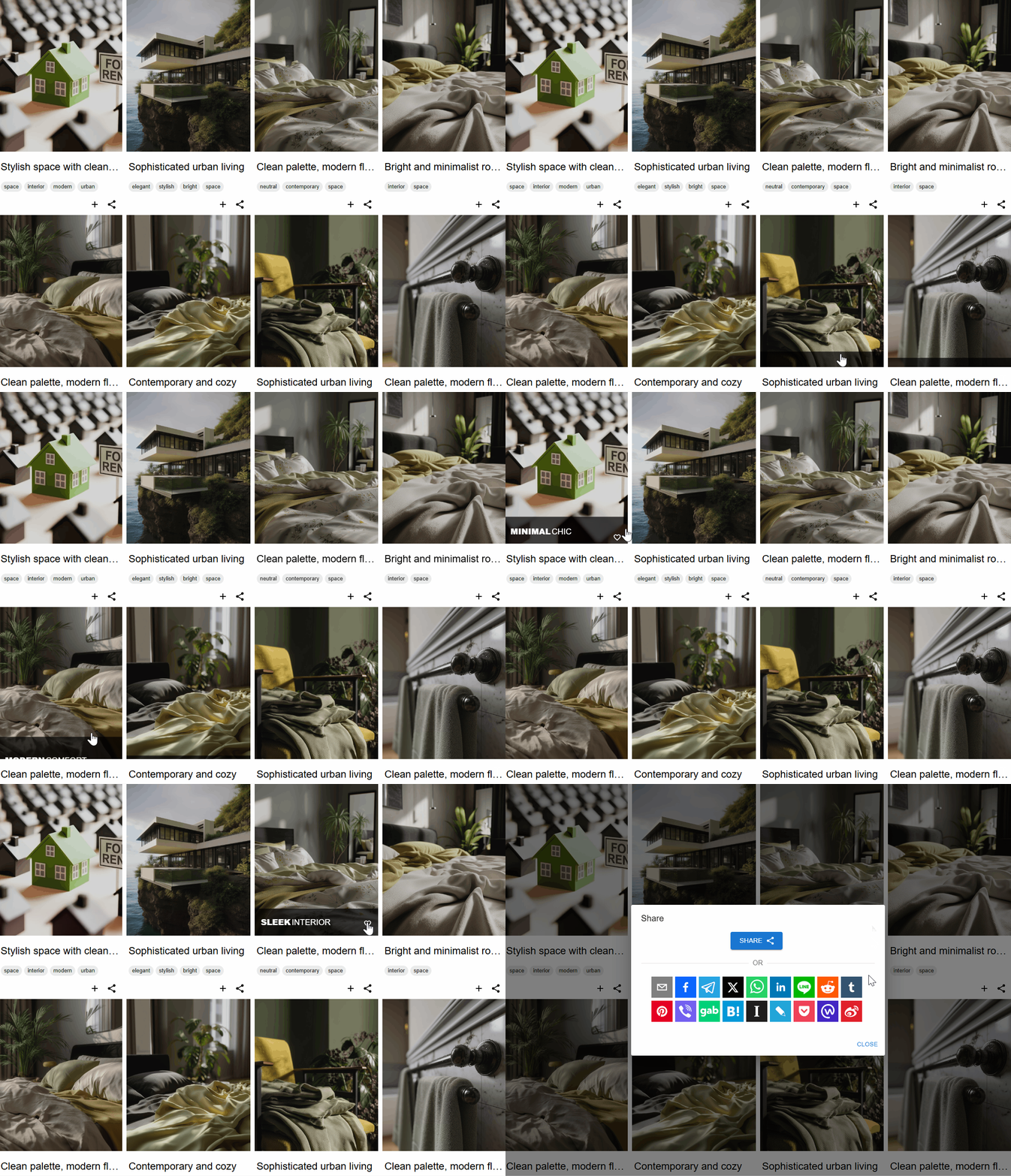
Add hover-based social sharing across more than 20 platforms, including Facebook, Telegram, LinkedIn, Reddit, WhatsApp, Pinterest, Twitter, and others. Social sharing options can be used within hover effects, polaroid layouts, and lightbox views, helping visitors share images and videos across popular social networks.
-
Video Gallery ▶️
Display videos from multiple sources, including YouTube playlists and channels. The video gallery supports platforms such as Facebook, Twitch, Vimeo, SoundCloud, and Wistia, allowing you to include video content alongside image galleries.
-
SEO and Performance 📈
The plugin uses optimized code and caching options to support efficient loading and consistent performance. Customizable links can be used within the gallery to connect images with relevant pages or resources. Support for image alt text helps improve accessibility and contributes to clearer image descriptions for search engines.
Customizable Views
With a wide range of gallery configuration options, this photo gallery plugin allows you to control how images, photos, and albums are displayed. You can choose from multiple gallery types, including grid, masonry, justify, mosaic, polaroid, and slider, to present your photo gallery or image gallery in different layouts. Available features include the fusion grid, horizontal masonry, vertical masonry, advanced polaroid styles, configurable hover effects, and a lightbox with fullscreen, slideshow, and download options, giving you flexible ways to customize your galleries.
Gallery Lightbox
Enhance your gallery with a built-in image lightbox designed to display images, photos, and videos in a responsive interface. The photo lightbox supports external sources such as YouTube, Facebook, Twitch, Streamable, Vimeo, Wistia, Mixcloud, and DailyMotion, allowing you to include different media types within your image gallery. You can configure titles and descriptions, enable slideshow mode with play and stop controls, and use zoom, fullscreen, and image download options. Social sharing features allow visitors to share images directly from the lightbox.
Interactive Hover Effects
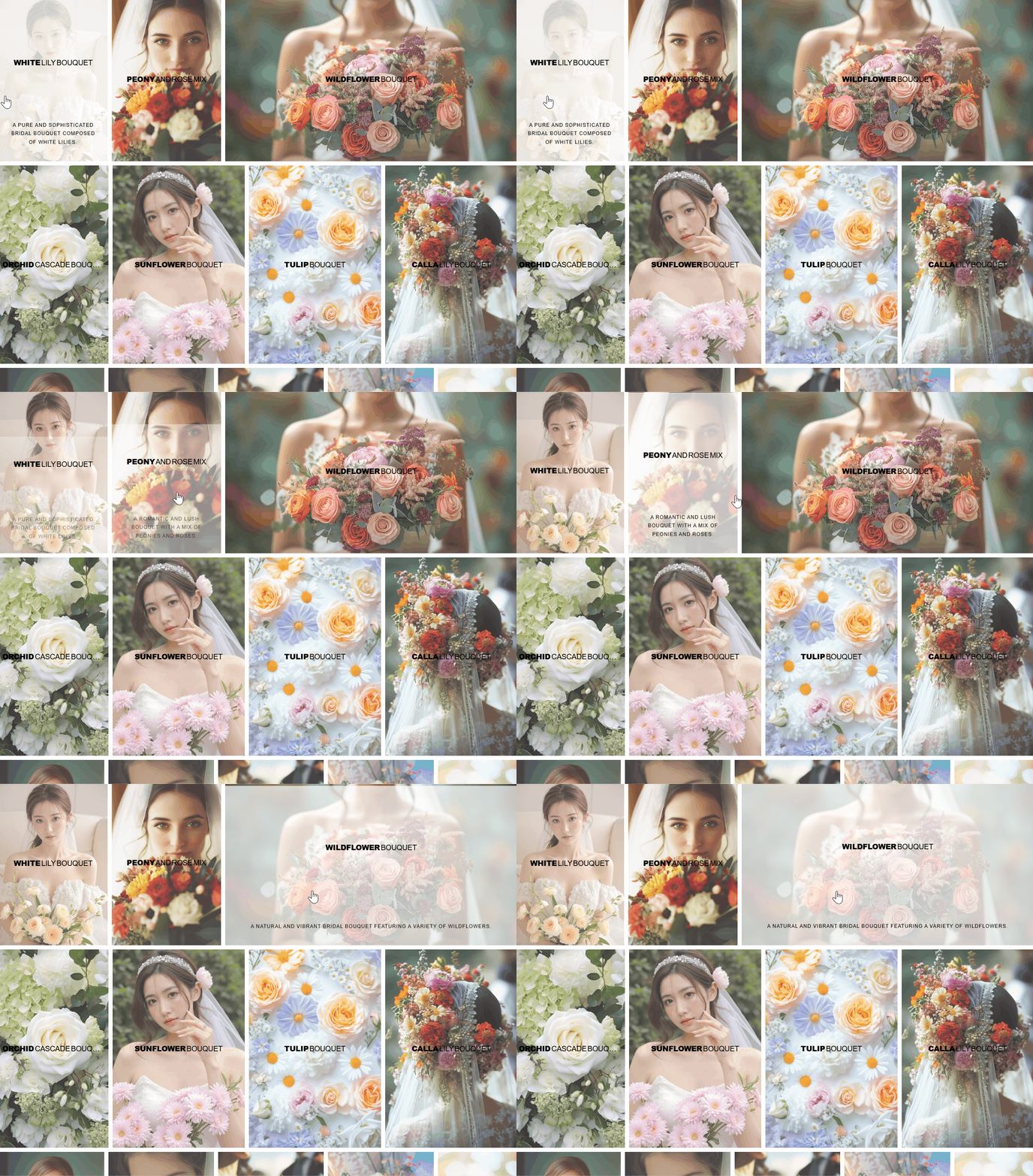
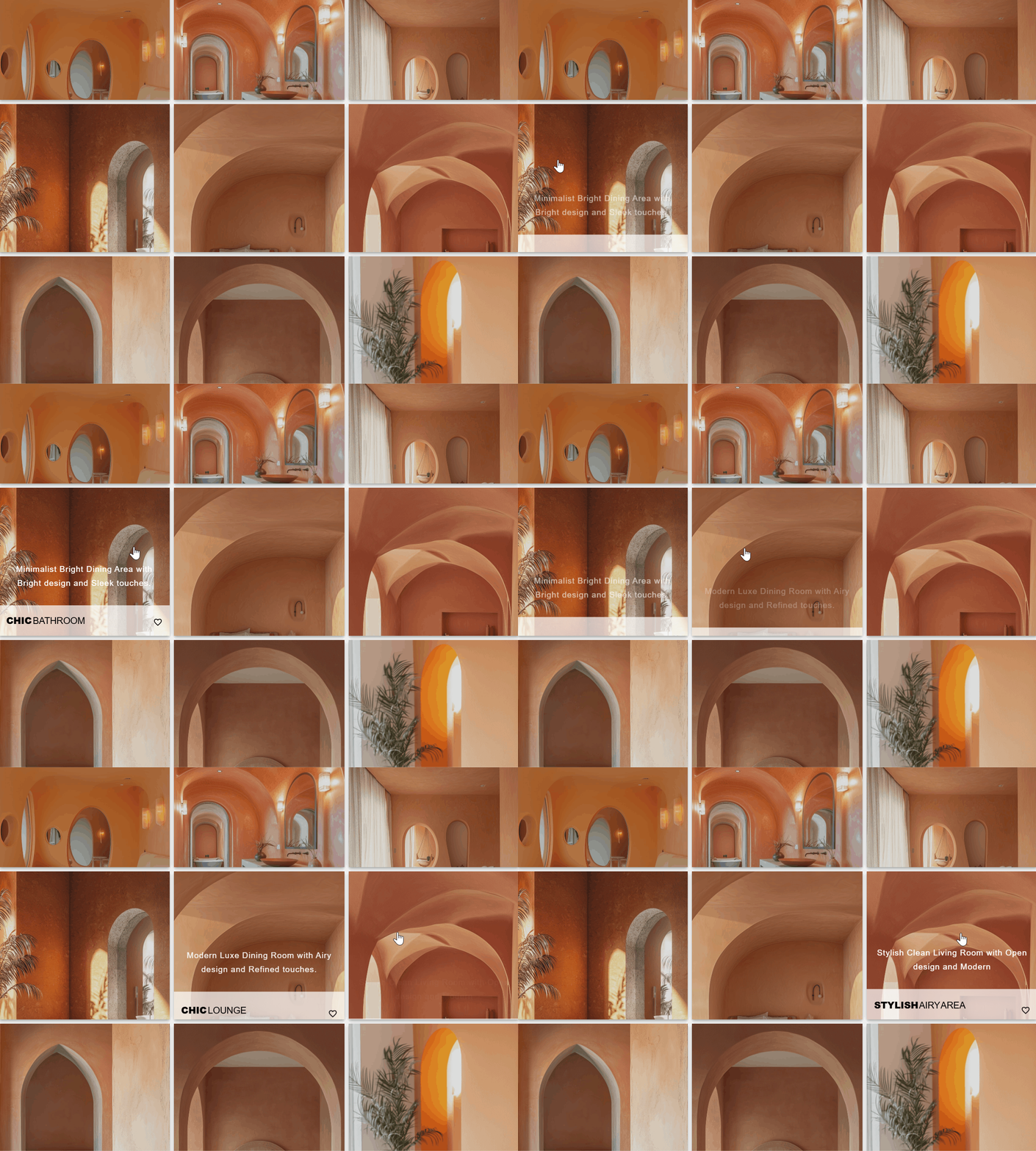
Enhance your photo gallery with a set of hover animations that add interactive behavior to images. Hover effects support transitions, layout customization, and options to display titles, descriptions, zoom controls, and link buttons. Some hover modes include social sharing functionality, helping users share images from the gallery. The hover template mode allows you to extend hover layouts using custom HTML and CSS, providing additional control over how galleries are presented.
Polaroid Gallery
Showcase images using a portfolio-style gallery with several layout options, including regular grid, masonry, mosaic, and justified views. The classic polaroid gallery displays image descriptions below thumbnails, providing a distinctive presentation for photo galleries. The enhanced polaroid mode extends customization options by allowing content panels to be placed on any side of the thumbnail top, left, right, or bottom. These panels can include titles, descriptions, lightbox controls, social sharing icons, zoom options, and custom links, giving you flexible ways to structure an image gallery.
Mobile-Friendly & Responsive Galleries
The gallery layouts are designed to adapt to different screen sizes, including smartphones, tablets, and desktop devices. Photo gallery views such as grids, masonry, and mosaic layouts adjust automatically for responsive display. Support for high-resolution images on Retina and Ultra HD displays allows images to remain clear on modern screens. Hover animations are adjusted for mobile interaction, and the lightbox, navigation, and user interface are structured to support browsing on both mobile and desktop devices.
Gallery Albums
Organize photo galleries using albums with multiple nesting levels to structure images, albums, and videos. You can build cover galleries that contain only albums or combine albums with photos, linked images, and embedded videos. This makes it possible to create multi-level image galleries with clear navigation and structured access to content. Layout options can be adjusted to fit different use cases, from compact album structures to larger album collections, supporting a wide range of gallery organization needs.
Navigation & Gallery Interface
The Fusion Grid includes an updated photo gallery navigation interface with configurable menu options. You can choose between Wide and Compact display modes depending on your layout preferences. The menu system supports dropdown navigation with multiple nesting levels, allowing structured organization of gallery hierarchies. An optional Sidebar Menu can be enabled on its own or combined with the top menu. Menu appearance can be adjusted using predefined themes or custom color settings, and menu labels can be customized. Breadcrumb navigation helps users move through gallery albums, while pagination, load more options, and lazy loading support efficient browsing across different screen sizes.
Social Media Sharing
Social media sharing options allow images, photos, and galleries to be shared from thumbnails, hover effects, and the lightbox. Sharing buttons are available in enhanced Polaroid layouts, lightbox views, and hover animations. Supported platforms include Twitter, Reddit, WhatsApp, Facebook, LinkedIn, Pinterest, Tumblr, and other social networks, making it easier to distribute image gallery content across multiple channels.
Image Slider
The image slider allows you to display images and photos in a responsive slideshow format. Slider options include captions, navigation controls, autoplay settings, transition effects, and adjustable slideshow speed. The slider can be used alongside gallery layouts to present photos, images, and albums in a structured way, supporting different presentation and content display scenarios.
Video Gallery
Create video galleries with support for multiple platforms. Videos can be embedded from YouTube playlists and channels, as well as other sources such as Facebook, Twitch, Vimeo, SoundCloud, and Wistia. The video gallery is responsive and supports configurable layouts, allowing video content to be displayed alongside images and photos within the same gallery structure.
Bulk Images Uploader & Server Import
Upload and organize large numbers of images using the bulk uploader and server import tools. Photos can be imported directly from server folders, and multiple galleries can be created in a single process. Gallery metadata such as titles, captions, descriptions, tags, links, and video URLs can be defined using a configuration file, allowing metadata to be applied automatically during import. This workflow is suitable for managing large photo galleries and reducing manual setup when working with extensive image collections.
Display Anywhere
Each gallery is stored as a custom post type, making it easy to manage and reuse. Galleries can be added to posts, pages, sidebars, and other areas of your website using the Gallery Widget, Gutenberg block, Elementor gallery widget, or classic shortcodes.
Performance
The photo gallery plugin is designed to support efficient loading of images, albums, and galleries. Features are implemented to operate consistently, helping photo galleries and image displays load reliably while maintaining visual quality.
Cache
Caching options are available to help improve the loading behavior of image galleries, photo albums, and lightbox features. By reducing repeated server requests and reusing stored data, galleries and photos can load more efficiently during user navigation.
Optimization
The image gallery plugin is optimized for use with WordPress themes and plugins. Clean and efficient code helps limit resource usage when displaying galleries, lightbox views, and organized albums. Regular updates focus on maintaining compatibility and stable behavior for photo galleries and image displays.
💎 Pro Key Features
-
Customizable Gallery Interface – Adjust layouts, colors, styles, and visual effects to fit different design requirements.
-
Unlimited Albums & Nested Structure – Create albums with multiple nesting levels and combine photos, linked images, videos, and albums within the same gallery.
-
Enhanced Polaroid Mode – Use content panels on thumbnails to display titles, descriptions, zoom controls, links, and social sharing buttons.
-
YouTube Gallery Support – Display YouTube playlists and channels directly inside a gallery layout.
-
Multiple Gallery Layouts – Choose from grid, masonry, mosaic, polaroid, justify, slider, and other layouts designed to work on both mobile and desktop devices.
-
Predefined Gallery Themes – Apply ready-made theme styles to galleries to control colors and visual appearance.
-
Configurable Hover Effects – Use hover animations with buttons, overlays, and interactive elements to enhance image presentation.
-
Editable Hover Template – Create custom hover layouts using HTML and CSS to extend default hover behavior.
-
Gallery Search – Allow visitors to search images by titles, descriptions, and tags within galleries.
-
Custom Links – Assign links to images, albums, or external pages to support navigation and content flow.
What’s Next 🔥
In 2025, development of Robo Gallery continues with a focus on expanding functionality and improving existing features. The release of Version 5 introduces a new foundation for future updates, with ongoing improvements planned as part of the regular development cycle.
Planned areas of development include:
- Additional Animation Effects: New animation options for gallery elements and hover interactions.
- Post Grid Functionality: Tools to display posts within structured grid layouts.
- New Layouts and Themes: Additional gallery layouts and theme styles for different presentation needs.
- Image Slider Improvements: Extended slider options with configurable controls and transitions.
- Additional Gallery Sources: Planned support for external sources such as Instagram, Pinterest, Flickr, Unsplash, Pexels, Pixabay, Google Drive, OneDrive, and Dropbox.
Updates are planned on a regular basis to introduce new features, improvements, and compatibility updates as development progresses.
🖼️ All Demos
Grid Layout Demo with Fade hover effect
Multi Categories Polaroid style Movie Demo with classic layout
Design Sketch Demo with grid layout
Multi Categories Demo with custom interface colors and classic layout
Minimum requirements for WordPress Robo Gallery
WordPress 3.3
PHP 5.x
MySQL 5.x
Compatibility
Plugin implemented in native WordPress style. All code is implemented based on WordPress API and base classes. Also, we tried in our plugin code to avoid conflicts with other plugins and libraries. If you accordantly meet with some errors, conflicts or other related problems feel free to contact us and we’ll sort everything out in a short time.
If any problem occurs, please contact us.
Installation
You don’t need any additional configurations or manual code changes. Simply install it using WordPress’s built-in installer. Download the plugin and install it manually or automatically from the WordPress repository. If you have any questions about our plugin, feel free to contact our support team – we’re always happy to help!
Frequently asked questions
How to Upload Images to the Gallery?
When you create a new gallery or edit an existing one, you’ll find the Images Manager button on the right side of the settings section. Open the Images Manager to upload, edit, or delete media resources. You can also use the drag-and-drop upload tool for easy image management.
How to Change the Quality of the Thumbnails?
You can adjust the thumbnail quality in the Size Options, Thumbnails Options, Source settings.
Where Can I Define Vertical and Horizontal Paddings?
You can set horizontal and vertical paddings between thumbnails in the gallery settings.
Are There Any Limits on Image Size?
No, there are no restrictions on image size.
How Can I Create a Custom Grid Layout for Thumbnails?
Our plugin uses a column-based layout system. You can set the total number of columns in your gallery grid and customize the number of columns each image occupies. This allows you to create a fully customized gallery grid layout.
Is It Possible to Insert a Video as a Gallery Link?
Yes! In the Media Manager, select an image, and on the right side, you’ll find Image Options. Each image has a video link field, where you can add a custom video URL.
How to Define the Size of Gallery Thumbnails?
Our thumbnail layout is fully responsive, and sizes are calculated dynamically based on general size and layout settings. You can define the aspect ratio for thumbnails and choose from WordPress’s predefined sizes: thumbnail, medium, large, or full.
How Does the “Load More” Function Work?
In the admin panel, you can set the number of images loaded initially. Clicking the Load More button loads additional images dynamically, providing a Google-style pagination experience.
How Do I Change the Number of Columns in the Layout?
In the General Settings, you’ll find the Thumbnail Column options. You can set different column numbers based on screen size, allowing for a responsive gallery layout across all devices.
How to Enable Swipe Mode in the Lightbox?
In the Lightbox Settings section, you’ll find a Swipe Mode option. Enable this setting to allow users to swipe through images in the lightbox on mobile devices.
Changelog
Compatible with WordPress 7.1
5.1.6 (04-09-2026)
- Compatible with WordPress 7.1
5.1.5 (27-05-2026)
- Compatible with WordPress 7.0
5.1.4 (22-03-2026)
- Resolved UI-related issues and inconsistencies
- Compatibility improvements for PHP versions
5.1.3 (25-02-2026)
- Fixed several UI issues
- Improved compatibility with various PHP versions
5.1.2 (28-12-2025)
- Updated plugin description and headings to align with guidelines
5.1.1 (03-12-2025)
- Compatible with WordPress 6.9
Screenshots

For developers
Is this your plugin? Show off the numbers.
Add a live badge to your site, docs or GitHub README. It updates on its own — no account needed.
Best Robo Gallery alternatives
All gallery plugins →



FAQ
Robo Gallery – Photo & Image Slider: quick answers
Straight answers, pulled from live WordPress.org data.
Live data from WordPress.org · checked Sep 28, 2026
Is Robo Gallery free?
Yes. Robo Gallery is free to download and use from the official WordPress.org plugin directory.
Is Robo Gallery safe to use in 2026?
Yes — Robo Gallery is a safe, well-maintained plugin to use in 2026. It runs on 40K+ sites, is rated 4.3/5 and was last updated 3 weeks ago, and scores 92/100 on our health check.
How many websites use Robo Gallery?
Robo Gallery is active on 40K+ WordPress websites and has been downloaded 2,497,014 times since it launched in July 2015. It was downloaded 23,198 times in the last 30 days.
Does Robo Gallery work with WordPress 7.1?
Yes. The developer has tested Robo Gallery up to WordPress 7.1.2, the latest release. It requires WordPress 3.3 or newer.
When was Robo Gallery last updated?
The latest version, 5.1.6, was released on September 4, 2026 (3 weeks ago).
Who makes Robo Gallery?
Robo Gallery is developed and maintained by robosoft.
What are the best alternatives to Robo Gallery?
The most popular alternatives to Robo Gallery are Smart Slider 3 (800K+ installs), Slider, Gallery, and Carous… (500K+ installs) and Photo Gallery, Sliders, Pro… (300K+ installs).
Powered by PageForge
Want thousands of pages that rank like these? Build them in an afternoon.
This directory runs on the same engine as PageForge. Turn any spreadsheet, CSV or API into thousands of fast, SEO-ready WordPress pages — with schema, internal links and AI-written copy baked in.
- CSV, Google Sheets & API data sources
- AI content, schema & internal links per page
- Works with Elementor, Gutenberg, Yoast & Rank Math
- Free on WordPress.org — no credit card


