



Richpanel – Customer Support Helpdesk & Chat
Free Live Chat & Help desk for WooCommerce. Integrate in 2 mins.

Consider an alternative
Richpanel shows warning signs in 2026 — compare the alternatives below before installing. It runs on 100+ sites, is rated 3.9/5 and was last updated 2 years ago, and scores 36/100 on our health check.
- Small user base (100+ active installs)
- No update in over a year
- Only tested up to WordPress 6.4 (latest is 7.1)
How does it stack up?
Side-by-side on installs, updates, ratings & support


Daily downloads
Download spikes usually follow a new release — each site that auto-updates counts as a download.
Rankings
Where Richpanel stands todayWordPress.org search rankings
Live position in the plugin search, top 100| Keyword | Position |
|---|---|
| bots | >100 |
| chat | >100 |
| customer service | >100 |
| customer support | >100 |
| live chat | >100 |
Version adoption
Share of active sites per release.
Rating breakdown
★★★★★★★★★★ 3.9 from 7 reviews
About Richpanel
From the official readme · v2.5.4Description
Today’s ecommerce support system is scattered across email, live chat, ticketing, FAQs, return centre and whatnot. Ricpanel allows you to streamline your complete customer service operation with three solutions in one platform.
THREE CUSTOMER SUPPORT SOLUTIONS IN ONE PLATFORM
👉 Omnichannel Helpdesk & Ticketing
👉 Integrated Ecommerce Self-service
👉 Modern Live Chat & Messaging
Video walkthrough
6 REASONS YOU SHOULD SWITCH TO RICHPANEL
1. Manage all support channels from one collaborative inbox
Customers can contact you on their favourite channel – Live Chat, Email, Facebook & Whatsapp. You can manage all the support tickets from a single collaborative inbox.
2. Complete customer profile with WooCommerce integration
Richpanel pulls in data from your WooCommerce store with seamless integration. Agents can view customer’s order details, website activities and they can use the data in responses and macros. They have all the context to assist customer queries quickly and at scale.
3. Eliminate repetitive contacts with ecommerce self-service.
30-35% of ecommerce support requests are repetitive. Richpanel lets you create guided self-service workflows to automate these common support scenarios. Customers submit all the information related to the issue in one go. Support agents can resolve the issue instantly without prolonged back and forth communication.
4. Convert more leads with a modern live chat on your store
Built for support team all sizes, Richpanel helpdesk has all the tools to help you easily collaborate across your support team and different business functions to shorten the resolution time. Create unlimited users and teams as per your need.
5. Resolve customer issues instantly with power tools and shortcuts
Use Power Reply to combine multiple actions; responses, assignments and order operations in one shortcut to resolve such queries with a single tap of the key. Use shortcuts to perform the most frequent helpdesk tasks in a jiffy.
6. Access all the support analytics and KPIs you need
See how agents are performing at customer feedback & response times and assisting conversions. Richpanel also measures what agents are influencing sales and creating long term customer relationships. Filter reports by tags, channel (live chat, email, social) & agents.
HOW TO GET STARTED
Want to learn how you can power up your WooCommerce store support with Richpanel? Book a demo here or Sign-up here to see it in action.
Installation
Once you install the plugin, follow these steps:
- Activate the plugin after installation.
- It will ask for an API Key & API Secret.
- Enter your unique Richpanel API Key & API Secret and click “Save Keys”. If you don’t have these API tokens, sign up for free now and get one!
- Once the keys are saved, you will have the option to “Sync Orders” and “Sync Subscriptions” which will sync the orders and subscription details of the customers with Richpanel.
Frequently asked questions
How to get started?
To get started with Richpanel Book a demo here or Sign-up here to see it in action.
What are the messaging channels Richpanel supports?
Richpanel connects with your support email, Facebook Page, WhatsApp Business and live chat to bring all the messages in one inbox.
How many agents can I add?
There is no limit to the number of agents in Richpanel plans.
What are the integrations available?
Richpanel integrates with WooCommerce, Shopify, Magento, HubSpot, Salesforce, Zendesk, Segment, WhatsApp & Facebook.
Changelog
2024-01-20 – version 2.5.0
* Tested for compatibility with WooCommerce version 8.3.1
2023-11-27 – version 2.4.9
* Added compatibility with HPOS
2023-07-26 – version 2.4.8
* Resolved the indentation errors throughout the codebase to adhere to the coding standards.
2023-07-14 – version 2.4.7
* Improved plugin performance by optimizing order and subscription data import processes to only execute when required, mitigating unnecessary database load.
2023-06-24 – version 2.4.6
* Added condition to execute queries during sync
2023-06-20 – version 2.4.5
* Added AJAX callback to clear events
2023-03-04 – version 2.4.4
* Removed get_item_meta function support
2023-03-01 – version 2.4.3
* Fixed the undefined variable issues
2023-03-01 – version 2.4.2
* Added logic to sync the code and fix security vulnerability because of unsanitised data
2023-03-01 – version 2.4.1
* Added logic to add datalayer
2023-03-01 – version 2.4.0
* Refactoring code
2023-02-20 – version 2.3.9
* Removing the flow to set cookies for visitors
2022-12-13 – version 2.3.8
* Fixing antipatterns
2022-12-13 – version 2.3.6
* Handle warning messages
2021-09-02 – version 2.3.2
* Preventing loading of messenger on admin screen
2021-06-25 – version 2.3.1
* Added suppport for item based tracking
2021-04-23 – version 2.3.0
* Added auto update and removed backward compatibility
2021-04-01 – version 2.2.9
* Added refund tracking
2021-03-05 – version 2.2.8
* Added lineItemId to handle duplicate custom order
2020-12-18 – version 2.2.7
* Removed direct call for order properties
2020-09-21 – version 2.2.6
* Optimized tracking code fetch
2020-07-27 – version 2.2.5
* Updated plugin to fetch order number
2020-04-17 – version 2.2.4
* Minor fixes
2020-02-25 – version 2.2.3
* Updated variant tracking info
2020-01-31 – version 2.2.2
* Added support for canada post tracking
2019-10-24 – version 2.2.0
* Update plugin action links
2019-10-18 – version 2.1.0
* Update plugin installation flow
2019-08-30 – version 2.0.3
* Updated URLs in Shipment & Tracking Helpdesk
* Updated Queries in Live Chat
* Made helpdesk plugin compatible with new version
2019-06-01 – version 2.0.2
* Updated Event Names and added User Details
* Improvements to mobile version of help desk
* Added animations when transitioning to different screens in the help desk
* Added UI improvements to live chat
* Added device tracking & channel tracking in CRM
* Added integration with WooCommerce Shipment Tracking
* See order & shipment tracking details inside helpdesk
* Agents can use order information in live chat & email
2018-04-01 – version 2.0.1
* Subscription Update
* Launched mobile compatible version of the help desk
* New and improved customer timelines in the help desk
* Converted conversations report in help desk
* Track which live chats resulted in a conversion and track them in helpdesk reports
2019-02-01 – version 2.0.0
* Updated Event Structure
* A new improved version of the help desk
* Inrtoduced customer survey on live chat and email conversations
* Customer satisfaction reports and surveys in help desk
* Filter helpdesk satisfaction reports by star rating and agents
* New and improved live chat messenger
* Conversation list in the live chat view
* Customers can continue live chats on email and vice versa
2018-12-01 – version 1.0.6
* Tracking all product interactions and display inside help desk
* Option to route chats to colleagues
* Filter conversations in the help desk by tags, user type (customer or visitor) & channels (email or Live chat)
2018-10-01 – version 1.0.4
* Set up chat bots for visitor qualification
* Route live chat to different teams based on responses
* Set a greeting and inrto message in live chat
* Set chat bots in live chat messenger
* Configure live chat visibility based on different urls
* Option to tag colleagues in the help desk
* Add private notes that are not visible to customers
2018-08-01 – version 1.0.2
* View and manage different views in the help desk
* Leave private notes in the helpdesk
* Configure live chat launcher
* Different live chat appearance for logged-in users and visitors
* Imporvements to mobile comptability of live chat
* CRM reports to track revenues by channel, source, medium, product, coupon, payment methods and more
2018-06-01 – version 1.0.1
* Imrpovements to live chat apperance
* Admin can collect visitor details in live chat
* Set online and offline Chat hours
* Begin live chat only after collecting qualification Details
* Configure live chat widget colors
2018-04-01 – version 1.0.0
* Launched live chat & Helpdesk
* Integration with WooCommerce
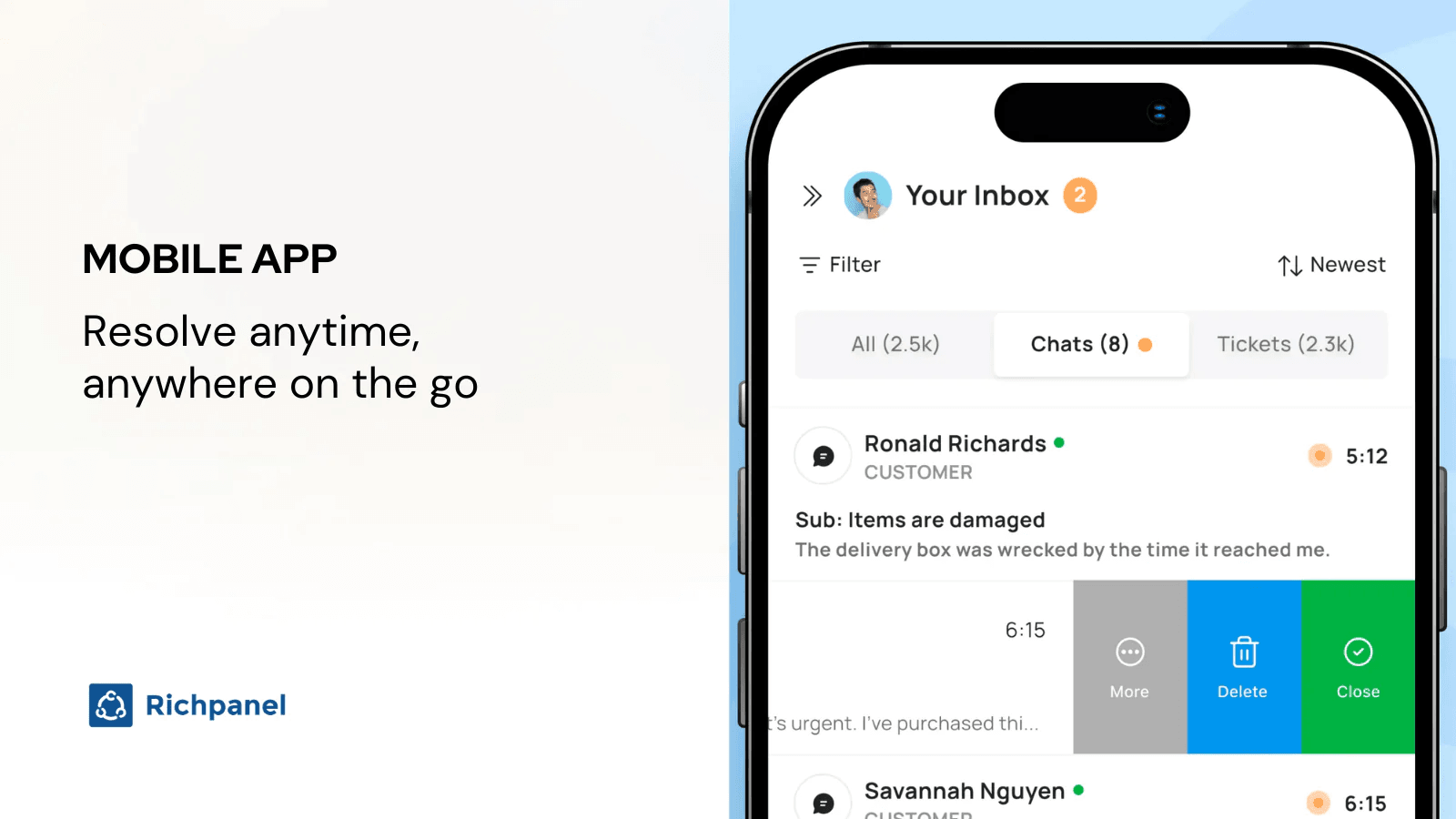
Screenshots


For developers
Is this your plugin? Show off the numbers.
Add a live badge to your site, docs or GitHub README. It updates on its own — no account needed.
Best Richpanel alternatives
All bots plugins →





FAQ
Richpanel: quick answers
Straight answers, pulled from live WordPress.org data.
Live data from WordPress.org · checked Oct 1, 2026
Is Richpanel free?
Yes. Richpanel is free to download and use from the official WordPress.org plugin directory.
Is Richpanel safe to use in 2026?
Richpanel shows warning signs in 2026 — compare the alternatives below before installing. It runs on 100+ sites, is rated 3.9/5 and was last updated 2 years ago, and scores 36/100 on our health check.
How many websites use Richpanel?
Richpanel is active on 100+ WordPress websites and has been downloaded 9,384 times since it launched in April 2018. It was downloaded 161 times in the last 30 days.
Does Richpanel work with WordPress 7.1?
Richpanel is officially tested up to WordPress 6.4.12, while the latest release is 7.1.2. It may still work, but try it on a staging site first.
What PHP version does Richpanel need?
Richpanel requires PHP 5.6 or higher. Most hosts run PHP 8.x today, so it works on any modern WordPress hosting.
When was Richpanel last updated?
The latest version, 2.5.4, was released on February 19, 2025 (2 years ago).
Who makes Richpanel?
Richpanel is developed and maintained by Richpanel Team.
What are the best alternatives to Richpanel?
The most popular alternatives to Richpanel are BBQ Firewall (100K+ installs), Login No Captcha reCAPTCHA (50K+ installs) and Shield Security (30K+ installs).
Powered by PageForge
Want thousands of pages that rank like these? Build them in an afternoon.
This directory runs on the same engine as PageForge. Turn any spreadsheet, CSV or API into thousands of fast, SEO-ready WordPress pages — with schema, internal links and AI-written copy baked in.
- CSV, Google Sheets & API data sources
- AI content, schema & internal links per page
- Works with Elementor, Gutenberg, Yoast & Rank Math
- Free on WordPress.org — no credit card


