



Revision Manager TMC
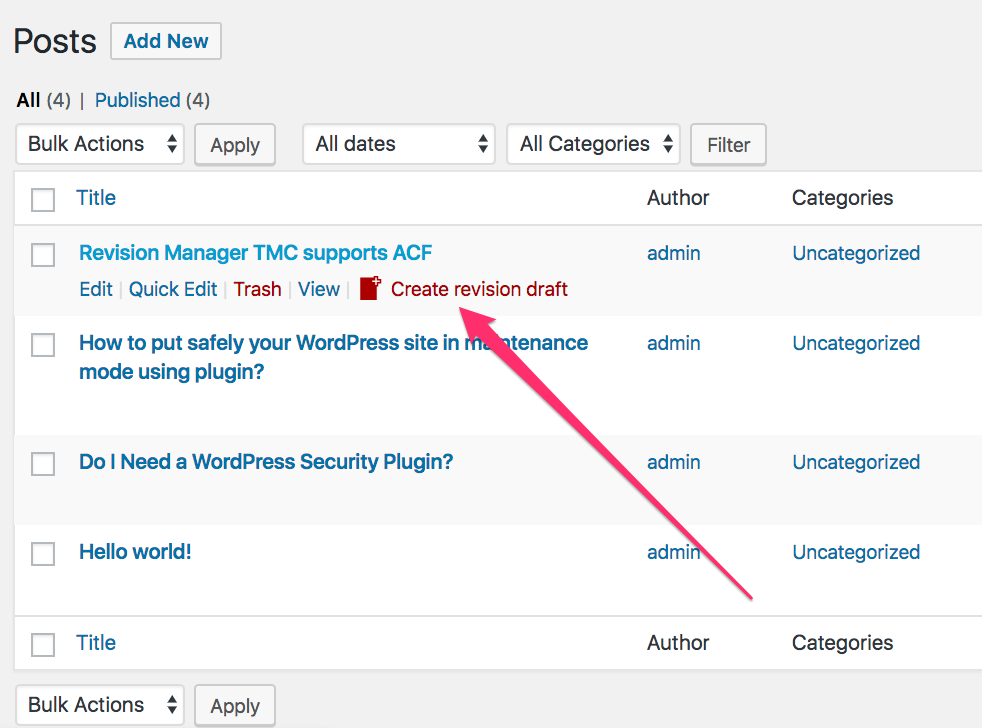
Revision Manager TMC clones your already published posts and submits them to review.

Use with caution
Revision Manager TMC works, but test it on a staging site before relying on it in 2026. It runs on 1K+ sites, is rated 4.9/5 and was last updated 6 months ago, and scores 60/100 on our health check.
- Momentum — downloads up 25.3% vs the previous 30 days
- Only tested up to WordPress 6.9 (latest is 7.1)
How does it stack up?
Side-by-side on installs, updates, ratings & support



Daily downloads
Download spikes usually follow a new release — each site that auto-updates counts as a download.
Rankings
Where Revision Manager TMC stands todayWordPress.org search rankings
Live position in the plugin search, top 100| Keyword | Position |
|---|---|
| clone post | #36 |
| revision | #3 |
| revision control | #4 |
| revision manager | #1 |
| revisionary | #2 |
Version adoption
Share of active sites per release.
Rating breakdown
★★★★★★★★★★ 4.9 from 10 reviews
About Revision Manager TMC
From the official readme · v2.8.24Description
Revision Manager TMC clones your already published posts and submits them to review.
Do you have multi-user site? Allow your editors to create clones of posts and replace them with one click.
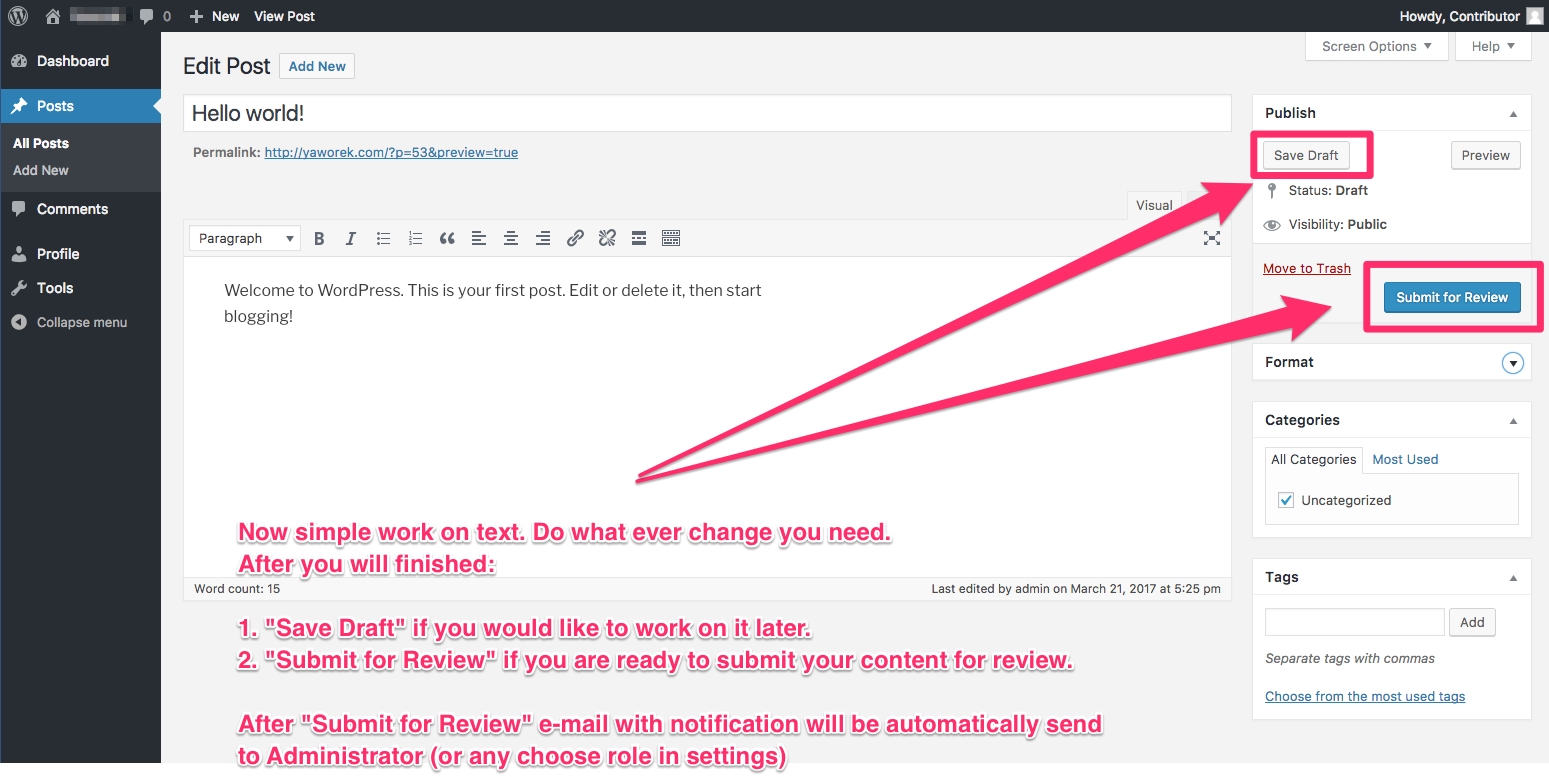
When cloned post has been marked as pending, administrator receives e-mail notification.
Revision Manager TMC is an easy and simple way to revisionize your posts.
Until acceptance of the revision, published content remains unchanged one the web.
Our plugin is very lightweight. It will not bloat your WordPress. We promise!
Revision Manager TMC helps, approve posts, accepts posts, creates revision, clones your post, page (PRO version) or Custom Post Type (PRO version) to a draft.
Create and remove revisions from code
From version 2.7.5 you can use publicly accessible methods:
rm_tmc_createRevision( [ORIGINAL POST ID YOU WANT TO MAKE COPY OF] )
rm_tmc_acceptRevision( [REVISION POST ID TO ACCEPT] )
Read more about our plugin in BEGINNER’S GUIDE FOR WORDPRESS — wpbeginner.com – Revision Manager TMC
Schedule posts
From version 2.4.6 we support scheduling revisions.
Gutenberg editor (Core WP Blocks)
From version 2.5.3 (10.04.2019) we support Gutenberg / WP Blocks. Feel free to discover this feature. Your feedback is welcome.
Advanced Custom Fields
From version 2.1.0 we strongly support ACF.
In 2.1.0 we launched new feature, allows to show differences in fields changes. So if there is a difference between original post field and clone, there will be a mark on the side of field. This feature is still on beta ( undergoing work and testing )
In 2.2.1 of Revision Manager TMC finally we launched feature Showing differences in changes ACF filed values changes.
We are showing old value, before u decide publish revision. Also we mark place were changes were made. What more, you can decide what color you want to show on the changed field.
In 2.4.0 of Revision Manager TMC We add compare box, so now you have full view of changes.
Beaver Builder
From version 2.5.4 we support Beaver Builder seamlessly.
Just publish changes from front-end editor and posts will merge.
Elementor
From version 2.5.8 we support Elementor seamlessly.
Just publish changes from front-end editor and posts will merge.
CUSTOMIZATION
Revision Manager Features:
- ✭✭✭NEW!✭✭✭ Possibility to limit notifications to only authors of posts (PRO).
- ✭✭✭NEW!✭✭✭ Support Beaver Builder.
- ✭✭✭NEW!✭✭✭ Support Elementor.
- ✭✭✭NEW!✭✭✭ Support Gutenberg editor.
- Schedule Revision – now you can easily schedule the publication of an approved revision post
- Support section – we add system info dump for rapid environment testing. When you need help, you can simple send us system info.
- Show differences in changes (don’t forget to update your ACF to newest free ACF verstion 5.X.X )
- Support Bedrock Project
- Support ACF PLUGIN – Advanced Custom Fields ( PRO )
- Support 3rd party metadata based plugins.
- Delete all revisions from database
- Dashboard widget to see all prepared clones
- Quick and easy setup
- Email notifications
- Choose who can receive notifications by e-mail
- Option to receive
- Select who can review and approve revisions
NEED SOME MORE FEATURES?
Look at the video tutorial on Revision Manager TMC PRO
Revision Manager TMC Pro
- All revisions in one e-mail (one per day). Choose frequency of receiving e-mails notification : every single or one per day.
- Five professional e-mail notification designs – spice up your e-mail notifications
- Choose addresses you want to exclude from notifications
- Choose every post type in PRO version
- Edit content of notification e-mail or add your own HTML
- Use codes (such as ‘%author_name% – Author of this revision’) to personalize your e-mail notifications.
Revision Manager TMC Pro e-mail templates
Five professional landing page designs – pleasing to the eye Revision Manager e-mail templates:
- aqua Revision Mananger e-mail template
- moonlight Revision Mananger e-mail template
- blue Revision Mananger e-mail template
- light Revision Mananger e-mail template
- mono Revision Mananger e-mail template
SUPPORT
Your feedback is WELCOME!
Installation
Using The WordPress Dashboard
- Navigate to the ‘Add New’ in the plugins dashboard
- Search for ‘revision-manager-tmc’
- Click ‘Install Now’
- Activate the plugin on the Plugin dashboard
Uploading in WordPress Dashboard
- Navigate to the ‘Add New’ in the plugins dashboard
- Navigate to the ‘Upload’ area
- Select
revision-manager-tmc.zipfrom your computer - Click on ‘Install Now’ button
- Activate the plugin in the Plugin dashboard
Using FTP
- Download
revision-manager-tmc.zip - Extract the
revision-manager-tmcdirectory to your computer - Upload the
revision-manager-tmcfolder to the/wp-content/plugins/directory - Activate the plugin in the Plugin dashboard
Frequently asked questions
1. How can I delete all previous revisions on publish?
Just go to the wordpress Dashboard. Find “Revision Manager Section”. You will see two section “Revisions to accept” and “Tools”.In the tools section you will find a button that will allow you to delete all revisions
2. How can I find all pending reviews for acceptance?
Just go to the wordpress Dashboard. Find “Revision Manager Section”. In the Revision Manager section you will find all pending revisions.
3. How can I enable the additional features?
The additional features are available in the PRO version. Get it from here: http://jetplugs.com/
4. How can I change frequency of receiving e-mails notification with revisions?
Since version 2.3.0 of Revision Manger TMC PRO, we launched new feature: Possibility to choose frequency of receiving e-mails notification : every single or all revisions in one e-mail (one per day).
5. How can I get help or report a bug?
Since version 2.4.3 we provide better support for Revision Manager TMC. We added system info dump for rapid environment testing.We added system info dump for rapid environment testing. You might find this feature in “Tools” bookmark in “System info” section. You easly download file withi system info, and send to us. NEW! Support section – we add system info dump for rapid environment testing. When you need help, you can simple send us system info.
Changelog
2.8.24
Refactor: WordPress 6.9.4 compatibility check.
2.8.23
Refactor: Speed up initial load of plugin.
Bump: Tested up to latest WordPress Core.
2.8.22
Fix: Possible problem with default options.
Bump: Tested up to latest WordPress Core.
Update: ShellPress version.
Fix: TextDomain notices.
2.8.21
Version bump.
Refactor: WordPress textdomain fix.
2.8.20
Fix: Public action vulnerability.
2.8.19
Refactor: WordPress 6.6.1 compatibility check.
Refactor: PHP requirement bump up to 7.1
Fix: tags stripped when publishing future revisions.
Screenshots


For developers
Is this your plugin? Show off the numbers.
Add a live badge to your site, docs or GitHub README. It updates on its own — no account needed.
Best Revision Manager TMC alternatives
All clone post plugins →





FAQ
Revision Manager TMC: quick answers
Straight answers, pulled from live WordPress.org data.
Live data from WordPress.org · checked Oct 14, 2026
Is Revision Manager TMC free?
Yes. Revision Manager TMC is free to download and use from the official WordPress.org plugin directory.
Is Revision Manager TMC safe to use in 2026?
Revision Manager TMC works, but test it on a staging site before relying on it in 2026. It runs on 1K+ sites, is rated 4.9/5 and was last updated 6 months ago, and scores 60/100 on our health check.
How many websites use Revision Manager TMC?
Revision Manager TMC is active on 1K+ WordPress websites and has been downloaded 60,508 times since it launched in March 2017. It was downloaded 654 times in the last 30 days.
Does Revision Manager TMC work with WordPress 7.1?
Revision Manager TMC is officially tested up to WordPress 6.9.10, while the latest release is 7.1.3. It may still work, but try it on a staging site first.
What PHP version does Revision Manager TMC need?
Revision Manager TMC requires PHP 7.1 or higher. Most hosts run PHP 8.x today, so it works on any modern WordPress hosting.
When was Revision Manager TMC last updated?
The latest version, 2.8.24, was released on April 27, 2026 (6 months ago).
Who makes Revision Manager TMC?
Revision Manager TMC is developed and maintained by themastercut.
What are the best alternatives to Revision Manager TMC?
The most popular alternatives to Revision Manager TMC are WP Post Page Clone (70K+ installs), Duplicate Page and Post (70K+ installs) and WP Duplicate Page (60K+ installs).
Powered by PageForge
Want thousands of pages that rank like these? Build them in an afternoon.
This directory runs on the same engine as PageForge. Turn any spreadsheet, CSV or API into thousands of fast, SEO-ready WordPress pages — with schema, internal links and AI-written copy baked in.
- CSV, Google Sheets & API data sources
- AI content, schema & internal links per page
- Works with Elementor, Gutenberg, Yoast & Rank Math
- Free on WordPress.org — no credit card


