


Restricted Site Access
Limit access to visitors who are logged in or allowed by IP addresses. Includes many options for handling blocked visitors.

Safe pick
Yes — Restricted Site Access is a safe, well-maintained plugin to use in 2026. It runs on 10K+ sites, is rated 4.8/5 and was last updated 1 month ago, and scores 89/100 on our health check.
- Proven at scale on 10K+ active sites
- Loved by users — 4.8/5 from 62 reviews
- Tested with the latest WordPress (7.1)
How does it stack up?
Side-by-side on installs, updates, ratings & supportDaily downloads
Download spikes usually follow a new release — each site that auto-updates counts as a download.
Rankings
Where Restricted Site Access stands todayWordPress.org search rankings
Live position in the plugin search, top 100| Keyword | Position |
|---|---|
| limited | #2 |
| permissions | #18 |
| privacy | #56 |
| restrict | #21 |
| security | >100 |
Version adoption
Share of active sites per release.
Rating breakdown
★★★★★★★★★★ 4.8 from 62 reviews
About Restricted Site Access
From the official readme · v7.6.4Description
Limit access your site to visitors who are logged in or accessing the site from a set of specified IP addresses. Send restricted visitors to the log in page, redirect them, or display a message or page. A great solution for Extranets, publicly hosted Intranets, or parallel development / staging sites.
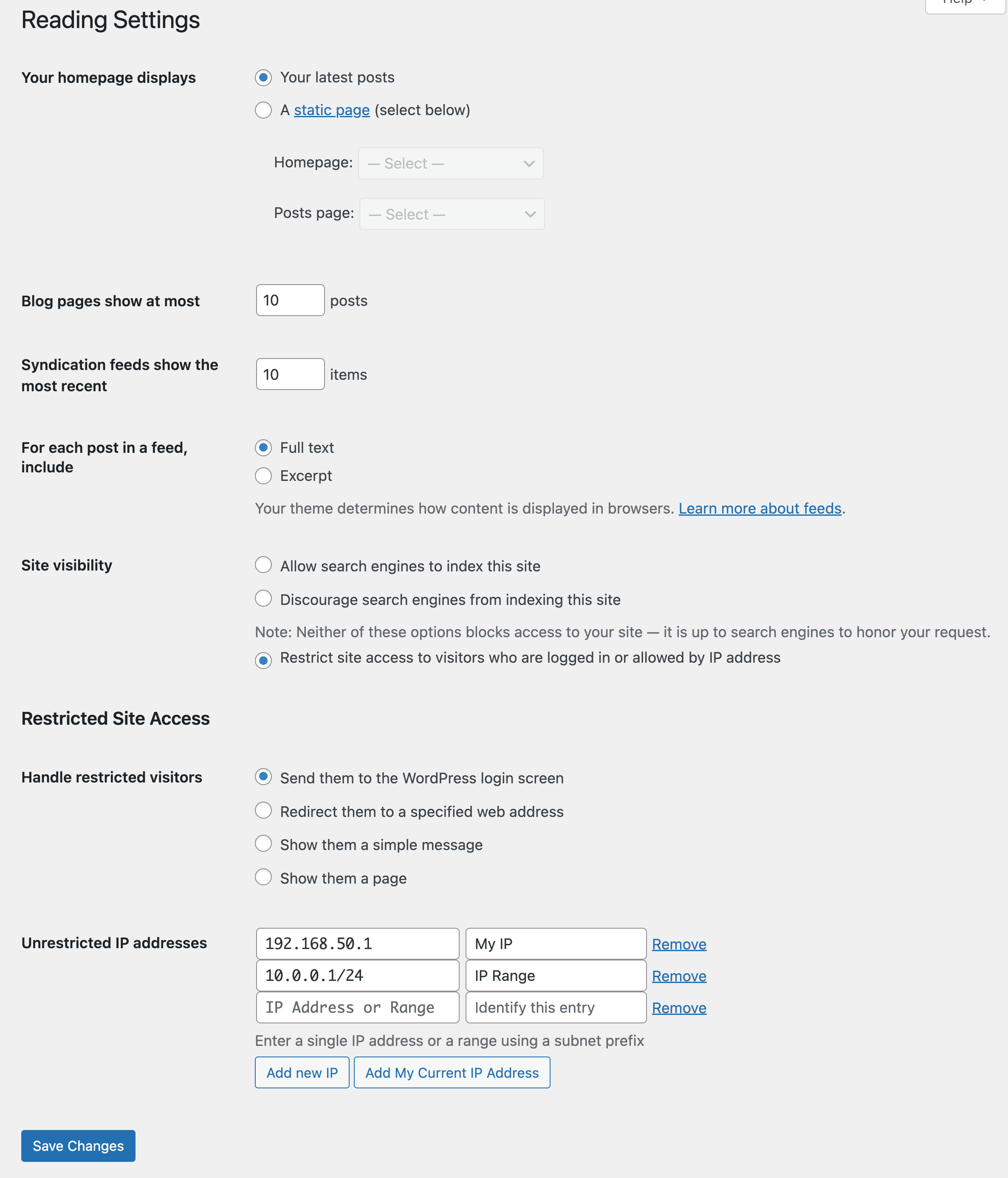
Adds a number of new configuration options to the Reading settings panel as well as the Network Settings panel in multisite. From these panels you can:
- Enable or disable site restriction
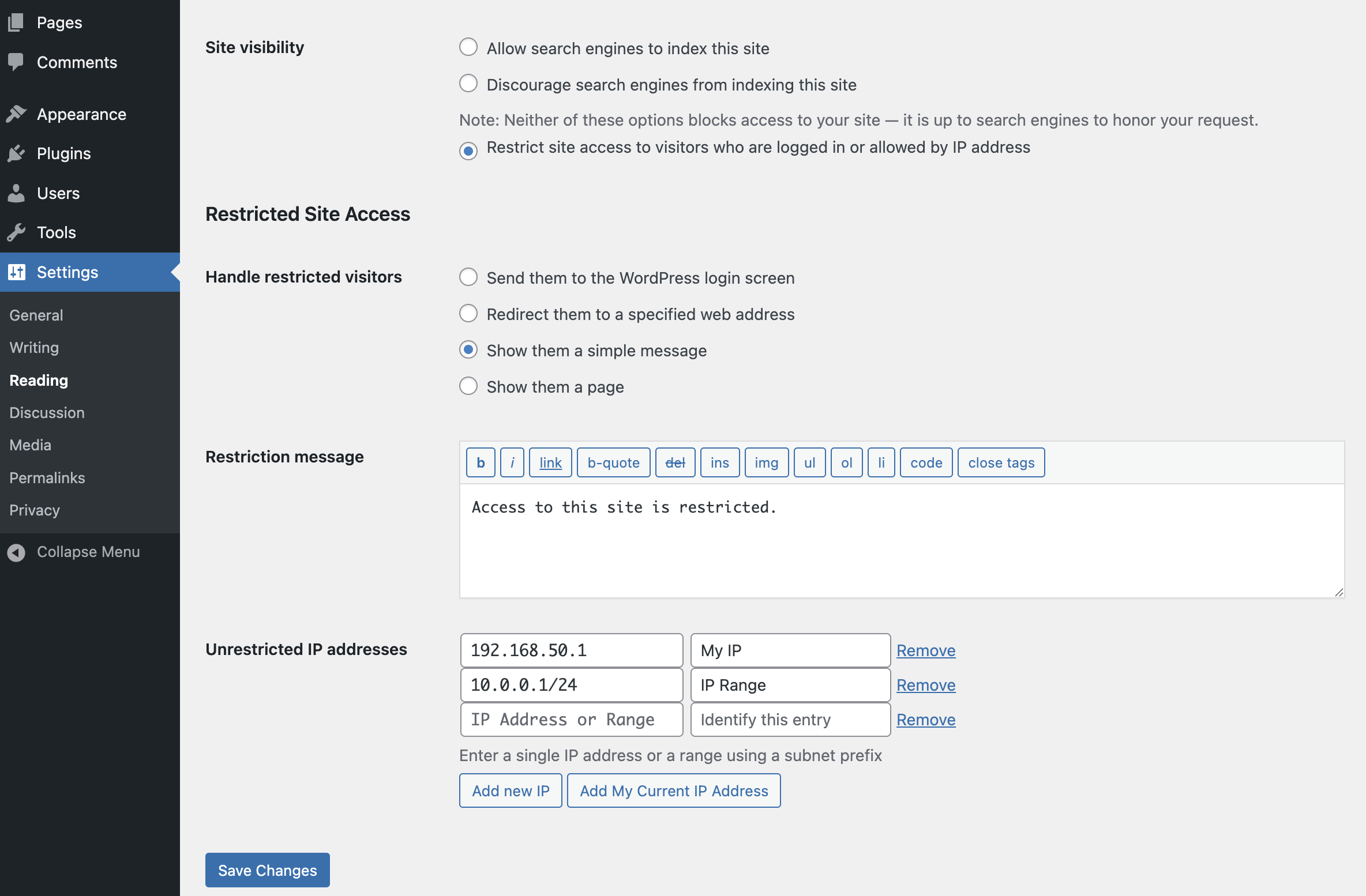
- Change the restriction behavior: send to login, redirect, display a message, display a page
- Add IP addresses to an unrestricted list, including ranges
- Quickly add your current IP to the unrestricted list
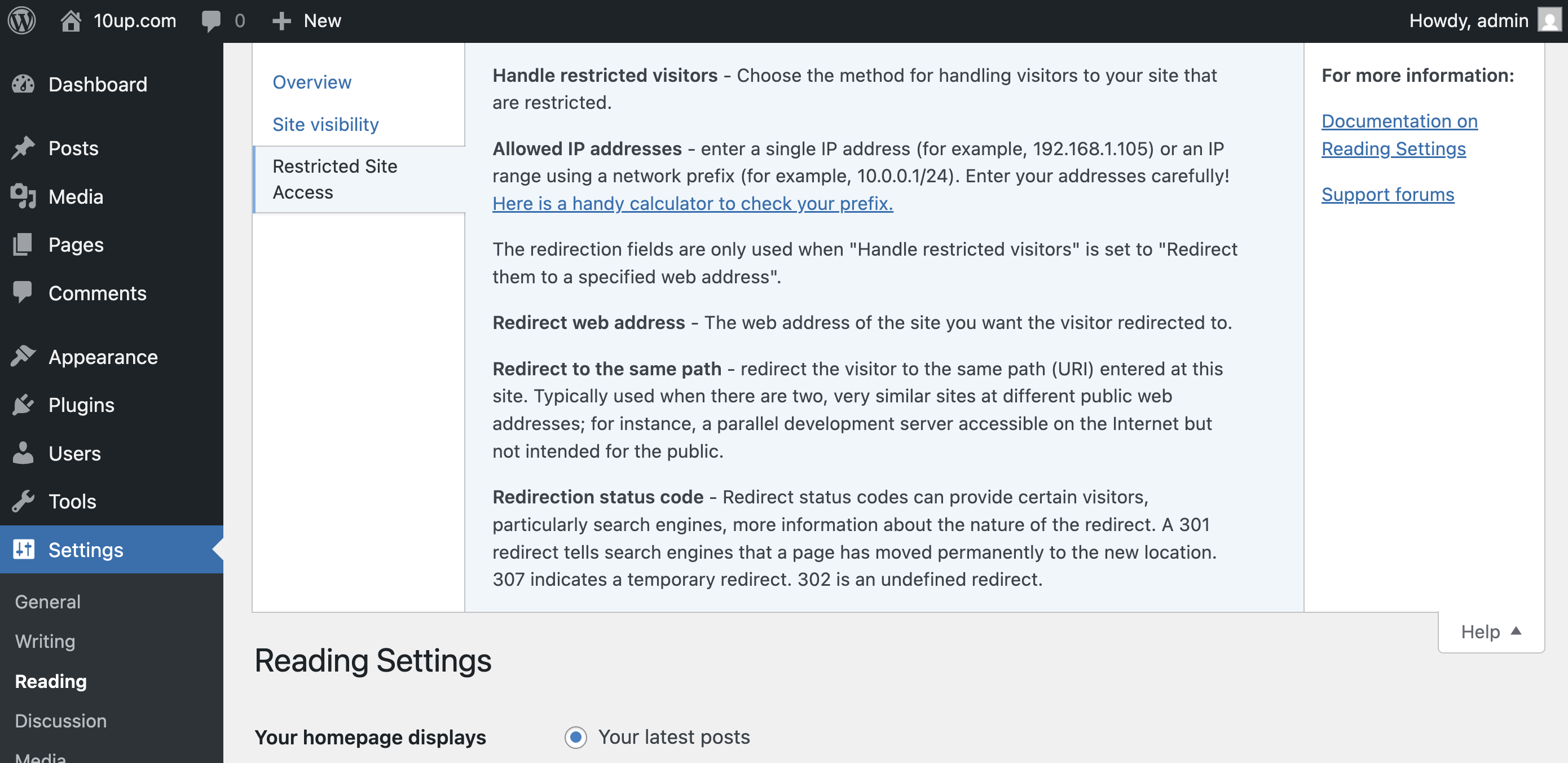
- Customize the redirect location, including an option to send them to the same requested path and set the HTTP status code for SEO friendliness
- Define a simple message to show restricted visitors, or select a page to show them – great for “coming soon” teasers!
Installation
- Install easily with the WordPress plugin control panel or manually download the plugin and upload the extracted folder to the
/wp-content/plugins/directory. - Activate the plugin through the ‘Plugins’ menu in WordPress.
- Configure the plugin by going to the “Reading” menu (WP3.5+) or “Privacy” (earlier versions) under “Settings”.
Changelog
This is a security release, it is recommended to upgrade immediately
7.6.4 – 2026-10-14
BREAKING: Restricted sites now return a 401 JSON error for anonymous REST API requests instead of redirects/HTML. API clients, MCP clients, mobile apps, and headless front ends may need to authenticate or update error handling.
- Added: Restricted REST API requests now return a 401 JSON error (403 for logged-in users without access) instead of the configured redirect, message or page. New
restricted_site_access_use_rest_responseandrestricted_site_access_rest_responsefilters (#447). - Changed: REST API requests to a restricted site no longer go through the
restricted_site_access_message,restricted_site_access_redirect_urlorrestricted_site_access_headfilters. Sites that used those to handle API requests should move to the new filters, or return false fromrestricted_site_access_use_rest_responseto keep the old behavior (#447). - Security: Resolve GHSA-88hj-qmx6-c77f (GHSA-88hj-qmx6-c77f).
7.6.3 – 2026-09-28
- Fixed: Remove filter flags from applying to the
REMOTE_ADDRheader (props @dkotter, @jeffpaul, @peterwilsoncc via GHSA-jrf7-cq25-hc3x) - Security: Resolve GHSA-x79x-6v7g-xww7 (props @dkotter, @jeffpaul, @peterwilsoncc via GHSA-x79x-6v7g-xww7)
- Security: Resolve GHSA-mhr2-3fc8-g999 (props @dkotter, @jeffpaul, @peterwilsoncc via GHSA-mhr2-3fc8-g999)
- Security: Resolve GHSA-jrf7-cq25-hc3x (props @dkotter, @jeffpaul, @peterwilsoncc via GHSA-jrf7-cq25-hc3x)
7.6.2 – 2026-08-27
Note that this version bumps the WordPress minimum supported version from 6.6 to 6.9.
- Fixed: Allow programatic changes to first allow-listed IP address label. (props @thisismyurl, @jeffpaul, @peterwilsoncc via #419)
- Changed: Bump tested up to header to indicate WordPress 6.9 support. (props @peterwilsoncc, @dkotter via #379)
- Changed: Bump WordPress “tested up to” version 7.0 (props @phpbits, @dkotter, @peterwilsoncc via #404)
- Changed: Bump tested up to header to indicate WordPress 7.1 support (props @phpbits, @jeffpaul, @peterwilsoncc via #428)
- Changed: Increase minimum supported WordPress version from 6.6 to 6.9 (props @phpbits, @jeffpaul, @peterwilsoncc via #428)
Screenshots
For developers
Is this your plugin? Show off the numbers.
Add a live badge to your site, docs or GitHub README. It updates on its own — no account needed.
Best Restricted Site Access alternatives
All limited plugins →| Rank | Plugin | Active installs |
|---|---|---|
| 2 |
 Limited Admin Menu Access by URLs
Give support agents limited WordPress admin access — restricted to specific pages you… |
10+ |
FAQ
Restricted Site Access: quick answers
Straight answers, pulled from live WordPress.org data.
Live data from WordPress.org · checked Nov 16, 2026
Is Restricted Site Access free?
Yes. Restricted Site Access is free to download and use from the official WordPress.org plugin directory.
Is Restricted Site Access safe to use in 2026?
Yes — Restricted Site Access is a safe, well-maintained plugin to use in 2026. It runs on 10K+ sites, is rated 4.8/5 and was last updated 1 month ago, and scores 89/100 on our health check.
How many websites use Restricted Site Access?
Restricted Site Access is active on 10K+ WordPress websites and has been downloaded 1,279,772 times since it launched in August 2009. It was downloaded 21,810 times in the last 30 days.
Does Restricted Site Access work with WordPress 7.1?
Yes. The developer has tested Restricted Site Access up to WordPress 7.1.4, the latest release. It requires WordPress 6.9 or newer.
What PHP version does Restricted Site Access need?
Restricted Site Access requires PHP 7.4 or higher. Most hosts run PHP 8.x today, so it works on any modern WordPress hosting.
When was Restricted Site Access last updated?
The latest version, 7.6.4, was released on October 14, 2026 (1 month ago).
Who makes Restricted Site Access?
Restricted Site Access is developed and maintained by 10up.
What are the best alternatives to Restricted Site Access?
The most popular alternatives to Restricted Site Access are Limited Admin Menu Access b… (10+ installs).
Powered by PageForge
Want thousands of pages that rank like these? Build them in an afternoon.
This directory runs on the same engine as PageForge. Turn any spreadsheet, CSV or API into thousands of fast, SEO-ready WordPress pages — with schema, internal links and AI-written copy baked in.
- CSV, Google Sheets & API data sources
- AI content, schema & internal links per page
- Works with Elementor, Gutenberg, Yoast & Rank Math
- Free on WordPress.org — no credit card


