


Restrict Elementor Widgets, Columns and Sections
Restrict Elementor Widgets based on different conditions. Works for any widgets from any plugins.

Use with caution
Restrict Elementor Widgets, Col… works, but test it on a staging site before relying on it in 2026. It runs on 400+ sites, is rated 4.2/5 and was last updated 1 year ago, and scores 45/100 on our health check.
- Small user base (400+ active installs)
- No update in over a year
- Only tested up to WordPress 6.8 (latest is 7.1)
Daily downloads
Download spikes usually follow a new release — each site that auto-updates counts as a download.
Rankings
Where Restrict Elementor Widgets,… stands todayWordPress.org search rankings
Live position in the plugin search, top 100| Keyword | Position |
|---|---|
| lock elementor | #19 |
| restrict elementor | #11 |
| restrict widget | #16 |
Version adoption
Share of active sites per release.
Rating breakdown
★★★★★★★★★★ 4.2 from 5 reviews
About Restrict Elementor Widgets, Columns and…
From the official readme · v1.12Description
Restrict Elementor Widgets is an Elementor add-on that helps you hide your Elementor widgets or sections based on different conditions. It works beautifully with any widgets from any plugins.
⛳️ Showcase Elementor widgets only when needed!
👉 Official Website
👉 Help & Support
👉 Facebook Page
⛳️ Show or hide widgets based on different conditions
🎉 Logged in users
A widget, column or section can be shown to the logged in users only. Any visitors who are not logged in, cannot see this.
🎉 Logged out users
A widget, column or section can be hidden from the loggen in users and visible to those who are not logged in.
🎉 Users from specific roles
You can create a content that you want to showcase to specific user roles. Other users won’t see this.
🎉 Users with specific ID’s
Some user ID’s can be specified as well. You just to need to input some coma-separated user ID’s who can see the content.
🎉 For a given date/time period
Want to display a widget in the morning? Or maybe on Sunday and Wednesday only or on the first day of the month? You can do this.
🎉 Based on the query strings added to the URL
Sometimes you may need to show some content to the visitors who come from an affiliate? How would you do this? Use this plugin and get the problem resolved.
🎉 To WooCommerce customers (PRO)
Custom-only content can be handled with this plugin as well. You even can set it for specific product ID’s or order statuses.
🎉 To WooCommerce Subscriptions subsribers (PRO)
It made it possible to show a widget or section to the users who have subscribed to your products or services. Can be used based on subscriptio product ID or subscription status.
⛳️ Display an alternate content
🎉 Show a text message
You can set a custom text to be displayed when a content is rescricted and the visitor is not allowed to access it. With the native text editor, you can decide how you want the text to look.
🎉 Show a Section template
Alternatively, a custom template can be used. You just need to create a Section template from the Elementor -> Templates section.
🎉 Show nothing
It allows you to completely hide your content and not to show an alternate text or template.
Explore More Plugins
Discover our wide range of plugins and extensions that might be just what you’re looking for. Check out our other plugins here:
🔥 CoDesigner
Crafting stunning WooCommerce sites with Elementor has never been easy! CoDesigner (formerly WooLementor) makes it easy to design beautiful WooCommerce sites with Elementor, even without coding. Its intuitive drag-and-drop interface allows you to customize shop pages, filters, checkout, and more, quickly achieving a professional look. With 94+ widgets, 14+ modules, and 150+ templates, CoDesigner lets you tailor your site to increase engagement, conversions, and customer retention. Its features include AJAX-based filters, customizable email templates, variation swatches, flash sale timers, and a streamlined checkout. Compatible with top WordPress themes, CoDesigner offers comprehensive support and tools to elevate your WooCommerce store.
🔥 ThumbPress
Meet ThumbPress, the ultimate WordPress image management solution! Effortlessly manage all your images and thumbnails with ThumbPress, the powerful WordPress plugin for image optimization and control. With features like disabling unwanted thumbnail sizes, regenerating thumbnails, limiting image upload size and resolution, and converting images to WebP, ThumbPress keeps your site running fast and saves server space. The Pro version also offers advanced tools to detect large and unused images, compress images, replace images, and even edit them directly on the dashboard. ThumbPress is your all-in-one solution for streamlined, secure, and efficient WordPress image management.
🔥 WC Affiliate
Looking to launch an affiliate program for your WooCommerce store? WC Affiliate is the perfect solution to get started without a developer! This plugin is designed to seamlessly integrate with WooCommerce, offering features like referral tracking, real-time reporting, unlimited affiliates, and automated payouts through PayPal and Stripe. Customize commissions, build banners, create short links, and enable cross-domain cookie sharing for maximum reach. Translation-ready and user-friendly, WC Affiliate provides a fully customizable dashboard and exportable data. Experience its full potential with a live demo and join a community of users to boost your sales growth!
🔥 Restrict Elementor Widgets
Meet Restrict Elementor Widgets, the Elementor add-on that allows you to control when and where Elementor widgets or sections are displayed based on various conditions. You can choose to show or hide widgets for logged-in or logged-out users, specific user roles, or even certain user IDs. Schedule content for specific dates, times, or based on URL query strings, perfect for targeted displays like affiliate content. For WooCommerce users, you can set visibility based on customer roles, products, or subscription statuses (PRO). Customize restricted content by showing a message, a template, or hiding it entirely.
🔥 Duplica
Duplica lets you duplicate posts, pages, or custom posts to the same or different types, including posts, pages, WooCommerce products, and EDD downloads, with more options coming soon. It copies all post meta data and taxonomy terms as well. Starting with version 0.2, you can also duplicate users along with their data, metadata, and roles.
🔥 CF7 Submissions
Meet CF7 Submissions, the essential plugin for securely storing and managing Contact Form 7 submissions right in your WordPress dashboard. Say goodbye to lost or misplaced emails! Each user submission and file attachment is safely saved in your database for easy access anytime. With features like seamless Contact Form 7 integration, advanced search, read/unread status, and bulk actions, CF7 Submissions helps you stay organized. Respond directly to users from your dashboard and keep your submissions tidy. Get CF7 Submissions today for reliable, convenient, and secure contact form management!
Installation
- Install Woolementor using the native Plugin installer, or download the zip and extract it in the wp-content/plugins/ directory.
- Activate the plugin through the ‘Plugins’ admin menu.
- Set conditiona from the Elementor control under Advanced tab.
Please reach out to us if you need any help.
Frequently asked questions
Does it require Elementor?
Yes. You need to have Elementor activated in order to use this plugin.
Does it require Elementor Pro?
No, it doesn’t.
Is it compatible with any WordPress Theme?
Yes, it’s compatible with any WordPress themes as long as it works with Elementor.
Can I show my content only to the WooCommerce customers?
You need to install the WooCommerce extension to achieve this.
My question is not answered here
Please reach out to us. We’re always happy to help.
Changelog
v1.12 – 2025-06-03
- [fix] Plugin search issue fixed
v1.10 — 2024-05-11
- Compatibility tested with WordPress v6.8.1
v1.9 — 2024-04-20
- Plugin search result issue fixed
v1.8 — 2024-04-17
- Compatibility tested with WordPress v6.8
v1.7 — 2024-03-11
- Compatibility tested with WordPress v6.7.2
v1.6.1 — 2024-11-28
- Compatibility tested with WordPress v6.7.1
Screenshots


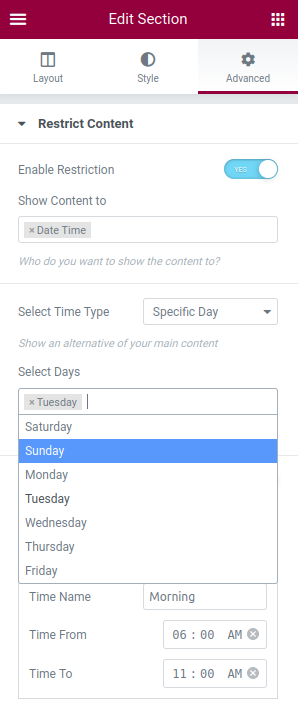

For developers
Is this your plugin? Show off the numbers.
Add a live badge to your site, docs or GitHub README. It updates on its own — no account needed.
FAQ
Restrict Elementor Widgets, Columns…: quick answers
Straight answers, pulled from live WordPress.org data.
Live data from WordPress.org · checked Oct 12, 2026
Is Restrict Elementor Widgets, Col… free?
Yes. Restrict Elementor Widgets, Col… is free to download and use from the official WordPress.org plugin directory.
Is Restrict Elementor Widgets, Col… safe to use in 2026?
Restrict Elementor Widgets, Col… works, but test it on a staging site before relying on it in 2026. It runs on 400+ sites, is rated 4.2/5 and was last updated 1 year ago, and scores 45/100 on our health check.
How many websites use Restrict Elementor Widgets, Col…?
Restrict Elementor Widgets, Col… is active on 400+ WordPress websites and has been downloaded 11,341 times since it launched in January 2021. It was downloaded 176 times in the last 30 days.
Does Restrict Elementor Widgets, Col… work with WordPress 7.1?
Restrict Elementor Widgets, Col… is officially tested up to WordPress 6.8.11, while the latest release is 7.1.3. It may still work, but try it on a staging site first.
What PHP version does Restrict Elementor Widgets, Col… need?
Restrict Elementor Widgets, Col… requires PHP 7.4 or higher. Most hosts run PHP 8.x today, so it works on any modern WordPress hosting.
When was Restrict Elementor Widgets, Col… last updated?
The latest version, 1.12, was released on June 3, 2025 (1 year ago).
Who makes Restrict Elementor Widgets, Col…?
Restrict Elementor Widgets, Col… is developed and maintained by Codexpert, Inc.
Powered by PageForge
Want thousands of pages that rank like these? Build them in an afternoon.
This directory runs on the same engine as PageForge. Turn any spreadsheet, CSV or API into thousands of fast, SEO-ready WordPress pages — with schema, internal links and AI-written copy baked in.
- CSV, Google Sheets & API data sources
- AI content, schema & internal links per page
- Works with Elementor, Gutenberg, Yoast & Rank Math
- Free on WordPress.org — no credit card


