


RestockX – Back in Stock Notifications for WooCommerce
Recover lost sales with automatic back-in-stock alerts. Customers click Notify Me on out-of-stock products and get an email when items return.

Solid choice
RestockX is a solid plugin choice in 2026, with a few things worth checking first. Was last updated 2 days ago, and scores 64/100 on our health check.
- Actively developed — last update 2 days ago
- Tested with the latest WordPress (7.1)
- Small user base (<10 active installs)
- Very few reviews so far
How does it stack up?
Side-by-side on installs, updates, ratings & support



Daily downloads
Download spikes usually follow a new release — each site that auto-updates counts as a download.
Rankings
Where RestockX stands todayWordPress.org search rankings
Live position in the plugin search, top 100| Keyword | Position |
|---|---|
| back in stock | >100 |
| notify me | #100 |
| restock | #50 |
| stock alert | >100 |
| stock notification | >100 |
About RestockX
From the official readme · v1.0.3Description
RestockX recovers lost sales on your WooCommerce store by letting interested customers subscribe to restock alerts for out-of-stock products. When a product comes back in stock, every confirmed subscriber is notified automatically by email — turning missed sales into completed orders.
Customers click the “Notify Me” button on any out-of-stock product, enter their email, and confirm the subscription. Store owners get a clean admin dashboard to manage subscribers, customize emails, and export data.
Unlock all Pro features with RestockX Pro.
Features
- “Notify Me” button on out-of-stock products — displayed automatically on single product pages, with support for both simple and variable products (per-variation detection).
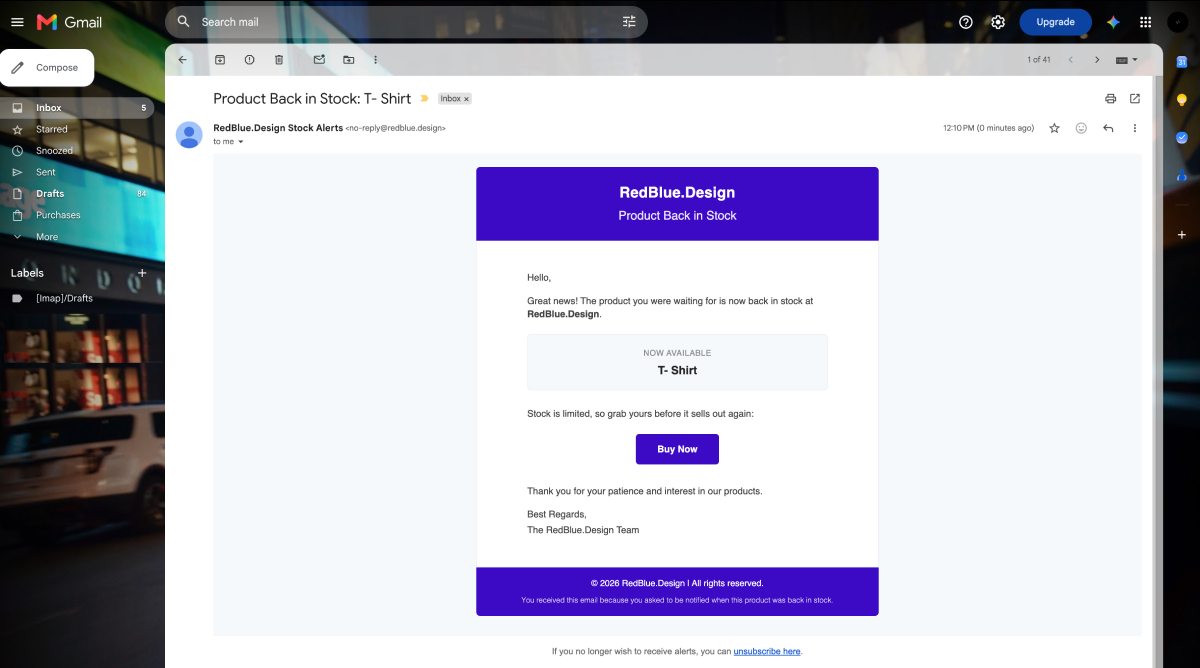
- Automatic back-in-stock emails — subscribers are emailed as soon as a product or variation’s stock status changes to “in stock”.
- Double opt-in confirmation — optional email confirmation protects your list from fake or mistyped addresses. Can be enabled or disabled.
- One-click unsubscribe — every alert email includes an unsubscribe link and a
List-Unsubscribeemail header, so subscribers can opt out anytime. - Customizable button appearance — change button text, tooltip, colors, font, icons, padding, margin, border width, color, and border radius from the admin area.
- Customizable email template — personalize the back-in-stock email with placeholders for product name, product URL, site name, and unsubscribe link.
- Stock notification threshold — choose the stock quantity at which notifications should be triggered.
- Subscriber management — view subscribers with product, email, date, and status (pending / confirmed / unsubscribed); delete entries in bulk.
- CSV export — export the full subscriber list for reporting or external marketing tools.
- Dashboard statistics widget — see total notifications, unique products, and unique subscribers at a glance on the WordPress dashboard.
- Alternative product suggestions — after subscribing, customers are shown up to 5 in-stock alternatives from the same categories or tags.
- Rate limiting — subscription requests are limited per email address to prevent abuse and spam.
- Email deliverability friendly — sender address is kept domain-aligned (with automatic Reply-To handling) so alert emails don’t get dropped by recipients’ providers.
- Translation ready — fully translatable via WordPress.org translate.wordpress.org.
Pro Features
Take restocking further with RestockX Pro:
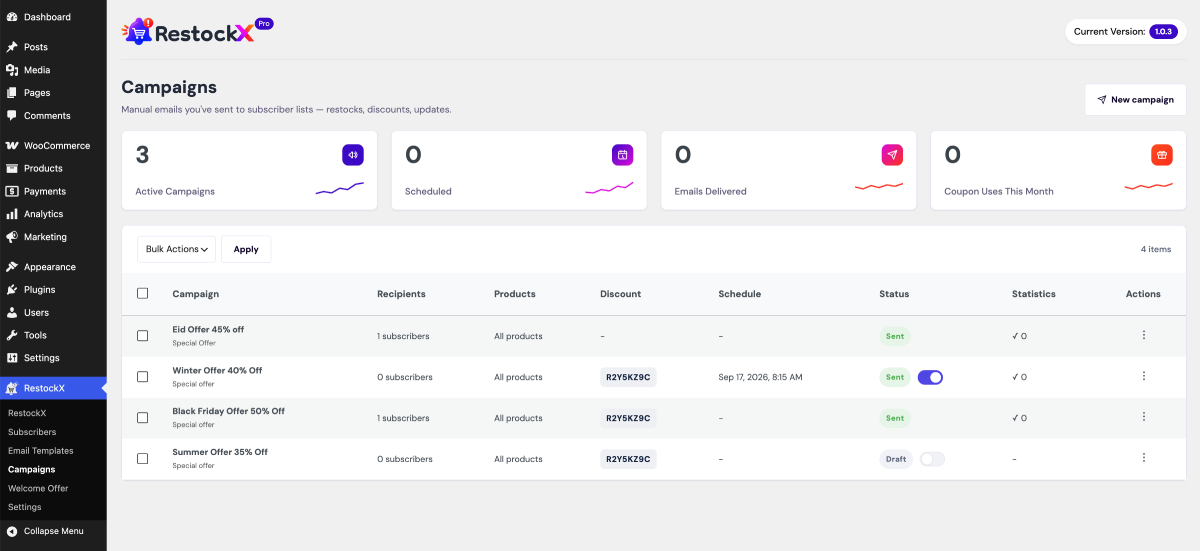
- Email campaigns — create, preview, duplicate, and manage targeted bulk email campaigns to your subscribers, with delivery status tracking for every send.
- Campaign scheduling — send a campaign immediately or schedule it for any future date and time.
- Flexible recipients — send to all confirmed subscribers, import recipients from a CSV file, or add specific email addresses individually.
- Discount codes in campaigns — attach a coupon code with an expiry period to any campaign to turn restock alerts into instant sales.
- Professional email templates — choose from four ready-made designs (Default, Modern, Minimal, and Product Showcase), each with a live template preview.
- Advanced merge placeholders — personalize campaign emails with
{campaign_title},{first_name},{discount_code},{discount_amount},{discount_expiry},{product_list},{cta_button}, and{site_name}. - Button customizer with live preview — fine-tune every detail of the “Notify Me” button (text, tooltip, colors, font, size, icon and icon position, padding, margin, border, and radius) while watching changes update in real time.
- Notification channel settings — configure your sender email address and branding in one place for maximum deliverability.
How it works
- A customer visits an out-of-stock product and clicks the “Notify Me” button.
- They enter their email address and submit the form.
- Depending on your settings, they either confirm via a double opt-in email or are subscribed instantly.
- When you restock the product, RestockX automatically emails all confirmed subscribers with a link back to the product.
Installation
Minimum requirements
- WordPress 6.2 or greater
- PHP 7.4 or greater (PHP 8.0+ recommended)
- MySQL 5.7 or greater (or MariaDB 10.3 or greater)
- WooCommerce (active)
Automatic installation
Automatic installation is the easiest option — WordPress handles the file transfer itself, and you won’t need to leave your web browser. To install RestockX, log in to your WordPress dashboard, navigate to the Plugins menu, and click Add New.
In the search field, type “RestockX for WooCommerce” and click Search Plugins. Once you find the plugin, you can view its details and install it by clicking Install Now. Afterwards, activate the plugin.
Manual installation
- Download the plugin ZIP file from WordPress.org.
- Go to Dashboard > Plugins > Add New > Upload Plugin.
- Choose
restockx.zip, click Install Now, and then activate the plugin.
The RestockX menu will appear in your WordPress admin, where you can view subscribers, customize email templates, and configure the notify button.
Frequently asked questions
Does this plugin work with variable products?
Yes. RestockX supports variable products — the notify button appears when a product (or all of its variations) is out of stock, and subscribers are alerted when the specific variation is back in stock.
Do subscribers need to create an account?
No. Logged-out customers simply enter their email address. Logged-in customers have their email filled in automatically.
Can I turn off the double opt-in confirmation email?
Yes. Double opt-in is enabled by default to keep your subscriber list clean, but you can disable it from the RestockX > Email Templates page. Note that unsubscribe links are always included in alert emails.
Is the plugin GDPR friendly?
Yes. Subscriptions are confirmed by email (when double opt-in is enabled), every alert contains a one-click unsubscribe link, and subscribers can be deleted at any time from the Subscribers page.
Can I export my subscribers?
Yes. Go to RestockX > Subscribers and click the CSV export button to download the complete subscriber list.
What does RestockX Pro add?
RestockX Pro unlocks email campaigns with scheduling and discount codes, four professional email templates, advanced merge placeholders, a live-preview button customizer, and notification channel settings. See the Pro version for details.
Where can I get support?
You can get support by posting in the support section of this plugin on the WordPress plugin directory, or by email: rejuan.17bd@gmail.com
Where can I report a bug?
Found a bug? Please let us know by opening a topic in the support section of this plugin on the WordPress plugin directory, or email us directly: rejuan.17bd@gmail.com
Changelog
Initial release. Enjoy!
1.0.3 [01/10/2026]
- New: Redesigned the Settings page with a tabbed layout — the free “Notify Me” button settings now live in their own tab, and the premium “Channels” and “Welcome Offer” tabs render Go Premium teaser screens that are automatically taken over by RestockX Pro when it is active.
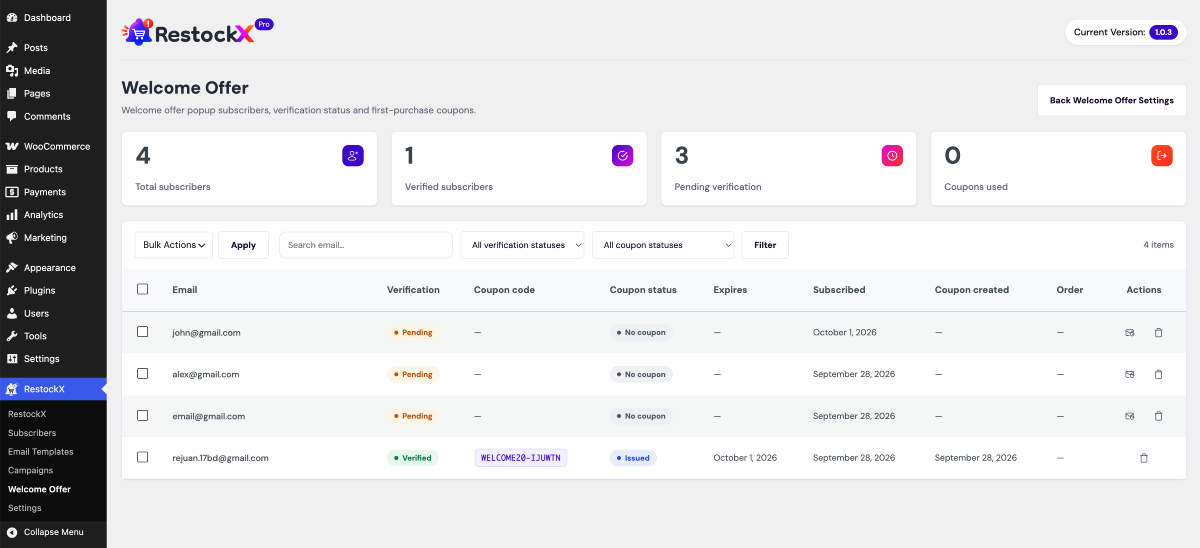
- New: Added a dedicated “Welcome Offer” submenu page under the RestockX menu (Go Premium teaser screen; replaced by the premium Welcome Offer page when Pro is active).
- New: Added the free “Notify Me” settings save handler (AJAX) so button options can be saved without Pro; the Pro handler takes priority when Pro is active.
- Updated: Added dedicated preview images for the premium Channels and Welcome Offer teaser screens instead of reusing the Settings screenshot.
- Updated: Refreshed the translation template (restockx.pot) with all the new settings strings.
- Fix: Fixed an issue where WordPress admin notifications were incorrectly hidden on RestockX admin pages.
- Fix: Minor admin CSS and JavaScript fixes and cleanup.
1.0.2 [23/09/2026]
- New: Added a “Delete” action button on each subscriber row. Admins can now delete a single subscriber directly from the Subscribers list (a confirmation prompt prevents accidental deletions).
- New: Added an “Actions” column to the Subscribers list table.
- New: Added a “Reset to Default” button on the Email Template page. Clicking it (after confirmation) restores the saved email template back to its default content.
- New: Added a dedicated admin JavaScript file (restock-admin.js) for admin interactions. It is loaded only on RestockX admin pages, and all confirmation messages are translatable.
1.0.1 [18/09/2026]
- New: Added a “Pro Features” section to the readme listing everything included in RestockX Pro (email campaigns, scheduling, discount codes, email templates, live-preview button customizer, and channel settings).
- New: Added a “What does RestockX Pro add?” FAQ entry.
- Updated: All “Go Premium” upgrade links now point to the RestockX Pro product page instead of the placeholder URL.
1.0.0
- Initial version released.
Screenshots


For developers
Is this your plugin? Show off the numbers.
Add a live badge to your site, docs or GitHub README. It updates on its own — no account needed.
Best RestockX alternatives
All back in stock plugins →




FAQ
RestockX: quick answers
Straight answers, pulled from live WordPress.org data.
Live data from WordPress.org · checked Oct 3, 2026
Is RestockX free?
Yes. RestockX is free to download and use from the official WordPress.org plugin directory.
Is RestockX safe to use in 2026?
RestockX is a solid plugin choice in 2026, with a few things worth checking first. Was last updated 2 days ago, and scores 64/100 on our health check.
How many websites use RestockX?
RestockX is active on <10 WordPress websites and has been downloaded 211 times since it launched in September 2026. It was downloaded 226 times in the last 30 days.
Does RestockX work with WordPress 7.1?
Yes. The developer has tested RestockX up to WordPress 7.1.2, the latest release. It requires WordPress 6.2 or newer.
What PHP version does RestockX need?
RestockX requires PHP 7.4 or higher. Most hosts run PHP 8.x today, so it works on any modern WordPress hosting.
When was RestockX last updated?
The latest version, 1.0.3, was released on October 1, 2026 (2 days ago).
Who makes RestockX?
RestockX is developed and maintained by Rejuan Ahamed.
What are the best alternatives to RestockX?
The most popular alternatives to RestockX are Back In Stock Notifier for… (20K+ installs), MoreConvert Wishlist for Wo… (8K+ installs) and Waitlist Woocommerce ( Back… (4K+ installs).
Powered by PageForge
Want thousands of pages that rank like these? Build them in an afternoon.
This directory runs on the same engine as PageForge. Turn any spreadsheet, CSV or API into thousands of fast, SEO-ready WordPress pages — with schema, internal links and AI-written copy baked in.
- CSV, Google Sheets & API data sources
- AI content, schema & internal links per page
- Works with Elementor, Gutenberg, Yoast & Rank Math
- Free on WordPress.org — no credit card


