



Replai Favicon – Favicon & App Icons for Every Device
Generate a complete favicon set for every browser and device from one image. Generated on your own site, no external service.

Use with caution
Replai Favicon works, but test it on a staging site before relying on it in 2026. Was last updated 1 month ago, and scores 60/100 on our health check.
- Tested with the latest WordPress (7.1)
- Small user base (<10 active installs)
- Very few reviews so far
Daily downloads
Download spikes usually follow a new release — each site that auto-updates counts as a download.
Rankings
Where Replai Favicon stands todayWordPress.org search rankings
Live position in the plugin search, top 100| Keyword | Position |
|---|---|
| app icons | >100 |
| apple touch icon | #40 |
| favicon | #46 |
| site icon | >100 |
| web app manifest | #32 |
About Replai Favicon
From the official readme · v1.0.12Description
Replai Favicon turns a single master image into every icon your site needs — and adds the right HTML automatically. No copy-paste, no third-party service: everything is generated on your own server.
From one image the plugin creates:
- favicon.ico (16/32/48) — the classic icon, still used by browsers on PDF pages and elsewhere.
- PNG favicons — 16, 32, 48 and 96 px for crisp browser tabs and Google search results.
- Apple Touch icon (180×180) — the iOS home-screen icon, always with a solid background.
- Android icons + web app manifest — 192 and 512 px plus a maskable icon and a
site.webmanifest. - Windows tiles — an
mstile-150x150.pngand abrowserconfig.xml. - SVG favicon — if your master image is an SVG, it is served as a modern vector favicon too.
Many options
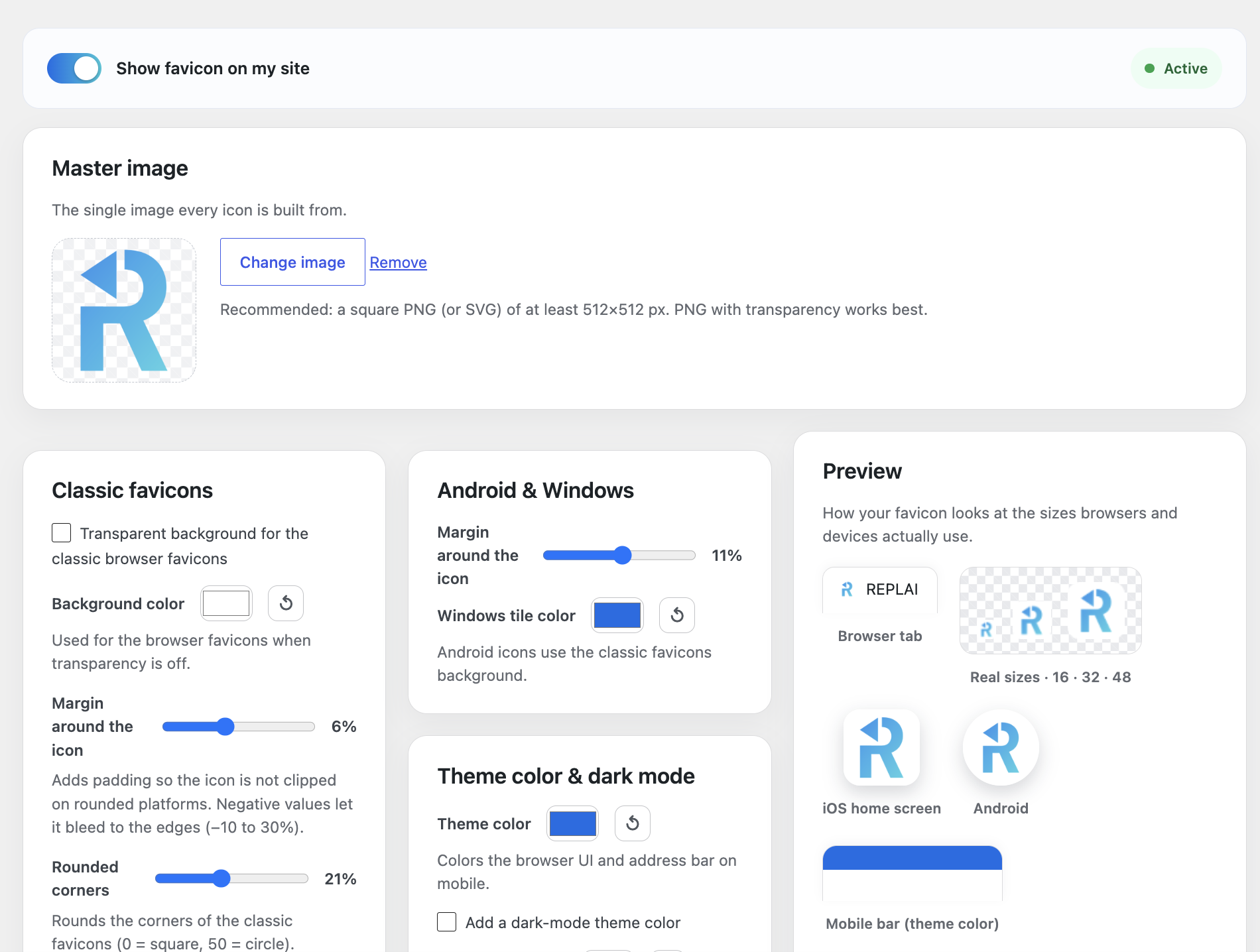
- Transparent or solid background for the classic favicons, with a color picker and a one-click reset to white.
- Padding per icon type — set a different margin for browser favicons, Apple Touch and Android, and even go slightly negative so the icon bleeds to the edges.
- Rounded corners for the classic favicons, from square all the way to a circle.
- Apple Touch background (iOS icons are always opaque).
- Theme color for the mobile browser UI, plus a Windows tile color.
- Dark mode — an optional alternative
theme-colorforprefers-color-scheme: dark. - App name for the web app manifest (defaults to your site title).
Smart and safe
- Real-time preview — a sticky preview panel shows your icon in a browser tab, at real sizes, on iOS and on Android, and updates live as you change any option, before you generate.
- Replaces the WordPress Site Icon tags (optional) so you never get duplicate icon markup.
- Serves /favicon.ico from the site root (optional) for browsers and crawlers that request it directly.
- Turn it on or off without regenerating — the files are kept.
The whole admin is available in 7 languages (English, Spanish, Catalan, French, Italian, Portuguese and German) based on your site language.
Everything runs on your own site. Icons are generated locally with GD or Imagick — your image is never uploaded to an external service.
Installation
- Upload the replai-favicon folder to
/wp-content/plugins/, or install it from the WordPress plugin directory. - Activate the plugin.
- Open the Replai Favicon menu, choose your master image, adjust the options and press Generate favicon.
Frequently asked questions
What image should I use?
A square image, at least 512×512 px. A PNG with transparency works best; SVG is also supported and served as a modern vector favicon.
Does it call any external service?
No. All icons are generated on your own server with GD or Imagick. Your image never leaves your site.
My server has no GD or Imagick. What happens?
The plugin shows a notice. Ask your host to enable the GD extension (available on almost all hosting) and generate again.
Will it clash with a Site Icon set in the Customizer?
No. By default Replai Favicon replaces the WordPress Site Icon tags so there are no duplicate icons. You can turn this off.
Does /favicon.ico work at the site root?
Yes, optionally. When enabled, requests to /favicon.ico are redirected to the generated icon, which helps browsers and crawlers that request it directly (for example on PDF pages).
Can I change the icon later?
Yes. Pick a new master image or change any option and press Regenerate. A cache-busting version is added automatically so browsers pick up the new icon.
Changelog
Official REPLAI icon and a fully multilingual plugin description.
1.0.12
- Branding: the plugin directory icon now uses the official REPLAI logo, consistent with the other REPLAI plugins.
- The plugin description in the Plugins list now follows your site language (7 languages), like the rest of the admin.
1.0.11
- UI: the option cards now use a masonry layout, so they line up neatly regardless of their height.
- Confirmed compatible with WordPress 7.1.
1.0.10
- UI: cleaner layout. The enable bar and the master image span the full width at the top; the options are grouped by icon type (classic favicons, Apple Touch, Android & Windows, theme color, app & advanced) with the live preview beside them.
1.0.9
- Listing and About page refreshed to cover per-type/negative padding, rounded corners, the reset-to-white control and the real-time sticky preview.
1.0.8
- UI: the live preview now follows the scroll down the whole settings column instead of stopping near the top.
1.0.7
- New: rounded corners for the classic favicons (0 = square, 50 = circle).
- New: padding can now go slightly negative (−10%) so the icon bleeds to the edges. All reflected live in the preview.
Screenshots

For developers
Is this your plugin? Show off the numbers.
Add a live badge to your site, docs or GitHub README. It updates on its own — no account needed.
FAQ
Replai Favicon: quick answers
Straight answers, pulled from live WordPress.org data.
Live data from WordPress.org · checked Sep 29, 2026
Is Replai Favicon free?
Yes. Replai Favicon is free to download and use from the official WordPress.org plugin directory.
Is Replai Favicon safe to use in 2026?
Replai Favicon works, but test it on a staging site before relying on it in 2026. Was last updated 1 month ago, and scores 60/100 on our health check.
How many websites use Replai Favicon?
Replai Favicon is active on <10 WordPress websites and has been downloaded 114 times since it launched in August 2026. It was downloaded 76 times in the last 30 days.
Does Replai Favicon work with WordPress 7.1?
Yes. The developer has tested Replai Favicon up to WordPress 7.1.2, the latest release. It requires WordPress 6.2 or newer.
What PHP version does Replai Favicon need?
Replai Favicon requires PHP 7.2 or higher. Most hosts run PHP 8.x today, so it works on any modern WordPress hosting.
When was Replai Favicon last updated?
The latest version, 1.0.12, was released on August 28, 2026 (1 month ago).
Who makes Replai Favicon?
Replai Favicon is developed and maintained by REPLAI.
Powered by PageForge
Want thousands of pages that rank like these? Build them in an afternoon.
This directory runs on the same engine as PageForge. Turn any spreadsheet, CSV or API into thousands of fast, SEO-ready WordPress pages — with schema, internal links and AI-written copy baked in.
- CSV, Google Sheets & API data sources
- AI content, schema & internal links per page
- Works with Elementor, Gutenberg, Yoast & Rank Math
- Free on WordPress.org — no credit card


