


Redesignee – Elementor Addons & Gutenberg Blocks Library
Lightweight Elementor addons & Gutenberg blocks. Copy/paste hero sections, sliders, and timelines to build fast websites without heavy plugins.

Solid choice
Redesignee is a solid plugin choice in 2026, with a few things worth checking first. It runs on 40+ sites, is rated 5/5 and was last updated 2 weeks ago, and scores 74/100 on our health check.
- Actively developed — last update 2 weeks ago
- Tested with the latest WordPress (7.1)
- Small user base (40+ active installs)
- Very few reviews so far
How does it stack up?
Side-by-side on installs, updates, ratings & support



Daily downloads
Download spikes usually follow a new release — each site that auto-updates counts as a download.
Rankings
Where Redesignee stands todayWordPress.org search rankings
Live position in the plugin search, top 100| Keyword | Position |
|---|---|
| carousel | >100 |
| elementor addons | >100 |
| gutenberg blocks | >100 |
| slider | >100 |
| timeline | >100 |
Version adoption
Share of active sites per release.
Rating breakdown
★★★★★★★★★★ 5 from 1 reviews
About Redesignee
From the official readme · v1.0.9Description
Stop installing heavy plugin packs for just one widget.
Redesignee is the ultimate Template and Block Library for WordPress. Unlike traditional Elementor addons or Gutenberg block plugins that load huge CSS/JS files for features you don’t use, Redesignee injects only the clean code required for the specific widget you choose.
Our library focuses heavily on high-converting Elementor hero sections and Gutenberg hero blocks, alongside a growing collection of premium layouts. Customize them visually and import them instantly. It’s the perfect solution for developers and designers who care about Core Web Vitals, PageSpeed, and clean code.
🚀 Why Choose Redesignee?
- Optimized Performance: We don’t load unused widgets on your server. If you pick one Elementor hero section, you only load code for that specific element.
- Dual Compatibility: Works seamlessly across both Elementor (as a widget) and Gutenberg / Block Editor (as a block).
- Visual Live Customizer: Edit content, colors, and layout in a live preview window before importing.
- Performance First: Built specifically to help sites hit green scores on Google PageSpeed Insights.
📦 Included Widgets & Templates
We add new responsive layouts and components weekly directly to the library without you needing to update the plugin.
- Hero Sections & Video Elements: High-converting hero layouts, background video blocks, and responsive video sliders for striking first impressions.
- Sliders & Carousels: Draggable testimonial sliders, review cards, logo carousels, and responsive image sliders.
- Content & Layout Elements: SEO-friendly Accordions (FAQs), horizontal/vertical Tabs, Text elements, and Feature grids.
- Marketing & Services: Responsive Pricing Tables with toggles, Service showcase grids, Call to Action (CTA) banners, and “How It Works” step-by-step sections.
- Advanced Visuals: Responsive Timelines, About sections, custom Navigation Menus, and rich Image elements.
✨ Features
- Copy & Paste Workflow: Browse the template library, click “Import,” and your layout is ready.
- Smart Asset Loading: Assets are loaded dynamically only on the pages where your widgets actually exist.
- Clean Code Markup: The output is standard, standards-compliant HTML/CSS that blends perfectly with your active WordPress theme.
- Global Styles: Inherits your site’s native theme fonts and colors automatically.
- Live Sidebar Search: Instantly look up widgets by titles, tags, or descriptive text keywords across the template collection.
- Advanced Positioning Controls: Adjust screen placement (fixed, absolute, static) directly from the customizer to effortlessly build sticky headers, floating promo bars, and screen-anchored widgets.
- Individual Purchases Unlock: Connect your account to automatically unlock premium layouts you’ve individually purchased, even without an active premium subscription.
- One-Click Domain Authorization: Instantly authorize staging or production environments using an automated centered popup configuration window.
3rd Party Service Disclaimer
This plugin relies on the Redesignee external service to function. It connects securely to the Redesignee API to fetch widget templates, library categories, and assets.
- This service is required to browse and import widgets.
- An API Key (Free or Premium) is used to authenticate your request.
- Terms of Service
- Privacy Policy
Installation
- Upload the plugin files to the
/wp-content/plugins/redesigneedirectory, or search for “Redesignee” in your WordPress admin plugin dashboard. - Activate the plugin through the ‘Plugins’ screen in WordPress.
- Go to Redesignee Settings in your dashboard (Optional: enter your API key for premium items).
- For Elementor: Search for the “Redesignee” widget in your Elementor editor sidebar.
- For Gutenberg: Click the “+” block inserter button and search for the “Redesignee” block.
Changelog
Feature Update: Click any text or image in the widget preview to edit just that element, plus a fix for the live preview breaking when changing fonts.
1.0.9
- Feature: Click-to-edit in the widget editor. Hover any text or image in the live preview to see a pencil icon, then click it to show the Content and Style controls for just that element. Use “All elements” or Esc to return to the full list.
- Improvement: Clicking a button label also shows its link settings, and the open tab (Content/Style) is remembered when switching between elements.
- Fix: Changing fonts no longer breaks or reloads the live preview.
- Fix: Links inside the preview no longer navigate away from the editor.
1.0.8
- Feature: Introduced Advanced Positioning Controls inside the editor, enabling drag-and-drop Screen Placement (Top Bar, Bottom Left, Full Screen, etc.) and Scroll Behavior settings (Static, Fixed, Absolute).
- Feature: Updated the library grid to officially support unlocking and importing individually purchased premium widgets without requiring an active global subscription.
- Improvement: Merged the latest core UI capabilities (live font searching, typography popovers, and exact element deletion) to achieve full feature parity with the main Redesignee platform customizer.
1.0.7
- Added Free/Premium filters and search header empty states to the widget browser.
- Fixed domain authorization status checks and cache-busting on the settings page.
- Added custom plugin quick action links.
- Added delete buttons to the customizer for removing elements in the widget.
1.0.6
- Feature: Unified typography controls (size, weight, line-height, etc.) into a clean, collapsible popover panel inside the Style tab.
- Improvement: Aligned the plugin customizer UI closer to the native web app experience for better usability.
1.0.5
- Feature: Rebuilt the typography font menu into an asynchronous virtualized infinite scroll list component to instantly render without freezing the sidebar editor panels.
- Improvement: Linked a secondary cross-window font sheet preloader to inject font files into both the child sandbox iframe and parent customizer window head tags automatically.
- Improvement: Swapped initial list loops for an on-demand chunking routine that processes font records only when a user actively clicks open a family menu trigger.
1.0.4
- Fix: Patched automatic item renumbering fallback inside structural layout engines to ignore multi-digit numbers (like timeline years), preserving custom dates exactly as written.
- Fix: Resolved an unhandled 403 AJAX server error string by introducing an explicit error handler callback that drops users smoothly into the public free-tier library tier when a domain is unauthorized.
- Improvement: Swapped background option polling with a clean on-load API verification cycle to automatically demote plugin status back to “Authorize this domain” if it is removed from the dashboard settings panel.
- Improvement: Programmed the verification script loop to trigger an explicit click sequence over native WordPress system submit buttons for immediate canvas refreshes.
Screenshots


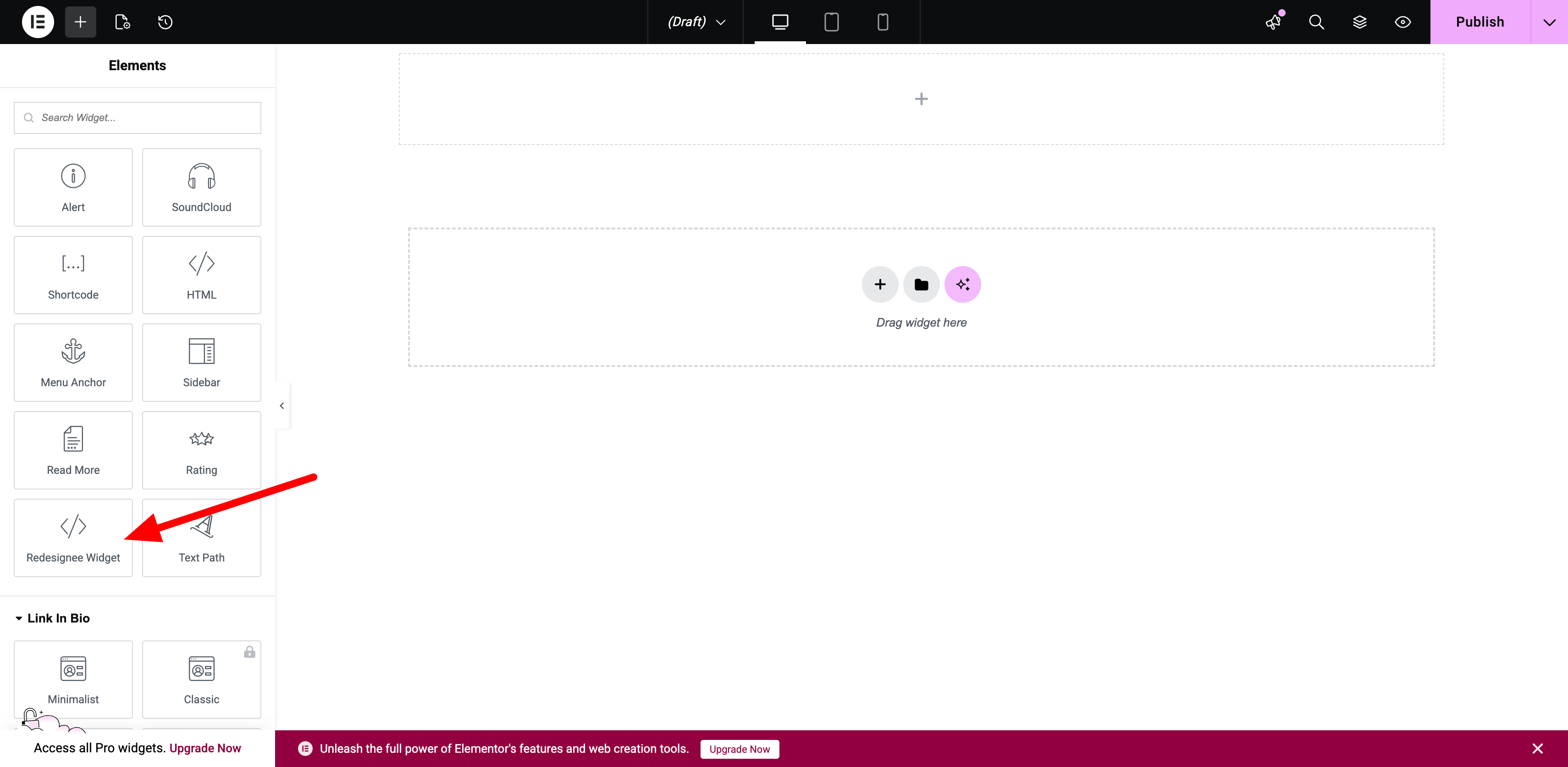


For developers
Is this your plugin? Show off the numbers.
Add a live badge to your site, docs or GitHub README. It updates on its own — no account needed.
Best Redesignee alternatives
All carousel plugins →





FAQ
Redesignee: quick answers
Straight answers, pulled from live WordPress.org data.
Source: WordPress.org
Is Redesignee free?
Yes. Redesignee is free to download and use from the official WordPress.org plugin directory.
Is Redesignee safe to use in 2026?
Redesignee is a solid plugin choice in 2026, with a few things worth checking first. It runs on 40+ sites, is rated 5/5 and was last updated 2 weeks ago, and scores 74/100 on our health check.
How many websites use Redesignee?
Redesignee is active on 40+ WordPress websites and has been downloaded 1,469 times since it launched in January 2026. It was downloaded 320 times in the last 30 days.
Does Redesignee work with WordPress 7.1?
Yes. The developer has tested Redesignee up to WordPress 7.1.5, the latest release. It requires WordPress 6.0 or newer.
What PHP version does Redesignee need?
Redesignee requires PHP 7.4 or higher. Most hosts run PHP 8.x today, so it works on any modern WordPress hosting.
When was Redesignee last updated?
The latest version, 1.0.9, was released on November 16, 2026 (2 weeks ago).
Who makes Redesignee?
Redesignee is developed and maintained by redesignee.
What are the best alternatives to Redesignee?
The most popular alternatives to Redesignee are Shortcodes Ultimate (400K+ installs), AI-Powered Carousel, Slider… (60K+ installs) and Carousel Slider Block for G… (50K+ installs).
Powered by PageForge
One template and a spreadsheet. A real page for every search.
PageForge turns each row of a CSV into a WordPress page with its own title, URL, SEO fields and schema, built on the layout you already designed. Free on WordPress.org.
- CSV and XLSX, plus Google Sheets on Professional and Enterprise
- Its own title, URL, SEO fields and schema for every page
- Works with the block editor, Elementor, Divi and Avada
- Free on WordPress.org, no credit card