



Returns, Exchanges & Refunds for WooCommerce – Recoup
WooCommerce returns plugin that converts refunds into exchanges and store credit. Self-service portal, return analytics, revenue recovery.

Consider an alternative
Returns, Exchanges & Refunds fo… shows warning signs in 2026 — compare the alternatives below before installing. It runs on 20+ sites, is rated 5/5 and was last updated 6 months ago, and scores 41/100 on our health check.
- Small user base (20+ active installs)
- Very few reviews so far
- Only tested up to WordPress 6.9 (latest is 7.1)
How does it stack up?
Side-by-side on installs, updates, ratings & support



Daily downloads
Download spikes usually follow a new release — each site that auto-updates counts as a download.
Rankings
Where Returns, Exchanges & Refund… stands todayWordPress.org search rankings
Live position in the plugin search, top 100| Keyword | Position |
|---|---|
| exchanges | #15 |
| refunds | #13 |
| returns | #18 |
| store credit | >100 |
| woocommerce | >100 |
Version adoption
Share of active sites per release.
Rating breakdown
★★★★★★★★★★ 5 from 1 reviews
About Returns, Exchanges & Refunds for WooCom…
From the official readme · v1.0.4Description
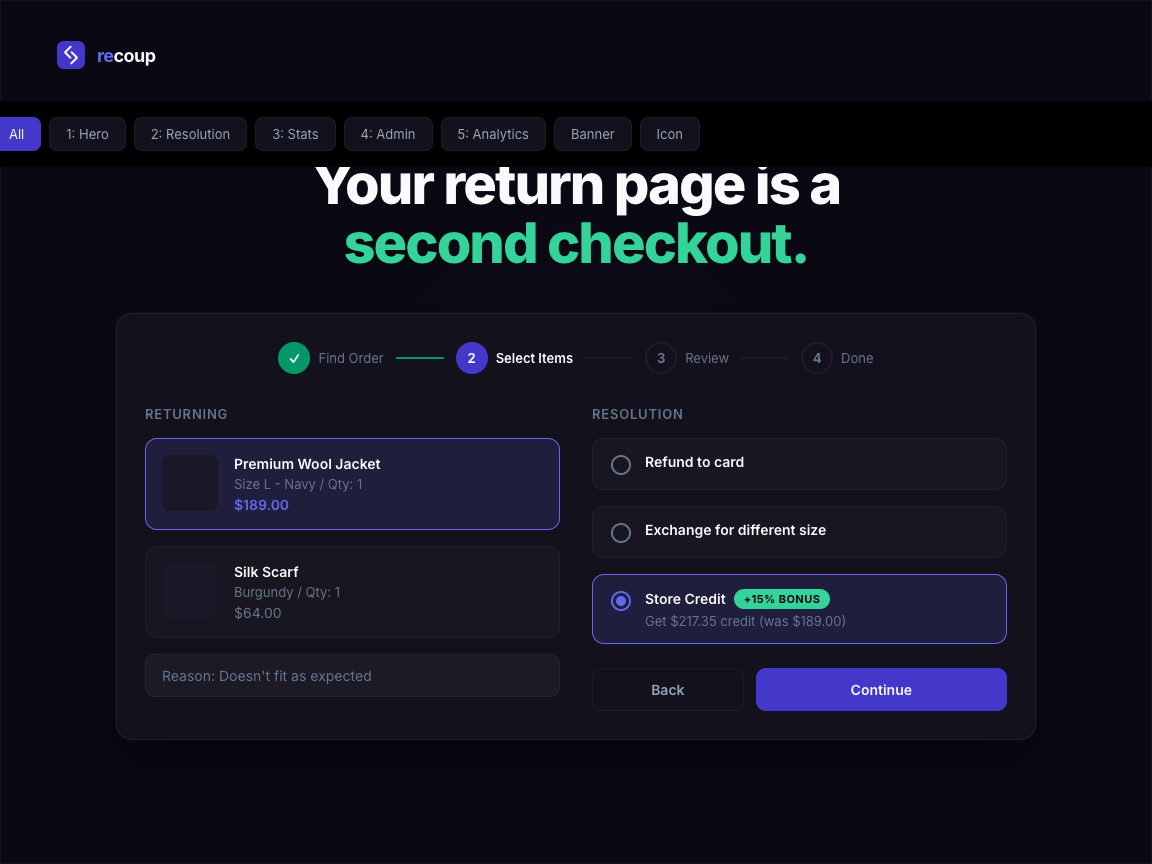
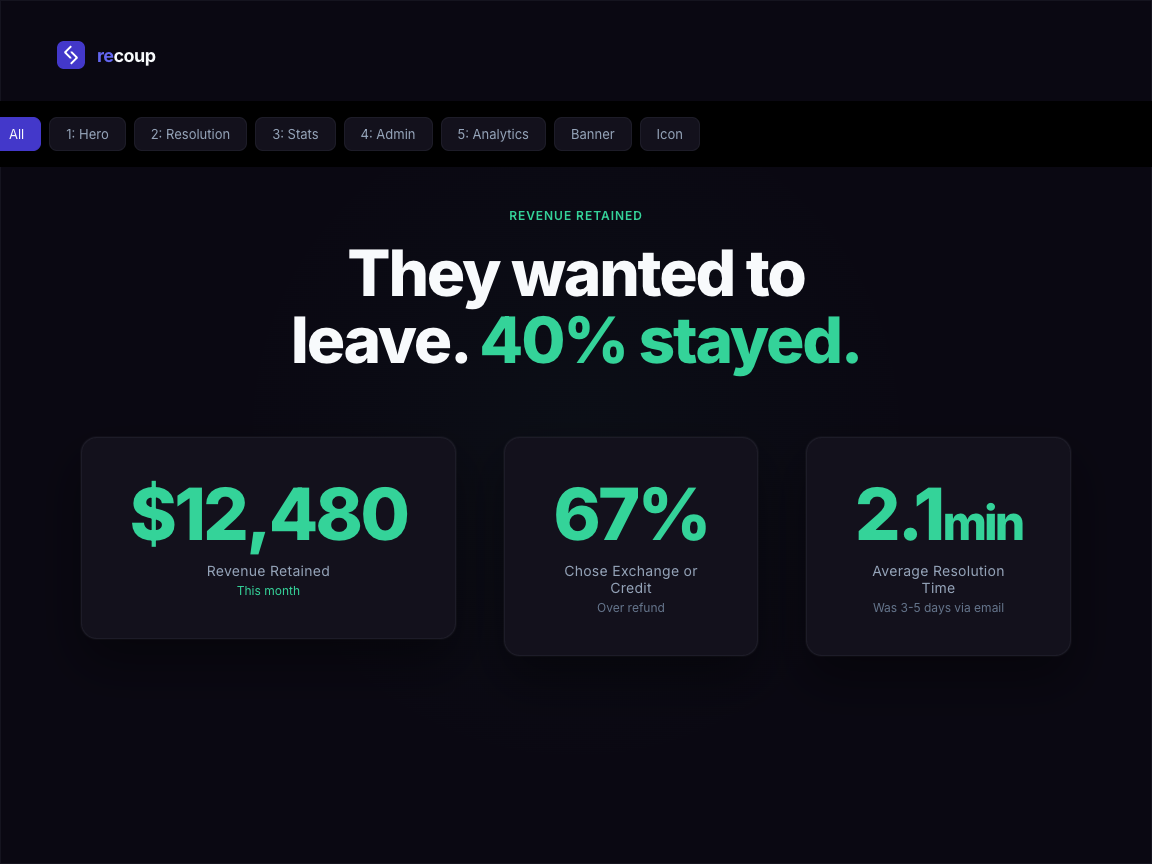
Recoup is a WooCommerce returns and refunds plugin that recovers revenue other plugins leave on the table. Instead of processing every return as a refund, Recoup guides customers toward exchanges and store credit – keeping the money in your store.
The self-service return portal replaces email-based returns completely. Customers request returns, select a reason, and choose their preferred resolution without contacting support. You get structured return data, faster processing, and fewer refunds hitting your bottom line.
67% of online shoppers check return policies before purchasing, and 30% of ecommerce orders are returned. A smart WooCommerce return policy is not a cost centre – it is a revenue recovery tool. Recoup gives you the return management system to make that shift.
How it works:
- Customer visits the returns portal (works for logged-in users and guest orders)
- They select the order and items to return, pick a reason, and choose refund, exchange, or store credit
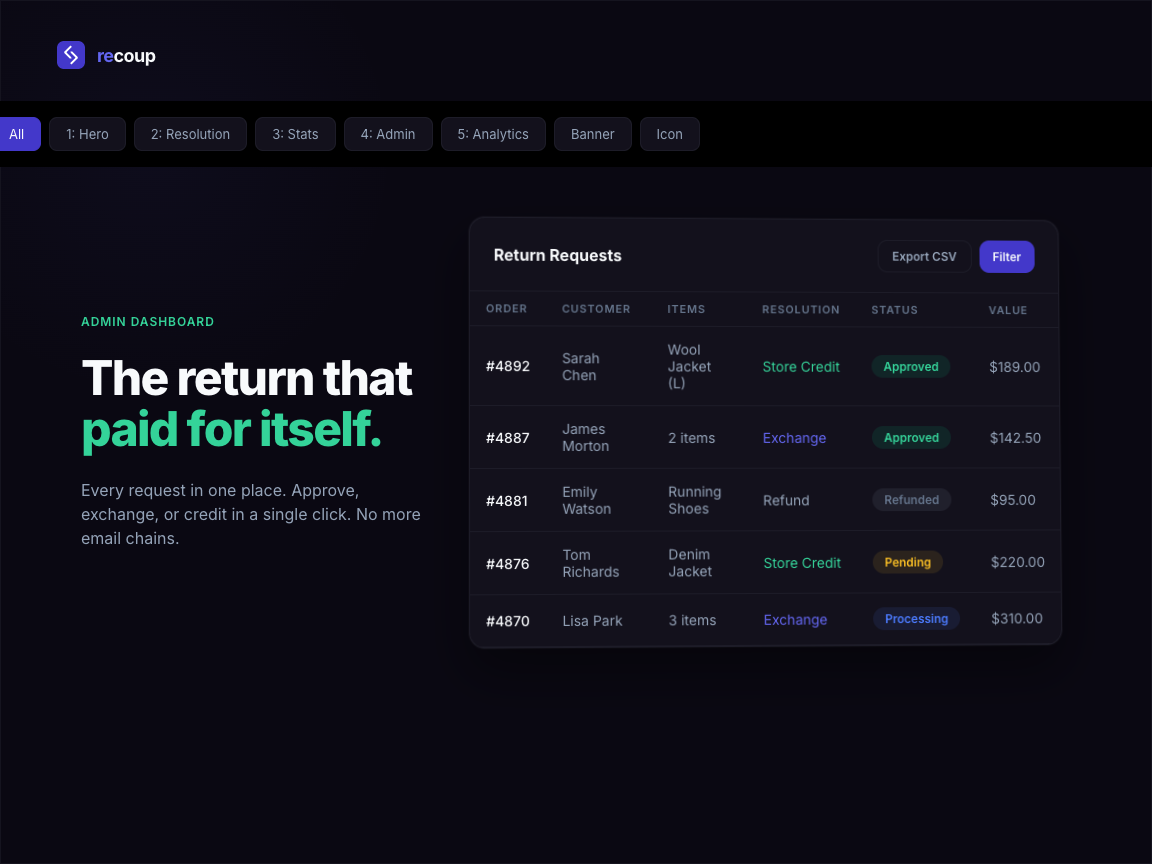
- You review the request in the admin dashboard (or set up auto-approve rules in Pro)
- Recoup processes the resolution automatically – refund to original payment method, exchange order creation, or store credit to their wallet
Built for modern WooCommerce:
Recoup is fully compatible with High-Performance Order Storage (HPOS) and integrates with the native WooCommerce email system. It works with any theme, requires no template overrides, and respects your store’s existing design through clean, minimal frontend markup.
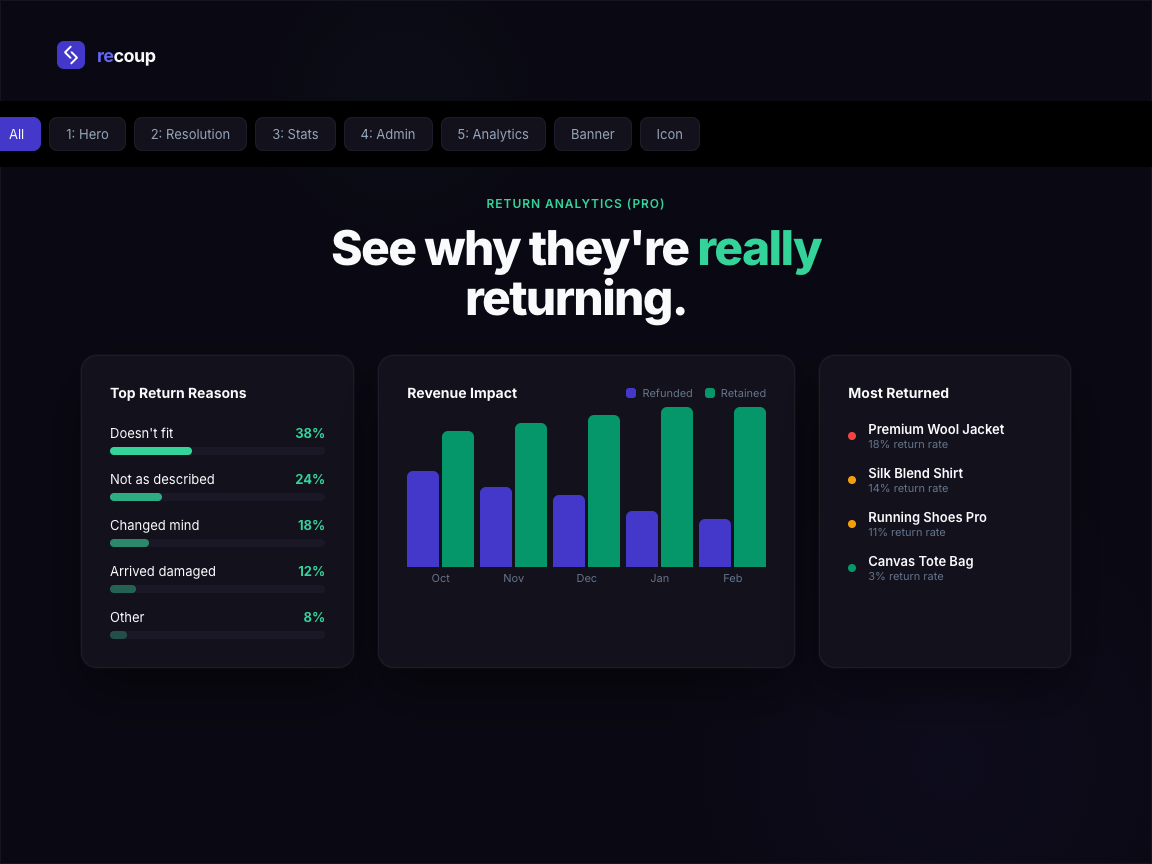
Return reason analytics give you the data to reduce returns at the source. When you can see that 40% of returns on a product cite “not as described,” you know exactly what to fix.
Free Features
- Self-service return request portal – customers submit returns without contacting support
- Configurable return window – set the number of days after delivery that returns are accepted
- Return reason collection – customisable dropdown with structured reason data
- Admin return management dashboard – view, approve, reject, and process all returns in one place
- Email notifications – automatic emails to customers at each stage of the return process
- Auto-refund processing – approved returns trigger refunds to the original payment method
- Guest order returns – customers without an account can return items using their order number and email
- Mobile responsive – the return portal works on any device
- HPOS compatible – works with WooCommerce High-Performance Order Storage
Pro Features
- Exchange flow – guide customers to select a replacement product instead of taking a refund, converting returns into new sales
- Store credit wallet – a proper balance system attached to the customer account (not coupon workarounds), usable at checkout like any payment method
- Return analytics dashboard – track return rates by product, category, and reason over time to identify and fix the root causes
- Auto-approve rules – define conditions (order value, customer history, return reason) to approve returns automatically
- Product and category exclusions – exclude specific products, categories, or sale items from the return policy
- Priority support – direct access to the development team
Installation
- Upload the
recoupfolder to the/wp-content/plugins/directory, or install the plugin through the WordPress plugin screen directly. - Activate the plugin through the “Plugins” screen in WordPress.
- Navigate to WooCommerce > Recoup to configure your return policy settings.
- The return portal is automatically available at
/returns/(a page is created on activation). - Customise your return reasons, return window, and email notifications from the settings screen.
Requirements:
- WordPress 5.8 or later
- WooCommerce 7.0 or later
- PHP 7.4 or later
Frequently asked questions
Does this work with WooCommerce High-Performance Order Storage (HPOS)?
Yes. Recoup is built with HPOS compatibility from the start. It works with both the legacy post-based storage and the newer HPOS tables.
Can customers return items without creating an account?
Yes. Guest customers can access the return portal using their order number and the email address used at checkout. No account registration is required.
Does Recoup send emails automatically?
Yes. Recoup integrates with the WooCommerce email system. Customers receive notifications when their return request is received, approved, rejected, or completed. You can customise the email content from WooCommerce > Settings > Emails.
Can I exclude certain products from being returned?
With Recoup Pro, you can exclude specific products, entire categories, or items purchased on sale from your return policy. In the free version, the return window setting applies to all products equally.
How does the exchange flow work?
The exchange flow is a Pro feature. When a customer initiates a return, they can choose “Exchange” as their resolution. Recoup then guides them to select a replacement product. A new order is created for the exchange item, and any price difference is handled automatically.
Will this work with my theme?
Recoup uses minimal, unstyled frontend markup that inherits your theme’s default styles. It does not require any template overrides and is tested with popular themes including Storefront, Astra, GeneratePress, and Flatsome.
How do I set up a WooCommerce return policy?
After activating Recoup, go to WooCommerce > Recoup to configure your return window (the number of days after purchase that returns are accepted), return reasons, and resolution options. The plugin creates a return request page automatically at /returns/. With Recoup Pro, you can set different return policies per product or category and exclude sale items.
Can Recoup reduce WooCommerce refunds?
Yes. Recoup is designed as a revenue recovery tool. The exchange flow encourages customers to swap for a different product rather than take a refund. The store credit wallet keeps funds in your store for future purchases. Pro users get analytics to identify which products generate the most returns and why, so you can fix root causes.
Is there a WooCommerce store credit system included?
The store credit wallet is a Pro feature. It gives each customer a balance attached to their account (not a coupon workaround) that they can apply at checkout like any other payment method. When a customer chooses store credit as their return resolution, the amount is added to their wallet instantly.
What is the difference between Recoup and other WooCommerce return plugins?
Most WooCommerce return and refund plugins focus on processing RMA requests. Recoup focuses on revenue recovery – converting refunds into exchanges and store credit so you keep more revenue. The analytics dashboard shows you exactly how much revenue your return policy is recovering each month.
Does Recoup work with WooCommerce Subscriptions?
Recoup processes returns and refunds against standard WooCommerce orders. For subscription orders, the refund will apply to the most recent renewal payment, but Recoup does not pause or cancel the underlying subscription automatically. Cancel or pause the subscription manually from WooCommerce > Subscriptions if a return represents the customer ending their subscription.
Can I print return shipping labels from Recoup?
Recoup focuses on the returns workflow itself rather than carrier label generation. For label printing, pair Recoup with a WooCommerce shipping plugin that integrates with your carrier (Royal Mail, ParcelForce, USPS, FedEx, etc.). The return request reference number from Recoup can be included on the label so warehouse staff can match the parcel back to the return on receipt.
Can I customise the return notification emails?
Yes. Recoup registers its return emails through the native WooCommerce email system. Go to WooCommerce > Settings > Emails to customise the subject line, heading, and content of every Recoup email exactly as you would for the built-in WooCommerce emails. You can also override the email templates by copying them into your theme.
Is Recoup GDPR compliant?
Yes. Recoup stores only the data needed to process the return: order ID, customer email, items selected, return reason, and any notes. No third-party tracking, no analytics calls, no external data transmission. On plugin uninstall, all return data, custom tables, and uploaded photos are removed. For data subject access or erasure requests, the return data is keyed by the customer email and order so it can be exported or removed in line with your existing WooCommerce GDPR processes.
Does Recoup work with WPML or multilingual stores?
Recoup uses standard WordPress translation functions throughout, so all customer-facing strings can be translated via WPML, Polylang, or the wp.org translation system. The return portal page can be translated through WPML’s standard page translation workflow. Translations for Spanish, French, German, and Italian are on the roadmap.
Can customers upload photos with their return request?
Photo uploads are a Recoup Pro feature. When enabled, customers can attach up to five photos when submitting a return request, useful for damaged goods or wrong-item disputes. File size and type restrictions are enforced server-side, and uploads are stored as private attachments accessible only to the merchant from the return detail screen.
Can I charge restocking fees for returns?
Restocking fees are a Recoup Pro feature. You can configure a flat fee or a percentage of the order value, applied automatically when the return is approved. The fee is deducted from the refund amount, and the customer sees the fee broken out clearly in their return confirmation email so there are no surprises.
Can I bulk approve or deny returns?
Yes. The admin returns list supports bulk actions. Tick the checkbox next to multiple return requests, choose Approve or Deny from the bulk actions dropdown, and apply. Recoup processes each request in turn, sending the relevant customer notification email for each.
What happens if I deactivate or uninstall Recoup?
Deactivating Recoup leaves all return data and settings in place, so reactivating restores everything as it was. Uninstalling (deleting the plugin from your Plugins screen) removes all Recoup data: the custom database tables, plugin options, the auto-created returns page, and any uploaded customer photos. Order data and refunds in WooCommerce itself are not affected, since Recoup uses the standard WooCommerce refund APIs.
Can I migrate return data from another plugin?
Recoup does not currently include a one-click importer for other returns plugins. For one-off migrations, contact support with details of your existing plugin and we can advise on the best approach. New return requests created in Recoup live alongside your historical returns from any previous plugin without conflict.
Changelog
FAQ expansion only. No code changes.
1.0.4
- Expanded the FAQ section with answers to fourteen common merchant questions covering subscriptions, shipping labels, GDPR, multilingual support, performance, payment gateways, restocking fees, and more.
1.0.3
- Refreshed the wp.org listing title, tags, and short description for clearer search relevance.
1.0.2
- Added an “Upgrade” submenu under WooCommerce for discovering Pro features.
- Added a Revenue Left on the Table insight panel on the returns list when refund revenue is logged this month.
1.0.1
- Security hardening for wp.org review: explicit nonce and capability checks on admin actions, sanitised photo upload handling, late-escaped output in settings, and identifier placeholders in wpdb queries.
- Moved inline admin CSS into a properly enqueued stylesheet.
- Replaced the query-string flash notice with a transient-based flash so no untrusted input is read on the returns list view.
1.0.0
- Initial release
Screenshots

For developers
Is this your plugin? Show off the numbers.
Add a live badge to your site, docs or GitHub README. It updates on its own — no account needed.
Best Returns, Exchanges & Refunds… alternatives
All exchanges plugins →FAQ
Returns, Exchanges & Refunds for Wo…: quick answers
Straight answers, pulled from live WordPress.org data.
Live data from WordPress.org · checked Oct 7, 2026
Is Returns, Exchanges & Refunds fo… free?
Yes. Returns, Exchanges & Refunds fo… is free to download and use from the official WordPress.org plugin directory.
Is Returns, Exchanges & Refunds fo… safe to use in 2026?
Returns, Exchanges & Refunds fo… shows warning signs in 2026 — compare the alternatives below before installing. It runs on 20+ sites, is rated 5/5 and was last updated 6 months ago, and scores 41/100 on our health check.
How many websites use Returns, Exchanges & Refunds fo…?
Returns, Exchanges & Refunds fo… is active on 20+ WordPress websites and has been downloaded 503 times since it launched in April 2026. It was downloaded 96 times in the last 30 days.
Does Returns, Exchanges & Refunds fo… work with WordPress 7.1?
Returns, Exchanges & Refunds fo… is officially tested up to WordPress 6.9.10, while the latest release is 7.1.3. It may still work, but try it on a staging site first.
What PHP version does Returns, Exchanges & Refunds fo… need?
Returns, Exchanges & Refunds fo… requires PHP 7.4 or higher. Most hosts run PHP 8.x today, so it works on any modern WordPress hosting.
When was Returns, Exchanges & Refunds fo… last updated?
The latest version, 1.0.4, was released on April 14, 2026 (6 months ago).
Who makes Returns, Exchanges & Refunds fo…?
Returns, Exchanges & Refunds fo… is developed and maintained by russellwestgarth.
What are the best alternatives to Returns, Exchanges & Refunds fo…?
The most popular alternatives to Returns, Exchanges & Refunds fo… are ReturnsUp Connector for Woo… (<10 installs), BSS Return Manager for WooC… (<10 installs) and Recirco (<10 installs).
Powered by PageForge
Want thousands of pages that rank like these? Build them in an afternoon.
This directory runs on the same engine as PageForge. Turn any spreadsheet, CSV or API into thousands of fast, SEO-ready WordPress pages — with schema, internal links and AI-written copy baked in.
- CSV, Google Sheets & API data sources
- AI content, schema & internal links per page
- Works with Elementor, Gutenberg, Yoast & Rank Math
- Free on WordPress.org — no credit card


