


Real-Time Find and Replace
Set up find and replace rules that are executed AFTER a page is generated by WordPress, but BEFORE it is sent to a user's browser.

Solid choice
Real-Time Find and Replace is a solid plugin choice in 2026, with a few things worth checking first. It runs on 70K+ sites, is rated 4.5/5 and was last updated 1 month ago, and scores 74/100 on our health check.
- Proven at scale on 70K+ active sites
- Loved by users — 4.5/5 from 82 reviews
- Tested with the latest WordPress (7.1)
How does it stack up?
Side-by-side on installs, updates, ratings & support



Daily downloads
Download spikes usually follow a new release — each site that auto-updates counts as a download.
Rankings
Where Real-Time Find and Replace stands todayWordPress.org search rankings
Live position in the plugin search, top 100| Keyword | Position |
|---|---|
| find and replace | #1 |
| on demand replace | #1 |
| replace | #3 |
| search | >100 |
| search and replace | #5 |
Version adoption
Share of active sites per release.
Rating breakdown
★★★★★★★★★★ 4.5 from 82 reviews
About Real-Time Find and Replace
From the official readme · v4.3Description
This plugin allows you to dynamically (i.e. at the time when a page is generated) replace code and text from themes and other plugins with code and text of your choosing before a page is delivered to a user’s browser.
Because the find and replace happens in real-time no changes are needed to plugins or themes which means upgrades remain easy!
A pro version (a lifetime license is less than $15) with additional filtering options, setting export/import functionality, and the ability to modify admin pages is available.
Here are some common uses:
- Want to selectively translate text that is being output by another plugin? You can do that.
- Trying to tweak the text on a product or shopping cart page? No problem.
- Hoping to remove footer text from a theme without modifying the theme? That’s easy.
Here are some more examples.
And some tips for those interested in on-page SEO.
Remember, all of the above can be done WITHOUT modifying themes or plugin files so you’ll always be able to upgrade them without having to worry about losing custom edits.
Installation
- Upload the real-time-find-and-replace folder to the ‘/wp-content/plugins/’ directory
- Activate the plugin through the ‘Plugins’ menu in WordPress
- The find and replace rules are in the Tools sidebar menu.
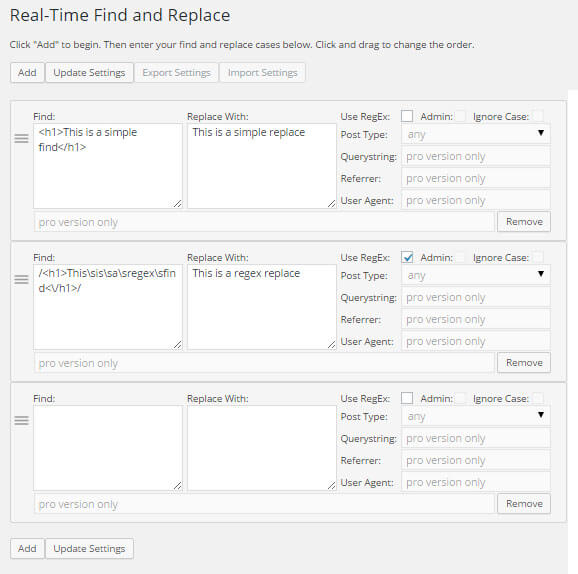
- Click on the Add link on the Find and Replace admin page to add as many rules as you want.
Frequently asked questions
Where is data stored?
In an array in the wp_options table. Just one record regardless of the number of find and replace rules.
Will the find and replace slow my site?
Unless you’re using 50+ rules, you shouldn’t notice any performance impact. And if you’re using a caching plugin, even more rules won’t slow your site.
What does the regex checkbox do?
You can do a straight up find and replace where the plugin will look for an exact match of what you specified. You can also used advanced pattern matching that is available through regular expressions by checking the regex checkbox.
My web site is showing a blank page. What do I do?
This will happen if you are using a rule with regex enabled and the rule has an error. Regex is tricky so I recommend starting with a simple rule and adding to it to perform the replace you want.
Changelog
4.3
- All Versions: Extra variable checking to eliminate PHP Warnings.
- All Versions: Synced plugin version numbers.
4.0.3
- All Versions: Updated info regarding the pro version.
4.0.2
- All Versions: Added nonce security check to rules form.
3.9
- All Versions: Security issue (cross-site scripting) fix applied. Discovered with DefenseCode WebScanner Security Analyzer by Neven Biruski.
3.8
- Pro version: Can now make changes to the login form when the Admin check box is selected.
3.7
- All versions: Additional checks for undefined variables.
Screenshots
For developers
Is this your plugin? Show off the numbers.
Add a live badge to your site, docs or GitHub README. It updates on its own — no account needed.
Best Real-Time Find and Replace alternatives
All find and replace plugins →




FAQ
Real-Time Find and Replace: quick answers
Straight answers, pulled from live WordPress.org data.
Live data from WordPress.org · checked Sep 26, 2026
Is Real-Time Find and Replace free?
Yes. Real-Time Find and Replace is free to download and use from the official WordPress.org plugin directory.
Is Real-Time Find and Replace safe to use in 2026?
Real-Time Find and Replace is a solid plugin choice in 2026, with a few things worth checking first. It runs on 70K+ sites, is rated 4.5/5 and was last updated 1 month ago, and scores 74/100 on our health check.
How many websites use Real-Time Find and Replace?
Real-Time Find and Replace is active on 70K+ WordPress websites and has been downloaded 917,094 times since it launched in July 2009. It was downloaded 3,066 times in the last 30 days.
Does Real-Time Find and Replace work with WordPress 7.1?
Yes. The developer has tested Real-Time Find and Replace up to WordPress 7.1.2, the latest release. It requires WordPress 5.0 or newer.
When was Real-Time Find and Replace last updated?
The latest version, 4.3, was released on August 20, 2026 (1 month ago).
Who makes Real-Time Find and Replace?
Real-Time Find and Replace is developed and maintained by Marios Alexandrou.
What are the best alternatives to Real-Time Find and Replace?
The most popular alternatives to Real-Time Find and Replace are Easy Search Replace (600+ installs), Text Replace (300+ installs) and Word Replace (200+ installs).
Powered by PageForge
Want thousands of pages that rank like these? Build them in an afternoon.
This directory runs on the same engine as PageForge. Turn any spreadsheet, CSV or API into thousands of fast, SEO-ready WordPress pages — with schema, internal links and AI-written copy baked in.
- CSV, Google Sheets & API data sources
- AI content, schema & internal links per page
- Works with Elementor, Gutenberg, Yoast & Rank Math
- Free on WordPress.org — no credit card


