



Hub5050 Ranking and Competitor Tracking
Free website ranking tool for monitoring your keyword performance. Also monitor competitor keywords for comparison.

Consider an alternative
Hub5050 Ranking and Competitor… shows warning signs in 2026 — compare the alternatives below before installing. It runs on 20+ sites, is rated 3.3/5 and was last updated 2 years ago, and scores 32/100 on our health check.
- Small user base (20+ active installs)
- Low rating so far — 3.3/5 from only 7 reviews
- No update in over a year
- Only tested up to WordPress 6.7 (latest is 7.1)
How does it stack up?
Side-by-side on installs, updates, ratings & supportDaily downloads
Download spikes usually follow a new release — each site that auto-updates counts as a download.
Rankings
Where Hub5050 Ranking and Competi… stands todayWordPress.org search rankings
Live position in the plugin search, top 100| Keyword | Position |
|---|---|
| keyword ranking | #73 |
| rank tracker | #43 |
| SEO Tools | >100 |
| serp | #96 |
| website ranking | >100 |
Version adoption
Share of active sites per release.
Rating breakdown
★★★★★★★★★★ 3.3 from 7 reviews
About Hub5050 Ranking and Competitor Tracking
From the official readme · v2.1.6Description
Free website ranking tool for monitoring your keyword performance. Also monitor competitor keywords for comparison.
Features
- 10 free keywords tracked
- Up to 3 competitors monitored
- Search Engine ranking according to your location
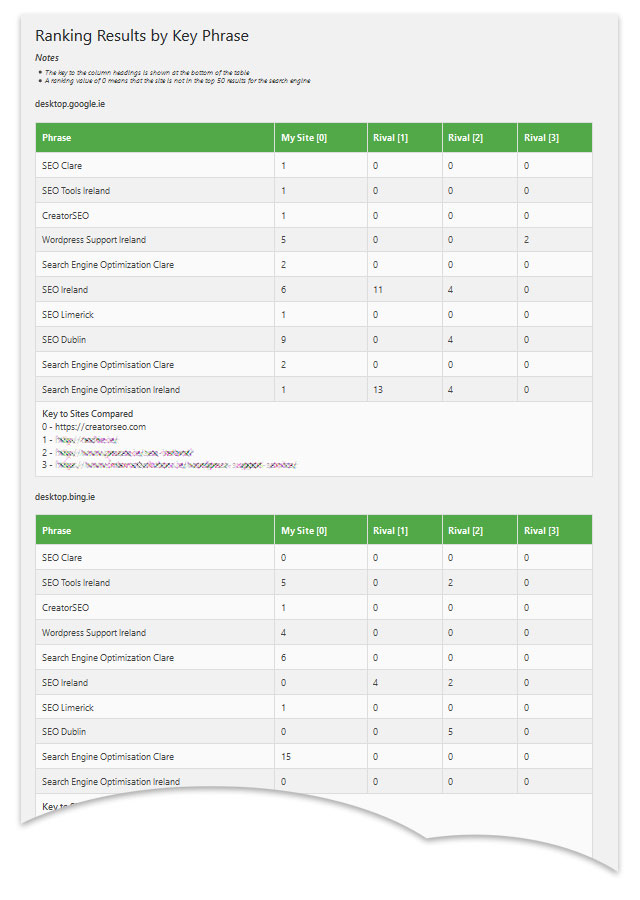
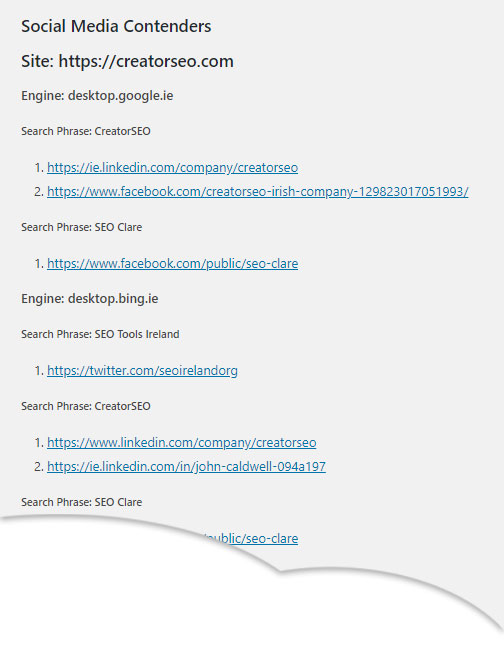
- Ranking data and a table fo ranking contenders for each keyword
- Website ranking history in graphs
- SEO ranking and real competition data captured
- A graphical representation of Market Leader Space displayed
- Lead identification (Premium Feature – Leads5050.com)
Hub5050 Ranking and Competitor Tracking FREE allows you to track up to 10 keywords and 3 competitors with weekly ranking updates.
Background
The Hub5050 Website ranking and competitor tracking plugin for WordPress allows you to monitor
* the keyword ranking of a site (domain) and
* the ranking for a list of competitors for each keyword
* the major competitors in your keyword space
* leads identification (Premium)
Ranking is based on the search position (SERP) reported by major search engines (like Google and Bing). Not only does the plugin track your ranking, it also monitors the ranking performance for up to 3 competitors.
Hub5050 – The WordPress website ranking plugin that also tracks your competitors
This website ranking plugin is easy to install using the WordPress interface and is intuitive enough to be configured in minutes. Keyword ranking results and Competitor comparisons are provided in a number of tables that are easy to interpret. These results are included in the admin dashboard of your WordPress website.
Notice
Data captured from your website is stored on an external database that is accessible through the [HUB5050 Portal](https://hub5050.com/. There is no private or user data captured.
The data is captured to allow processing to be performed on the Portal, thereby ensuring that the processing overhead is not carried by your server.
Any data captured is available on HUB5050.com. This information is not resolved back to any particular person and is used only for the purpose described in this document. The data is not shared with any third party.
For more information about our WordPress website ranking plugin, check out the plugin page on HUB5050.
Our associated service for lead tracking and visitor monitoring to your site Leads and Visitor Insights plugin can be found on the WordPress repository.
Installation
- Upload
ranking-and-competitor-trackingto the/wp-content/plugins/directory - Activate the plugin through the ‘Plugins’ menu in WordPress
- Click on ‘Ranking Performance’ in the Appearance menu to define your keywords
Frequently asked questions
Will this Plugin work with any theme?
Yes, the plugin is theme independent.
How often if the Ranking updated?
The Plugin will update the ranking every 3 days. More frequent updates are not necessary as changes in SERP are gradual.
How will I know when the Ranking is next to be updated?
The dashboard menu option labelled ‘Status Check’ shows the last run date and the approximate next due date for the Ranking update by search phrase.
How do I update the ranking?
The ranking is automatically updated continually (about every 3 days) by WordPress. A WordPress CRON job manages the updates.
Do all the updates happen at the same time?
No, the updates are staggered.
Are ranking results immediately available?
No, the first ranking results will take a little time to be collected and it may take an hour or two before a full set of ranking results are available. Trend charts can take a while longer because by their nature, they need to track the site over a number of days. Once the results are in place the data will remain up to date thereafter.
Can I increase the frequency of the ranking updates?
No these are controlled by the system. It is not advisable to measure more than once every 3 days as this allows a settling time between changes to the site pages.
Can the ranking performance be configured for a defined region?
Yes, there is a wide selection of distinct regions in this version. The site owner can select one primary region only.
Can more than 10 search terms be set up?
The current version allows only 10 search terms and 3 competitors. This will be extended in a future version.
What happens if a search term of competitor is changed after the software has been used for some time?
Any data from the old search term and / or competitor will be lost when a change is made. Therefore it is a good idea to carefully think through your key phrases before you start.
Is the API license necessary?
Yes, the software will not operate properly without registering the API. However, it is easily generated with a single click of a button and the only information gathered is the domain name of your site.
Is there any charge for the API licence?
The API licence will always be provided free of charge.
What is the purpose of the API license?
The API license provides a unique 5 character (case-sensitive) id on the site that allows every registered domain to be uniquely identified. Our server uses this domain / api combination to communicate with your site in order to capture ranking trend data. Ranking trends can be viewed directly from your site.
Does the API licence capture any Personal data?
No, there is no personal information sent when the API is registered. No personal information is captured by any of the plugin processes. The Plugin is fully GDPR compliant.
Can this plugin be used to track ranking on a different site?
Once installed on a WordPress site, ranking is tracked for the site domain and for 2 competitor domains. It can be installed on any number of sites, but the core tracking is always for the domain of the site that it is installed on.
Can this plugin be installed on other content management systems?
This plugin is only available for WordPress sites.
If the specified competitors are not on WordPress CMS will the plugin still work?
Yes, the plugin does not care whether the competitor sites are static or operate on a different CMS. The only requirement is that ths plugin is installed on WordPress.
How much information is held and will this data eventually clutter my database?
Data is held on the client site for the past 2 weeks and then is updated to the Hub5050 Cloud for longer term data analysis. The data footprint on the client site is very small considering the amount of information that is available aminly because data is stored on the cloud servers.
What is the keyword or key phrase space?
When you define a set of keywords or key phrases for a particular search engine and region, you are defining a search performance space. This is essentially a map of who the main ‘players’ (competitors) are for the search terms on the particular search engine.
What do I do if the ranking values are not updating?
There are 2 main reasons why ranking may not update: the first is if your developer has disabled CRON jobs, contact the developer to rectify this. The second is if your site IP address has been banned by a search engine (usually due to a spam site sharing the same IP address). Contact your hosting provider to resolve this.
Changelog
First edition nothing to add at this point First edition, nothing to add here
2.1.6
- Checks and PHP 8+ updates for Compatibility
2.1.5
- Version checks and system tweaks
2.1.4
- Code improvement
2.1.3
- WP compatibility checks
2.1.2
- Security Updates
- Change to engines tracked
2.1.1
- WordPress 5.7.1 compatibility checks
Screenshots





For developers
Is this your plugin? Show off the numbers.
Add a live badge to your site, docs or GitHub README. It updates on its own — no account needed.
Best Hub5050 Ranking and Competito… alternatives
All keyword ranking plugins →| Rank | Plugin | Active installs |
|---|---|---|
| 1 |
 Advanced Rank Checker
 lets you check your ranking on the keywords you provide to the…
Advanced Rank Checker
Advanced Rank Checker lets you check your ranking on the keywords you provide to the…
|
30+ |
| 3 |
 SEO4CMS
Check and optimize your content for the keywords you have set, avoid errors or incomplete…
SEO4CMS
Check and optimize your content for the keywords you have set, avoid errors or incomplete…
|
<10 |
FAQ
Hub5050 Ranking and Competitor Trac…: quick answers
Straight answers, pulled from live WordPress.org data.
Live data from WordPress.org · checked Oct 6, 2026
Is Hub5050 Ranking and Competitor… free?
Yes. Hub5050 Ranking and Competitor… is free to download and use from the official WordPress.org plugin directory.
Is Hub5050 Ranking and Competitor… safe to use in 2026?
Hub5050 Ranking and Competitor… shows warning signs in 2026 — compare the alternatives below before installing. It runs on 20+ sites, is rated 3.3/5 and was last updated 2 years ago, and scores 32/100 on our health check.
How many websites use Hub5050 Ranking and Competitor…?
Hub5050 Ranking and Competitor… is active on 20+ WordPress websites and has been downloaded 8,033 times since it launched in May 2018. It was downloaded 67 times in the last 30 days.
Does Hub5050 Ranking and Competitor… work with WordPress 7.1?
Hub5050 Ranking and Competitor… is officially tested up to WordPress 6.7.9, while the latest release is 7.1.2. It may still work, but try it on a staging site first.
When was Hub5050 Ranking and Competitor… last updated?
The latest version, 2.1.6, was released on November 15, 2024 (2 years ago).
Who makes Hub5050 Ranking and Competitor…?
Hub5050 Ranking and Competitor… is developed and maintained by Hub5050.
What are the best alternatives to Hub5050 Ranking and Competitor…?
The most popular alternatives to Hub5050 Ranking and Competitor… are Advanced Rank Checker (30+ installs) and SEO4CMS (<10 installs).
Powered by PageForge
Want thousands of pages that rank like these? Build them in an afternoon.
This directory runs on the same engine as PageForge. Turn any spreadsheet, CSV or API into thousands of fast, SEO-ready WordPress pages — with schema, internal links and AI-written copy baked in.
- CSV, Google Sheets & API data sources
- AI content, schema & internal links per page
- Works with Elementor, Gutenberg, Yoast & Rank Math
- Free on WordPress.org — no credit card


