


Quotable
Quotable adds buttons to quotes and text selection that make it quick and easy for your readers to share quotes from your website.

Consider an alternative
Quotable shows warning signs in 2026 — compare the alternatives below before installing. It runs on 40+ sites, is rated 5/5 and was last updated 6 years ago, and scores 36/100 on our health check.
- Small user base (40+ active installs)
- No update in 6 years
- Only tested up to WordPress 5.4 (latest is 7.1)
How does it stack up?
Side-by-side on installs, updates, ratings & support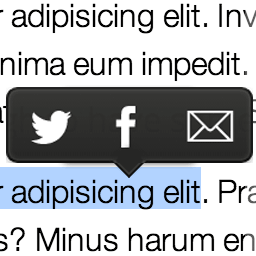



Daily downloads
Download spikes usually follow a new release — each site that auto-updates counts as a download.
Rankings
Where Quotable stands todayWordPress.org search rankings
Live position in the plugin search, top 100| Keyword | Position |
|---|---|
| Medium | >100 |
| quotes | >100 |
| share buttons | >100 |
| social media | >100 |
| >100 |
Version adoption
Share of active sites per release.
Rating breakdown
★★★★★★★★★★ 5 from 7 reviews
About Quotable
From the official readme · v2.1.0Description
Quotable adds buttons to quotes and text selection that make it quick and easy for your readers to share quotes from your website.
Simply install the plugin, there is no setup required. Icons that match your site’s theme will be added to quotes and appear in a contextual menu when readers select text on your website, allowing them to quickly and easily share the quotes to Twitter.
This plugin adds a page link, hashtags and mentions to shared quotes. WordPress tags are used as hashtags and, if you use Yoast’s WordPress SEO plugin, the post author’s and site’s Twitter accounts are added as mentions to Tweets.
Sponsorship
I am software engineer and I love to create free and open source software for nomads, bloggers and language learners. In order to afford to spend time creating, maintaining and updating my free software, I rely on financial support from donors. In return, I provide my donors with access to exclusive updates, support and features. If you find this plugin useful, please consider supporting me for just $1/month on Patreon.
Installation
- Upload the plugin files to the
/wp-content/plugins/directory - Activate the plugin through the ‘Plugins’ menu in WordPress
After installing the plugin, there is no setup required. Visit a page and highlight some text in the main content and you should see the Quotable toolbar pop up. Visit a page or post with quote blocks, and you should see the Quotable icon added at the end of the quote. See the FAQ for more information about available options and settings.
Changelog
This update adds German and Hungarian translations.
2.1.0
- Adds Hungarian translation
- Adds German translation
2.0.0
- Adds support for Gutenberg block editor
- Adds the ability to enable/disable buttons on individual quotes in the block editor
- Moves page and post settings to the Gutenberg document settings sidebar
- Hides Quotable settings on posts and pages if disabled site-wide
- Completely rewritten codebase using WordPress coding standards and modern JavaScript
- Removes a call to platform.twitter.com
- Adds Spanish translation for the plugin
- Improves the user expereince when installing and updating
- Adds settings shortcut in plugin list
- Various bug fixes and tests
- Released under GPL license, previous version was MIT
1.0.6
- Update code formatting and style to match WordPress standards.
- Remove underlines, shadows and borders from Twitter icon at the end of blockquotes.
1.0.2
- Fetch Twitter script via https
1.0.1
- Fixed minor console errors on pages with no quotable content
1.0.0
- Updated plugin meta information
- Prepared the plugin for future updates (coming soon!)
Screenshots


For developers
Is this your plugin? Show off the numbers.
Add a live badge to your site, docs or GitHub README. It updates on its own — no account needed.
Best Quotable alternatives
All Medium plugins →




FAQ
Quotable: quick answers
Straight answers, pulled from live WordPress.org data.
Live data from WordPress.org · checked Oct 1, 2026
Is Quotable free?
Yes. Quotable is free to download and use from the official WordPress.org plugin directory.
Is Quotable safe to use in 2026?
Quotable shows warning signs in 2026 — compare the alternatives below before installing. It runs on 40+ sites, is rated 5/5 and was last updated 6 years ago, and scores 36/100 on our health check.
How many websites use Quotable?
Quotable is active on 40+ WordPress websites and has been downloaded 16,484 times since it launched in April 2014. It was downloaded 158 times in the last 30 days.
Does Quotable work with WordPress 7.1?
Quotable is officially tested up to WordPress 5.4.23, while the latest release is 7.1.2. It may still work, but try it on a staging site first.
What PHP version does Quotable need?
Quotable requires PHP 5.2 or higher. Most hosts run PHP 8.x today, so it works on any modern WordPress hosting.
When was Quotable last updated?
The latest version, 2.1.0, was released on May 5, 2020 (6 years ago).
Who makes Quotable?
Quotable is developed and maintained by Jo Sprague.
What are the best alternatives to Quotable?
The most popular alternatives to Quotable are Selection Sharer by Hans va… (2K+ installs), Source Medium Tracker for C… (200+ installs) and WP Applaud (100+ installs).
Powered by PageForge
Want thousands of pages that rank like these? Build them in an afternoon.
This directory runs on the same engine as PageForge. Turn any spreadsheet, CSV or API into thousands of fast, SEO-ready WordPress pages — with schema, internal links and AI-written copy baked in.
- CSV, Google Sheets & API data sources
- AI content, schema & internal links per page
- Works with Elementor, Gutenberg, Yoast & Rank Math
- Free on WordPress.org — no credit card


