



Quickout
A fast, lightweight funnel & checkout builder for WooCommerce -- landing page, checkout, and CartFlows import. Free during launch.

Use with caution
Quickout works, but test it on a staging site before relying on it in 2026. Was last updated 2 months ago, and scores 55/100 on our health check.
- Small user base (<10 active installs)
- Very few reviews so far
How does it stack up?
Side-by-side on installs, updates, ratings & supportDaily downloads
Download spikes usually follow a new release — each site that auto-updates counts as a download.
Rankings
Where Quickout stands todayWordPress.org search rankings
Live position in the plugin search, top 100| Keyword | Position |
|---|---|
| cartflows | #33 |
| checkout | >100 |
| Funnel Builder | >100 |
| landing page | >100 |
| woocommerce | >100 |
About Quickout
From the official readme · v1.4.1Description
Quickout lets you build a product landing page in Elementor or Gutenberg, drop in a fully
customizable WooCommerce checkout form, and link pages together into a funnel — all without
leaving WordPress, and without the bloat of a full page-builder suite bundled in.
Everything is free during launch — no license key, no trial countdown
- Unlimited funnels
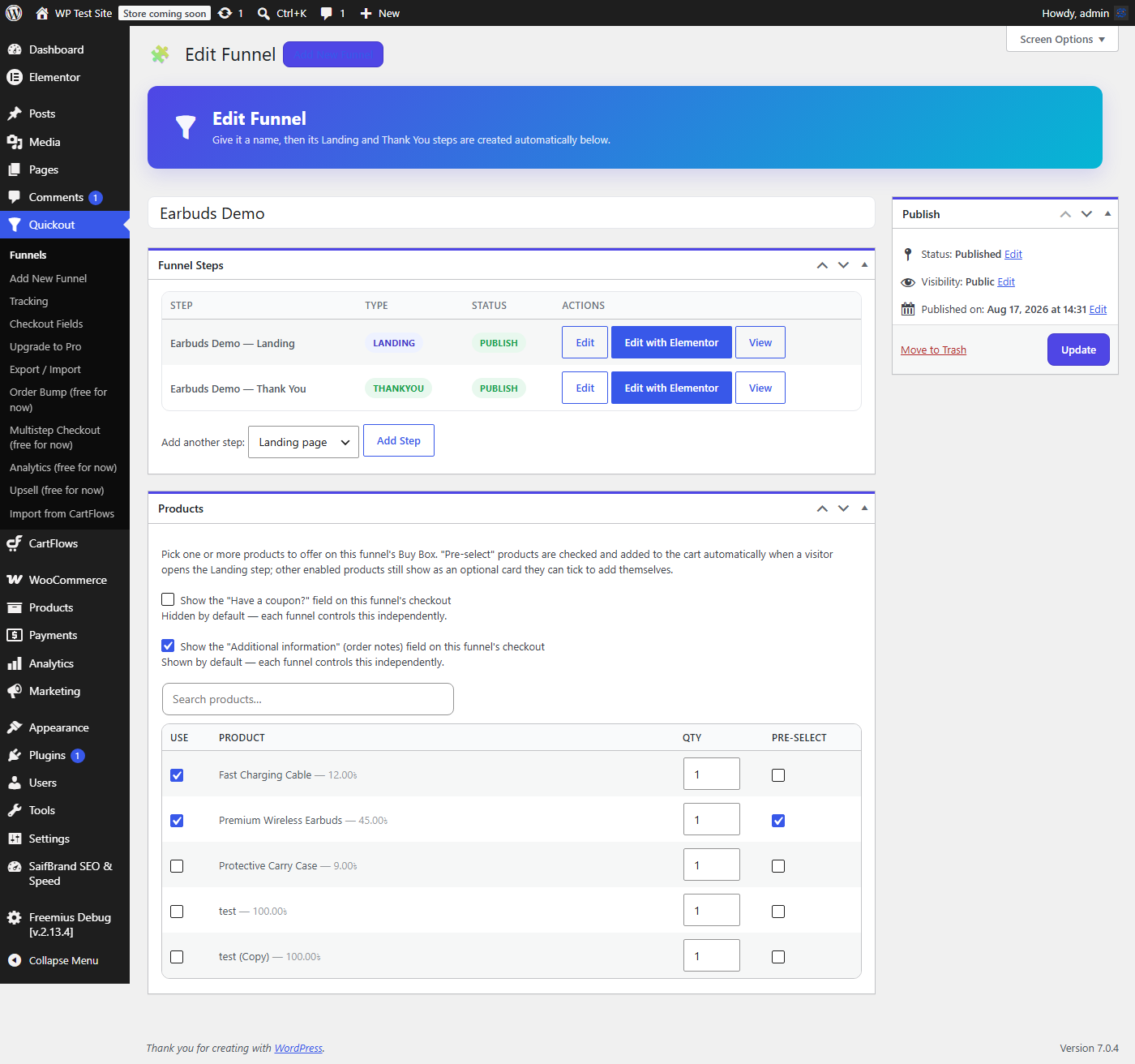
- Attach one or more products to a funnel; the cart is set automatically when the Landing step opens
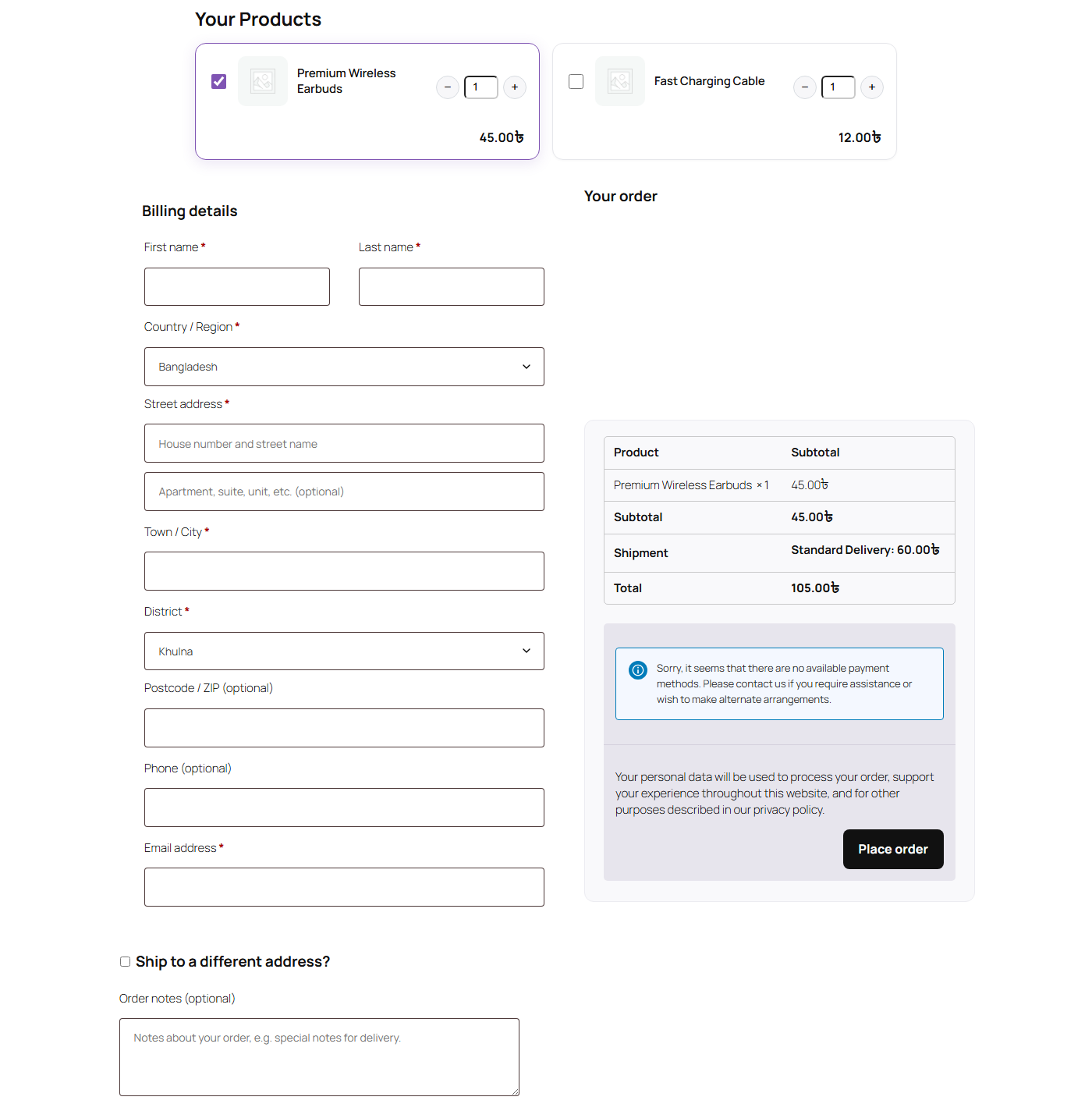
- Product Buy Box block/widget (image, price, stock, Order Now) for Elementor and Gutenberg
- Checkout Form block/widget for Elementor and Gutenberg
- Checkout field customization (enable/require/reorder/relabel billing & shipping fields, any language)
- Coupon field on/off
- Next Step Button to chain steps together
- One-column or two-column checkout layout
- Order bumps at checkout
- Multistep checkout layout
- Distraction-free “instant checkout” layout
- Per-funnel conversion analytics
- One-click post-purchase upsells (requires a tokenizing gateway like Stripe or WooCommerce Payments)
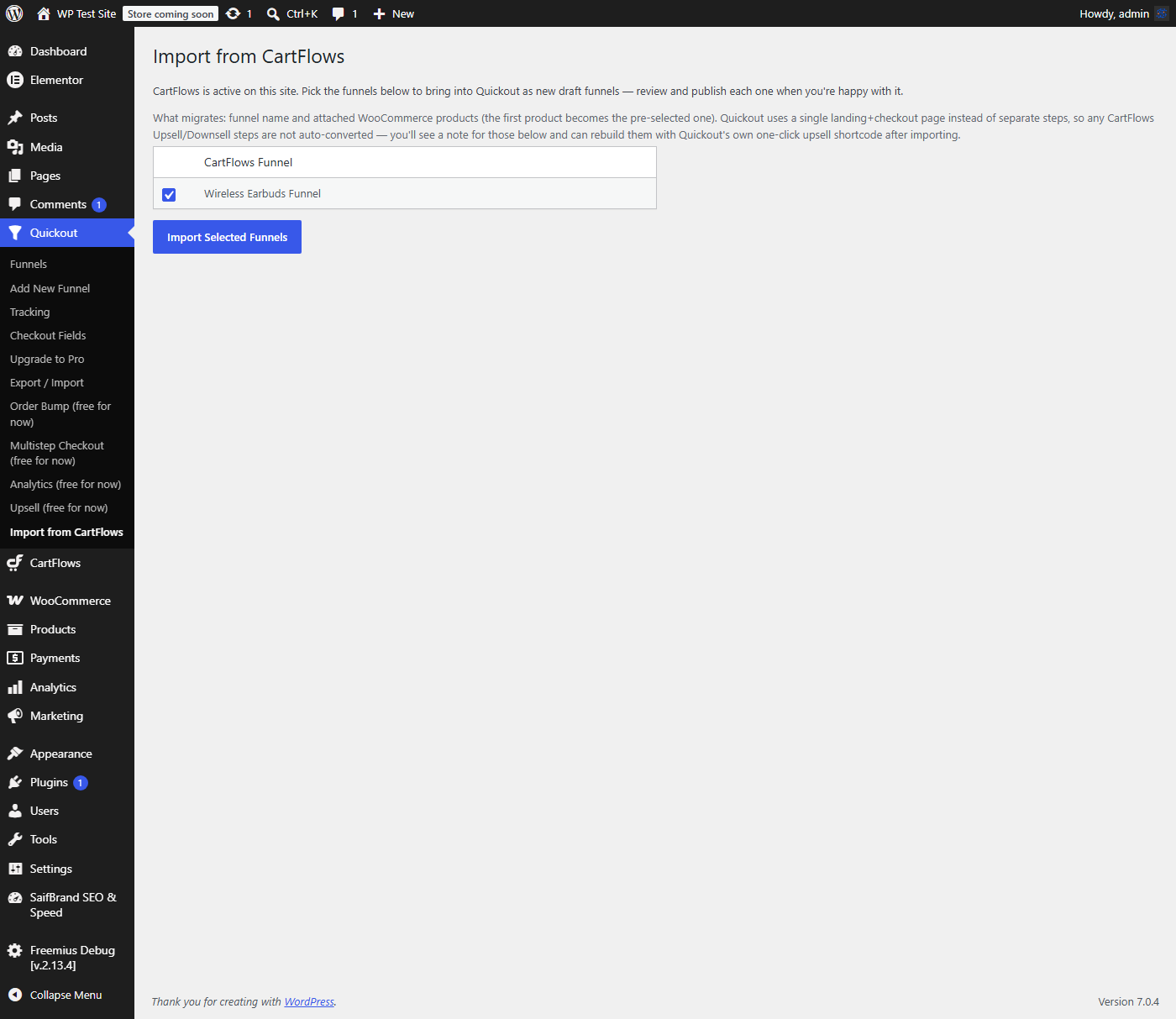
- One-click import from CartFlows — if CartFlows is active on the same site, Quickout reads its funnels directly and creates matching draft funnels with the same attached products, so switching over doesn’t mean rebuilding everything from scratch
- Optional Facebook Pixel and Google Ads tracking, with the full standard event set wired up (PageView, ViewContent, AddToCart, InitiateCheckout, Purchase) — leave both IDs blank to keep it fully off
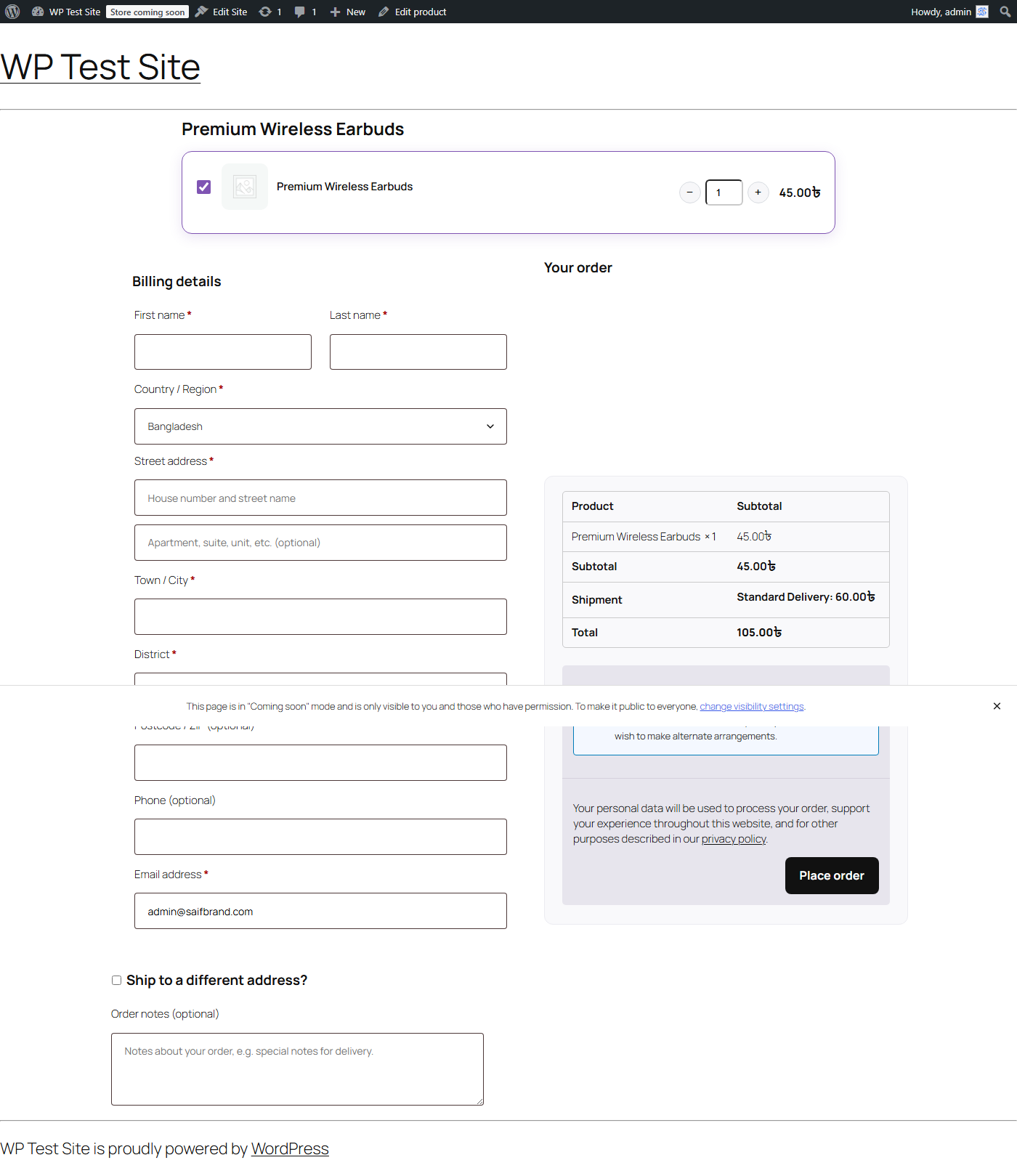
- Single-product checkout — optionally replace a product’s own page with a one-page Buy Box + Checkout, per product (off by default, one checkbox per product to turn it on), using the same checkout field customization as everywhere else in the plugin
Coming from CartFlows?
Go to Quickout -> Import from CartFlows. It lists every CartFlows funnel found on the site;
pick the ones to bring over and Quickout creates a matching draft funnel for each, with the
same WooCommerce products attached (the first product becomes the pre-selected one). Review and
publish each one when you’re ready. CartFlows itself is never modified — this only reads its data.
External services
This plugin can optionally connect to Facebook Pixel and Google Ads for funnel/conversion tracking. Both are entirely opt-in — if you don’t enter a Pixel ID or Google Ads ID under Quickout -> Tracking, no request to either service is ever made and no script from either service is loaded.
Facebook Pixel (Meta Platforms, Inc.): if a Pixel ID is configured, the plugin loads Meta’s own fbevents.js script from connect.facebook.net on every Quickout funnel page, and sends standard e-commerce events (PageView, ViewContent, AddToCart, InitiateCheckout, Purchase) including the product ID(s), price, and currency involved, plus (on a completed order) the order total and order ID. This happens on every page view of a funnel page for site visitors, and additionally on checkout completion. Meta Terms of Service, Meta Privacy Policy.
Google Ads (Google LLC): if a Google Ads Conversion ID is configured, the plugin loads Google’s own gtag.js script from googletagmanager.com on every Quickout funnel page, and sends the same standard event set (page_view, view_item, add_to_cart, begin_checkout, and a conversion/purchase event on a completed order) including product ID(s), value, and currency. Google Terms of Service, Google Privacy Policy.
Installation
- Upload the plugin to
/wp-content/plugins/quickout, or install via Plugins -> Add New. - Activate Quickout. WooCommerce must already be installed and active.
- Create a Funnel under Quickout -> Add New. Saving it automatically creates and publishes its
Landing and Thank You steps — the Landing step already has the Product Buy Box and Checkout
Form on it, live, with no editing required. - In the Products box, enable the product(s) this funnel sells (tick “Pre-select” for the one(s)
that should be checked and in the cart by default). - Open the Landing step’s “View” link — it’s already working. Only click “Edit with Elementor” if
you want to add your own hero text/images/branding around the Buy Box and Checkout Form, or
rebuild that section with the matching Elementor widgets for finer visual control. - Design the Thank You step however you like; orders placed on this funnel redirect there
automatically.
How do I turn on single-product checkout?
Open any WooCommerce product, tick “Show a one-page checkout on this product’s own page” in the Quickout Checkout box (sidebar), and update the product. Visiting that product’s normal page now shows the Buy Box + Checkout Form directly instead of the usual product page — no separate funnel page to build or link to.
Frequently asked questions
Is this really all free?
Yes, every feature listed above is unlocked on every install right now — there’s no separate paid tier being sold at the moment. This is a launch decision, not a time-boxed trial.
Does the CartFlows import change or delete anything in CartFlows?
No. It only reads CartFlows’ funnels and products to create new Quickout funnels — your CartFlows install and its data are never modified.
What doesn’t get imported from CartFlows?
Quickout uses a single landing+checkout page instead of CartFlows’ separate step pages, so Upsell/Downsell steps have no direct equivalent to auto-convert into. The import screen tells you which funnels had steps like that skipped, so you can rebuild them with Quickout’s own one-click upsell feature afterward.
Changelog
1.4.1
- Fixed: the 3 Gutenberg blocks still had their old “FunnelCraft” name/title/description/textdomain from before the rename, including a stale editor-script handle that no longer matched what was registered (broke the block-editor UI for these blocks). Fully renamed to Quickout.
- Fixed: the “Edit” link on a funnel’s Landing/Thank You steps was silently broken (a real WordPress core limitation, not a Gutenberg-specific issue) because the step post type had show_ui disabled — it still has no separate admin menu, but its own edit screen now works.
- Shortened the readme’s short description to fit WordPress.org’s 150-character limit.
1.4.0
- Renamed from FunnelCraft to Quickout (new slug) per WordPress.org naming/trademark review feedback.
- New: single-product checkout — an optional, per-product one-page Buy Box + Checkout on the product’s own page, off by default.
- Fixed: nonce checks now sanitize $_POST before verifying, per WordPress.org review feedback.
- Fixed: every inline
<script>now loads through wp_enqueue_script()/wp_add_inline_script() instead of being echoed directly into the page. - Fixed: removed the now-unnecessary load_plugin_textdomain() call (WordPress.org auto-loads translations since 4.6).
- Tracking: added the ViewContent/view_item and InitiateCheckout/begin_checkout events (previously only PageView and Purchase fired), and it now also fires on the single-product checkout page.
- Documented the optional Facebook Pixel / Google Ads external services in this readme.
1.3.2
- Fixed: nonce checks now sanitize $_POST before verifying, per WordPress.org review feedback.
- Fixed: every inline
<script>now loads through wp_enqueue_script()/wp_add_inline_script() instead of being echoed directly into the page. - Fixed: removed the now-unnecessary load_plugin_textdomain() call (WordPress.org auto-loads translations since 4.6).
- Tracking: added the ViewContent/view_item and InitiateCheckout/begin_checkout events (previously only PageView and Purchase fired).
- Documented the optional Facebook Pixel / Google Ads external services in this readme.
1.3.1
- New: one-click funnel import from CartFlows.
- Every feature unlocked and free during launch.
- Sidebar: replaced the WhatsApp contact link with a direct Live Chat link.
1.0.0
- Initial release.
Screenshots
For developers
Is this your plugin? Show off the numbers.
Add a live badge to your site, docs or GitHub README. It updates on its own — no account needed.
Best Quickout alternatives
All cartflows plugins →| Rank | Plugin | Active installs |
|---|---|---|
| 1 |
 Rebrand CartFlows
CartFlows is a sales funnel builder that allows you to transform your WordPress website…
Rebrand CartFlows
CartFlows is a sales funnel builder that allows you to transform your WordPress website…
|
20+ |
FAQ
Quickout: quick answers
Straight answers, pulled from live WordPress.org data.
Live data from WordPress.org · checked Oct 21, 2026
Is Quickout free?
Yes. Quickout is free to download and use from the official WordPress.org plugin directory.
Is Quickout safe to use in 2026?
Quickout works, but test it on a staging site before relying on it in 2026. Was last updated 2 months ago, and scores 55/100 on our health check.
How many websites use Quickout?
Quickout is active on <10 WordPress websites and has been downloaded 215 times since it launched in August 2026. It was downloaded 70 times in the last 30 days.
Does Quickout work with WordPress 7.1?
Quickout is officially tested up to WordPress 7.0.7, while the latest release is 7.1.3. It may still work, but try it on a staging site first.
What PHP version does Quickout need?
Quickout requires PHP 7.4 or higher. Most hosts run PHP 8.x today, so it works on any modern WordPress hosting.
When was Quickout last updated?
The latest version, 1.4.1, was released on August 18, 2026 (2 months ago).
Who makes Quickout?
Quickout is developed and maintained by SaifBrand.
What are the best alternatives to Quickout?
The most popular alternatives to Quickout are Rebrand CartFlows (20+ installs).
Powered by PageForge
Want thousands of pages that rank like these? Build them in an afternoon.
This directory runs on the same engine as PageForge. Turn any spreadsheet, CSV or API into thousands of fast, SEO-ready WordPress pages — with schema, internal links and AI-written copy baked in.
- CSV, Google Sheets & API data sources
- AI content, schema & internal links per page
- Works with Elementor, Gutenberg, Yoast & Rank Math
- Free on WordPress.org — no credit card


