



QueryCraft – Filter everything, such as posts and products
QueryCraft is a powerful and intuitive filtering plugin for WordPress, built with modern code and best practices. It allows you to build advanced filters for your posts, WooCommerce products, or any custom post type…

Consider an alternative
QueryCraft shows warning signs in 2026 — compare the alternatives below before installing. Was last updated 1 year ago, and scores 30/100 on our health check.
- Small user base (<10 active installs)
- Very few reviews so far
- No update in over a year
- Only tested up to WordPress 6.8 (latest is 7.1)
How does it stack up?
Side-by-side on installs, updates, ratings & support



Daily downloads
Download spikes usually follow a new release — each site that auto-updates counts as a download.
Rankings
Where QueryCraft stands todayWordPress.org search rankings
Live position in the plugin search, top 100| Keyword | Position |
|---|---|
| ajax filter | >100 |
| content filter | >100 |
| post filter | >100 |
| product filter | >100 |
| woocommerce filter | >100 |
About QueryCraft
From the official readme · v1.7.5Description
QueryCraft is a powerful and intuitive filtering plugin for WordPress, built with modern code and best practices. It allows you to build advanced filters for your posts, WooCommerce products, or any custom post type, with support for clean, SEO-friendly URLs.
Core Features:
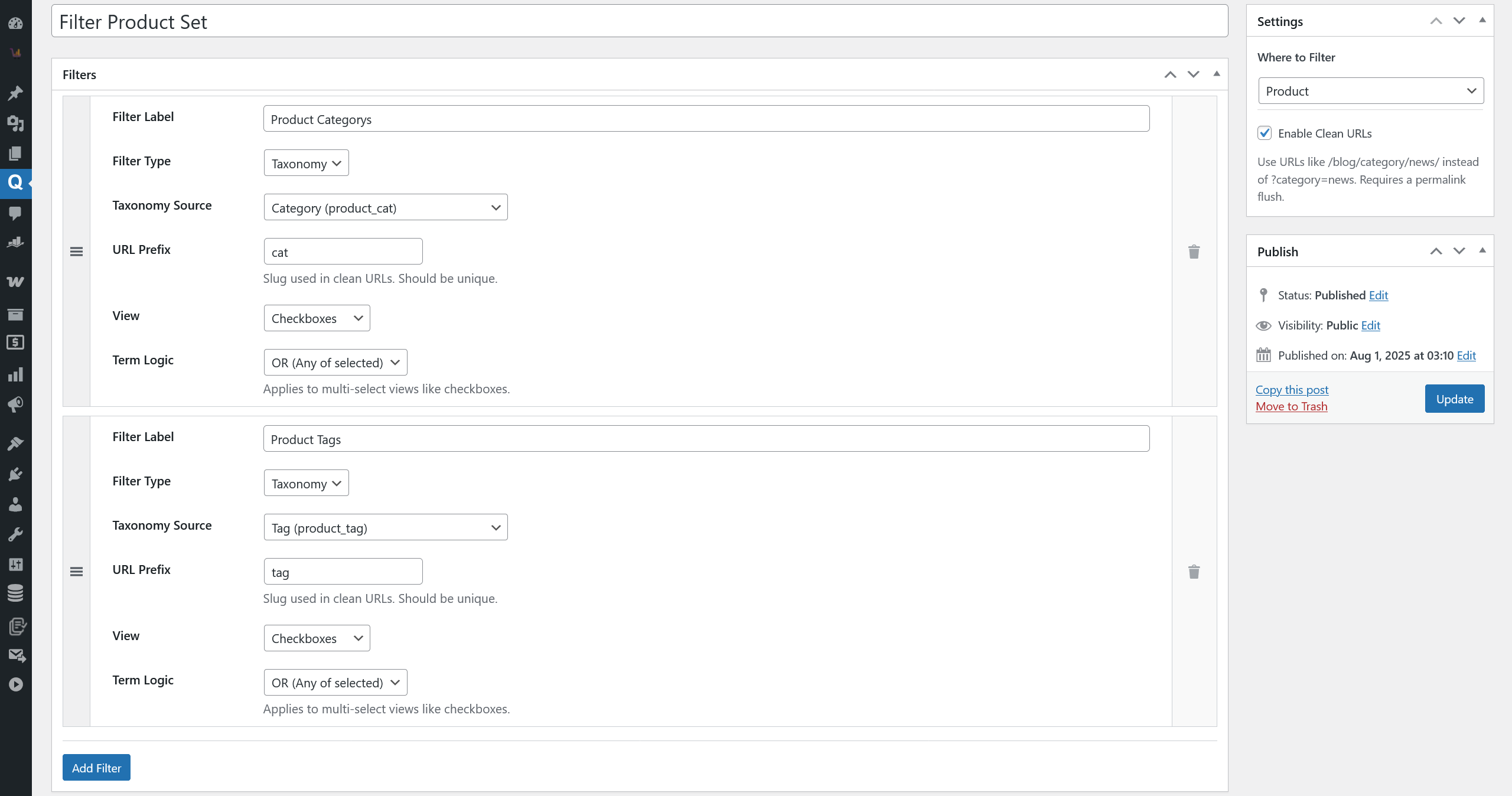
- Filter by Anything: The current version provides robust filtering by any taxonomy (e.g., categories, tags, product attributes).
- Flexible Display: Display filters as checkboxes, radio buttons, or a dropdown menu to best suit your needs.
- Highly Compatible AJAX Engine: An advanced AJAX mode rendered page fragments. This ensures that updated content, pagination, and the filter widget itself perfectly match your theme’s styling and structure, every time.
- Clean URLs for SEO: Enable “Clean URLs” to transform messy query strings (
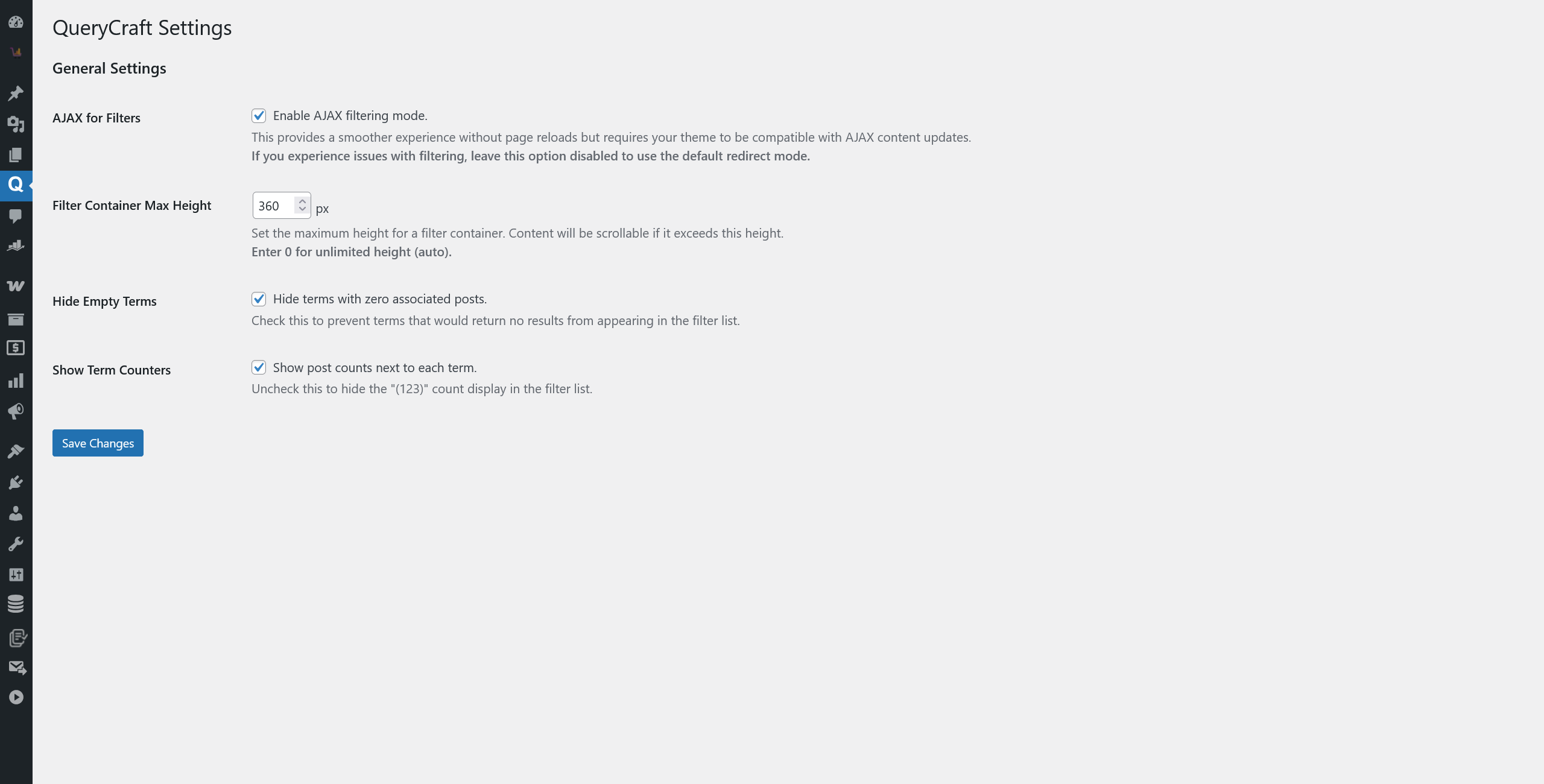
?category=news) into SEO-friendly permalinks (/category/news/), with deep integration into WordPress’s Rewrite API. - Customization Options: A dedicated settings page provides extensive options, allowing you to control the filter mode (AJAX/Redirect), hide terms with no posts, show/hide post counters, and set a max height for filter lists to enable scrolling.
- Widget Integration: Easily add your filters to any sidebar or widget area using the “QueryCraft Filters” widget, which is designed to automatically inherit your theme’s title styles.
Future Development (Roadmap)
QueryCraft is under active development. We are committed to making it the most powerful and user-friendly filtering plugin for WordPress. Here are some of the exciting features planned for future releases:
- More Filter Criteria: Support for filtering by Custom Fields, Price, Ratings, Post Date, and more.
- Keyword Search: An integrated search box to filter results by keyword.
- Result Sorting: Allow users to sort the filtered results by various criteria (e.g., Price, Date, Title).
- Live Filtering (Auto-Submission): An option to apply filters instantly as the user makes a selection, without needing to click a button.
- Shortcode Support: Place your filters anywhere on your site using a simple shortcode.
- Enhanced Visual Options: Introduce beautiful visual filters like Color Swatches and Image/Logo Swatches.
- Advanced Layouts: More layout options, including Horizontal filters and multi-column displays.
- Deeper Page Builder Integration: Dedicated widgets/modules for popular page builders like Elementor, Divi, Oxygen, etc.
- Advanced SEO: Full control over meta titles, descriptions, and other SEO data for filtered pages.
- Filter Any Custom Query: The ability to apply filters to any custom post loop or grid on any page, not just main archive pages.
We are excited about the future of QueryCraft and welcome your feedback as we continue to grow!
Installation
- Upload the
query-craftfolder to the/wp-content/plugins/directory. - Activate the plugin through the ‘Plugins’ menu in WordPress.
- Go to QueryCraft > Settings to configure global settings like the filtering mode.
- To use SEO-friendly URLs, create a Filter Set, check the “Enable Clean URLs” box in its settings, then go to Settings > Permalinks in your WordPress admin and click “Save Changes” to flush the rewrite rules.
- Add the “QueryCraft Filters” widget to your theme’s widget area (e.g., sidebar).
- Visit your archive page to see the filters in action!
Frequently asked questions
Will this plugin work with my theme?
Yes. The plugin has been architected for maximum theme compatibility. The primary AJAX mode is designed to work seamlessly with almost any theme’s structure and styling. In the rare case of a conflict, you can disable AJAX in the plugin’s settings to use the universal “Redirect Mode,” which is guaranteed to work with all themes.
How do I use the “Clean URLs” feature?
First, in the settings for a specific “Filter Set,” check the box to “Enable Clean URLs and click the “Save Changes” button.
Can I filter by custom fields?
The current version focuses on providing a powerful and robust taxonomy filtering experience. Filtering by custom fields is a planned feature for a future release.
How do I change the style of the filters?
The plugin is designed to inherit as much styling as possible (fonts, colors, etc.) from your active theme. The widget title automatically matches your theme’s other widget titles, and the “Apply Filters” button uses the standard WordPress .button class. For further customization, you can apply your own styles using custom CSS.
Changelog
This version introduces Clean URLs (Pretty Permalinks). After enabling this feature for a filter set, you must go to Settings > Permalinks and click "Save Changes" to apply the new URL structure.
1.7.5
- Major Enhancement: Re-architected the AJAX filtering engine for maximum theme compatibility. The plugin now uses a server-side request to fetch fully rendered HTML, ensuring perfect style and content matching.
- Enhancement: Implemented a fallback mechanism. If the server does not support loopback requests, the plugin gracefully degrades to the previous “rebuild” method, ensuring high reliability across different hosting environments.
- Fix: This new architecture comprehensively resolves compatibility issues with various theme templates, pagination functions, and widget styling.
1.7.4
- Fix: Fixed a critical bug where pagination links were not updated correctly during AJAX filtering, leading to incorrect page results.
- Enhancement: The pagination navigation is now fully updated via AJAX, including page numbers and links with active filter parameters.
1.7.3
- Feature: Added the ability to set a custom title for the filter widget. The widget now uses the theme’s title style automatically.
- Enhancement: The widget title now defaults to the Filter Set’s name if no custom title is provided.
- Enhancement: Added an option to show or hide the widget title.
1.7.2
- Feature: Added “Hide Empty Terms” setting to hide filter options with zero posts.
- Feature: Added “Show Term Counters” setting to control the visibility of post counts next to each term.
1.7.1
- Feature: Added a “Filter Container Max Height” setting to control the height of filter lists and enable scrolling.
- Fix: Resolved a fatal error on the frontend caused by the settings class not being loaded outside of the admin area.
1.7.0
- Feature: Added a global “Settings” page for the plugin.
- Enhancement: Changed the default filtering method to page redirection for maximum theme compatibility. AJAX filtering is now an optional mode.
- Fix: Corrected a major bug where filtering and state preservation failed when “Clean URLs” were disabled.
- Enhancement: Added a “Settings saved” notice on the settings page for better user feedback.
Screenshots

For developers
Is this your plugin? Show off the numbers.
Add a live badge to your site, docs or GitHub README. It updates on its own — no account needed.
Best QueryCraft alternatives
All ajax filter plugins →




FAQ
QueryCraft: quick answers
Straight answers, pulled from live WordPress.org data.
Live data from WordPress.org · checked Oct 12, 2026
Is QueryCraft free?
Yes. QueryCraft is free to download and use from the official WordPress.org plugin directory.
Is QueryCraft safe to use in 2026?
QueryCraft shows warning signs in 2026 — compare the alternatives below before installing. Was last updated 1 year ago, and scores 30/100 on our health check.
How many websites use QueryCraft?
QueryCraft is active on <10 WordPress websites and has been downloaded 479 times since it launched in August 2025. It was downloaded 50 times in the last 30 days.
Does QueryCraft work with WordPress 7.1?
QueryCraft is officially tested up to WordPress 6.8.11, while the latest release is 7.1.3. It may still work, but try it on a staging site first.
What PHP version does QueryCraft need?
QueryCraft requires PHP 7.4 or higher. Most hosts run PHP 8.x today, so it works on any modern WordPress hosting.
When was QueryCraft last updated?
The latest version, 1.7.5, was released on August 30, 2025 (1 year ago).
Who makes QueryCraft?
QueryCraft is developed and maintained by wowown.
What are the best alternatives to QueryCraft?
The most popular alternatives to QueryCraft are HUSKY (80K+ installs), Category AJAX Filter (6K+ installs) and Better Post & Filter Widget… (4K+ installs).
Powered by PageForge
Want thousands of pages that rank like these? Build them in an afternoon.
This directory runs on the same engine as PageForge. Turn any spreadsheet, CSV or API into thousands of fast, SEO-ready WordPress pages — with schema, internal links and AI-written copy baked in.
- CSV, Google Sheets & API data sources
- AI content, schema & internal links per page
- Works with Elementor, Gutenberg, Yoast & Rank Math
- Free on WordPress.org — no credit card


