



PSB Bot Traffic Controller
Block, limit, or allow AI crawlers, search bots, and scrapers by category — with rate limiting and robots.txt generation.

Use with caution
PSB Bot Traffic Controller works, but test it on a staging site before relying on it in 2026. Was last updated 1 month ago, and scores 60/100 on our health check.
- Tested with the latest WordPress (7.1)
- Small user base (<10 active installs)
- Very few reviews so far
How does it stack up?
Side-by-side on installs, updates, ratings & support



Daily downloads
Download spikes usually follow a new release — each site that auto-updates counts as a download.
Rankings
Where PSB Bot Traffic Controller stands todayWordPress.org search rankings
Live position in the plugin search, top 100| Keyword | Position |
|---|---|
| AI Crawlers | >100 |
| bots | >100 |
| firewall | >100 |
| rate limiting | >100 |
| security | >100 |
About PSB Bot Traffic Controller
From the official readme · v1.0.4Description
PSB Bot Traffic Controller sits in front of your WordPress site and classifies incoming traffic into five bot categories:
- AI training bots
- AI assistants
- Autonomous AI agents
- Search engine crawlers
- Scraping agents
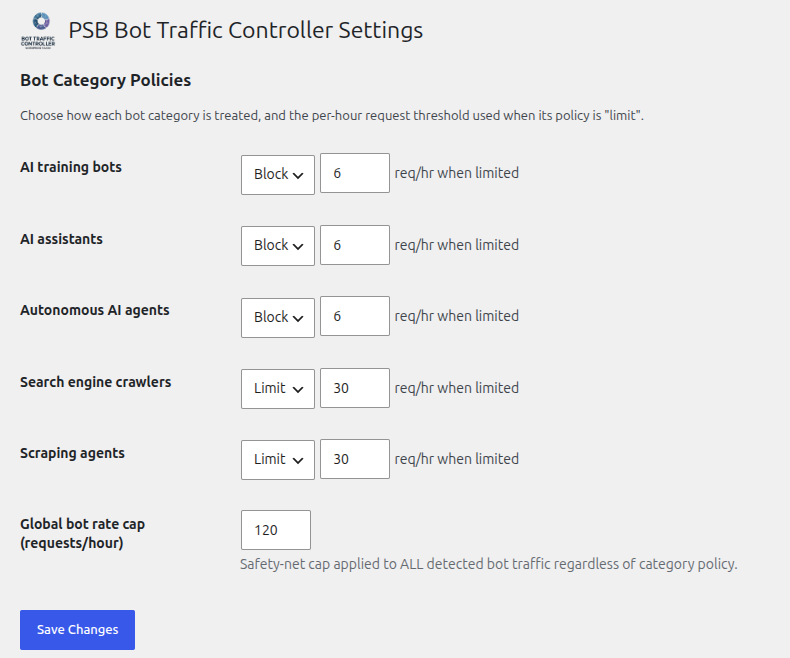
Each category can be configured independently to block (HTTP 403), rate-limit (HTTP 429 once a configurable per-hour threshold is exceeded), or allow traffic. A global safety-net cap also applies to all detected bot traffic regardless of per-category policy.
Detection runs via a free, zero-dependency regex/User-Agent pattern engine, curated from third-party bot-pattern data (see Credits below).
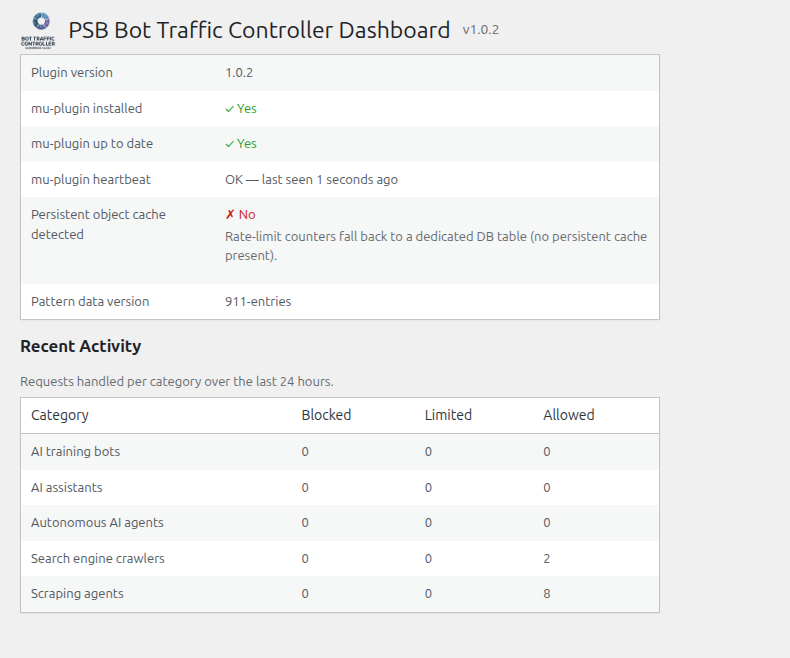
For performance, bot interception runs as early as possible via a small mu-plugin installed automatically into wp-content/mu-plugins/ — this avoids the cost of a full WordPress bootstrap for traffic that ends up being blocked.
Credits
The bundled bot-pattern data (includes/detection/regex/data/bot-patterns.php) is built from three third-party sources, each under a GPL-compatible license:
- matomo-org/device-detector — LGPL-3.0
- crawler-user-agents — MIT
- ai.robots.txt — MIT
No code from these projects is bundled — only pattern/name/category data, transformed at build time (tools/cmd/build-patterns) into this plugin’s own runtime format.
This plugin makes no outbound HTTP requests and does not integrate with any third-party or external service. Earlier versions of the bundled pattern data included a per-signature producer field (an attribution URL crediting the upstream source of each entry); it has been removed entirely, since it was never fetched or otherwise dereferenced by the plugin at runtime.
Installation
- Upload the plugin zip via Plugins > Add New > Upload Plugin, or extract it into
wp-content/plugins/psb-bot-traffic-controller/. - Activate the plugin. This installs a small companion file into
wp-content/mu-plugins/(WordPress’s “must-use plugin” mechanism) that performs early bot interception. - Configure per-category policy under Settings > PSB Bot Traffic Controller.
Frequently asked questions
Does this replace a WAF or CDN-level bot protection?
No — PSB Bot Traffic Controller runs inside WordPress (or, for the mu-plugin path, as early in WordPress’s own bootstrap as possible) and cannot intercept traffic before it reaches your web server. It complements, rather than replaces, edge-level protection.
What happens if the mu-plugin file can’t be written on activation?
An admin notice is shown with the filesystem error. The plugin still activates, but early interception won’t run until the mu-plugin is successfully installed (retry by deactivating/reactivating, or check file permissions on wp-content/mu-plugins/).
How do I reset rate-limit counters while testing?
Add define( 'PSB_BTC_DEBUG', true ); to wp-config.php on a staging/test site. This enables a rotating-token reset URL shown on the Dashboard (valid for a few hours at a time, then automatically expires). It is disabled by default and should never be enabled on a production site.
Changelog
1.0.4
- Implemented robots.txt generation, previously advertised in this plugin’s description but not
actually built: categories set to “block” now get aUser-agent/Disallow: /block in
robots.txt, sourced from the same curated bot-name data the detector already uses. Default
mode is dynamic (WordPress’srobots_txtfilter, nothing written to disk); an advanced,
opt-in setting writes a physical robots.txt file instead, with a persistent warning (Settings
page and Dashboard) whenever a physical file exists on disk, since it always takes precedence
over the dynamic filter regardless of which mode is configured. - Fixed readme.txt’s Description/Installation/Credits sections rendering with broken mid-sentence
line breaks on the WP.org plugin page. The source file had each paragraph hard-wrapped across
multiple lines for editor readability, but WP.org’s readme parser treats every newline as a
literal line break rather than reflowing prose — unlike Markdown, a single\ndoes not get
collapsed into a space. Fixed by joining each paragraph onto one logical line. Docs-only, no
code changes. - robots.txt generation now detects other active SEO plugins (AIOSEO, Yoast, Rank Math,
SEOPress, The SEO Framework) that commonly also manage robots.txt, and shows an informational
notice on the Settings and Dashboard pages when one is found — WordPress’srobots_txtfilter
is designed for multiple plugins to extend the same output, so this doesn’t change behavior by
default, it just surfaces the interaction. Our filter callback also now registers at a later
priority to reduce the chance of being silently overwritten by another plugin’s callback. - Added a master on/off switch for robots.txt generation on the Settings page (on by default),
independent of the existing physical-file advanced-mode toggle — when off, this plugin never
modifies robots.txt at all, regardless of category policy. Turning it off also removes a
physical robots.txt file this plugin had previously written, so a stale Disallow list doesn’t
linger on disk after the feature is disabled. - Added a help icon with a plain-language explanation to each bot category on the Settings page
(hover for a description of what that category actually covers), aimed at non-technical site
owners deciding how to configure policy.
1.0.3
- Removed a stale description line claiming an “optional WURFL.js-based detection engine can
be enabled for higher accuracy” — no such engine exists yet (seeCLAUDE.md‘s architecture
notes: WURFL.js is planned, not implemented). Docs-only correction, no code changes. - Added a global average bot request rate (requests/minute) to the Dashboard’s Recent Activity
section, computed from the same 24-hour activity summary already used for the per-category
block/limit/allow table — no new data collection, just a new aggregate view over existing
counters.
1.0.2
- Re-analyzed every remaining automated Plugin Check finding against this version’s actual
code, rather than restating prior documentation, and applied two genuine fixes found in the
process (both comment-only, zero behavior change): - Added
phpcs:ignore WordPress.DB.PreparedSQL.InterpolatedNotPreparedannotations to the
three interpolated-table-name queries inclass-ratelimit-store-db.php
(increment_and_get(),get_count(),cleanup_expired()) — this file had none, unlike its
siblingclass-ratelimit-reset.php, despite sharing the identical unfixable-by-design
pattern (table names can never be%s/%d$wpdb->prepare()placeholders). - Corrected
class-ratelimit-reset.php‘s existingphpcs:ignorecomment on its
TRUNCATE TABLE query: it previously named the sniffWordPress.DB.PreparedSQL.NotPrepared,
which is not what actually fires there — fixed to name
WordPress.DB.PreparedSQL.InterpolatedNotPrepared,PluginCheck.Security.DirectDB.UnescapedDBParameter,
matching what the checker actually reports, so the comment provides real suppression instead
of none.
1.0.1
- Regenerated the icon/banner/logo image assets from an updated source design (ring emblem +
“BOT TRAFFIC CONTROLLER” wordmark), replacing the placeholder artwork shipped in 1.0.0. - Sanitize
psb_btc_mu_respond()‘s output (strip control characters before echoing) rather
than relying on every current call site happening to pass a hardcoded literal — all 3 call
sites still do today, so this closes a latent gap rather than fixing a live exploit, but
escaping at the point of output shouldn’t depend on that staying true as the file is edited. - Re-reviewed the remaining automated Plugin Check findings against this version and confirmed
they remain the already-documented false positives / accepted architectural exceptions
covered inSUBMISSION.md(non-atomic-counterflock()locking has noWP_Filesystem
equivalent and must run pre-bootstrap;$wpdb->prepare()placeholders the checker’s static
analysis can’t trace through) — nothing else new to fix.
1.0.0
- Renamed the plugin from “botpolice” to “PSB Bot Traffic Controller” (slug
psb-bot-traffic-controller), following a WordPress.org plugin review finding that
“botpolice” too closely matched an existing project with overlapping functionality.
Every internal class/function/constant prefix, option/table/transient name, and
generated mu-plugin filename was renamed to match (Botpolice_*→PSB_BTC_*,
botpolice_* →psb_btc_*,BOTPOLICE_*→PSB_BTC_*). - Removed the
producerattribution field from the bundled bot-pattern data
(includes/detection/regex/data/bot-patterns.php) — it held a URL in most entries and
was flagged twice by review under two headings (“calling files remotely” and
“undocumented use of a 3rd party/external service”), even though it was never
dereferenced as a URL anywhere in the runtime code. Removed entirely rather than
disclosed, since the plugin makes no outbound HTTP requests and integrates with no
external service. - Changed the mu-plugin’s per-category config cache from an executable
<?php return array(…); file to plain JSON (nowpsb-btc-config-cache.json,
read viajson_decode()), per a review finding against writing executable code
files intowp-content/mu-plugins/outside the small set of core-defined drop-in
exceptions. The mu-plugin bootstrap file itself and the (much larger) pattern-data
cache were not affected — review did not flag either of those. - Fixed a real correctness bug review’s automated tooling also caught: both the
object-cache-backed rate-limit store and the mu-plugin’s flat-file rate-limit
counters used a non-atomic read-increment-write sequence, letting concurrent
requests undercount and bypass configured limits. The object-cache store now uses
wp_cache_add()/wp_cache_incr()(atomic at the cache backend); the mu-plugin’s
flat-file counters now useflock()-based exclusive locking around the
read-modify-write. - Replaced the compound
if ( ! defined('ABSPATH') && ! defined('...STANDALONE') )
direct-access guard (used to allow PHPUnit to load classes without a full WP
install) with the literal bareif ( ! defined( 'ABSPATH' ) ) { exit; }review
expects, across all affected files. Test-only standalone loading now works by
having the PHPUnit bootstrap itself defineABSPATH, rather than each production
file special-casing a second constant.
0.4.1
- Address findings from the official WordPress Plugin Check tool: escape remaining
unescaped Dashboard output, switchclass-mu-installer.php‘s version-stamp read and
class-ratelimit-reset.php’s counter-file cleanup off raw file-handle/unlink()calls,
document the intentional nonce-free design of the (opt-in, off-by-default) debug reset
endpoint, add a direct-access guard to the generatedbot-patterns.php(via
tools/cmd/build-patterns, not by hand-editing the output), and correct “Tested up to”
to the current WordPress release. SeeSUBMISSION.mdfor a list of remaining Plugin
Check findings that are intentional design choices rather than defects (the
BOTPOLICE_STANDALONE direct-access guard variant, the mu-plugin’s necessarily-early
filesystem calls, and the reset endpoint’s token-based-not-nonce-based auth).
Screenshots
For developers
Is this your plugin? Show off the numbers.
Add a live badge to your site, docs or GitHub README. It updates on its own — no account needed.
Best PSB Bot Traffic Controller alternatives
All AI Crawlers plugins →





FAQ
PSB Bot Traffic Controller: quick answers
Straight answers, pulled from live WordPress.org data.
Live data from WordPress.org · checked Oct 1, 2026
Is PSB Bot Traffic Controller free?
Yes. PSB Bot Traffic Controller is free to download and use from the official WordPress.org plugin directory.
Is PSB Bot Traffic Controller safe to use in 2026?
PSB Bot Traffic Controller works, but test it on a staging site before relying on it in 2026. Was last updated 1 month ago, and scores 60/100 on our health check.
How many websites use PSB Bot Traffic Controller?
PSB Bot Traffic Controller is active on <10 WordPress websites and has been downloaded 189 times since it launched in August 2026. It was downloaded 96 times in the last 30 days.
Does PSB Bot Traffic Controller work with WordPress 7.1?
Yes. The developer has tested PSB Bot Traffic Controller up to WordPress 7.1.2, the latest release. It requires WordPress 6.0 or newer.
What PHP version does PSB Bot Traffic Controller need?
PSB Bot Traffic Controller requires PHP 8.0 or higher. Most hosts run PHP 8.x today, so it works on any modern WordPress hosting.
When was PSB Bot Traffic Controller last updated?
The latest version, 1.0.4, was released on August 29, 2026 (1 month ago).
Who makes PSB Bot Traffic Controller?
PSB Bot Traffic Controller is developed and maintained by paulborile.
What are the best alternatives to PSB Bot Traffic Controller?
The most popular alternatives to PSB Bot Traffic Controller are Better Robots.txt (5K+ installs), Prime SEO (100+ installs) and SEO & AI Readiness Check (30+ installs).
Powered by PageForge
Want thousands of pages that rank like these? Build them in an afternoon.
This directory runs on the same engine as PageForge. Turn any spreadsheet, CSV or API into thousands of fast, SEO-ready WordPress pages — with schema, internal links and AI-written copy baked in.
- CSV, Google Sheets & API data sources
- AI content, schema & internal links per page
- Works with Elementor, Gutenberg, Yoast & Rank Math
- Free on WordPress.org — no credit card


