


ProxyMIR Reseller Storefront
Storefront widget for the ProxyMIR.com proxy service: offer proxy traffic on your site, follow your earnings and request payouts.

Solid choice
ProxyMIR Reseller Storefront is a solid plugin choice in 2026, with a few things worth checking first. Was last updated 3 days ago, and scores 64/100 on our health check.
- Actively developed — last update 3 days ago
- Tested with the latest WordPress (7.1)
- Small user base (<10 active installs)
- Very few reviews so far
- Needs PHP 8.1 or newer
How does it stack up?
Side-by-side on installs, updates, ratings & support


Daily downloads
Download spikes usually follow a new release — each site that auto-updates counts as a download.
Rankings
Where ProxyMIR Reseller Storefront stands todayWordPress.org search rankings
Live position in the plugin search, top 100| Keyword | Position |
|---|---|
| partner | >100 |
| proxy | >100 |
| reseller | #22 |
| storefront | >100 |
| widget | >100 |
About ProxyMIR Reseller Storefront
From the official readme · v2.1.8Description
ProxyMIR Reseller Storefront connects your WordPress site to the ProxyMIR.com proxy service as a partner (reseller). Visitors of your site open a shop widget, choose a package, register, pay and receive their proxies. The service takes care of the proxies, the payments and the buyers’ accounts; the plugin shows the shop on your site and the partner area in your dashboard.
What you get
- A shop widget in a phone-style window: catalog, personal area, reviews, top up, proxy checker. Light and dark theme, position and logo of the button are set in the plugin.
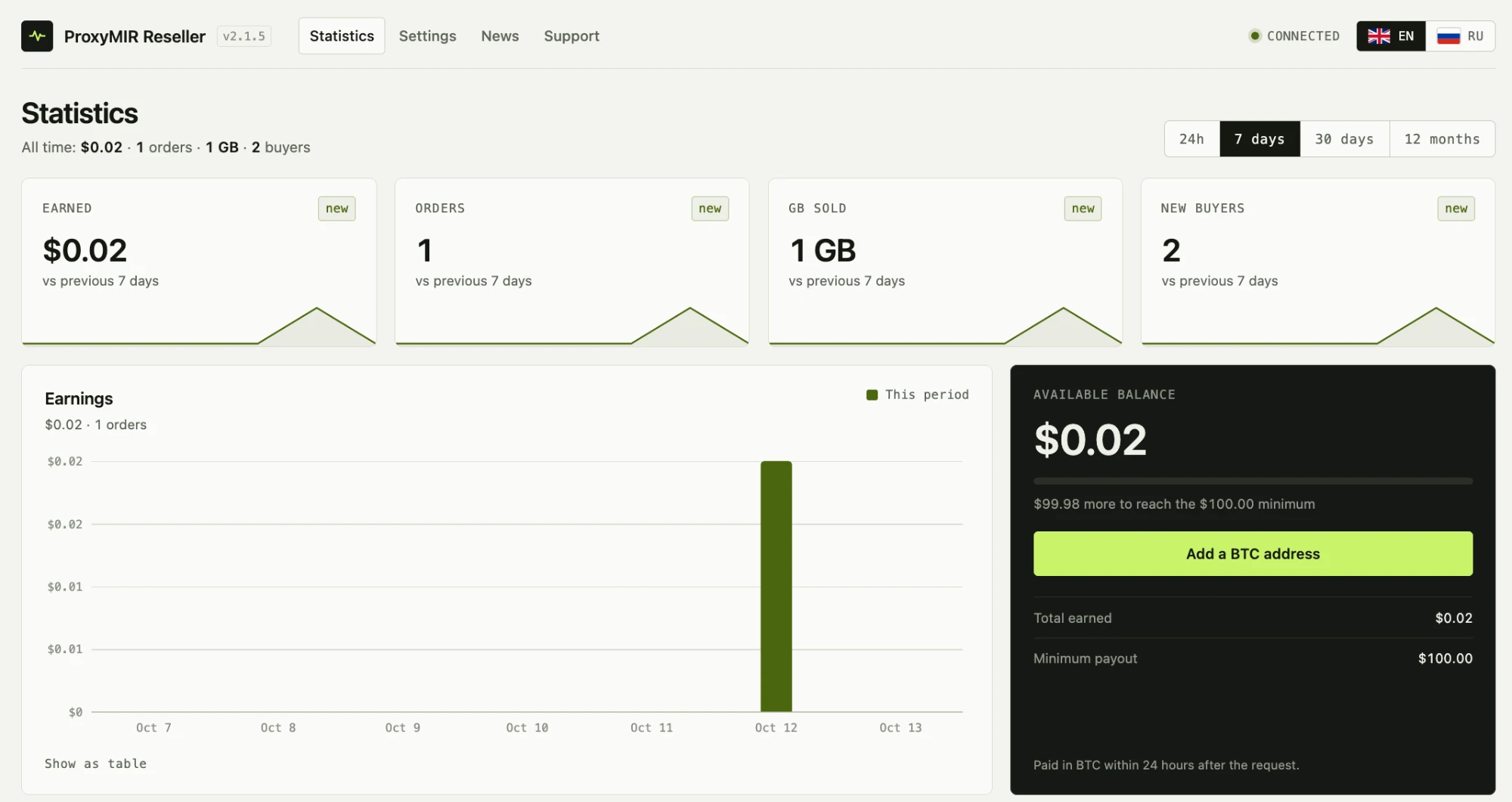
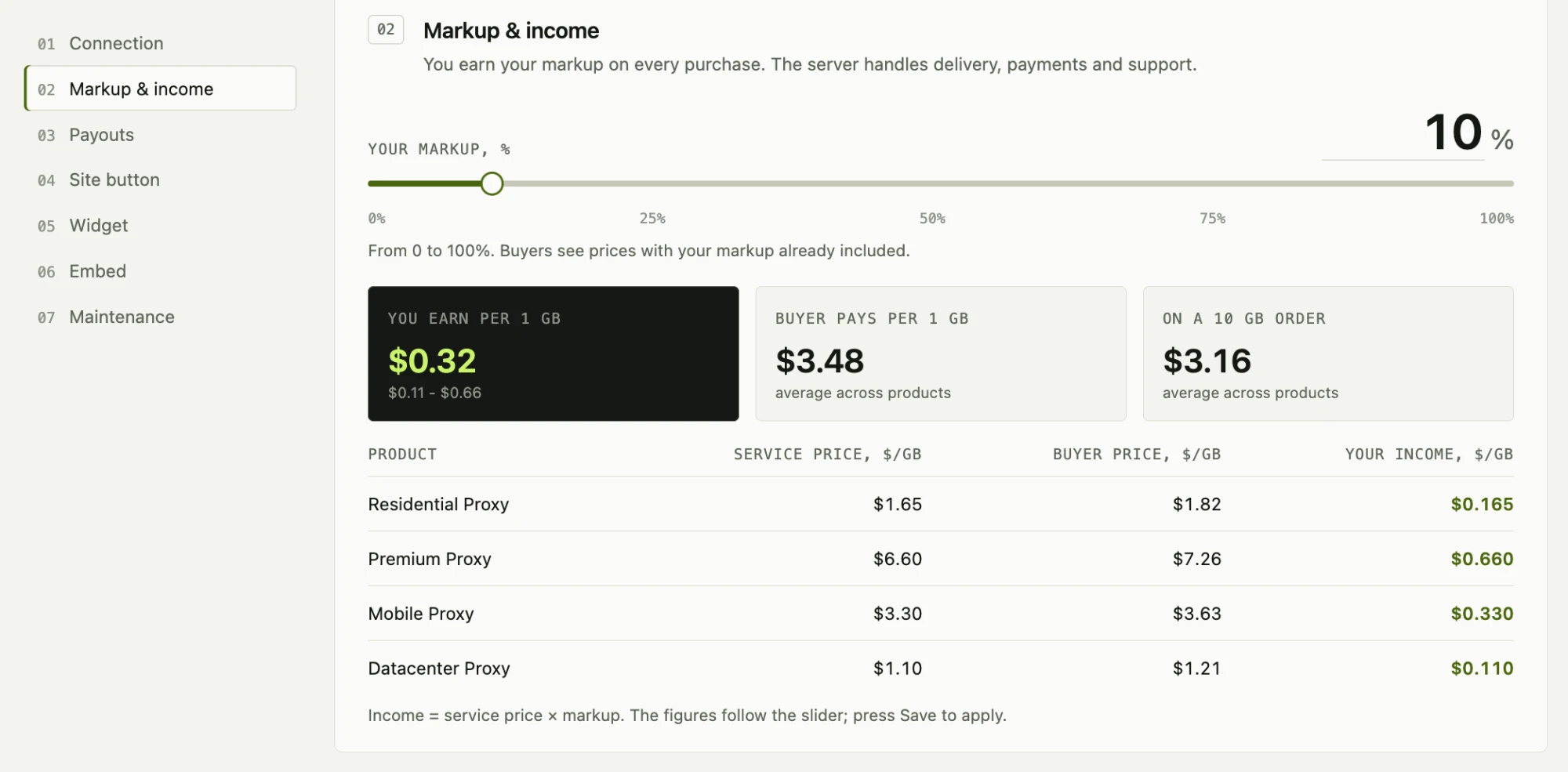
- Your own markup on top of the service price (up to 100%) and live earnings statistics: income, orders, traffic sold, top products, payout history.
- Payout requests to a Bitcoin address of your choice, handled by the service.
- News from the service and a support desk (tickets with the service administrators) inside your dashboard.
- English and Russian interface; every dashboard user picks the language with the flags in the plugin header.
You need a partner account
The plugin is a client of an external service and does nothing useful without a partner account at ProxyMIR.com. When you press Connect to ProxyMIR.com on the first screen, the plugin creates the partner account and the API key for your site, and all sections open at once. If the service asks for an application first, you fill in a short form (name, job title, site, email) and the sections open when it is approved. Details are on the first screen of the plugin and at https://proxymir.com/reseller/.
The plugin makes no request to the service until the site administrator presses Connect to ProxyMIR.com on the first screen.
External services
This plugin is a client of the ProxyMIR.com service (https://proxymir.com), which is operated by the plugin author. All shop logic, prices, accounts, payments and payouts live on that service; the plugin sends requests to it.
- Terms of the service: https://proxymir.com/terms/?lang=en
- Privacy policy of the service: https://proxymir.com/privacy/?lang=en
When the plugin contacts the service
- Only after the site administrator pressed “Connect to ProxyMIR.com”, or when an API key or an application is already saved.
- When you press “Connect to ProxyMIR.com” and the service takes partners without an application, the partner account is created at once (site address, administrator email and interface language are sent, the API key comes back and is saved).
- When you open the plugin screens in the dashboard (offer, connection, statistics, news, support), when you save the settings, send an application, create or change the key, request a payout or write to support.
- On the public site, when a visitor uses the shop widget (registers, logs in, orders, pays, asks for proxies, writes to support). The request goes from the visitor’s browser to your own site, and the plugin forwards it to the service. In the background the plugin refreshes the shop catalog (about every five minutes) and, in the dashboard, news and tickets.
What is sent
- With every request: the plugin version, the API key (when one exists) and the site address.
- When an API key is created: the site address, the site administrator email and the interface language.
- When an application is sent: the name, job title, site and email typed into the form.
- For shop visitors: what the visitor types into the widget (login, email, password, orders, messages to support) and the visitor’s IP address and browser name, which the service uses for abuse protection. For sites behind Cloudflare the visitor address is taken from the Cloudflare header.
- Cookie: after a visitor logs in to the shop widget the plugin sets one functional cookie,
prxr_buyer(HttpOnly, up to 30 days), with the session of the visitor. The site administrator’s browser gets no cookie from the plugin. - Payment: when a buyer pays, the widget opens the payment page of the payment provider chosen by the service. The plugin itself never sees card data.
The plugin adds a ready-made paragraph to Settings > Privacy (the privacy policy guide) that describes this.
Links the user can click
- The payout history links to https://mempool.space (a public Bitcoin explorer) for the transaction of a paid payout. Nothing is sent to it unless the user clicks the link.
Installation
- Install and activate the plugin.
- Open ProxyMIR Reseller in the dashboard menu, read the offer and press Connect to ProxyMIR.com. If you already have a key from another site, open “Already have a key?” on the same screen and paste it instead.
- The partner account is created and Statistics, Settings, News and Support open. If the service asks for an application, send it first; when it is approved, press Create API key in Settings.
- In ProxyMIR Reseller > Settings set your markup, the look of the button and the language of the widget.
- Put the shortcode
[proxy_reseller]on any page (a floating button) or[proxy_reseller inline="1" width="300" height="120"]where the button should appear inside the content.
Frequently asked questions
Is the plugin free?
Yes. The plugin is free and open source. Selling through the service means you earn a share of every sale; the service terms are at https://proxymir.com/terms/?lang=en.
Where is my API key stored?
In a separate option, encrypted with libsodium (XSalsa20-Poly1305) with a key derived from the salts of your wp-config.php. If the salts change, the key cannot be read any more and the plugin asks you to enter the saved key again. Save the key when it is shown.
Does the plugin store card or wallet data?
No. Payments are made on the pages of the payment providers; the BTC address for payouts is stored in the plugin settings and checked by the service.
Can I use another server?
Operators of their own compatible service can define PRXR_HUB_URL in wp-config.php (or use the prxr_hub_url filter).
How do I stop the plugin from contacting the service?
Open ProxyMIR Reseller > Settings > Connection and press “Withdraw permission”. The plugin stops all requests to the service and the shop window disappears from the site. Your key and settings are kept; the button “Connect to ProxyMIR.com” turns everything on again.
What happens when I delete the plugin?
All plugin data (settings, the encrypted key, caches, per-user settings) is removed from your database. Your partner account at the service is not affected.
Screenshots
For developers
Is this your plugin? Show off the numbers.
Add a live badge to your site, docs or GitHub README. It updates on its own — no account needed.
Best ProxyMIR Reseller Storefront alternatives
All partner plugins →FAQ
ProxyMIR Reseller Storefront: quick answers
Straight answers, pulled from live WordPress.org data.
Live data from WordPress.org · checked Oct 17, 2026
Is ProxyMIR Reseller Storefront free?
Yes. ProxyMIR Reseller Storefront is free to download and use from the official WordPress.org plugin directory.
Is ProxyMIR Reseller Storefront safe to use in 2026?
ProxyMIR Reseller Storefront is a solid plugin choice in 2026, with a few things worth checking first. Was last updated 3 days ago, and scores 64/100 on our health check.
How many websites use ProxyMIR Reseller Storefront?
ProxyMIR Reseller Storefront is active on <10 WordPress websites and has been downloaded 90 times since it launched in October 2026. It was downloaded 94 times in the last 30 days.
Does ProxyMIR Reseller Storefront work with WordPress 7.1?
Yes. The developer has tested ProxyMIR Reseller Storefront up to WordPress 7.1.3, the latest release. It requires WordPress 6.3 or newer.
What PHP version does ProxyMIR Reseller Storefront need?
ProxyMIR Reseller Storefront requires PHP 8.1 or higher. Most hosts run PHP 8.x today, so it works on any modern WordPress hosting.
When was ProxyMIR Reseller Storefront last updated?
The latest version, 2.1.8, was released on October 13, 2026 (3 days ago).
Who makes ProxyMIR Reseller Storefront?
ProxyMIR Reseller Storefront is developed and maintained by ProxyMIR.
What are the best alternatives to ProxyMIR Reseller Storefront?
The most popular alternatives to ProxyMIR Reseller Storefront are Client Partner Showcase (100+ installs), Partnerize Partner (20+ installs) and Kw Modern Advertise (10+ installs).
Powered by PageForge
Want thousands of pages that rank like these? Build them in an afternoon.
This directory runs on the same engine as PageForge. Turn any spreadsheet, CSV or API into thousands of fast, SEO-ready WordPress pages — with schema, internal links and AI-written copy baked in.
- CSV, Google Sheets & API data sources
- AI content, schema & internal links per page
- Works with Elementor, Gutenberg, Yoast & Rank Math
- Free on WordPress.org — no credit card


