


Product Designer App
WooCommerce product designer plugin for custom printing, personalization, templates, artwork, quotes, and print-ready files.

Solid choice
Product Designer App is a solid plugin choice in 2026, with a few things worth checking first. It runs on 90+ sites, is rated 1/5 and was last updated 3 days ago, and scores 63/100 on our health check.
- Actively developed — last update 3 days ago
- Tested with the latest WordPress (7.1)
- Small user base (90+ active installs)
- Very few reviews so far
How does it stack up?
Side-by-side on installs, updates, ratings & support



Daily downloads
Download spikes usually follow a new release — each site that auto-updates counts as a download.
Rankings
Where Product Designer App stands todayWordPress.org search rankings
Live position in the plugin search, top 100| Keyword | Position |
|---|---|
| personalization | #87 |
| print-on-demand | #42 |
| product customizer | #72 |
| product designer | #14 |
| woocommerce designer | #30 |
Version adoption
Share of active sites per release.
Rating breakdown
★★★★★★★★★★ 1 from 1 reviews
About Product Designer App
From the official readme · v1.1.5Description
Product Designer App is a professional WooCommerce product designer and online product customizer plugin for print shops, print-on-demand stores, gift personalization businesses, apparel brands, sign makers, stationery shops, and any WordPress store that sells customizable products.
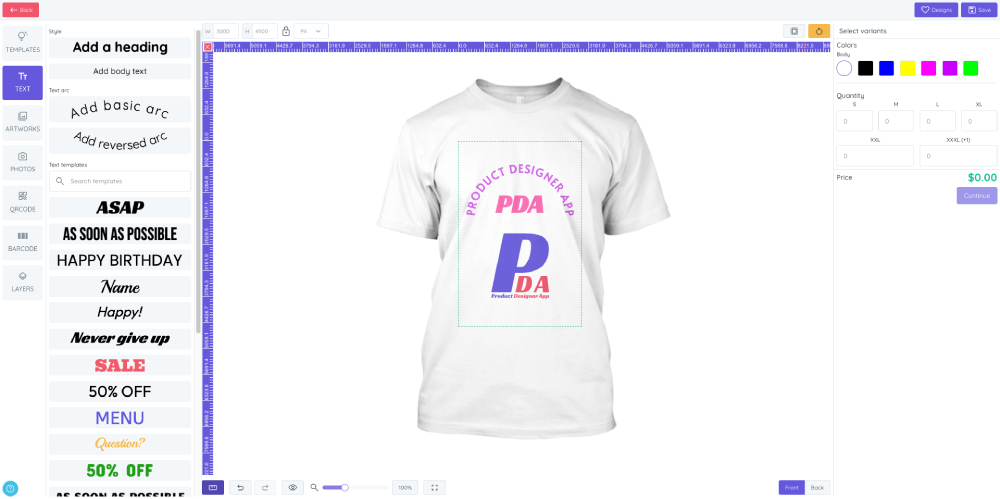
With Product Designer App, customers can personalize products directly on your website. They can add text, upload photos, choose artwork, apply templates, customize colors, generate QR codes or barcodes, preview designs, and add customized products to the WooCommerce cart. Store owners can manage product bases, design areas, templates, artwork libraries, printing methods, pricing rules, orders, and production-ready design files from a dedicated admin panel.
The plugin helps you turn a standard WooCommerce store into a complete online design studio for products such as t-shirts, hoodies, mugs, business cards, flyers, posters, banners, stickers, phone cases, labels, packaging, uniforms, teamwear, and other personalized products.
Live Demo and Tutorials
Explore Product Designer App before installing:
- Live shop demo: https://demo.productdesignerapp.com/wordpress/shop
- Design template demo: https://demo.productdesignerapp.com/wordpress/design-template
- Free design resources: https://productdesignerapp.com/resource
- Documentation: https://docs.productdesignerapp.com
- Installation guide: https://docs.productdesignerapp.com/docs/installation
- Product setup examples: https://docs.productdesignerapp.com/docs/product-setup-examples
- Product Designer App Pro: https://productdesignerapp.com/shop/woocommerce
- Help center: https://help.productdesignerapp.com
- Product overview video: https://www.youtube.com/watch?v=gFbe-sjMju4
- Installation video tutorial: https://www.youtube.com/watch?v=hb3zdTbaT94
- YouTube tutorials: https://www.youtube.com/@productdesignerapp
Why Choose Product Designer App?
Product Designer App is built for real production workflows, not only simple product previews. It combines customer-facing design tools with admin controls for managing assets, templates, WooCommerce products, order files, and printing options.
Use it to:
- Let customers design personalized products online.
- Sell custom printed products through WooCommerce.
- Create product templates for faster customer design.
- Manage artwork, fonts, shapes, text presets, and image assets.
- Set up product design areas, product colors, masks, layers, and views.
- Configure printing types, quantity discounts, and dynamic pricing rules.
- Save customer design data to cart and order details.
- Download print-ready files for production.
- Build a professional web-to-print or print-on-demand website without custom coding.
Main Features
- Online product designer for WooCommerce products.
- Responsive design studio for desktop, tablet, and mobile.
- Customer text editing with fonts, colors, spacing, outlines, opacity, and styles.
- Artwork support for SVG, PNG, and JPG files.
- Customer photo upload with crop, shape, filter, resize, rotate, and flip options.
- Ready-made design templates for faster personalization.
- Product base management for apparel, print products, merchandise, and custom items.
- Multiple design areas for front, back, sleeves, labels, panels, or custom print zones.
- Product color options using predefined colors or a color picker.
- Dynamic pricing for printing types, sizes, colors, views, and quantities.
- WooCommerce cart and checkout integration.
- Design thumbnails in cart, checkout, order details, and emails.
- Print file download for SVG, PNG, and PDF output, depending on configuration and plan.
- Admin dashboard for resources, orders, and system requirements.
- Addon and theme management for extending the design studio.
- Multi-language support and built-in language editor.
- Shortcode support for adding the design studio to pages.
Admin Management
Product Designer App includes a dedicated admin workspace so store owners can manage the full product personalization process.
- Dashboard with resource totals, order statistics, and system status.
- Order management with customer details, design thumbnails, notes, and print file access.
- Quote management in the Premium version.
- Product base creation, editing, importing, exporting, duplication, and searching.
- Multiple product layers for realistic product previews.
- Design area configuration for one or many printable areas.
- Mask layers for advanced mockups and print boundaries.
- Product color, quantity discount, layout, artwork, and template settings.
- Artwork bulk upload, bulk edit, folder organization, search, and multi-language data.
- Template creation using the same design tools available to customers.
- Import and export tools for backup, migration, or fast setup.
- Printing type setup with fixed price, price by color, price by size, price by area, and quantity rules.
- Addon install, activation, deactivation, upgrade, and per-product configuration.
- Theme install, activation, CSS editing, and one-click upgrades.
- Global settings for uploads, download formats, text, tools, fonts, shapes, filters, languages, cache, and updates.
Customer Design Tools
Customers get an intuitive online design experience that helps them personalize products quickly.
- Add, edit, move, resize, rotate, copy, lock, flip, and delete design elements.
- Add text from presets or create custom text.
- Customize fonts, colors, spacing, outlines, opacity, and text style.
- Add artwork from the store library.
- Upload photos in supported image formats.
- Recolor supported SVG artwork and template elements.
- Apply crop, shape, and filter options for photos and artwork.
- Use undo, redo, reset, preview, zoom, fullscreen, rulers, and view switching tools.
- Group and ungroup selected elements.
- Reorder layers from the layer panel.
- Add multiple variations of the same design to cart.
- Save design notes with the order.
- Use QR code, barcode, team name and number, save/load, quote, and hotkey features in the Premium version.
WooCommerce Integration
Product Designer App works with WooCommerce to connect product customization with the shopping workflow.
- Link product bases to WooCommerce products.
- Assign design templates to specific WooCommerce products.
- Display a Customize button on product pages.
- Save design data to cart and checkout.
- Generate thumbnails for cart and order previews.
- Update product design prices dynamically.
- Support classic and block-based WooCommerce cart and checkout.
- Save design information in WooCommerce orders.
- Show design thumbnails in order details and customer emails.
- Allow customers to reorder previous customized products in supported versions.
Shortcode
Use this shortcode to display the Product Designer App studio page:
[pdapp-studio-page id="1"]
Premium Version
Product Designer App Pro unlocks advanced features for professional print shops and high-volume personalization stores.
Premium features include, depending on version and addon configuration:
- One-click import of product bases, templates, artwork, fonts, themes, and other resources.
- Advanced product attributes and variant management.
- Quote request workflow.
- Save and load customer designs.
- Cart design editing for classic WooCommerce cart.
- High-quality PNG, PDF output.
- Artwork and template pricing.
- Team name and number tools.
- QR code and barcode tools.
- Photo library.
- Watermark settings.
- Hotkeys.
- Product duplication.
- Share design features.
- Additional addons, themes, updates, and support.
Learn more about Product Designer App Pro: https://productdesignerapp.com/shop/woocommerce
Free vs Pro Comparison
Product Designer App is available as a free plugin and paid premium licenses for stores that need more production features, resource imports, support, and unlimited order file downloads.
- Free – Best for testing the basic WooCommerce product designer workflow. Includes limited features, 1-domain usage, no included technical support, no resource import, SVG print file export, and limited order file downloads for up to 10 orders.
- Basic – Best for small stores that need essential premium benefits. Includes core features unlocked, latest versions, lifetime updates, 1-domain license, 3 months of technical support, free resource imports, unlimited order file downloads, and SVG/PNG print file export.
- Professional – Best for serious print shops and personalization businesses. Includes the complete feature package, all features fully unlocked, latest versions, lifetime updates, 1-domain license, 6 months of technical support, free resource imports, unlimited order file downloads, and SVG/PNG/PDF print file export.
Key premium advantages include:
- Access to the latest premium version and lifetime updates.
- Free resource imports for product bases, artworks, fonts, templates, themes, and addons.
- Unlimited order file downloads.
- Advanced print file export options.
- Custom product views, design templates, layer manager, undo/redo, save design, customer design downloads, and edit design in cart.
- Premium tools such as photo library, team members, QR code generator, barcode generator, watermark preview, hotkeys, request a quote, product variants, duplicate product design, quick color selection, related products, and addon system.
See the full license comparison: https://productdesignerapp.com/shop/woocommerce
Important Notes
- WooCommerce product variants are not fully supported in every workflow. For best results, set up a single WooCommerce product and manage design options inside Product Designer App.
- Starting from version 1.0.9, the free plugin focuses on WordPress and WooCommerce compatibility updates. Product Designer App Pro continues to receive full bug fixes, feature updates, and support.
- Always back up your website and design data before upgrading.
External Services
Product Designer App connects to ProductDesignerApp.com APIs for update notifications and, for Premium users, resource imports such as product bases, artworks, templates, fonts, themes, and addons.
Premium users may need to provide a purchase code for verification. Product Designer App may store the personal information you provide for account and purchase verification, such as your email address and PayPal transaction ID. The plugin does not store passwords or other login credentials. Access is handled by a secure login code sent to your email.
Terms of Use: https://productdesignerapp.com/term-condition
Privacy Policy: https://productdesignerapp.com/privacy-policy
Dependency Libraries
The plugin uses third-party JavaScript libraries. These dependencies are licensed under the MIT license, and uncompressed source code is available for development review.
- Barcode: https://github.com/lindell/JsBarcode
- Chart.js: https://github.com/chartjs/Chart.js
- CircleType: https://github.com/peterhry/CircleType
- ColorThief: https://github.com/lokesh/color-thief
- Hotkeys: https://jaywcjlove.github.io/hotkeys-js
- jsPDF: https://github.com/MrRio/jsPDF
- Moveable: https://github.com/daybrush/moveable
- Selecto: https://github.com/daybrush/selecto
- QRCode SVG: https://github.com/papnkukn/qrcode-svg
- Spectrum Colorpicker: https://github.com/bgrins/spectrum
- SVG Colors: https://github.com/snorpey/get-svg-colors-browser
- Vue.js: https://github.com/vuejs/vue
Installation
Minimum Requirements
- WordPress 6.0 or higher.
- WooCommerce 7.0 or higher.
- PHP 7.0 or higher.
- MySQL 5.0 or higher.
Recommended Requirements
- PHP 8.1 or higher.
- MySQL 5.6 or higher.
- WordPress memory limit of 1024 MB or higher. 2048 MB or more is recommended for large stores.
Installation from WordPress Dashboard
- Go to WordPress Dashboard > Plugins > Add New.
- Search for Product Designer App.
- Click Install Now.
- Click Activate.
- Open Pages > Add New and click the PDA button to access the Product Designer App admin panel.
- Configure product bases, design areas, templates, artwork, printing types, and WooCommerce product links.
Manual Installation
- Download the Product Designer App plugin zip file.
- Upload the plugin folder to
/wp-content/plugins/. - Go to WordPress Dashboard > Plugins.
- Activate Product Designer App.
- Complete the plugin setup from the Product Designer App admin panel.
After Installation
- Create or import a product base.
- Add design areas, colors, layers, and product preview images.
- Upload artwork or import resources.
- Create design templates.
- Configure printing types and pricing rules.
- Link the design product to a WooCommerce product.
- Test the customer design workflow from product page to checkout.
For step-by-step help, read the installation guide at https://docs.productdesignerapp.com/docs/installation and the product setup examples at https://docs.productdesignerapp.com/docs/product-setup-examples.
Frequently asked questions
What is Product Designer App?
Product Designer App is a WooCommerce product designer plugin that lets customers personalize products online and helps store owners manage design assets, templates, print options, orders, and print-ready files.
Who should use this plugin?
Product Designer App is ideal for print shops, print-on-demand businesses, apparel stores, gift stores, stationery shops, sign makers, promotional product companies, and WooCommerce stores that sell customizable products.
Does Product Designer App work with WooCommerce?
Yes. Product Designer App integrates with WooCommerce products, cart, checkout, orders, order emails, and product pricing.
Can customers upload their own images?
Yes. Customers can upload supported image files and use photo editing tools such as crop, resize, rotate, shapes, filters, opacity, flip, and positioning options.
Can I create ready-made templates?
Yes. You can create reusable design templates so customers can start from professional layouts and customize text, images, colors, and other design elements.
Can I download print-ready files?
Yes. Store owners can download production files from orders. Output formats include SVG, PNG, and PDF, depending on plugin configuration and plan.
Does the plugin support dynamic pricing?
Yes. You can configure printing types and pricing rules based on fixed price, color count, size, design area, quantity, views, and other print settings.
Does it work on mobile devices?
Yes. The design studio is responsive and works on desktops, tablets, and mobile devices.
Does Product Designer App work with all WordPress themes?
Product Designer App is designed to work with themes that follow WordPress and WooCommerce coding standards. For best performance, use a lightweight, well-maintained theme.
Do I need coding skills?
No. You can create products, templates, design areas, artwork libraries, and pricing rules from the admin panel without writing code.
What is the difference between the free version and Product Designer App Pro?
The free version includes the core product designer workflow. Product Designer App Pro adds advanced production features, resource imports, quote tools, save/load designs, premium addons, advanced pricing options, additional output controls, and full support.
Where can I get help?
Use the documentation, help center, feedback page, or social channels: Documentation: https://docs.productdesignerapp.com Help center: https://help.productdesignerapp.com Bug reports and feedback: https://productdesignerapp.com/feedback Facebook: https://www.facebook.com/productdesignerapps X: https://x.com/pdesignerapp YouTube: https://www.youtube.com/@productdesignerapp
Changelog
Back up your website and Product Designer App data before upgrading.
1.1.5 – 2026-10-15
- Supported WooCommerce 11.2.1.
- Supported WordPress 7.1.3
- Updates on security issues in WordPress 7.1.x
- Fixed: Variant Price
- Fixed issues move product layer after duplicate [Paid version]
- Fixed issues in layer EDGE theme [Paid version]
1.1.4 – 2026-09-10
- Supported WooCommerce 11.1.0.
- Supported WordPress 7.1
- Fixed: Add variant product to cart.
- Improved: SVG artwork is now automatically cleaned and normalized before upload for better compatibility and more reliable rendering.
- Added language for color picker
1.1.3 – 2026-08-13
- Supported WooCommerce 11.0.1.
- Supported WordPress 7.0.4
- Added Rotation input control for the Edge theme [Paid version].
- Fixed Undo/Redo functionality for barcode elements [Paid version].
- Fixed SVG downloads now use the correct design area dimensions when the measurement unit is set to centimeters (cm).
- Improved SVG artwork is now automatically cleaned and normalized before upload for better compatibility and more reliable rendering [Paid version].
1.1.2 – 2026-06-04
- Supported WooCommerce 10.8.1.
- Supported WordPress 7.0.
- Fixed quote saving in the Pro version [Paid version]
- Fixed product duplication after linking with WooCommerce products
- Fixed text size after rotation [Paid version]
- Added rotation options for design elements [Paid version]
- Added automatic text rotation when the design area height is more than four times its width [Paid version]
1.1.1 – 2026-04-13
- Supported WooCommerce 10.6.2
- Supported WordPress 6.9.4
- Supported customer reorder from old orders in My Account [Paid version]
- Supported share design after save [Paid version]
- Fixed team design tools [Paid version]
- Fixed adding multiple variants to cart [Paid version]
- Fixed adding multiple fonts to text [Paid version]
- Fixed issues active qrcode [Paid version]
- Fixed layout styles [Paid version]
- Added the Minimal Edge theme [Paid version]
1.1.0 – 2026-02-25
- Supported WooCommerce 10.5.2
- Fixed ruler blur on retina screens [Paid version]
- Fixed large data posting on some servers [Paid version]
- Fixed text template search [Paid version]
- Fixed cart thumbnail view [Paid version]
- Fixed background changes [Paid version]
- Fixed product design preview with multiple layers [Paid version]
Screenshots


For developers
Is this your plugin? Show off the numbers.
Add a live badge to your site, docs or GitHub README. It updates on its own — no account needed.
Best Product Designer App alternatives
All personalization plugins →



FAQ
Product Designer App: quick answers
Straight answers, pulled from live WordPress.org data.
Live data from WordPress.org · checked Oct 17, 2026
Is Product Designer App free?
Yes. Product Designer App is free to download and use from the official WordPress.org plugin directory.
Is Product Designer App safe to use in 2026?
Product Designer App is a solid plugin choice in 2026, with a few things worth checking first. It runs on 90+ sites, is rated 1/5 and was last updated 3 days ago, and scores 63/100 on our health check.
How many websites use Product Designer App?
Product Designer App is active on 90+ WordPress websites and has been downloaded 4,033 times since it launched in December 2024. It was downloaded 207 times in the last 30 days.
Does Product Designer App work with WordPress 7.1?
Yes. The developer has tested Product Designer App up to WordPress 7.1.3, the latest release. It requires WordPress 6.0 or newer.
What PHP version does Product Designer App need?
Product Designer App requires PHP 7.0 or higher. Most hosts run PHP 8.x today, so it works on any modern WordPress hosting.
When was Product Designer App last updated?
The latest version, 1.1.5, was released on October 15, 2026 (3 days ago).
Who makes Product Designer App?
Product Designer App is developed and maintained by Product Designer App.
What are the best alternatives to Product Designer App?
The most popular alternatives to Product Designer App are Quiz Builder for WooCommerce (2K+ installs), Sailthru for WordPress (1K+ installs) and What Would Seth Godin Do (900+ installs).
Powered by PageForge
Want thousands of pages that rank like these? Build them in an afternoon.
This directory runs on the same engine as PageForge. Turn any spreadsheet, CSV or API into thousands of fast, SEO-ready WordPress pages — with schema, internal links and AI-written copy baked in.
- CSV, Google Sheets & API data sources
- AI content, schema & internal links per page
- Works with Elementor, Gutenberg, Yoast & Rank Math
- Free on WordPress.org — no credit card


