


PrintIntegrator Product Design Connector
Connect WooCommerce to an Odoo Design Studio backend for product sync, store management, and interactive customization.

Solid choice
PrintIntegrator Product Design… is a solid plugin choice in 2026, with a few things worth checking first. Was last updated 3 days ago, and scores 64/100 on our health check.
- Actively developed — last update 3 days ago
- Tested with the latest WordPress (7.1)
- Small user base (<10 active installs)
- Very few reviews so far
Daily downloads
Download spikes usually follow a new release — each site that auto-updates counts as a download.
Rankings
Where PrintIntegrator Product Des… stands todayWordPress.org search rankings
Live position in the plugin search, top 100| Keyword | Position |
|---|---|
| design studio | >100 |
| odoo | #16 |
| personalization | >100 |
| product-sync | >100 |
| woocommerce | >100 |
About PrintIntegrator Product Design Connector
From the official readme · v1.8.6Description
PrintIntegrator Product Design Connector connects your store to a self-hosted or remote Odoo Design Studio backend.
Features:
- Store setup wizard in the WordPress admin sidebar
- WooCommerce REST API key provisioning for secure sync
- Real-time product sync to Design Studio
- Per-store cart isolation for multi-store setups
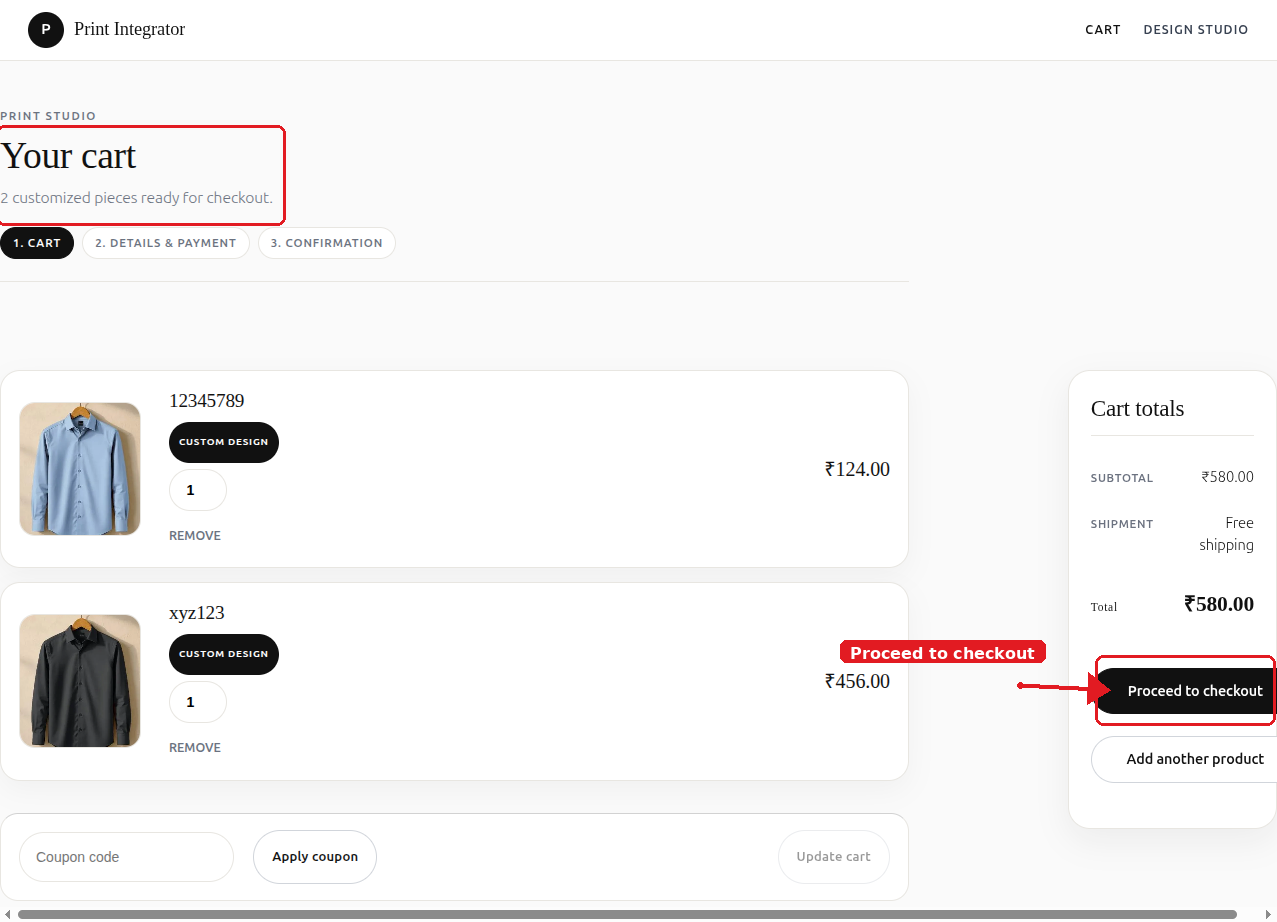
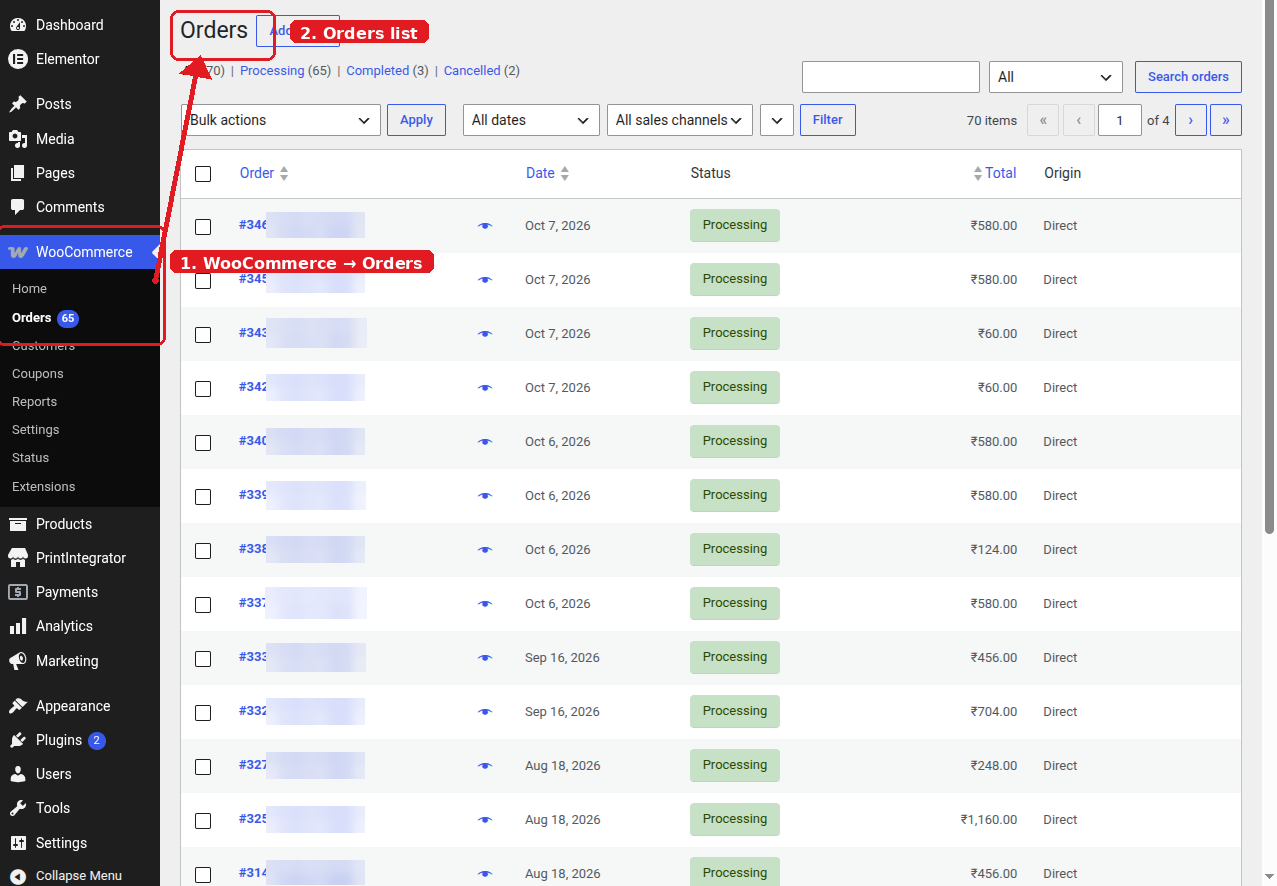
- Custom design sessions added to the WooCommerce cart and orders
- Stripe Checkout payment gateway
- Professional cart, checkout, and order-received styling
This plugin is not affiliated with WooCommerce or Odoo.
Third-Party Services
This plugin connects to an external Odoo / Design Studio server that you configure in the plugin settings.
- Service: Your configured Odoo Design Studio backend (self-hosted or SaaS)
- Data sent: store URL, product data, design session metadata, order line items
- When: only after you save settings, test the connection, connect a store, customize a product, or check out. Activation and first admin load do not contact any remote server.
- Terms and privacy depend on your configured backend instance
Stripe Checkout is used when the Stripe payment method is enabled:
- Service: Stripe (https://stripe.com)
- Data sent: order total, currency, line item labels, customer email, success/cancel URLs
- Terms: https://stripe.com/legal
- Privacy: https://stripe.com/privacy
Installation
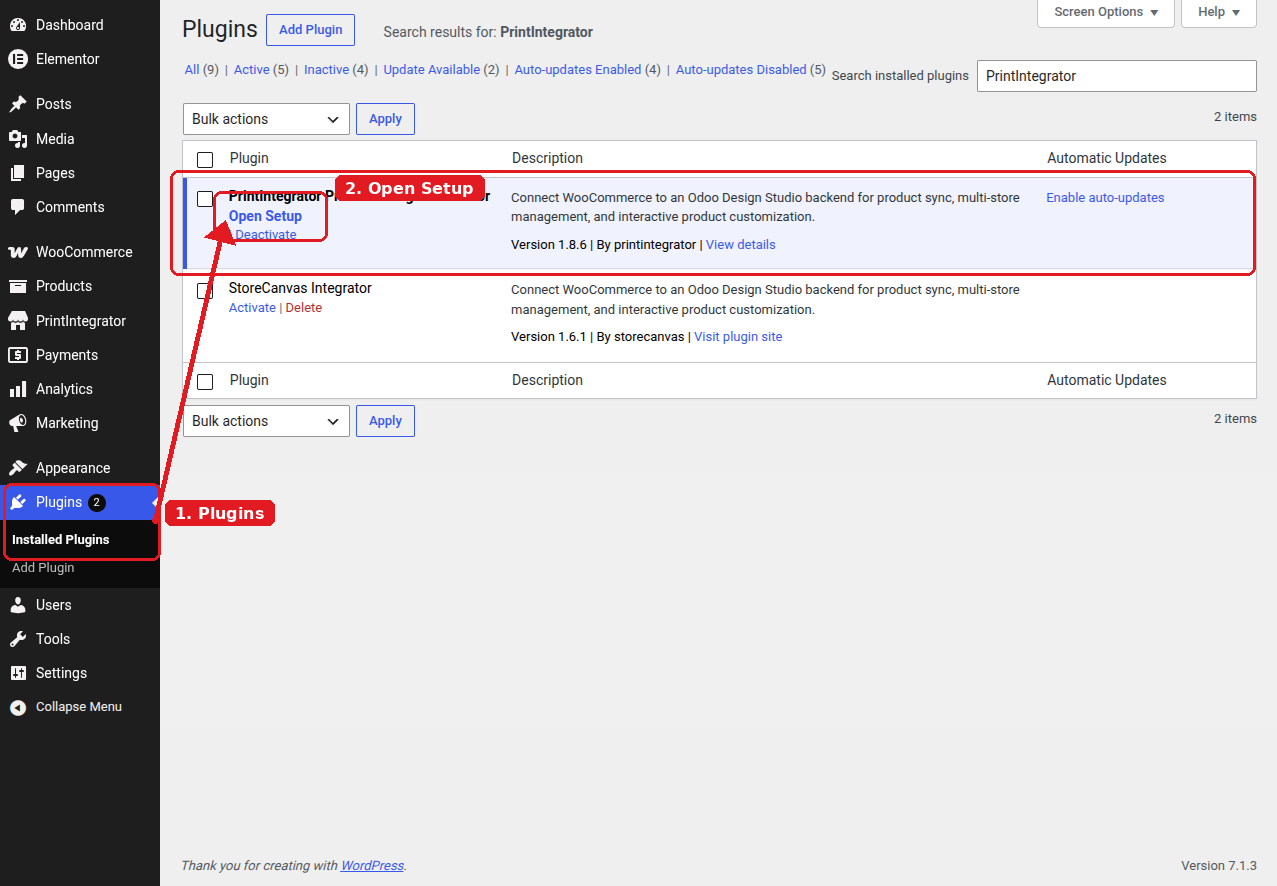
- Upload the plugin zip via Plugins → Add New → Upload Plugin (or install from the WordPress.org directory).
- Activate PrintIntegrator Product Design Connector. WooCommerce must also be active.
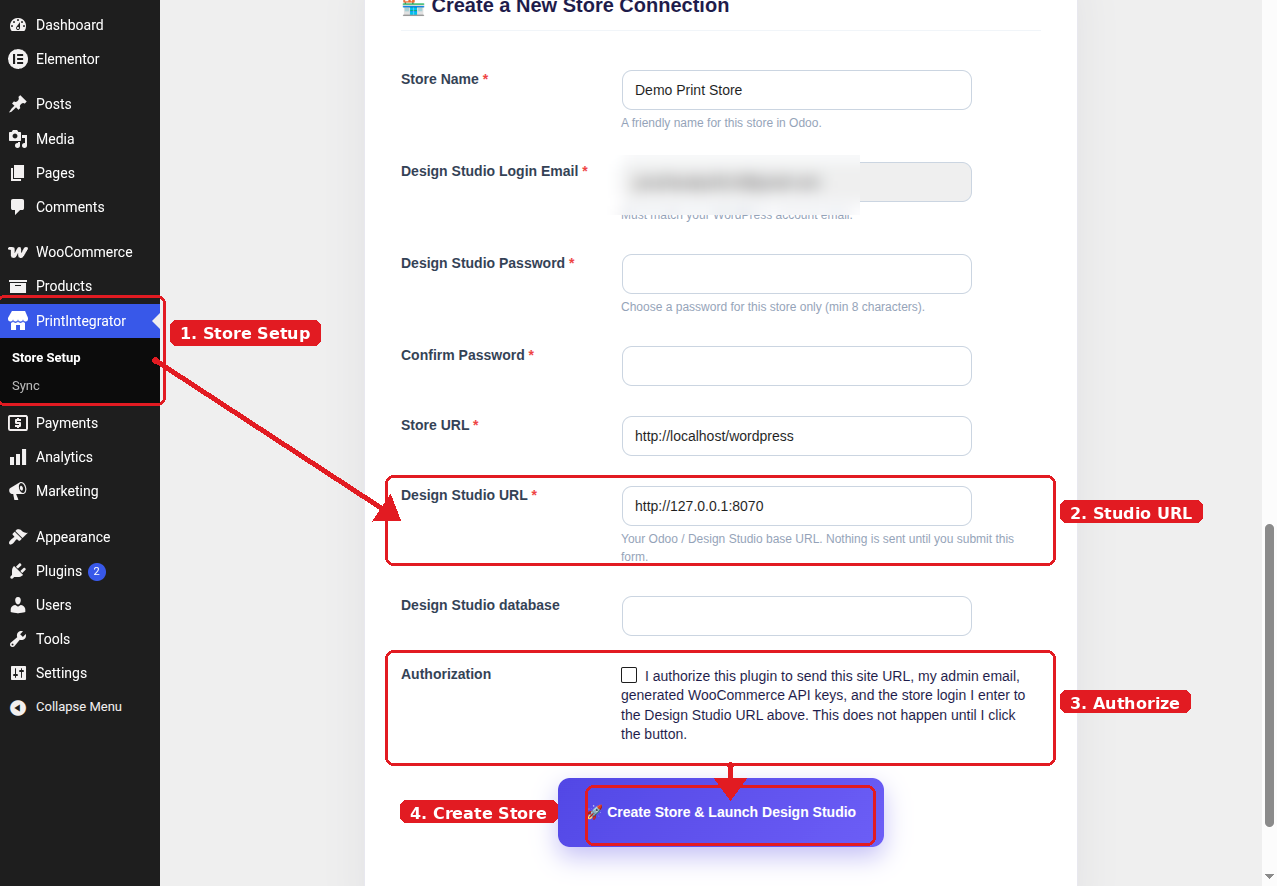
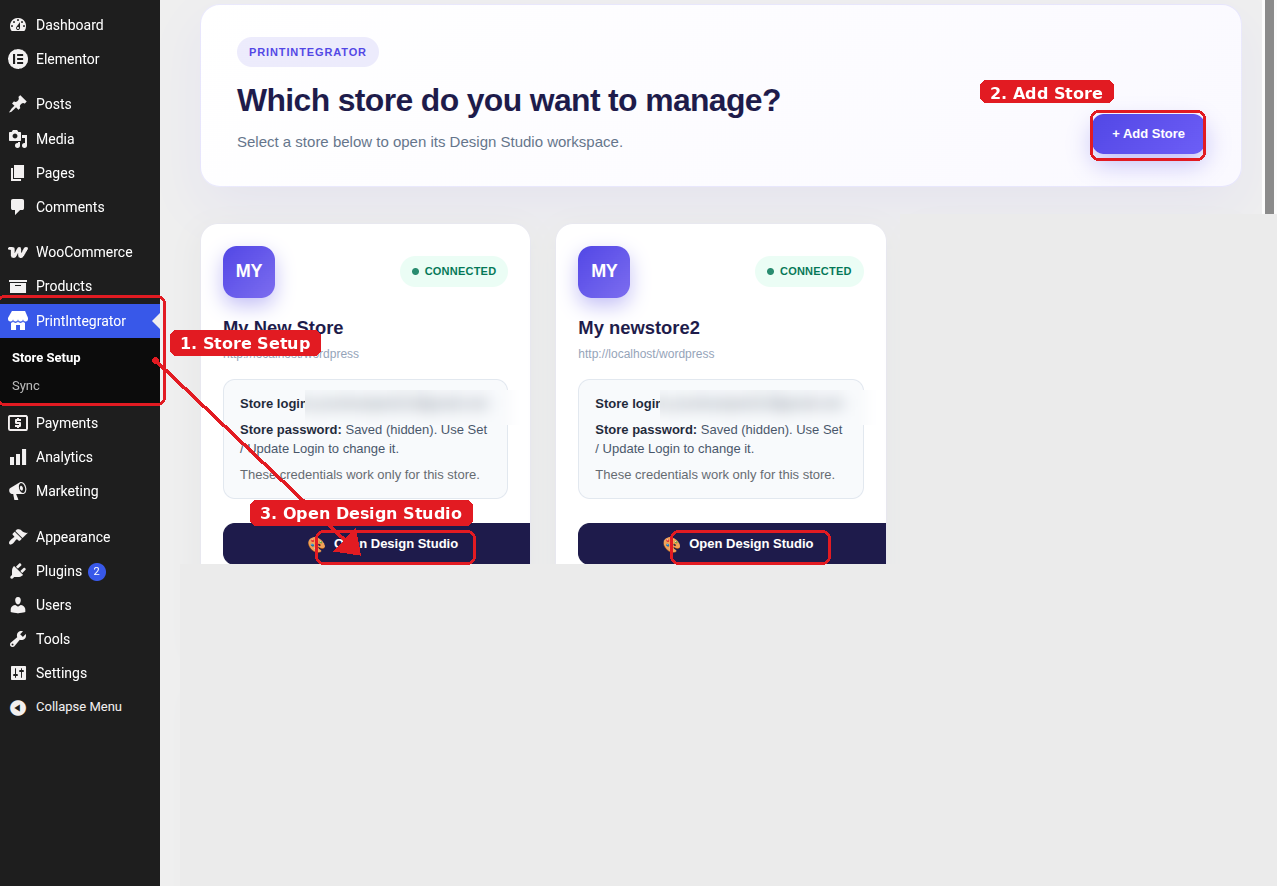
- Open PrintIntegrator → Store Setup, enter your Design Studio URL, authorize, and connect the store.
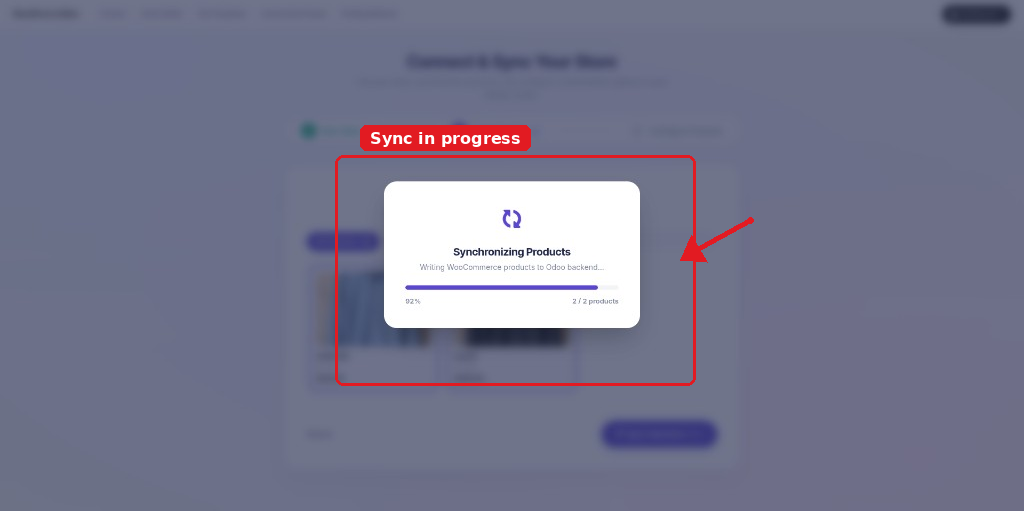
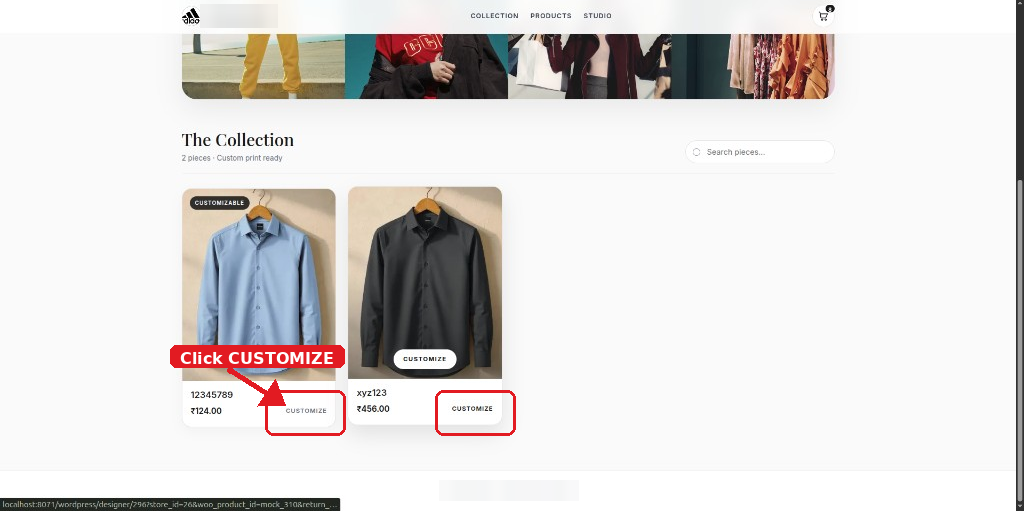
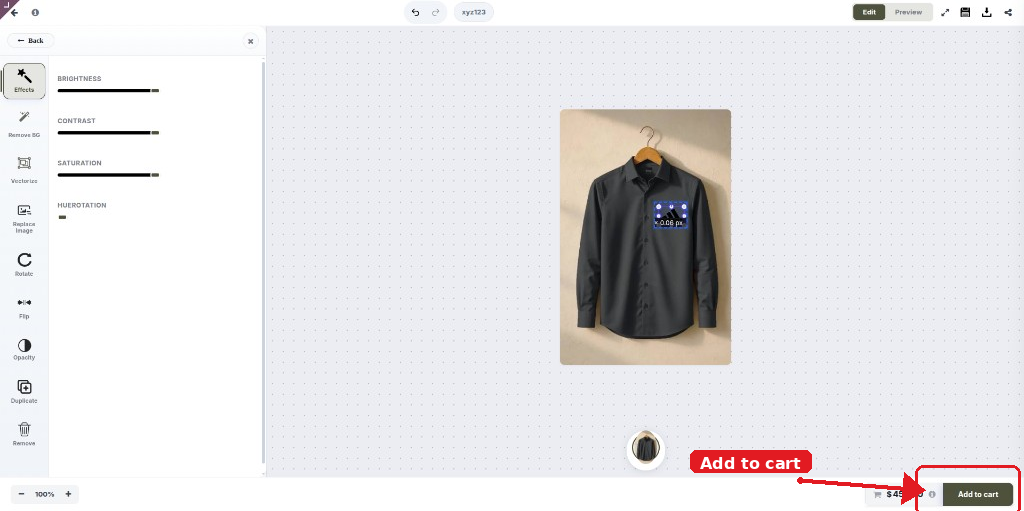
- Sync products, customize on the storefront, check out — designs appear on WooCommerce orders.
See the Screenshots section for a visual setup guide of each step.
Changelog
1.8.6
- Design preview requires a Design Studio access token and verifies it server-side before exposing preview media.
1.8.5
- Distinctive display name: PrintIntegrator Product Design Connector.
- Removed Plugin URI header (no third-party project URL).
- Requested permalink/slug: printintegrator-sync.
1.8.4
- Rebranded display name to PrintIntegrator Product Design Connector (account printintegrator). Removed prior temporary branding.
- Requested permalink/slug: printintegrator-sync.
1.8.3
- Design return to cart requires a verified Design Studio session token; price/store/product never taken from unverified query args.
- Cart store isolation no longer trusts a raw ?store_id= parameter to remove other stores’ items.
1.8.2
- Storefront cart/checkout/thank-you styling without loading Google Fonts (Guideline 7).
- Collection-style order confirmation; theme header chrome hidden on those pages.
- Legacy Design Studio dashboard links redirect to storecanvas-store-setup.
1.8.1
- Cart and order-received URLs work on hosts without pretty permalinks.
- Customized designs add to cart even when the WooCommerce product id is a Design Studio mock id.
- Stripe payments stay off until enabled. No localhost auto-connect. No activation redirect.
- Inline onclick handlers replaced with enqueued JavaScript.
Screenshots
For developers
Is this your plugin? Show off the numbers.
Add a live badge to your site, docs or GitHub README. It updates on its own — no account needed.
FAQ
PrintIntegrator Product Design Conn…: quick answers
Straight answers, pulled from live WordPress.org data.
Source: WordPress.org
Is PrintIntegrator Product Design… free?
Yes. PrintIntegrator Product Design… is free to download and use from the official WordPress.org plugin directory.
Is PrintIntegrator Product Design… safe to use in 2026?
PrintIntegrator Product Design… is a solid plugin choice in 2026, with a few things worth checking first. Was last updated 3 days ago, and scores 64/100 on our health check.
How many websites use PrintIntegrator Product Design…?
PrintIntegrator Product Design… is active on <10 WordPress websites and has been downloaded 252 times since it launched in October 2026. It was downloaded 116 times in the last 30 days.
Does PrintIntegrator Product Design… work with WordPress 7.1?
Yes. The developer has tested PrintIntegrator Product Design… up to WordPress 7.2, the latest release. It requires WordPress 6.0 or newer.
What PHP version does PrintIntegrator Product Design… need?
PrintIntegrator Product Design… requires PHP 7.4 or higher. Most hosts run PHP 8.x today, so it works on any modern WordPress hosting.
When was PrintIntegrator Product Design… last updated?
The latest version, 1.8.6, was released on November 26, 2026 (3 days ago).
Who makes PrintIntegrator Product Design…?
PrintIntegrator Product Design… is developed and maintained by printintegrator.
Powered by PageForge
One template and a spreadsheet. A real page for every search.
PageForge turns each row of a CSV into a WordPress page with its own title, URL, SEO fields and schema, built on the layout you already designed. Free on WordPress.org.
- CSV and XLSX, plus Google Sheets on Professional and Enterprise
- Its own title, URL, SEO fields and schema for every page
- Works with the block editor, Elementor, Divi and Avada
- Free on WordPress.org, no credit card