


PriceWise – Measurement Price Calculator for WooCommerce
Measurement price calculator and product add ons for WooCommerce. Price by area, length, weight or quantity. Your formula sets the price live.

Solid choice
PriceWise is a solid plugin choice in 2026, with a few things worth checking first. It runs on 10+ sites, is rated 5/5 and was last updated 2 weeks ago, and scores 73/100 on our health check.
- Actively developed — last update 2 weeks ago
- Tested with the latest WordPress (7.1)
- Small user base (10+ active installs)
- Very few reviews so far
How does it stack up?
Side-by-side on installs, updates, ratings & support



Daily downloads
Download spikes usually follow a new release — each site that auto-updates counts as a download.
Rankings
Where PriceWise stands todayWordPress.org search rankings
Live position in the plugin search, top 100| Keyword | Position |
|---|---|
| Cost Calculator | #33 |
| measurement price calculator | #6 |
| price calculator | #27 |
| product add-ons | >100 |
| woocommerce | >100 |
Version adoption
Share of active sites per release.
Rating breakdown
★★★★★★★★★★ 5 from 4 reviews
About PriceWise
From the official readme · v2.0.4Description
Some products do not have one price. Flooring goes by the square metre, fabric by the metre, glass by its size, topsoil by weight. So the product page says “contact us for a quote”, and then you spend your evening answering emails about a 2 metre by 3 metre piece of ply.
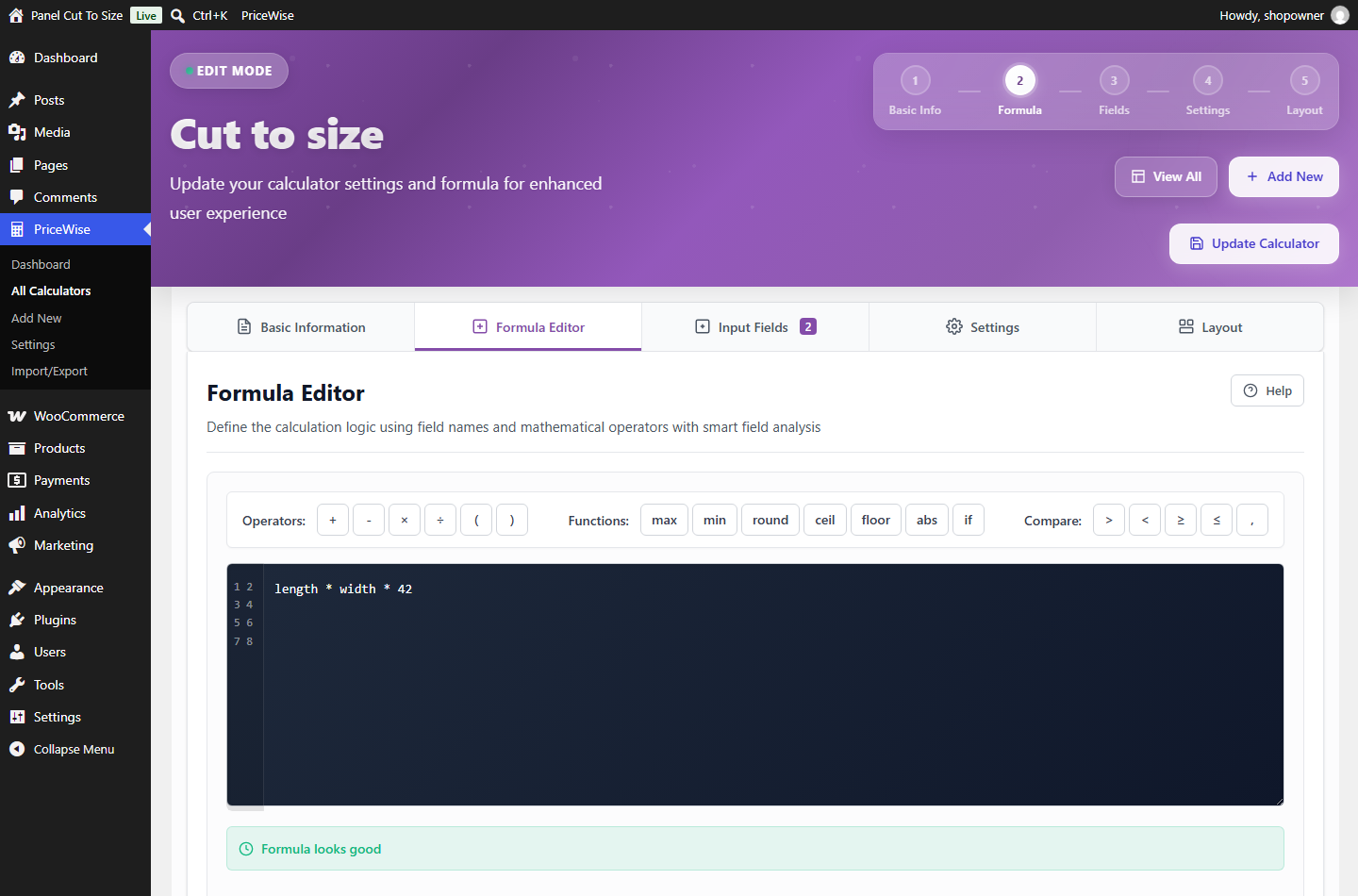
PriceWise puts the calculator on the product page instead. The customer types in their measurements, length and width for example, and the price works out live from a formula you write once, like length * width * 12. They add it to the cart themselves.
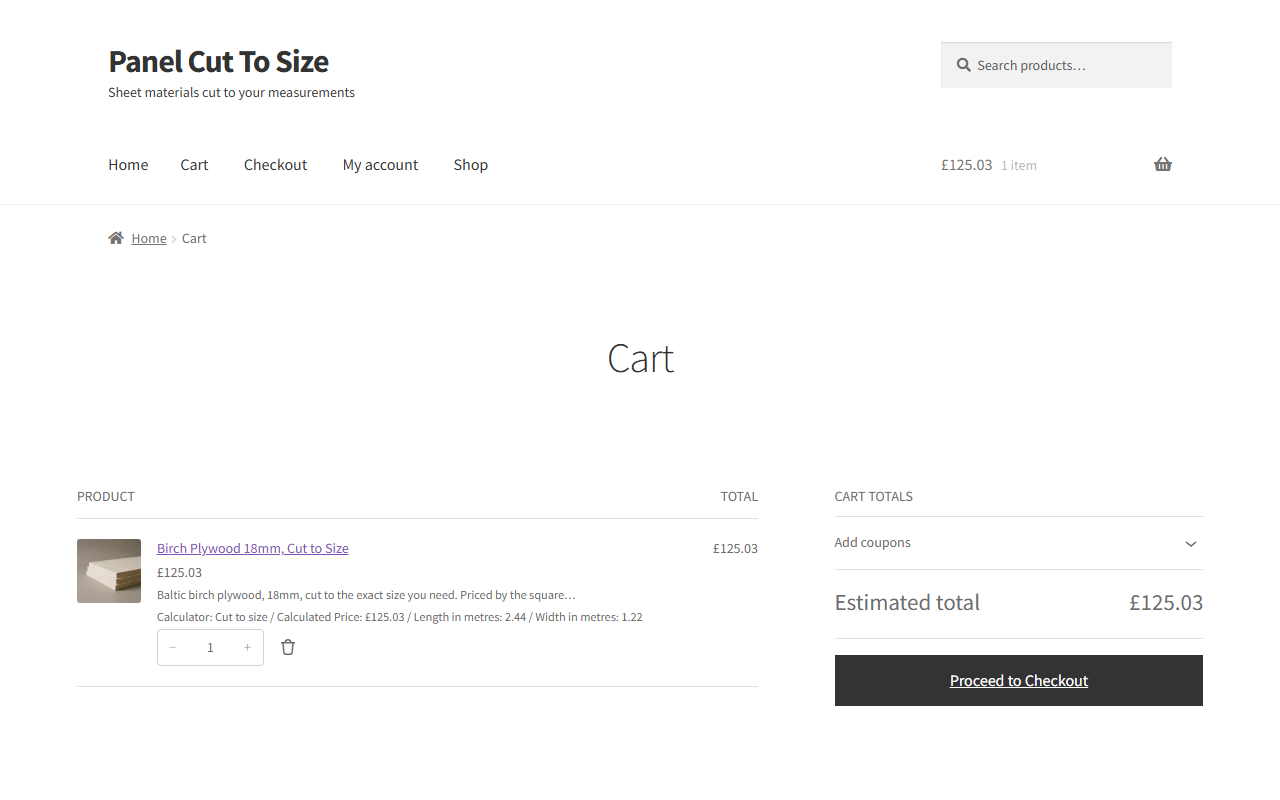
The price is worked out again on your server when the item is added to the cart, so nobody can change it in the browser. It carries into the cart, the checkout and the order with the customer’s numbers saved on the line, which is what your workshop actually needs to cut the job.
You write the formula one time. The plugin does the maths every time someone fills in the boxes.
The free version is the full price by formula calculator: number fields, your formula, a live price, and the WooCommerce cart. That covers pricing by area, by length, by weight, by quantity, or by any rule you can write down. PriceWise Pro adds measurement fields with real units and the product add ons side of it, which is dropdowns, checkboxes, swatches, file upload and the rest.
What the free version does
- Price by measurement with a formula. Ask for length and width and charge by area with
length * width * 12. Ask for metres and charge per metre. Ask for kilos and charge per kilo. If you can write the rule down, the calculator can price it. - Number fields. Ask the customer for length, width, quantity, guests, or any number you need.
- Write the formula once. Use your own field names with
+ - * / ( )and the functionsround,ceil,floor,min,max,absandif. Somax(length * width * 12, 30)charges by area but never drops below 30. Andceil(length / 10) * 10rounds up to whole units. - Live price. The total moves as the customer types. No reload, no button to press.
- Checked on your server. The final price is worked out again at add to cart, so a customer cannot edit it in the browser dev tools.
- Into the cart and the order. The price and the numbers the customer entered are saved on the cart line, the checkout and the order.
- Any currency. The live price follows your WooCommerce currency settings, symbol on the left or the right, comma or dot separators, so it reads properly anywhere: Rs 1,234.50, 1.234,50 EUR, or $1,234.50.
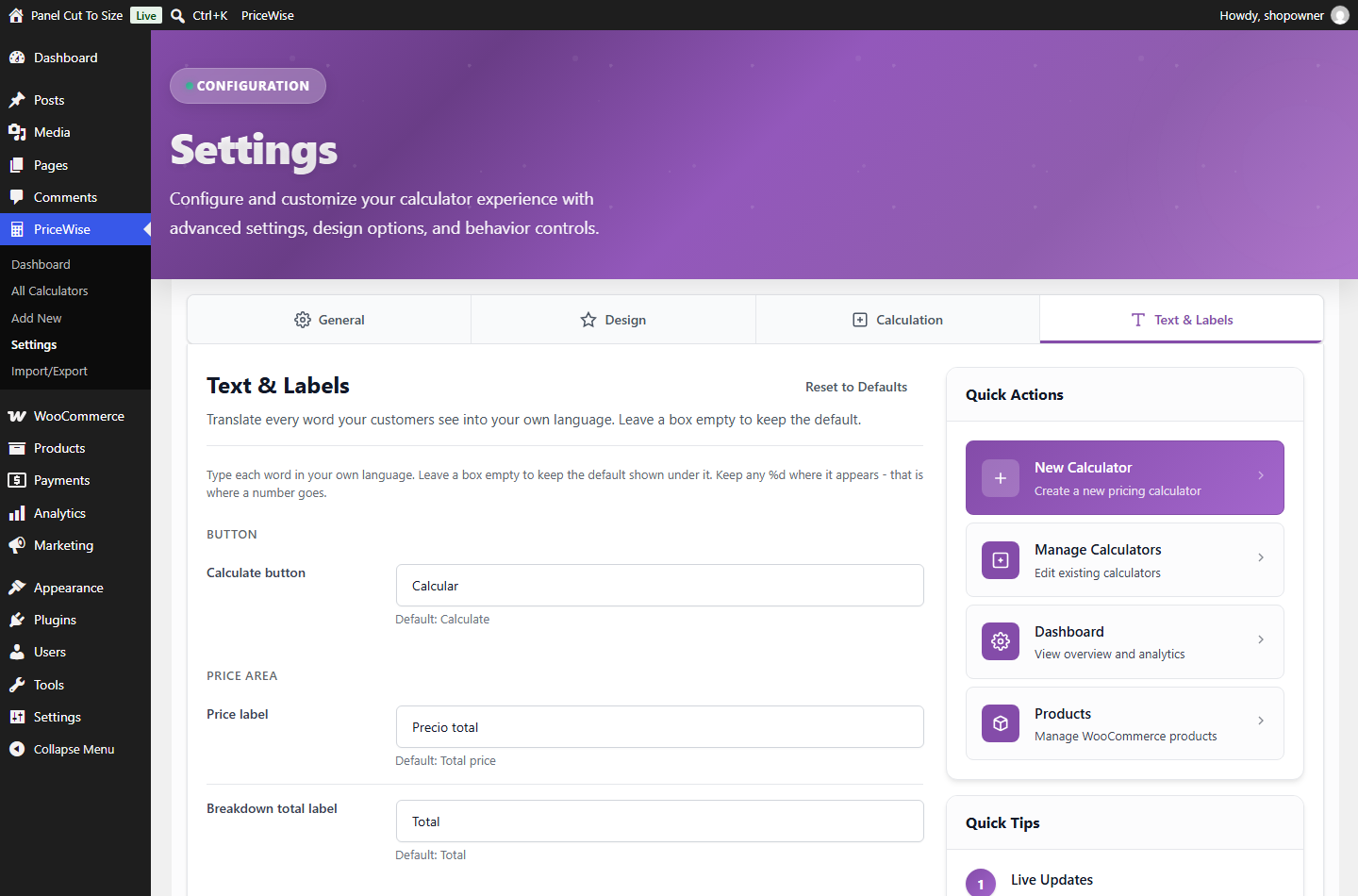
- Your own words. Set the Add to Cart text, the Price label and the on screen messages in your language from Settings > Text & Labels. A .pot file is included for a full translation.
- Two layouts. Show every field together, or inline with no card so it blends into your theme.
- Colour controls, so it matches your store.
- Import and export, to move your calculators between sites as a file.
- Shows on all your products. One calculator, applied across the store.
What you sell, and what goes in the boxes
Underneath, all of these are the same thing: the number fields you decide to ask for, and one formula. None of it needs code. Find the one closest to your shop.
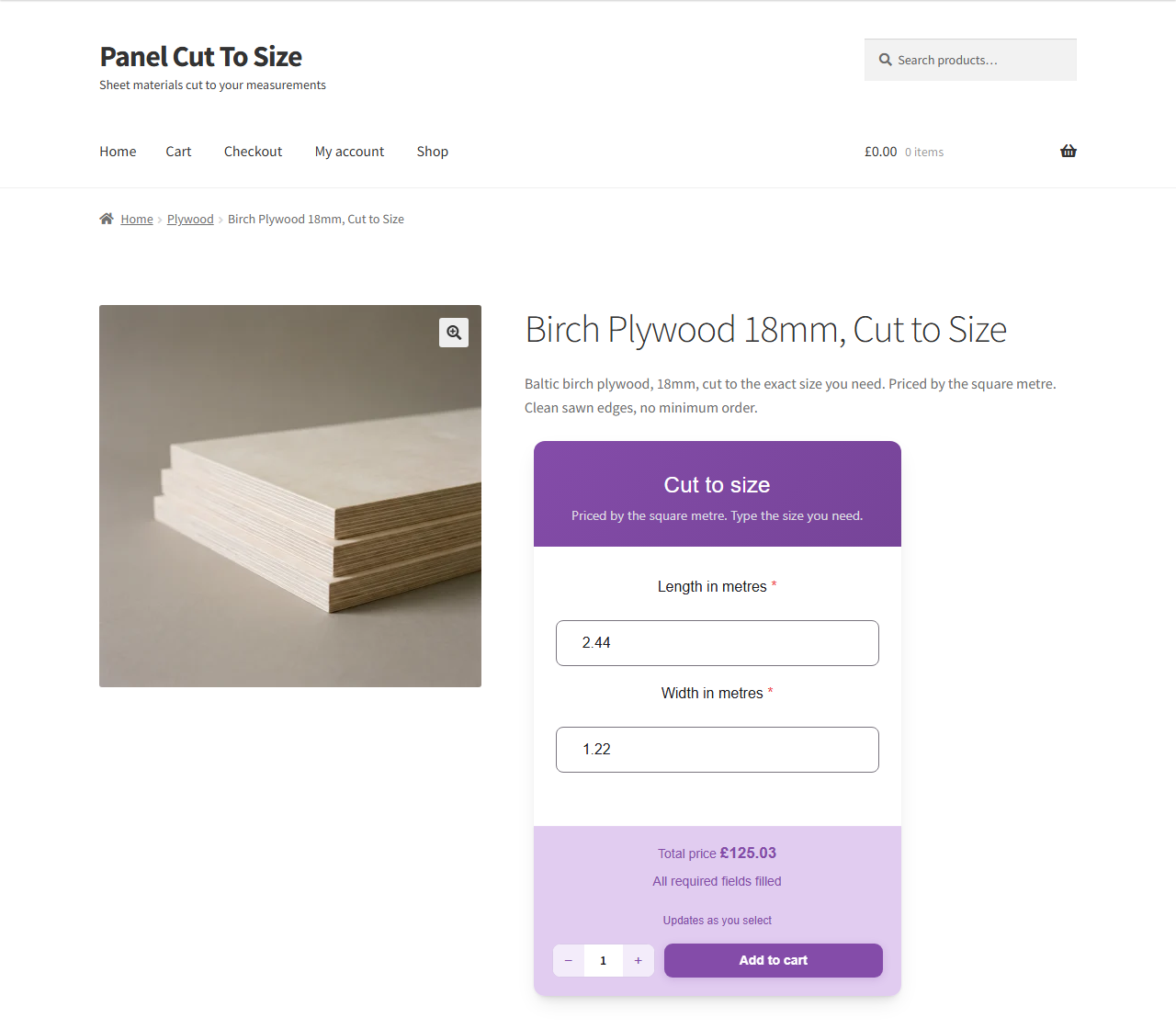
Panel and sheet material. Plywood, birch ply, hardwood faced ply, MDF, moisture resistant MDF, melamine faced chipboard, OSB, acrylic, perspex and polycarbonate, cut to size. Ask for a length and a width in millimetres, and a thickness, because 18mm board does not cost what 12mm costs. length / 1000 * width / 1000 * 42 gives you the square metre price at 42 a metre, and the thickness sits on the same line with its own number.
Glass, mirrors, worktops and countertops. Width and height, plus thickness in mm, since 4mm float and 10mm toughened are not the same product. max(width * height * 180, 45) charges by the size but never goes below 45, so a small shelf does not come out at two pounds. Splashbacks and worksurfaces price the same way.
Flooring and tiling. Room width and room length, and however much waste you allow. ceil(length * width * 1.1 / 2.2) * 38 turns a room into whole packs, at 2.2 square metres a pack, 38 a pack, with ten per cent spare. Laminate, vinyl, carpet, wall and floor tiles, resin and epoxy all work off the same shape.
Wallpaper and wall murals. Wall width and wall height, and the roll size you stock. ceil(width / 0.52) * ceil(height / 10.05) works out how many drops you get out of a standard roll and how many rolls that is, and a mural priced by the square metre is just width times height times your rate.
Roofing, cladding, decking and insulation. Sheets and boards by the square metre, where the thickness or the profile changes the rate. Decking goes by the board or by the area, whichever way you quote it. Roofing felt and membrane go by the roll, so ask for the run in metres and let the formula work out how many rolls that is.
Fabric, upholstery, curtains and blinds. Metres off the roll, or width by drop for a blind, a curtain or a shutter. Roll width matters, so ask for it and let the formula work out how many drops come out of a roll. Leather goes by the hide or the square foot on the same principle.
Rope, cable, tube, timber and trim. Anything off a reel or by the linear metre. One box in metres, one rate, done. Skirting, architrave, mouldings, guttering, garden edging and LED strip all take that same shape.
Rubber, mesh and netting. Sold by the metre off a roll, or by length and width for a cut sheet, with the grade or the gauge changing the rate.
Covers and outdoor. Tarpaulins, awnings and canopies, priced by width and drop with eyelets and hems added on top. Same maths as a banner, different trade.
Topsoil, gravel, bark and firewood. Bulk goods by weight or volume. A cubic metre figure or a kilo figure times your rate, with a minimum load written into the formula so a single bag is not worth the delivery. Sand, ballast, aggregate, ready mix concrete, compost and mulch all sit here.
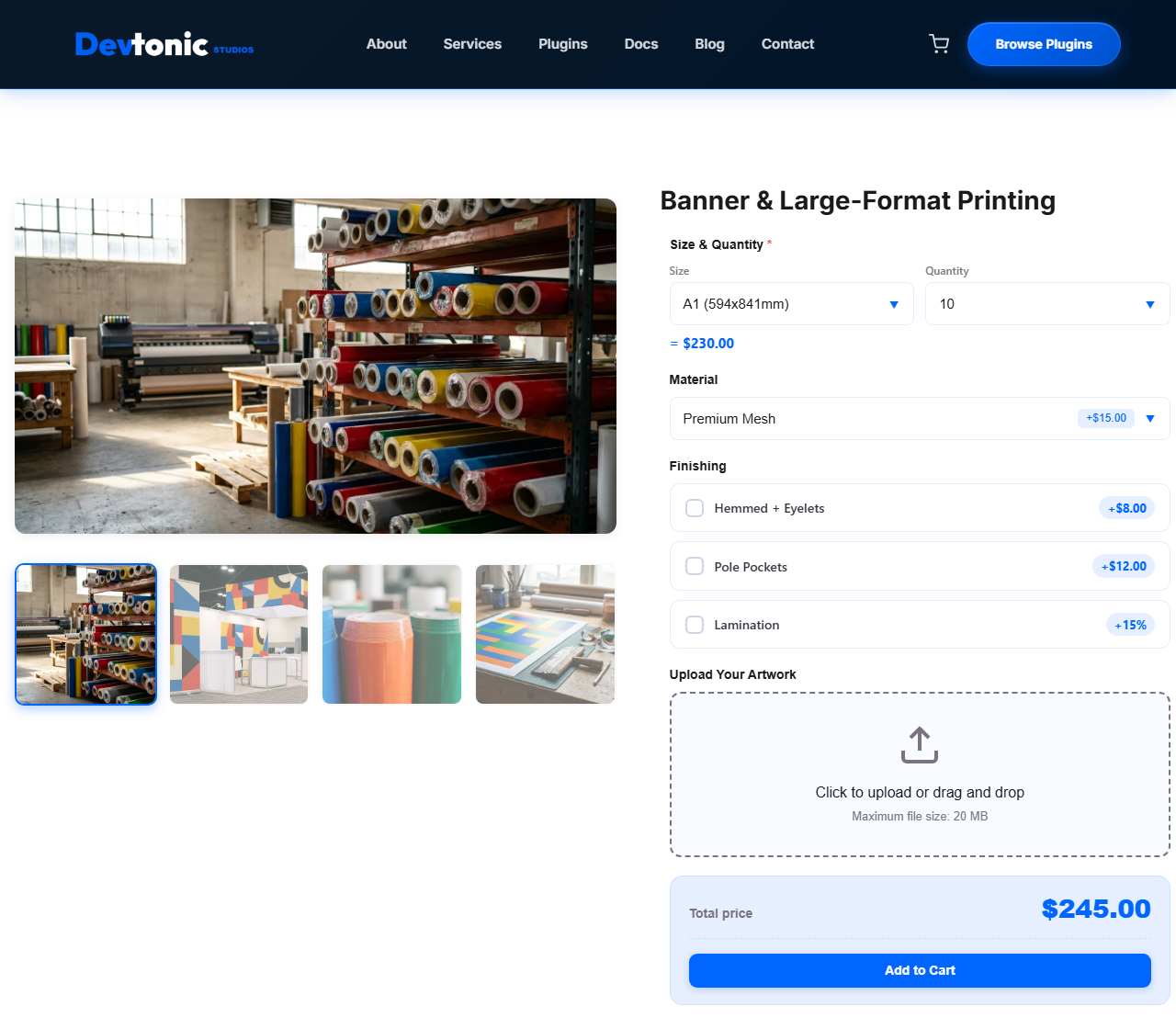
Signs, banners, print and graphics. Width and height for the material, a quantity for the run, and the finishing on top: hemming, eyelets, lamination. Vinyl banners, canvas prints, stickers, labels, posters, business cards, vehicle graphics and vinyl wrap all price this way. Window film and tinting too.
Steel, aluminium and foam. Cut to size by length, or by length and width for a sheet, with a thickness or a gauge changing the rate.
Bricks, blocks and paving. Area in, packs or pallets out. The round up function does the awkward part, so you never sell three quarters of a pack.
Fencing and gates. Run length in metres, panel height, and whether posts and gravel boards are in the price. Railings and garden gates follow the same line.
Work measured on site. Cleaning by the room or the square metre. Painting and decorating by wall area. Rendering and plastering by the square metre. Landscaping and lawn care by area. Window cleaning by the window. Removals by item or van load.
Per person and per day. Catering and buffets by the head. Marquee, event and equipment hire by the day. Party packages by the guest. Coach and minibus hire. Workshops and classes by the seat.
Food and dry goods by weight. Coffee beans, loose tea, spices, bulk nuts, grains, animal feed. Paint and liquids by the litre.
If your product page currently says “contact us for a quote”, this is the part that replaces it.
Product add ons and extra product options
People call this kind of thing different names depending on where they came from. Product add ons, product addons, extra product options, a product configurator. They all mean the same job: let the customer choose something on the product page, and have that choice change the price.
The free version does the calculator half. Number fields, your formula, a live price that the server checks. If the price depends on a measurement or a number the customer types in, free does that on its own and you do not need to buy anything.
PriceWise Pro does the options half. Dropdowns, radio buttons, checkboxes, colour and image swatches, sliders, file upload for artwork, date and booking fields, and optional paid add ons. Every option can carry its own price, a percentage, or its own line in the formula. That is the part that turns a calculator into a full product configurator.
Most shops end up needing both. A sign shop asks for a width and a height, and then asks what material, whether you want eyelets, and would you like to upload your artwork. The first part is free. The rest is Pro.
Free vs Premium
The free version is the formula based price calculator, applied to all your products. The premium version adds:
- Measurement fields with real units. Pick square metres, square feet, metres, kilos or litres instead of writing the formula yourself, with a waste percentage and round up to whole boxes or rolls.
- More field types. Dropdown, radio, checkbox, slider, file upload, date and booking, and optional add ons.
- Price tables. Price by a size band, or a size against quantity grid, which is the classic print shop pricing table.
- PDF quotes. A clean, branded PDF on every order, attached to the order email if you want it.
- More control. Show and hide field rules, colour and image swatches, the step by step layout, per product and per category targeting, editing a configured item from the cart, and order email alerts.
See what PriceWise Pro adds, or open the live calculators and use them yourself. They are working calculators on a real shop, not screenshots.
How it works
- Install and activate PriceWise.
- Go to PriceWise > Add Calculator.
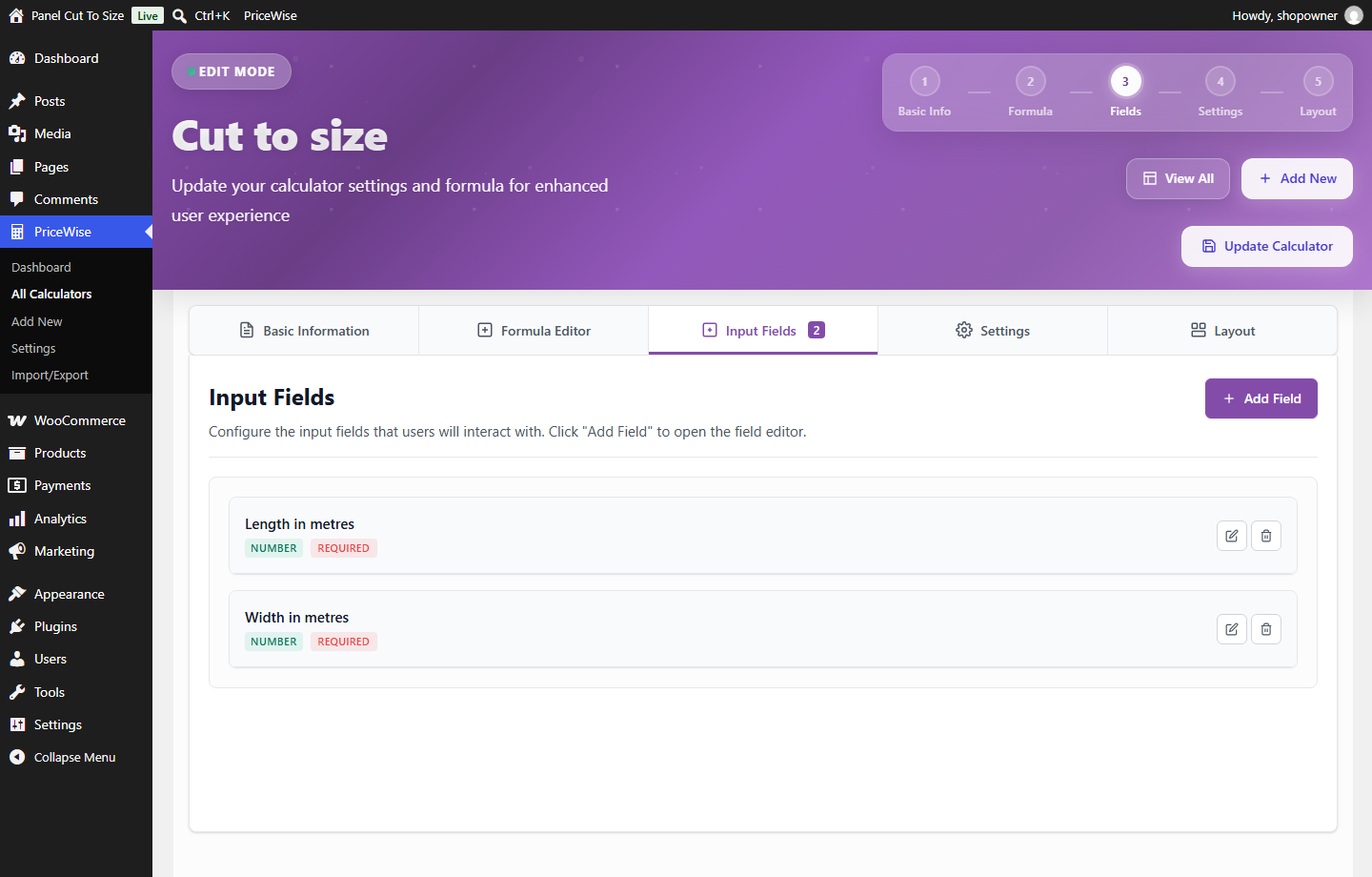
- Add your number fields, length and width for example, and write the formula,
length * width * 12for example. - Save. The calculator shows on your WooCommerce products and the price moves as customers type.
Privacy
PriceWise does not send any data to outside services. Every calculation runs on your own server, and the free plugin makes no external connections.
Installation
Requirements
- WordPress 5.8 or newer
- PHP 7.4 or newer
- WooCommerce 5.0 or newer, for the cart price
Install from your dashboard
- Go to Plugins > Add New.
- Search for “PriceWise measurement price calculator”.
- Click Install Now, then Activate.
Install manually
- Download the plugin zip.
- Go to Plugins > Add New > Upload Plugin.
- Choose the zip, click Install Now, then Activate.
After activating
- Go to PriceWise > Add Calculator.
- Add your number fields and write the formula.
- Save, then open one of your products to see the live price.
Frequently asked questions
Can it price by square metre, or by other measurements?
Yes. In the free version you do it with a formula: add length and width fields and write length * width * 12 to charge 12 per square metre. The same idea works per metre, per kilo, per litre or per person. PriceWise Pro adds measurement fields where you just pick the unit, plus a waste percentage and round up to whole boxes or rolls.
Is this a product add ons or extra product options plugin?
Partly, and it is worth being straight about which part. The free version is the price calculator: number fields and a formula that work out the price live. PriceWise Pro is the product add ons and extra product options side, with dropdowns, checkboxes, radio buttons, swatches, file upload, date pickers and other choosable extras that change the price. If you only need to price by a measurement or a number the customer enters, free does that on its own.
Can I use it as a WooCommerce product configurator?
That is what Pro is for. A configurator is really just options plus a price that reacts to them, which is dropdowns, swatches, show and hide rules and a step by step layout. The free version handles the measurement side of a configurator, so if your product is built purely on sizes, free is enough.
What is free, and what is premium?
Free gives you formula based price calculators with a live, server checked price, applied to all your products, in any currency and any language, with import and export. Premium adds measurement fields with units, more field types including dropdown, file upload, date and add ons, price tables, PDF quotes, and per product or per category targeting.
Do I need to know code?
No. You write a plain formula using your field names, like length * width * 12. There are buttons for round, min, max and if, so you do not have to remember them.
Can a customer fake the price in their browser?
No. The price shown live is for the customer, but the real price is worked out again on your server when the item goes into the cart. The browser’s number is never trusted.
Does it work in my currency?
Yes. The price follows your WooCommerce currency format, the symbol position and the decimal and thousands separators, so it reads correctly in any country. The cart and the order use the same format.
Can I translate the words customers see?
Yes, two ways. Open Settings > Text & Labels and type the button text, the Price label and the messages in your own language, with no translator plugin needed. Or translate the whole plugin with the included .pot file using something like Loco Translate or Poedit.
Will it work with my theme?
It works with standard WooCommerce product pages, and it is tested on common themes like Storefront, Astra and GeneratePress. If your theme heavily overrides the product page you may need to place the calculator with a shortcode.
Can I move my calculators to another site?
Yes. Export your calculators to a file on one site and import them on another.
Does it need WooCommerce?
Yes. PriceWise is built for WooCommerce. It puts the calculated price into the WooCommerce cart and order, so WooCommerce needs to be installed and active.
My calculator isn’t showing on the product page. Why?
Two things to check: the calculator needs at least one field added, and the WooCommerce product needs a regular price set.
Changelog
Fixes number boxes in the all-in-one and inline layouts: Enter no longer hides a box, the price updates after Backspace, and a 0 below the minimum no longer counts as filled. Your calculators and settings are untouched.
2.0.4 – 2026-09-24
- Fix: pressing Enter in a number box hid that box when the calculator shows every field in one card or inline. Enter now works the price out and every box stays on screen.
- Fix: the price did not always update after Backspace or fast typing. A change made while the last price was still loading was dropped, so the old price stayed on screen. It is now priced as soon as that answer is back.
- Fix: a box left on a number below its own minimum, like a 0 when the minimum is 1, counted as filled, so the calculator said “All required fields filled” before anything was typed. It now counts as empty until a real size is typed.
- Fix: typing a number could turn it into a different one. With a minimum of 10, typing 50 gave 100, because the 5 was pulled up to 10 while it was still being typed. The minimum is now applied when you leave the box.
- Fix: when the price cannot be worked out, the old price no longer stays on screen.
2.0.3 – 2026-09-16
- Fix: the Add Field button in the field editor did nothing. Saving a new field stopped on a script error, so no field could be added to a calculator. Fields now save as they should.
2.0.2 – 2026-08-30
- Fix: the admin menu was still called “Calculator Pro”. It is now called PriceWise, so it matches the plugin name and the setup steps on this page.
- Fix: a fresh install built its example calculator with a dropdown field, which is a premium field type, so the example arrived asking for a “Size” with nothing to choose from. The example is now a working price by area calculator with a Length and a Width box.
- Fix: the plugin’s own admin screens lost their styling on any site not running in English. The stylesheets were tied to the translated menu title, so on a German or French site they never loaded and the pages came out unstyled.
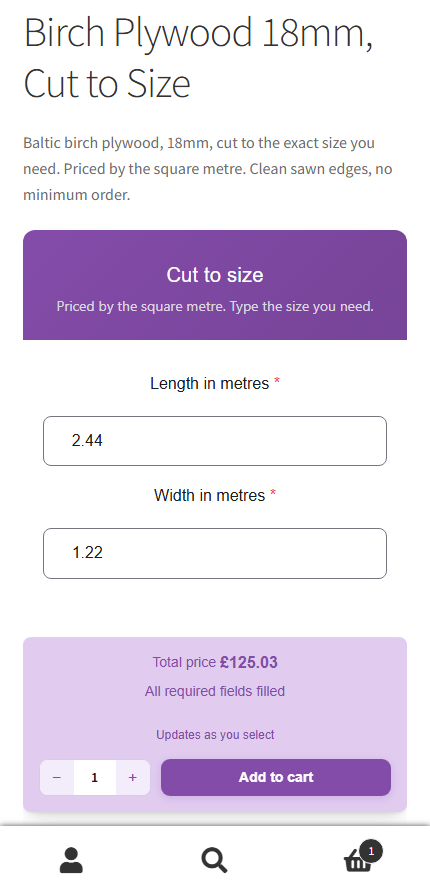
- New screenshots. Six of the free version doing its job, including the calculator on a real product page and on a phone, then four of PriceWise Pro so you can see what the paid version adds. Every Pro one says so in its caption.
- Tested with WordPress 7.1 and WooCommerce 11.0.
2.0.1 – 2026-06-19
- Tested and confirmed compatible with WordPress 7.0.
2.0.0 – 2026-06-08
- Rebuilt on a new engine shared with the premium version.
- New: formula functions
round,ceil,floor,min,max,abs, andif. For example,max(area * 50, 30)charges by area but never less than 30. - New: the live price is re-checked on your server at add-to-cart, so it can’t be changed in the browser.
- New: full currency formatting (symbol position, comma or dot separators) on the live price, the cart, and the order.
- New: set the Add to Cart text, the Price label, and messages in your own language from Settings > Text & Labels.
- New: two layouts, all-in-one and inline.
- Improved: faster admin and a smaller, cleaner build. Tested with WooCommerce HPOS and the block-based cart.
- Your existing calculators and settings from 1.0.0 are kept.
1.0.0 – 2025-01-27
- Initial release: number-field price calculators with a live price and WooCommerce cart integration.
Screenshots


For developers
Is this your plugin? Show off the numbers.
Add a live badge to your site, docs or GitHub README. It updates on its own — no account needed.
Best PriceWise alternatives
All Cost Calculator plugins →





FAQ
PriceWise: quick answers
Straight answers, pulled from live WordPress.org data.
Live data from WordPress.org · checked Oct 10, 2026
Is PriceWise free?
Yes. PriceWise is free to download and use from the official WordPress.org plugin directory.
Is PriceWise safe to use in 2026?
PriceWise is a solid plugin choice in 2026, with a few things worth checking first. It runs on 10+ sites, is rated 5/5 and was last updated 2 weeks ago, and scores 73/100 on our health check.
How many websites use PriceWise?
PriceWise is active on 10+ WordPress websites and has been downloaded 1,176 times since it launched in February 2026. It was downloaded 280 times in the last 30 days.
Does PriceWise work with WordPress 7.1?
Yes. The developer has tested PriceWise up to WordPress 7.1.3, the latest release. It requires WordPress 5.8 or newer.
What PHP version does PriceWise need?
PriceWise requires PHP 7.4 or higher. Most hosts run PHP 8.x today, so it works on any modern WordPress hosting.
When was PriceWise last updated?
The latest version, 2.0.4, was released on September 24, 2026 (2 weeks ago).
Who makes PriceWise?
PriceWise is developed and maintained by Hamza Afridi.
What are the best alternatives to PriceWise?
The most popular alternatives to PriceWise are Cost Calculator Builder (20K+ installs), Cost Calculator for Contact… (5K+ installs) and Stylish Cost Calculator (1K+ installs).
Powered by PageForge
Want thousands of pages that rank like these? Build them in an afternoon.
This directory runs on the same engine as PageForge. Turn any spreadsheet, CSV or API into thousands of fast, SEO-ready WordPress pages — with schema, internal links and AI-written copy baked in.
- CSV, Google Sheets & API data sources
- AI content, schema & internal links per page
- Works with Elementor, Gutenberg, Yoast & Rank Math
- Free on WordPress.org — no credit card


