



Prevent Files / Folders Access
Prevent public access to WordPress files and folders. Protect downloads from public access. Role and user based folder access in premium plans only.

Solid choice
Prevent Files / Folders Access is a solid plugin choice in 2026, with a few things worth checking first. It runs on 1K+ sites, is rated 4.6/5 and was last updated 4 days ago, and scores 74/100 on our health check.
- Loved by users — 4.6/5 from 35 reviews
- Actively developed — last update 4 days ago
- Tested with the latest WordPress (7.1)
- Momentum — downloads up 128.4% vs the previous 30 days
How does it stack up?
Side-by-side on installs, updates, ratings & support


Daily downloads
Download spikes usually follow a new release — each site that auto-updates counts as a download.
Rankings
Where Prevent Files / Folders Acc… stands todayWordPress.org search rankings
Live position in the plugin search, top 100| Keyword | Position |
|---|---|
| content restriction | #43 |
| media restriction | #23 |
| protect uploads | #26 |
| protect-folders | #10 |
| secure files | #19 |
Version adoption
Share of active sites per release.
Rating breakdown
★★★★★★★★★★ 4.6 from 35 reviews
About Prevent Files / Folders Access
From the official readme · v2.6.8Description
WordPress Prevent files/ folders access provides the easiest way to protect WordPress files from public users so that your wordpress media library can be accessed only by WordPress logged in users, or by users with specific roles/capabilities (role based restriction is available in the premium plans only, it is not part of the free version). Your ebooks, pdfs, other important files, etc., can be protected from google indexing so that data is protected from getting stolen. Control users access to media library, Control users access to the WordPress upload folder or sub folders, and restrict all the files published on your WordPress site.
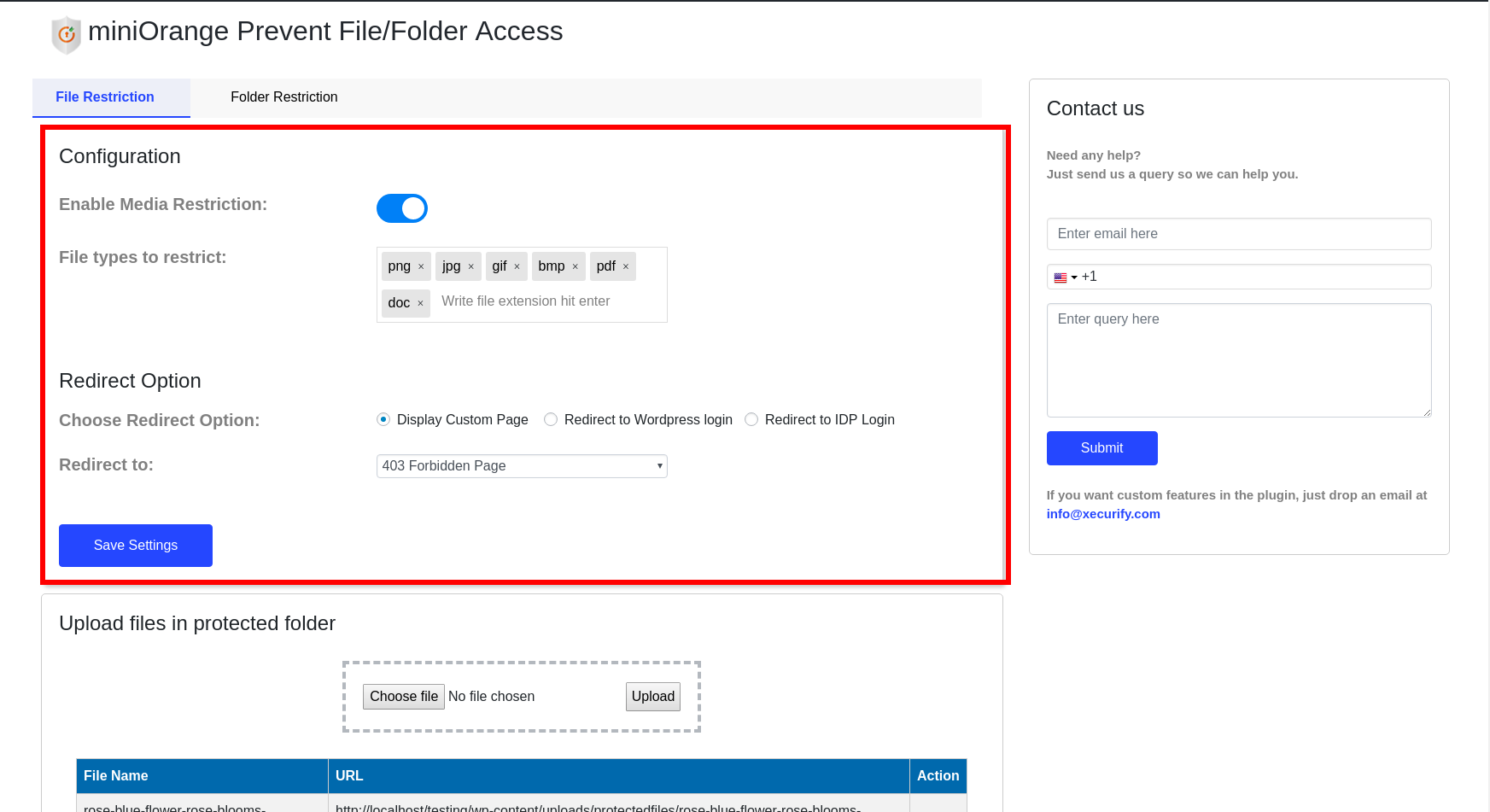
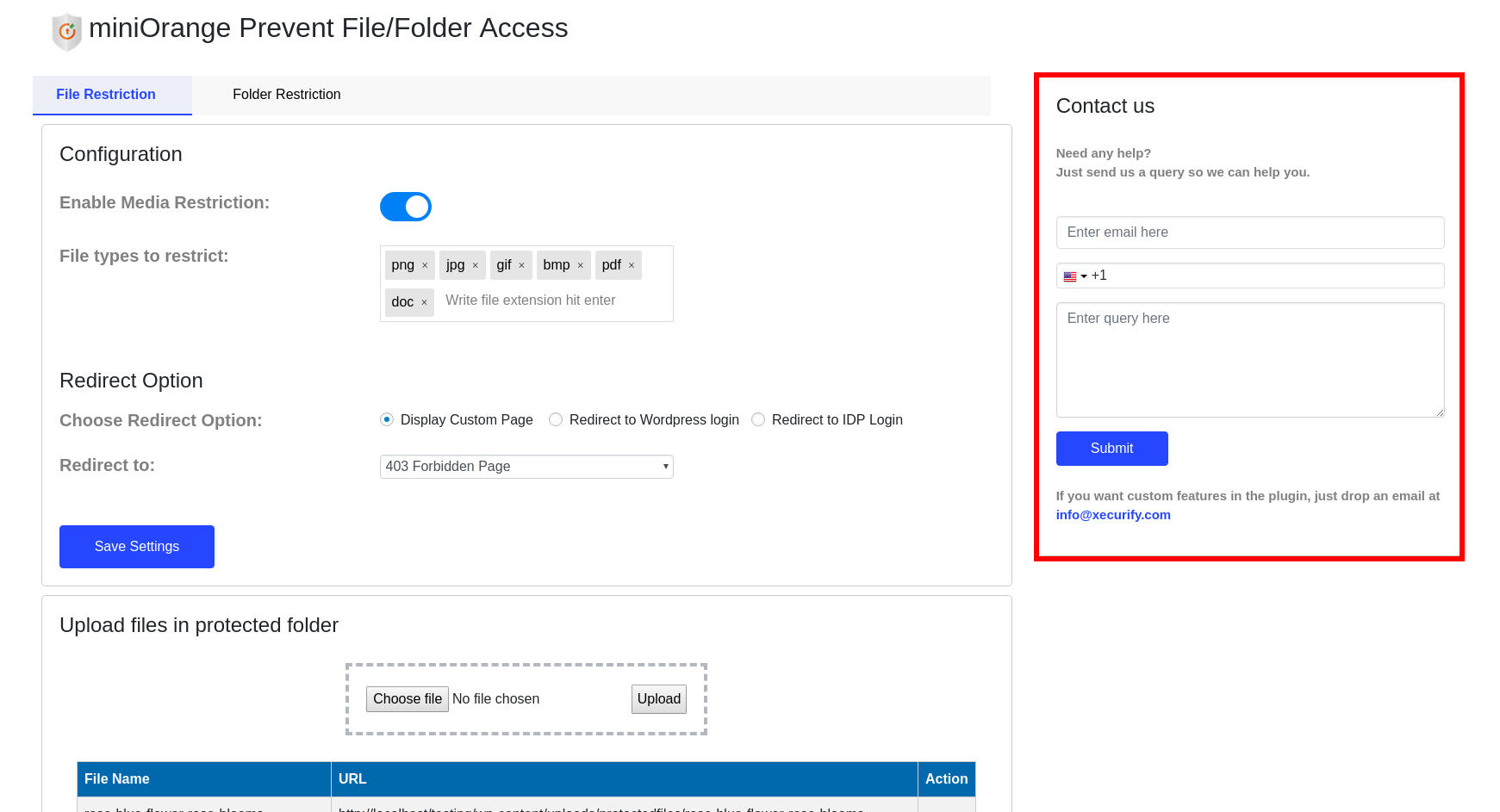
For restricted Content you can choose to redirect users to 403 forbidden page, your custom page, WordPress login page, SSO login page (if you are using OAuth or SAML SSO).
No change required or no manual work needed to create a private link to protect your wordpress media file. Our plugin takes care of your media library or via Media, Pages, or Posts.
We support a level of security where you can choose either cookie-based restriction or session-based restriction.
Also, we support Apache and Nginx servers to prevent direct access to the WordPress media library and therefore protect the media library for public or restricted users.
It prevents private download of the media files from public access and only the logged-in users or specific user roles (role based access requires a premium plan) can access and download the wordpress media files.
We also support media/files/folders Restriction based on NFT holding in the user crypto wallet. We support any level of customization according to your requirement.
File-Based Protection
WordPress Prevent file/folder access is developed to allow you to protect wordpress media file in your customized way. It will prevent direct access from media library based on their extension.
You can protect file types below:

* Images - Every type of image files can be protected. eg: jpeg, jpg, gif, png, bmp, webp, pfg, ico, psd, etc.
* Videos - Every type of video files can be protected. eg: mp4, m4a, m4v, f4v, f4a, m4b, m4r, f4b, mov, 3gp, avi etc.
* Documents - Every type of document files can be protected. eg: doc, docx, html, pdf, txt, ppt, xls, xlsx, pptx, odt.
Redirect
WordPress Prevent file/folder access provides redirect options. This allow you to redirect the restricted users to any WordPress page of your website.
- 403 forbidden page (DEFAULT) – Users will be shown 403 forbidden pages with a restricted access message.
- Display custom page – We can redirect users to any WordPress custom page when they try to access restricted files or folders.
- WordPress login – Users will be redirected to the WordPress default login page.
- IDP login – Users will redirect to the selected IDP (SAML/OAuth) login page and after IdP authentication they can see the restricted content.
Private Directory/Protected folder
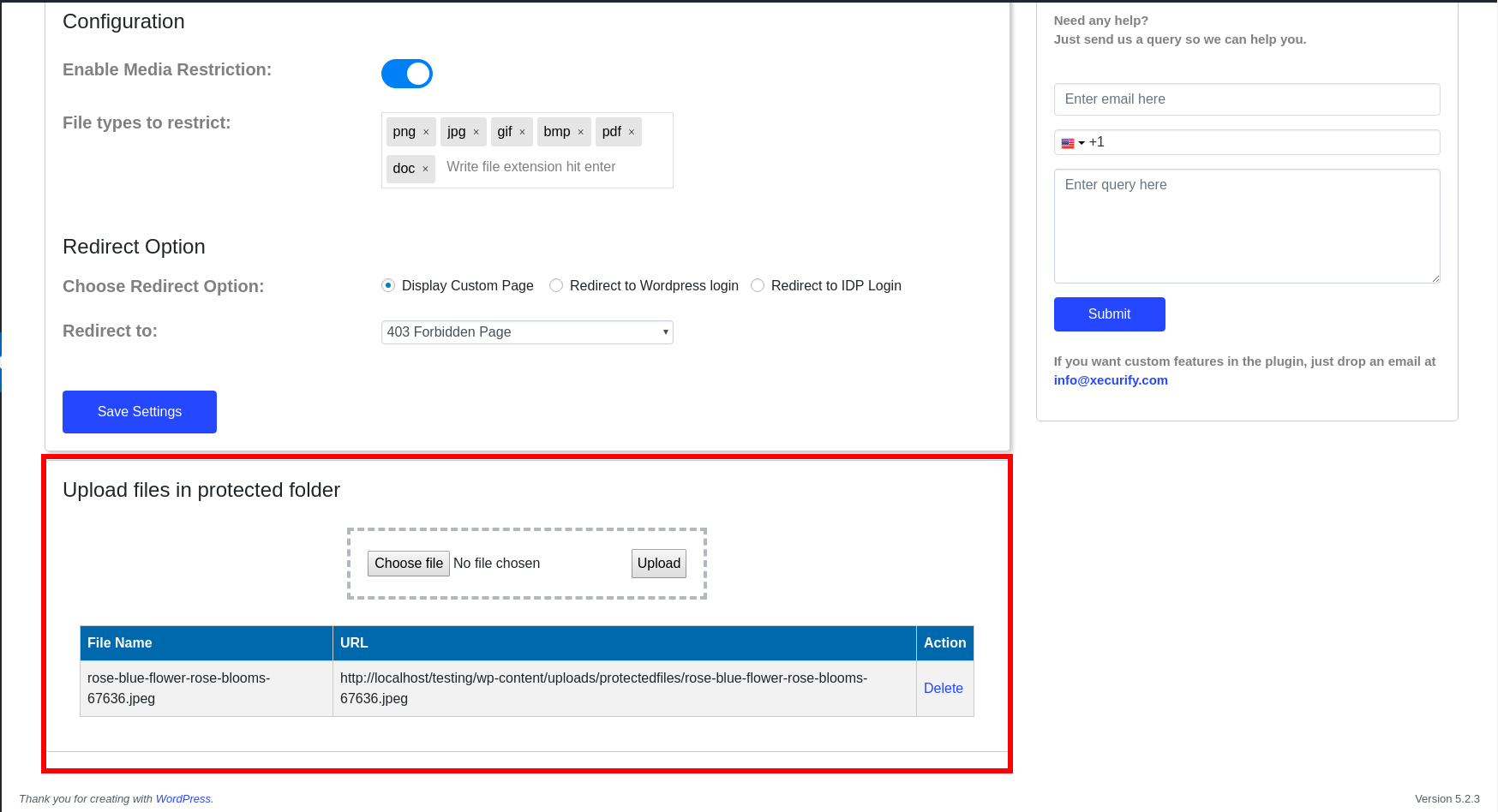
- Our plugin also gives you a Private Directory where you can add files of all extension types and restrictions will be applied to all files inside the private directory.
Membership Based Media Restriction.
- WordPress Prevent files/ folder allows you to secure media library and control wp-content/uploads access based on the membership purchased by the user.
Folder Based Protection
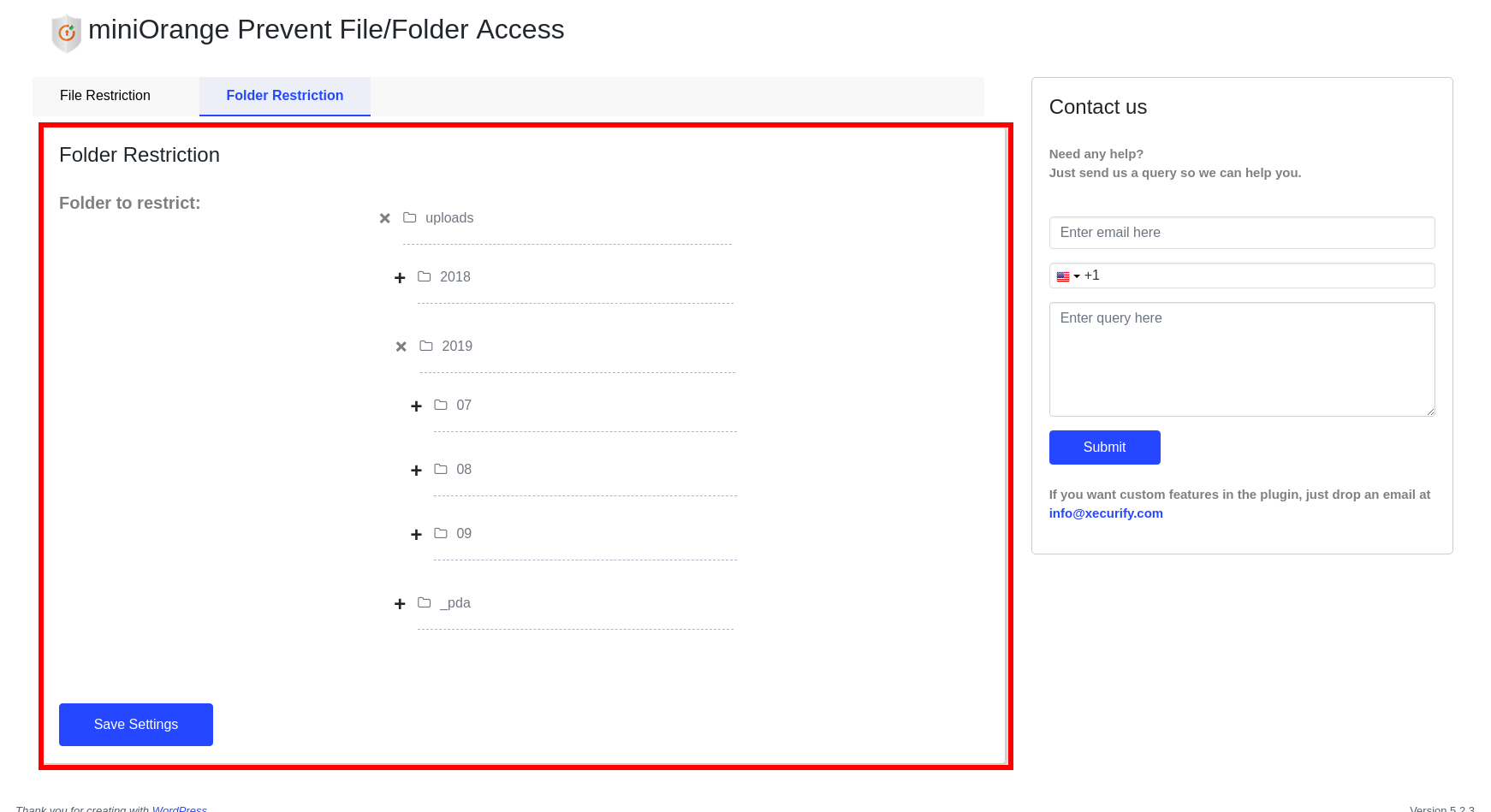
- WordPress Prevent files/ folders access allows you to protect your folders too, the wp-content or uploads folder where all the wordpress media files like images, videos, and document files are stored will also be protected.
- Users have the option to protect a particular month’s media files or sub folder in uploads directory..
- User-Based Restriction (premium plans only) – A particular user can access only a particular folder. (Admin would be able to access all the folders)
- Role Base folder access (premium plans only) – Uploads folder or subfolders can be restricted for public access and allowed folder access to users with specific role. (Admin would be able to access all the folders)
Please note: Role based and user based file/folder restriction are premium plan features. They are NOT available in the free version – the free plugin only shows these screens as a preview of the premium plans.
We support LearnDash and other LMS to restrict files and folders according to different groups and specific user roles (premium plans only).
You can customize the restriction rules and use them as per your needs.
This functionality operates at the server level, thus if the Apache server rules don’t work, or also the WP Engine, Siteground, and other servers like this run on an Nginx server, which requires the use of Nginx configuration rules. If you face any issues please email us at info@xecurify.com or oauthsupport@xecurify.com. We would recommend you to please ensure your PHP server and rules first which will work on your server before purchasing it or else contact us we will help you to set up the plugin according to your requirements on your site.
FREE VERSION FEATURES
- WordPress Prevent Files/Folder Access allows you to protect your wordpress media files, libraries and folders from public access.
- File Extensions Restricted – Can restrict five standard extensions (.png, .jpg, .gif, .pdf, .doc).
- Redirection of non-logged-in users: Can redirect non-logged-in users to any page of your WordPress site.
- Protected Folder: Can keep selected files in a protected folder and they will be restricted from the public users.
- Supported Servers: You can configure the plugin on the Apache server easily.
- Security Level Base: Plugin will check if a user is logged in or not through Cookie.
PREMIUM VERSION FEATURES
- WordPress Prevent Files/Folder Access allows you to protect your media files and folders from public access.
- File Extensions Restricted – Media restricton to unlimited extensions is supported.
- Redirection of non-logged-in users: You can redirect the non-logged-in users to any page of your WordPress site or to the WordPress login page.
- Folder Restriction: Can restrict access to wordpress media library from non-logged-in users.
- Protected Folder: Can store unlimited files in a private directory/protected folder and they will be restricted from the public users and indexing on search engine.
- Supported Servers: You can configure plugins on Apache and NGINX servers easily.
- Security Level Base: Plugin will check if a user is logged in or not through Cookie.
ENTERPRISE VERSION FEATURES
- WordPress Prevent Files/Folder Access allows you to protect your WordPress media files and folders from public access.
- File Extensions Restricted – Media restriction to unlimited extensions is supported.
- Redirection of non-logged-in users: You can redirect non-logged-in users to any page of your WordPress site or to the WordPress login page or to SAML/OAuth login page.
- Folder Restriction: Can restrict access to the WordPress uploads folder or any other folder in your WordPress instance from non-logged-in users by enabling user access restrictions.
- Protected Folder: Can keep unlimited files in a protected folder and they will be restricted from the public users to prevent direct access to specific user roles.
- Supported Servers: You can configure plugins on Apache and NGINX servers easily.
- Security Level Base: Plugin will check if a user is logged in or not through Cookie or Session.
ALL INCLUSIVE VERSION FEATURES
- WordPress Prevent Files/Folder Access allows you to protect your WordPress media files and folders from public access.
- File Extensions Restricted – Media restricton to unlimited extensions is supported.
- Redirection of non-logged-in users: You can redirect non-logged-in users to any page of your WordPress site or to the WordPress login page or to SAML/OAuth login page.
- Folder Restriction: Can restrict access to the WordPress uploads folder or any other folder in your WordPress instance from non-logged-in users by enabling user access restrictions.
- Protected Folder: Can keep unlimited files in a protected folder and they will be restricted from the public users to prevent direct access to specific user roles.
- Supported Servers: You can configure plugins on Apache and NGINX servers easily.
- Security Level Base: Plugin will check if a user is logged in or not through Cookie or Session.
- Media Management: You can create custom folders and subfolders to organize your media library and control access of the created folders and subfolders.
- Download Logs: You can view logs for uploading, downloading, and deleting files.
- Membership Based Media Restriction: Compatible with Paid Memberships Pro, ARMember Membership, WordPress Membership, and WooCommerce Subscriptions.
DOCUMENTATION AND SUPPORT
- For documentation go to our Documentation
- If you have any questions or want to request new features, contact us via email at oauthsupport@xecurify.com
Frequently asked questions
Is role based file/folder restriction available in the free version?
No. Role based restriction and user based restriction are premium plan features only. The free version of the plugin restricts files and folders based on whether a user is logged in or not, it cannot restrict them by WordPress role. The Role/User base Restriction screen in the free plugin is a disabled preview of the premium feature, so any settings shown there cannot be saved or applied.
Can I prevent access to any particular folder?
Yes. You can prevent access to any WordPress folder that you want.
Is there a limit on the number of files that can be protected?
No. You can protect unlimited files.
Are the licenses perpetual?
Yes, the perpetual license and the Support Plan are valid for 12 months. Along with support from the development team, you also get version updates. You can renew the support plan after 12 months at 50% of the current license cost. Check more.
Why should I buy the premium/Enterprise/All Inclusive plugin?
The premium plan offers a range of advanced features, including WordPress Custom Folder Restriction, Media Restriction, User-Based Folder Restriction, Roles-Based Folder Restriction, Display Custom Page, Redirect to SSO (SAML or OAuth) Login Page, and numerous others.
Can I customize the plugin according to my needs?
Please email us at info@xecurify.com or Contact us. You can also submit your query from the plugin’s configuration page.
Do you provide customer support?
Yes, we at miniOrange provide high-quality customer support. Please email us at info@xecurify.com or Contact us. You can also submit your query from the plugin’s configuration page.
Changelog
Security improvements
2.6.8
- Security improvements
2.6.7
- Removed the Role Restriction toggle UI
2.6.6
- Added support to prevent-file-access for JPEG, DOCX files.
2.6.5
- Compatibility with WP 7.1
2.6.4
- Security fixes
- New improved UI
2.6.3
- Fixed file extension upload issue.
- Added Compatibility with WordPress 7.0
Screenshots
For developers
Is this your plugin? Show off the numbers.
Add a live badge to your site, docs or GitHub README. It updates on its own — no account needed.
Best Prevent Files / Folders Access alternatives
All content restriction plugins →





FAQ
Prevent Files / Folders Access: quick answers
Straight answers, pulled from live WordPress.org data.
Live data from WordPress.org · checked Sep 29, 2026
Is Prevent Files / Folders Access free?
Yes. Prevent Files / Folders Access is free to download and use from the official WordPress.org plugin directory.
Is Prevent Files / Folders Access safe to use in 2026?
Prevent Files / Folders Access is a solid plugin choice in 2026, with a few things worth checking first. It runs on 1K+ sites, is rated 4.6/5 and was last updated 4 days ago, and scores 74/100 on our health check.
How many websites use Prevent Files / Folders Access?
Prevent Files / Folders Access is active on 1K+ WordPress websites and has been downloaded 44,591 times since it launched in September 2019. It was downloaded 3,460 times in the last 30 days.
Does Prevent Files / Folders Access work with WordPress 7.1?
Yes. The developer has tested Prevent Files / Folders Access up to WordPress 7.1.2, the latest release. It requires WordPress 4.7 or newer.
What PHP version does Prevent Files / Folders Access need?
Prevent Files / Folders Access requires PHP 5.6 or higher. Most hosts run PHP 8.x today, so it works on any modern WordPress hosting.
When was Prevent Files / Folders Access last updated?
The latest version, 2.6.8, was released on September 24, 2026 (4 days ago).
Who makes Prevent Files / Folders Access?
Prevent Files / Folders Access is developed and maintained by miniOrange.
What are the best alternatives to Prevent Files / Folders Access?
The most popular alternatives to Prevent Files / Folders Access are User Registration & Members… (50K+ installs), Paid Membership Subscriptio… (10K+ installs) and Restrict User Access (10K+ installs).
Powered by PageForge
Want thousands of pages that rank like these? Build them in an afternoon.
This directory runs on the same engine as PageForge. Turn any spreadsheet, CSV or API into thousands of fast, SEO-ready WordPress pages — with schema, internal links and AI-written copy baked in.
- CSV, Google Sheets & API data sources
- AI content, schema & internal links per page
- Works with Elementor, Gutenberg, Yoast & Rank Math
- Free on WordPress.org — no credit card


