


PraiseBloom – Customer Reviews & Testimonials
Happy customers in. Beautiful reviews out. Collect reviews on your site, invite every reviewer to share on Google, Yelp and Trustpilot.

Use with caution
PraiseBloom works, but test it on a staging site before relying on it in 2026. Was last updated 1 month ago, and scores 60/100 on our health check.
- Tested with the latest WordPress (7.1)
- Small user base (<10 active installs)
- Very few reviews so far
How does it stack up?
Side-by-side on installs, updates, ratings & support



Daily downloads
Download spikes usually follow a new release — each site that auto-updates counts as a download.
Rankings
Where PraiseBloom stands todayWordPress.org search rankings
Live position in the plugin search, top 100| Keyword | Position |
|---|---|
| customer reviews | >100 |
| review form | >100 |
| reviews | >100 |
| star rating | >100 |
| testimonials | >100 |
About PraiseBloom
From the official readme · v1.0.0Description
PraiseBloom turns one happy customer into reviews in several places at once.
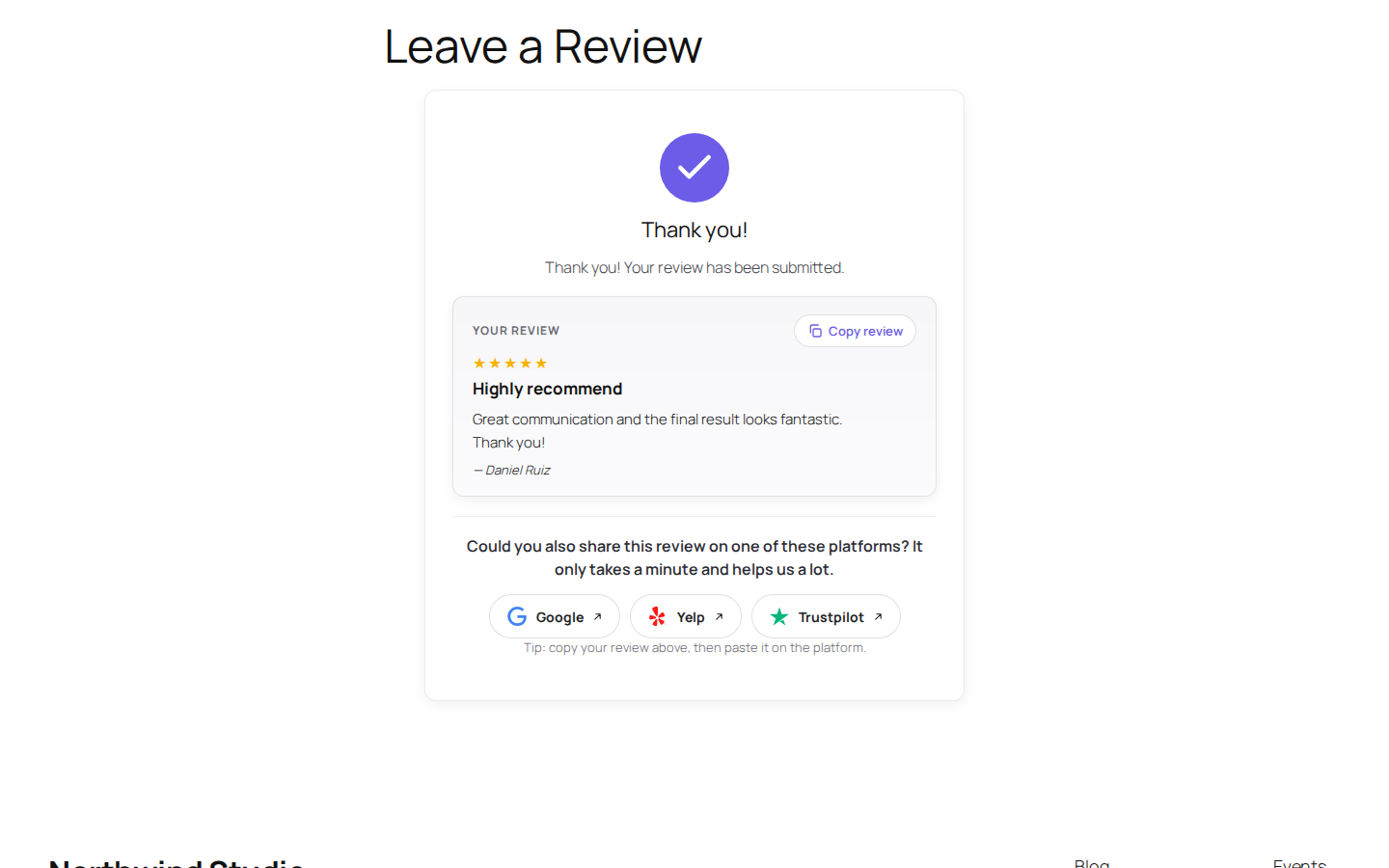
Most review plugins stop when the review is saved. PraiseBloom goes one step further: right after a customer leaves a review on your site, it shows them their own words in a clean card with a one-click Copy button, and asks them to post the same review on Google, Yelp, Trustpilot or any platform you choose. Copy, tap, paste, done. Your best reviews now help you on your website and on the platforms new customers actually search.
Everything is self-hosted. Reviews live in your own WordPress database: no external service, no account, no API key, no tracking, no monthly fee.
How it works
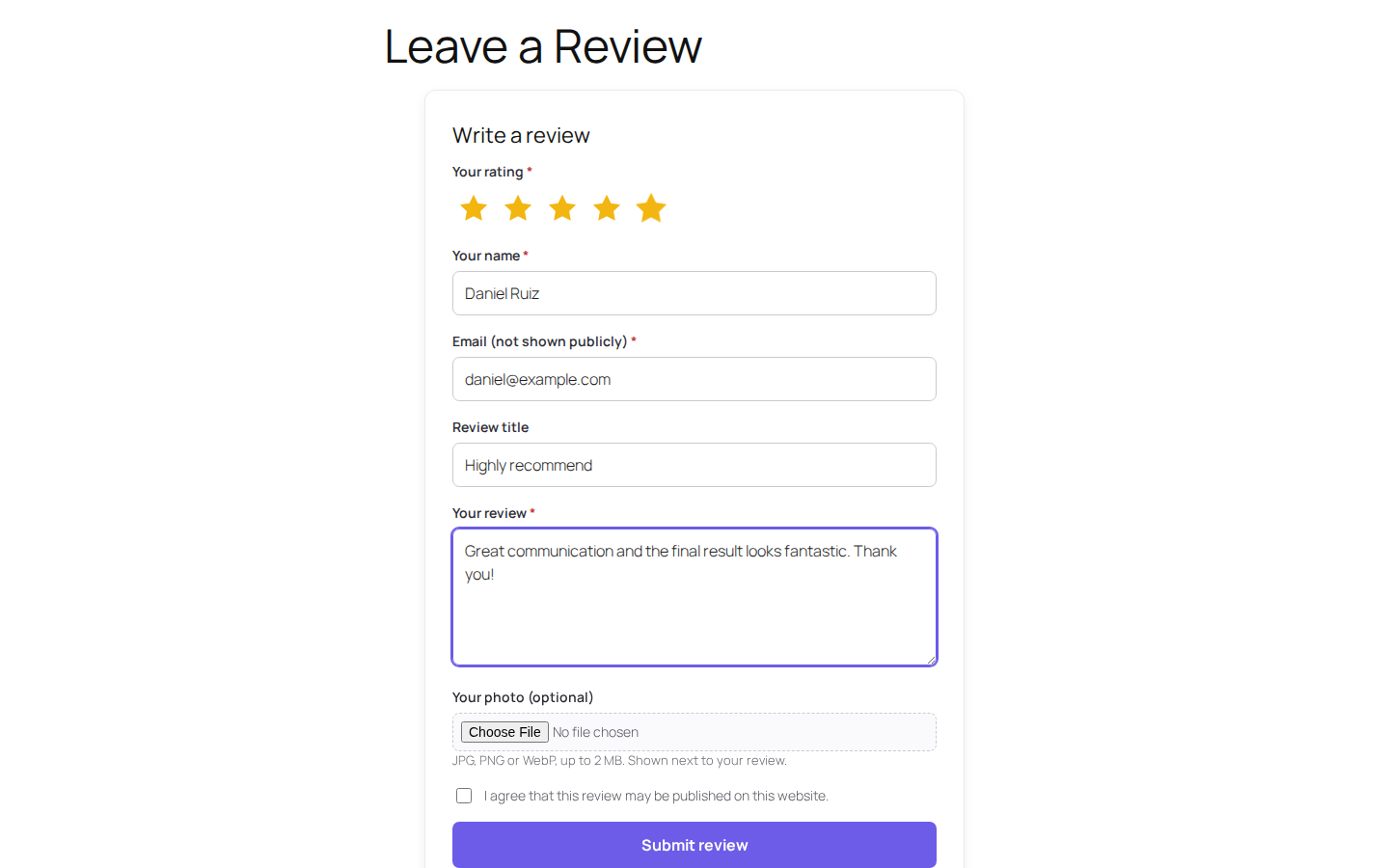
- Collect. Customers write their review in a clean, mobile-first form with an optional photo.
- Amplify. After submitting, they see their review in a card with a Copy button and your platform buttons.
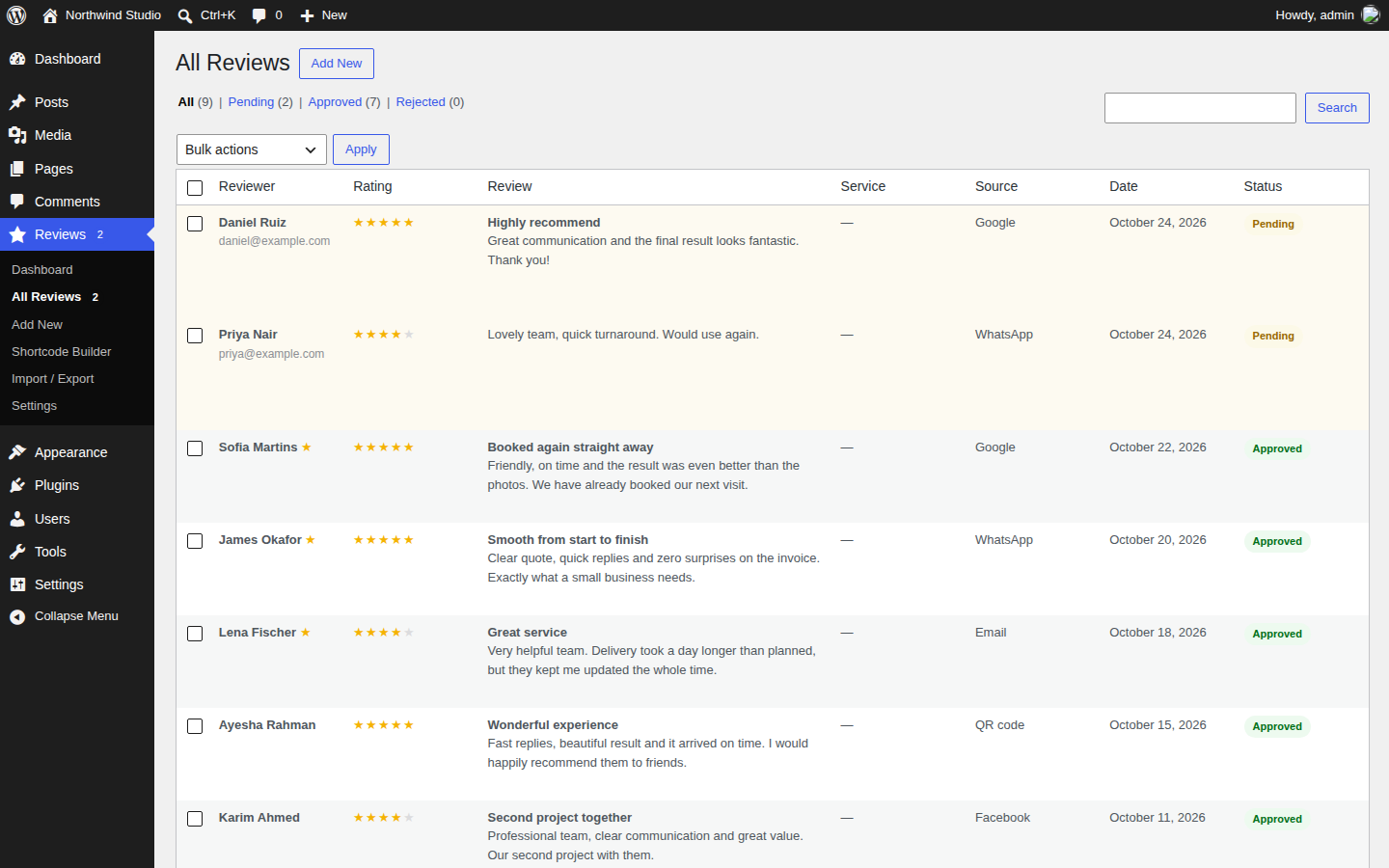
- Moderate. Every review, whatever the rating, waits in your dashboard. Approve, reject, edit, feature or reply in one click.
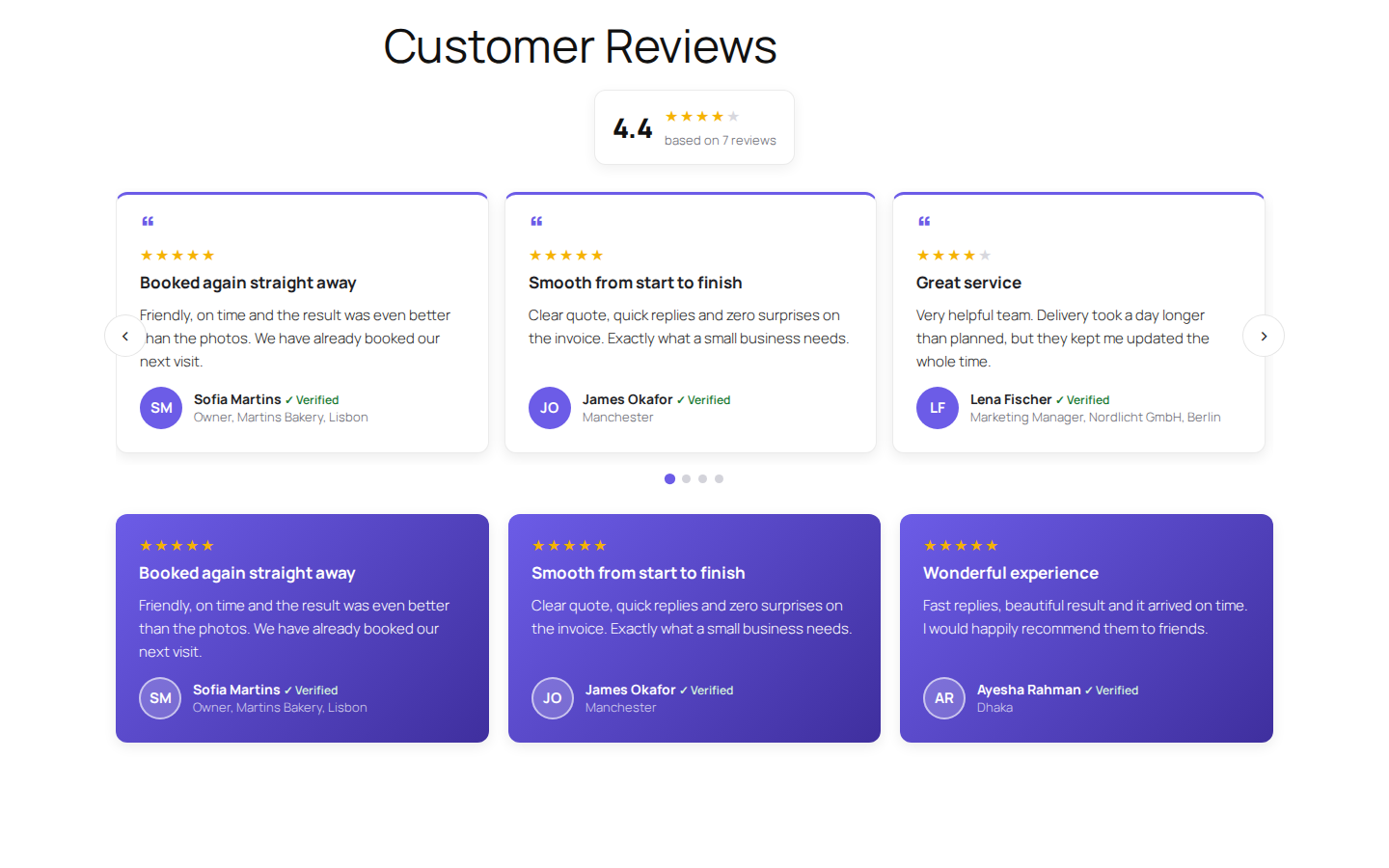
- Show. Display approved reviews anywhere with one shortcode: grid, list, carousel or a rating badge, in five card designs.
Built to get you more reviews
- Review page created for you. Activation creates a ready-to-share review page at /praisebloom.
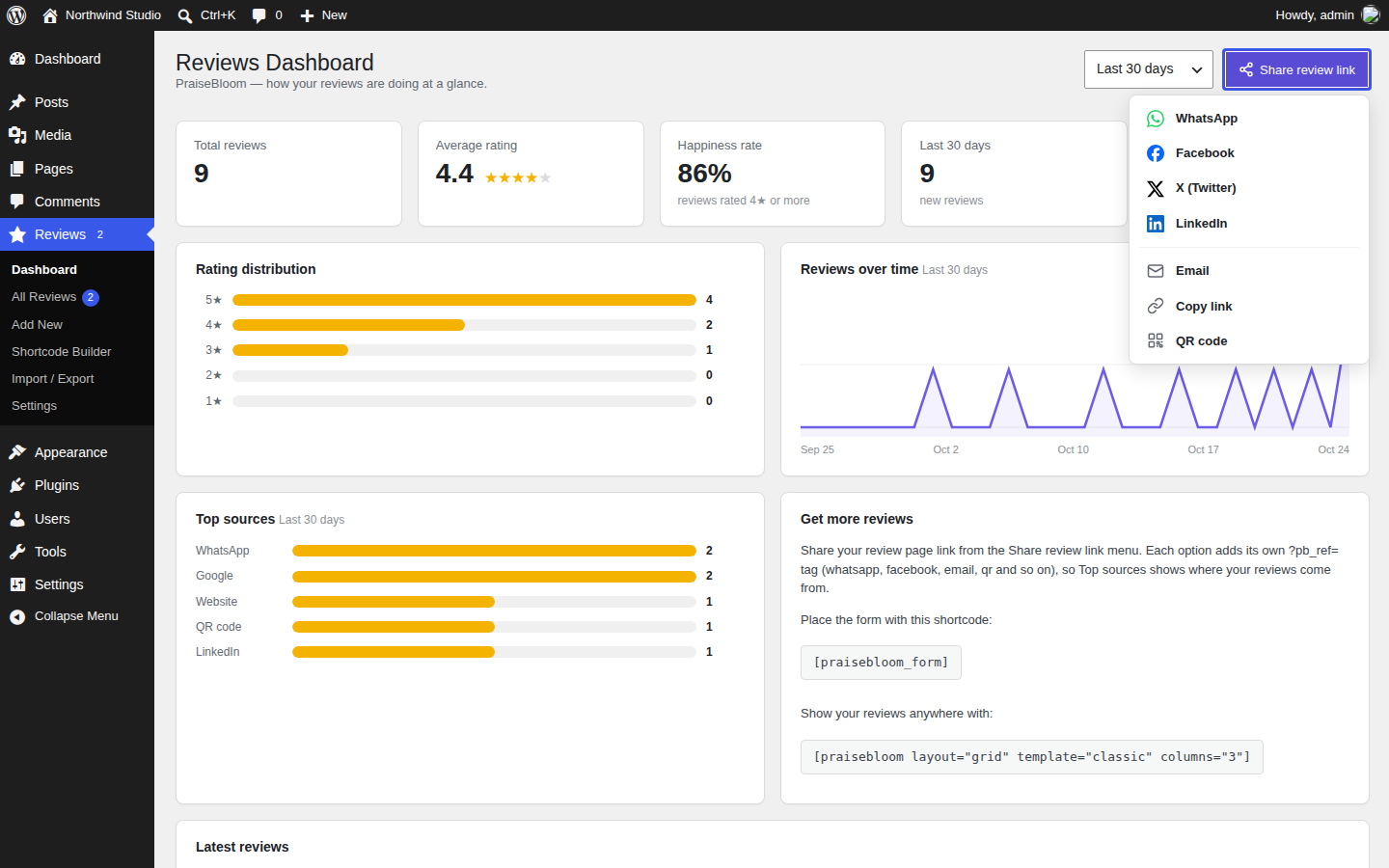
- Share in one click. The dashboard’s Share review link menu sends your review page by WhatsApp, Facebook, X, LinkedIn or email, copies the link, or gives you a downloadable QR code for counters, receipts and packaging. Every option adds its own tracking tag, so Top sources shows which channel brings in reviews. Links stay in sync even if you rename the page.
- Know what works. Each share channel is tagged automatically, so the dashboard shows which channel brings in reviews.
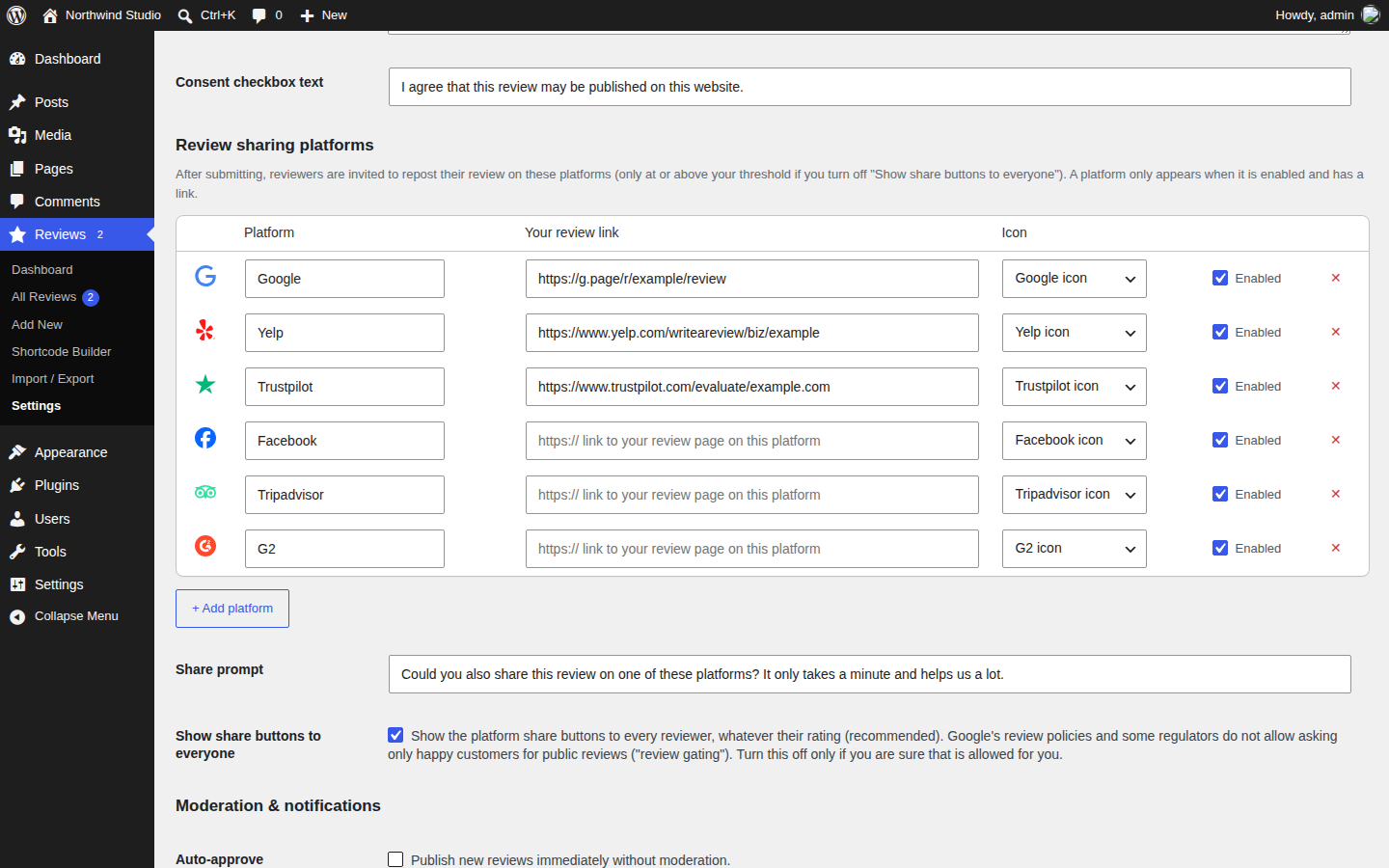
- Your platforms, your icons. Google, Yelp, Trustpilot, Facebook, Tripadvisor and G2 are ready to enable: paste your review link and they appear. Add any other platform with its own logo from your Media Library.
A dashboard that tells you something
- Total reviews, average rating, happiness rate, new reviews and pending count at a glance.
- Rating distribution, reviews over time and top sources for the last 30 days, 90 days or 12 months.
- Latest reviews with one-click approve and reject.
Beautiful displays
- Layouts: grid (1–6 columns), list, carousel with arrows, dots and autoplay, and a rating badge.
- Card templates: Classic, Modern, Minimal, Bubble and Gradient.
- Filters: minimum rating, service or product, featured only; order by date, rating or random.
- Design settings: accent color, star color and corner radius, applied everywhere.
- Shortcode Builder: pick options in the admin and copy the finished shortcode.
- Reviewer photos with a tidy initials avatar when there is none.
Shortcodes
[praisebloom_form]– the review form with the share screen.[praisebloom layout="carousel" template="modern" columns="3" min_rating="4"]– display reviews.[praisebloom layout="badge"]– average-rating badge.
More features
- Add and edit reviews in the admin with a star-click rating and a headshot from the Media Library.
- CSV import and export.
- Spam protection with a honeypot, a time trap and rate limiting, with no external service.
- Email notification for every new review.
- A custom capability so editors can moderate reviews without full admin rights.
- Theme developers can override card templates from
yourtheme/praisebloom/. - Personal data export and erase tools, and suggested privacy policy text.
- Translation-ready and accessible: keyboard navigation, focus states and reduced-motion support.
A note on fairness
Every customer can write a review, every rating lands in your moderation queue, and by default every reviewer is invited to share on your platforms, whatever their rating. Asking only happy customers to post publicly is known as “review gating”, and Google’s review policies and some regulators do not allow it. If gating is allowed for you, you can turn off Show share buttons to everyone and set a rating threshold instead. Reviews you add manually require you to confirm the customer’s permission.
Credits
PraiseBloom links to your own review pages on the platforms you configure. It is not affiliated with or endorsed by any of them; platform names and marks belong to their owners and are used only to identify where your links go. Platform icon shapes come from the Simple Icons project (CC0). The bundled QR code generator is the MIT-licensed qrcode-generator library by Kazuhiko Arase.
Installation
- Install PraiseBloom from Plugins → Add New, or upload the plugin folder to
/wp-content/plugins/. - Activate the plugin. A review page is created at
/praisebloom. - Go to Reviews → Settings, paste your Google, Yelp or Trustpilot review links.
- Share your review page from Reviews → Dashboard → Share review link.
- Put
[praisebloom]wherever you want reviews to appear, or build the shortcode in Reviews → Shortcode Builder.
Changelog
Initial public release.
1.0.0
- Initial public release: review form with optional photo, share-to-platform screen, moderation dashboard with stats and charts, share menu with WhatsApp, Facebook, X, LinkedIn, email, copy link and QR code with per-channel source tracking, dynamic platforms, five card templates, grid, list, carousel and badge layouts, Shortcode Builder, CSV import and export, privacy tools.
Screenshots
For developers
Is this your plugin? Show off the numbers.
Add a live badge to your site, docs or GitHub README. It updates on its own — no account needed.
Best PraiseBloom alternatives
All customer reviews plugins →





FAQ
PraiseBloom: quick answers
Straight answers, pulled from live WordPress.org data.
Source: WordPress.org
Is PraiseBloom free?
Yes. PraiseBloom is free to download and use from the official WordPress.org plugin directory.
Is PraiseBloom safe to use in 2026?
PraiseBloom works, but test it on a staging site before relying on it in 2026. Was last updated 1 month ago, and scores 60/100 on our health check.
How many websites use PraiseBloom?
PraiseBloom is active on <10 WordPress websites and has been downloaded 188 times since it launched in October 2026. It was downloaded 93 times in the last 30 days.
Does PraiseBloom work with WordPress 7.1?
Yes. The developer has tested PraiseBloom up to WordPress 7.1.5, the latest release. It requires WordPress 6.2 or newer.
What PHP version does PraiseBloom need?
PraiseBloom requires PHP 7.4 or higher. Most hosts run PHP 8.x today, so it works on any modern WordPress hosting.
When was PraiseBloom last updated?
The latest version, 1.0.0, was released on October 24, 2026 (1 month ago).
Who makes PraiseBloom?
PraiseBloom is developed and maintained by Modasserul Hoque.
What are the best alternatives to PraiseBloom?
The most popular alternatives to PraiseBloom are Customer Reviews for WooCom… (80K+ installs), WP Social Ninja (30K+ installs) and Revopic (10K+ installs).
Powered by PageForge
One template and a spreadsheet. A real page for every search.
PageForge turns each row of a CSV into a WordPress page with its own title, URL, SEO fields and schema, built on the layout you already designed. Free on WordPress.org.
- CSV and XLSX, plus Google Sheets on Professional and Enterprise
- Its own title, URL, SEO fields and schema for every page
- Works with the block editor, Elementor, Divi and Avada
- Free on WordPress.org, no credit card