


PowerPress Podcasting plugin by Blubrry
No. 1 Podcasting plugin for WordPress.

Solid choice
PowerPress Podcasting plugin by… is a solid plugin choice in 2026, with a few things worth checking first. It runs on 20K+ sites, is rated 4.6/5 and was last updated 1 month ago, and scores 77/100 on our health check.
- Proven at scale on 20K+ active sites
- Loved by users — 4.6/5 from 231 reviews
- Actively developed — last update 1 month ago
- Tested with the latest WordPress (7.1)
How does it stack up?
Side-by-side on installs, updates, ratings & supportDaily downloads
Download spikes usually follow a new release — each site that auto-updates counts as a download.
Rankings
Where PowerPress Podcasting plugi… stands todayWordPress.org search rankings
Live position in the plugin search, top 100| Keyword | Position |
|---|---|
| apple podcasts | #4 |
| podcast | #10 |
| podcast publishing | #2 |
| podcast rss feed | #6 |
| Spotify | #10 |
Version adoption
Share of active sites per release.
Rating breakdown
★★★★★★★★★★ 4.6 from 231 reviews
About PowerPress Podcasting plugin by Blubrry
From the official readme · v11.17.9Description
No. 1 Podcasting plugin for WordPress.
This is PowerPress, the ultimate podcasting plugin developed by Blubrry Podcasting. Designed by podcasters for podcasters, PowerPress enables you to publish and manage one or multiple podcasts directly from your WordPress website. Strengthen your brand and reach audiences across all major platforms, such as Apple Podcasts, Spotify, YouTube Music, Amazon Music, and more.
Key Features at a Glance:
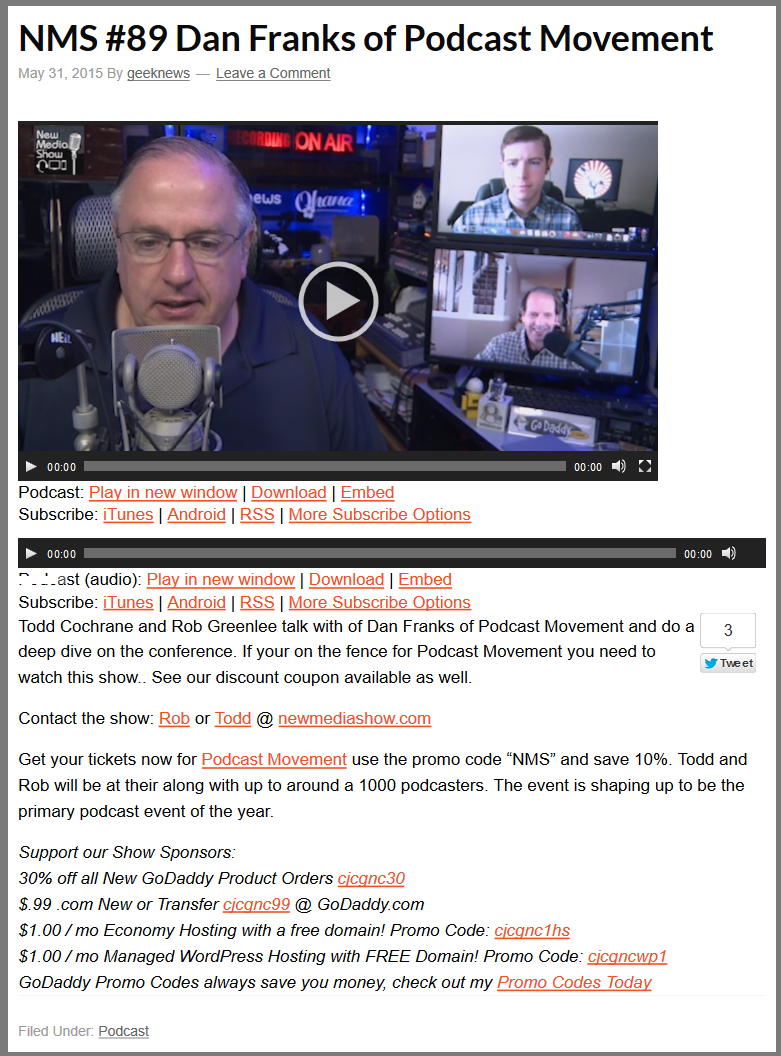
- Integrated Players: Choose from audio and video players with embedded support for platforms like YouTube. The ‘Skip to Position in Player’ shortcode allows listeners to jump to specific episode timestamps, and the Playlist Player will enable you to show multiple episodes at a glance.
- Effortless Podcast Import and Migration: Seamlessly transition from hosts such as Spotify for Podcasters, SoundCloud, Libsyn, and more. Our Import Podcast and Migrate Media tools ensure a smooth transfer, especially to Blubrry Hosting, without losing content.
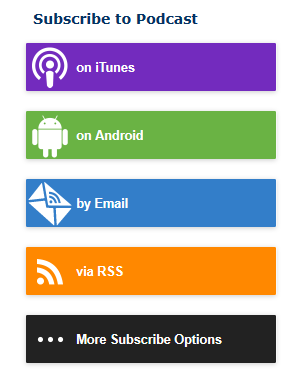
- Subscribe Tools: Boost your audience engagement with our subscribe page and sidebar widgets. Designed for responsive websites and high-resolution screens, these tools are optimized for standard and Apple Retina displays.
- Multiple Podcast Management: Easily handle multiple podcasts on one website with our Category Podcasting and Podcast Channels features.
- Global Language Support: PowerPress speaks your language, with numerous translations available and emoji support for your podcast feed.
- Podcasting 2.0: As podcasting advances, Blubrry is at the forefront, implementing new Podcasting 2.0 features regularly, such as transcripts, funding, Value Time Split, chapters, live, and many more.
Get Started with Ease:
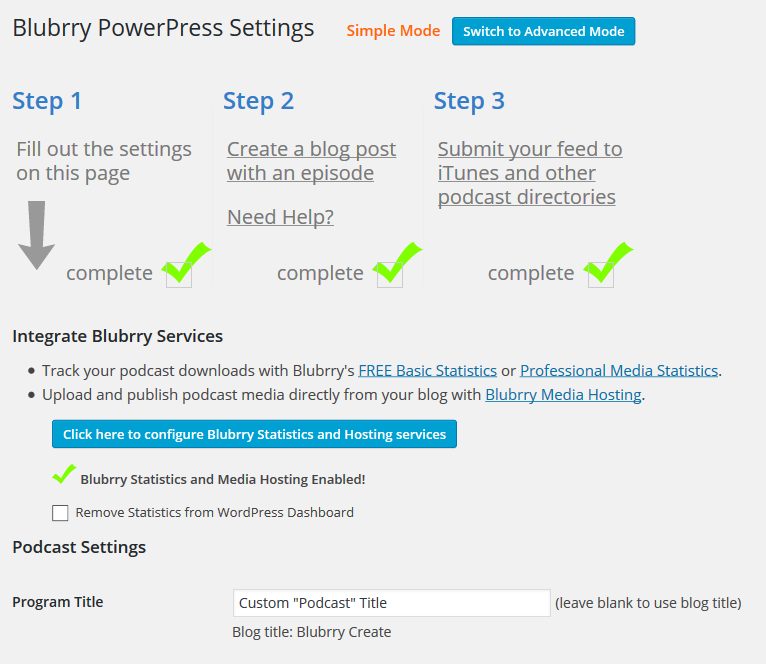
Dive into podcasting with our user-friendly onboarding. From essential settings to publishing your first episode, we guide you through each step. Plus, easily submit your podcast to major directories for maximum reach.
Integrated Media Players – Tailored for Your Content:
- Audio Players: Choose from Blubrry Player (exclusive for Blubrry Hosting customers) with close captions and chapter support, MediaElement.js, the native HTML5 audio player, or use another player of your choice.
- Video Players: Video podcasting support select from MediaElement.js, VideoJS, or the native HTML5 video player.
- Customizable Positioning: Place your player above or below content with easy-to-use player shortcodes.
- Playlist Player Embed: Showcase a playlist of your latest episodes effortlessly.
- Diverse File Support: PowerPress supports various audio and video formats, with a strong recommendation for MP3 for audio & MP4 for video.
Exclusive Integrated Subscribe Tools for Audience Growth:
Create a dedicated subscribe page and a mobile-optimized sidebar widget. Our tools are designed for clarity and ease, ensuring visitors become loyal followers/subscribers.
Blubrry Podcast Hosting Customers – Enjoy Streamlined Features:
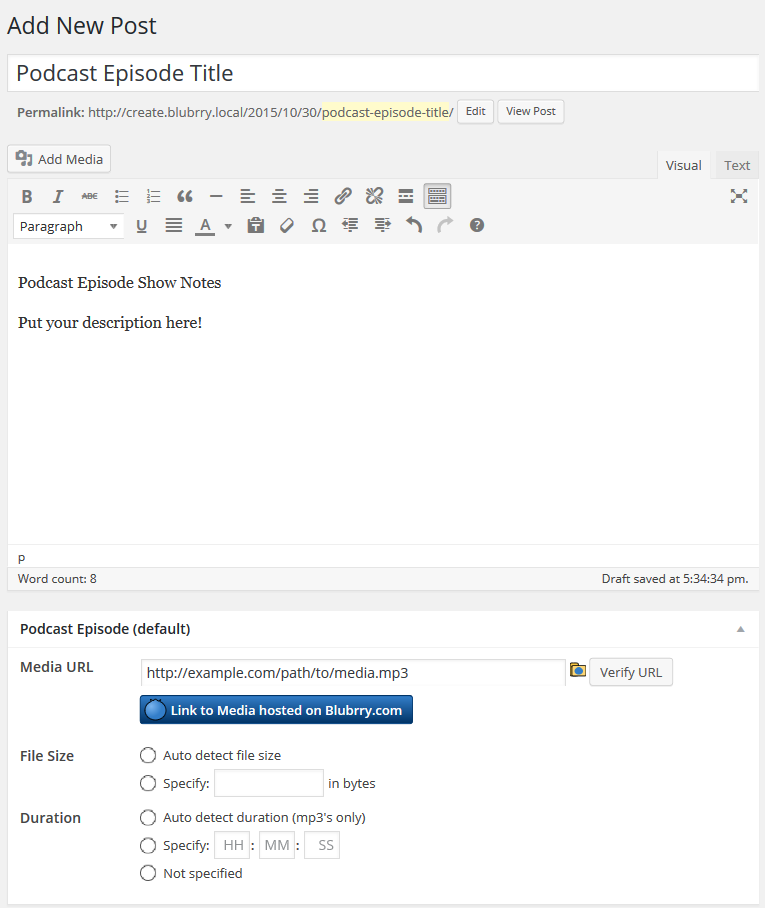
- Publish media directly from your site.
- View hosting usage and manage monthly quotas with ease.
- Conveniently migrate media files to your Blubrry account.
- Access IAB Certified Compliant statistics, with free and advanced options.
- Automated Transcripts (Optional)
- Media Mastering of Audio Files (Optional)
Migrating from Other Platforms?
PowerPress makes it easy. Whether you’re coming from another podcast plugin or a different service such as Libsyn or PodBean, our Import Podcast tool efficiently transfers your RSS feed and episodes.
PowerPress in Your Language:
Join our global community with PowerPress’ multilingual support. Interested in contributing translations? Contact us for an opportunity to get involved and gain recognition.
Ready to Transform Your Podcast?
Embrace the power of PowerPress for a seamless, feature-rich podcasting experience. Visit our website to learn more, download the plugin, and start your podcasting adventure today!
Need Help?
Contact the Blubrry Support team and look through the PowerPress documentation we’ve created.
Contributors
- Angelo Mandato, CIO Blubrry – Plugin founder, architect and lead developer
- Pat McSweeny, PHP Developer – Developed initial version (v0.1.0) of plugin
- Jerry Stephens, Way of the Geek – Contributed initial code fix for excerpt bug resolved in v0.6.1, wrote initial code for the 4 new flash players.
- Darcy Fiander, Rooty Radio – Fixed bug with category links to FeedValidator.org and category title warning when validating category feeds.
- Joel Haasnoot, Personal Blog – Developed PodPress archive statistics.
- Nicolas Bouliane, Personal Blog – Contributed code for
get_the_powerpress_all_players()function. - Isiah Lloyd – Developed features in PowerPress 7.5, 7.6 and part of 8.0
- Ben Beecroft – Developed features in PowerPress 8.1+
Translators
- Danish translation for v1.0.11+ by Team Blogos – Latest translation available here
- French translation for v1.0.11+ by Aur�lien Denis – Aur�lien is looking for assistance maintaining the French translation, email wpchannel [at] gmail.com if interested.
- Simplified Chinese for v1.0.12+ by webmote – From webmote: Welcome to use the plugin. Very good! and then hope you to access my site.
- Italian translation for v2.0.4+ by Umberto Sartori
- Romanian translation for v2.0.4+ by Alexander Ovsov (Web Geek Sciense: http://webhostinggeeks.com/science/)
- Russian translation for v4.0.5+ by Igor Mercury
- Brazilian Portuguese translation for v6.0+ by Leo Lopes from Radiofobia
Support
Blubrry Social
Installation
Point and Click Installation
- Sign into your blog, go to the plugins section and click ‘Add New’.
- In the search box enter “PowerPress”, then click ‘Search’.
- Click the ‘Install Now’ link and proceed to install the plugin.
- Once installed, click ‘Activate’.
- Configure your Blubrry PowerPress by going to the Settings > Blubrry PowerPress page.
Manual Installation
To install Blubrry PowerPress manually, follow these steps:
- Download PowerPress from WordPress.org.
- Extract the downloaded zip file to a temporary folder.
- Copy the entire powerpress folder from the downloaded zip file into the /wp-content/plugins/ folder on your server.
- Activate the “Blubrry PowerPress” plugin in your blog’s Plugin Management page.
- Configure your Blubrry PowerPress by going to the Settings > Blubrry PowerPress page.
Next Major Release Announcements
- We are looking for beta testers! If you would like to beta test future versions of PowerPress, please contact us with your name and email.
Fan of PowerPress and want to show your support?
If you are a fan of PowerPress, we would greatly appreciate it if you could take a moment and leave us a review on WordPress.org. Your support is greatly appreciated!
Frequently asked questions
Compatible Themes and Plugins
Most themes and plugins are compatible with PowerPress. PowerPress is developed and tested using the default themes packaged with WordPress. These themes use WordPress best practices and adhere to theme rules set by WordPress.org. Any child theme based on these themes should also work without issue. If you are having a problem, try Diagnosing Feed and/or Player Issues. If you are having a problem specifically with the player and links, try the “Having issues?” option under PowerPress Settings > Website > PowerPress Shortcodes tab. Visit Resolving Plugin or Theme Conflicts for details.
Premium podcasting themes compatible with PowerPress
Second Line Themes are designed specifically to take advantage of built-in features, settings, and podcast episode metadata in PowerPress. The Blubrry team works with the Appendipity team during beta testing and major WordPress releases to make sure the Podcast Pro theme and PowerPress work together seamlessly.
Why doesn’t Blubrry PowerPress support multiple enclosures in one feed item/post?
PowerPress does not allow you to include multiple media files for one feed item (blog post). This is because each podcatcher handles multiple enclosures in feeds differently. Apple Podcasts will download the first enclosure that it sees in the feed ignoring the rest. Other podcatchers and podcasting directories either pick up the first enclosure or the last in each post item. This inconsistency, combined with the fact that Dave Winer does not recommend multiple enclosures, is why the Blubrry PowerPress does not support them. As an alternative, PowerPress allows you to create additional custom…
Why doesn’t Blubrry PowerPress include media statistics built-in?
Blubrry’s PowerPress does not include media statistics built-in. This is not because Blubrry has its own statistics service, although that’s a good reason by itself. Maintaining and calculating statistics is a resource and server intensive task that would detract from an otherwise efficient WordPress podcasting plugin. We recommend using your media hosting’s web statistics to give you basic download numbers and, if you are seeking more granular measurements, such as client and geographical information for each episode, you’re more than welcome to use the Blubrry Statistics service as well.
How do you insert the player within a blog post?
You can insert the media player within your blog posts by using the WordPress shortcode feature. The shortcode for PowerPress is [powerpress] (all lowercase). You may use the shortcode to add a player to other media files (non episode files) by specifying the media url in the shortcode: [powerpress url=”http://example.com/path/to/media.mp3″] For advanced users with multiple podcast feeds, you may insert the player for a specific feed by specifying the feed slug in the shortcode: [powerpress feed=”podcast”] If you want to specify a cover image, add an image attribute which points to the…
Why can’t you upload large media files?
File uploads are tricky to handle because there are so many web hosting variations with different upload size limits. We recommend using an FTP application to upload large media files. FTP is much more efficient than web based uploads and is typically provided by nearly all web hosting providers. Alternatively, you can sign up for a Blubrry hosting plan, which makes file uploads in PowerPress easier.
The Media Player does not appear on my site (or the RSS feed is invalid)
This can happen when there is a theme or plugin conflict. Please visit our Diagnosing Feed and/or Player Issues for instructions how to resolve such issues.
Where do I report security bugs found in this plugin?
Please report security bugs found in the source code of the PowerPress Podcasting plugin through the Patchstack Vulnerability Disclosure Program. The Patchstack team will assist you with verification, CVE assignment, and notify the developers of this plugin.
Changelog
None
11.17.9
- Add user network management
- Update network sync
11.17.8
- Additional error store cleanup
- Fix media select compatibility error
11.17.7
- Fix channel level donation visibility
11.17.6
- Version number fix
11.17.5
- Fix notice output and add dedup to store
11.17.4
- PHP Version compatibility fix
Screenshots



For developers
Is this your plugin? Show off the numbers.
Add a live badge to your site, docs or GitHub README. It updates on its own — no account needed.
Best PowerPress Podcasting plugin… alternatives
All apple podcasts plugins →| Rank | Plugin | Active installs |
|---|---|---|
| 2 |
 Simple Podcasting
Set up multiple podcast feeds using built-in WordPress posts. Includes a podcast block and…
Simple Podcasting
Set up multiple podcast feeds using built-in WordPress posts. Includes a podcast block and…
|
100+ |
FAQ
PowerPress Podcasting plugin by Blu…: quick answers
Straight answers, pulled from live WordPress.org data.
Live data from WordPress.org · checked Sep 27, 2026
Is PowerPress Podcasting plugin by… free?
Yes. PowerPress Podcasting plugin by… is free to download and use from the official WordPress.org plugin directory.
Is PowerPress Podcasting plugin by… safe to use in 2026?
PowerPress Podcasting plugin by… is a solid plugin choice in 2026, with a few things worth checking first. It runs on 20K+ sites, is rated 4.6/5 and was last updated 1 month ago, and scores 77/100 on our health check.
How many websites use PowerPress Podcasting plugin by…?
PowerPress Podcasting plugin by… is active on 20K+ WordPress websites and has been downloaded 6,445,656 times since it launched in August 2008. It was downloaded 23,996 times in the last 30 days.
Does PowerPress Podcasting plugin by… work with WordPress 7.1?
Yes. The developer has tested PowerPress Podcasting plugin by… up to WordPress 7.1.2, the latest release. It requires WordPress 3.6 or newer.
What PHP version does PowerPress Podcasting plugin by… need?
PowerPress Podcasting plugin by… requires PHP 5.2 or higher. Most hosts run PHP 8.x today, so it works on any modern WordPress hosting.
When was PowerPress Podcasting plugin by… last updated?
The latest version, 11.17.9, was released on August 28, 2026 (1 month ago).
Who makes PowerPress Podcasting plugin by…?
PowerPress Podcasting plugin by… is developed and maintained by blubrry.
What are the best alternatives to PowerPress Podcasting plugin by…?
The most popular alternatives to PowerPress Podcasting plugin by… are Simple Podcasting (100+ installs).
Powered by PageForge
Want thousands of pages that rank like these? Build them in an afternoon.
This directory runs on the same engine as PageForge. Turn any spreadsheet, CSV or API into thousands of fast, SEO-ready WordPress pages — with schema, internal links and AI-written copy baked in.
- CSV, Google Sheets & API data sources
- AI content, schema & internal links per page
- Works with Elementor, Gutenberg, Yoast & Rank Math
- Free on WordPress.org — no credit card


