


Posts To-Do List
Share post ideas with writers, suggest them writing topics and keep track of the posts ideas with a to-do list.

Solid choice
Posts To-Do List is a solid plugin choice in 2026, with a few things worth checking first. It runs on 60+ sites, is rated 4.7/5 and was last updated 2 months ago, and scores 75/100 on our health check.
- Tested with the latest WordPress (7.1)
- Small user base (60+ active installs)
How does it stack up?
Side-by-side on installs, updates, ratings & support



Daily downloads
Download spikes usually follow a new release — each site that auto-updates counts as a download.
Rankings
Where Posts To-Do List stands todayWordPress.org search rankings
Live position in the plugin search, top 100| Keyword | Position |
|---|---|
| multi author | #50 |
| post management | >100 |
| posts | >100 |
| to do list | #3 |
Version adoption
Share of active sites per release.
Rating breakdown
★★★★★★★★★★ 4.7 from 7 reviews
About Posts To-Do List
From the official readme · v1.4.4Description
Most people who run a multi-author blog need to tell their writers what post they should write. And so administrators send emails with a URL of the post source, the keyword for the post, any notes accompanying that. And sometimes a user notices a post that is worth writing and he wants to tell the other writers, so they have to email the administrator who will tell the other users and everyone will kill themselves in the end. The Posts To-Do List plugin allows you to get rid of that rigmarole.
By a convenient box in the posts editing page, everyone will be able to share the posts they think are worth writing. You have this little box, where you put the URL of the page where you read that great post, and the plugin will fetch the title by itself. You will then be able to change the retrieved title, suggest a keyword and add other notes, set a priority and assign the post to some user of the blog. And if you want to leave everything blank but the title field, leaving a suggestion that anyone can catch and deepen… well, you can!
No more emails to tell “You do this and that, use this keyword and don’t forget that…”. Everything can be down inside WordPress. Not only by the administrator, but by any logged in user.
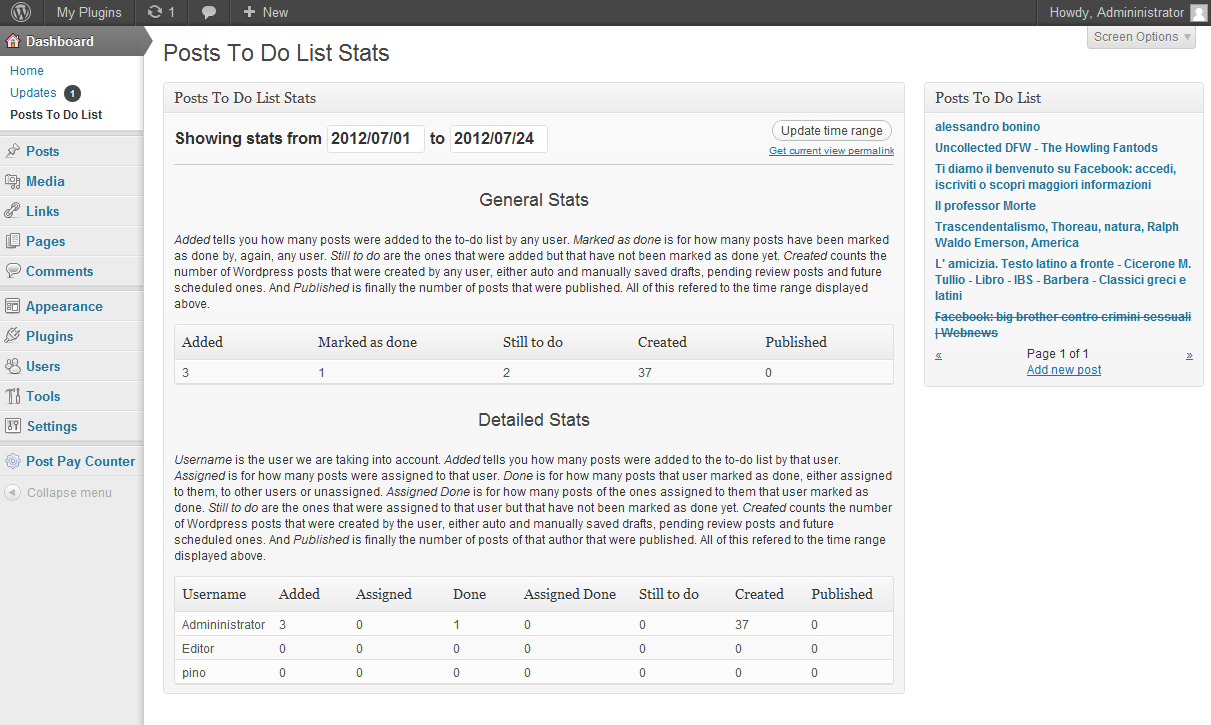
You, as the administrator, want everything in the power of your hand? No problem, you can decide what user roles can add new posts to the to-do list and what user roles can delete already added items. You want your users to stick to the post you assigned to them? You can hide the posts you have assigned to other users from their view. From a simple stats page it will be immediately clear how many posts you have already assigned and how many of them are still to do, so that it will be easy to understand how much your writers have done and how many posts you have still to assign. Almost every action is powered by AJAX, so that no page reloads are needed and you do not even notice it is happening, it just works.
Installation
- Upload the directory of the Posts To-Do List in your wp-content/plugins directory; note that you need the whole folder, not only the single files.
- Activate the plugin through the “Activate” button in the “Plugins” page of your WordPress.
- Head to the configuration page first. The plugin already comes with a predefined set of settings, but you may want to configure it to better suit your needs.
- That’s it, done!
Changelog
1.4.5
- Improv: parse shortcodes in Notes field.
1.4.4
- Fix: issue with widget public display option having reverse behavior.
1.4.3
- Fix: issue with public widget not showing to non logged in users.
1.4.2
- Fix: mark as done flag feature not working.
- Fix: assign/unassign features not working with page reload.
1.4.1
- Fix: Add new post button not working.
- Fix: style of Add button.
1.4
- Feature: widget with to-do list. Ability to show it to non logged-in users as well.
- Feature: localization-ready.
Screenshots


For developers
Is this your plugin? Show off the numbers.
Add a live badge to your site, docs or GitHub README. It updates on its own — no account needed.
Best Posts To-Do List alternatives
All multi author plugins →




FAQ
Posts To-Do List: quick answers
Straight answers, pulled from live WordPress.org data.
Live data from WordPress.org · checked Oct 18, 2026
Is Posts To-Do List free?
Yes. Posts To-Do List is free to download and use from the official WordPress.org plugin directory.
Is Posts To-Do List safe to use in 2026?
Posts To-Do List is a solid plugin choice in 2026, with a few things worth checking first. It runs on 60+ sites, is rated 4.7/5 and was last updated 2 months ago, and scores 75/100 on our health check.
How many websites use Posts To-Do List?
Posts To-Do List is active on 60+ WordPress websites and has been downloaded 12,065 times since it launched in September 2012. It was downloaded 186 times in the last 30 days.
Does Posts To-Do List work with WordPress 7.1?
Yes. The developer has tested Posts To-Do List up to WordPress 7.1.3, the latest release. It requires WordPress 3.0 or newer.
When was Posts To-Do List last updated?
The latest version, 1.4.4, was released on August 16, 2026 (2 months ago).
Who makes Posts To-Do List?
Posts To-Do List is developed and maintained by Stefano.
What are the best alternatives to Posts To-Do List?
The most popular alternatives to Posts To-Do List are Co-Authors Plus (20K+ installs), Authors Widget (1K+ installs) and Byline (200+ installs).
Powered by PageForge
Want thousands of pages that rank like these? Build them in an afternoon.
This directory runs on the same engine as PageForge. Turn any spreadsheet, CSV or API into thousands of fast, SEO-ready WordPress pages — with schema, internal links and AI-written copy baked in.
- CSV, Google Sheets & API data sources
- AI content, schema & internal links per page
- Works with Elementor, Gutenberg, Yoast & Rank Math
- Free on WordPress.org — no credit card


