



Post to Google My Business (Google Business Profile)
Auto-publish posts, pages & CPTs, plus manage Google Business Profile posts. All from your WordPress dashboard!

Solid choice
Post to Google My Business (Goo… is a solid plugin choice in 2026, with a few things worth checking first. It runs on 10K+ sites, is rated 4.9/5 and was last updated 1 month ago, and scores 75/100 on our health check.
- Proven at scale on 10K+ active sites
- Loved by users — 4.9/5 from 158 reviews
- Tested with the latest WordPress (7.1)
How does it stack up?
Side-by-side on installs, updates, ratings & supportDaily downloads
Download spikes usually follow a new release — each site that auto-updates counts as a download.
Rankings
Where Post to Google My Business… stands todayWordPress.org search rankings
Live position in the plugin search, top 100| Keyword | Position |
|---|---|
| gmb | #3 |
| google business profile | #1 |
| google my business | #4 |
| google places | #13 |
| local seo | #42 |
Version adoption
Share of active sites per release.
Rating breakdown
★★★★★★★★★★ 4.9 from 158 reviews
About Post to Google My Business (Google Busi…
From the official readme · v3.4.4Description
The Posts feature in Google Business Profile (formerly Google My Business) is a powerful way to enhance your business’s presence on Google. However, constantly logging into your Google account to create new posts can be time-consuming, and easy to forget.
With the Post to Google My Business plugin, you can save time and maximize your SEO benefits by publishing directly from your WordPress dashboard!
Effortless auto-posting & powerful features
Use the Auto-post feature to instantly share your latest WordPress content to your Google Business Profile. Posts are generated based on a preset template and automatically include your post’s featured image, keeping your profile fresh with minimal effort.
Why choose Post to Google My Business?
✅ Create, edit, and delete posts without leaving WordPress
✅ Auto-publish your latest WordPress posts, pages and custom post types to your Google Business Profile
✅ Beautiful, clean posts – Automatically strips unnecessary HTML, shortcodes, and visual editor clutter (Divi, WPBakery, etc.)
✅ Multisite support – Works on both network and site level
✅ Third-party integration – Publish from Zapier, IFTTT, Integromat, ManageWP, MainWP, and more
✅ Secure & reliable – Uses the official Google My Business API with oAuth authentication
✅ Developer-friendly – Hooks, filters, and WordPress-native functions for easy customization
✅ Translation-ready – Fully compatible with WPML and other translation plugins
✅ Modern image support – Works with WebP, AVIF, and other optimized formats
✅ Gutenberg-compatible – Works seamlessly with the Block Editor
Time-saving features available in Premium:
Upgrade to Post to Google My Business premium for even more automation and flexibility:
⭐ Product support – Create and manage real Google Business Profile Products from WooCommerce or other content
⭐ Scheduled posts – Plan and automate future post publishing
⭐ Multi-location & Multi-account support – Publish posts across multiple GBP locations at once
⭐ Auto re-posting (Recycling) – Keep your content fresh by automatically republishing posts at set intervals
⭐ Category- & tag-based auto-publishing – Control exactly what gets posted
⭐ Custom field support – Use content from custom meta fields and ACF/SCF in your posts
⭐ Evergreen content – Randomly publish from a selection of your best content
⭐ Post campaigns – Create GMB posts that aren’t tied to a specific WordPress post or page
⭐ Multiple auto-post Templates – Customize and manage different posting styles
⭐ Agency support – Manage Google My Business posts for multiple clients
⭐ 3rd party plugin support – Use dynamic data from WooCommerce, ACF/SCF, Yoast and more in your posts
Learn more about Post to Google My Business Premium
Great support!
We’re here to help in case you’re having trouble using Post to Google My Business. Just ask in the support forum and we’ll get back to you ASAP. Feedback and ideas to improve the plugin are always welcome.
Installation
Installing and configuring Post to Google My Business is easy!
- Upload the plugin files to the
/wp-content/plugins/post-to-google-my-businessdirectory, or install it through the Plugins section within your WordPress Dashboard. - Activate the plugin through the Plugins section in WordPress
- Go to the Post to GMB > Settings > Google Settings page to configure the plugin
- To allow your website to post to your Google Business Profile on your behalf, click Connect to Google Business Profile. Confirm the authorization using the Google account that holds the business location(s) you want to use. Make sure you check the checkbox to allow the plugin to manage your GMB locations.
- You will be redirected back to the settings page. Select your business location in the Default Location section and press Save Changes.
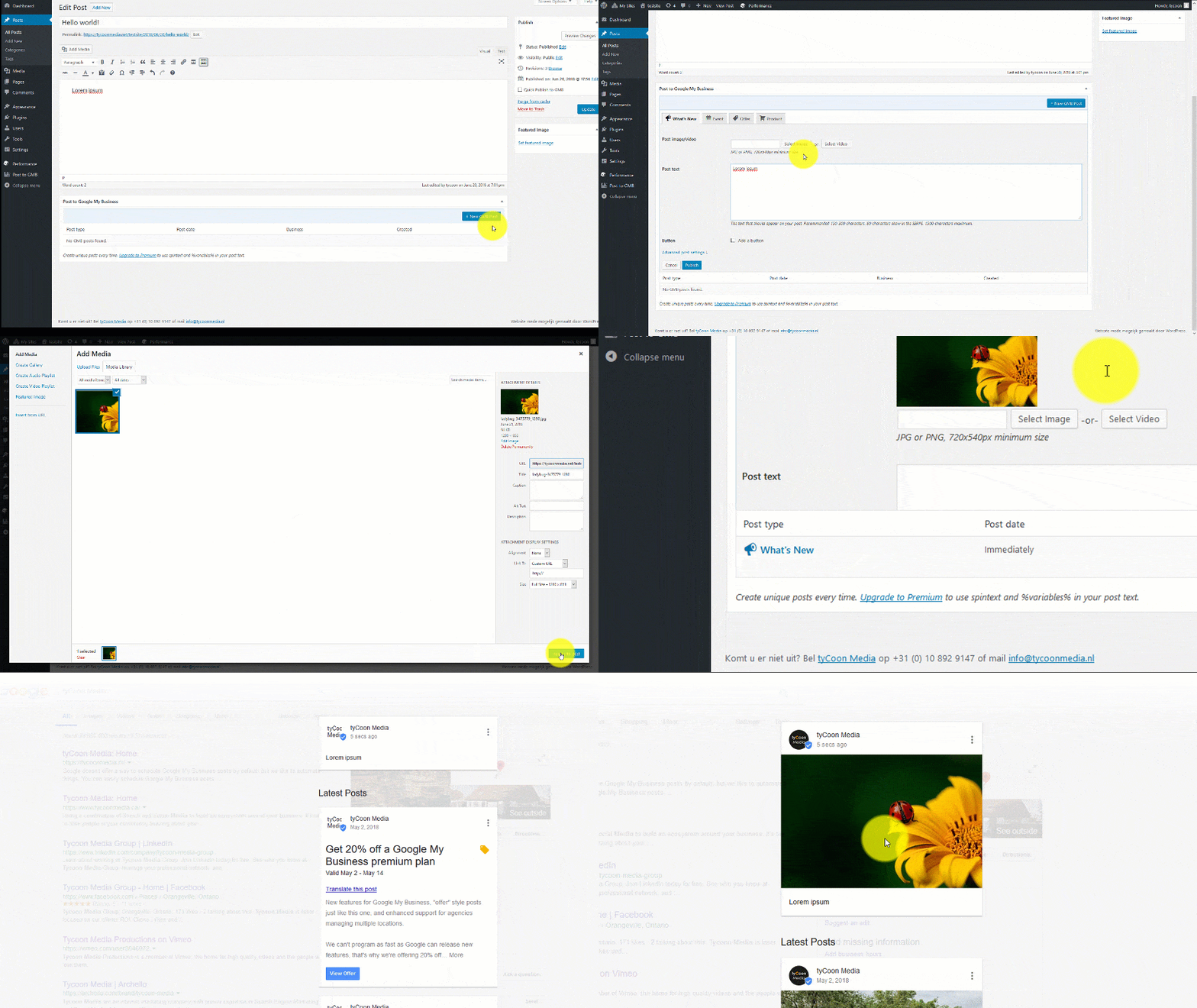
- All set! When creating a new WordPress Post there will a new metabox that allows you to create posts on Google My Business.
Frequently asked questions
Can I use this plugin on a localhost installation?
Yes, but you may run into errors if you add a link or image to your post. Google will try to fetch your image/video, or resolve the link to your website, but if your localhost installation can’t be reached from the outside world, it won’t be able to do so. The quick post feature will not work at all in that case, because it uses the URL and Featured Image of your post.
Why is/are my location(s) grayed out?
Not every Google My Business listing is allowed to create posts on Google My Business (localPostAPI is disabled). This means the plugin can’t create posts on those locations. First, make sure your location is fully verified & live. Business chains (10+ locations) are normally exempt from creating posts, but are temporarily allowed to create them to share updates about the corona virus.
Why are my scheduled posts being published too late/not at all?
Post to Google My Business relies on the WP Cron system to send out scheduled posts. By default, it is only triggered when someone visits your website. If your site doesn’t get a lot of visitors, your posts may be sent out too late. To make the WP Cron system more dependable, you can hook it into the system task scheduler
Why can’t I create posts with a video?
While GBP itself supports creating posts with video, it’s (currently) not possible to create them through the GBP API. So the plugin can not do it either.
Why can’t I create posts with multiple images?
While GBP itself lets you create posts with up to 10 images, the GBP API (currently) only allows a single image to be uploaded. That’s why you can only upload a single image in the plugin.
Why does the plugin require such extensive permissions on my GBP locations?
While ideally we’d ask for as little permissions as possible to make the plugin work, the Google Business Profile API oddly enough only has a single permission level. It’s either all or nothing. The idea of giving the plugin permission to edit or delete your GBP location(s) might sound scary, but rest assured, your access tokens are only stored (securely) within your own website. Nor are the endpoints to make any bad stuff happen implemented in the plugin backend, or the plugin itself. So even if your site were to be compromised, the access tokens would be useless.
I’m getting a “Fetching image failed” error when creating posts
When creating a post with an image, Google will try to download the post image directly from your website. Hence, it must be directly accessible when opening the image URL. When you get a “Fetching image failed” error, it means Google is unable to download the image from your website Services like CloudFlare may have an impact on this. In CloudFlare, turn off any image hotlinking protection or other features that may interfere with image accessibility. To further debug the issue, you can use a service like httpstatus. Enter the URL of your image (it is shown along with the error) into the…
Changelog
3.4.4
- Fix: Pagination not working in metabox
3.4.3
- Fix: Call to action URL not working with {{post.url}} variable
3.4.1
- Fix: Not showing new features and upgrade notification
3.4.0
- Tested on WordPress 7.0
- Added: Mustache template engine for post templates
- Added: Pop-in post preview and variable explorer
- Added: pgmb_page_cap filter for changing the required capability for accessing plugin settings
- Added: “Restore default” button for restoring default template
- Change: Bumped minimum PHP version to 7.4
- Fix: JS conflict with some 3rd-party plugins causing locations not to load if no default location is selected
- Update: Freemius SDK 2.13.1
Premium
- Change: Move location selector out of “Advanced Post Settings” to main area
- Removed: Support for spintax (interfered with Mustache, and is pretty much irrelevant with AI in 2026)
3.3.4
- Fix: Scaling issue on AVIF/WebP images
- Update: Pt-br translations (thanks @valdemirmaran)
3.3.3
- Fix: Location selector not indicating whether locations are still being loaded
- Improved: Handling of large AVIF/WebP files that could exceed 5MB when converted to PNG for GBP
- Improved: Added offending image URL in image error messages
- Update: Composer dependencies
Screenshots



For developers
Is this your plugin? Show off the numbers.
Add a live badge to your site, docs or GitHub README. It updates on its own — no account needed.
Best Post to Google My Business (G… alternatives
All gmb plugins →| Rank | Plugin | Active installs |
|---|---|---|
| 2 |
 Auto-Publish to Google Business Profile (GMB Poster)
Auto-publish WordPress posts to your Google Business Profile Updates section. Or use the…
Auto-Publish to Google Business Profile (GMB Poster)
Auto-publish WordPress posts to your Google Business Profile Updates section. Or use the…
|
<10 |
FAQ
Post to Google My Business (Google…: quick answers
Straight answers, pulled from live WordPress.org data.
Live data from WordPress.org · checked Sep 26, 2026
Is Post to Google My Business (Goo… free?
Yes. Post to Google My Business (Goo… is free to download and use from the official WordPress.org plugin directory.
Is Post to Google My Business (Goo… safe to use in 2026?
Post to Google My Business (Goo… is a solid plugin choice in 2026, with a few things worth checking first. It runs on 10K+ sites, is rated 4.9/5 and was last updated 1 month ago, and scores 75/100 on our health check.
How many websites use Post to Google My Business (Goo…?
Post to Google My Business (Goo… is active on 10K+ WordPress websites and has been downloaded 462,718 times since it launched in March 2018. It was downloaded 1,726 times in the last 30 days.
Does Post to Google My Business (Goo… work with WordPress 7.1?
Yes. The developer has tested Post to Google My Business (Goo… up to WordPress 7.1.2, the latest release. It requires WordPress 4.9.0 or newer.
What PHP version does Post to Google My Business (Goo… need?
Post to Google My Business (Goo… requires PHP 7.4 or higher. Most hosts run PHP 8.x today, so it works on any modern WordPress hosting.
When was Post to Google My Business (Goo… last updated?
The latest version, 3.4.4, was released on August 13, 2026 (1 month ago).
Who makes Post to Google My Business (Goo…?
Post to Google My Business (Goo… is developed and maintained by Koen Reus.
What are the best alternatives to Post to Google My Business (Goo…?
The most popular alternatives to Post to Google My Business (Goo… are Auto-Publish to Google Busi… (<10 installs).
Powered by PageForge
Want thousands of pages that rank like these? Build them in an afternoon.
This directory runs on the same engine as PageForge. Turn any spreadsheet, CSV or API into thousands of fast, SEO-ready WordPress pages — with schema, internal links and AI-written copy baked in.
- CSV, Google Sheets & API data sources
- AI content, schema & internal links per page
- Works with Elementor, Gutenberg, Yoast & Rank Math
- Free on WordPress.org — no credit card


