


Post My CF7 Form
This plugin enables the mapping of each form field to a post field. Each forms submitted from your website will then be saved as a new post which you can manage in your dashboard and display on the front end.

Solid choice
Post My CF7 Form is a solid plugin choice in 2026, with a few things worth checking first. It runs on 2K+ sites, is rated 4.8/5 and was last updated 2 months ago, and scores 67/100 on our health check.
- Loved by users — 4.8/5 from 48 reviews
How does it stack up?
Side-by-side on installs, updates, ratings & support



Daily downloads
Download spikes usually follow a new release — each site that auto-updates counts as a download.
Rankings
Where Post My CF7 Form stands todayWordPress.org search rankings
Live position in the plugin search, top 100| Keyword | Position |
|---|---|
| contact form 7 | #55 |
| contact form 7 extension | #21 |
| contact form 7 module | #9 |
| form to post | #11 |
Version adoption
Share of active sites per release.
Rating breakdown
★★★★★★★★★★ 4.8 from 48 reviews
About Post My CF7 Form
From the official readme · v7.1.0Description
This plugin enables the mapping of each form field to a post field. Each forms submitted from your website will then be saved as a new post which you can manage in your dashboard and display on the front end.
You can submit and map to a post all of the following fields,
- Default post field, title, author, content, excerpt
- featured image, you can submit a file and save it as a post attachment
- meta fields, unlimited number of meta-fields can be created
- taxonomies, you can map select/checkbox/radio input fields to taxonomies and the plugin will auto-populate your field items.
- map your submitted forms to existing post types using the new UI
- addition of form key to identify cf7 forms instead of the form id to make development more portable
- this plugin allows your users to manage multiple draft submissions from a single page.
- for large forms with multiple fields, an auto-create functionality has been added for meta-field mapping. See the installation instruction for details.
- add links to newly saved posts into your confirmation mail.
v3.0 of this plugin introduces many changes to enable other plugin developers to leverage the functionality available in this plugin. If you are a developer, please look at the code where ample comments are provided.
Make your CF7 Form more portable
this plugin introduces form keys (which you can modify in the CF7 admin table). Keys are unique for each form, allowing you identify a form my its key rather than an ID. Why is this priceless? IDs changes from one server to the next because they are the custom post ID attributed by the WordPress installation, and therefore you develop your form in a local machine only to find out that the IDs are different when you move your form to your production server. To overcome this problem, we suggest you use a form key along with this plugin’s contact form shortcode, [cf7form key="contact-us"]. Don’t worry your old contact form 7 shortcodes will still work too, behind the scenes we simply map the key to the ID and call the regular contact form 7 shortcode.
Powerful form designs
This plugin is now fully compatible with Smart Grid-Layout Designs for Contact Form 7. The Smart Grid for CF7 allows responsive grid-layout designed forms, as well as powerful features such as repetitive field inputs (using table structures with multiple row inputs), repetitive form sections using multiple tabbed inputs, as well as optional input sections using toggled collapsible sections. Furthermore the plugin offers a modular approach to form design, where existing forms can be inserted as sub-sections.
Post my CF7 Form now saves these complex forms designs seamlessly into your dashboard posts.
Other compatible plugins
- Contact Form 7 Conditional Fields By Jules Colle.
- Contact Form 7 Multi-Step Addon By ThemeREX.
- Contact Form Submissions by Jason Green.
- Live Preview for Contact Form 7 by Addons for Contact Form 7.
- Void Contact Form 7 widget for elementor page builder by voidCoders.
- Country & Phone Field Contact Form 7 by Narinder Singh Bisht.
- Date Time Picker Field by Carlos Moreira.
Filters for fields
In addition to mapping your form fields to post fields you are also given a custom filter for that specific form field. The filter option allows you to custom fill the post created for the submitted form, for example if a form requests the date of birth, you may want to create an additional post field for the age, so you can filter the date field in your functions.php file and calculate the age and save it to a custom post meta field. The custom filters are created using the following nomenclature, cf7_2_post_filter-<post_type>-<post-field>. For example if you have created a custom post type quick-contact, which as a meta field age, you could filter it with,
add_filter('cf7_2_post_filter-quick-contact-age','filter_date_to_age',10,3);
function filter_date_to_age($value, $post_id, $form_data){
  //$value is the post field value to return, by default it is empty
  //$post_id is the ID of the post to which the form values are being mapped to
  // $form_data is the submitted form data as an array of field-name=>value pairs
  if(isset($form_data['date-of-birth']){
    //calculate the age
    $value = ....
  }
  return $value;
}
Special Fields
Author – unless the user sets the field, the default set in this order: current logged in user else, the recipient of the CF7 form email if such a user exists in the database, else it reverts to the user_id=1 which is the administrator. A filter is also available to set the author.
Featured image/Thumbnail – these will only accept form fields of type file. However, non image files uploaded will not show up as thumbnails in the post edit page.
Title/Content/Excerpt – there are enabled by default, and can be used to map any form fields to them. However, if you wish disable these fields (using the post registration supports array of values), then please use the filter that allows these to be set for your custom post type. (see the filters section for more info)
Pre-fill form fields
Contact Form 7 does not allow you to pre-fill fields before your form is displayed. With this plugin you can do this, you will need to map your form first, and use the filter ‘cf7_2_post_filter_cf7_field_value’ to pre-fill your fields, see the Filter & Actions section for more details.
Contact Form 7 list table
This plugin re-organises the CF7 dashboard list table, using the cf7 custom post list table to permit other developers to easily add custom columns to the list table. You can therefore use WP functionality to customise your table. For example you could view how many submits a form has received.
Other hooks
The plugin has been coded with additional actions and filters to allow you to hook your functionality such as when a form to post mapping is completed. For a list of such hooks, please refer to the Filter & Actions section.
Checkout our other CF7 plugin extensions
-
CF7 Polylang Module – this plugin allows you to create forms in different languages for a multi-language website. The plugin requires the Polylang plugin to be installed in order to manage translations.
-
CF7 Multi-slide Module – this plugin allows you to build a multi-step form using a slider. Each slide has cf7 form which are linked together and submitted as a single form.
-
Post My CF7 Form – this plugin allows you to save you cf7 form to a custom post, map your fields to meta fields or taxonomy. It also allows you to pre-fill fields before your form is displayed.
-
CF7 Google Map – allows google maps to be inserted into a Contact Form 7. Unlike other plugins, this one allows map settings to be done at the form level, enabling diverse maps to be configured for each forms.
*Smart Grid Layout Design for CF7 – allows responsive grid layout Contact Form 7 form designs, enabling modular designs of complex forms, and rich inter-linking of your CMS data with taxonomy/posts populated dynamic dropdown fields.
Privacy Notices
This plugin, in itself, does not:
- track users by stealth;
- write any user personal data to the database;
- send any data to external servers;
- use cookies.
However, be aware that this plugin allows you to map your forms so as to save the data of any submissions made through these forms to the WordPress database. Should any of these mapped forms collect data considered to be private to the user, it will be saved to the database so you should take due diligence to inform your form user and comply with Privacy Data laws.
30. Allow non-admin users to manage mapping options.
Some of the mapping options (eg quick edit of mapped posts) are by default only accessible to admin users. You can modify this using the following hook and returning a WordPress capability for your user’s role:
add-filter('cf7_2_post_mapping_capability', 'c2p_options_allow_editors', 10,1);
function c2p_options_allow_editors($capability){
    return 'edit_others_posts'; //any editor role capability
}
Filters & Actions for Developers
The following are hooks primarily aimed at developers. More general hooks and filters are now documented inline in a helper metabox in the mapping edit page.
‘cf7_2_post_filter_taxonomy_registration-{$taxonomy_slug}’
This filter allows you to customise taxonomies arguments before they are registered.
add_filter('cf7_2_post_filter_taxonomy_registration-my_categories','modify_my_categories');
function modify_my_categories($taxonomy_arg){
  //$taxonomy_arg is an array containing arguments used to register the custom taxonomy
  //modify the values in the array and pass it back
  //for example, by default all taxonomies are registered as hierarchical, use this filter to change this.
  $taxonomy_arg['hierarchical'] = false;
  return $taxonomy_arg;
}
It is possible to pass optional arguments for Metabox callback functions, taxonomy count update, and the taxonomy capabilities. See the WordPress register_taxonomy documentation for more information.
add_filter('cf7_2_post_filter_taxonomy_registration-my_categories','modify_my_categories');
function modify_my_categories($taxonomy_arg){
  $args = array(
          'meta_box_cb' => 'my_custom_taxonomy_metabox',
          'update_count_callback' => 'my_taxonomy_selected',
          'capabilities' => array(
                              'manage_terms' => 'manage_categories'
                              'edit_terms' => 'manage_categories'
                              'delete_terms' => 'manage_categories'
                              'assign_terms' => 'edit_posts'
                            )
        );
  return args;
}
‘cf7_2_post_filter_taxonomy_query’
This filter allows you to modify the taxonomy terms query arguments for a form’s dropdown/checkbox/radio list.
add_filter('cf7_2_post_filter_taxonomy_query','custom_dropdown_order',10,3);
function custom_dropdown_order($args, $cf7_post_id, $taxonomy){
  if(20 == $cf7_post_id && 'location_categories' == $taxonomy){
    //modify the order in which the terms are listed,
    $args['order_by'] = 'count';
  }
  return $args;
}
This function changes the list order, putting the most commonly used terms at the top of the list.
For more information on taxonomy query arguments, please refer to the WP codex documentation.
‘cf7_2_post_filter_cf7_taxonomy_select2’
This filter expects a boolean, by default it is true and enables jQuery select2 plugin on select dropdown fields.
To disable it, do the following
add_filter('cf7_2_post_filter_cf7_taxonomy_select2','disable_select2_plugin',10,3);
function disable_select2_plugin($enable, $cf7_post_id, $form_field){
  if(20 == $cf7_post_id && 'your-option' == $form_field){
    //we assume here that cf7 form 20 has a dropdown field called 'your-option' which was mapped to a taxonomy
    $enable=false;
  }
  //you could just return false if you want to disable for all dropdown
  return $enable;
}
‘cf7_2_post_register_post_{post_type}’
this filter allows you to tweak the arguments used to register the custom_post type, for example, if you want to modify the rewrite front-end slug for the post type,
add_filter('cf7_2_post_register_post_my-custom-post', 'set_rewrite_slug');
function set_rewrite_slug($args){
  $args['rewrite'] = array(
    'slug' => 'posted-replies',
    'with_front' => true
  );
  return $args;
}
`cf7_2_post_form_posted`
action introduced for plugin developers specifically. Fired at the end of the submission mapping process, once a new post has been created for a new submission. The current mapping of the form fields is exposed, along with the data values submitted in the form and the files uploaded. For developers interested in using this hook, please lookup in the inline documentation in the code itself. The action is located in the includes/class-cf7-2-post-factory.php file.
`cf72post_register_mapped_post`
This action is fired each time the a mapped post is registered with the WP framework. This is mainly added for plugin developers to extend this plugin and target custom post types that are created by this plugin.
add_action(‘cf72post_register_mapped_post’, ‘custom_mapped_post’);
function custom_mapped_post($post_type){
//$post_type the post type being registered in the backend.
}
Contributions
The following have contributed to bug fixes, documentation, and/or translations for this plugin,
Installation
- Install the Contact Form 7 plugin
- Install the Post My CF7 Form plugin
- Create a contact form. A new column appears in the contact table list which shows you which Post Type the form is mapped to
- Click on the link ‘Create New’ that appears on the column to start mapping your form to a custom post.
- Create the post and it will appear in your Dashboard. Currently you cannot undo a mapped form, you will have to create a new form and re-map it while deleting the old one to change the mapping. So be careful when you save finally create your form. In a later version of this plugin I will introduce functionality to un-publish a mapped form.
- As of v1.5 of this plugin a functionality has been introduced to quickly create meta-field mappings. This is useful when you have complex forms with multiple fields. Simply add a new meta-field and select a field to map (leave the meta field name to the default value), the meta-field name will automatically update itself to reflect the form field name with hyphens replaced by underscores. Subsequent additions of new meta-fields will further increase the magic by auto-selecting the next form field in the dropdown and filling in the meta-field name too. If you wish to switch-off this functionality, simply manually edit the meta-field name and it will switch-off the autofill.
- Each time a visitor submits the form on your website, a new post will be created.
Frequently asked questions
1. How do I redirect to a page and access the saved post?
Place the following in your functions.php file, add_filter('cf7_2_post_form_append_output', 'redirect_on_submit', 10, 3); function redirect_on_submit($script, $attr, $nonce){ //$attr cf7 shortcode attributes to check if this is the correct form. $url = site_url('/submitted'); //page slug to redirect to. $url = add_query_arg( array('cf72post' => $nonce,), $url); $url = esc_url($url); $script .= ''.PHP_EOL; return $script; } where you need to change the slug of your page to which you want to redirect. Now the submitted form is saved to a post and its ID is stored in a transient field by the…
2. map a form to a post?
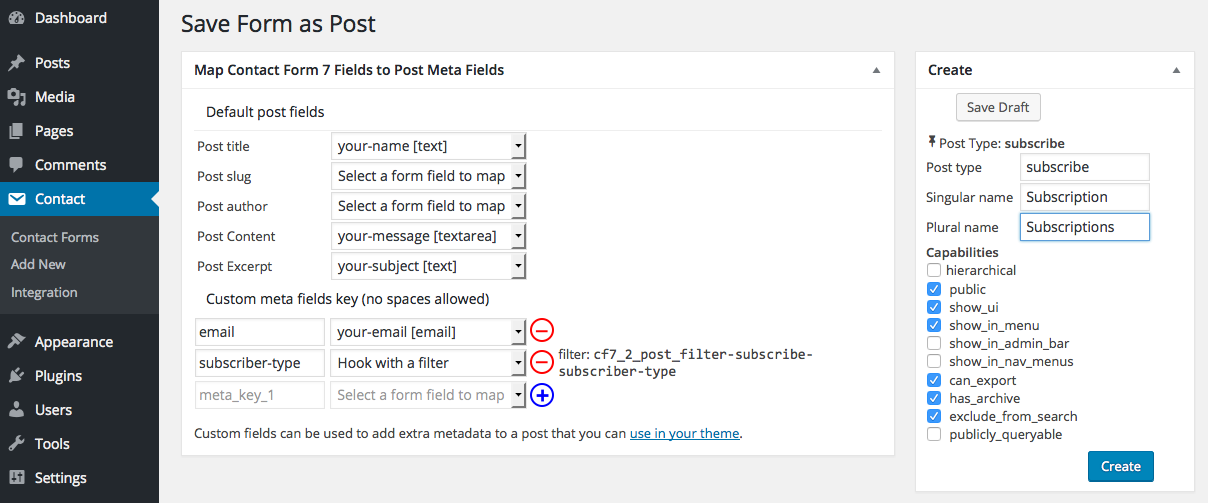
In the Contact Form 7 table list you will notice a new column has been added which allows you to create a new custom post mapping. This will take you to a new screen where you will see your existing fields listed in select dropdowns. Map your form fields to either a default field (eg title, content, excerpt, or author), or create a custom (meta) field, or even create a new taxonomy for your post. Once you have mapped your form you can toggle its status from on to off. In the off position, the plugin will no longer capture form submissions and save them to the mapped post.
3. I made a mistake in my form mapping, how do I correct it once it is created?
You can simply modify the mapping at any given time, however if a mapping has been live and saving submissions to your post, then it is not recommended to make changes. Unless you have a fair understanding of WordPress posts and meta-fields structures and how these are saved in the database, I highly recommend that you delete any existing posts that may have been saved from form submissions that used the previous mappings. Failing to do this without a proper understanding of the changes you are making to an existing mapping with previously saved post submissions could lead to difficult errors…
4. How do remove a mapping?
Simply toggle the status to off.
5. How do I map a field to a taxonomy ?
You create a new taxonomy and map your field to it. Note however that only select/checkbox/radio type of fields can be mapped to taxonomies. Once mapped and published you will see your taxonomy appear in your custom post menu. You can add terms to your taxonomy and these will be made pre-filled into your mapped field. Users can select a term and when the form is submitted, the post will be created with those terms assigned to it. (see screenshot 9 for more details.)
6. How do I create non-hierarchical taxonomies ?
You need to use a special filter for this, ‘cf7_2_post_filter_taxonomy_registration-{$taxonomy_slug}’, see the Filter & Actions section for more details.
7. Why filter the taxonomy mapping ?
You may have noticed that in addition to mapping a post field or taxonomy to one of your form fields, you can also use a filter to hook your own custom values. In the case of taxonomies, you can actually map a form submission to a specific set of terms depending on the submission of other fields.
8. How do I allow my form users to create a new term for a taxonomy?
This is a little more complex. You will need to create an input field in your form in which users can submit a new term. You will then need to hook the action cf7_2_post_form_mapped_to_{$post_type} which is fired right at the end of the saving process. The hook parses the newly created $post_ID as well as the submitted $cf7_form_data form data array. You can then check if your user has submitted a new value and include it in taxonomy and assign the new term to the post.
9. How can I pre-fill a form’s field values ?
There are are 2 filters provided to achieve this. In both cases, these filters are fired if the form is mapped to a post type only. The default behaviour is for the plugin to seek any draft saved form values for teh current user. A form is saved (draft) if the save button tag is used which allows a user to save a partially filled form and to submit it at a later stage. If a draft form is found for the current user, then the first filter will not be fired, the cf7_2_post_filter_cf7_field_value is fired for each field, and a helper code is available in the mapping edit admin page (see the…
10. How to use custom JavaScript script on the form front-end ?
The plugin fires a number of jQuery scripts in order to map saved submissions back to draft forms. So if you need to customise some additional functionality on your form on $(document).ready(), then you need to make sure it fires after the plugin’s scripts have finished. In order to achieve this, the script fires a custom event on the form, the form id built using a nonce to ensure the event is unique to the form (in case you have multiple forms on the same page), which you can use to ensure you script fires in the right order, here is how you would enable this…
11. Is it possible to save my form to an existing post type?
yes, but you need to know how to use WordPress hooks in your functions.php file in order to get it to work. If you map your form, you now have a dropdown to select the type of post to which you want to save it to. When you select ‘Existing Post’ from the option, instructions will show up on screen to map your form.
12. I am saving my form to an existing post, can I pre-load taxonomy terms in my form?
Sure you can, again you need to use the hooks cf7_2_post_map_extra_taxonomy & cf7_2_post_pre_load-{$post_type} to get it to work, see the example in the section Filter & Actions.
13. Is there any advanced documentation for developers ?
sure, there is a section Filter & Actions which lists all the hooks (filters & actions) available for developers with examples of how to use them. These expose a lot of the default functionality for further fine-tuning. If you see a scope for improvement and/or come across a bug, please report it in the support forum.
14. Is it possible to have multiple forms submitted from a single page ?
yes, as of v1.4 of this plugin you can now have multiple saved/draft submissions on a single page. To get it to work you need to track which forms are mapped to which post yourself. Introduce a hidden variable in your form to store your mapped post ids. For example you have a custom post which maps/stores submitted faults reported by your users. On page load, you need to pass the mapped post id to this plugin via your cf7 shortcode by dynamically calling the shortcode using do_shortcode and the attribute cf7_2_post_id, $args = array( 'post_type' => 'fault-post', 'post_status'=> 'any'…
15. I have enabled a save button on my form, but draft submissions are not being validated!
This is the default functionality for saving draft submissions. This is especially useful for a very large forms which users may take several visits to your site to complete. Email notifications of draft submissions are also disabled. If you wish to override this, you may do with the filters cf7_2_post_draft_skips_validation & cf7_2_post_draft_skips_mail examples of which are given in the documentation Filters & Actions below.
16. How do I publish posts automatically on form submission ?
The default behaviour is to save post to ‘draft’ status. If you wish to change this, you can use the filter ‘cf7_2_post_status_{$post_type}’ and return a valid post status. See the Filters & Hooks section of this documentation for more information.
17. How do I make custom posts publicly visible on the front-end ?
the default configuration of the plugin mapped custom posts are only visible in the dashboard. This a security feature. If you want your posts to be visible on the front-end, then you need to change the registration attributes. See this screenshot for the posts settings you need to enable or disable for making your posts public as well as query-able on the front-end. If you have created a custom taxonomy for your post, you can include these into your main menu by enabling them in the Appearance->Menu screen options dropdown of your Dashboard.
18. I mapped some fields to post meta-fields, why can’t I see them in the dashboard?
When you map your form fields to the custom post meta fields, you need to to ensure that these meta-fields are displayed in the post edit page of your dashboard using meta-boxes. You can custom create these meta-boxes in your functions.php file or you can also use a plugin. However, without these metaboxes you won’t be able to see your field values when you edit your posts.
19. Why does my form page have no-cache metas ?
As of v3.0.0 the no-cache metas have been added by default to pages with embedded forms that are being mapped by this plugin. Note this does not affect pages with forms which are not mapped. This is done to ensure that forms with pre-loaded field values (saved draft forms or forms with pre-filled values) are not being cached by the browser and as a result load spurious values. If your form is not being saved by users and not being pre-filled, then you may decide to disable the no-cache metas with the following filter, add_filter('cf7_2_post_print_page_nocache_metas', '__return_false')); It is…
20. How can I reload forms already submitted?
Once a form is submitted the _cf7_2_post_form_submitted meta-field is updated (from ‘no’ to ‘yes’) in the post to which the form was saved. As of v3.3.0 a metabox is introduced in the post admin page which allows an administrator to toggle the status back to ‘no’ and therefore allow your user to re-load the form with the submitted values (same functionality as a saved draft form).
Changelog
As of now there is no special upgrade notes, simply follow the normal plugin update process.
7.1.0
- skip prefill of file fields.
- introduction of filter
c2p_prefill_form_file_fieldfor users to circumvent default behaviour.
7.0.0
- code ravamp and cleanup aimed to meet WP coding stds.
- use of CF7 Smart Grid form prefill functionality which allows for setting table and tabbed field.
- fix major issue Insecure Direct Object References reported by patchstack.com.
- fix bug with post-meta field mapping using filter options.
- replace clipboard.js plugin with HTML Clipboard API.
Screenshots


For developers
Is this your plugin? Show off the numbers.
Add a live badge to your site, docs or GitHub README. It updates on its own — no account needed.
Best Post My CF7 Form alternatives
All contact form 7 plugins →





FAQ
Post My CF7 Form: quick answers
Straight answers, pulled from live WordPress.org data.
Live data from WordPress.org · checked Sep 26, 2026
Is Post My CF7 Form free?
Yes. Post My CF7 Form is free to download and use from the official WordPress.org plugin directory.
Is Post My CF7 Form safe to use in 2026?
Post My CF7 Form is a solid plugin choice in 2026, with a few things worth checking first. It runs on 2K+ sites, is rated 4.8/5 and was last updated 2 months ago, and scores 67/100 on our health check.
How many websites use Post My CF7 Form?
Post My CF7 Form is active on 2K+ WordPress websites and has been downloaded 102,268 times since it launched in June 2016. It was downloaded 794 times in the last 30 days.
Does Post My CF7 Form work with WordPress 7.1?
Post My CF7 Form is officially tested up to WordPress 7.0.6, while the latest release is 7.1.2. It may still work, but try it on a staging site first.
What PHP version does Post My CF7 Form need?
Post My CF7 Form requires PHP 7.4 or higher. Most hosts run PHP 8.x today, so it works on any modern WordPress hosting.
When was Post My CF7 Form last updated?
The latest version, 7.1.0, was released on August 1, 2026 (2 months ago).
Who makes Post My CF7 Form?
Post My CF7 Form is developed and maintained by Aurovrata Venet.
What are the best alternatives to Post My CF7 Form?
The most popular alternatives to Post My CF7 Form are Database Addon for Contact… (600K+ installs), Redirection for Contact For… (200K+ installs) and ReCaptcha v2 for Contact Fo… (200K+ installs).
Powered by PageForge
Want thousands of pages that rank like these? Build them in an afternoon.
This directory runs on the same engine as PageForge. Turn any spreadsheet, CSV or API into thousands of fast, SEO-ready WordPress pages — with schema, internal links and AI-written copy baked in.
- CSV, Google Sheets & API data sources
- AI content, schema & internal links per page
- Works with Elementor, Gutenberg, Yoast & Rank Math
- Free on WordPress.org — no credit card


