


Post Cloner
Post cloner allows you to easily make complete duplicates of any post on your site. That includes posts, pages and custom post types.

Consider an alternative
Post Cloner shows warning signs in 2026 — compare the alternatives below before installing. It runs on 1K+ sites, is rated 4.8/5 and was last updated 3 years ago, and scores 38/100 on our health check.
- No update in 2 years
- Only tested up to WordPress 6.4 (latest is 7.1)
How does it stack up?
Side-by-side on installs, updates, ratings & support



Daily downloads
Download spikes usually follow a new release — each site that auto-updates counts as a download.
Rankings
Where Post Cloner stands todayWordPress.org search rankings
Live position in the plugin search, top 100| Keyword | Position |
|---|---|
| clone | >100 |
| copy | >100 |
| duplicate | >100 |
| post | >100 |
| posts | >100 |
Version adoption
Share of active sites per release.
Rating breakdown
★★★★★★★★★★ 4.8 from 9 reviews
About Post Cloner
From the official readme · v1.0.0Description
Post Cloner will create a quick to access action button on the post/page edit screen alongside ‘Edit’, ‘Quick Edit’, ‘Trash’ and ‘View’.
All cloned posts, pages and custom post types will have ‘- Clone’ appended to the end of their title. All cloned posts, pages and custom post types will also be set to draft so they don’t appear anywhere on your site until you decide to publish them.
Features
- Clone posts, pages and custom post types
- Full control over what is clone-able (Example: Enable cloning pages but disabled for posts)
- Works with Easy Digital Downloads
- Complete clone of posts/pages including taxonomies and meta data (includes featured images, categories, tags and any custom metadata assigned to the post/page/custom post type)
- Lightweight, compact solution
- Nonce checks implemented for security
- High quality code adhering to WordPress Coding Standards
FuturePlans
- Additional settings to adjust post data of the new cloned post
Installation
Installation
- Upload
wp-post-cloner.zipto the/wp-content/plugins/directory - Activate the plugin through the ‘Plugins’ menu in WordPress
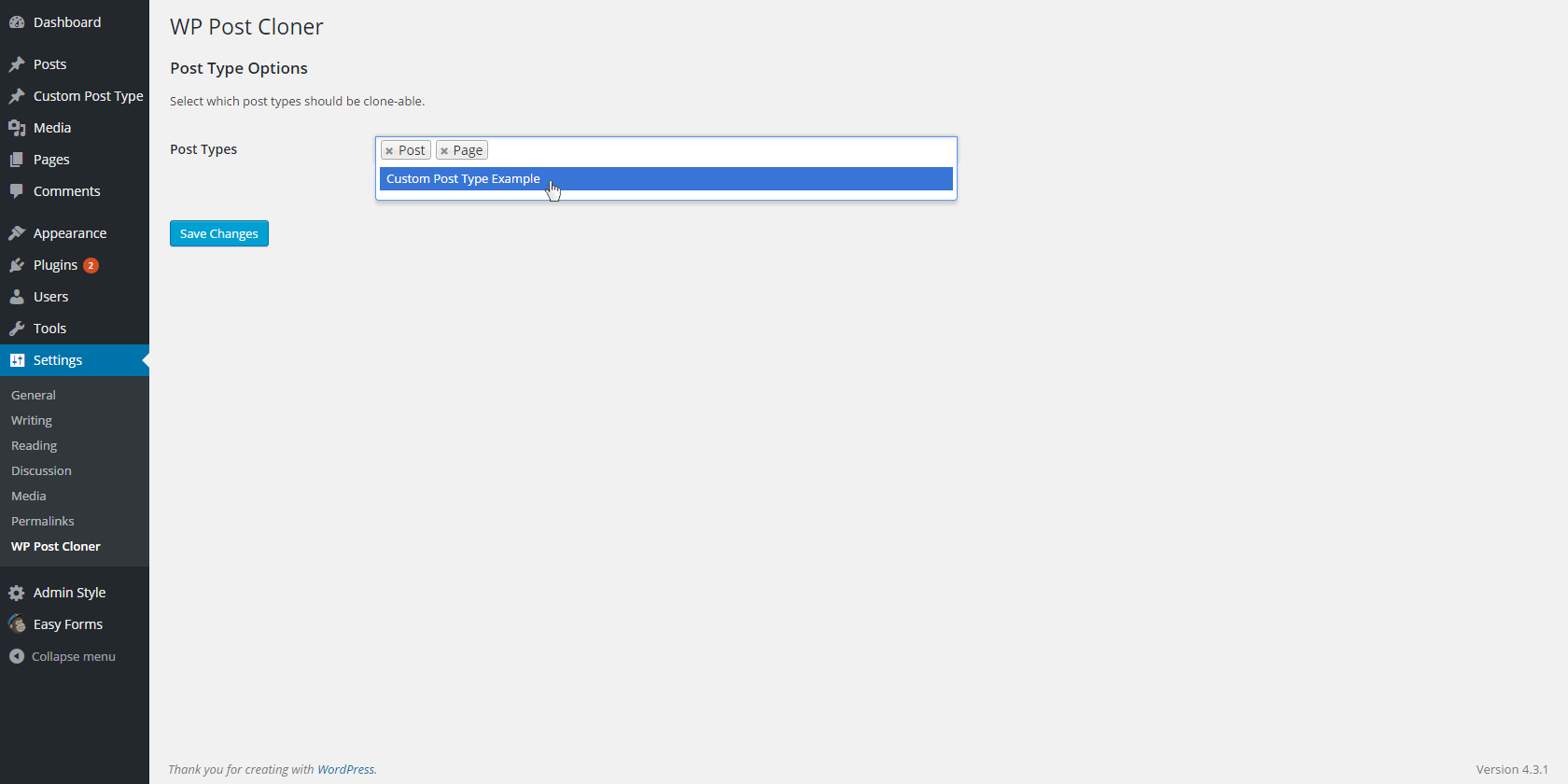
- Go to the ‘Settings >WP Post Cloner’ to toggle which post types can be cloned.
- Head into Posts, Pages or any Custom Post Type list page. Hover over any post and click ‘Clone’.
- ???
- Prosper
Frequently asked questions
How come I can’t change my permalinks?
You need to make sure that your permalinks are set to anything but the default inside of Settings > Permalinks. Once the permalinks are changed from the defaults you should have no problem changing the permlink of your page.
I have (a) custom post type(s) registered on my site. Can I use this plugin to clone it?
Yes! We’ve built out a settings page ('Settings > WP Post Cloner') where you can specify which post types are cloneable. By default only pages and posts are active. You can add or remove any registered post type on your site.
My custom post type doesn’t have a ‘Duplicate’ button. Why not?
You need to ensure that you’ve assigned the psot type as ‘clone-able’ on the settings page. Head into 'Settings > WP Post cloner' and click inside the input field to reveal a full list of registered post types. You’ll want to make sure that your custom post type appears on this list.
I have a whole bunch of custom meta assigned to my posts/pages/custom post type, will this plugin transfer over everything?
Yes! We’ve built in full support for taxonomies and meta data for default posts, pages and even custom post types that may be specific to your theme or created via third party plugins.
Changelog
Built in support for Easy Digital Downloads product cloning.
0.1.1
- Built in support for Easy Digital Downloads product cloning.
0.1
- Initial realease of Post Cloner
Screenshots



For developers
Is this your plugin? Show off the numbers.
Add a live badge to your site, docs or GitHub README. It updates on its own — no account needed.
Best Post Cloner alternatives
All clone plugins →





FAQ
Post Cloner: quick answers
Straight answers, pulled from live WordPress.org data.
Live data from WordPress.org · checked Sep 30, 2026
Is Post Cloner free?
Yes. Post Cloner is free to download and use from the official WordPress.org plugin directory.
Is Post Cloner safe to use in 2026?
Post Cloner shows warning signs in 2026 — compare the alternatives below before installing. It runs on 1K+ sites, is rated 4.8/5 and was last updated 3 years ago, and scores 38/100 on our health check.
How many websites use Post Cloner?
Post Cloner is active on 1K+ WordPress websites and has been downloaded 25,317 times since it launched in September 2015. It was downloaded 284 times in the last 30 days.
Does Post Cloner work with WordPress 7.1?
Post Cloner is officially tested up to WordPress 6.4.12, while the latest release is 7.1.2. It may still work, but try it on a staging site first.
When was Post Cloner last updated?
The latest version, 1.0.0, was released on December 13, 2023 (3 years ago).
Who makes Post Cloner?
Post Cloner is developed and maintained by Evan Herman.
What are the best alternatives to Post Cloner?
The most popular alternatives to Post Cloner are All-in-One WP Migration and… (5M+ installs), Yoast Duplicate Post (3M+ installs) and WPvivid (900K+ installs).
Powered by PageForge
Want thousands of pages that rank like these? Build them in an afternoon.
This directory runs on the same engine as PageForge. Turn any spreadsheet, CSV or API into thousands of fast, SEO-ready WordPress pages — with schema, internal links and AI-written copy baked in.
- CSV, Google Sheets & API data sources
- AI content, schema & internal links per page
- Works with Elementor, Gutenberg, Yoast & Rank Math
- Free on WordPress.org — no credit card


