



Points and Rewards for WooCommerce
Points and Rewards for WooCommerce offer a reward for points to your customers for their activities & increase customer loyalty.

Safe pick
Yes — Points and Rewards for WooComme… is a safe, well-maintained plugin to use in 2026. It runs on 7K+ sites, is rated 4.5/5 and was last updated 2 weeks ago, and scores 87/100 on our health check.
- Loved by users — 4.5/5 from 179 reviews
- Actively developed — last update 2 weeks ago
- Tested with the latest WordPress (7.1)
- Momentum — downloads up 352.9% vs the previous 30 days
How does it stack up?
Side-by-side on installs, updates, ratings & support



Daily downloads
Download spikes usually follow a new release — each site that auto-updates counts as a download.
Rankings
Where Points and Rewards for WooC… stands todayWordPress.org search rankings
Live position in the plugin search, top 100| Keyword | Position |
|---|---|
| gamification | #7 |
| Loyalty | #16 |
| Points and Rewards | #2 |
| referral points | #2 |
| Reward points | #2 |
Version adoption
Share of active sites per release.
Rating breakdown
★★★★★★★★★★ 4.5 from 179 reviews
About Points and Rewards for WooCommerce
From the official readme · v2.10.4Description
Feature-rich points and rewards system for WooCommerce that turns customers into loyal fans. Reward users for sign-ups, referrals, social sharing, and past purchases. Create flexible loyalty programs, enable easy point redemption, track points with detailed reports, and build memberships with automated email notifications.
Points and Rewards for WooCommerce is a points management plugin that engages customers by offering them points for activities like sign-up, purchase, referrals, social sharing, etc. Customers can redeem WooCommerce rewards using the WooCommerce reward points plugin to buy products at your store or participate in your membership program with the WordPress loyalty points plugin. Access to features like the ability to award users based on their number of orders, points on upgrade membership level, and points on cart subtotal.
With the referral points plugin at your WooCommerce Store, you can improve sales, Return On Investment(ROI), conversion rate, Customer Lifetime Value(CLV), and referral marketing scope
Demo | Documentation | Contact Us
SALIENT FEATURES OF OUR LOYALTY REWARDS PLUGIN
1) Membership System For Exclusive Offers
Merchants can create their membership system based on the WooCommerce Loyalty Program plugin. This helps them to offer exclusive discounts to customers based on the points they collect. They can add discounts on some categories and their products, and include per-currency points ( set the conversion for the points you want to offer on the set order value) for different members’ tiers.) If the customer subscribes to the membership, they can purchase those discounted products — Grant exclusive WooCommerce points based on membership levels. The admins can create up to two membership levels using this feature. If they wish to add more levels, a premium version of the plugin is required.
2) Gamified Loyalty Program
The WooCommerce points and rewards plugin enables store owners to run engaging, gamified campaigns, such as gamification spin-the-wheel, referral, quiz, birthday rewards, and comment-based points, all within customizable pop-ups. Options include showcasing earned points, referral counts, setting dynamic images for the pop-up, or simply choosing from 5+ predefined templates for upcoming festivals, and selecting specific display pages to make it fun, engagement-targeted, and reward-driven. The customers will also receive mail about their earned points.
Note: The features included in the premium version of the Points and Rewards plugin, such as birthday rewards, points on first orders, or multiple quizzes, will only work if you have the pro version installed
3) Points for Every Purchase
Reward your customers for every dollar they spend! With the Points for Every Purchase feature, customers earn points proportional to the amount they spend in your store — for example, 1 point for every $1 spent. This makes every purchase more rewarding, encourages repeat shopping, and helps boost customer loyalty. Points can be redeemed for discounts, free products, or special rewards, turning every transaction into a valuable engagement.
4) Referral Points
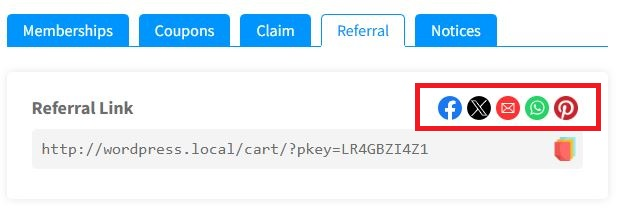
The merchants can offer rewards to the referrer for every unique referral. The admin just needs to enable the referral Woo points option and enter the number of points and minimum referrals required. Customers can also share their referral links with other users via social media platforms like Pinterest, Facebook, Twitter, email, and WhatsApp. The customer will only earn points and rewards if someone uses their shared referral link.
5) Gamification Settings
The gamification plugin enables merchants to make their websites more engaging and interesting with gamification settings. After enabling the settings, your customers will get a chance to spin the “win-wheel” and earn rewards and points. The settings of this feature are completely dynamic. The merchants can also decide the types of rewards, i.e., reward points or wallet credits.
NOTE: Wallet credits only work when you have the Wallet System for WooCommerce plugin enabled.
Want to know more about the working of this feature? Check out the Documentation For Gamification
6) Notifications Via WhatsApp / SMS/ Email
Customers will receive notifications Via WhatsApp, text messages, and email about the points they have earned and redeemed on the WooCommerce platform. This helps them to keep track of the overall accumulated points.
7) Assign Product Points
Merchants can assign points globally to the products using the rewards plugin for WooCommerce
8) Reward Points For Guest Users
Merchants can now reward the guest users visiting their WooCommerce store for the purchases they have made. But there’s a catch here – they can only redeem these points after successfully registering for your WooCommerce store. So, it’s a win-win.
9) Gamified Loyalty Campaigns
Merchants can take advantage of this functionality by showcasing earned points, referral counts, setting dynamic images for the pop-up, or simply choosing 5+ pre-defined templates for upcoming festivals, and customizing the footer message to make it fun, engagement-targeted, and reward-driven.
10) User Level & Badges
Admins can motivate customers to earn WooCommerce loyalty points through various activities by awarding unique user badges. The admins have full control over their position and level names. They can also set the milestone threshold for customers to reach their desired level with ease, and point values that they’ll get.
NOTE: The merchants can only add two user levels in the free version. The pro version, on the other hand, offers unlimited user levels and badge kinds.
Want to know more about the working of this feature? Check out the User Badges & Level Documentation
11) User Points Report
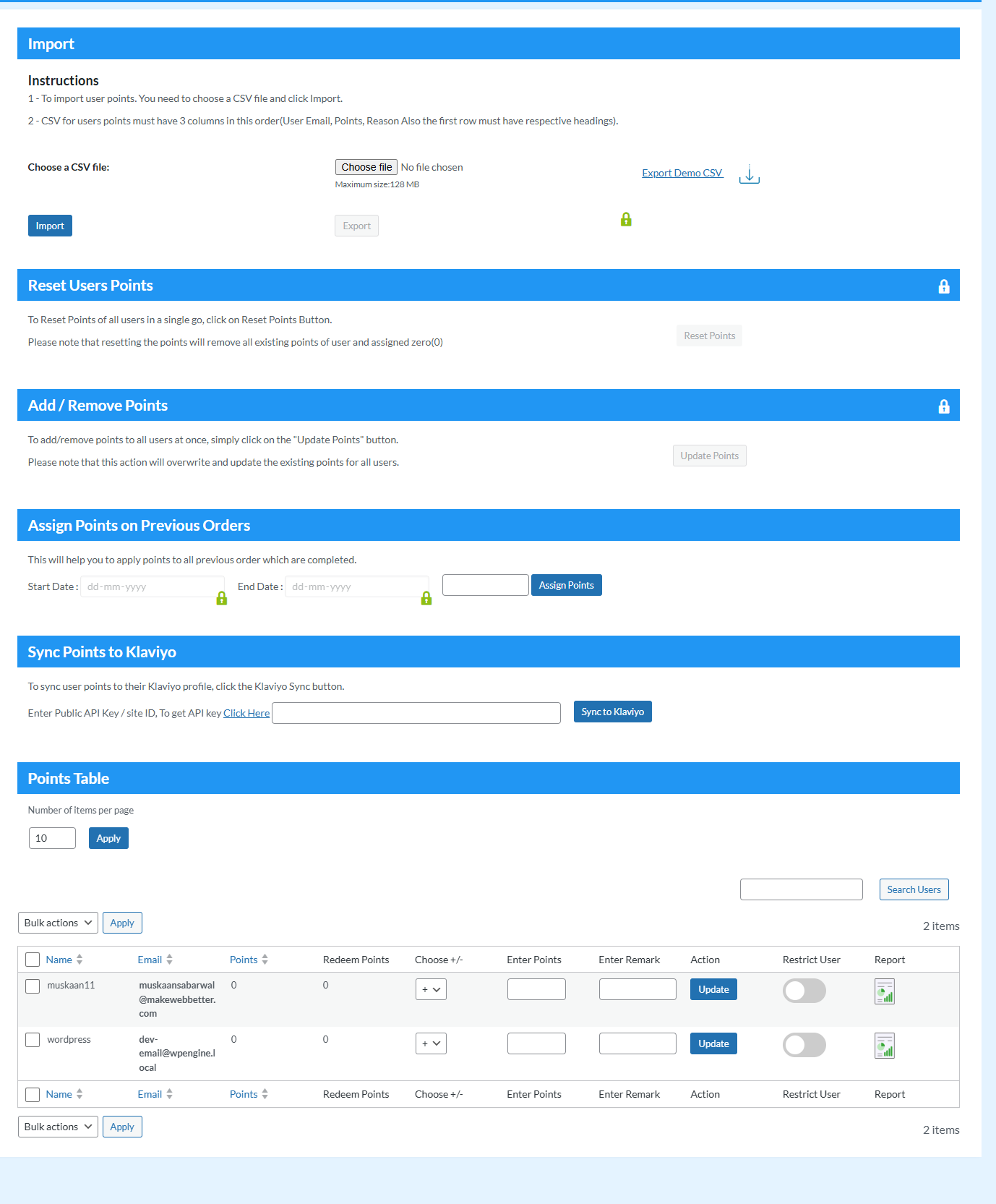
Admins can utilize this enhancement in the points table feature, where they can get an overview of all the points the customers have earned and redeemed. This enhancement helps the admins understand how many WooCommerce points the customers are earning and spending.
12) Assign Woo Points On Previous Orders
With the Rewards points plugin, the merchants get a chance to assign Woo points on previous orders. This setting enables the merchants to assign points to those orders.
13) Display Total Redeemed Reward Points
The admins can utilize this setting to see the point rewards that the customers are redeeming, this helps admins to plan how to reward their customers for other future activities.
14) Flexible Admin Controls & Reward Restrictions
With this feature of the WooCommerce loyalty program plugin, merchants can restrict customers from earning points on the purchase of products that the customers have already bought by redeeming their existing reward points.
15) WooCommerce Rewards Points on Actions
Customers have the opportunity to earn points for rewards through various activities like:
- Merchants can offer points and rewards on unique customer sign-ups.
- Users can share their referral links on Facebook, Twitter, Email, and WhatsApp directly from their accounts.
- Set the WooCommerce loyalty points for rewards to be credited to the customer’s account against each penny they spend on their store via the conversion feature.
- Assign global WooCommerce points and rewards value to all simple products of their store so the customer gets the same number of points on the purchase of any product.
- Set the number of rewards and points the customer will get if his order value lies within a set range.
LIVE DEMO OF POINTS AND REWARDS FOR WOOCOMMERCE PLUGIN
WITH THE WOOCOMMERCE POINTS AND REWARDS SYSTEM PLUGIN YOU CAN:
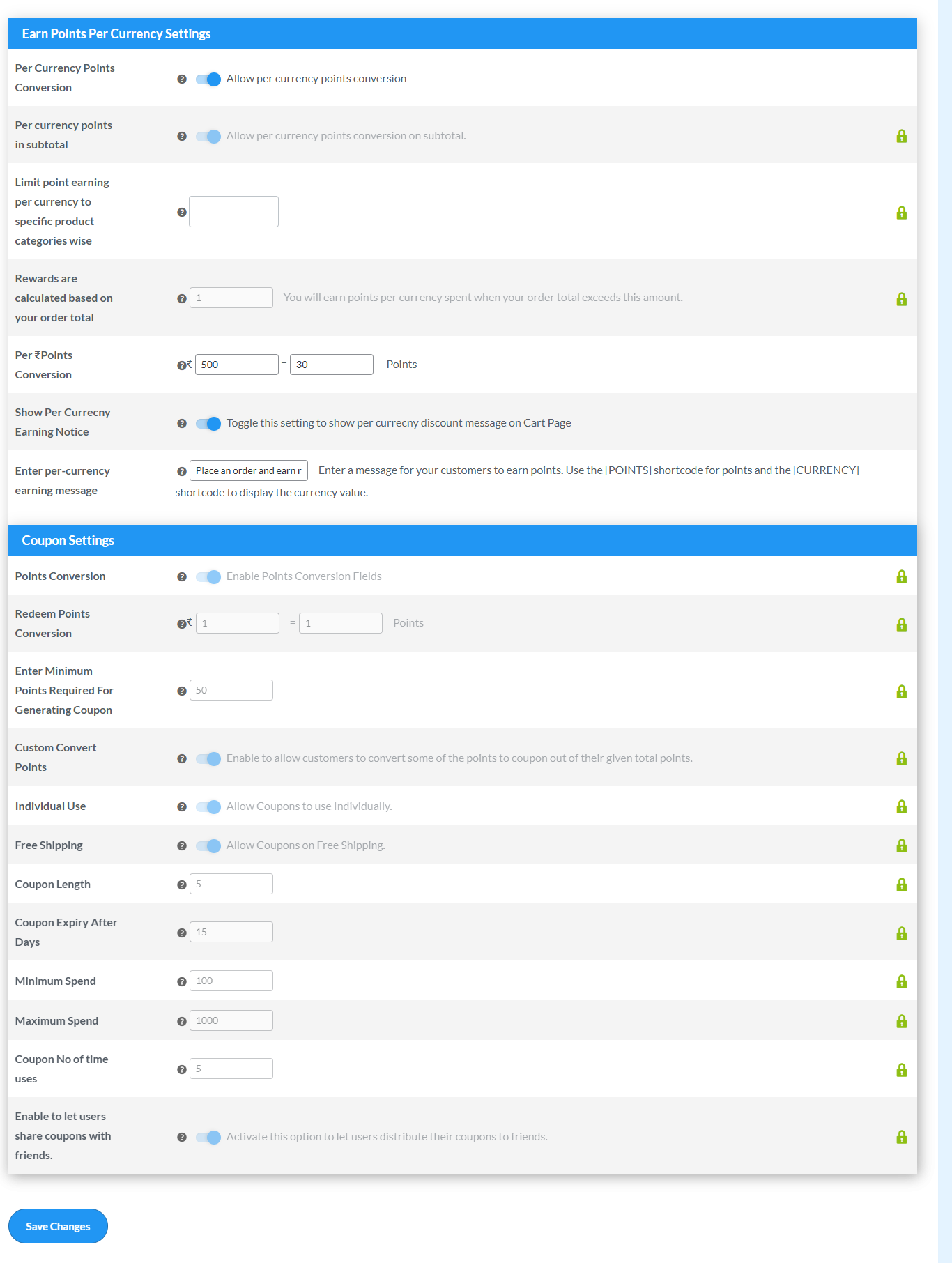
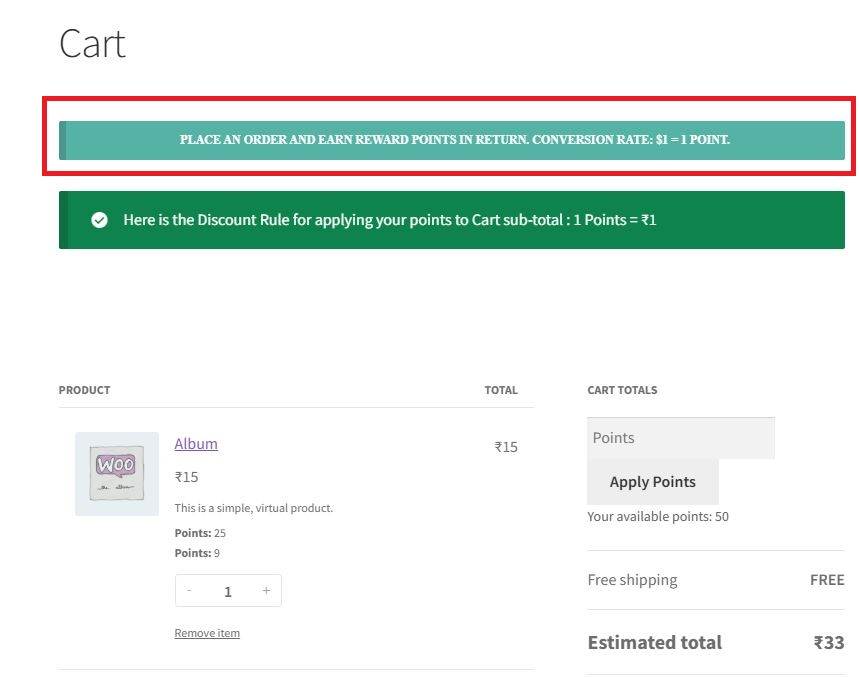
- Decide whether to show the “notice message” for the per currency & redemption settings over the cart page.
- Encourage customers to earn reward points by awarding them with user badges for different levels. * Track the WooCommerce loyalty points transaction of every customer with a
- Elevate your websites by enabling customers to spin the wheel and unlock point rewards, enhancing interaction and excitement.
point log report - Offer woo points and rewards on signups, referrals, purchases, etc. to engage your customers
- Offer WooCommerce loyalty points and rewards on previous orders
WOOCOMMERCE REWARD POINTS COMPATIBILITIES
-
Compatibility with Klaviyo enables merchants to sync their customer points-related data to their respective profiles on Klaviyo
-
Compatibility with Gutenberg Block allows the merchants to seamlessly utilize the shortcodes to add different elements to different pages.
-
The rewards plugin works seamlessly with the Smart Coupons Plugin. Customers can redeem their points and utilize smart coupon discounts.
-
Points and Rewards is compatible with WooCommerce Subscription. This functionality allows customers to earn points on the renewal of subscription products.
-
Compatible with MultiVendorX Marketplace and MultiVendorX, enables the vendors to earn points and rewards on purchases made in their stores
- Compatible with Membership with WooCommerce and Membership for WooCommerce Pro. Allows the admins to award a specific set of points, after the successful completion of a Membership Plan
- Compatible with Ultimate Gift Cards for WooCommerce and Gift Cards for WooCommerce Pro Plugin. Allows the merchants to give a specific set of points on the purchase of gift card products.
- Compatible with Wallet System for WooCommerce and WooCommerce Wallet System Pro plugin. Allows you to convert your earned points and rewards into wallet credit based on a specific conversion rate. We have also integrated the gamification feature with this compatibility.
- Compatible with Currency Switcher for WooCommerce. Allows your customers to select the currency unit for their purchase.
- The WooCommerce loyalty points plugin is compatible with WooCommerce PayPal Payment for operating secure online payments.
- Elementor Page Builder is compatible with the Points and Rewards plugin. Lets you use to add “apply points” snippets to the cart page and checkout page efficiently.
- WooCommerce Points and Rewards Plugin is compatible with WPML multilingual support
- The WooCommerce Points and Rewards Plugin is compatible with Subscriptions For WooCommerce Free and Subscriptions For WooCommerce Pro allowing the users to get points on subscription products.
- Our WooCommerce Referral Program plugin is Compatibility with Dokan Plugin
WHAT PREMIUM VERSION OF WOOCOMMERCE POINTS AND REWARDS OFFERS
1) Allow Purchase Through Points Only The Purchase through Points feature allows users to purchase items with rewards and points
2) Assign Product Points Merchants can assign reward points to the products as well as different categories using Points and Rewards for WooCommerce
3) Setup Multi-Level Membership The admin can create multiple membership tiers and add the required number of WooCommerce rewards to join them
4) Reward Points For Referral Signup And Purchase The admin can now assign a reward for points to the users, who have signed up or made a purchase using the referral link.
5) Gamification and Badges WooCommerce points and rewards plugins can be utilized to curate engaging loyalty programs by including gamification and user badge elements.
6) Setup Points Expiration Set the expiration period for the points customers earn from the Points Expiration setting of the rewards plugin.
7) API Settings API settings for integrating the points and rewards plugin with other applications have been provided for the admin
TAKE ADVANTAGE OF EXCLUSIVE FEATURES OF WOOCOMMERCE LOYALTY POINTS AND REWARD PLUGIN
Points and Rewards for WooCommerce help merchants create a points-based loyalty program to reward customers.
Note: Get Points and Rewards for WooCommerce Pro
SEE WHAT MITAPETS IS SAYING ABOUT THE POINTS AND REWARDS PLUGIN:
WP Swings support and the technical team have been helpful with my queries and issues pre- and – post upgrade. They have been very prompt in their replies too. The plugin back-end admin is easy to understand and set up. Thanks so much for all your help See point rewards Case Study
SUPPORT
If you need support or have questions, kindly use our online chat window here or connect with us then Generate a ticket
Create and Revamp your eCommerce store with WooCommerce Services
If our documentation doesn’t contain the solution to your problem, you can visit the WP Swings Forums Community or Generate a ticket
External Services
Klaviyo (Email Marketing & Data Sync)
Used to sync customer loyalty data for marketing automation.
Data sent: Customer email address and loyalty points data
When: When admin enables integration and customer data is updated
Endpoint: https://a.klaviyo.com/api/identify
Terms: https://www.klaviyo.com/legal/terms-of-service
Privacy: https://www.klaviyo.com/legal/privacy-policy
WP Swings Support Service
Used to submit support requests.
Data sent: Name, email, and message (user input)
When: When user submits a support query
Endpoint: https://wpswings.com/submit-query/
Terms: https://wpswings.com/terms-and-conditions/
Privacy: https://wpswings.com/privacy-policy/
HubSpot Forms
Used for onboarding and feedback collection.
Data sent: Name, email, website URL, and feedback
When: When forms are submitted
Endpoint: https://api.hsforms.com/
Terms: https://legal.hubspot.com/terms-of-service
Privacy: https://legal.hubspot.com/privacy-policy
Twilio / WhatsApp / Meta Setup Links
Used for configuring messaging services.
Data sent: The plugin does not directly send data
When: Admin uses external setup links
Endpoints: https://console.twilio.com/, https://business.facebook.com/
Terms: https://www.twilio.com/legal/tos, https://www.facebook.com/terms.php
Privacy: https://www.twilio.com/legal/privacy, https://www.facebook.com/privacy/policy
YouTube (Tutorials)
Used to display help videos.
Data sent: IP address and device data (by YouTube)
When: When videos are loaded or played
Terms: https://www.youtube.com/t/terms
Privacy: https://policies.google.com/privacy
WP Swings Client Notification Service
Used to fetch plugin update notifications displayed in the admin panel.
Data sent: Plugin slug and version number
When: When the admin visits the plugin dashboard
Endpoint: https://demo.wpswings.com/client-notification/points-and-rewards-for-woocommerce/wps-client-notify.php
Terms: https://wpswings.com/terms-and-conditions/
Privacy: https://wpswings.com/privacy-policy/
Facebook Graph API (WhatsApp Business)
Used to send WhatsApp messages to customers via the WhatsApp Business API.
Data sent: Customer phone number and points-related message
When: When points are awarded and WhatsApp notification is enabled
Endpoint: https://graph.facebook.com/v21.0/{PHONE_NUMBER_ID}/messages
Terms: https://www.facebook.com/terms.php
Privacy: https://www.facebook.com/privacy/policy
Facebook SDK (Social Sharing)
Used to render Facebook share buttons for referral sharing.
Data sent: IP address and device data (by Facebook)
When: When the points/referral page is loaded
Endpoint: https://connect.facebook.net/en_GB/sdk.js
Terms: https://www.facebook.com/terms.php
Privacy: https://www.facebook.com/privacy/policy
Pinterest (Social Sharing)
Used to open Pinterest pin creation for referral sharing.
Data sent: The plugin does not directly send data; user is redirected to Pinterest
When: When user clicks the Pinterest share button
Endpoint: https://pinterest.com/pin/create/link/
Terms: https://policy.pinterest.com/en/terms-of-service
Privacy: https://policy.pinterest.com/en/privacy-policy
Installation
Automatic installation
Automatic installation is the easiest option as WordPress handles the file transfers itself and you don’t need to leave your web browser. To do an automatic install of the plugin, log in to your WordPress dashboard, navigate to the Plugins menu, and click Add New.
In the search field type “Points and Rewards for WooCommerce” and click Search Plugins. Once you’ve found our Points and Rewards for WooCommerce plugin you can view details about it such as the point release, rating, and description. Most importantly, of course, you can install it by simply clicking “Install Now”.
Manual installation
The manual installation method involves downloading our Points And Rewards for WooCommerce and uploading it to your web server via your favorite FTP application. The WordPress codex contains instructions on how to do this here.
Updating
Automatic updates should work like a charm; as always though, ensure you backup your site just in case.
Frequently asked questions
Can we reward points to the user if he pays through a specific payment method?
Yes, we have this feature in point rewards plugin where the admin can reward points to users if they pay via a particular payment method For this: Go to other settings>Reward points via payment method>select the payment method for which you want to reward points.
Is it possible to assign Points Badges to users based on the points they have accumulated?
Yes, you do have the option to assign point badges to the user based on the points they have accumulated. However, if you would like to add multiple levels, you will need to purchase our Points and Rewards for WooCommerce Pro for this feature.
Do you have a Gamification feature on your point rewards plugin?
Yes, we have a gamification feature in our plugin and you can find the “Gamification settings” in our plugin settings from where you can make various changes to showcase this feature as per your need.
Can we restrict reward points when the user applies points while placing an order?
Yes, you can restrict reward points when a user applies points while placing an order. For this: Go to other settings>Under Restrict reward points section>Enable Restrict reward points settings. Now the user will not receive any reward points if they apply any points while placing an order
Can I assign Points to all Previous orders that are completed?
Yes, you can assign points to all previous orders which are completed. For this: Go to Points Table>Under Assign Points on Previous order section>Enter Points to assign>Click on Assign Points Button. After that points will be assigned to all the previous orders that are completed
How does the WooCommerce Rewards Points plugin work?
Merchants can create a WooCommerce rewards point management system using this plugin. In this point reward system, customers get rewarded with loyalty points for their store activities like purchases, signups, referrals, and many more. Customers can further redeem earned point value as a discount for their purchase.
Who can use the points Loyalty Points and Rewards plugin?
Any WooCommerce store owner who wants to build a loyalty rewards program for their customers can use this plugin.
How can points be redeemed using the WooCommerce Reward Point plugin?
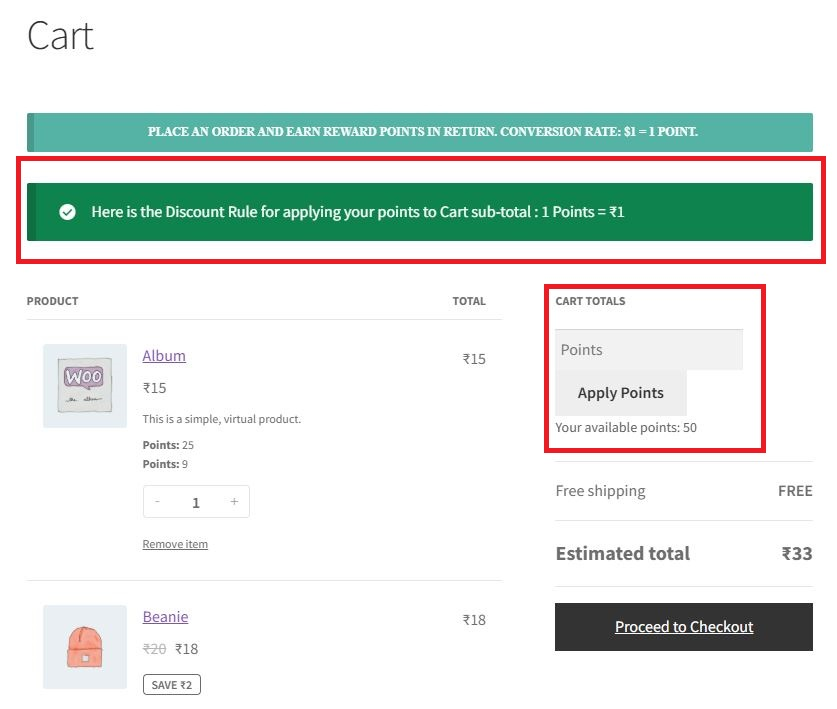
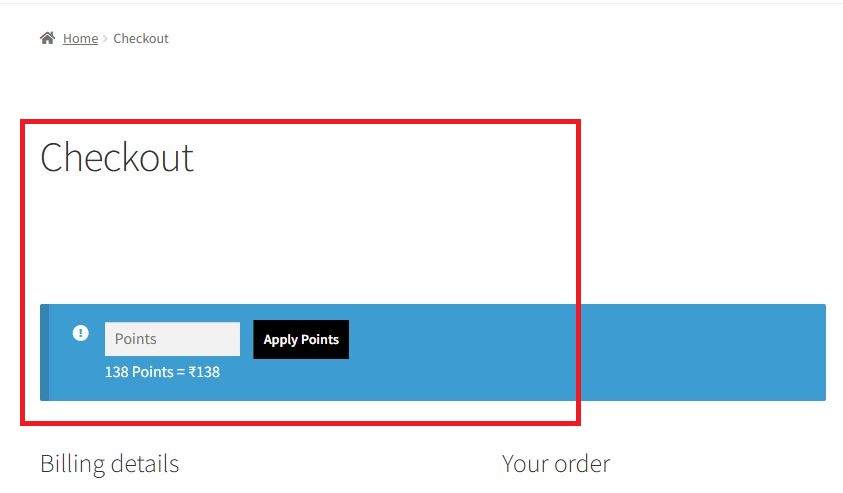
The plugin allows merchants to let their users redeem earned points either on the cart or the checkout page. Customers need to add the points in the “Apply Points” field and the points will be redeemed.
How and where can we manually add, remove, or view the points for the user?
You can view, add, or remove the users’ points manually through the points table section. To do this, go to your WordPress Dashboard then navigate to WooCommerce > Points and Rewards, and in the plugin, go to the Points Table section. Under that section, you can select whether you want to add or deduct points for a specific user, add your remarks for updating the points, and click on Update and you’re done.
Is there any feature in the WooCommerce rewards points plugin by which we can give the points on the order total?
Yes. Through the “Order Total Points” setting, the admin can offer points on the order total. Merchants can set the number of points a customer will receive if his order value lies within a set price range. For example: Merchants can offer 100 points whenever a customer spends an amount between 100 to 300 dollars. So you can add 100 in as the minimum and 300 as the maximum price and the customer will receive 100 points whenever they spend this much amount. To enable this feature, go to your WordPress Dashboard > WooCommerce > Points and Rewards > Order Total Points and click on the checkbox…
Are coding skills required for using the loyalty points and rewards plugin?
No. Coding skills are not required to use this WooCommerce reward points plugin. You can easily install, activate, and use this plugin.
Can I provide points to the customer for signup?
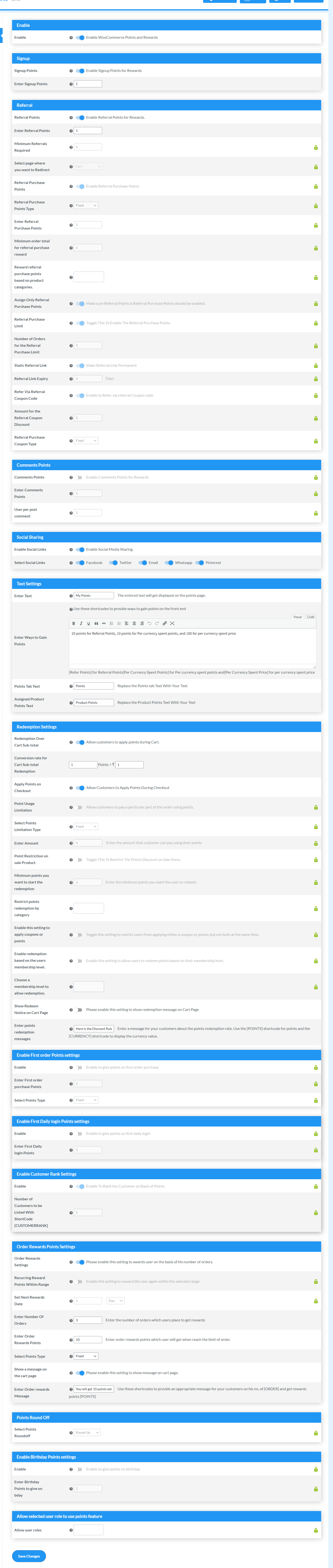
Yes, you can offer points on Signup by enabling the Signup Points feature. To do this, go to your WordPress dashboard and navigate to WooCommerce > Points and Rewards > General. In the General tab, you’ll see the Signup section. Enable the checkbox that says “Enable Signup Points for Rewards” and enter the number of points you want to offer to customers on every unique sign-up. Save changes once you’re done and the customers will receive rewards for their signup.
How will customers get the benefit of the membership feature?
Admin can create the membership and set a specific number of points to join the membership. When a customer collects a set number of points, he/she can spend that amount of points to join the membership program.
Do customers receive an email notification about the reward points they have earned?
Yes. You can notify the customers about the transaction of their loyalty points through emails. There are different scenarios to notify customers of their points transactions. You can create a different subject line and message for every notification. The email will be sent to the registered email of the customer.
How can a customer or admin check the point’s transaction history?
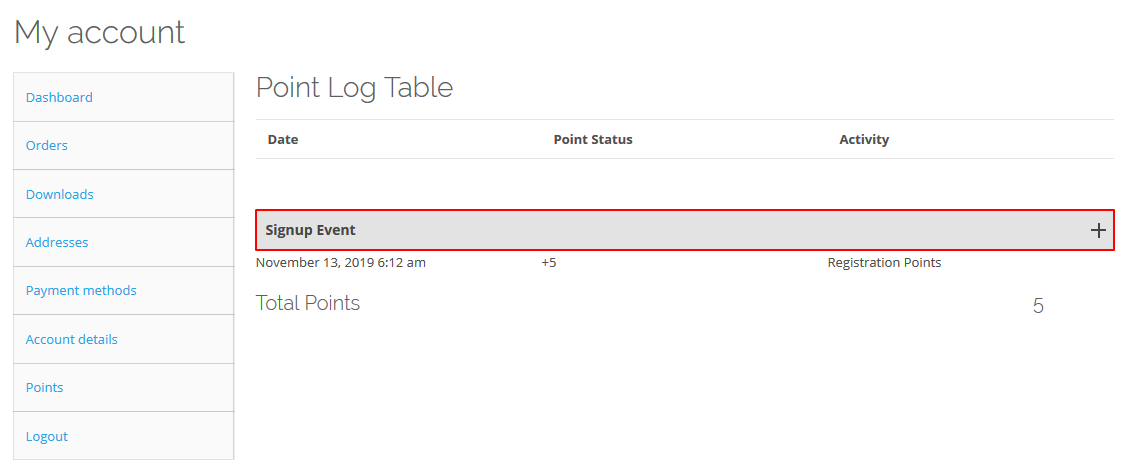
Our WooCommerce Points and Rewards plugin offers a points log report feature that allows both customers and admins to check the point’s transaction history. For customers: Customers can check their points transaction history on your online store by going to My Account > Points > Viewpoint Log. All the points transactions are shown in that report. For admins: Admins can check the points transaction history of each customer by going to their WordPress Dashboard and then navigating to WooCommerce > Points and Rewards > Points Table. In the points table, the admin can click on the View Point Log…
Can customers earn points on the referral signup?
Yes. The admin can enable this feature to offer loyalty points on referral signups. To do this, go to your WordPress dashboard and navigate to WooCommerce > Points and Rewards > General. In the General tab, you’ll see the Referral section. Enable the checkbox that says “Enable Referral Points for Rewards” and enter the number of loyalty points you want to offer to customers on every referral sign-up. Save changes once you’re done and the referrer will receive the loyalty points whenever a referee signs up to your website using the referrer’s referral link.
How do I see my points balance with the WooCommerce Loyalty Points and Rewards plugin?
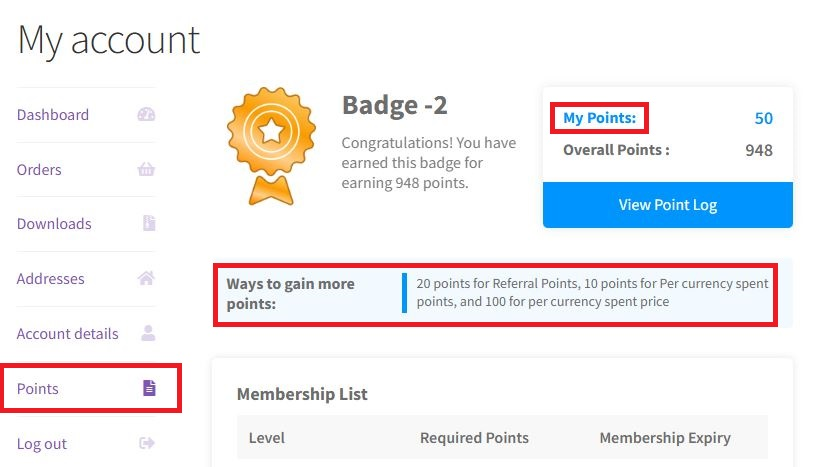
Customers can see their points balance in the Points tab under the Account section.
My Question is not listed?
Please visit WP Swings PAR Knowledge Base
Changelog
Security Fix: Added missing capability check on wps_wpr_assign_claim_points() AJAX endpoint (CVE-PENDING) Security Fix: Implemented server-side validation of Win Wheel claim amounts against admin-configured segment values Security Fix: Fixed anti-repeat-claim mechanism to enforce minimum 1-day cooldown even when admin value is unset/0 Security Fix: Added duplicate action check to wps_wpr_assign_social_share_points() to prevent social share farming Security Fix: Extended validation to wallet claims (previously only points were validated) Security: Added security audit logging for invalid claim attempts with wps_wpr_invalid_claim_attempt action hook Improvement: Enhanced input sanitization using absint() for all numeric claim values
2.10.4 – Released on 15 September 2026
- Security Fix: Added missing capability check on wps_wpr_assign_claim_points() AJAX endpoint (CVE-PENDING)
- Security Fix: Implemented server-side validation of Win Wheel claim amounts against admin-configured segment values
- Security Fix: Fixed anti-repeat-claim mechanism to enforce minimum 1-day cooldown even when admin value is unset/0
- Security Fix: Added duplicate action check to wps_wpr_assign_social_share_points() to prevent social share farming
- Security Fix: Extended validation to wallet claims (previously only points were validated)
- Security: Added security audit logging for invalid claim attempts with wps_wpr_invalid_claim_attempt action hook
- Improvement: Enhanced input sanitization using absint() for all numeric claim values
2.10.3 – Released on 31 August 2026
- New: Setup Wizard on Plugin Activation
- New: Compatibility with latest WP 7.1 and WC 11.0.1 update
- Fix: Save settings issue where update_option returning false was treated as failure
- Fix: PHPCS coding standards compliance issues across multiple core files
- Fix: Cleaned up unused code in onboarding templates
- Improvement: Various UI/UX improvements across admin interface
- Improvement: Functionality improvements in core plugin architecture
- Improvement: All styling inline to bypass cache issues
- Improvement: Added cache busting to wizard assets (CSS/JS) for immediate
- Fix: Added missing capability check to wps_wpr_assign_claim_points() AJAX endpoint to prevent unauthorized access
- Fix: Added server-side validation of claim amounts against configured Win Wheel prizes to prevent manipulation
- Fix: Fixed anti-repeat-claim mechanism to enforce default 1-day cooldown when not configured (was 0 days)
- Fix: Added duplicate action check to wps_wpr_assign_social_share_points() to prevent social share point farming
- Fix: Extended daily rate limiting to both points and wallet claims (previously wallet-only)
- Fix: Added maximum daily claim limit (default: 1 claim per day per user) with filter hook wps_wpr_max_daily_game_claims
2.10.2 – Released on 10 July 2026
- New : Compatibility with latest WC ( 10.9.4 ) and WP ( 7.0.1 )
- Fix : Design issue fix in points table
2.10.1 – Released on 06 July 2026
- Fix: Object injection vulnerability (replaced unserialize with json_decode)
- Fix: Removed nopriv exposure on admin-only AJAX endpoints
- Fix: cURL SSL bypass and ZIP path traversal in plugin installer
- Fix: Added permission_callback to all REST API routes + input sanitization
- Fix: Points now awarded correctly on all manual order status changes
- Fix: Resolved $0 discount bug on points redemption at checkout
- Fix: Cart applied discount persists through page reloads
- Fix: Category points assignments now save correctly
- Fix: Memory leak in background processing – batch processing added
- Fix: PHP 8.3 compatibility + DIVI 5 checkout compatibility
- New: Compatibility with latest WP (7.0.0) and WC (10.9.3)
2.10.0 – Released on 07 May 2026
- New : Compatibility with latest WC ( 10.7.0 ) and WP ( 6.9.4 )
- New : UI/UX dashboard layout changes
- New : Points tab template
- Fix : Performance Optimization
2.9.8 – Released on 08 April 2026
- Fix : Deprecated function issues and escaping issues
Screenshots
For developers
Is this your plugin? Show off the numbers.
Add a live badge to your site, docs or GitHub README. It updates on its own — no account needed.
Best Points and Rewards for WooCom… alternatives
All gamification plugins →




FAQ
Points and Rewards for WooCommerce: quick answers
Straight answers, pulled from live WordPress.org data.
Live data from WordPress.org · checked Sep 26, 2026
Is Points and Rewards for WooComme… free?
Yes. Points and Rewards for WooComme… is free to download and use from the official WordPress.org plugin directory. The developer also sells premium add-ons or a Pro version with extra features.
Is Points and Rewards for WooComme… safe to use in 2026?
Yes — Points and Rewards for WooComme… is a safe, well-maintained plugin to use in 2026. It runs on 7K+ sites, is rated 4.5/5 and was last updated 2 weeks ago, and scores 87/100 on our health check.
How many websites use Points and Rewards for WooComme…?
Points and Rewards for WooComme… is active on 7K+ WordPress websites and has been downloaded 354,587 times since it launched in November 2019. It was downloaded 8,414 times in the last 30 days.
Does Points and Rewards for WooComme… work with WordPress 7.1?
Yes. The developer has tested Points and Rewards for WooComme… up to WordPress 7.1.2, the latest release. It requires WordPress 6.7.0 or newer.
What PHP version does Points and Rewards for WooComme… need?
Points and Rewards for WooComme… requires PHP 7.4 or higher. Most hosts run PHP 8.x today, so it works on any modern WordPress hosting.
When was Points and Rewards for WooComme… last updated?
The latest version, 2.10.4, was released on September 15, 2026 (2 weeks ago).
Who makes Points and Rewards for WooComme…?
Points and Rewards for WooComme… is developed and maintained by WP Swings.
What are the best alternatives to Points and Rewards for WooComme…?
The most popular alternatives to Points and Rewards for WooComme… are GamiPress (10K+ installs), WP Optin Wheel (1K+ installs) and GamiPress – Button (800+ installs).
Powered by PageForge
Want thousands of pages that rank like these? Build them in an afternoon.
This directory runs on the same engine as PageForge. Turn any spreadsheet, CSV or API into thousands of fast, SEO-ready WordPress pages — with schema, internal links and AI-written copy baked in.
- CSV, Google Sheets & API data sources
- AI content, schema & internal links per page
- Works with Elementor, Gutenberg, Yoast & Rank Math
- Free on WordPress.org — no credit card


