


PluginCity Ordering Hours for WooCommerce
Pause new WooCommerce orders without taking your shop offline. Set vacation or holiday breaks, or weekly ordering hours; browsing carries on.

Solid choice
PluginCity Ordering Hours for W… is a solid plugin choice in 2026, with a few things worth checking first. Was last updated 3 days ago, and scores 64/100 on our health check.
- Actively developed — last update 3 days ago
- Tested with the latest WordPress (7.1)
- Small user base (<10 active installs)
- Very few reviews so far
- Needs PHP 8.1 or newer
How does it stack up?
Side-by-side on installs, updates, ratings & support



Daily downloads
Download spikes usually follow a new release — each site that auto-updates counts as a download.
Rankings
Where PluginCity Ordering Hours f… stands todayWordPress.org search rankings
Live position in the plugin search, top 100| Keyword | Position |
|---|---|
| holiday mode | >100 |
| Opening Hours | >100 |
| pause orders | >100 |
| store closed | >100 |
| vacation mode | #45 |
About PluginCity Ordering Hours for WooCommer…
From the official readme · v1.1.0Description
PluginCity Ordering Hours for WooCommerce pauses new orders without taking the shop offline. Products stay on the site, customers can keep browsing, and checkout is refused until you are ready to take orders again.
Watch the setup tutorial on YouTube:
Your shop stays open for browsing. Ordering doesn’t.
Going on holiday? Pause orders until you return. Only fulfil Monday to Friday? Set regular ordering hours. Warehouse overloaded? Pause new orders immediately. Closed for Christmas? Schedule the break and reopen automatically.
The free version is permanent. It does not expire, needs no licence key, and never contacts PluginCity.
What you get
- Pause new orders while the shop stays online
- Pause orders until a date and time, then reopen automatically
- Schedule one temporary closure for a holiday, vacation or fulfilment break
- Weekly ordering hours, one window a day
- A message you write yourself, with the reopening time filled in from your hours
- Choose to keep the cart or hide add to cart
- Notices on the cart and checkout, and in the mini-cart, classic and block
- Place order and Proceed to checkout are switched off while ordering is paused
- Checkout blocked on classic and block flows
- Express payment flows are blocked while ordering is paused
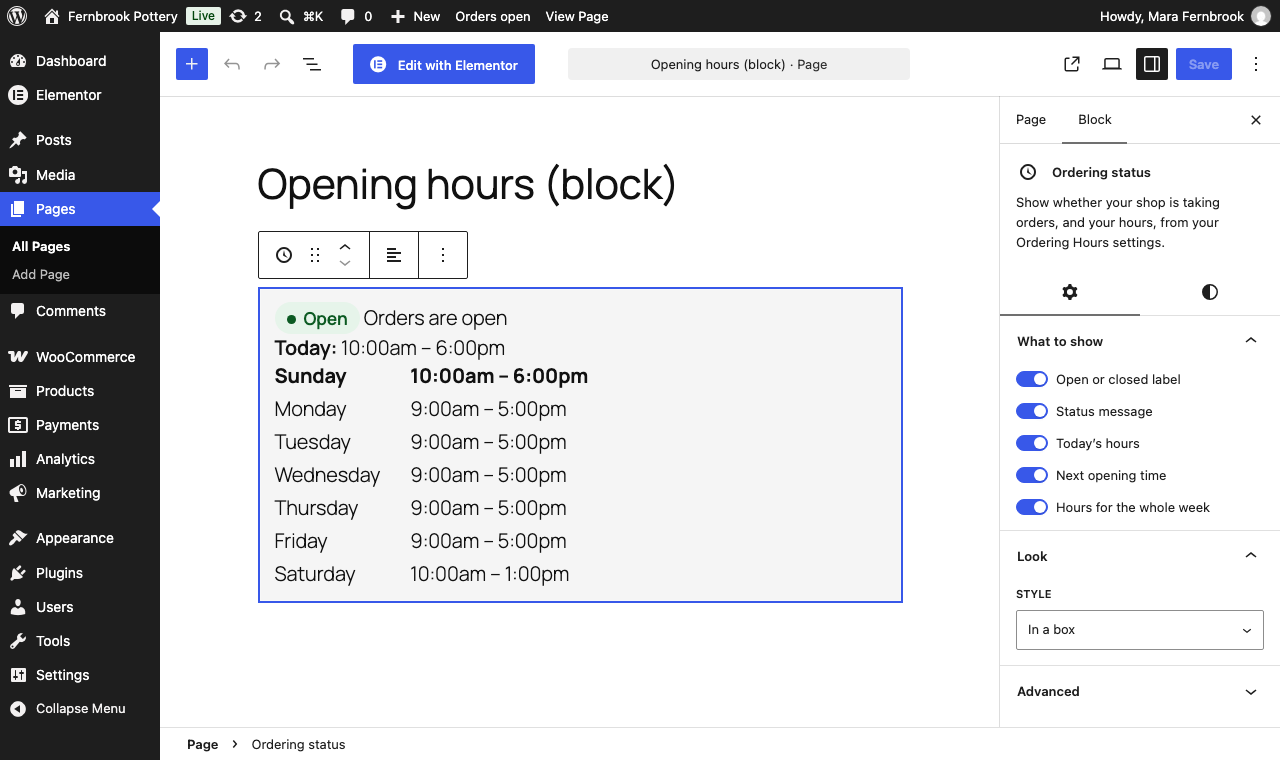
- Block, shortcode and Elementor widget to put the status anywhere
- Opening hours markup for search engines (schema.org), built from your hours and closures
- Settings import and export, so a configuration can be copied to another shop or kept as a backup
- Admin toolbar status showing whether ordering is open or paused
- High-Performance Order Storage compatibility
The free version never phones home. There is no account, no licence key, and no trial clock.
Need multiple closures, date-specific hours, customer-group rules or more advanced scheduling? Ordering Hours Pro adds those features.
Pro is a separate paid version, sold and distributed by PluginCity. It is not included in this plugin and is not downloaded or installed by it, and nothing described above depends on it. Your settings carry over if you buy it.
Configuration
- Leave orders open, or pause them straight away.
- Set weekly ordering hours if you only take orders on certain days.
- Add one temporary closure for a holiday, vacation or fulfilment break, if you have one coming.
- Write the message a customer sees while orders are paused.
- Choose whether to keep the cart or hide add to cart.
Installation
WooCommerce must be installed and active first.
- In WordPress, go to Plugins → Add New.
- Search for Ordering Hours for WooCommerce.
- Click Install Now, then Activate.
- Go to WooCommerce → Ordering Hours, or click Settings on the Plugins screen.
Installing from a downloaded ZIP instead: go to Plugins → Add New → Upload Plugin, choose the ZIP file, and click Install Now. Leave the ZIP as it is; there is no need to unzip it.
Changelog
Adds a status block, an Elementor widget and optional opening hours markup. Your settings are unchanged, and nothing new appears until you add one of them.
1.1.0
- New: the Ordering status block, for the block editor and the site editor.
- New: the Ordering status widget for Elementor, shown only when Elementor is active.
- New: the shortcode can show today’s hours, the next opening time or the whole week, in a choice of looks.
- New: optional schema.org opening hours markup, printed once per page, which steps aside for Yoast Local SEO and Rank Math Local SEO.
1.0.1
- New: the headline and message for the cart, checkout and mini-cart can be edited, with the reopening time filled in from your hours ({reopen_time}, {reopen_day}, {reopen_date}, {reopen_clock}).
- New: the message now appears in the Mini-Cart block and its drawer as well as the classic mini-cart.
- Changed: Place order and Proceed to checkout are switched off while orders are paused, in the classic and block flows, and the mini-cart Checkout button with them.
- Changed: the shipped message now reads “Your basket is ready, but ordering is currently closed.” with “We reopen Monday at 8:00am.”
- Changed: reopening times follow the time format set under Settings → General.
1.0.0
- First public release.
Screenshots


For developers
Is this your plugin? Show off the numbers.
Add a live badge to your site, docs or GitHub README. It updates on its own — no account needed.
Best PluginCity Ordering Hours for… alternatives
All holiday mode plugins →FAQ
PluginCity Ordering Hours for WooCo…: quick answers
Straight answers, pulled from live WordPress.org data.
Source: WordPress.org
Is PluginCity Ordering Hours for W… free?
Yes. PluginCity Ordering Hours for W… is free to download and use from the official WordPress.org plugin directory.
Is PluginCity Ordering Hours for W… safe to use in 2026?
PluginCity Ordering Hours for W… is a solid plugin choice in 2026, with a few things worth checking first. Was last updated 3 days ago, and scores 64/100 on our health check.
How many websites use PluginCity Ordering Hours for W…?
PluginCity Ordering Hours for W… is active on <10 WordPress websites and has been downloaded 406 times since it launched in October 2026. It was downloaded 210 times in the last 30 days.
Does PluginCity Ordering Hours for W… work with WordPress 7.1?
Yes. The developer has tested PluginCity Ordering Hours for W… up to WordPress 7.2, the latest release. It requires WordPress 6.7 or newer.
What PHP version does PluginCity Ordering Hours for W… need?
PluginCity Ordering Hours for W… requires PHP 8.1 or higher. Most hosts run PHP 8.x today, so it works on any modern WordPress hosting.
When was PluginCity Ordering Hours for W… last updated?
The latest version, 1.1.0, was released on November 26, 2026 (3 days ago).
Who makes PluginCity Ordering Hours for W…?
PluginCity Ordering Hours for W… is developed and maintained by PluginCity.
What are the best alternatives to PluginCity Ordering Hours for W…?
The most popular alternatives to PluginCity Ordering Hours for W… are Unstoppable Order Pause for… (10+ installs), Graphics Cove Shop Pause &… (<10 installs) and MUQ Vacation Mode & Notice… (<10 installs).
Powered by PageForge
One template and a spreadsheet. A real page for every search.
PageForge turns each row of a CSV into a WordPress page with its own title, URL, SEO fields and schema, built on the layout you already designed. Free on WordPress.org.
- CSV and XLSX, plus Google Sheets on Professional and Enterprise
- Its own title, URL, SEO fields and schema for every page
- Works with the block editor, Elementor, Divi and Avada
- Free on WordPress.org, no credit card