


Plugin Notes Plus
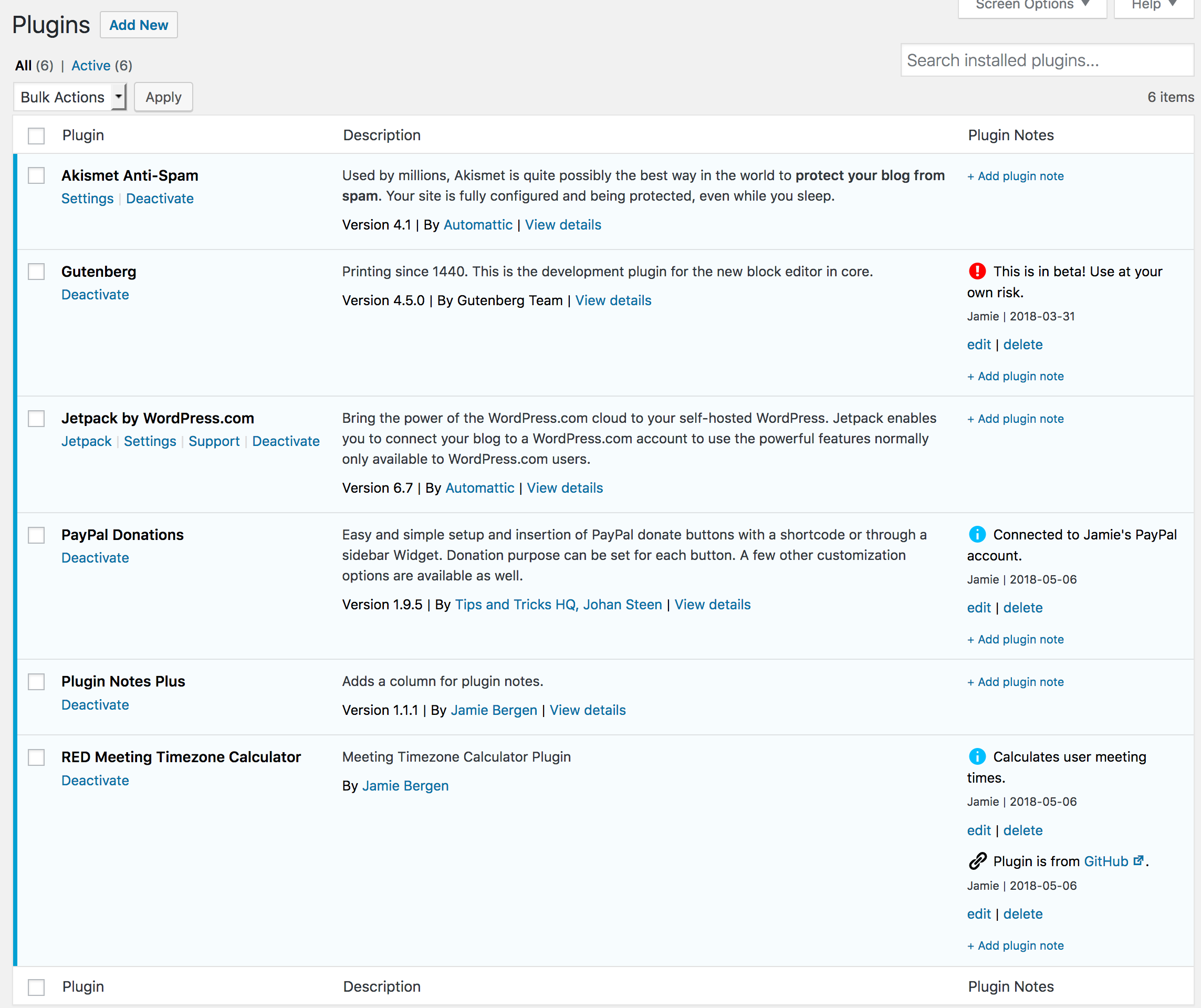
Adds a column to the Plugins page where you can add, edit, or delete notes about a plugin.

Solid choice
Plugin Notes Plus is a solid plugin choice in 2026, with a few things worth checking first. It runs on 9K+ sites, is rated 5/5 and was last updated 2 months ago, and scores 69/100 on our health check.
- Loved by users — 5/5 from 62 reviews
How does it stack up?
Side-by-side on installs, updates, ratings & support



Daily downloads
Download spikes usually follow a new release — each site that auto-updates counts as a download.
Rankings
Where Plugin Notes Plus stands todayWordPress.org search rankings
Live position in the plugin search, top 100| Keyword | Position |
|---|---|
| memo | #2 |
| plugin notes | #1 |
| plugins | #36 |
Version adoption
Share of active sites per release.
Rating breakdown
★★★★★★★★★★ 5 from 62 reviews
About Plugin Notes Plus
From the official readme · v1.2.10Description
Have you ever returned to a site that you built a while back and asked, “Why did I install this plugin?” This plugin provides an extra column on the Plugins page that enables you to add, edit, or delete notes about the plugins you have installed on a particular site. These notes are intended to provide documentation regarding why a particular plugin was installed and how or where it’s being used.
Features
- Add as many or as few notes as you need for each plugin.
- Edit or delete notes as desired.
- Select an icon to go with each note to quickly convey what type of content it contains (e.g., info, warning, link, etc.)
- Format notes using basic HTML tags if desired.
- Any links included in the note will be automatically converted to
target="_blank" - Notes are added and updated via Ajax, avoiding slow page reloads.
- Notes also display on the WordPress Updates page for any plugins that need to be updated.
- A filter is provided if you would like to display notes beneath the plugin description instead of in a separate column.
- A filter is available to selectively hide or display plugin notes in the admin.
Installation
- You can either install the plugin via the Plugins directory from within your WordPress install, or you can upload the files manually to your server by extracting the .zip file and placing its contents in the /wp-content/plugins/ directory.
- Activate the plugin through the Plugins menu in WordPress.
- Add, edit, or delete notes in the Plugin Notes column on the Installed Plugins page.
Frequently asked questions
Can I display the plugin notes beneath the plugin description instead of in a separate column?
As of version 1.2.4, you can use the filter plugin-notes-plus_note_placement to move notes beneath the plugin description. Here is an example of a snippet that places plugin notes beneath the plugin description. It can be added to your child theme’s functions.php. Without this, the note position will default to a separate column on the plugins page. function pnp_change_note_placement( $note_placement ) { $note_placement = 'description'; return $note_placement; } add_filter( 'plugin-notes-plus_note_placement', 'pnp_change_note_placement' );
Can I modify which icons are available to display next to plugin notes?
Yes, you can use the filter plugin-notes-plus_icon_options to modify the set of icons available. The icons must be selected from the list of available WordPress dashicons. Here is an example of a snippet that removes one icon and adds an additional icon to the list of options. It can be added to your child theme’s functions.php: function pnp_change_icon_options( $icon_options ) { // Remove key option unset( $icon_options['dashicons-admin-network'] ); // Add smartphone option $icon_options['dashicons-smartphone'] = 'Smartphone'; return $icon_options; } add_filter(…
Which HTML tags are permitted, and can that list be modified?
You can use the following HTML tags: a, br, p, b, strong, i, em, u, hr. To modify the list of available tags, use the filter plugin-notes-plus_allowed_html. Be careful, however, to avoid allowing tags that could leave the site vulnerable to an XSS attack. function pnp_change_allowed_html_tags( $allowed_tags ) { // Remove br from allowed tags unset( $allowed_tags['br'] ); // Add img to allowed tags $allowed_tags['img'] = array(); return $allowed_tags; } add_filter( 'plugin-notes-plus_allowed_html', 'pnp_change_allowed_html_tags' );
Where is the data stored?
Plugin notes and note metadata are stored in a custom table whose name ends in plugin_notes_plus. In the initial version (1.0.0), notes were stored in the options table. Version 1.1.0 was released to migrate existing notes from the options table into the plugin_notes_plus table. Upgrading to version 1.1.1 will perform a cleanup, removing any notes from the options table.
How does it work on multisite installs?
Each site within a multisite install maintains its own plugin notes. Additionally, the superadmin can maintain their own plugin notes.
Can I hide plugin notes from specific users?
As of version 1.2.6, you can use the filter plugin-notes-plus_hide_notes to show or hide plugin notes. Here is an example of a snippet that hides plugin notes from a specfic user. It can be added to your child theme’s functions.php. Without this, plugin notes are displayed by default to all users who can view the plugins page. function pnp_hide_notes( $hide_notes ) { // logic to set $hide_notes to TRUE or FALSE return $hide_notes; } add_filter( 'plugin-notes-plus_hide_notes', 'pnp_hide_notes' );
Changelog
This version fixes a plugin conflict with WPML.
1.2.10
- Fixed: Ajax conflict with WPML version 4.7.0 and up. Thanks to @ericmuc for bringing this to my attention.
1.2.9
- Fixed: PHP warnings related to I18n.
1.2.8
- Fixed: Checking for user permission on ajax requests.
1.2.7
- Fixed: Cross site scripting (XSS) vulnerability related to icon rendering.
1.2.6
- Added: Option to selectively hide or display plugin notes. Thanks to @garconis for the suggestion.
1.2.5
- Fixed: PHP warning caused by deprecated usage of wp_localize_script. Thanks to @brianhenryie for finding this.
Screenshots
For developers
Is this your plugin? Show off the numbers.
Add a live badge to your site, docs or GitHub README. It updates on its own — no account needed.
Best Plugin Notes Plus alternatives
All memo plugins →





FAQ
Plugin Notes Plus: quick answers
Straight answers, pulled from live WordPress.org data.
Live data from WordPress.org · checked Sep 26, 2026
Is Plugin Notes Plus free?
Yes. Plugin Notes Plus is free to download and use from the official WordPress.org plugin directory.
Is Plugin Notes Plus safe to use in 2026?
Plugin Notes Plus is a solid plugin choice in 2026, with a few things worth checking first. It runs on 9K+ sites, is rated 5/5 and was last updated 2 months ago, and scores 69/100 on our health check.
How many websites use Plugin Notes Plus?
Plugin Notes Plus is active on 9K+ WordPress websites and has been downloaded 77,617 times since it launched in February 2018. It was downloaded 469 times in the last 30 days.
Does Plugin Notes Plus work with WordPress 7.1?
Plugin Notes Plus is officially tested up to WordPress 7.0.6, while the latest release is 7.1.2. It may still work, but try it on a staging site first.
What PHP version does Plugin Notes Plus need?
Plugin Notes Plus requires PHP 5.6 or higher. Most hosts run PHP 8.x today, so it works on any modern WordPress hosting.
When was Plugin Notes Plus last updated?
The latest version, 1.2.10, was released on July 23, 2026 (2 months ago).
Who makes Plugin Notes Plus?
Plugin Notes Plus is developed and maintained by jamiebergen.
What are the best alternatives to Plugin Notes Plus?
The most popular alternatives to Plugin Notes Plus are Page & Post Notes (1K+ installs), Notely (600+ installs) and Plugin Notes (400+ installs).
Powered by PageForge
Want thousands of pages that rank like these? Build them in an afternoon.
This directory runs on the same engine as PageForge. Turn any spreadsheet, CSV or API into thousands of fast, SEO-ready WordPress pages — with schema, internal links and AI-written copy baked in.
- CSV, Google Sheets & API data sources
- AI content, schema & internal links per page
- Works with Elementor, Gutenberg, Yoast & Rank Math
- Free on WordPress.org — no credit card


