



Plugin Memory Usage
Measures changes in WordPress memory usage. This tool helps you to reveal plugins that are poorly programmed and do not release memory properly.

Solid choice
Plugin Memory Usage is a solid plugin choice in 2026, with a few things worth checking first. It runs on 600+ sites, is rated 5/5 and was last updated 4 months ago, and scores 62/100 on our health check.
- Small user base (600+ active installs)
- Very few reviews so far
Daily downloads
Download spikes usually follow a new release — each site that auto-updates counts as a download.
Rankings
Where Plugin Memory Usage stands todayWordPress.org search rankings
Live position in the plugin search, top 100| Keyword | Position |
|---|---|
| increase memory | #1 |
| memory | #3 |
| memory limit | #3 |
| memory usage | #3 |
| ram | #7 |
Version adoption
Share of active sites per release.
Rating breakdown
★★★★★★★★★★ 5 from 1 reviews
About Plugin Memory Usage
From the official readme · v1.3.0Description
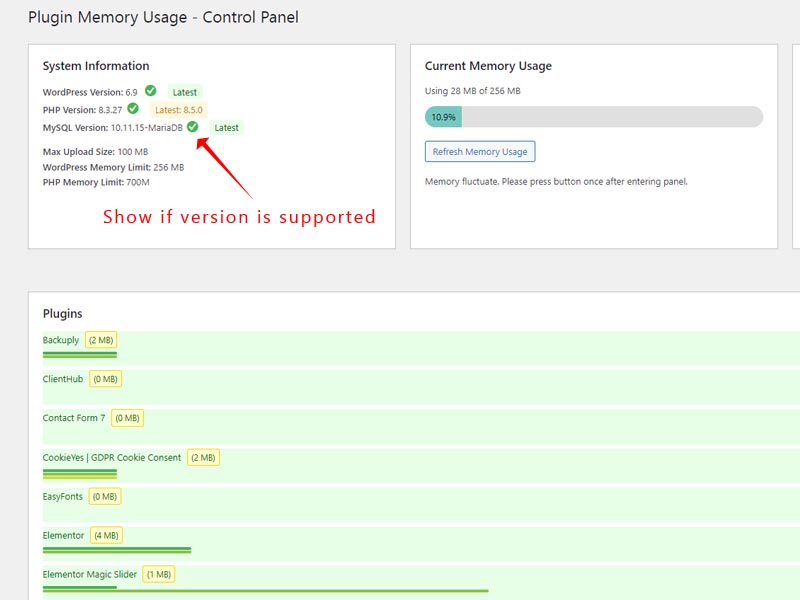
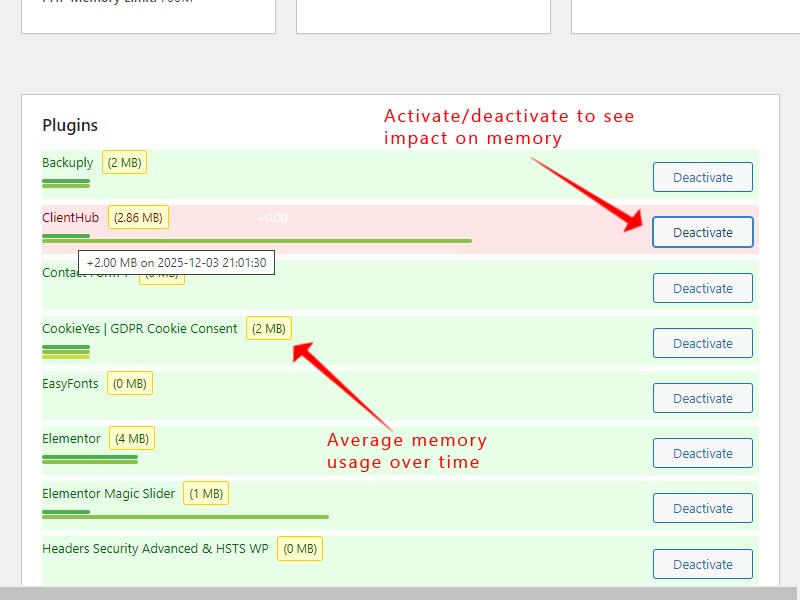
This plugin try to measure and record the memory usage of different WordPress plugins. When you activate or deactivate a plugin, it measures the memory usage. The difference between these measurements gives an estimate of each plugin’s memory impact. These measurements are estimates and may vary. Factors like caching, other active plugins, and WordPress itself can influence memory usage.
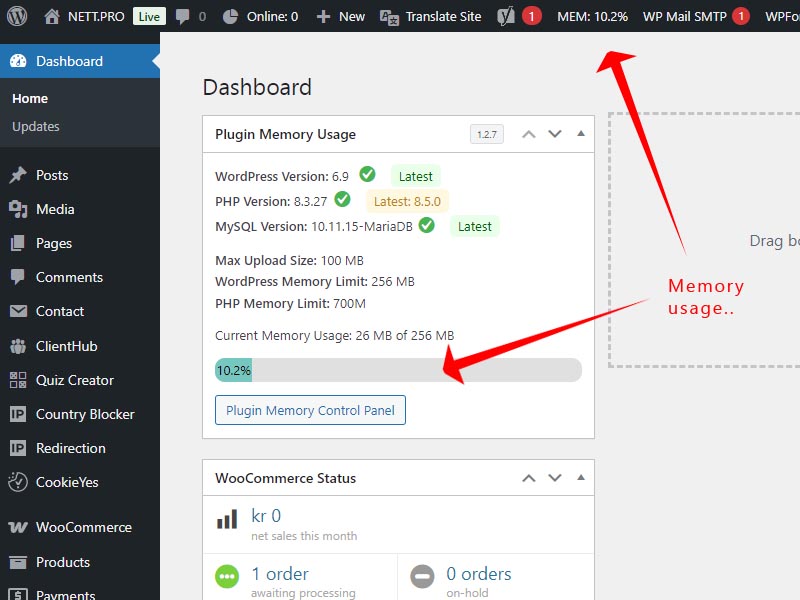
This plugin also show the current memory usage of your wordpress site. If you use more than 80% of memory limit this plugin gives you the option to increase the memory limit, while providing comprehensive system monitoring and version checking capabilities for both PHP and MySQL.
Key Features
- Monitors and displays memory usage for individual plugins
- Shows memory usage history for each plugin
- Calculates average memory usage based on historical data
- Detects when memory usage exceeds 80% of the allocated limit
- Provides an option to increase the memory limit when high usage is detected
- Displays current memory usage percentage in the WordPress admin bar for quick reference
- Optimizing Memory Usage for Better Performance
Memory Management Features:
– Monitors and tracks plugin memory usage
– Detects high memory consumption and offers memory limit increases
– Provides memory usage history and performance analytics
– Shows current WordPress memory usage with visual indicators
Performance & Security Benefits:
– Identifies memory-hungry plugins affecting site performance
– Monitors server compatibility and system requirements
– Helps maintain WordPress security by alerting to unsupported software versions
– Prevents compatibility issues before they impact your website
– Supports both MySQL and MariaDB database systems alerts
Why Use Plugin-Memory-Usage?
Excessive memory consumption can result in sluggish performance, website crashes, and an unsatisfactory user experience. This plugin offers valuable insights to help you maintain your site’s efficiency, allowing you to tackle potential issues before they become significant problems.
With the added ability to increase memory limits when needed and the convenient admin bar display, you can now proactively manage your WordPress site’s memory usage, ensuring optimal performance and preventing memory-related issues before they impact your users.
Installation
Upload the plugin folder to the /wp-content/plugins/ directory or download from WordPress. Activate plugin. You can now access the control panel from the widget in the dashboard.
Changelog
1.3.0 – 2026-05-25
- Tested compatibility with WordPress 7.0
- Updated readme.txt
1.2.9 – 2026-03-24
- Added: CPU load display (1-minute average) with color-coded progress bar in System Information
- Added: Disk usage display showing used/total space with color-coded progress bar in System Information
- Added: Graceful fallback for CPU and disk metrics on restricted or Windows hosting environments
- Fixed: Memory limit increase AJAX handler failing due to malformed action parameter in JavaScript
- Fixed: PHP version status check could return false positive ‘supported’ result due to incorrect array iteration logic
- Security: Updated index.php to use standard WordPress ABSPATH protection pattern
- Code: Replaced sys_getloadavg loop with direct branch lookup for PHP version status
1.2.8
- Tested compatibility with WordPress 6.9
- Updated readme.txt
1.2.7 – 2025-11-26
- Added: WordPress version checking with automatic update detection via WordPress.org API
- Added: Status indicators for WordPress core version with color-coded badges
- Added: Visual “Latest” badge when WordPress core is up to date
- Code: Renamed all function prefixes for WordPress coding standards compliance
- Code: Updated JavaScript function naming for consistency with PHP backend
- Code: Maintained backward compatibility for database table names to preserve user data
- Performance: Implemented 12-hour caching for WordPress version checks
- UX: Consistent version status display across WordPress, PHP, and MySQL/MariaDB
- Compat: Verified with WordPress 6.8.3
1.2.6 – 2025-10-30
- Enhanced: Admin bar memory display now uses color coding for quick status visibility
- Green (0-49%): Healthy memory usage
- Yellow (50-74%): Moderate memory usage
- Orange (75-89%): Warning – consider monitoring
- Red (90%+): Critical – immediate attention needed with pulsing animation
1.2.5 – 2025-08-07
- Added: MySQL/MariaDB version checking with support lifecycle tracking via EndOfLife.date API
- Added: Latest version display for MySQL/MariaDB (consistent with PHP version formatting)
- Added: Status indicators for MySQL/MariaDB versions with color-coded badges and tooltips
- Added: Full MariaDB support with separate version lifecycle tracking
- Security: Enhanced directory browsing protection with index.php file
- Performance: Implemented weekly caching for MySQL/MariaDB version data from API
- Code: Consolidated duplicate CSS classes into unified version indicator classes with proper plugin prefixes
- Code: Removed obsolete functions and cleaned up legacy hardcoded version checking code
- UX: Added informative tooltips for database version status icons
- Compat: Verified compatibility with both MySQL 8.x and MariaDB 10.x/11.x series
Screenshots
For developers
Is this your plugin? Show off the numbers.
Add a live badge to your site, docs or GitHub README. It updates on its own — no account needed.
FAQ
Plugin Memory Usage: quick answers
Straight answers, pulled from live WordPress.org data.
Live data from WordPress.org · checked Oct 2, 2026
Is Plugin Memory Usage free?
Yes. Plugin Memory Usage is free to download and use from the official WordPress.org plugin directory.
Is Plugin Memory Usage safe to use in 2026?
Plugin Memory Usage is a solid plugin choice in 2026, with a few things worth checking first. It runs on 600+ sites, is rated 5/5 and was last updated 4 months ago, and scores 62/100 on our health check.
How many websites use Plugin Memory Usage?
Plugin Memory Usage is active on 600+ WordPress websites and has been downloaded 7,106 times since it launched in November 2024. It was downloaded 474 times in the last 30 days.
Does Plugin Memory Usage work with WordPress 7.1?
Plugin Memory Usage is officially tested up to WordPress 7.0.6, while the latest release is 7.1.2. It may still work, but try it on a staging site first.
What PHP version does Plugin Memory Usage need?
Plugin Memory Usage requires PHP 7.0 or higher. Most hosts run PHP 8.x today, so it works on any modern WordPress hosting.
When was Plugin Memory Usage last updated?
The latest version, 1.3.0, was released on May 25, 2026 (4 months ago).
Who makes Plugin Memory Usage?
Plugin Memory Usage is developed and maintained by NETT.PRO.
Powered by PageForge
Want thousands of pages that rank like these? Build them in an afternoon.
This directory runs on the same engine as PageForge. Turn any spreadsheet, CSV or API into thousands of fast, SEO-ready WordPress pages — with schema, internal links and AI-written copy baked in.
- CSV, Google Sheets & API data sources
- AI content, schema & internal links per page
- Works with Elementor, Gutenberg, Yoast & Rank Math
- Free on WordPress.org — no credit card


