


Waitlist – Back in Stock for WooCommerce
Back-in-stock waitlist for WooCommerce. Shoppers leave their email, you email them on restock. Accessible, no layout shift.

Solid choice
Waitlist is a solid plugin choice in 2026, with a few things worth checking first. Is rated 5/5 and was last updated 2 days ago, and scores 71/100 on our health check.
- Actively developed — last update 2 days ago
- Tested with the latest WordPress (7.1)
- Small user base (<10 active installs)
- Very few reviews so far
- Needs PHP 8.1 or newer
How does it stack up?
Side-by-side on installs, updates, ratings & support



Daily downloads
Download spikes usually follow a new release — each site that auto-updates counts as a download.
Rankings
Where Waitlist stands todayWordPress.org search rankings
Live position in the plugin search, top 100| Keyword | Position |
|---|---|
| back in stock | #55 |
| >100 | |
| stock notification | >100 |
| waitlist | #23 |
| woocommerce | >100 |
Rating breakdown
★★★★★★★★★★ 5 from 2 reviews
About Waitlist – Back in Stock for WooCommerce
From the official readme · v1.0.30Description
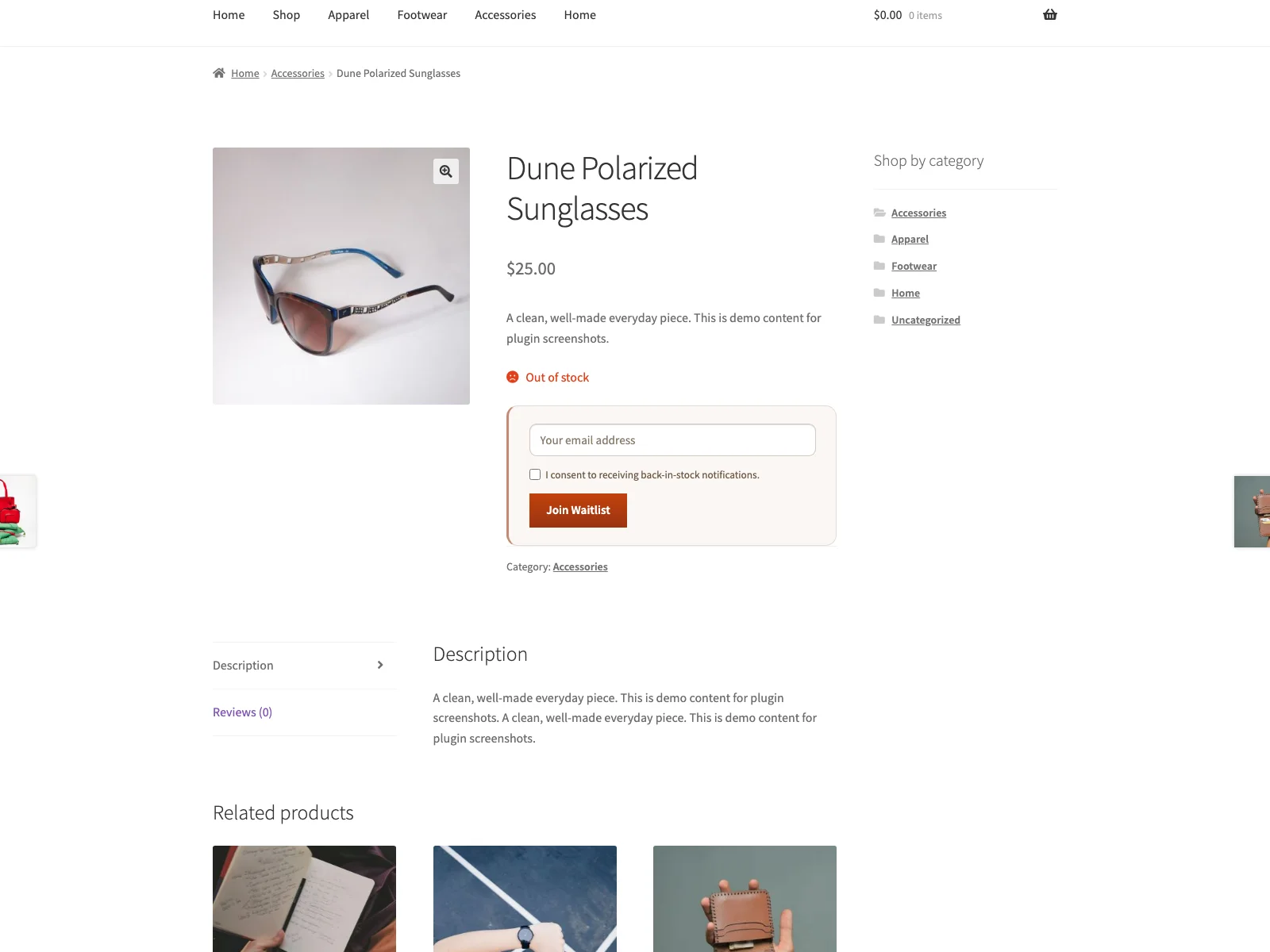
Plogins Waitlist adds a waitlist form to out-of-stock WooCommerce products. A shopper enters their email, and when you set the product back to “In stock”, Plogins Waitlist emails everyone waiting through your site’s own WordPress mailer. There is no external service, no account to sign up for, and nothing leaves your database.
The form is rendered in PHP on the single-product summary, where it sits in the normal page flow rather than being injected after load, so it does not shift surrounding content. Submitting it runs a small vanilla-JavaScript fetch request loaded with defer in the footer; the plugin adds no jQuery of its own. On variable products it hooks into WooCommerce’s existing variation script so the form only appears once an unavailable variation is selected.
Accessibility was a first-class concern rather than an afterthought. The email field carries a visually hidden label, consent is a real required checkbox, and the success/error message is announced through an aria-live region while the form reports aria-busy during submission.
Subscriber data lives in a single {prefix}_restock_waitlist table that the plugin creates and version-tracks. A restock queues the mailing and sends it in batches on WordPress’s own cron, so the request that changed the stock is not held open while the emails go out. Uninstalling drops the table, removes the plugin’s options and unschedules any batch still waiting, leaving nothing behind.
Source and issues: github.com/wppoland/plogins-waitlist . Patches and bug reports are welcome there.
Features
- Waitlist form shown automatically on out-of-stock and backorder (“on backorder”) product pages
- Variable products: form appears after the shopper selects an unavailable variation
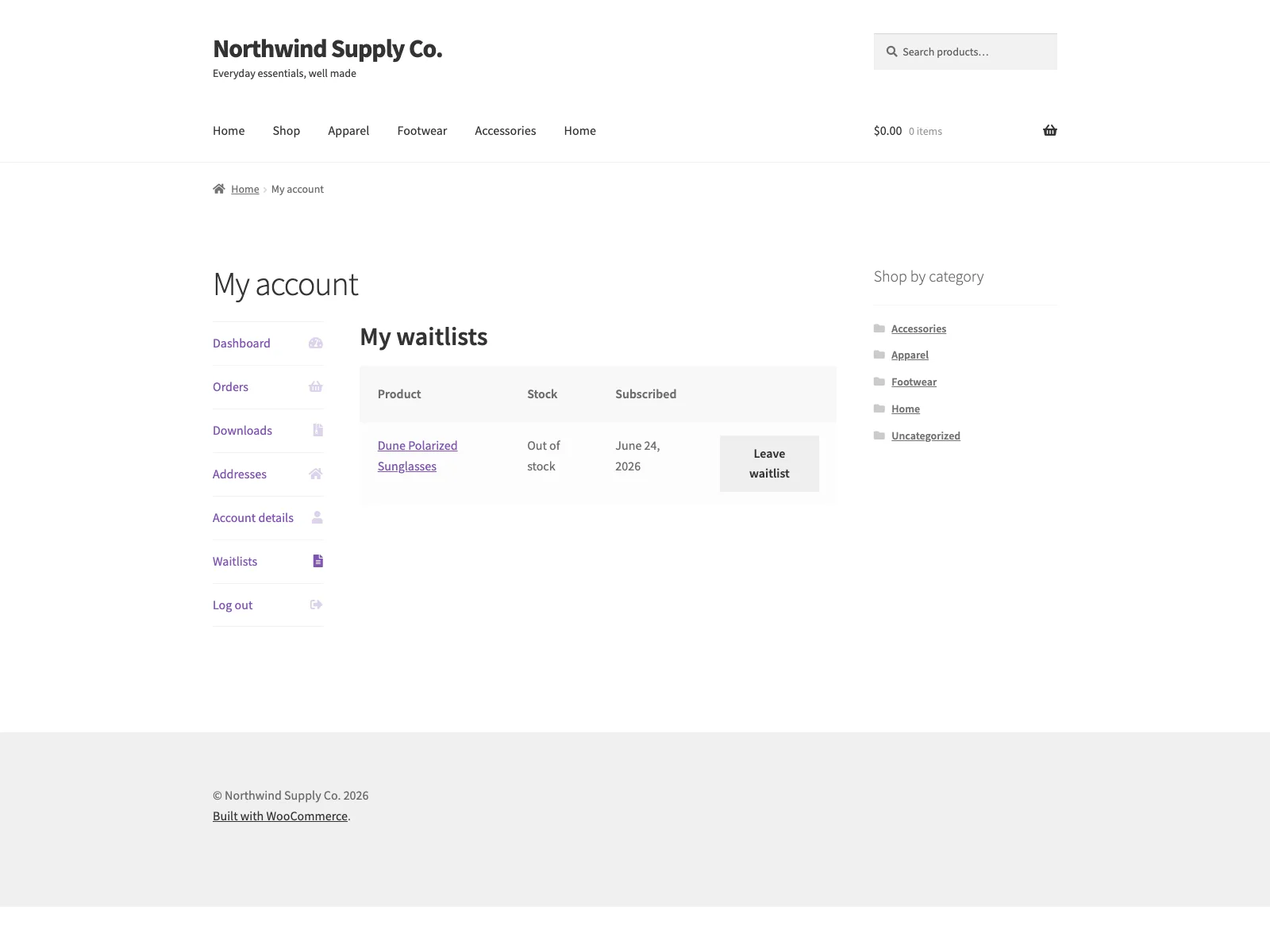
- WooCommerce My Account > Waitlists tab for logged-in customers (review lists, leave waitlist)
- Asynchronous submit with a vanilla-JavaScript fetch call, so the page does not reload
- Email field pre-filled for logged-in customers
- Required consent checkbox for every signup
- Automatic plain-text email notification on restock, sent via
wp_mail - Optional heading and intro text shown above the form
- Customisable form labels, button text, on-screen submit messages, and notification email subject/intro/closing text
- Place the form with the
[restock_waitlist]shortcode or the Elementor “Back-in-Stock Waitlist” widget - Toggle guest (not-logged-in) subscriptions on or off
- Social-proof “N shoppers are already waiting” line above the form (optional, customisable, singular/plural aware)
- Admin subscriber list with per-product filter, CSV export, and one-click remove
- Theme-overridable form template (
yourtheme/restock/single-product/waitlist-form.php) - Compatible with WooCommerce HPOS (Custom Order Tables) and Cart/Checkout Blocks
You may also like these plugins
More free WooCommerce plugins from WPPoland:
- Plogins Tiers – quantity and volume pricing tiers with a server-rendered price table.
- Sieve – Search & Filter – fast AJAX product search and filtering for WooCommerce, with no jQuery.
- Polski for WooCommerce – Polish-market compliance: GPSR, Omnibus, GDPR, invoices and storefront modules.
Browse the full catalogue at plogins.com/ .
Reporting a security issue: email hello@wppoland.com, and under our coordinated disclosure policy we confirm within two business days, assess within five, and patch a critical issue within seven days of confirming it.
Plogins Waitlist PRO
The free edition is the complete back-in-stock waitlist. Plogins Waitlist PRO adds demand insight and automation:
- Demand analytics – see what shoppers are waiting for and prioritise restocks
- Double opt-in – confirmed, consent-friendly signups
- Scheduled and batched sends – stagger notifications by batch size and interval
- Category segmentation – include and exclude rules per product category
Everything in the free edition stays free and open. Plogins Waitlist PRO starts at 29 EUR per year, billed in EUR.
Compare editions and pricing: plogins.com/plogins-waitlist-pro/pricing/
External Services
Plogins Waitlist does not connect to any external services. Back-in-stock notification emails are sent through your own site’s WordPress mailer (wp_mail); subscriber data stays in your WordPress database.
Translations
Plogins Waitlist is fully translatable and ships the plogins-waitlist.pot template. Translations are delivered by WordPress.org language packs from translate.wordpress.org, which is where Polish, German and Spanish are being contributed; the package itself carries no compiled translation files.
Installation
- Install and activate WooCommerce (8.0 or later).
- Install Plogins Waitlist from the WordPress plugin directory, or upload the
plogins-waitlistfolder to/wp-content/plugins/. - Activate the plugin through the Plugins screen.
- Optionally visit WooCommerce > Plogins Waitlist to customise labels and notification text; sensible defaults work out of the box.
- The waitlist form appears automatically on any out-of-stock or backorder product page.
Frequently asked questions
Documentation and links
Documentation – plogins.com/plogins-waitlist/docs/ Plugin page – plogins.com/plogins-waitlist/ Source code – github.com/wppoland/plogins-waitlist Bug reports and feature requests – github.com/wppoland/plogins-waitlist/issues
Does Plogins Waitlist require WooCommerce?
Yes. Plogins Waitlist is a WooCommerce extension and requires WooCommerce 8.0 or later. It will show an admin notice and stay inactive if WooCommerce is missing or out of date.
How are notifications sent?
When WooCommerce sets a product’s stock status to instock, Plogins Waitlist queues the mailing rather than sending it inside that request. WordPress cron then walks the pending subscribers for that product (and its parent, for variations) in batches of 50, oldest signup first, emailing each one with your site’s own WordPress mailer (wp_mail). Subscribers who are emailed successfully are marked as notified so they are not contacted twice. Filter plogins_waitlist_notify_batch_size to change the batch size.
Does it work with variable products?
Yes. Choose options in the standard WooCommerce variation form first. When the selected variation is out of stock or on backorder, the waitlist form appears and the subscription is stored for that specific variation.
Can guests join the waitlist?
Yes by default. You can restrict signups to logged-in customers by unchecking Allow guest subscriptions in WooCommerce > Plogins Waitlist.
Can customers manage waitlists in My Account?
Yes. Logged-in customers see a Waitlists tab under My Account with active subscriptions, current stock status, and a button to leave each list.
Does this comply with GDPR / consent requirements?
Every signup requires the shopper to tick an explicit consent checkbox before they can join the waitlist; the form will not submit without it. Subscriber emails are stored only in a custom table in your own WordPress database and are never sent to any external service. You are responsible for the wording of your consent label and your site’s privacy policy.
Can I export the subscriber list?
Yes. From WooCommerce > Plogins Waitlist > Subscribers you can view subscribers, filter by product, and export the list as CSV.
Does the form reload the page on submit?
No. The form is submitted with a vanilla-JavaScript fetch call and the result is announced in an aria-live region, so the page stays put. Plogins Waitlist loads no jQuery for this; on variable products it does rely on WooCommerce’s own variation script to know which variation is selected.
Does this plugin work on WordPress Multisite?
Yes. This plugin is compatible with WordPress Multisite. Network activate it or activate it on individual sites; each site keeps its own settings and data.
Changelog
1.0.30
- Fixed: the “Leave waitlist” button in My Account did nothing. Its script was never loaded on that tab, and the request it would have sent was refused because the handler read the security token from a field the script does not send.
- Fixed: on variable products in a store not running in English, the form never appeared for an out-of-stock variation, because the check looked for the English words “out of stock”. A variation on backorder never showed the form in any language. The plugin now tells the page which variations take signups, using the same rule as the signup itself.
- Fixed: the
[restock_waitlist]shortcode and the Elementor widget, placed anywhere except a product page, printed a form without its script. Submitting it reloaded the page, signed nobody up and put the email address in the URL.
1.0.29
- The sidebar upgrade promo now follows the same dismissal as the banner. Dismissing the banner used to leave a full-height advert on the settings screen for good, which is not what the WordPress.org guideline on upgrade prompts means by used with moderation.
1.0.28
- Fixed: the plugin logged
Warning: Class "Waitlist\Plugin" not foundon every request on any site with WP_DEBUG on. A compatibility alias kept for Plogins Waitlist PRO 1.0.2 and older was declared before the plugin’s autoloader was registered, so PHP could not find the class it was aliasing. The alias now sits below the autoloader, which also means it is finally declared: for the whole time it was above, it failed and gave those old PRO versions nothing. - Copy: the “How are notifications sent?” answer still described the email leaving the moment WooCommerce sets the stock status. It has been queued and sent in batches on WP-Cron since 1.0.25, which is what the rest of the readme says; the answer now says it too.
1.0.27
- Fixed: deactivating the plugin could throw a fatal error, and leave it impossible to switch off, on a site also running Plogins Waitlist PRO 1.0.12 or older. The deactivation routine read the name of its scheduled job off a class those PRO versions also supply, in a copy that does not carry that name. The name is now written out in full and the routine loads nothing.
- Fixed: deleting the plugin without deactivating it first left its queued mailing scheduled.
wp plugin deleteremoves an active plugin without deactivating it, so uninstall now unschedules the job in the same way deactivation does. - Added:
plogins_waitlist_should_notify, a filter deciding whether a restock mails the people waiting for that product. Returning false skips the mailing and leaves those subscribers pending. Plogins Waitlist PRO applies its category segmentation through it instead of taking the mailing over. - Note: if you run Plogins Waitlist PRO, update it to 1.0.14 or later at the same time. Older PRO versions remove this plugin’s mailing callback on every restock and send the emails themselves, one at a time, inside the request that changed the stock. PRO 1.0.14 hands that work back to the queue here, and requires this version.
1.0.26
- Fixed: the CSV export could leave subscribers out of the file without saying so. It read the list in chunks by offset, over the same rows a queued restock mailing marks as notified while it runs, so every row that left the set took another row with it. The export now walks by a cursor on a stable key, which cannot skip or repeat. Rows come out oldest first; the list on screen is unchanged.
- Fixed: a queued batch that could not run ended the mailing for good. If the product could not be loaded on that cron tick, or the waitlist had just been switched off, the front of the list was mailed and the rest was left neither mailed nor cleared. The same batch is now retried up to three times, five minutes apart, before the mailing is abandoned.
- Fixed: queued mailings survived deactivating the plugin. They are now unscheduled with the plugin, whichever batch they were up to.
- Fixed: “Remove” on the subscriber list threw you back to page one of an unfiltered list. It now returns to the page, product filter and search you removed from.
- Fixed: a personal-data export request (Tools > Export Personal Data) hit a fatal error on the “Subscribed At” row, which tried to print a date object as a string. Static analysis had been reporting it; the analysis now runs over the shared engine directory too, which had been outside both it and the coding-standards check.
- Changed: a pending-subscriber query that names no limit of its own now reads at most 5000 rows (filter
plogins_waitlist_pending_query_limit), and the waitlist list on a customer’s account page at most 200. Neither had a ceiling before.
1.0.25
- Fixed: restocking a product no longer sends the waitlist emails inside the request that changed the stock. A product save, a REST update or an order going through used to wait for one email per waiting shopper. The mailing is now queued and sent in batches of 50 (filter
plogins_waitlist_notify_batch_size), in the same order, to the same people. - Fixed: the Subscribers screen read the whole table on every load. It is now paged at 50 rows (filter
plogins_waitlist_subscribers_per_page), the summary counts come from the database so they describe the whole list, and the CSV export streams in chunks instead of loading every row first.
Screenshots

For developers
Is this your plugin? Show off the numbers.
Add a live badge to your site, docs or GitHub README. It updates on its own — no account needed.
Best Waitlist alternatives
All back in stock plugins →




FAQ
Waitlist: quick answers
Straight answers, pulled from live WordPress.org data.
Live data from WordPress.org · checked Oct 4, 2026
Is Waitlist free?
Yes. Waitlist is free to download and use from the official WordPress.org plugin directory.
Is Waitlist safe to use in 2026?
Waitlist is a solid plugin choice in 2026, with a few things worth checking first. Is rated 5/5 and was last updated 2 days ago, and scores 71/100 on our health check.
How many websites use Waitlist?
Waitlist is active on <10 WordPress websites and has been downloaded 1,291 times since it launched in June 2026. It was downloaded 372 times in the last 30 days.
Does Waitlist work with WordPress 7.1?
Yes. The developer has tested Waitlist up to WordPress 7.1.2, the latest release. It requires WordPress 6.4 or newer.
What PHP version does Waitlist need?
Waitlist requires PHP 8.1 or higher. Most hosts run PHP 8.x today, so it works on any modern WordPress hosting.
When was Waitlist last updated?
The latest version, 1.0.30, was released on October 2, 2026 (2 days ago).
Who makes Waitlist?
Waitlist is developed and maintained by Mariusz Szatkowski.
What are the best alternatives to Waitlist?
The most popular alternatives to Waitlist are Back In Stock Notifier for… (20K+ installs), MoreConvert Wishlist for Wo… (8K+ installs) and Waitlist Woocommerce ( Back… (4K+ installs).
Powered by PageForge
Want thousands of pages that rank like these? Build them in an afternoon.
This directory runs on the same engine as PageForge. Turn any spreadsheet, CSV or API into thousands of fast, SEO-ready WordPress pages — with schema, internal links and AI-written copy baked in.
- CSV, Google Sheets & API data sources
- AI content, schema & internal links per page
- Works with Elementor, Gutenberg, Yoast & Rank Math
- Free on WordPress.org — no credit card


