


Peek – Product Preview for WooCommerce
Fast product preview popup for WooCommerce: an AJAX product modal with gallery, price, SKU and add-to-cart. No jQuery.

Solid choice
Peek is a solid plugin choice in 2026, with a few things worth checking first. Is rated 5/5 and was last updated 2 weeks ago, and scores 71/100 on our health check.
- Actively developed — last update 2 weeks ago
- Tested with the latest WordPress (7.1)
- Small user base (<10 active installs)
- Very few reviews so far
- Needs PHP 8.1 or newer
How does it stack up?
Side-by-side on installs, updates, ratings & support

Daily downloads
Download spikes usually follow a new release — each site that auto-updates counts as a download.
Rankings
Where Peek stands todayWordPress.org search rankings
Live position in the plugin search, top 100| Keyword | Position |
|---|---|
| Product Modal | >100 |
| product quick view | >100 |
| quick shop | >100 |
| quick view | >100 |
| woocommerce | >100 |
Rating breakdown
★★★★★★★★★★ 5 from 1 reviews
About Peek – Product Preview for WooCommerce
From the official readme · v1.0.22Description
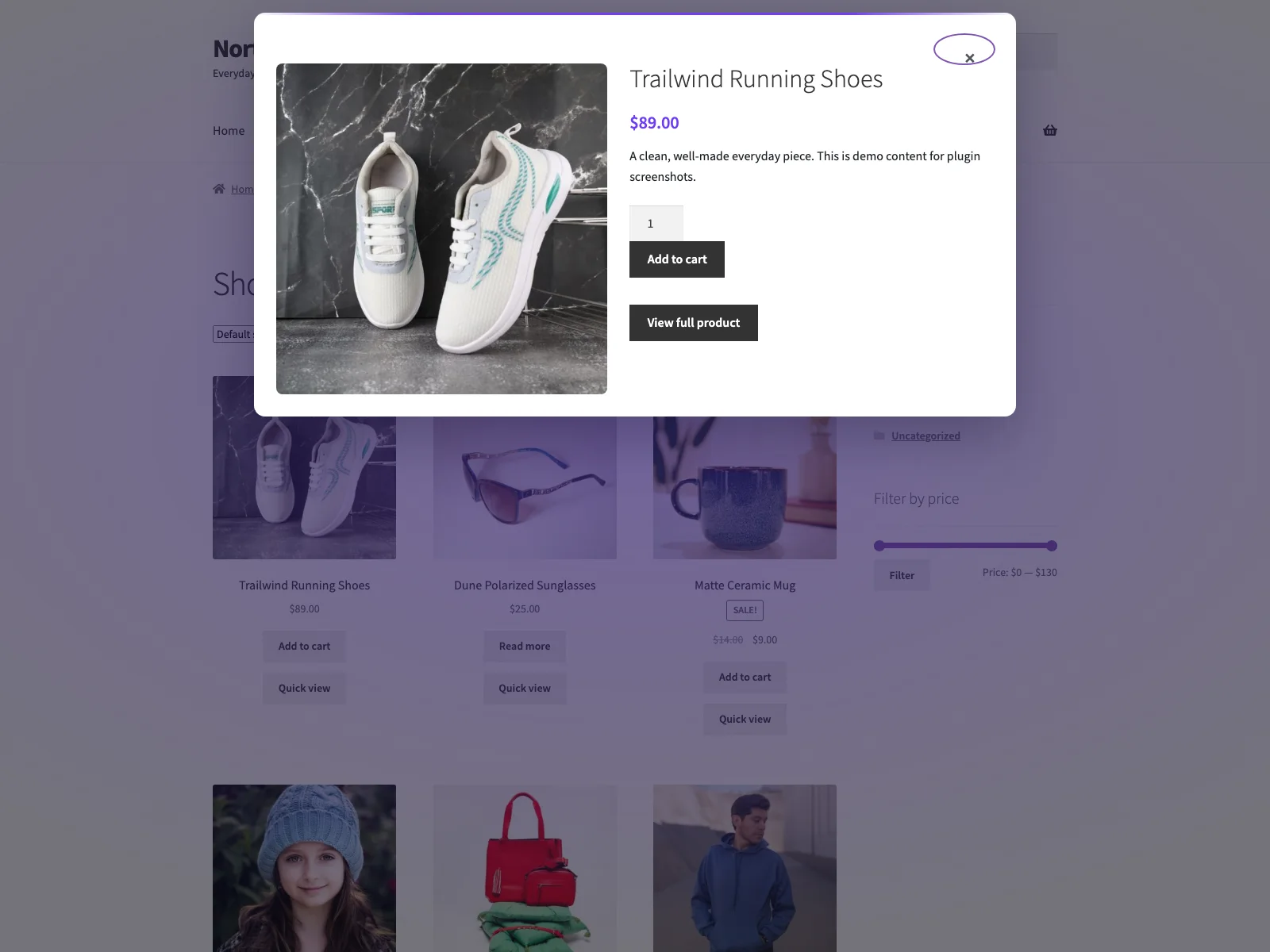
Peek adds a product quick view button to your WooCommerce shop and archive product loops. Clicking it opens an accessible AJAX product modal, so shoppers can preview products, choose options and add to cart without leaving the listing.
The modal shows the featured image and gallery thumbnails, title, SKU, price, stock status, short description, the native add-to-cart form (including variable products), and a link to the full product page. Each part can be toggled from the settings screen.
Documentation and links
- Documentation – plogins.com/plogins-peek/docs
- Plugin page – plogins.com/plogins-peek
- Source code – github.com/wppoland/plogins-peek
- Bug reports and feature requests – GitHub issues
Built for speed and accessibility
- No jQuery in the plugin’s own front-end code, the script is vanilla JS, deferred, and loaded in the footer.
- No layout shift (CLS). The modal is fully hidden until opened and scrolls internally, so it never reflows the page.
- Focus-trapped & keyboard friendly. Focus moves into the dialog on open, is trapped while it is open, closes on Escape or backdrop click, and returns to the trigger button on close. The dialog uses
role="dialog"witharia-modal. - Variation aware. The add-to-cart form supports variable products via WooCommerce’s own variation script.
Settings
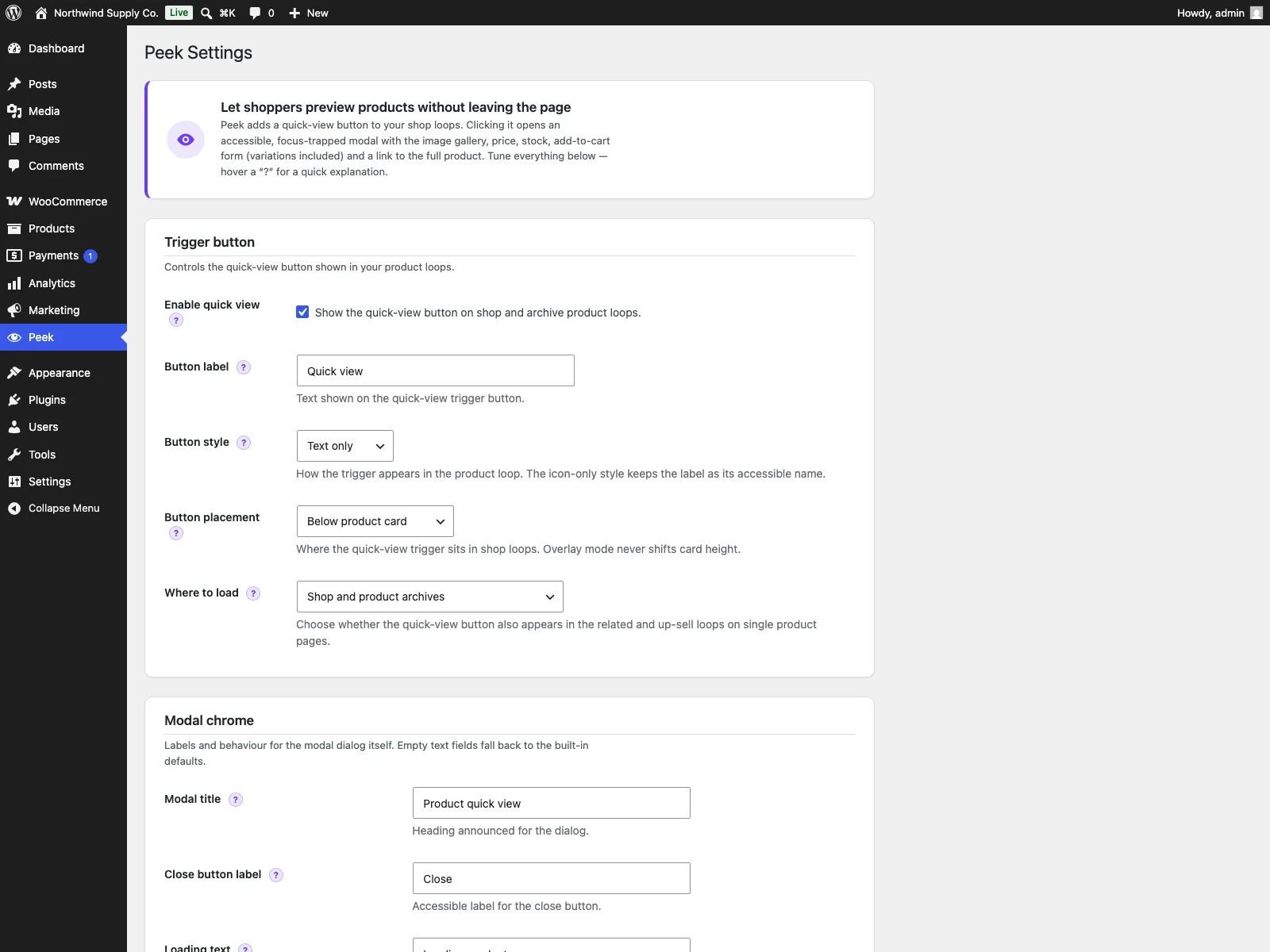
A WooCommerce-capability settings page (Peek menu) lets you:
- Enable or disable the quick view.
- Set the trigger button label and style (text, icon, or icon + text).
- Choose where it loads: shop and product archives only, or also the related/up-sell loops on single product pages.
- Configure the modal chrome: title, close-button label, loading and error text, the “view product” link text and the SKU label, plus toggles for the modal heading, close button and backdrop-click close.
- Choose which parts render in the modal (image, gallery with a configurable thumbnail count, title, SKU, price, stock status, short description, add-to-cart, full-product link).
Shortcode
Place a quick-view trigger anywhere with [peek_quick_view id="123"], or the shorter [peek id="123"] alias. Optional attributes: text (custom label) and style (text, icon, or icon_text). The modal and its assets load automatically wherever the shortcode appears.
Peek is developed in the open. The code, open issues and release history live at GitHub, bug reports and patches are welcome there.
Upgrade to Peek PRO
Peek PRO extends the free quick view with:
- Recently viewed products.
- A related-products carousel inside the modal.
- Colour and label variation swatches.
- Custom modal sections.
- Previous / next navigation between products without closing the modal.
- Extra styling controls.
- Quick-view analytics.
Learn more at plogins.com/plogins-peek-pro
More WooCommerce plugins by Plogins
- Reel – hover zoom, an accessible lightbox and product video for WooCommerce galleries: plogins.com/plogins-reel
- Sizer – accessible size guides and tables in a modal: plogins.com/plogins-sizer
- Marks – automatic and manual product badges, CSS-only: plogins.com/plogins-marks
- Swatch – accessible colour and label variation swatches, no jQuery: plogins.com/plogins-swatch
Browse the full family at plogins.com
Reporting a security issue: email hello@wppoland.com, and under our coordinated disclosure policy we confirm within two business days, assess within five, and patch a critical issue within seven days of confirming it.
External Services
Peek does not connect to any external services. The quick-view modal fetches its product fragment from your own site over WordPress’ admin-ajax.php (the peek_quick_view action), so no shopper or product data ever leaves your server. Peek’s only stored data is two WordPress options it creates, peek_settings (your modal and button configuration) and peek_db_version, both removed when the plugin is deleted. Peek sends no email and loads no third-party scripts, fonts or analytics.
Translations
Plogins Peek is fully translatable and ships the plogins-peek.pot template. Translations are delivered by WordPress.org language packs from translate.wordpress.org, which is where Polish, German and Spanish are being contributed; the package itself carries no compiled translation files.
Installation
- Upload the plugin to
/wp-content/plugins/plogins-peek, or install via Plugins > Add New. - Activate it. WooCommerce must be active.
- Visit the Peek menu in wp-admin to configure the button label and modal contents.
Frequently asked questions
Does it require WooCommerce?
Yes. Peek requires an active WooCommerce installation.
Does it use jQuery?
The plugin’s own front-end script is vanilla JavaScript with no jQuery dependency. When a product has variations, WooCommerce’s bundled variation script (which itself uses jQuery) is enqueued so the variation form works as expected.
Where does the quick-view button appear?
On the shop page and product archive loops (categories, tags, taxonomies), after each product. It does not change single product pages.
Does the modal support add to cart?
Yes. Peek renders WooCommerce’s native add-to-cart form inside the quick shop modal, including quantity and variable-product choices.
Does it work with variable products?
Yes. Variable products use WooCommerce’s own variation form inside the product modal, so shoppers can choose a variation before adding to cart.
Will it cause layout shift?
No. The modal is hidden until opened and overlays the page, so opening it never reflows existing content.
Can I place a quick-view button manually?
Yes. Use [peek_quick_view id="123"] or [peek id="123"] to add a product quick view trigger in custom layouts.
Does this plugin work on WordPress Multisite?
Yes. This plugin is compatible with WordPress Multisite. Network activate it or activate it on individual sites; each site keeps its own settings and data.
Changelog
1.0.22
- Fixed: the PRO upgrade promo kept selling to people who had already bought the paid edition. Only the banner could be dismissed, so the sidebar promo and the locked feature cards followed a paying customer around for good. The promo now checks whether the paid edition is active and steps aside when it is.
- Fixed: arrow glyphs in the admin menu paths, and in the strings handed to translators. An arrow inside a translatable string makes the glyph every translator’s problem and changes the layout in any locale that drops it.
1.0.21
- Changed: the PRO feature cards printed an arrow glyph in menu paths where the rest of the plugin and the documentation use a plain “>”. Same navigation, one character that renders everywhere.
1.0.20
- Fixed: deleting the plugin left the per-user “dismiss” flag from the PRO notice in the database. Uninstall now removes it for every user, not just the one who dismissed it.
1.0.19
- Fixed: every customer-facing string was untranslatable. The button label, the modal title, the close label, the loading and error messages, the SKU prefix and the view-product link shipped as English sentences in a config file and were written into the settings option the moment the plugin activated, so a shop running in another language showed English however complete its language pack was. The settings screen already offered to fall back to a default for a blank field; the packaged value meant blank never happened.
- The defaults are now translated strings resolved when the label is about to be shown, never written back to the database. A label you typed yourself is still used exactly as typed.
- On update, a label left byte for byte as the English default is cleared so the translated one takes over. Anything you edited, including a hand translation, is matched exactly and kept.
1.0.18
- Fixed: the plugin reported an older version number internally than the one it was released under. That number versions the stylesheets and scripts the admin screen loads, so a browser holding the previous files kept them after an update instead of fetching the corrected ones.
- Fixed: the package no longer ships its own translation files. WordPress.org builds language packs from translate.wordpress.org, and a bundled catalogue shadows that pack, so a translation corrected upstream could not reach you until the next release. Your language now comes from the language pack, which is the copy that stays current.
1.0.17
- Declared compatibility with WooCommerce 11.0.
Screenshots
For developers
Is this your plugin? Show off the numbers.
Add a live badge to your site, docs or GitHub README. It updates on its own — no account needed.
Best Peek alternatives
All Product Modal plugins →FAQ
Peek: quick answers
Straight answers, pulled from live WordPress.org data.
Live data from WordPress.org · checked Sep 28, 2026
Is Peek free?
Yes. Peek is free to download and use from the official WordPress.org plugin directory.
Is Peek safe to use in 2026?
Peek is a solid plugin choice in 2026, with a few things worth checking first. Is rated 5/5 and was last updated 2 weeks ago, and scores 71/100 on our health check.
How many websites use Peek?
Peek is active on <10 WordPress websites and has been downloaded 729 times since it launched in July 2026. It was downloaded 297 times in the last 30 days.
Does Peek work with WordPress 7.1?
Yes. The developer has tested Peek up to WordPress 7.1.2, the latest release. It requires WordPress 6.5 or newer.
What PHP version does Peek need?
Peek requires PHP 8.1 or higher. Most hosts run PHP 8.x today, so it works on any modern WordPress hosting.
When was Peek last updated?
The latest version, 1.0.22, was released on September 11, 2026 (2 weeks ago).
Who makes Peek?
Peek is developed and maintained by Mariusz Szatkowski.
What are the best alternatives to Peek?
The most popular alternatives to Peek are XT Quick View for WooCommer… (300+ installs) and WCQV (10+ installs).
Powered by PageForge
Want thousands of pages that rank like these? Build them in an afternoon.
This directory runs on the same engine as PageForge. Turn any spreadsheet, CSV or API into thousands of fast, SEO-ready WordPress pages — with schema, internal links and AI-written copy baked in.
- CSV, Google Sheets & API data sources
- AI content, schema & internal links per page
- Works with Elementor, Gutenberg, Yoast & Rank Math
- Free on WordPress.org — no credit card


