


PJ News Ticker
PJ News Ticker is a small plugin that shows your most recent posts in a marquee style.

Use with caution
PJ News Ticker works, but test it on a staging site before relying on it in 2026. It runs on 3K+ sites, is rated 4.5/5 and was last updated 1 year ago, and scores 47/100 on our health check.
- No update in over a year
- Only tested up to WordPress 6.8 (latest is 7.1)
How does it stack up?
Side-by-side on installs, updates, ratings & supportDaily downloads
Download spikes usually follow a new release — each site that auto-updates counts as a download.
Rankings
Where PJ News Ticker stands todayWordPress.org search rankings
Live position in the plugin search, top 100| Keyword | Position |
|---|---|
| jquery news ticker | #5 |
| marquee | #35 |
| News Headlines | #9 |
| news ticker | #11 |
Version adoption
Share of active sites per release.
Rating breakdown
★★★★★★★★★★ 4.5 from 6 reviews
About PJ News Ticker
From the official readme · v1.9.8Description
This plugin is now maintained by the developers at Primitiv Media
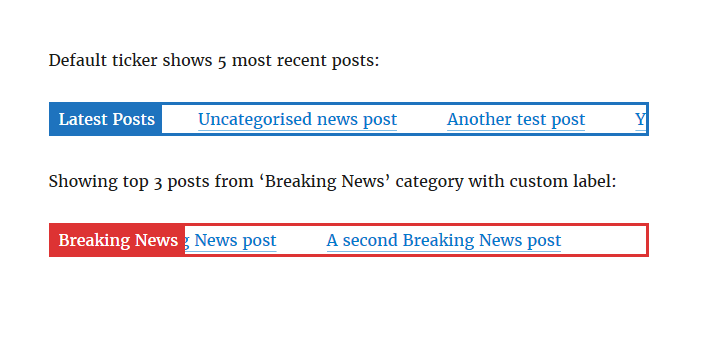
PJ News Ticker is a small plugin that shows your most recent posts in a marquee style.
You can embed the news ticker anywhere you like using shortcodes.
Installation
- Upload the plugin files to the
/wp-content/plugins/pj-news-tickerdirectory, or install the plugin through the WordPress plugins screen directly. - Activate the plugin through the ‘Plugins’ screen in WordPress
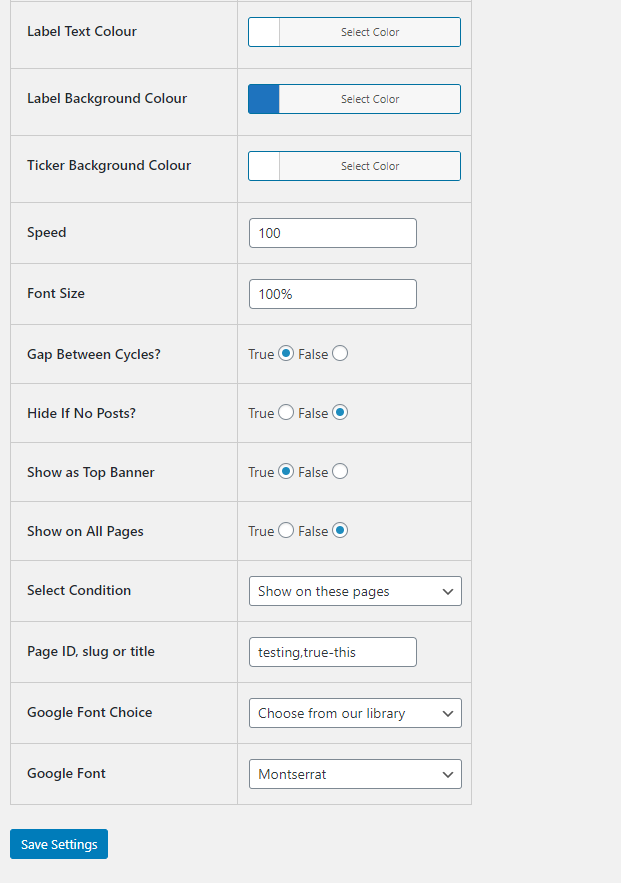
- Use the Settings->PJ News Ticker screen to configure the plugin defaults
- Use the shortcode in your page, post, or widgets
Shortcode instructions:
Using default settings:
[pj-news-ticker]
Customise:
[pj-news-ticker
* num_posts=”5″ – Defaults to showing 5 most recent posts, use “-1″ for all matching posts
* post_type=”slug” – Choose the type of post to display, default to “post” for normal posts, or select a custom post type
* post_cat=”slug” – Choose the slug of a category to limit the posts, use a comma to separate multiple categories, use “0” for all categories (default). WARNING: If you chose a category with 0 posts assigned to it, you will receive an error
* show_label=”true” – “true” or “false”, to show a label for the News Ticker
* label_text=”Latest Posts” – If a label is shown, what text to use
* label_text_colour=”#ffffff” – If a label is shown, what colour is the text
* label_bg_colour=”#1e73be” – If a label is shown, what colour is the background
* ticker_bg_colour=”#ffffff” – What colour is the background for the ticker
* no_content_text=”No matching posts” – The text to display if no matching posts are found
* show_excerpt=”false” – “true” or “false”, to show the excerpt for each post
* speed=”100″ – The speed in pixels per second
* size=”100%” – The font size, can be in em, px, or %
* target=”_self” – The target for the links, can be _self or _blank
* gap=”true” – Choose whether to show a gap between cycles of the marquee content, defaults to “true” for classic marquee style, set to “false” for new infinite scrolling style marquee
* hide_if_empty=”false” – Choose whether to hide the plugin if no matching posts are found, defaults to “false”
* override_posts_custom_colour= “True” or “false”; – Choose whether to use a custom color or not, defaults to “false”
* override_posts_custom_text_colour=”#cf2727″ – If custom colour is true, what colour is the text
* override_posts=”false” – “true” or “false” – Choose whether to hide the posts and show custom text instead, defaults to “false”
* override_posts_custom_text=”Custom Text” – If custom text is shown, what text to use
* override_posts_custom_text_colour=”#cf2727″ – If custom text is shown, what colour is the text
* override_posts_custom_text_url=”https://google.ca” – If custom text is shown, what url should it use. If left blank no URL will be added
* google_font_choice=”custom, predefined” – Chose to use a custom Google Font URL or a predefined one from our library, defaults to “Custom URL”
* google_font_url= – Enter the Google font URL, example “https://fonts.googleapis.com/css?family=Open+Sans&display=swap”, defaults to blank
* google_font=”Poppins, Roboto, Oswald, Open Sans, Lato, Montserrat” – Select the Google Font from our list
* custom_separator= “Enter your html here (img tag or HTML entities recommended)” – Choose what separator will be shown between posts
]
Frequently asked questions
How to add this to your site
The easiest way is just to add a page and use the shortcode. If you want to add this somewhere else on your site, like header, footer, sidebar, etc, then probably the easiest way is to go to Appearance, Widgets, and place a text widget somewhere in your layout, and use the shortcode in that. For this to work, you will need to use a plugin that will enable shortcodes in widgets. This is handy to have, not just for this plugin but for all your plugins. Do a google search, you will find plenty of resources explaining how to achieve this. Good luck!
Changelog
Added option to hide plugin if there are no posts to display
1.9.8
- Tested with WordPress 6.8.0
1.9.7
- Tested with WordPress 6.7.0
1.9.6
- Added proper sanitization when rendering the shortcode
- Tested with WordPress 6.6.2
1.9.5
- Fixed a typo within the option list
- Tested with WordPress 5.8
1.9.4
- Tested with WordPress 5.7.2
- Added a new field for a custom separator image
1.9.3
- Tested with WordPress 5.7
- Fixed a bug that caused the animation loop to break if the ticker is hidden on the page
Screenshots

For developers
Is this your plugin? Show off the numbers.
Add a live badge to your site, docs or GitHub README. It updates on its own — no account needed.
Best PJ News Ticker alternatives
All jquery news ticker plugins →| Rank | Plugin | Active installs |
|---|---|---|
| 2 |
 Advance News Ticker
Provides flexible and advance news ticker. Display it via shortcode and more.
Advance News Ticker
Provides flexible and advance news ticker. Display it via shortcode and more.
|
10+ |
| 3 |
 Muizz Newsticker
A wordpress plugin which gives you ability to add news ticker.
Muizz Newsticker
A wordpress plugin which gives you ability to add news ticker.
|
10+ |
FAQ
PJ News Ticker: quick answers
Straight answers, pulled from live WordPress.org data.
Live data from WordPress.org · checked Sep 27, 2026
Is PJ News Ticker free?
Yes. PJ News Ticker is free to download and use from the official WordPress.org plugin directory.
Is PJ News Ticker safe to use in 2026?
PJ News Ticker works, but test it on a staging site before relying on it in 2026. It runs on 3K+ sites, is rated 4.5/5 and was last updated 1 year ago, and scores 47/100 on our health check.
How many websites use PJ News Ticker?
PJ News Ticker is active on 3K+ WordPress websites and has been downloaded 80,260 times since it launched in January 2017. It was downloaded 369 times in the last 30 days.
Does PJ News Ticker work with WordPress 7.1?
PJ News Ticker is officially tested up to WordPress 6.8.0, while the latest release is 7.1.2. It may still work, but try it on a staging site first.
When was PJ News Ticker last updated?
The latest version, 1.9.8, was released on April 30, 2025 (1 year ago).
Who makes PJ News Ticker?
PJ News Ticker is developed and maintained by Primitiv Media.
What are the best alternatives to PJ News Ticker?
The most popular alternatives to PJ News Ticker are Advance News Ticker (10+ installs) and Muizz Newsticker (10+ installs).
Powered by PageForge
Want thousands of pages that rank like these? Build them in an afternoon.
This directory runs on the same engine as PageForge. Turn any spreadsheet, CSV or API into thousands of fast, SEO-ready WordPress pages — with schema, internal links and AI-written copy baked in.
- CSV, Google Sheets & API data sources
- AI content, schema & internal links per page
- Works with Elementor, Gutenberg, Yoast & Rank Math
- Free on WordPress.org — no credit card


