


Photoviq AI for WooCommerce
Generate stunning AI product images for WooCommerce with DALL-E 3, Gemini & Magnific. Save time and money on professional photography.

Solid choice
Photoviq AI for WooCommerce is a solid plugin choice in 2026, with a few things worth checking first. Was last updated 1 week ago, and scores 64/100 on our health check.
- Actively developed — last update 1 week ago
- Tested with the latest WordPress (7.1)
- Small user base (<10 active installs)
- Very few reviews so far
How does it stack up?
Side-by-side on installs, updates, ratings & support



Daily downloads
Download spikes usually follow a new release — each site that auto-updates counts as a download.
Rankings
Where Photoviq AI for WooCommerce stands todayWordPress.org search rankings
Live position in the plugin search, top 100| Keyword | Position |
|---|---|
| ai image generator | >100 |
| dall-e-3 | #28 |
| gemini ai | >100 |
| product photography | >100 |
| WooCommerce AI | >100 |
About Photoviq AI for WooCommerce
From the official readme · v1.0.4Description
Photoviq AI for WooCommerce allows store owners to generate AI-based product images directly from the WordPress dashboard.
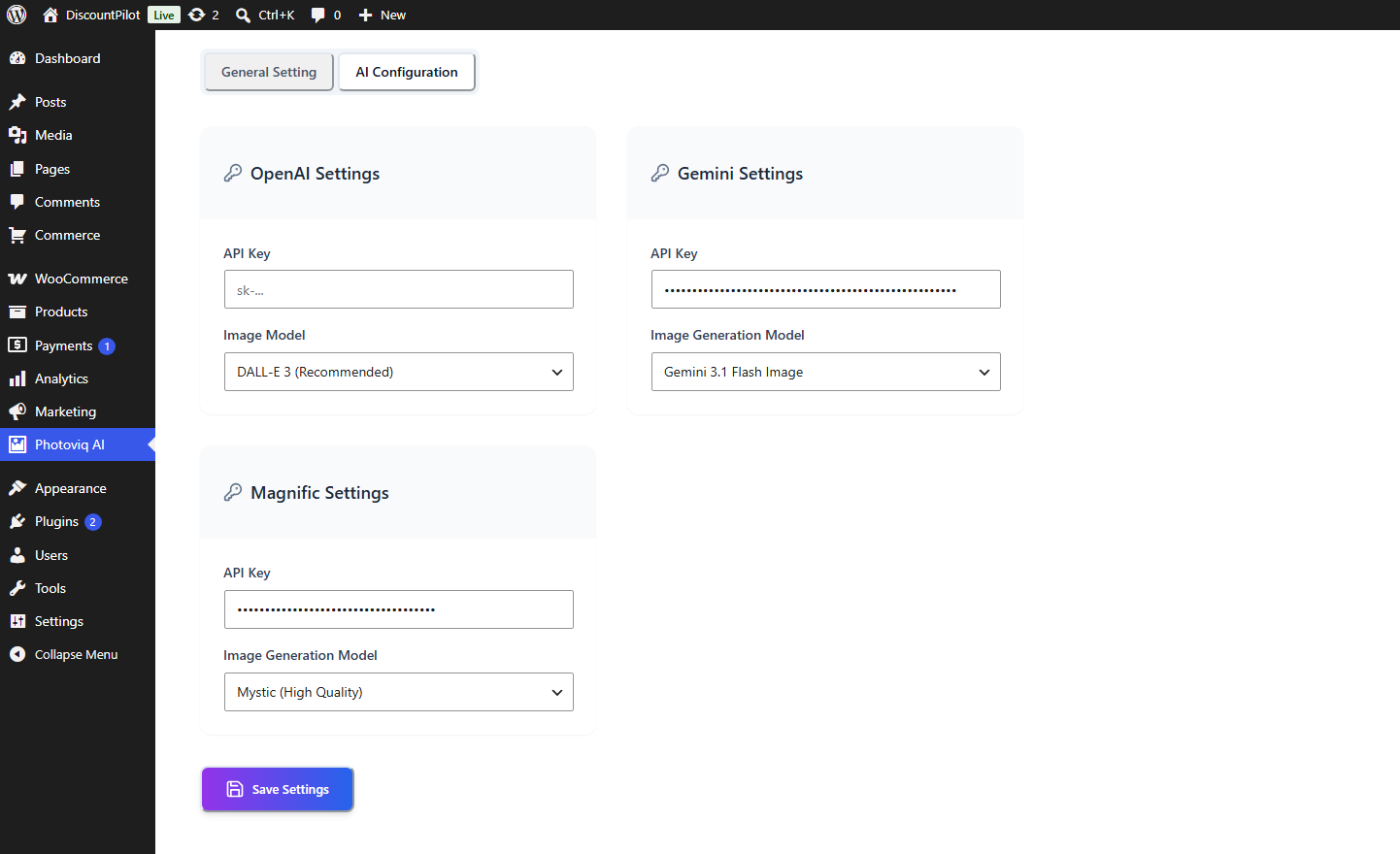
Using state-of-the-art AI visual models like OpenAI DALL-E 3, Google Gemini Imagen 3.0 and gemini-3.1-flash-image, and Magnific Mystic, Photoviq AI allows you to create professional product shots, lifestyle images, and creative backgrounds in seconds.
Whether you’re struggling with poor-quality vendor photos or high photography costs, Photoviq AI provides an affordable, instant way to enhance your product presentation and boost sales.
Why Choose Photoviq AI?
- Cost-Effective: Skip expensive professional photoshoots.
- Instant Results: Generate multiple variations in seconds.
- Smart Automation: Use product titles and descriptions as AI prompts automatically.
- Seamless Integration: Works directly within the WooCommerce “Edit Product” page.
Free Features
- Direct AI Prompting: Generate images directly from the WooCommerce
Edit Productscreen. - Image-to-Image (I2I): Upload a sketch or a raw photo and let AI turn it into a professional shot.
- AI Image Variations: Generate dozens of variations from a single reference image.
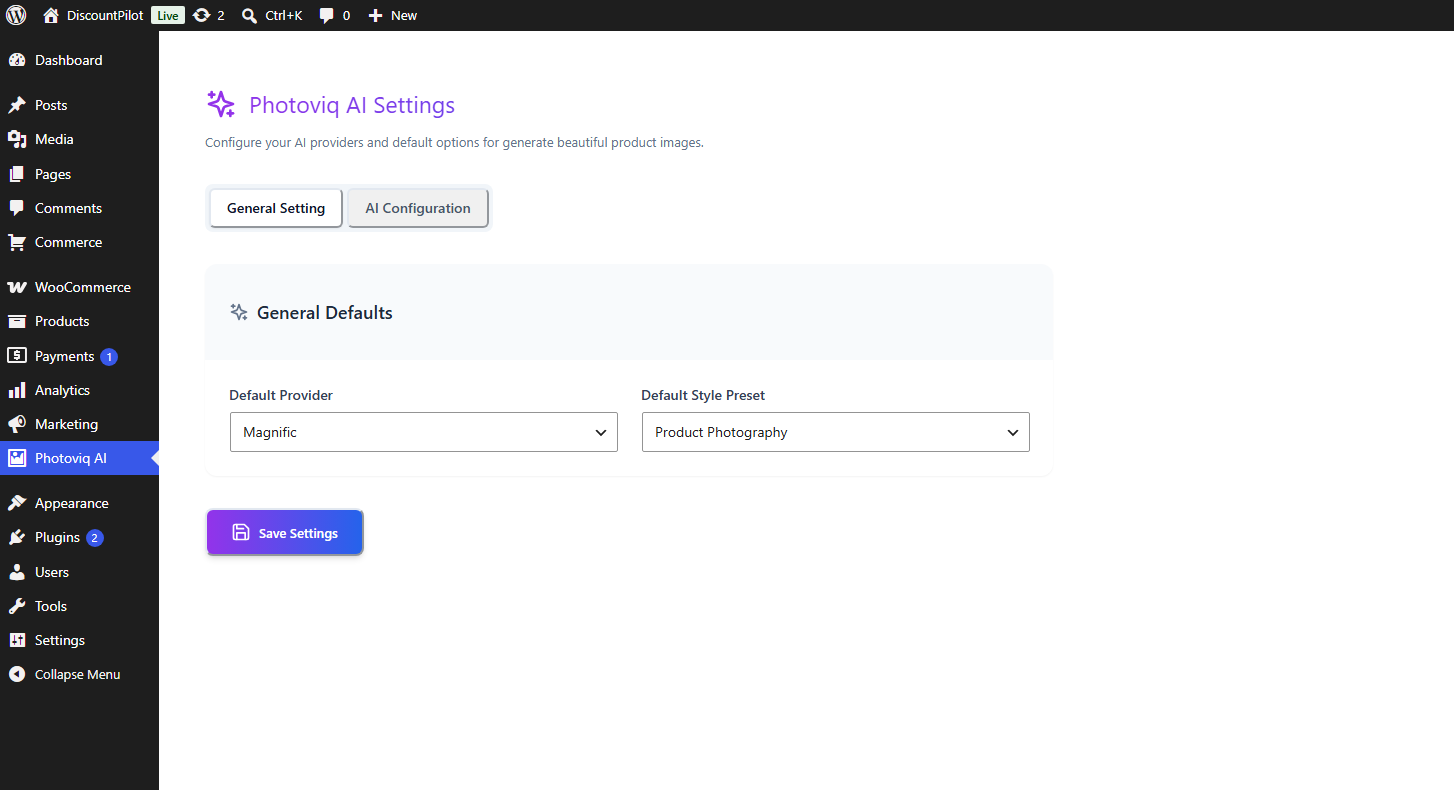
- Multi-Model Support: Integration with OpenAI (DALL-E 3), Google Gemini, and Magnific AI.
- Media Library Sync: One-click import into your WordPress Media Library.
- Instant Featured Image: Set any generated image as the Product Featured Image instantly.
- Gallery Creation: Batch generate images and add them to your product gallery.
- Smart Variables: Use
{product_name},{product_description}, and{price}in your prompts for better accuracy. - React-Powered UI: A modern, fast, and beautiful interface for a smooth workflow.
Pro Features
Upgrade to Photoviq AI for WooCommerce Pro for advanced AI capabilities and bulk processing tools:
- Bulk Generation: Generate high-quality images for your entire catalog at once.
- Custom Scenery & Backgrounds: Upload your own backgrounds or describe custom environments.
- Ultra High-Resolution: Get crisp, 4K-ready images suitable for high-end e-commerce.
- Advanced Usage Tracking: Monitor API usage and team performance.
- Priority Support: Dedicated assistance for your business scaling needs.
- Prompt Templates: Save Templates for reuse;
- Prompt Enhnace: Enhnace prompt by ai;
- Prompt generation: Generate prompt from product information;
External Services
This plugin connects to external AI services to generate product images based on user prompts and WooCommerce product data.
OpenAI
This plugin can connect to the OpenAI API to generate AI images.
Data sent:
- User-provided prompt text
- Selected image size/settings
- WooCommerce product data (such as product title, price, and description) when used in prompts
This service is provided by OpenAI.
Terms of Service:
https://openai.com/policies/terms-of-use/
Privacy Policy:
https://openai.com/policies/privacy-policy/
Google Gemini
This plugin can connect to the Google Gemini API to generate AI images.
Data sent:
- User-provided prompt text
- Selected image size/settings
- WooCommerce product data (such as product title, price, and description) when used in prompts
This service is provided by Google.
Terms of Service:
https://policies.google.com/terms
Privacy Policy:
https://policies.google.com/privacy
Magnific
This plugin can connect to the Magnific AI API to generate AI images.
Data sent:
- User-provided prompt text
- Selected image size/settings
- WooCommerce product data (such as product title, price, and description) when used in prompts
This service is provided by Magnific.
Terms of Service:
https://www.magnific.com/legal/terms-of-use
Privacy Policy:
https://www.magnific.com/legal/privacy
Privacy Policy
Photoviq AI for WooCommerce uses Appsero SDK to collect some telemetry data upon user’s confirmation. This helps us to troubleshoot problems faster & make product improvements.
Appsero SDK does not gather any data by default. The SDK only starts gathering basic telemetry data when a user allows it via the admin notice. We collect the data to ensure a great user experience for all our users.
Integrating Appsero SDK DOES NOT IMMEDIATELY start gathering data, without confirmation from users in any case.
Learn more about how Appsero collects and uses this data.
Installation
- Upload the plugin files to the
/wp-content/plugins/photoviq-aidirectory, or install the plugin through the WordPress plugins screen. - Activate the plugin through the ‘Plugins’ screen in WordPress.
- Navigate to Photoviq AI in your dashboard and enter your API keys.
- Open any WooCommerce Product to start generating!
Frequently asked questions
Does this require an API key?
Yes, you will need an API key from OpenAI, Google Cloud (Gemini), or Magnific to generate images.
Can I use the images for commercial purposes?
The usage rights depend on the AI provider (OpenAI, Google, Magnific). Generally, most provide commercial rights for generated content, but please check their respective Terms of Service.
Does it support bulk generation?
Bulk generation is available in the Pro version of Photoviq AI.
Changelog
1.0.3
- Added gemini 3.1 flash image model
- Removed gemini imagen model
1.0.2
- Updated Image Generator Ui
1.0.1
- Added user opt-in
1.0.0
- Initial release of Photoviq AI.
- Integrated DALL-E 3, Gemini Imagen, and Magnific.
- Basic prompt variable support.
Screenshots

For developers
Is this your plugin? Show off the numbers.
Add a live badge to your site, docs or GitHub README. It updates on its own — no account needed.
Best Photoviq AI for WooCommerce alternatives
All ai image generator plugins →





FAQ
Photoviq AI for WooCommerce: quick answers
Straight answers, pulled from live WordPress.org data.
Live data from WordPress.org · checked Sep 30, 2026
Is Photoviq AI for WooCommerce free?
Yes. Photoviq AI for WooCommerce is free to download and use from the official WordPress.org plugin directory.
Is Photoviq AI for WooCommerce safe to use in 2026?
Photoviq AI for WooCommerce is a solid plugin choice in 2026, with a few things worth checking first. Was last updated 1 week ago, and scores 64/100 on our health check.
How many websites use Photoviq AI for WooCommerce?
Photoviq AI for WooCommerce is active on <10 WordPress websites and has been downloaded 983 times since it launched in July 2026. It was downloaded 497 times in the last 30 days.
Does Photoviq AI for WooCommerce work with WordPress 7.1?
Yes. The developer has tested Photoviq AI for WooCommerce up to WordPress 7.1.2, the latest release. It requires WordPress 5.0 or newer.
What PHP version does Photoviq AI for WooCommerce need?
Photoviq AI for WooCommerce requires PHP 7.4 or higher. Most hosts run PHP 8.x today, so it works on any modern WordPress hosting.
When was Photoviq AI for WooCommerce last updated?
The latest version, 1.0.4, was released on September 20, 2026 (1 week ago).
Who makes Photoviq AI for WooCommerce?
Photoviq AI for WooCommerce is developed and maintained by Md Rubel Islam.
What are the best alternatives to Photoviq AI for WooCommerce?
The most popular alternatives to Photoviq AI for WooCommerce are AutoWP (1K+ installs), Instant AI Image Generator (900+ installs) and PixMagix (200+ installs).
Powered by PageForge
Want thousands of pages that rank like these? Build them in an afternoon.
This directory runs on the same engine as PageForge. Turn any spreadsheet, CSV or API into thousands of fast, SEO-ready WordPress pages — with schema, internal links and AI-written copy baked in.
- CSV, Google Sheets & API data sources
- AI content, schema & internal links per page
- Works with Elementor, Gutenberg, Yoast & Rank Math
- Free on WordPress.org — no credit card


