



List Petfinder Pets
The List Petfinder Pets plugin takes advantage of the Petfinder API to list your available pets on your website.

Consider an alternative
List Petfinder Pets shows warning signs in 2026 — compare the alternatives below before installing. It runs on 400+ sites, is rated 4.8/5 and was last updated 2 years ago, and scores 41/100 on our health check.
- Small user base (400+ active installs)
- No update in over a year
- Only tested up to WordPress 6.7 (latest is 7.1)
How does it stack up?
Side-by-side on installs, updates, ratings & supportDaily downloads
Download spikes usually follow a new release — each site that auto-updates counts as a download.
Rankings
Where List Petfinder Pets stands todayWordPress.org search rankings
Live position in the plugin search, top 100| Keyword | Position |
|---|---|
| adoptable pets | #1 |
| petfinder | #1 |
Version adoption
Share of active sites per release.
Rating breakdown
★★★★★★★★★★ 4.8 from 11 reviews
About List Petfinder Pets
From the official readme · v1.1.5Description
Petfinder is a free site where shelters and rescues can post pets for adoption. The List Petfinder Pets plugin takes advantage of the Petfinder API to list your available pets on your website. All you need is your Petfinder shelter id and free Petfinder API v2.0 API key and secret.
The List Petfinder Pets plugin allows you to:
- Display all your shelter’s Petfinder pets on your own website
- Display a featured or random pet from Petfinder in a widget
Sign up to be notified when the Petfinder plugin is updated
You can sign up to receive notices when this plugin is updated or other important changes here: (https://unboxinteractive.com/petfinder-plugin-email-list/)
Demos
Shortcode
[shelter_list] displays a list of pets from your shelter. You must enter your shelter ID, Petfinder v2.0 API key and secret on the List Petfinder Pets’ settings page for this shortcode to work. You may also need to edit your Petfinder settings to enable sharing your data with third parties. See Petfinder settings under Frequently Asked Questions below.
Optional attributes for shortcode are:
-
shelter_id – Allows you to list adoptable pets from a shelter different from the shelter id defined in your List Petfinder Pets Settings.
-
breed – If you wish to list only one breed on a page, or leave blank/don’t set to get all breeds. Note: adding ! before breed to exclude breeds was removed when plugin was updated to support Petfinder API v2.0 in version 1.0.13.
-
count – The maximum number of pets to return. Defaults to 75 and must be a number. Petfinder API v2.0 added ability to filter before retrieving results so you can set the count to the real number you want to list on the page now. Max returned is 100.
-
page – Which page of pets to return. If you have over 100 pets, or want to break up your pets into multiple pages, you can put the shortcode on multiple pages, each with a different page number. You’ll need to add a link to each page so your users can navigate between pages. NOTE: Don’t set ‘sort_by’ parameter when using page. Sorting only sorts the pets returned on the current page. Petfinder does not provide a way to sort by pet’s name. It can only sort by recent and distance in the initial call. I sort by name after the results are returned so it won’t work with paging.
-
animal – Type of animal. Value should be one of the following or blank/don’t set to get all: Dog, Cat, Rabbit, Small & Furry, Horse, Bird, Scales, Fins & Other, Barnyard.
-
include_info – Value should be set to “yes” or “no”; default is “yes”. If set to “yes”, Breeds, Spayed/Neutered, Up-to-date with routine shots, Housebroken, kid safe, cat safe, dog safe, special needs are displayed in list below photo thumbnails. Each list item has a different CSS class so you can hide any you do not want to show.
-
css_class – Set your own class name on div containing all pets. The default value is ‘pets’. This allows you to control the styles separately on different pages.
-
status – For backwards compatability values can be one of [A, H, P, X], and new values of [adoptable, adopted, found]. Petfinder API V1 used: ‘A’ = adoptable, ‘H’ = hold, ‘P’ = pending, ‘X’ = adopted/removed. Petfinder API V2 only accepts adoptable, adopted, and found, so values of H and P switch to adoptable now.
-
sort_by – Value can be: newest, last_updated or name. Value can also be set globally in Petfinder Settings.
-
age – Accepts values of: baby, young, adult, or senior. Can separate with commas to display pets that match more than one age group. If not set, will display pets from all age groups.
-
Note – parameter include_mixes was removed with Petfinder API v2.0 in plugin version 1.0.13
-
Note – parameter contact was removed with version 1.0.19.
Example:
[shelter_list breed=”Italian Greyhound”] – other breeds are not displayed
Example: [shelter_list count=20 page=1] and on another page [shelter_list count=20 page=2] – would list the first 20 pets on page with first shortcode, and the 2nd 20 pets on page with second shortcode.
Example using all attributes: [shelter_list shelter_id=”WI185″ breed=”Italian Greyhound” count=75 page=2 animal=”Dog” include_info=”no” css_class=”cats” status=”adoptable” sort_by=”newest” age=”baby”]
You can also list a single pet with the following shortcode
[get_pet pet_id=”numeric value”]
-
pet_id – Required. You can get this id from the pet’s Petfinder URL. URL will look like the following: https://www.petfinder.com/dog/nanook-45732995/mo/kansas-city/missouri-kansas-ig-rescue-mo306/ – 45732995 is the pet_id.
-
css_class – Set your own class name on div containing single pet. The default value is ‘pets’. This allows you to control the styles separately on different pages.
-
include_info – Value should be set to “yes” or “no”; default is “yes”. If set to “yes”, Breeds, Spayed/Neutered, Up-to-date with routine shots, Housebroken, kid safe, cat safe, dog safe, special needs are displayed in list below photo thumbnails. Each list item has a different CSS class so you can hide any you do not want to show.
Example using all attributes: [get_pet pet_id=”23367571″ include_info=”no” css_class=”cats”]
Widget
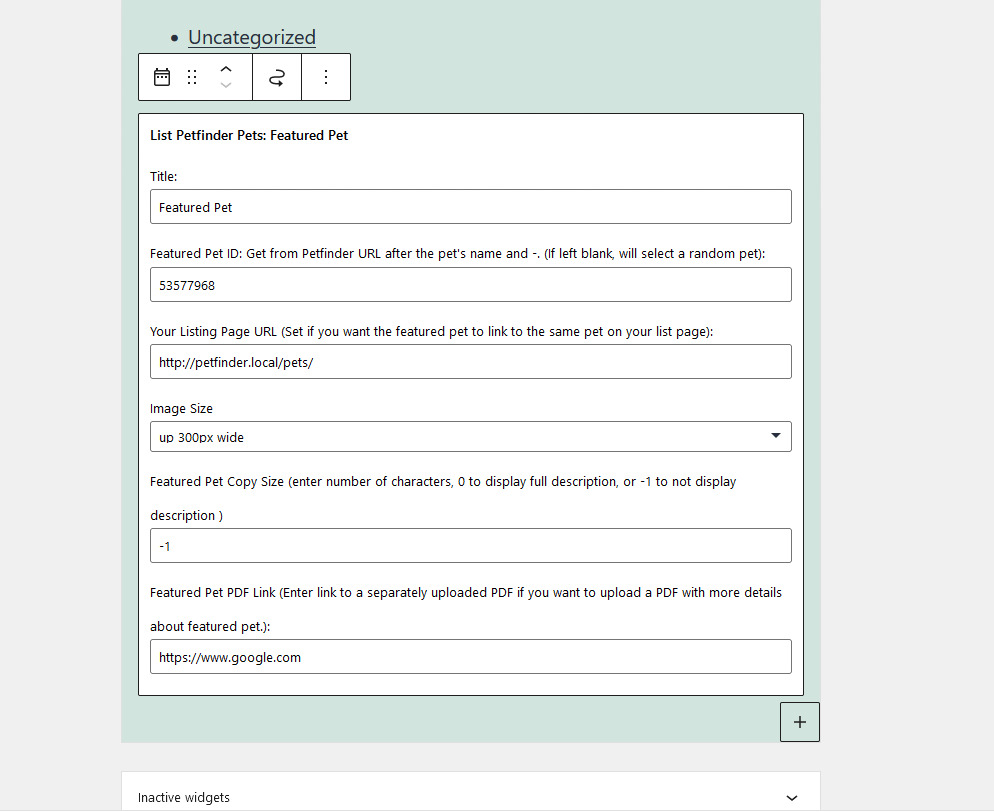
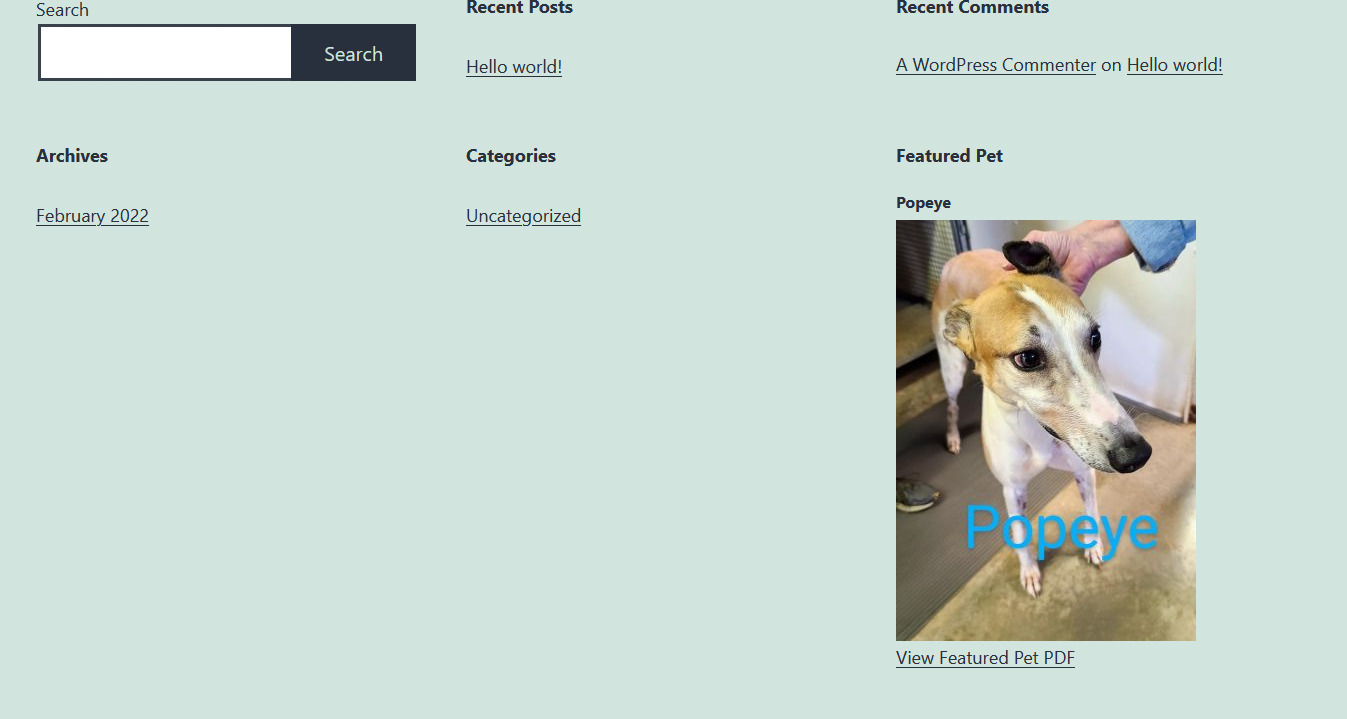
Add the List Petfinder Pets Featured Pet widget under Appearance -> Widgets. After adding the widget to a widget area you can set a featured pet id to display a featured pet, or leave blank to display a random pet from your shelter.
Featured Pet Widget Settings:
Featured Pet ID – You can get this id from the pet’s Petfinder URL. URL will look like the following: https://www.petfinder.com/dog/nanook-45732995/mo/kansas-city/missouri-kansas-ig-rescue-mo306/?referrer_id=cca97ef9-e23d-4d0b-b29d-52afa8f7d70e – 45732995 is the pet id.
Your Listing Page URL – The page where your shortcode [shelter_list] can be found. If this is set, your featured pet will link directly to this pet on your shelter list page. (Optional)
Featured Pet Image Size – The size of the Featured Pet image. (Required)
Featured Pet PDF Link – If you would like to create a PDF with more information about your Featured Pet. Link to the PDF uploaded separately through WordPress’ Media here.
Filters
Need to change your pets’ description? Perhaps you want to remove/replace special characters that are not displaying correctly, or want to add a paragraph to the end of all pets’ descriptions? You can do so with the following filter. Add it to your functions.php file. The filter name is petf_replace_description and it acts on all pets’ descriptions.
function replace_pet_description( $description ) {
return $description . ” Add me to end of all pets’ descriptions”;
}
add_filter( ‘petf_replace_description’, ‘replace_pet_description’ );
Installation
- Upload expanded petfinder-listings folder to the /wp-content/plugins/ directory
- Activate the plugin through the “Plugins” menu in WordPress
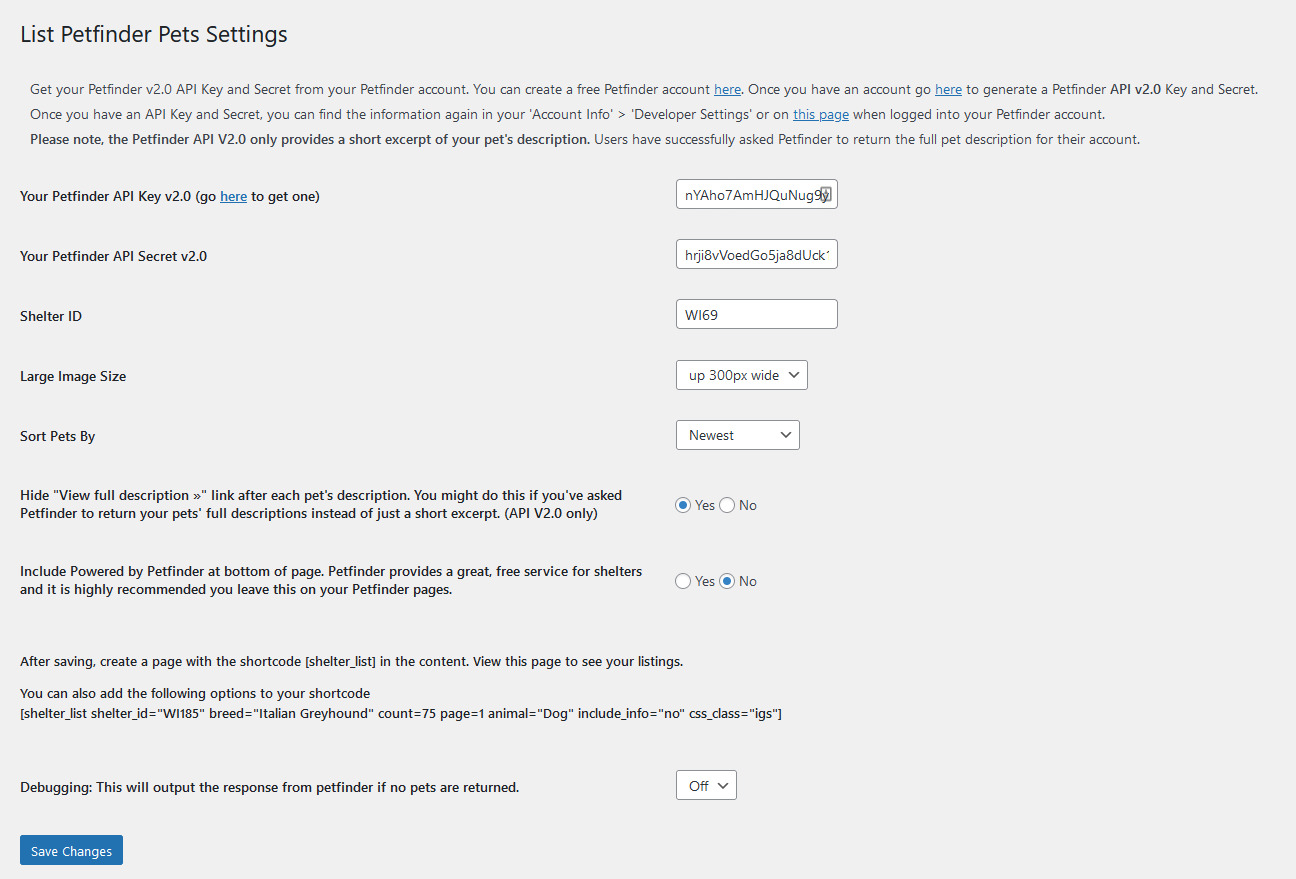
- Set your Petfinder v2.0 API Key and Secret, Shelter Id, Thumbnail and Large image size under WordPress Settings -> List Petfinder Pets. You will need to generate a free Petfinder API key on Petfinder here: https://www.petfinder.com/developers/. You’ll need to create an account on Petfinder first if you don’t already have one. You do not need to use your shelter’s Petfinder account to generate these keys, you can use your own. Your shelter ID is your Shelter’s Petfinder username, usually your state abbreviation and a number.
- Place the shortcode [shelter_list] in a Page or Post content to display your pet list on a page. The list includes all pets’ name, description and photos uploaded to Petfinder.
- If the list is not working after correctly entering all your List Petfinder Pets Settings, make sure your Petfinder account is set up to share data through Petfinder’s API. To do this, log into your Petfinder account and click on the Organization Info tab. Look for the box labeled ‘Share Pet List’ and make sure all checkboxes within this box are selected: Please share my pet list with all third parties, Partner sites & Petfinder API users. (As of 12/1/2019, I do not know if these instructions need to be changed after Petfinder updated its interface. I do not currently have a shelter Petfinder account to view this information. If these instructions need to be changed, please contact me so I can update them. )
- Add the List Petfinder Pets Featured Pet widget (Appearance -> Widgets) if desired.
Frequently asked questions
How do you get a Petfinder API key?
You will need to generate a free Petfinder API key on Petfinder here: https://www.petfinder.com/developers/.
What to do if your page doesn’t list any pets and says ‘shelter opt-out’
If the list is not working after correctly entering your Petfinder API and Secret and the page displays a status of ‘shelter opt-out’, make sure your Petfinder account is set up to share data through Petfinder’s API. To do this, log into your Petfinder account and click on the Organization Info tab. Look for the box labeled ‘Share Pet List’ and make sure all checkboxes within this box are selected: Please share my pet list with all third parties, Partner sites & Petfinder API users. (Please let me know if these instructions need to be updated after Petfinder changed its interface.)
My site is going over Petfinder’s daily API limit
First, be sure your site is using a caching plugin. If your page listing pets is cached, it will lower the number of API calls the site makes to Petfinder. You might be able to increase the amount of time pages are stored in cache. If your site is still going over your API limit, contact Petfinder and ask to increase your API daily limit. Caching saves on server processing power, which saves electricity, which saves trees, so please try caching your site first.
How do you change the Petfinder list styles?
This plugin generates generic HTML and includes a stylesheet to position the elements. To style, override the CSS in your theme’s stylesheet. You might need to add !important to some styles, or use greater specificity.
I have a video in petfinder but it isn’t showing on my site.
Petfinder does not return video information through their API, however if you have a video on YouTube you can paste the video embed code in your pet’s description to display the video through the Petfinder plugin.
Changelog
1.1.5
- 11/13/2024
- Changing Pet Names to H2s
1.1.4
- 11/13/2024
- Fixing styles
1.1.3
- 11/12/2024
- Added CSS to fix display of thumbnails
1.1.2
- 11/12/2024
- Fixing version.
1.1.1
- 11/12/2024
- Fixed so works with Petfinder’s API changes.
1.1
- Changed string sanitization function used for plugin output *
Screenshots
![Excerpt of one pet from page with shortcode [shelter_list]](https://ps.w.org/petfinder-listings/trunk/screenshot-3.jpg?rev=3187875)
For developers
Is this your plugin? Show off the numbers.
Add a live badge to your site, docs or GitHub README. It updates on its own — no account needed.
Best List Petfinder Pets alternatives
All adoptable pets plugins →| Rank | Plugin | Active installs |
|---|---|---|
| 2 |
 Pet Adoption Listings
Display adoptable pets from an Adopt-a-Pet.com shelter's listings.
Pet Adoption Listings
Display adoptable pets from an Adopt-a-Pet.com shelter's listings.
|
100+ |
| 3 |
 PetBridge
Embed PetBridge features on your WordPress site to streamline pet adoptions, surrenders…
PetBridge
Embed PetBridge features on your WordPress site to streamline pet adoptions, surrenders…
|
10+ |
FAQ
List Petfinder Pets: quick answers
Straight answers, pulled from live WordPress.org data.
Live data from WordPress.org · checked Oct 15, 2026
Is List Petfinder Pets free?
Yes. List Petfinder Pets is free to download and use from the official WordPress.org plugin directory.
Is List Petfinder Pets safe to use in 2026?
List Petfinder Pets shows warning signs in 2026 — compare the alternatives below before installing. It runs on 400+ sites, is rated 4.8/5 and was last updated 2 years ago, and scores 41/100 on our health check.
How many websites use List Petfinder Pets?
List Petfinder Pets is active on 400+ WordPress websites and has been downloaded 16,506 times since it launched in June 2012. It was downloaded 128 times in the last 30 days.
Does List Petfinder Pets work with WordPress 7.1?
List Petfinder Pets is officially tested up to WordPress 6.7.10, while the latest release is 7.1.3. It may still work, but try it on a staging site first.
When was List Petfinder Pets last updated?
The latest version, 1.1.5, was released on November 13, 2024 (2 years ago).
Who makes List Petfinder Pets?
List Petfinder Pets is developed and maintained by bridgetwes.
What are the best alternatives to List Petfinder Pets?
The most popular alternatives to List Petfinder Pets are Pet Adoption Listings (100+ installs) and PetBridge (10+ installs).
Powered by PageForge
Want thousands of pages that rank like these? Build them in an afternoon.
This directory runs on the same engine as PageForge. Turn any spreadsheet, CSV or API into thousands of fast, SEO-ready WordPress pages — with schema, internal links and AI-written copy baked in.
- CSV, Google Sheets & API data sources
- AI content, schema & internal links per page
- Works with Elementor, Gutenberg, Yoast & Rank Math
- Free on WordPress.org — no credit card


