



PDF Forms Filler for WooCommerce
This plugin allows WooCommerce store owners to add automatic PDF form filling features for email notification attachments and order downloads to their WooCommerce store.

Use with caution
PDF Forms Filler for WooCommerce works, but test it on a staging site before relying on it in 2026. It runs on 20+ sites and was last updated 6 months ago, and scores 46/100 on our health check.
- Small user base (20+ active installs)
- Very few reviews so far
How does it stack up?
Side-by-side on installs, updates, ratings & support



Daily downloads
Download spikes usually follow a new release — each site that auto-updates counts as a download.
Rankings
Where PDF Forms Filler for WooCom… stands todayWordPress.org search rankings
Live position in the plugin search, top 100| Keyword | Position |
|---|---|
| download | >100 |
| >100 | |
| form | >100 |
| >100 | |
| woocommerce | >100 |
Version adoption
Share of active sites per release.
About PDF Forms Filler for WooCommerce
From the official readme · v1.1.6Description
This plugin allows WooCommerce store owners to add automatic PDF form filling features for email notification attachments and order downloads to their WooCommerce store.
An existing PDF can be set up to be filled with customer and order information when an order is placed or processed. Images can also be downloaded from a dynamic URL and embedded into the PDF. You can then have your customers receive order email notifications with PDF attachments containing customer order data. You can also allow your customers to download the filled PDF on their order page via the downloadable files feature of WooCommerce. The filled PDF files can be saved in a custom uploads subdirectory on your web server.
What makes this plugin special is its approach to preparing PDF files. It is not generating PDF documents from scratch. It modifies the original PDF document that was prepared using third party software and supplied to the plugin. This allows users the freedom to design exactly what they need and use their pre-existing documents.
Possible uses:
* Automated creation of tickets for events
* Automated creation of certificates for certifications requiring payment
* Automated creation of official documents that require payment
* Automated warranty document creation based on date of purchase
* Automated creation of PDFs that assist with order fulfillment
An external web API is used for working with PDF files (free usage has limitations). The plugin comminicates with the external service to create an API key, upload your blank PDF files, retrieve information about your PDF files and eventually add your user information to your PDF files. Please see privacy policy at https://pdf.ninja.
Please see Pdf.Ninja Terms of Use and Pdf.Ninja Privacy Policy.
Requirements:
* PHP 5.5 or newer
* WordPress 5.4 or newer
* WooCommerce 5.6.0 or newer
* Chrome 60, Firefox 56 (or equivalent) or newer
Known incompatible plugins:
* Imagify (strips forms from PDF files)
* ShortPixel Image Optimizer (strips forms from PDF files)
Special thanks to the following sponsors of this plugin:
* BrowserStack
Installation
- Install the WooCommerce plugin.
- Upload this plugin’s folder to the
/wp-content/plugins/directory, or install the plugin through the WordPress plugins screen directly. - Activate the plugin through the ‘Plugins’ screen in WordPress.
- Start using the ‘PDF Forms’ section on the WooCommerce product editor page.
Frequently asked questions
Does this plugin allow my website users to edit PDF files?
No. This plugin adds UI features to the WooCommerce interface in the WordPress Admin Panel only.
Does this plugin require special software installation on the web server?
No. The plugin uses core WordPress and WooCommerce features only. No special software or PHP extensions are needed. Working with PDF files is done through Pdf.Ninja API. It is recommended to have a working SSL/TLS certificate validation with cURL.
How are WooCommerce placeholders mapped to PDF form fields?
The field mapper tool allows you to map fields individually. Combinations of placeholders with custom text can be mapped to a PDF field. Mappings can be associated with a specific PDF attachment or all PDF attachments. Field value mappings can also be created, allowing filled PDF fields to be filled with content that differs from the source values.
My fields are not getting filled, what is wrong?
Make sure the mapping exists in the list of mappings and the field names match. If you attached an updated PDF file and your mappings were for the old attachment ID then those mappings will be deleted and you will need to recreate them. Sometimes PDF form fields have validation scripts which prevent value with an incorrect format to be filled in. Date PDF fields must be filled with correctly formatted date strings.
How do I update the attached PDF file without attaching a new version and losing attachment ID related mappings and embeds?
Try using the Enable Media Replace plugin to replace the PDF file in-place in the Media Library.
My checkboxes and/or radio buttons are not getting filled, what is wrong?
Make sure your PDF checkbox/radio field’s exported value matches the value that is mapped to it. Usually, it is “On” or “Yes”. If you have a different value in the WooCommerce placeholder, you will need to create a value mapping so that your placeholder value gets changed to your PDF checkbox export value. Some PDF viewers don’t render checkboxes correctly in some PDF files. You may be able to solve this issue by recreating the PDF in a different PDF editor. If you are using Pdf.Ninja API v1, switching to v2 may resolve your issue.
How do I remove the watermark in the filled PDF files?
Please see the Pdf.Ninja API website.
Changelog
1.1.6
-
Release date: April 2, 2026
-
Verified support for WP 7.0 and WC 10.6
1.1.5
-
Release date: December 29, 2025
-
Verified support for WC 10.4
- Other minor bug fixes and improvements
1.1.4
-
Release date: November 19, 2025
-
Added the
Downloadstable in the edit order page meta box - Bug fix: plugin randomly failing to work due to a race condition causing product settings not to be stored in new orders (when HPOS is enabled with compatibility mode)
- Other minor bug fixes and improvements
1.1.3
-
Release date: November 13, 2025
-
Bug fix: Only the first email receives PDF attachment when multiple emails are sent on order submission
1.1.2
-
Release date: November 7, 2025
-
Verified support for WC 10.3
- Added PDF as a supported image format for embedding
- Bug fixes and minor improvements
1.1.1
-
Release date: February 12, 2025
-
Bug fix: All PDFs are attached to email messages instead of just the configured ones
- Bug fix: Adding multiple attachments at the same time causes options for all but one to be overwritten
- Other minor fixes and improvements
Screenshots


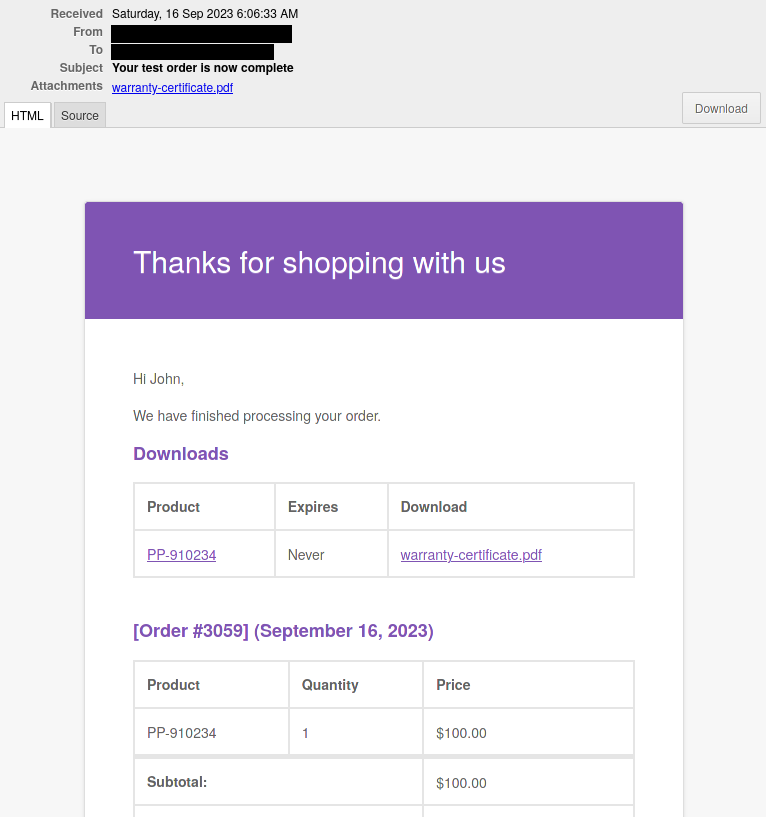
For developers
Is this your plugin? Show off the numbers.
Add a live badge to your site, docs or GitHub README. It updates on its own — no account needed.
Best PDF Forms Filler for WooComme… alternatives
All download plugins →





FAQ
PDF Forms Filler for WooCommerce: quick answers
Straight answers, pulled from live WordPress.org data.
Live data from WordPress.org · checked Oct 4, 2026
Is PDF Forms Filler for WooCommerce free?
Yes. PDF Forms Filler for WooCommerce is free to download and use from the official WordPress.org plugin directory.
Is PDF Forms Filler for WooCommerce safe to use in 2026?
PDF Forms Filler for WooCommerce works, but test it on a staging site before relying on it in 2026. It runs on 20+ sites and was last updated 6 months ago, and scores 46/100 on our health check.
How many websites use PDF Forms Filler for WooCommerce?
PDF Forms Filler for WooCommerce is active on 20+ WordPress websites and has been downloaded 3,475 times since it launched in January 2024. It was downloaded 93 times in the last 30 days.
Does PDF Forms Filler for WooCommerce work with WordPress 7.1?
PDF Forms Filler for WooCommerce is officially tested up to WordPress 7.0.6, while the latest release is 7.1.2. It may still work, but try it on a staging site first.
What PHP version does PDF Forms Filler for WooCommerce need?
PDF Forms Filler for WooCommerce requires PHP 5.5 or higher. Most hosts run PHP 8.x today, so it works on any modern WordPress hosting.
When was PDF Forms Filler for WooCommerce last updated?
The latest version, 1.1.6, was released on April 2, 2026 (6 months ago).
Who makes PDF Forms Filler for WooCommerce?
PDF Forms Filler for WooCommerce is developed and maintained by maximum.software.
What are the best alternatives to PDF Forms Filler for WooCommerce?
The most popular alternatives to PDF Forms Filler for WooCommerce are Download Plugin (60K+ installs), Export Media Library (30K+ installs) and Download Plugins and Themes… (30K+ installs).
Powered by PageForge
Want thousands of pages that rank like these? Build them in an afternoon.
This directory runs on the same engine as PageForge. Turn any spreadsheet, CSV or API into thousands of fast, SEO-ready WordPress pages — with schema, internal links and AI-written copy baked in.
- CSV, Google Sheets & API data sources
- AI content, schema & internal links per page
- Works with Elementor, Gutenberg, Yoast & Rank Math
- Free on WordPress.org — no credit card


