


PDF for Gravity Forms + Drag And Drop Template Builder
PDF Builder for Gravity Forms helps you create custom PDF documents from form submissions using a powerful drag-and-drop template builder.

Safe pick
Yes — PDF for Gravity Forms + Drag An… is a safe, well-maintained plugin to use in 2026. It runs on 400+ sites, is rated 5/5 and was last updated 3 weeks ago, and scores 81/100 on our health check.
- Actively developed — last update 3 weeks ago
- Tested with the latest WordPress (7.1)
- Small user base (400+ active installs)
- Very few reviews so far
How does it stack up?
Side-by-side on installs, updates, ratings & support
Daily downloads
Download spikes usually follow a new release — each site that auto-updates counts as a download.
Rankings
Where PDF for Gravity Forms + Dra… stands todayWordPress.org search rankings
Live position in the plugin search, top 100| Keyword | Position |
|---|---|
| contact form pdf | #23 |
| form pdf | #16 |
| Gravity Forms PDF | #2 |
| pdf contact form | #23 |
| pdf Gravity Forms | #2 |
Version adoption
Share of active sites per release.
Rating breakdown
★★★★★★★★★★ 5 from 2 reviews
About PDF for Gravity Forms + Drag And Drop T…
From the official readme · v7.2.0Description
DEMO: https://pdf.add-ons.org/gravity-forms/
Pro Version: https://add-ons.org/plugin/gravity-form-pdf-generator-attachment/
Documents: https://pdf.add-ons.org/document/
Create custom PDF documents from Gravity Forms submissions using a powerful drag-and-drop PDF builder.
Generate certificates, quotes, contracts, reports, invoices, tickets, and other PDF documents without coding.
Automatically attach generated PDFs to Gravity Forms email notifications, allow users to download PDFs after submission, and fully customize your PDF layouts using dynamic form data.
Why Choose PDF Builder for Gravity Forms?
- Drag-and-drop PDF builder
- No coding required
- Dynamic Gravity Forms field data
- Attach PDFs to email notifications
- Download PDFs after form submission
- Conditional logic support
- QR codes and barcodes
- Multiple PDF templates per form
- Multilingual and RTL ready
Key Features
Drag and Drop PDF Builder
Design custom PDF templates using an intuitive drag-and-drop editor.
Dynamic Form Data
Insert Gravity Forms field values dynamically into your PDF documents.
Conditional Logic
Show or hide PDF content and control when PDF documents are generated.
Multiple PDFs Per Form
Generate multiple PDF documents from a single form submission.
Download PDF Files
View, download, and manage generated PDFs directly from the Gravity Forms Entries page.
QR Codes & Barcodes
Generate dynamic QR codes and barcodes using form submission data for certificates, tickets, reports, and other PDF documents.
Email PDF Attachments
Automatically attach generated PDF documents to Gravity Forms email notifications and send them to users or administrators.
Repeater Field Support
Generate PDF documents using data collected from Gravity Forms Repeater fields.
Shortcodes and Merge Tags
Generate PDF download links using shortcodes and merge tags.
Smart Real-Time Preview
Preview your PDF templates instantly while editing.
Page Break Support
Insert page breaks and organize content across multiple PDF pages.
Custom PDF Paper Sizes
Create PDF templates using custom paper sizes.
Additional Fonts
Upload and use custom fonts to match your brand identity.
Multilingual Support
Generate PDFs in multiple languages, including RTL languages.
Privacy and Security
PDF documents are generated directly on your server without third-party services.
Unlimited Use, No Restrictions
Create and generate as many PDF documents as needed without usage limits.
Popular Use Cases
Certificates
Automatically generate personalized certificates after form submission.
Quotes & Estimates
Create professional PDF quotations and send them directly to customers.
Contracts & Agreements
Generate contracts using submitted form data and attach them to email notifications.
Event Tickets
Create downloadable tickets with QR codes and attendee information.
Reports & Summaries
Convert form submissions into structured PDF reports.
Application Forms
Generate printable PDF copies of submitted applications and registrations.
Invoice & Billing Documents
Create professional invoice-style PDF documents and automatically send them to customers after form submission.
Upgrade to Pro version
Unlock advanced PDF customization and automation features:
- Table Customization
- QRcode Supports
- Barcode Supports
- Watermarks Supports
- Header Supports
- Footer Supports
- Conditional logics Supports
- 30-day money-back guarantee
- 1-year support
External services
This plugin connects to the Dropbox API to store PDF files. Data is only sent to Dropbox when the user has configured and enabled the integration in the plugin settings.
This service is provided by Dropbox, Inc.
Terms of Use https://www.dropbox.com/terms, Privacy Policy https://www.dropbox.com/privacy
Installation
Normal installation
- Download the pdf-for-gravity-forms.zip file to your computer.
- Unzip the file.
- Upload the
pdf-for-gravityforms.zipdirectory to your/wp-content/plugins/directory. - Activate the plugin through the ‘Plugins’ menu in WordPress.
Document include in plugin
Frequently asked questions
Can I generate multiple PDF documents from a single form submission?
Yes. You can generate multiple PDF documents from a single Gravity Forms submission using different templates and configurations. The number of PDFs that can be generated depends on your server resources.
Changelog
7.2.0
- Fixed: Compatible with Gravity Forms 3.0.0 and latest version
6.5.1
- Fixed: PHP Object Injection
6.2.0
- Added: Installation wizard template
6.0.0
- Added: Font awesome ( [yeepdf_fontawesome unicode=’f2b4′] use Unicode ) https://fontawesome.com/search?o=r&ic=free&s=regular&ip=classi
5.9.0
- Fixed: Time format
- Fixed: delete pdf
5.3.0
- Added: Rotate text
- Fixed: Background
- Fixed: Broken Access Control
Screenshots
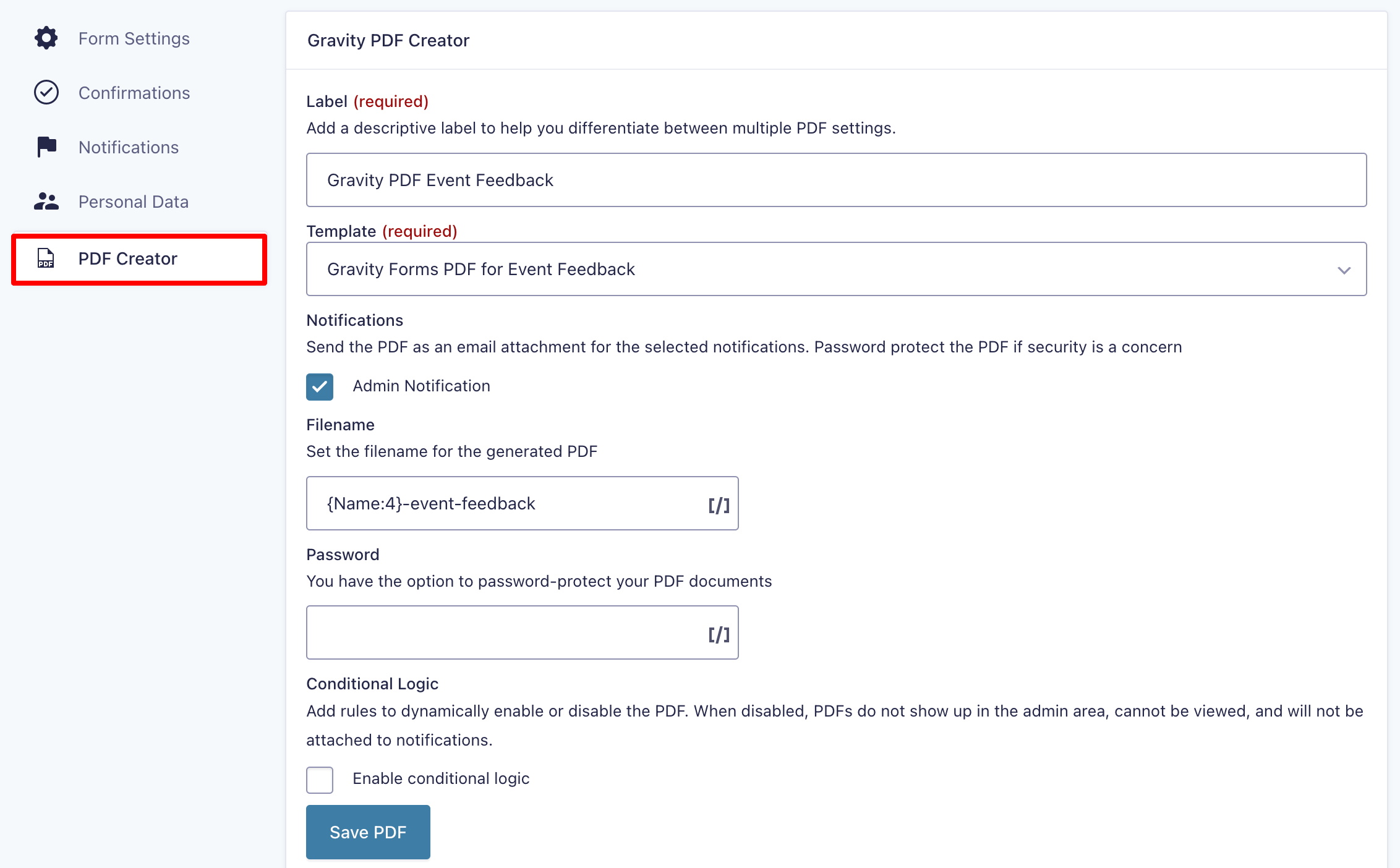


For developers
Is this your plugin? Show off the numbers.
Add a live badge to your site, docs or GitHub README. It updates on its own — no account needed.
Best PDF for Gravity Forms + Drag… alternatives
All contact form pdf plugins →FAQ
PDF for Gravity Forms + Drag And Dr…: quick answers
Straight answers, pulled from live WordPress.org data.
Live data from WordPress.org · checked Oct 11, 2026
Is PDF for Gravity Forms + Drag An… free?
Yes. PDF for Gravity Forms + Drag An… is free to download and use from the official WordPress.org plugin directory.
Is PDF for Gravity Forms + Drag An… safe to use in 2026?
Yes — PDF for Gravity Forms + Drag An… is a safe, well-maintained plugin to use in 2026. It runs on 400+ sites, is rated 5/5 and was last updated 3 weeks ago, and scores 81/100 on our health check.
How many websites use PDF for Gravity Forms + Drag An…?
PDF for Gravity Forms + Drag An… is active on 400+ WordPress websites and has been downloaded 11,556 times since it launched in March 2024. It was downloaded 386 times in the last 30 days.
Does PDF for Gravity Forms + Drag An… work with WordPress 7.1?
Yes. The developer has tested PDF for Gravity Forms + Drag An… up to WordPress 7.1.3, the latest release. It requires WordPress 2.0 or newer.
What PHP version does PDF for Gravity Forms + Drag An… need?
PDF for Gravity Forms + Drag An… requires PHP 5.6 or higher. Most hosts run PHP 8.x today, so it works on any modern WordPress hosting.
When was PDF for Gravity Forms + Drag An… last updated?
The latest version, 7.2.0, was released on September 20, 2026 (3 weeks ago).
Who makes PDF for Gravity Forms + Drag An…?
PDF for Gravity Forms + Drag An… is developed and maintained by add-ons.org.
What are the best alternatives to PDF for Gravity Forms + Drag An…?
The most popular alternatives to PDF for Gravity Forms + Drag An… are PDF for WPForms + Drag and… (1K+ installs), PDF for Contact Form 7 + Dr… (500+ installs) and EPE Formetto (<10 installs).
Powered by PageForge
Want thousands of pages that rank like these? Build them in an afternoon.
This directory runs on the same engine as PageForge. Turn any spreadsheet, CSV or API into thousands of fast, SEO-ready WordPress pages — with schema, internal links and AI-written copy baked in.
- CSV, Google Sheets & API data sources
- AI content, schema & internal links per page
- Works with Elementor, Gutenberg, Yoast & Rank Math
- Free on WordPress.org — no credit card


