



Payment Gateway for Authorize.net for WooCommerce
Credit/Debit Cards, eCheck & Google Pay. Supports saved cards, subscriptions & checkout blocks - By an official Authorize.net Partner.

Safe pick
Yes — Payment Gateway for Authorize.n… is a safe, well-maintained plugin to use in 2026. It runs on 800+ sites, is rated 5/5 and was last updated 6 days ago, and scores 81/100 on our health check.
- Actively developed — last update 6 days ago
- Tested with the latest WordPress (7.1)
- Small user base (800+ active installs)
- Very few reviews so far
How does it stack up?
Side-by-side on installs, updates, ratings & support


Daily downloads
Download spikes usually follow a new release — each site that auto-updates counts as a download.
Rankings
Where Payment Gateway for Authori… stands todayWordPress.org search rankings
Live position in the plugin search, top 100| Keyword | Position |
|---|---|
| authorize.net | #2 |
| credit card | #23 |
| visa | #3 |
Version adoption
Share of active sites per release.
Rating breakdown
★★★★★★★★★★ 5 from 3 reviews
About Payment Gateway for Authorize.net for W…
From the official readme · v1.0.25Description
Payment Gateway for Authorize.net for WooCommerce by Easy Payment is a secure and feature-rich solution for accepting credit card payments via Authorize.net. Customers stay on your website during checkout, creating a seamless experience.
This plugin uses Authorize.net Accept.js to tokenize credit card details before they reach your server—ensuring full PCI-DSS SAQ A-EP compliance. It supports one-time and recurring payments with full integration for WooCommerce Subscriptions and the modern Checkout Block system. Developed by an Official Authorize.net Partner, this plugin ensures high performance and reliability.
Payment Methods
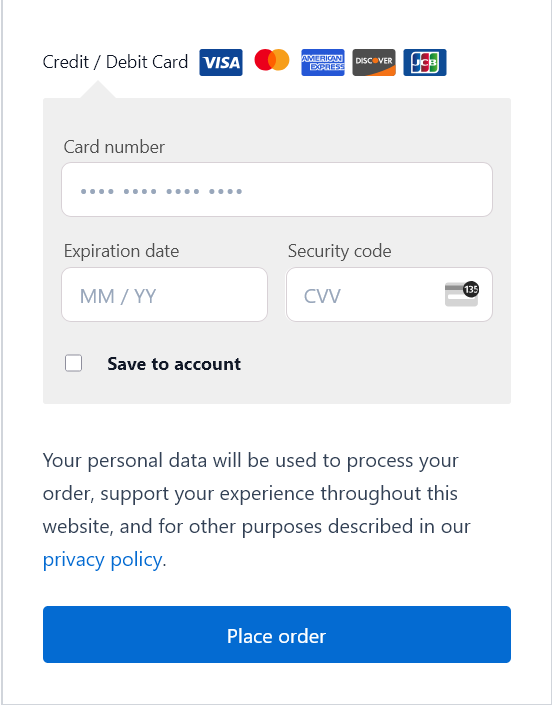
- Credit & Debit Card Payments
- eCheck (ACH)
- Google Pay
Features
- Accept credit card payments using Authorize.net Accept.js
- Process refunds and voids from the WooCommerce order screen
- Pre-authorization and capture later (“Authorize Only”) supported
- Save cards for future purchases with secure tokenization
- Works with WooCommerce Subscriptions for recurring billing
- FunnelKit compatible for upsell and cross-sell flows
- Fully compatible with WooCommerce Checkout Blocks
- PCI compliant using tokenization (SAQ A-EP)
- Responsive credit card form for all devices
- Logging and debug tools for development and troubleshooting
Supported Card Types
- Visa
- MasterCard
- American Express
- Discover
- JCB
- Diners Club
Integration Compatibility
- WooCommerce Subscriptions
- WooCommerce Checkout Blocks
- WooCommerce Pre-Orders
- FunnelKit Checkout / FunnelKit Upsell
External Services
This plugin connects to several Authorize.net services to process payments securely and provide related functionality:
-
Authorize.net API
Used for processing payments, issuing refunds, storing payment profiles, and handling subscriptions.- Data sent: transaction amount, customer name, address, and tokenized card data
- Endpoints used:
- https://api.authorize.net/xml/v1/request.api
- https://apitest.authorize.net/xml/v1/request.api
-
Accept.js
Used to tokenize credit card details in the browser before they reach your server.- Data sent: raw card number, expiry, CVV (sent directly to Authorize.net via JavaScript SDK)
- Endpoints used:
- https://js.authorize.net/v1/Accept.js
- https://jstest.authorize.net/v1/Accept.js
-
Webhook Services
Used to receive updates from Authorize.net about transaction status, subscription events, etc.- Endpoints used:
- https://api.authorize.net/rest/v1/webhooks
- https://apitest.authorize.net/rest/v1/webhooks
- Endpoints used:
-
Merchant Signup Links
Provides a link to register or log in to an Authorize.net merchant account.- Endpoints:
- https://account.authorize.net/
- https://sandbox.authorize.net/
- https://account.authorize.net/signUpNow?resellerId=27457
- No personal data is sent by the plugin automatically.
- Endpoints:
Terms of Service: https://www.authorize.net/about-us/terms.html
Privacy Policy: https://www.authorize.net/about-us/privacy.html
Installation
- Upload the plugin to the
/wp-content/plugins/directory. - Activate it via Plugins > Installed Plugins.
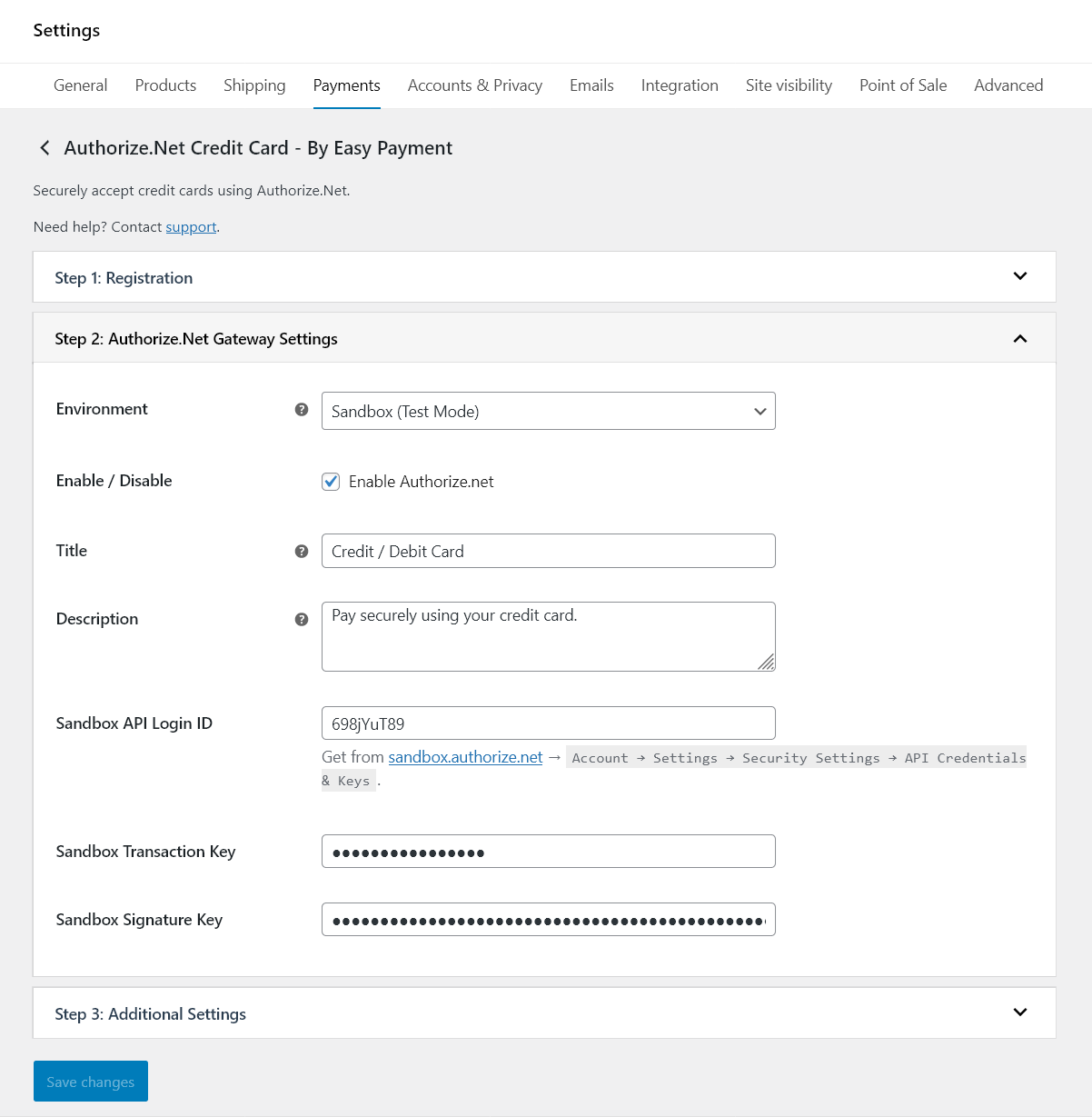
- Go to WooCommerce > Settings > Payments > Authorize.net Credit Card.
- Enter your Authorize.net credentials: API Login ID, Transaction Key, and Signature Key. The Public Client Key required by Accept.js is detected and stored automatically.
- Enable the gateway and configure optional settings.
Frequently asked questions
Does this plugin support subscriptions?
Yes. It fully supports WooCommerce Subscriptions using saved cards via tokenization.
Why is Accept.js required?
Accept.js is used to tokenize card data in the browser before it’s sent to your server, making the integration PCI compliant.
Can I issue refunds directly from WooCommerce?
Yes. You can process refunds and voids from the WooCommerce order admin.
Will customers leave my site to complete the payment?
No. All payment processing happens inline using Accept.js—customers stay on your checkout page.
Does it support WooCommerce Checkout Blocks?
Yes. This plugin is fully compatible with the block-based Cart and Checkout experience.
Changelog
1.0.25
- Improved – Tested with WordPress 7.1.2.
1.0.24
- Fixed – WooCommerce Subscriptions: every automatic renewal was charged twice in the same scheduled run. The gateway’s renewal handler was registered once by WooCommerce and a second time by the Checkout Blocks integration, so each renewal charge was submitted twice: Authorize.net rejected the duplicate (“Error 11: A duplicate transaction has been submitted.”), and that rejection then marked the already-paid renewal order as Failed and put the subscription On hold – so the customer was charged, yet received a renewal invoice asking them to pay again. Renewal handlers now run exactly once per renewal. If this affected your store: those Failed renewal orders were in fact paid – verify the charge in the Authorize.net Merchant Interface, then set the order back to Processing and reactivate the subscription. Thanks to @gordonium for the precise report.
- Fixed – As a permanent safeguard, a renewal order that already has a completed payment can never be charged again or flipped to Failed by a duplicate attempt, whatever triggers it: the duplicate is skipped and recorded as an order note instead, and Authorize.net’s own 120-second duplicate-transaction window remains active on all renewal and saved-card charges.
- Fixed – The Checkout Blocks integration created its own private copies of the card, eCheck and Google Pay gateways on every page load; it now reuses the gateways WooCommerce has already loaded. This also stops the same duplication elsewhere: saving the gateway settings no longer validates credentials and re-registers the Authorize.net webhook twice, “Capture Authorized Payment” no longer submits the capture twice (which left a stray “Capture failed” note on a successfully captured order), and removing a saved card no longer sends the profile deletion to Authorize.net twice.
1.0.23
- Fixed – Payments that Authorize.net accepted but held for review (Advanced Fraud Detection Suite) were marked as Failed orders with the misleading reason “Error I00001: Successful”, so customers who had already been charged were told the payment failed and paid again. These orders now go On hold with the transaction ID and a note telling you to approve or decline the transaction in the Authorize.net Merchant Interface. Approvals and ordinary declines are unchanged.
- Added – Order status now follows the outcome of a fraud review automatically: approving a held transaction in Authorize.net completes the order, declining it cancels the order and restores stock. Existing stores are updated on their own after this release – no settings need to be re-saved, no webhook is replaced, and any extra event types you added to the webhook yourself are kept.
- Improved – Card, eCheck and Google Pay orders held for review are never flipped to Failed by a later error during checkout, and “Capture Authorized Payment” is hidden while a transaction is still under review.
- Improved – Refunding an order whose payment is still under review now tells you to approve or decline the review in Authorize.net first, instead of returning a gateway error. Authorize.net does not allow these transactions to be refunded or voided until the review is settled.
- Fixed – With the transaction type set to “Authorize only”, a post-purchase order bump or upsell charge (CheckoutWC, FunnelKit) moved the original order back to On hold and replaced its transaction ID with the bump’s. The order now keeps its own status and transaction reference, and the extra authorization is recorded in an order note so you can capture it in the Authorize.net Merchant Interface.
- Added – Developers: the duplicate-transaction window sent to Authorize.net can now be set with the
easyauthnet_authorizenet_duplicate_windowfilter, which turns on Authorize.net’s own protection against a customer submitting the same payment twice. The default is unchanged.
1.0.22
- Fixed – In rare cases checkout could fail at the final step with “There was an error processing your order.” and no explanation, because an unexpected PHP error during payment stopped WooCommerce from returning a valid response. The gateway now reports a proper error message and records the cause in WooCommerce > Status > Logs. Successful payments and ordinary card declines are unaffected.
- Improved – Tested with WooCommerce 11.0.
1.0.21
- Added – Accounting integration support: every order now carries its Authorize.Net transaction reference, including pre-authorized card payments and eCheck (ACH). QuickBooks connectors and similar bookkeeping tools can reconcile these orders against the gateway automatically.
- Improved – eCheck orders keep their transaction reference through settlement, so your books stay in step with the payment as it clears. Your configured eCheck order status is unchanged.
- Improved – Streamlined payment gateway registration for smoother compatibility with third-party plugins that list your store’s payment methods.
1.0.20
- Added – Google reCAPTCHA v3 fraud protection for card and eCheck checkout, blocking card-testing attacks. Optional and off by default; enable it under the Credit Card settings tab with your own v3 keys.
- Added – CheckoutWC compatibility: post-purchase one-click order bumps are charged to the card saved during checkout, with refund support.
- Added – WooCommerce Subscriptions: admins can now change or repair a subscription’s payment method from the subscription edit screen, and a recovered failing payment method is applied to future renewals automatically.
- Fixed – Changing a subscription’s payment method from My Account charged the customer immediately; the new card is now saved without any charge.
- Fixed – WooCommerce Pre-Orders “charge upon release” now works end-to-end: the card is saved at checkout and charged automatically when the pre-order is released.
- Fixed – FunnelKit upsells: guest checkout upsells are now supported and a declined upsell charge shows the real decline reason instead of failing silently.
- Improved – Safer detection of third-party plugins to prevent rare fatal errors caused by other plugins’ autoloaders, and stricter saved-card validation so a payment can only use cards saved by this gateway.
Screenshots
For developers
Is this your plugin? Show off the numbers.
Add a live badge to your site, docs or GitHub README. It updates on its own — no account needed.
Best Payment Gateway for Authorize… alternatives
All authorize.net plugins →


FAQ
Payment Gateway for Authorize.net f…: quick answers
Straight answers, pulled from live WordPress.org data.
Live data from WordPress.org · checked Sep 28, 2026
Is Payment Gateway for Authorize.n… free?
Yes. Payment Gateway for Authorize.n… is free to download and use from the official WordPress.org plugin directory.
Is Payment Gateway for Authorize.n… safe to use in 2026?
Yes — Payment Gateway for Authorize.n… is a safe, well-maintained plugin to use in 2026. It runs on 800+ sites, is rated 5/5 and was last updated 6 days ago, and scores 81/100 on our health check.
How many websites use Payment Gateway for Authorize.n…?
Payment Gateway for Authorize.n… is active on 800+ WordPress websites and has been downloaded 11,598 times since it launched in August 2025. It was downloaded 1,611 times in the last 30 days.
Does Payment Gateway for Authorize.n… work with WordPress 7.1?
Yes. The developer has tested Payment Gateway for Authorize.n… up to WordPress 7.1.2, the latest release. It requires WordPress 5.6 or newer.
What PHP version does Payment Gateway for Authorize.n… need?
Payment Gateway for Authorize.n… requires PHP 7.4 or higher. Most hosts run PHP 8.x today, so it works on any modern WordPress hosting.
When was Payment Gateway for Authorize.n… last updated?
The latest version, 1.0.25, was released on September 23, 2026 (6 days ago).
Who makes Payment Gateway for Authorize.n…?
Payment Gateway for Authorize.n… is developed and maintained by Easy Payment.
What are the best alternatives to Payment Gateway for Authorize.n…?
The most popular alternatives to Payment Gateway for Authorize.n… are Secure Gateway for Authoriz… (10K+ installs), WC Authorize.net Payment Ga… (30+ installs) and Authorize.net for WooCommer… (30+ installs).
Powered by PageForge
Want thousands of pages that rank like these? Build them in an afternoon.
This directory runs on the same engine as PageForge. Turn any spreadsheet, CSV or API into thousands of fast, SEO-ready WordPress pages — with schema, internal links and AI-written copy baked in.
- CSV, Google Sheets & API data sources
- AI content, schema & internal links per page
- Works with Elementor, Gutenberg, Yoast & Rank Math
- Free on WordPress.org — no credit card


