


Payment Form for PayPal Pro
This plugin is for integrating PayPal Pro to accept credit cards directly into your website without navigating to a PayPal hosted payment page.

Use with caution
Payment Form for PayPal Pro works, but test it on a staging site before relying on it in 2026. It runs on 20+ sites, is rated 2.7/5 and was last updated 9 months ago, and scores 42/100 on our health check.
- Small user base (20+ active installs)
- Low rating so far — 2.7/5 from only 7 reviews
- Only tested up to WordPress 6.9 (latest is 7.1)
How does it stack up?
Side-by-side on installs, updates, ratings & support



Daily downloads
Download spikes usually follow a new release — each site that auto-updates counts as a download.
Rankings
Where Payment Form for PayPal Pro stands todayWordPress.org search rankings
Live position in the plugin search, top 100| Keyword | Position |
|---|---|
| accept | >100 |
| paypal | >100 |
| paypal advanced | #64 |
| paypal pro | #38 |
| Pro | >100 |
Version adoption
Share of active sites per release.
Rating breakdown
★★★★★★★★★★ 2.7 from 7 reviews
About Payment Form for PayPal Pro
From the official readme · v1.1.73Description
This plugin is for integrating PayPal Pro to accept credit cards directly into your website without navigating to a PayPal hosted payment page.
The PayPal integration available in this plugin requires a PayPal Pro account.
If you aren’t sure if you have a PayPal Pro account or if you are looking for a classic PayPal Standard integration then use the CP Contact Form with PayPal plugin.
You can check the differences betwen PayPal Pro and PayPal Standard at https://www.paypal.com/webapps/mpp/compare-business-products
Special note: This plugin has been developed by an Official PayPal Partner.
With Payment Form for PayPal Pro you can insert a form into a WordPress website and use it to process credit card payments directly into your website without navigating to an external payment page.
This plugin uses the PayPal Pro API to process the credit cards. The credit card related data is used only to process the payment through the payment API, it isn’t stored in the website for keeping it secure.
Once the user has filled the form fields and clicks the submit button the payment is processed and the posted data (excluding the credit card related information) is saved into the WordPress database. The website administrator (the email indicated from the settings) will receive an email with the form data and the user will receive a confirmation/thank you email.
Features:
- Supports PayPal Pro to accept payments directly into your website without navigating to PayPal
- Supports many contact forms into the same WP website, each one with its own prices and settings.
- You can customize the notification email details, including from address, subject and content.
- Includes optional captcha verification.
- Supports HTML formatted emails (*)
- Can be tested with the PayPal Sandbox
- Exports the submissions to CSV/Excel
- Developer by an Official PayPal Partner.
Proffesional Version Features:
The following features aren’t part of the free version. The following features are present only in the pro version
- Visual form builder: The free version includes the payment form with an email field plus the required PayPal fields. If you need a different form you should opt for the commercial version.
- In the commercial version PayPal Standard is supported in addition to PayPal Pro.
If you are interested in a version with the pro features you can get it here: https://wordpress.dwbooster.com/forms/paypal-payment-pro-form
Language Support
The Payment Form for PayPal Pro plugin is compatible with all charsets. The troubleshoot area contains options to change the encoding of the plugin database tables if needed.
Translations are supported through PO/MO files located in the Payment Form for PayPal Pro plugin folder “languages”.
The following translations are already included in the plugin:
- Afrikaans (af)
- Albanian (sq)
- Arabic (ar)
- Armenian (hy_AM)
- Azerbaijani (az)
- Basque (eu)
- Belarusian (be_BY)
- Bosnian (bs_BA)
- Bulgarian (bg_BG)
- Catalan (ca)
- Central Kurdish (ckb)
- Chinese (China zh_CN)
- Chinese (Taiwan zh_TW)
- Croatian (hr)
- Czech (cs_CZ)
- Danish (da_DK)
- Dutch (nl_NL)
- Esperanto (eo_EO)
- Estonian (et)
- Finnish (fi)
- French (fr_FR)
- Galician (gl_ES)
- Georgian (ka_GE)
- German (de_DE)
- Greek (el)
- Gujarati (gu_IN)
- Hebrew (he_IL)
- Hindi (hi_IN)
- Hungarian (hu_HU)
- Indian Bengali (bn_IN)
- Indonesian (id_ID)
- Irish (ga_IE)
- Italian (it_IT)
- Japanese (ja)
- Korean (ko_KR)
- Latvian (lv)
- Lithuanian (lt_LT)
- Macedonian (mk_MK)
- Malay (ms_MY)
- Malayalam (ml_IN)
- Maltese (mt_MT)
- Norwegian (nb_NO)
- Persian (fa_IR)
- Polish (pl_PL)
- Portuguese Brazil(pt_BR)
- Portuguese (pt_PT)
- Punjabi (pa_IN)
- Russian (ru_RU)
- Romanian (ro_RO)
- Serbian (sr_RS)
- Slovak (sk_SK)
- Slovene (sl_SI)
- Spanish (es_ES)
- Swedish (sv_SE)
- Tagalog (tl)
- Tamil (ta)
- Thai (th)
- Turkish (tr_TR)
- Ukrainian (uk)
- Vietnamese (vi)
Updates
New features has been published in the current Payment Form for PayPal Pro version 1.0.2 based on the feedback received and we would like to thank you all the people that have supported the development, provided feedback and feature requests. The plugin is currently over the 4000 downloads/installations and a new set of updates is already being prepared, any feature requests will be welcome. Thank you!
Installation
To install Payment Form for PayPal Pro, follow these steps:
- Download and unzip the Payment Form for PayPal Pro plugin
- Upload the entire paypal-payment-pro-form/ directory to the /wp-content/plugins/ directory
- Activate the Payment Form for PayPal Pro plugin through the Plugins menu in WordPress
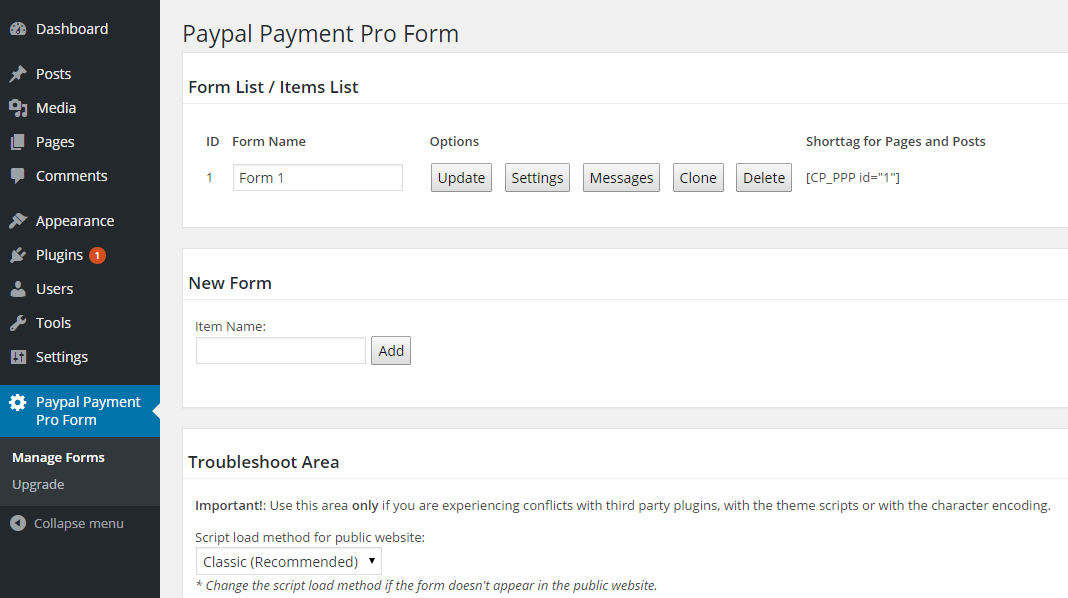
- Configure the PayPal contact form settings at the administration menu >> Settings >> Payment Form for PayPal Pro
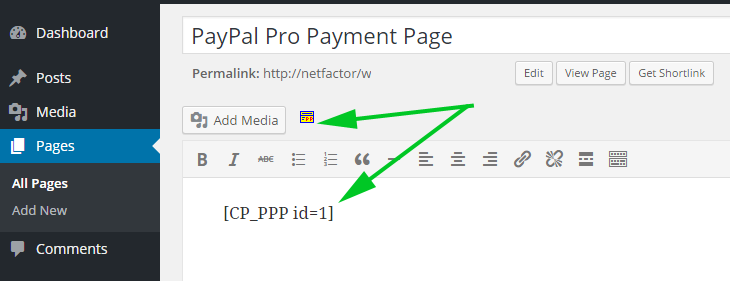
- To insert the PayPal contact form into some content or post use the icon that will appear when editing contents
Frequently asked questions
Q: Where can I find more info about this plugin?
A: The product’s page contains more information: https://wordpress.dwbooster.com/forms/paypal-payment-pro-form
Q: Where can I publish the PayPal Pro form with the PayPal button?
A: You can publish the PayPal contact forms / PayPal button into pages, posts and as a widget in the sidebar.
Q: I’m not receiving the emails after PayPal payment.
A: Try first using a “from” email address that belongs to your website domain, this is the most common restriction applied in most hosting services. If that doesn’t work please check if your hosting service requires some specific configuration to send emails from PHP/WordPress websites. The plugin uses the settings specified into the WordPress website to deliver the emails, if your hosting has some specific requirements like a fixed “from” address or a custom “SMTP” server those settings must be configured into the WordPress website.
Q: Are the forms GDPR compliant?
A: In all plugin versions you can turn off IP tracking to avoid saving that user info. Full GDPR compliant forms can be built using the commercial versions of the plugin.
Changelog
Compatible with WordPress 6.8
1.0.1
- First stable version released.
1.0.2
- XSS vulnerability fixed
1.0.3
- Tested and compatible with WordPress 4.4
- Fixed parameter value in saving settings process.
1.0.4
- Tested with WordPress 4.5
1.0.5
- Scripts loaded in a different order for WP 4.5 issues
1.0.6
- Tested with WP 4.6
Screenshots


For developers
Is this your plugin? Show off the numbers.
Add a live badge to your site, docs or GitHub README. It updates on its own — no account needed.
Best Payment Form for PayPal Pro alternatives
All accept plugins →

FAQ
Payment Form for PayPal Pro: quick answers
Straight answers, pulled from live WordPress.org data.
Live data from WordPress.org · checked Oct 6, 2026
Is Payment Form for PayPal Pro free?
Yes. Payment Form for PayPal Pro is free to download and use from the official WordPress.org plugin directory.
Is Payment Form for PayPal Pro safe to use in 2026?
Payment Form for PayPal Pro works, but test it on a staging site before relying on it in 2026. It runs on 20+ sites, is rated 2.7/5 and was last updated 9 months ago, and scores 42/100 on our health check.
How many websites use Payment Form for PayPal Pro?
Payment Form for PayPal Pro is active on 20+ WordPress websites and has been downloaded 23,717 times since it launched in August 2015. It was downloaded 110 times in the last 30 days.
Does Payment Form for PayPal Pro work with WordPress 7.1?
Payment Form for PayPal Pro is officially tested up to WordPress 6.9.10, while the latest release is 7.1.3. It may still work, but try it on a staging site first.
When was Payment Form for PayPal Pro last updated?
The latest version, 1.1.73, was released on December 26, 2025 (9 months ago).
Who makes Payment Form for PayPal Pro?
Payment Form for PayPal Pro is developed and maintained by codepeople.
What are the best alternatives to Payment Form for PayPal Pro?
The most popular alternatives to Payment Form for PayPal Pro are Multi CryptoCurrency Paymen… (300+ installs), Specify a Vary: Accept-Enco… (200+ installs) and SiteMile Terms Of Use Agree (20+ installs).
Powered by PageForge
Want thousands of pages that rank like these? Build them in an afternoon.
This directory runs on the same engine as PageForge. Turn any spreadsheet, CSV or API into thousands of fast, SEO-ready WordPress pages — with schema, internal links and AI-written copy baked in.
- CSV, Google Sheets & API data sources
- AI content, schema & internal links per page
- Works with Elementor, Gutenberg, Yoast & Rank Math
- Free on WordPress.org — no credit card


