



Palette Commerce Kit for WooCommerce
Import and export WooCommerce data with visual field mapping, private chunked processing, row-level logs and rollback.

Use with caution
Palette Commerce Kit for WooCom… works, but test it on a staging site before relying on it in 2026. Was last updated 3 months ago, and scores 55/100 on our health check.
- Small user base (<10 active installs)
- Very few reviews so far
How does it stack up?
Side-by-side on installs, updates, ratings & support



Daily downloads
Download spikes usually follow a new release — each site that auto-updates counts as a download.
Rankings
Where Palette Commerce Kit for Wo… stands todayWordPress.org search rankings
Live position in the plugin search, top 100| Keyword | Position |
|---|---|
| csv | >100 |
| export | >100 |
| import | >100 |
| woocommerce | >100 |
| xlsx | >100 |
About Palette Commerce Kit for WooCommerce
From the official readme · v4.0.1Description
Palette Commerce Kit for WooCommerce is a focused data-management toolkit for WooCommerce stores. It combines import, export, visual field mapping and operational logs in one WordPress administration menu.
The current feature set is intentionally focused on WooCommerce data operations: importing, exporting, field mapping, validation, row-level logs, rollback and scheduled processing.
The plugin is designed for store migrations, supplier files, recurring inventory updates, catalog maintenance and auditable bulk operations. Files remain on your server and no store data is sent to an external service.
Supported WooCommerce data
- Products, variable products and variations.
- Orders and order items.
- Customers and billing fields.
- Coupons and usage restrictions.
- Product inventory and stock operations.
Import features
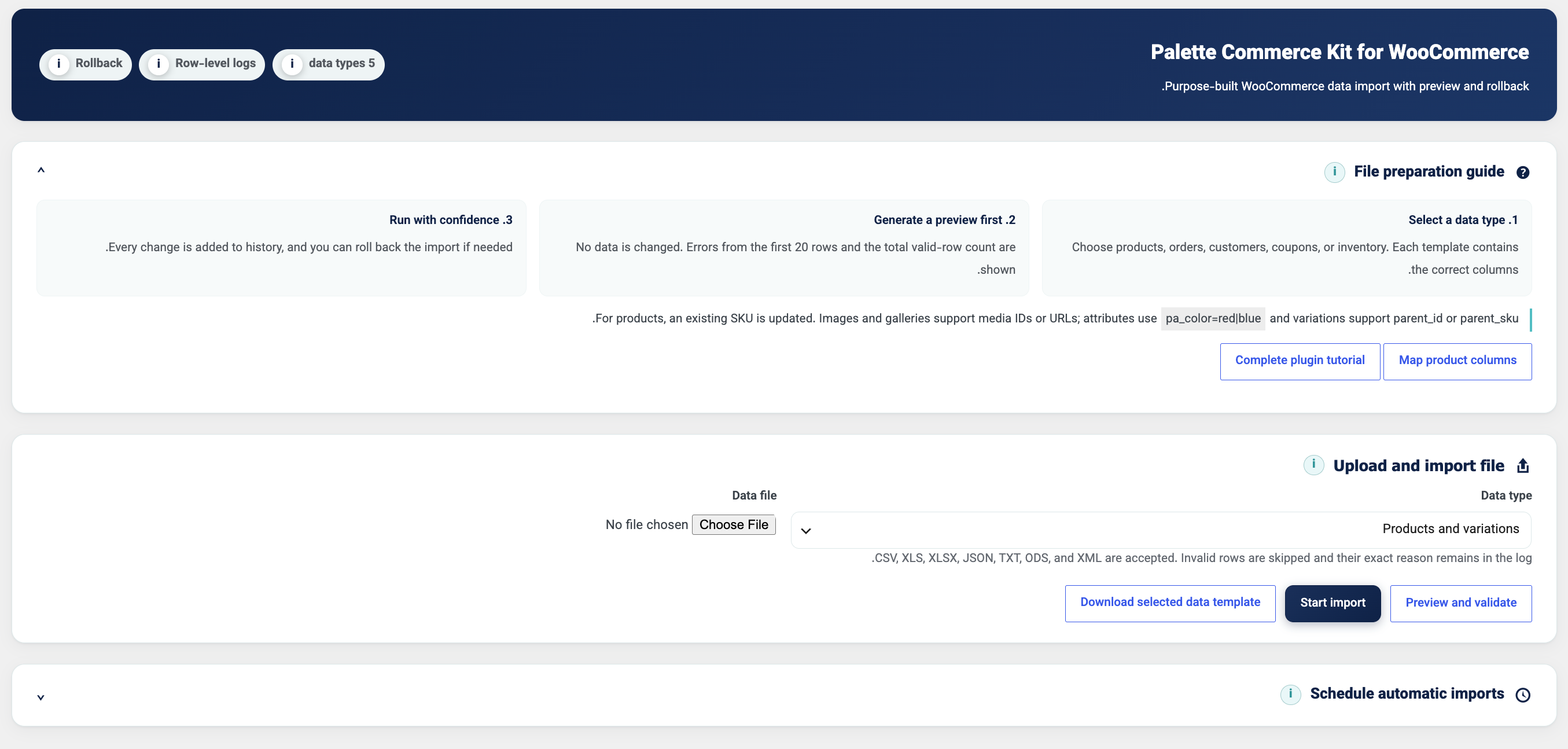
- Read CSV, XLSX, Excel 2003 XML with an XLS extension, JSON, TXT, ODS and XML files.
- Download a separate starter template for each supported data type.
- Preview and validate data before modifying WooCommerce.
- Update an existing product when its SKU already exists, or create a new product for a new SKU.
- Create missing product categories and registered taxonomies when required.
- Import product images and galleries from WordPress attachment IDs or allowed URLs.
- Handle variable parent products and connect variations using a parent SKU or parent ID.
- Import product attributes, variation attributes, public custom fields and mapped metadata.
- Process normalized data in private packages of up to 500 KB.
- Queue packages sequentially through WooCommerce Action Scheduler, with WP-Cron as a fallback.
Visual field mapping
- Inspect file headers and sample rows without importing data.
- Connect source columns to WooCommerce product fields using drag and drop or select controls.
- Save, select, reset and delete reusable mapping profiles through AJAX.
- Use built-in presets for simple products, variable parent products and variations.
- Discover registered WooCommerce attributes and public taxonomies on the current site.
- Discover compatible ACF and MetaBox fields when their field definitions are available.
The supplied template is only a starting point. A store is not limited to the template columns: site-specific attributes, taxonomies and compatible custom fields are exposed by the mapping screen.
Export features
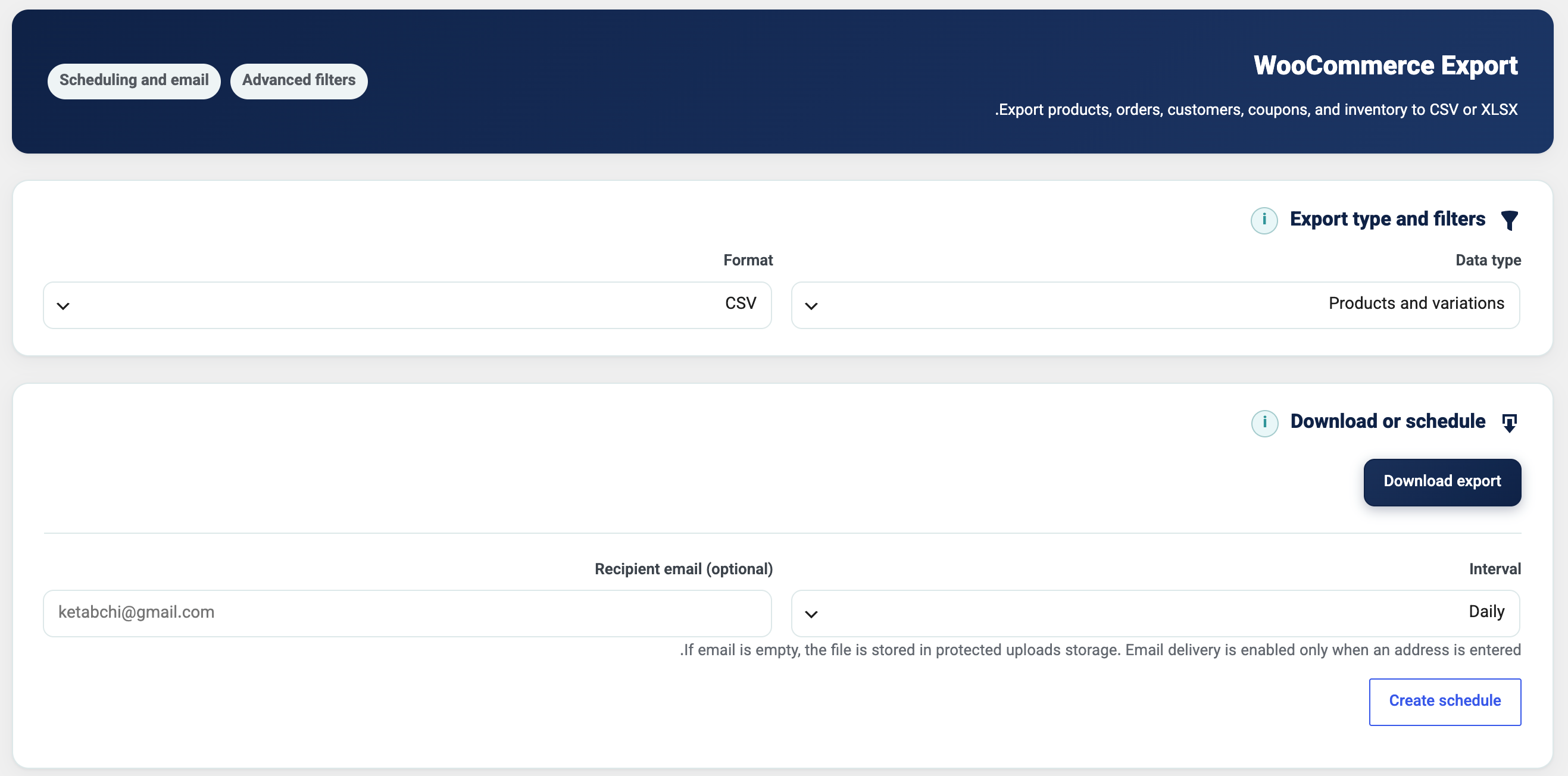
- Export products, orders, customers, coupons and inventory as CSV or XLSX.
- Select product columns and product categories.
- Include or exclude variations as separate product rows.
- Filter orders by date range, status, product and customer role.
- Filter customers by role and inventory by stock status.
- Protect spreadsheet exports against CSV formula injection.
- Download immediately or schedule recurring exports.
Logs, history and rollback
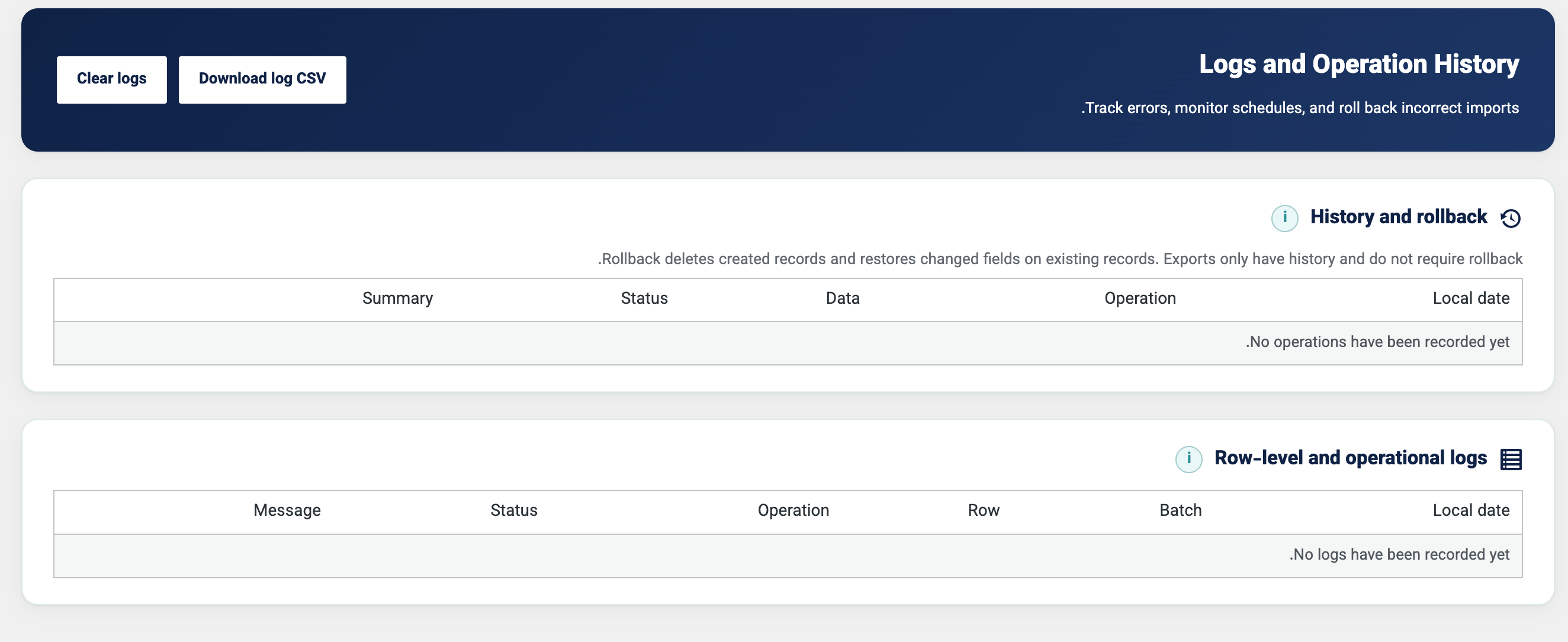
- Record the status, source row number and exact message for each processed row.
- Record operational failures from upload, parsing, mapping, queue, database and export operations.
- Display log and history dates in the Jalali calendar while retaining canonical timestamps for sorting.
- Download logs through an authenticated, nonce-protected CSV action.
- Clear row-level logs without removing rollback history.
- Roll back recorded imports by removing newly created records and restoring captured previous values.
- Retain import history for 30 days and row-level logs for 90 days.
Privacy and storage
- Store scheduled files and processing packages in a protected private location outside the public web root whenever the hosting layout permits it.
- Use randomized operating-system temporary storage as a protected fallback.
- Remove stale processing packages and temporary files automatically.
- Avoid storing raw customer identifiers in operational log contexts.
- Integrate with the WordPress personal-data exporter and eraser.
- Remove plugin options, schedules, private files and the custom log table on uninstall.
Administration experience
- Dedicated Palette-styled Import, Export, Logs and Training screens.
- Contextual information tooltips available by mouse, keyboard and touch.
- Locally bundled Vazirmatn typography with no remote font request.
- Responsive RTL-aware interface with LTR isolation for technical values.
Legacy binary BIFF XLS files are not supported. Save those files as XLSX, CSV or Excel 2003 XML before importing.
Usage
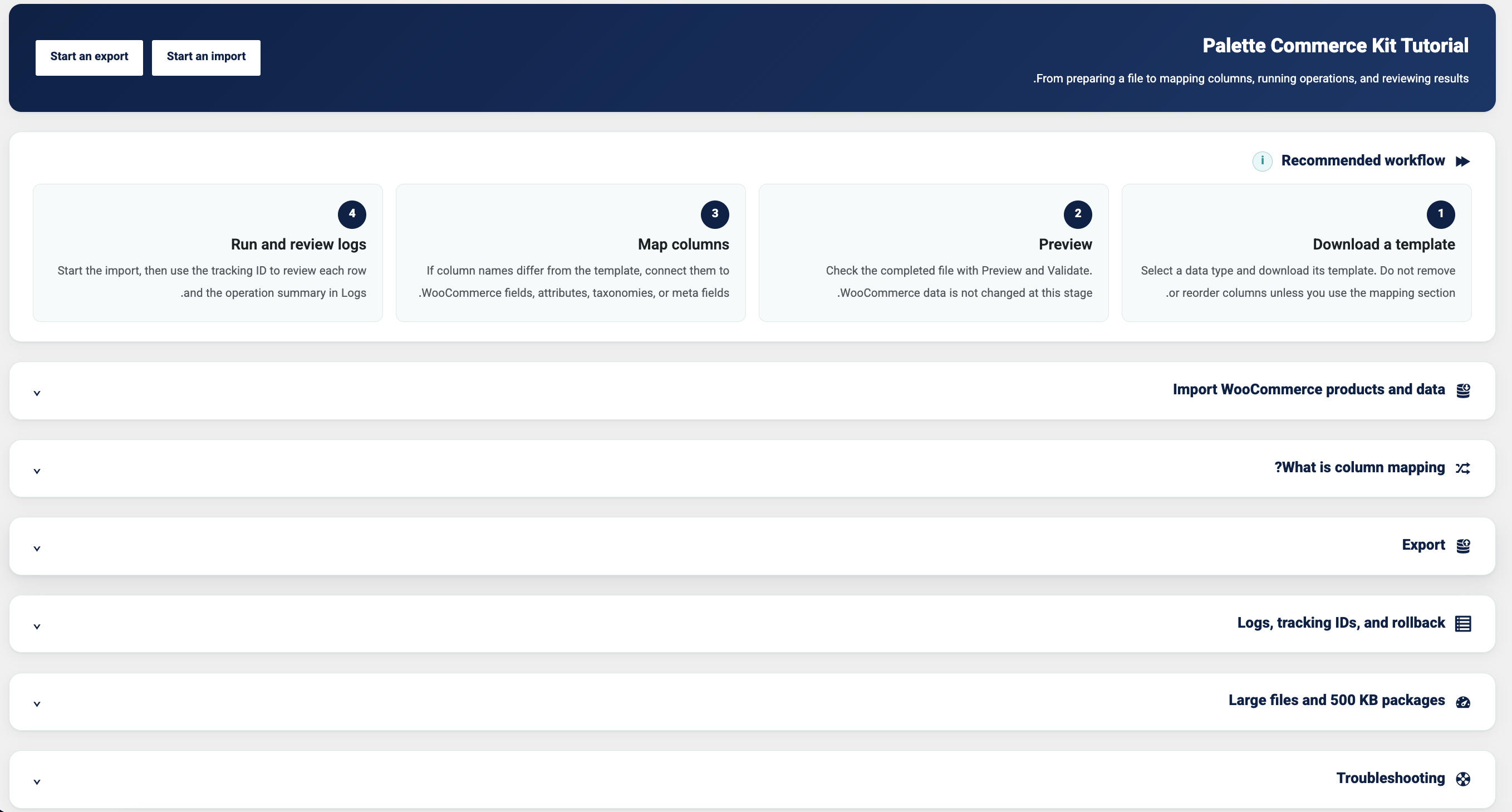
First product import
- Open Palette Commerce Kit > Import.
- Select Products and Variations and download its template.
- Fill the template without deleting required identifiers such as SKU.
- Upload the file and run Preview and Validation.
- If your column names differ, open Header Mapping and save a mapping profile.
- Start the import and copy the tracking ID shown in the success message.
- Open Logs to review each row and the final operation summary.
Variable product example
Create the parent row first with product_type set to variable. Add each variation on a later row with product_type set to variation and parent_sku set to the SKU of the parent row.
Product attributes can use a value such as pa_color=Red|Blue;pa_size=M|L. Variation attributes contain one selected value per attribute, such as pa_color=Red;pa_size=M.
Scheduled operations
Choose a recurrence and optionally provide a notification email. Scheduled imports reuse a protected copy of the uploaded file. Scheduled exports create a fresh file from the current store data on every run.
Privacy Policy
Palette Commerce Kit for WooCommerce processes store data on the WordPress server. It does not transmit store information to Palette Agency or an external API.
Imports, exports and row-level logs may temporarily process personal information contained in WooCommerce orders and customer records. Operational log contexts avoid raw customer identifiers. WordPress privacy export and erase requests include compatible plugin history and log cleanup.
Scheduled operation files and processing packages are stored in protected private storage and are removed by retention cleanup or plugin uninstall.Palette Commerce Kit for WooCommerce is developed by Palette Agency.
This plugin bundles Vazirmatn version 33.003 by the Vazirmatn Project Authors. Vazirmatn is distributed under the SIL Open Font License 1.1. The complete license is included at assets/fonts/vazirmatn/OFL.txt, and the upstream project is available at github.com/rastikerdar/vazirmatn.
Installation
- Upload the
palette-commerce-kitfolder to/wp-content/plugins/, or install the release ZIP from Plugins > Add New > Upload Plugin. - Make sure WooCommerce is installed and active.
- Activate Palette Commerce Kit for WooCommerce.
- Open Palette Commerce Kit in the WordPress administration menu.
- Visit the Training submenu for the recommended first-import workflow.
Frequently asked questions
Does the template limit the fields I can import?
No. The template contains common fields for a quick start. The mapping screen discovers WooCommerce fields, product attributes, registered taxonomies and compatible custom fields available on the current website.
What happens when a product SKU already exists?
The matching WooCommerce product is updated. A new product is created when no matching SKU exists.
Can the plugin import variable products and variations?
Yes. Use a variable parent row and connect variation rows with parent_sku or parent_id. The built-in mapping presets provide the common parent and variation fields.
What does rollback restore?
Rollback removes records created by the selected import and restores captured previous values for updated records. It is not a full database backup. Take a complete site backup before large production imports.
Where are scheduled and temporary files stored?
They are stored in a private directory outside the public WordPress web root when possible. If the hosting layout does not allow that location, the plugin uses a randomized operating-system temporary directory.
Does the plugin send data to Palette Agency, Google or another service?
No. Store data is processed locally. The administration font is bundled inside the plugin and no remote font service is contacted.
Why is an imported file split into 500 KB packages?
Smaller sequential jobs reduce the execution time and memory required by each request. This lowers the likelihood of server timeouts, although server resources and cron configuration still affect very large operations.
Does the plugin support old binary XLS files?
No. The XLS parser supports Excel 2003 XML workbooks. Convert legacy binary BIFF XLS files to XLSX or CSV first.
How long are logs retained?
Row-level logs are retained for 90 days. Import history used for rollback is retained for 30 days. Administrators can clear row-level logs manually at any time.
Changelog
4.0.1 – 2026-07-28
- Updated the WordPress.org contributor username.
- Removed bundled locale files so translations are delivered through Translate.WordPress.org.
- Removed an unnecessary direct load of the WordPress user administration file.
- Routed parser reads and writes through the WordPress Filesystem API with explicit failure handling.
4.0.0 – 2026-07-26
- Rebranded the plugin as Palette Commerce Kit for WooCommerce.
- Changed the directory, main file, text domain, PHP namespace and internal identifiers to the
palette-commerce-kitnaming system. - Focused the repository description on the plugin’s current WooCommerce import, export and data-management features.
- Rebuilt the Persian translations and release package for the new identity.
3.3.1 – 2026-07-26
- Resolved Plugin Check false positives for translated internal exception messages with precise PHPCS annotations.
- Prefixed local loop variables in the advanced order export template.
3.3.0 – 2026-07-25
- Added complete internationalization for PHP and JavaScript administration interfaces.
- Added a translation template and bundled Persian (fa_IR) PO/MO translations.
- Added automatic script translation loading for the field-mapping interface.
3.2.2 – 2026-07-25
- Increased the contrast of information icons inside the import header with a white default state and amber hover/focus state.
- Applied the locally bundled Vazirmatn font to every plugin administration descendant while preserving the Dashicons icon font.
- Changed the variable-font source declaration to the broadly compatible WOFF2 format and retained version-based cache busting.
3.2.1 – 2026-07-25
- Aligned the plugin text domain and translation calls with the directory slug required by WordPress.org Plugin Check.
- Kept administration and storage identifiers stable for that release.
Screenshots
For developers
Is this your plugin? Show off the numbers.
Add a live badge to your site, docs or GitHub README. It updates on its own — no account needed.
Best Palette Commerce Kit for WooC… alternatives
All csv plugins →





FAQ
Palette Commerce Kit for WooCommerce: quick answers
Straight answers, pulled from live WordPress.org data.
Live data from WordPress.org · checked Oct 26, 2026
Is Palette Commerce Kit for WooCom… free?
Yes. Palette Commerce Kit for WooCom… is free to download and use from the official WordPress.org plugin directory.
Is Palette Commerce Kit for WooCom… safe to use in 2026?
Palette Commerce Kit for WooCom… works, but test it on a staging site before relying on it in 2026. Was last updated 3 months ago, and scores 55/100 on our health check.
How many websites use Palette Commerce Kit for WooCom…?
Palette Commerce Kit for WooCom… is active on <10 WordPress websites and has been downloaded 215 times since it launched in August 2026. It was downloaded 55 times in the last 30 days.
Does Palette Commerce Kit for WooCom… work with WordPress 7.1?
Palette Commerce Kit for WooCom… is officially tested up to WordPress 7.0.7, while the latest release is 7.1.3. It may still work, but try it on a staging site first.
What PHP version does Palette Commerce Kit for WooCom… need?
Palette Commerce Kit for WooCom… requires PHP 7.4 or higher. Most hosts run PHP 8.x today, so it works on any modern WordPress hosting.
When was Palette Commerce Kit for WooCom… last updated?
The latest version, 4.0.1, was released on August 7, 2026 (3 months ago).
Who makes Palette Commerce Kit for WooCom…?
Palette Commerce Kit for WooCom… is developed and maintained by PaletteAgency.
What are the best alternatives to Palette Commerce Kit for WooCom…?
The most popular alternatives to Palette Commerce Kit for WooCom… are TablePress (600K+ installs), WP All Import (100K+ installs) and Import and export users and… (70K+ installs).
Powered by PageForge
Want thousands of pages that rank like these? Build them in an afternoon.
This directory runs on the same engine as PageForge. Turn any spreadsheet, CSV or API into thousands of fast, SEO-ready WordPress pages — with schema, internal links and AI-written copy baked in.
- CSV, Google Sheets & API data sources
- AI content, schema & internal links per page
- Works with Elementor, Gutenberg, Yoast & Rank Math
- Free on WordPress.org — no credit card


