



Page scroll to id
Create links that scroll the page smoothly to any id within the document.

Safe pick
Yes — Page scroll to id is a safe, well-maintained plugin to use in 2026. It runs on 100K+ sites, is rated 4.9/5 and was last updated 4 months ago, and scores 81/100 on our health check.
- Proven at scale on 100K+ active sites
- Loved by users — 4.9/5 from 225 reviews
How does it stack up?
Side-by-side on installs, updates, ratings & support



Daily downloads
Download spikes usually follow a new release — each site that auto-updates counts as a download.
Rankings
Where Page scroll to id stands todayWordPress.org search rankings
Live position in the plugin search, top 100| Keyword | Position |
|---|---|
| navigation | #27 |
| page animation | #3 |
| page scrolling | #1 |
| single-page navigation | #2 |
| smooth scroll | #6 |
Version adoption
Share of active sites per release.
Rating breakdown
★★★★★★★★★★ 4.9 from 225 reviews
About Page scroll to id
From the official readme · v1.7.9Description
Page scroll to id is a fully featured plugin which replaces browser’s “jumping” behavior with a smooth scrolling animation, when links with href value containing # are clicked. It provides all the basic tools and advanced functionality for single-page websites, in-page navigation, back-to-top links etc. with features like:
- Adjustable scrolling animation duration and easing (over 30 easing types)
- Link and target highlighting via ready-to-use CSS classes
- Vertical and/or horizontal scrolling
- Scrolling from/to different pages (scrolling to target id on page load)
- Offset scrolling by pixels or element selector with custom expressions
- Insert link and target id buttons in post visual editor
- Link-specific offset, scrolling duration, highlight target etc.
Demo (default animation duration/easing, link highlighting etc.)
Plugin resources, links and tutorials
Requirements
Page scroll to id requires WordPress version 3.3 or higher (jQuery version 1.7.0 or higher) and your theme must (and should) have wp_head() and wp_footer() functions. In some Microsoft Windows based web servers some plugins might produce an error 500 (depends on server/PHP configuration). To pinpoint the issue enable debugging in wp-config.php and check wp-content/debug.log file for relevant errors.
GDPR (General Data Protection Regulation)
The plugin is GDPR compliant. It does not use or store any kind of user information/data. In fact, it’s functionality has nothing to do with user data (personal or otherwise). So there’s that.
Quick usage and tips
- Install the plugin.
- The plugin is enabled by default on your WordPress Menu links, so you can start adding custom links and set their URL to the id/target you want to scroll to.
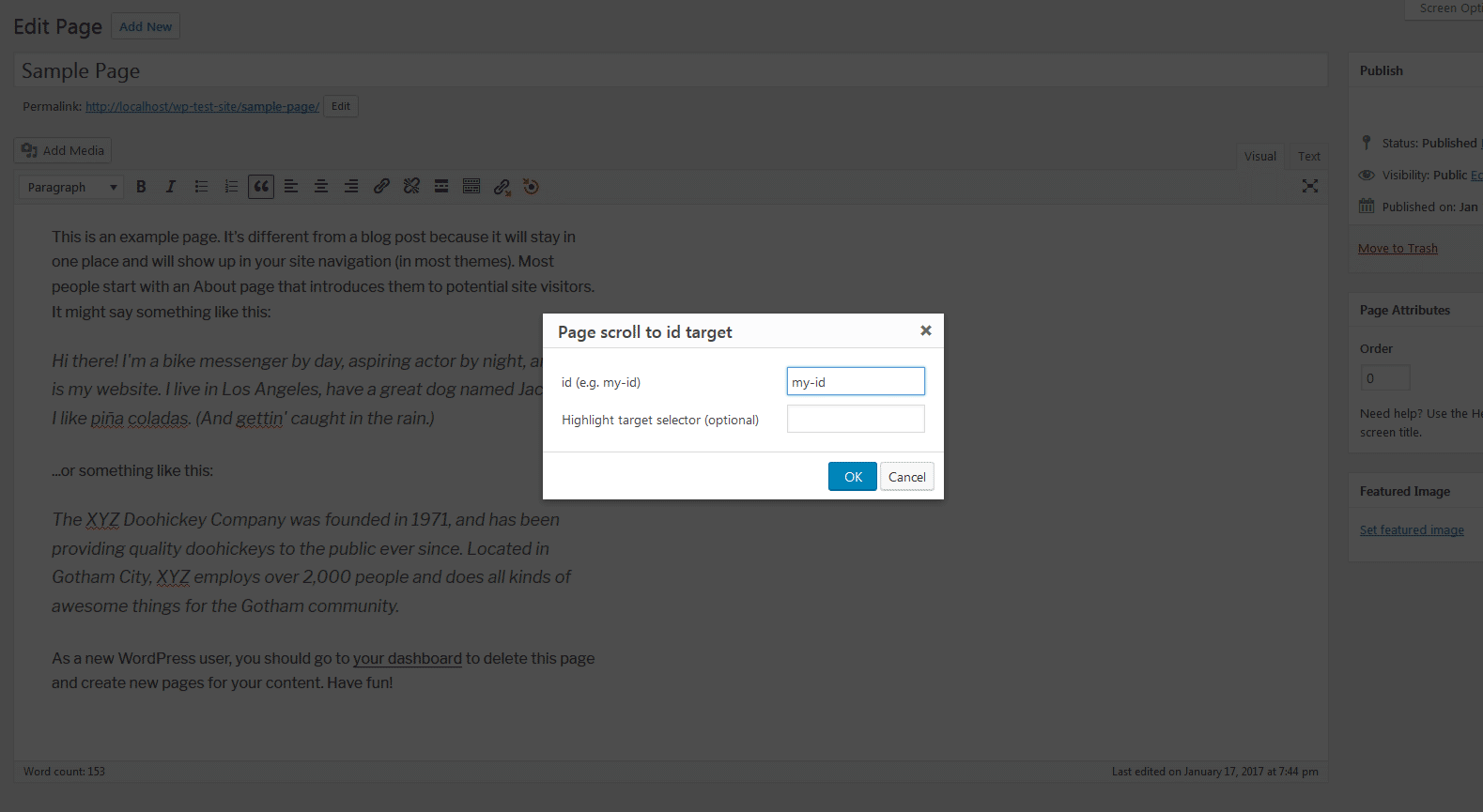
- Create id targets within your content using plugin’s “Insert Page scroll to id target” button and/or shortcode (see contextual “Help” menu in plugin settings page) in post visual/text editor. Create targets in widgets areas using “Page scroll to id target” widget.
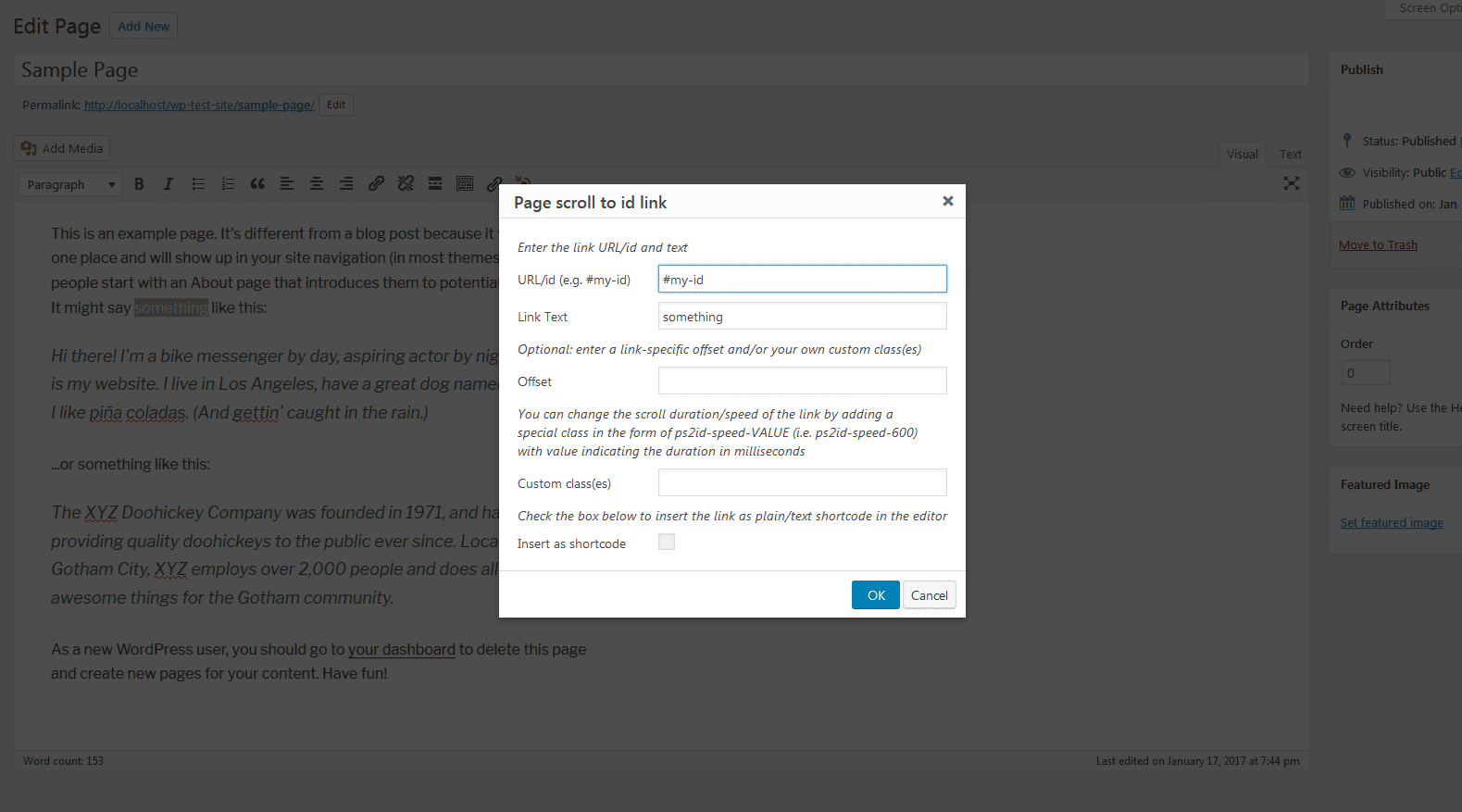
- Create links within your content using plugin’s “Insert/edit Page scroll to id link” button and/or shortcode in post visual/text editor. You can also add the class
ps2idon any existing link you want to be handled by the plugin.
For more info see plugin’s basic tutorial
License
MIT
You should have received a copy of the MIT License along with this program.
If not, see http://opensource.org/licenses/MIT.
Donate
If you like this plugin and find it useful, consider making a donation :).
Plugin previous/other versions
Other/external resources
- How to create anchor links on WordPress Gutenberg editor
- Using Page scroll to id with the Divi Builder plugin
- One Page WordPress Smooth Scrolling Menu – How to Use Page Scroll to ID Plugin 2017
- Smooth scrolling between page sections using Page scroll to id
- Video tutorial: How to create a single page WordPress website
- GeneratePress – Elementor – Page Scroll to ID – One Page Website
- Onepage WordPress – Page scroll to iD plugin
Installation
Automatic
- Click ‘Add New’ under ‘Plugins’ menu in WordPress.
- Perform a search for the term ‘Page scroll to id’ and in search results, click ‘Install/Install Now’ under plugin name.
- When installation is finished, click ‘Activate Plugin’.
Manual
- Download and extract the plugin.
- Upload the entire
page-scroll-to-idfolder to/wp-content/plugins/directory. - Activate the plugin through the ‘Plugins’ menu in WordPress.
Configuration
Configure plugin options by clicking ‘Settings’ under plugin name or through the ‘Settings’ menu in WordPress administration.
Frequently asked questions
Is it GDPR compliant?
Yes.
Why it hasn’t been updated for x weeks/months?
Because it works and it already has a ton of features. The plugin has little dependency on WordPress functions so it doesn’t need to be updated every time WordPress updates (that’s why it works on ancient WordPress versions like 3.3).
Changelog
Fixed various PHP 8 warnings, changed plugin shortcodes files to adhere to wp coding standards.
1.7.9
- Fixed various PHP 8 warnings.
- Changed plugin shortcodes files to adhere to wp coding standards.
1.7.8
- Added aria-label attribute in plugin shortcodes (requires PHP v5.3 or greater).
- Changed plugin shortcodes markup to remove empty attributes.
- Fixed PHP warning (Array to string conversion) in PHP 8 installations – related issue.
- Fixed issue with text formatting in plugin admin page – related issue.
- Modified various plugin files to comply with the WordPress Coding Standards.
- Fixed an issue with shortcodes not working in WordPress 2022 theme editor.
- Created the special class “ps2id-auto-scroll” to easily auto-scroll to a target id with this specific class on page load.
1.7.7
- Changed a couple of plugin functions in order to comply with the WordPress Coding Standards.
1.7.6
- Fixed various PHP notices and warnings.
- Extended unbind unrelated click events extra/deferred script.
- Patched vulnerability in plugin’s shortcode.
1.7.5
- Fixed various PHP 7.4 and PHP 8 notices and warnings appearing on plugin installation.
- Fixed a minor javascript expression issue.
- Fixed PHP warning with old PHP versions (5.2 and 5.3).
1.7.4
- Added link-specific offset special class (ps2id-offset-NUMBER) for WordPress Menu items. For example adding the class ps2id-offset-150 to a menu item, will give the link an offset of 150.
- Extended plugin’s offset selector expressions with the :sticky selector.
Screenshots





For developers
Is this your plugin? Show off the numbers.
Add a live badge to your site, docs or GitHub README. It updates on its own — no account needed.
Best Page scroll to id alternatives
All navigation plugins →





FAQ
Page scroll to id: quick answers
Straight answers, pulled from live WordPress.org data.
Live data from WordPress.org · checked Sep 26, 2026
Is Page scroll to id free?
Yes. Page scroll to id is free to download and use from the official WordPress.org plugin directory.
Is Page scroll to id safe to use in 2026?
Yes — Page scroll to id is a safe, well-maintained plugin to use in 2026. It runs on 100K+ sites, is rated 4.9/5 and was last updated 4 months ago, and scores 81/100 on our health check.
How many websites use Page scroll to id?
Page scroll to id is active on 100K+ WordPress websites and has been downloaded 1,865,884 times since it launched in June 2012. It was downloaded 2,868 times in the last 30 days.
Does Page scroll to id work with WordPress 7.1?
Page scroll to id is officially tested up to WordPress 7.0.6, while the latest release is 7.1.2. It may still work, but try it on a staging site first.
When was Page scroll to id last updated?
The latest version, 1.7.9, was released on June 9, 2026 (4 months ago).
Who makes Page scroll to id?
Page scroll to id is developed and maintained by malihu.
What are the best alternatives to Page scroll to id?
The most popular alternatives to Page scroll to id are Breadcrumb NavXT (800K+ installs), WP-PageNavi (500K+ installs) and Max Mega Menu (300K+ installs).
Powered by PageForge
Want thousands of pages that rank like these? Build them in an afternoon.
This directory runs on the same engine as PageForge. Turn any spreadsheet, CSV or API into thousands of fast, SEO-ready WordPress pages — with schema, internal links and AI-written copy baked in.
- CSV, Google Sheets & API data sources
- AI content, schema & internal links per page
- Works with Elementor, Gutenberg, Yoast & Rank Math
- Free on WordPress.org — no credit card


