



Oxyplug Image
Oxyplug Image speeds up your website by automatically optimizing your images. It compresses your photos, creates multiple display-ready versions (1X, 2X, 2.8X, and 3X DPRs, including Retina Display quality), and…

Consider an alternative
Oxyplug Image shows warning signs in 2026 — compare the alternatives below before installing. It runs on 10+ sites and was last updated 10 months ago, and scores 38/100 on our health check.
- Small user base (10+ active installs)
- Very few reviews so far
- Only tested up to WordPress 6.8 (latest is 7.1)
- Needs PHP 8.1 or newer
How does it stack up?
Side-by-side on installs, updates, ratings & support



Daily downloads
Download spikes usually follow a new release — each site that auto-updates counts as a download.
Rankings
Where Oxyplug Image stands todayWordPress.org search rankings
Live position in the plugin search, top 100| Keyword | Position |
|---|---|
| lcp | #82 |
| Optimize | >100 |
| preload | >100 |
| resource hint | #29 |
| seo | >100 |
Version adoption
Share of active sites per release.
About Oxyplug Image
From the official readme · v1.0.3Description
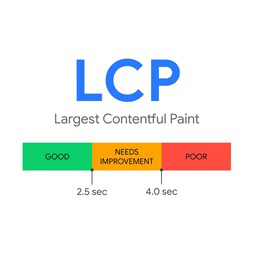
Oxyplug Image speeds up your website by automatically optimizing your images. It compresses your photos, creates multiple display-ready versions (1X, 2X, 2.8X, and 3X DPRs, including Retina Display quality), and converts them to faster formats like WebP, and (AVIF available in Premium). It also preloads your featured images to improve your Largest Contentful Paint (LCP) and boost your Core Web Vitals score on Google Lighthouse.
Oxyplug Image gives you the flexibility to load images using either the standard tag or the advanced tag for better browser compatibility and performance.
For safety, the plugin automatically saves a backup of your original images, and you can choose how long to keep them (default is 60 days). You can restore any original image at any time during that period. Even if you deactivate or uninstall the plugin, all optimized images remain on your server and continue to work normally.
Key benefits for everyday users:
- Makes images load much faster without losing quality
- Creates high-resolution images for Retina screens
- Automatically generates 1X, 2X, and 2.8X images (3X Premium)
- Helps your site perform better on Google
- Fully automatic, no technical skills required
- Reduces server load and saves bandwidth
- Supports both and tags for maximum flexibility
- Bulk image optimization
- Safe backup system with user-configurable retention period
(Premium) Features:
- AVIF image format
- 3X DPR image generation
- Image and text watermarks
- Add copyright information
- More image credits
Installation
Installation from within WordPress
- Visit Plugins > Add Plugin.
- Search for Oxyplug Image.
- Install and activate the Oxyplug Image plugin.
Manual installation
- Upload the entire
oxyplug-imagefolder to the/wp-content/plugins/directory. - Visit Plugins.
- Activate the Oxyplug Image plugin.
Changelog
1.0.3
Release Date – 02 December 2025
- Fixed a bug in sql query.
- Added RTL support
1.0.2
Release Date – 30 November 2025
- Fixed a bug that caused Ajax requests to not work properly in some cases.
- Database queries improved.
1.0.1
Release Date – 23 November 2025
- Fix some security bugs
1.0.0
Release Date – 22 November 2025
For developers
Is this your plugin? Show off the numbers.
Add a live badge to your site, docs or GitHub README. It updates on its own — no account needed.
Best Oxyplug Image alternatives
All lcp plugins →




FAQ
Oxyplug Image: quick answers
Straight answers, pulled from live WordPress.org data.
Live data from WordPress.org · checked Sep 27, 2026
Is Oxyplug Image free?
Yes. Oxyplug Image is free to download and use from the official WordPress.org plugin directory.
Is Oxyplug Image safe to use in 2026?
Oxyplug Image shows warning signs in 2026 — compare the alternatives below before installing. It runs on 10+ sites and was last updated 10 months ago, and scores 38/100 on our health check.
How many websites use Oxyplug Image?
Oxyplug Image is active on 10+ WordPress websites and has been downloaded 579 times since it launched in November 2025. It was downloaded 69 times in the last 30 days.
Does Oxyplug Image work with WordPress 7.1?
Oxyplug Image is officially tested up to WordPress 6.8.10, while the latest release is 7.1.2. It may still work, but try it on a staging site first.
What PHP version does Oxyplug Image need?
Oxyplug Image requires PHP 8.1 or higher. Most hosts run PHP 8.x today, so it works on any modern WordPress hosting.
When was Oxyplug Image last updated?
The latest version, 1.0.3, was released on December 2, 2025 (10 months ago).
Who makes Oxyplug Image?
Oxyplug Image is developed and maintained by Oxyplug Team.
What are the best alternatives to Oxyplug Image?
The most popular alternatives to Oxyplug Image are Preload LCP Image (3K+ installs), Lazy Load Control For Eleme… (3K+ installs) and Preload Featured Images (1K+ installs).
Powered by PageForge
Want thousands of pages that rank like these? Build them in an afternoon.
This directory runs on the same engine as PageForge. Turn any spreadsheet, CSV or API into thousands of fast, SEO-ready WordPress pages — with schema, internal links and AI-written copy baked in.
- CSV, Google Sheets & API data sources
- AI content, schema & internal links per page
- Works with Elementor, Gutenberg, Yoast & Rank Math
- Free on WordPress.org — no credit card


