



Ostheimer SEO
Lightweight technical SEO: titles, descriptions, schema, sitemaps, social previews and Yoast import. No account or cloud dependency.

Solid choice
Ostheimer SEO is a solid plugin choice in 2026, with a few things worth checking first. It runs on 60+ sites and was last updated 7 days ago, and scores 68/100 on our health check.
- Actively developed — last update 7 days ago
- Tested with the latest WordPress (7.1)
- Small user base (60+ active installs)
- Very few reviews so far
- Needs PHP 8.1 or newer
How does it stack up?
Side-by-side on installs, updates, ratings & support



Daily downloads
Download spikes usually follow a new release — each site that auto-updates counts as a download.
Rankings
Where Ostheimer SEO stands todayWordPress.org search rankings
Live position in the plugin search, top 100| Keyword | Position |
|---|---|
| breadcrumbs | >100 |
| open graph | >100 |
| schema | >100 |
| seo | >100 |
| sitemap | >100 |
Version adoption
Share of active sites per release.
About Ostheimer SEO
From the official readme · v1.6.2Description
Ostheimer SEO handles the technical foundations of search visibility using WordPress core features. Settings live on one page. There are no advertising banners, SEO scores, subscriptions or keyword-density targets.
Included features
- Title and description templates for posts, pages, public content types, taxonomy archives and special pages.
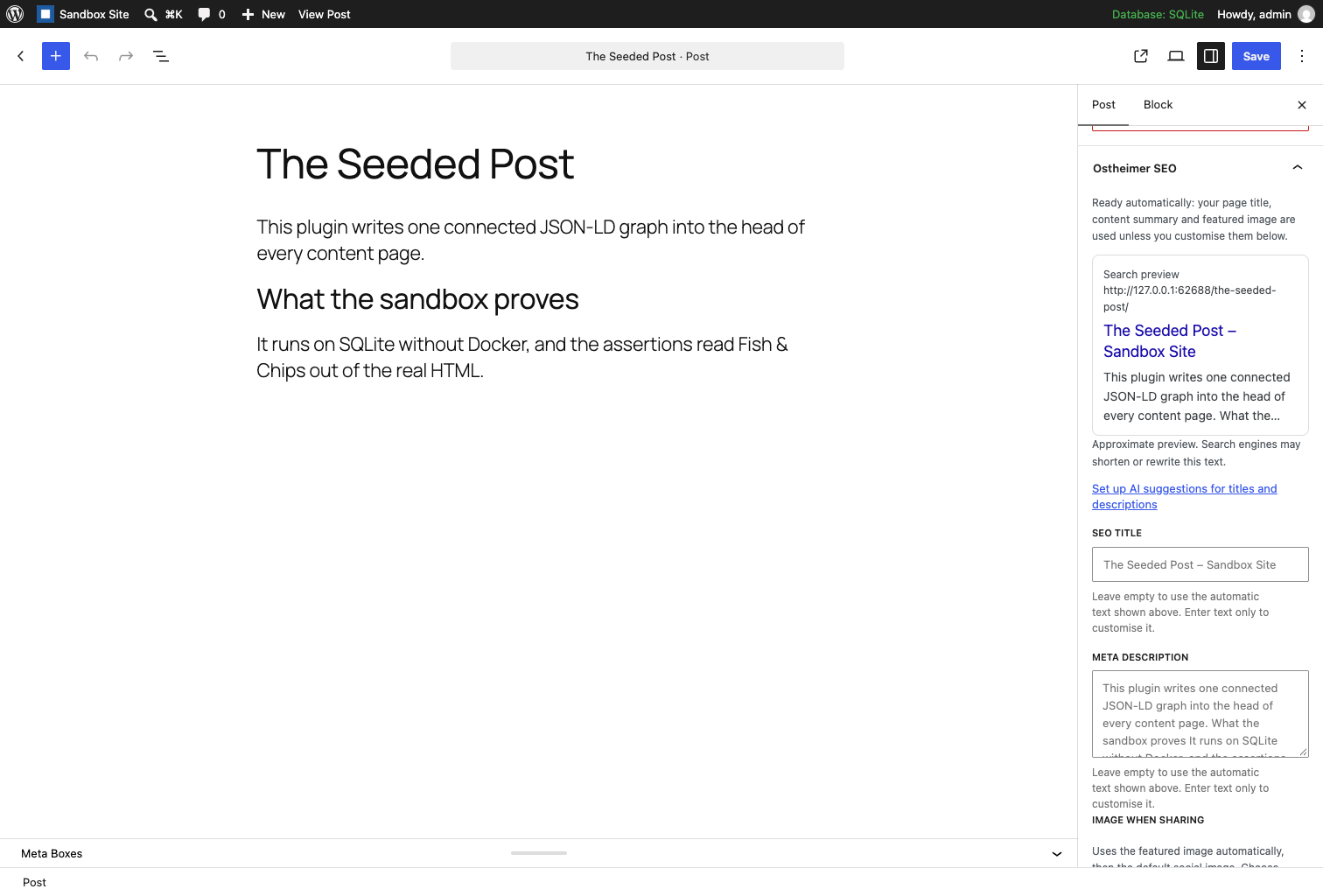
- Per-post SEO fields in the block editor and classic editor, with a server-rendered search preview.
- Canonical URLs and robots directives, including archive and content-type indexing controls.
- Open Graph and X cards, with per-post images and a fallback image.
- WordPress core XML sitemaps with noindex exclusions and modification dates.
- Permanent redirects from the old Yoast SEO sitemap URLs, such as sitemap_index.xml and post-sitemap.xml, to the WordPress sitemap index. The Yoast import switches them on.
- One connected JSON-LD graph: Organization, optional LocalBusiness (with contact, address, service area and opening hours) or Person, WebSite, WebPage, Article and BreadcrumbList.
- An accessible breadcrumbs block, the [native_seo_breadcrumbs] shortcode and a theme template function.
- Read-only import from Yoast SEO: post metadata, supported site templates, social profiles, identity and archive settings. Source data stays intact.
- Optional IndexNow notifications, disabled by default.
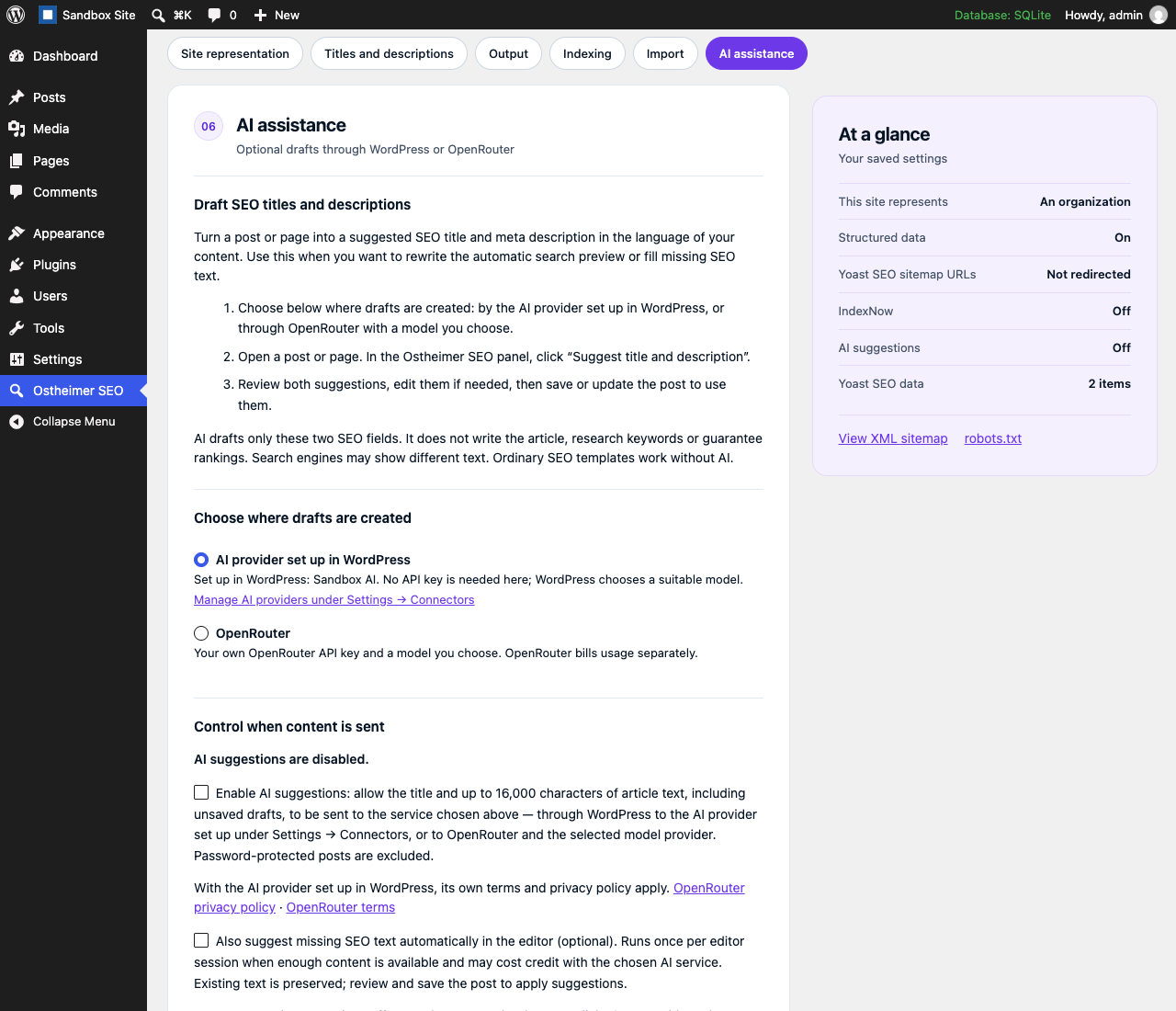
- Optional AI drafts for SEO titles and meta descriptions, created either by the AI provider set up in WordPress (WordPress 7.0 or later, Settings → Connectors) or through your own OpenRouter key and a model you choose. Review the suggestions in the post or page editor before saving. Automatic suggestions are a separate opt-in.
- One settings page with a status line (whether search engines may index the site and where the sitemap is), numbered sections and an at-a-glance summary of the saved settings: facts, no scores.
- Live template examples and editor previews, native image selection and explained advanced controls.
- Translation-ready PHP and JavaScript with WordPress.org language-pack support.
AI visibility
Connected structured data describes your content and its publisher to systems that support it. Ostheimer SEO does not promise rankings, inclusion in AI answers or citations. Optional AI writing uses the AI provider set up in WordPress or your own OpenRouter key. This release does not include crawler analytics, llms.txt or a Markdown endpoint.
Privacy
The plugin does not collect visitor analytics, store IP addresses, set tracking cookies, load CDN assets or require an external account. IndexNow and OpenRouter are optional external services, each disabled until explicitly enabled. With AI enabled, article titles and text (including drafts) are sent when generating SEO text: either to OpenRouter and the selected model provider, or through WordPress’s own AI Client to the AI provider set up under Settings → Connectors. No visitor data is sent.
Compatibility
Ostheimer SEO pauses its frontend metadata output when Yoast SEO, Rank Math, All in One SEO or SEOPress is detected. This helps prevent duplicate tags while migrating. Import first, then deactivate the other SEO plugin and verify your pages. Other plugins or themes may also output metadata; check the rendered page when switching.
For developers
Plugin information: https://www.ostheimer.at/leistungen/wordpress-plugins
All runtime PHP and JavaScript source is included in the plugin download.
Readable JavaScript uses WordPress-provided packages directly. There is no JavaScript compilation step. Composer is needed for development tools only, not at runtime.
Filters include native_seo_title, native_seo_description, native_seo_canonical, native_seo_robots, native_seo_open_graph, native_seo_schema_graph, native_seo_breadcrumbs_markup and native_seo_sitemap_exclude.
External services
IndexNow is disabled by default. Enabling it in Ostheimer SEO sends published or updated public URLs, the site hostname and a verification key to https://api.indexnow.org/indexnow. No post content or visitor data is sent. Search engines decide whether to crawl or index the URLs. A notification is not confirmation of indexing.
- Documentation: https://www.indexnow.org/documentation
- Terms: https://www.indexnow.org/terms
- Microsoft privacy statement: https://privacy.microsoft.com/privacystatement
OpenRouter AI writing is disabled by default. Enabling it in Ostheimer SEO → AI assistance allows article titles and up to 16,000 characters of plain article text, including drafts, to be sent to https://openrouter.ai/api/v1/chat/completions and the selected model provider. Password-protected posts are excluded. Requests happen when an editor clicks Generate, or when the explicitly enabled autofill mode finds missing SEO text in an open editor. Generated text is a draft until the post is saved. Existing custom SEO text is preserved unless the editor explicitly selects replacement. Provider usage costs are billed by OpenRouter. No key is included with this plugin and no credit is sold by Ostheimer SEO.
Administrators can explicitly click “Load current models from OpenRouter” to fetch the public catalogue from https://openrouter.ai/api/v1/models. This sends no API key or article content and does not enable AI writing. The searchable list shows text models advertising JSON response-format support and input/output prices in USD per million tokens. The catalogue is not loaded in the background or stored. Account/provider restrictions can still affect availability. Existing selections are preserved, and model IDs can also be entered manually.
Administrators can explicitly click “Test API key” to check an entered or configured key at https://openrouter.ai/api/v1/key. The key is sent to OpenRouter for authentication, with no article content or text generation. Testing does not save a newly entered key, enable AI suggestions or verify model availability and generation credit.
The API key is encrypted with the site’s WordPress authentication salt in a non-autoloaded option, never returned to the browser. Changing that salt requires reconnecting the key. Server administrators can instead define NATIVE_SEO_OPENROUTER_KEY in wp-config.php. A separate short-lived database lock limits generation to one request per editor per minute; it is reclaimed on demand and removed on uninstall. There are no scheduled AI jobs.
- OpenRouter documentation: https://openrouter.ai/docs/quickstart
- Terms: https://openrouter.ai/terms
- Privacy policy: https://openrouter.ai/privacy
AI writing through WordPress is offered on WordPress 7.0 or later when an AI provider is set up under Settings → Connectors. It is disabled by default and uses the same switch in Ostheimer SEO → AI assistance. With this choice, Ostheimer SEO itself sends nothing to an external endpoint: it hands the article title and up to 16,000 characters of plain article text, including drafts, to WordPress’s AI Client (wp_ai_client_prompt()), and WordPress sends them to the provider configured there, under that provider’s terms and privacy policy. Which provider and model WordPress uses, and what it costs, is set up and billed outside this plugin. Showing this choice on the settings page sends no request. Password-protected posts are excluded, generated text is a draft until the post is saved, and existing custom SEO text is preserved unless the editor explicitly selects replacement.
Installation
- Upload the ostheimer-seo folder to /wp-content/plugins/ and activate Ostheimer SEO.
- Open Ostheimer SEO and configure your site identity and templates.
- When migrating from Yoast SEO, run the import, then deactivate Yoast SEO.
- Edit a post or page to set an individual SEO title, description, canonical URL or social image.
- Check the rendered page and wp-sitemap.xml. Enable IndexNow only if you want URL notifications sent to that service.
Changelog
Fixes how special characters such as & are written into the page title.
1.6.2
- Special characters such as & and < in an SEO title are now written correctly into the page’s title element. Open Graph titles and structured data were already correct.
1.6.1
- Pages built with a shortcode page builder such as Avada are now read correctly: AI suggestions no longer ask for more content there, and the automatic description from the page text works on these pages. WordPress’s own media shortcodes, such as image captions, are still left out.
1.6.0
- AI suggestions can now use the AI provider set up in WordPress (WordPress 7.0 or later, Settings → Connectors) through the WordPress AI Client, without an OpenRouter key. OpenRouter keeps working as before.
- Existing AI settings are kept: a site that already uses OpenRouter stays on OpenRouter, AI stays off until it is enabled, and a WordPress choice whose provider disappears pauses AI drafts instead of switching to OpenRouter.
1.5.0
- Redesign the settings page: a compact header, a status line that shows whether search engines may index the site and where the sitemap is, numbered sections and an “At a glance” summary of the saved settings.
- The section navigation, the summary column and the save button stay in view while scrolling on wide screens.
- No setting, stored value or frontend output changes.
1.4.1
- Clearly show whether an API key is saved, even when AI suggestions are disabled, and confirm when the AI settings have been saved.
- Test a saved or newly entered OpenRouter API key without generating text or saving changes.
1.4.0
- Make the AI settings and editor explanations easier to understand, with clear steps for setting up and using AI suggestions.
- Choose an AI model from the current OpenRouter catalogue, complete with prices, loaded only when an administrator clicks to fetch it — no key or article content is sent.
- Raise the AI response limit so modern models have enough room to answer.
- Point the plugin information links to the new overview page on ostheimer.at.
Screenshots

For developers
Is this your plugin? Show off the numbers.
Add a live badge to your site, docs or GitHub README. It updates on its own — no account needed.
Best Ostheimer SEO alternatives
All breadcrumbs plugins →




FAQ
Ostheimer SEO: quick answers
Straight answers, pulled from live WordPress.org data.
Live data from WordPress.org · checked Nov 17, 2026
Is Ostheimer SEO free?
Yes. Ostheimer SEO is free to download and use from the official WordPress.org plugin directory.
Is Ostheimer SEO safe to use in 2026?
Ostheimer SEO is a solid plugin choice in 2026, with a few things worth checking first. It runs on 60+ sites and was last updated 7 days ago, and scores 68/100 on our health check.
How many websites use Ostheimer SEO?
Ostheimer SEO is active on 60+ WordPress websites and has been downloaded 1,398 times since it launched in September 2026. It was downloaded 639 times in the last 30 days.
Does Ostheimer SEO work with WordPress 7.1?
Yes. The developer has tested Ostheimer SEO up to WordPress 7.1.4, the latest release. It requires WordPress 6.5 or newer.
What PHP version does Ostheimer SEO need?
Ostheimer SEO requires PHP 8.1 or higher. Most hosts run PHP 8.x today, so it works on any modern WordPress hosting.
When was Ostheimer SEO last updated?
The latest version, 1.6.2, was released on November 10, 2026 (7 days ago).
Who makes Ostheimer SEO?
Ostheimer SEO is developed and maintained by Andreas Ostheimer.
What are the best alternatives to Ostheimer SEO?
The most popular alternatives to Ostheimer SEO are Breadcrumb NavXT (700K+ installs), Flexy Breadcrumb (10K+ installs) and Breadcrumb (10K+ installs).
Powered by PageForge
Want thousands of pages that rank like these? Build them in an afternoon.
This directory runs on the same engine as PageForge. Turn any spreadsheet, CSV or API into thousands of fast, SEO-ready WordPress pages — with schema, internal links and AI-written copy baked in.
- CSV, Google Sheets & API data sources
- AI content, schema & internal links per page
- Works with Elementor, Gutenberg, Yoast & Rank Math
- Free on WordPress.org — no credit card


