


Order Status Per Product For WooCommerce
Order Status Per Product For WooCommerce solves a common problem in WooCommerce stores: a single order may contain multiple products that are in different fulfillment stages, yet WooCommerce gives the whole order just…

Use with caution
Order Status Per Product For Wo… works, but test it on a staging site before relying on it in 2026. It runs on 30+ sites and was last updated 5 months ago, and scores 52/100 on our health check.
- Small user base (30+ active installs)
- Very few reviews so far
Daily downloads
Download spikes usually follow a new release — each site that auto-updates counts as a download.
Rankings
Where Order Status Per Product Fo… stands todayWordPress.org search rankings
Live position in the plugin search, top 100| Keyword | Position |
|---|---|
| custom order status woocommerce | >100 |
| order item status | #57 |
| per product order status | #47 |
| woocommerce item tracking | >100 |
| woocommerce order status | >100 |
Version adoption
Share of active sites per release.
About Order Status Per Product For WooCommerce
From the official readme · v1.1Description
Order Status Per Product For WooCommerce solves a common problem in WooCommerce stores: a single order may contain multiple products that are in different fulfillment stages, yet WooCommerce gives the whole order just one status.
This plugin adds a dedicated status selector directly inside each product line item on the WooCommerce order admin screen. You create your own custom statuses — Packed, Dispatched, Out for Delivery, Ready for Pickup, Backordered, or anything else your workflow needs — and assign each one a color and an optional note. When a status is saved, the date and time are recorded automatically. Customers see the status, update date, and note on their order page in My Account, all formatted using a template you control completely.
- Documentation: https://www.plugin999.com/docs/order-status-per-product-for-woocommerce/
- Demo: https://plugin999.com/demo/check-pincode-for-woocommerce/my-account/view-order/58/
- Get Pro: https://www.plugin999.com/plugin/order-status-per-product-for-woocommerce/
- Support: https://www.plugin999.com/support/
WHO IS THIS PLUGIN FOR?
- Multi-product stores where different items in one order ship on different days or from different warehouses.
- Made-to-order or craft businesses that need granular fulfillment stages like “In Production”, “Quality Check”, or “Ready to Ship”.
- Click-and-collect stores that want to mark individual items as “Ready for Pickup” without affecting others in the same order.
- Dropshipping stores sourcing products from multiple suppliers, each with independent dispatch timelines.
- Any WooCommerce store that needs to give customers real-time, per-product fulfillment visibility beyond the default order-level statuses.
KEY FEATURES
Enable / Disable With One Click
A prominent toggle switch on the settings page lets you activate or deactivate the entire plugin without losing your configured statuses. Disable it during setup or maintenance and re-enable when ready.
Unlimited Custom Order Statuses
Create as many custom statuses as your workflow requires directly from the plugin’s admin panel. Each status you create is made up of three fields:
- Status Name — The label shown in the admin dropdown and on the customer’s order page (e.g., “Packed”, “Dispatched”, “Out for Delivery”).
- Status Color — A custom color chosen from the WordPress Color Palette. The color is applied to the status label on the customer-facing order page so customers can visually distinguish statuses at a glance.
- Status Note — An optional free-text note attached to the status, such as a tracking message or customer-facing explanation. The note can be displayed on the customer’s order page via a template placeholder.
Per-Product Status Selector in Order Admin
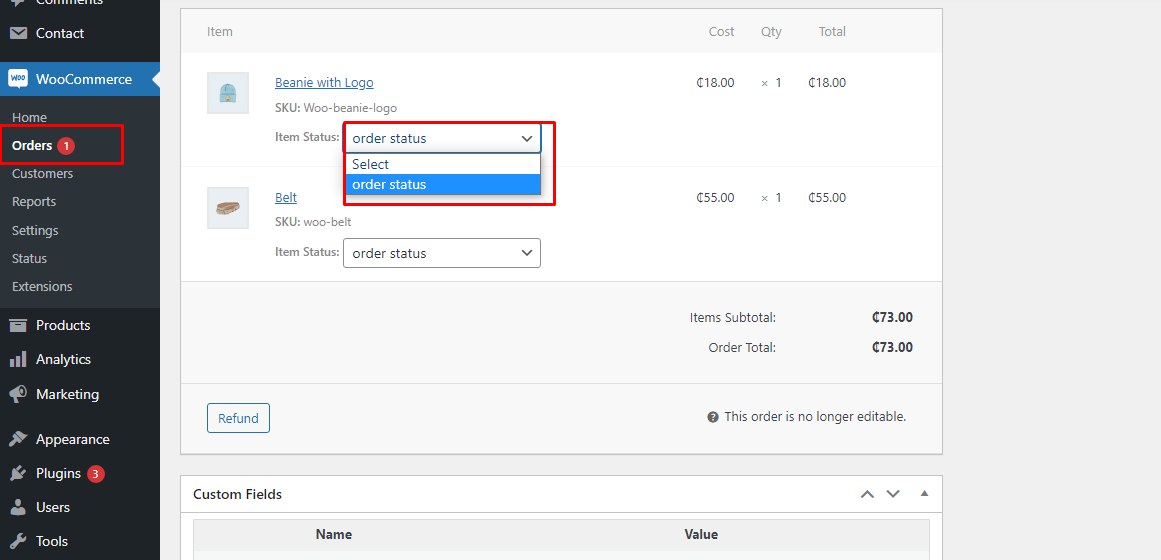
When the plugin is enabled, a dropdown menu labelled “Item Status” appears directly beneath each product line item inside the WooCommerce order edit screen. The dropdown is populated with all your custom statuses, allowing your team to set a different status for every product in the same order independently — without affecting the overall WooCommerce order status. Supports both standard products and product variations.
Automatic Status Date and Time Tracking
Every time a status is saved for a product line item, the plugin automatically records the current date and time. No manual date entry is needed. This timestamp is used in the customer-facing display so shoppers can see exactly when a status was last updated.
Custom Date Format
Define how status update dates appear to customers using standard PHP date format strings (e.g., d-M-Y, d/F/Y, j F Y g:i A). A built-in reference guide inside the settings panel lists all available PHP date codes and their output. If left blank, the plugin falls back to the date and time format already configured in your WordPress General Settings.
Flexible Status Display Template
Control exactly how the status block looks on the customer’s order page using a free-text template field with three smart placeholders:
- {status} — Outputs the status name, wrapped in the status color defined for that status.
- {date} — Outputs the status update date in your chosen date format.
- {note} — Outputs the optional note associated with the status.
Arrange the placeholders in any order, add surrounding HTML or text, and style the output however your theme requires.
Customer-Facing Order Page Display
The formatted status block is displayed on the customer’s My Account > View Order page, directly beneath each product line item. Only items that have an assigned status and a recorded date are displayed — items without a status set remain clean with no extra output.
Add and Remove Statuses Dynamically
The status list in the admin panel is fully dynamic. Click Add Status to add a new row instantly; click Remove on any existing row to delete it. Statuses with a blank name are automatically discarded when saving.
HOW IT WORKS
- Install and activate the plugin.
- Go to WooCommerce Order Status in your WordPress admin menu.
- Toggle the plugin Enabled.
- Click Add Status and create your custom statuses — give each one a name, a color, and an optional note.
- Set your preferred Date Format (or leave blank to use WordPress defaults).
- Write your Status Display Template using the {status}, {date}, and {note} placeholders.
- Click Save Changes.
- Open any WooCommerce order in the admin. Each product line item now shows an Item Status dropdown — select the appropriate status and save the order.
- Customers visiting My Account > View Order will see the status, last-updated date, and note displayed beneath each product in their order.
Frequently asked questions
Can I assign a different status to each product inside the same order?
Yes, that is the core purpose of this plugin. Each product line item in a WooCommerce order gets its own independent Item Status dropdown, so you can mark one item as Dispatched while another in the same order is still Packed.
Where does the status selector appear in the admin?
The status dropdown appears directly under each product line item in the WooCommerce order edit screen, in the same area where SKU and item meta are displayed. It is only visible when the plugin is enabled and at least one custom status has been created.
Where does the customer see the item status?
On the customer’s My Account > View Order page, the plugin appends the formatted status block directly beneath each product line item. Only items with an assigned status and a recorded update date will show output.
Does the plugin support product variations?
Yes. The item status selector works on both simple products and product variations within a WooCommerce order.
Can I customize what the status looks like on the customer’s page?
Yes. Use the Status Display Template field to build your own output using the {status}, {date}, and {note} placeholders. You can add your own text, HTML, or labels around the placeholders to match your theme’s style.
What happens to the date format if I leave the Date Format field blank?
The plugin falls back to the date and time format settings configured in WordPress Settings > General, so you will still get a properly formatted date without any additional configuration.
Can I create as many custom statuses as I need?
Yes, there is no limit on the number of custom statuses you can create. Add a row for each stage in your fulfillment workflow.
Where can I get support?
Visit plugin999.com/support to submit a support request. You can also leave a review on the WordPress.org plugin page.
Changelog
Version 1.1 introduces a fully redesigned admin panel, per-status color and note fields, a customizable display template, and improved security. Upgrade recommended for all users on version 1.0.
1.1
- Redesigned admin panel with React-based settings UI and card layout.
- Added WordPress ColorPalette integration for per-status color selection.
- Added Status Note field to attach an optional message to each custom status.
- Added Status Display Template with {status}, {date}, and {note} placeholders for full customer-facing layout control.
- Added custom PHP Date Format field with built-in format reference guide.
- Added automatic fallback to WordPress General date/time settings when date format is left blank.
- Added dynamic Add/Remove status rows — blank-name rows are silently discarded on save.
- Added support for product variations in the item status dropdown.
- Improved nonce verification and data sanitization on all save operations.
1.0
- Initial release — custom item status selector per product line item in WooCommerce orders.
Screenshots


For developers
Is this your plugin? Show off the numbers.
Add a live badge to your site, docs or GitHub README. It updates on its own — no account needed.
FAQ
Order Status Per Product For WooCom…: quick answers
Straight answers, pulled from live WordPress.org data.
Live data from WordPress.org · checked Oct 6, 2026
Is Order Status Per Product For Wo… free?
Yes. Order Status Per Product For Wo… is free to download and use from the official WordPress.org plugin directory.
Is Order Status Per Product For Wo… safe to use in 2026?
Order Status Per Product For Wo… works, but test it on a staging site before relying on it in 2026. It runs on 30+ sites and was last updated 5 months ago, and scores 52/100 on our health check.
How many websites use Order Status Per Product For Wo…?
Order Status Per Product For Wo… is active on 30+ WordPress websites and has been downloaded 1,887 times since it launched in February 2023. It was downloaded 118 times in the last 30 days.
Does Order Status Per Product For Wo… work with WordPress 7.1?
Order Status Per Product For Wo… is officially tested up to WordPress 7.0.6, while the latest release is 7.1.2. It may still work, but try it on a staging site first.
What PHP version does Order Status Per Product For Wo… need?
Order Status Per Product For Wo… requires PHP 7.4 or higher. Most hosts run PHP 8.x today, so it works on any modern WordPress hosting.
When was Order Status Per Product For Wo… last updated?
The latest version, 1.1, was released on May 23, 2026 (5 months ago).
Who makes Order Status Per Product For Wo…?
Order Status Per Product For Wo… is developed and maintained by silverplugins217.
Powered by PageForge
Want thousands of pages that rank like these? Build them in an afternoon.
This directory runs on the same engine as PageForge. Turn any spreadsheet, CSV or API into thousands of fast, SEO-ready WordPress pages — with schema, internal links and AI-written copy baked in.
- CSV, Google Sheets & API data sources
- AI content, schema & internal links per page
- Works with Elementor, Gutenberg, Yoast & Rank Math
- Free on WordPress.org — no credit card


