



Orchestra Map
Interactive orchestra map powered by Leaflet. Manage orchestra entries and display them on a map, in a list, or with a search bar.

Use with caution
Orchestra Map works, but test it on a staging site before relying on it in 2026. Was last updated 2 months ago, and scores 55/100 on our health check.
- Small user base (<10 active installs)
- Very few reviews so far
How does it stack up?
Side-by-side on installs, updates, ratings & support



Daily downloads
Download spikes usually follow a new release — each site that auto-updates counts as a download.
Rankings
Where Orchestra Map stands todayWordPress.org search rankings
Live position in the plugin search, top 100| Keyword | Position |
|---|---|
| directory | >100 |
| leaflet | >100 |
| map | >100 |
| Orchestra | #4 |
| shortcode | >100 |
About Orchestra Map
From the official readme · v1.9.90Description
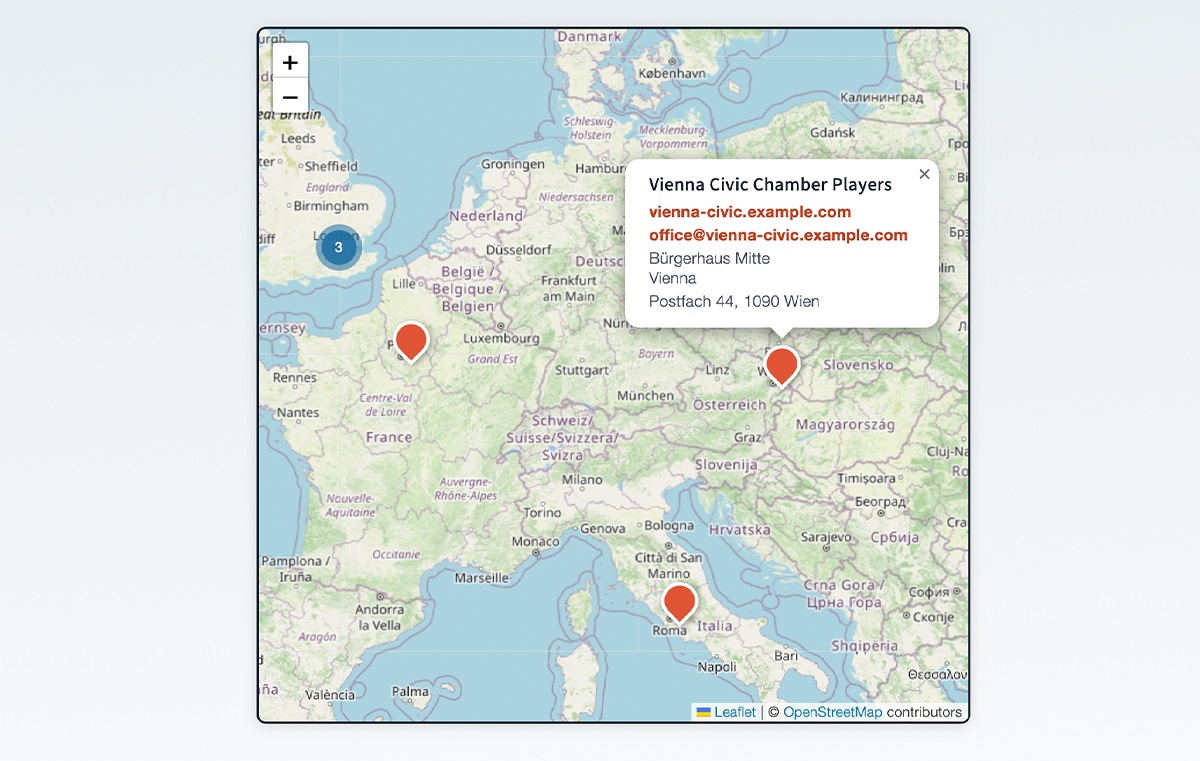
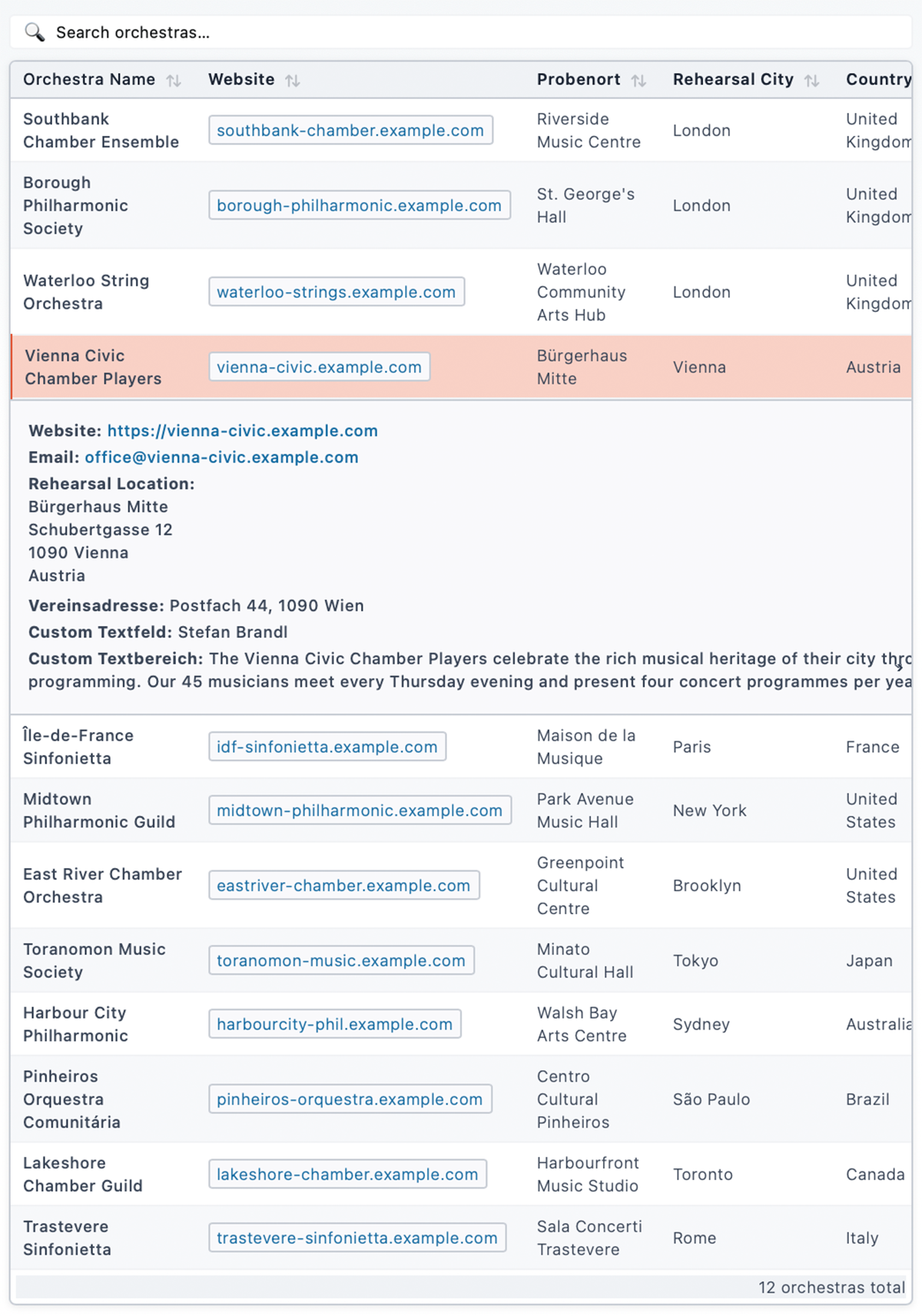
Orchestra Map lets you build an interactive directory of orchestras (or any kind of location-based entries) and display them on a Leaflet map, in a filterable list, or with a standalone search bar.
Core features (free)
- Interactive map via [orchestra_map] shortcode – powered by Leaflet.js and MarkerCluster
- List view via [orchestra_list] shortcode – filterable, connected to the map
- Search bar via [orchestra_search] shortcode – communicates with map and list via DOM events
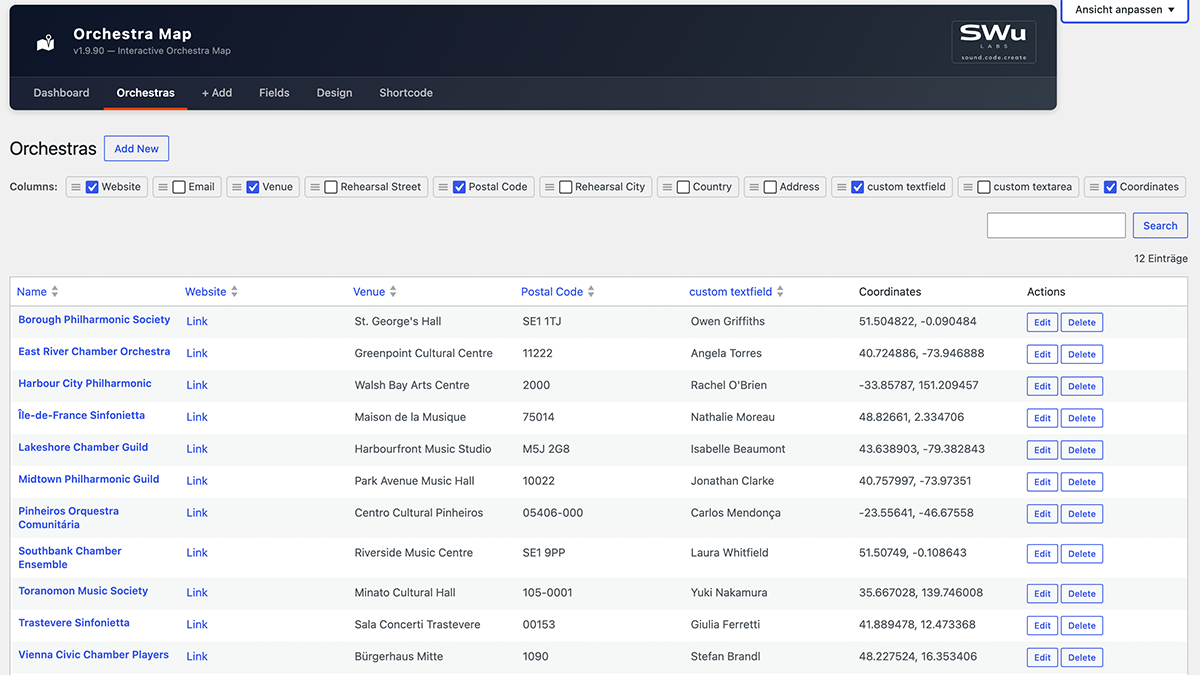
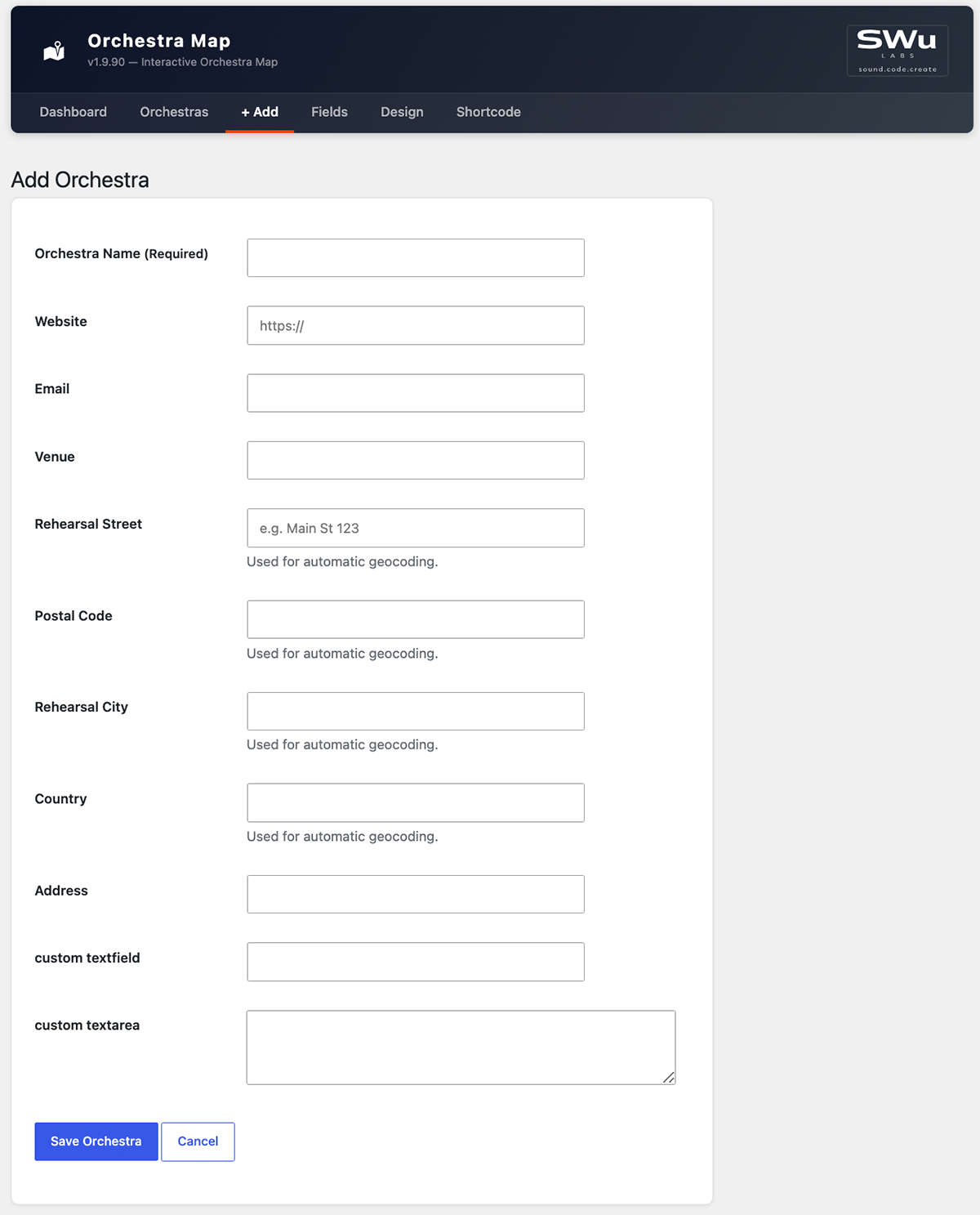
- Add / edit / delete orchestras in a clean admin UI
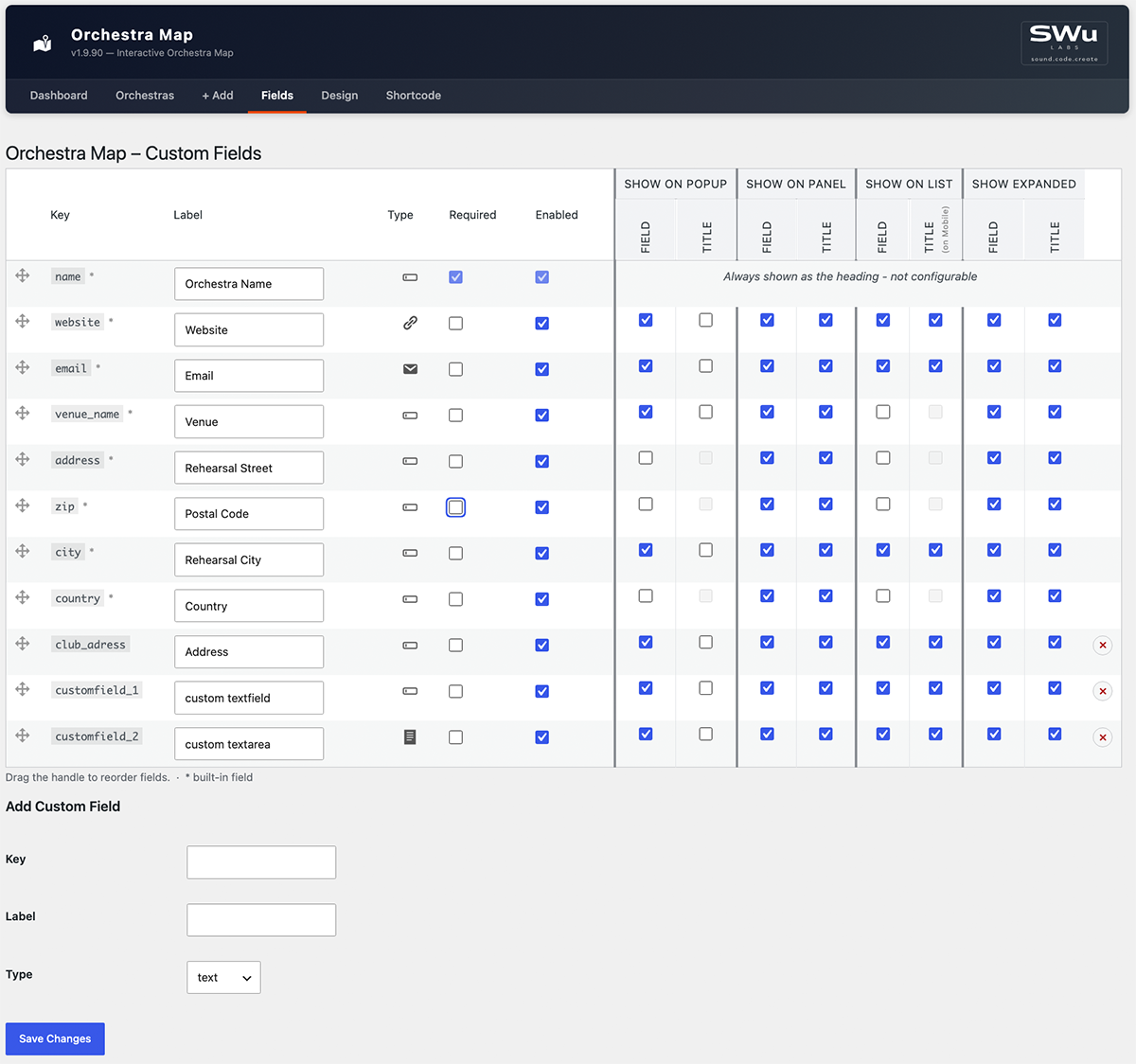
- Built-in fields: Name, Website, Email, Venue name, Address, ZIP, City, Country
- Custom Fields – add, reorder, and label your own data columns in the Fields settings page
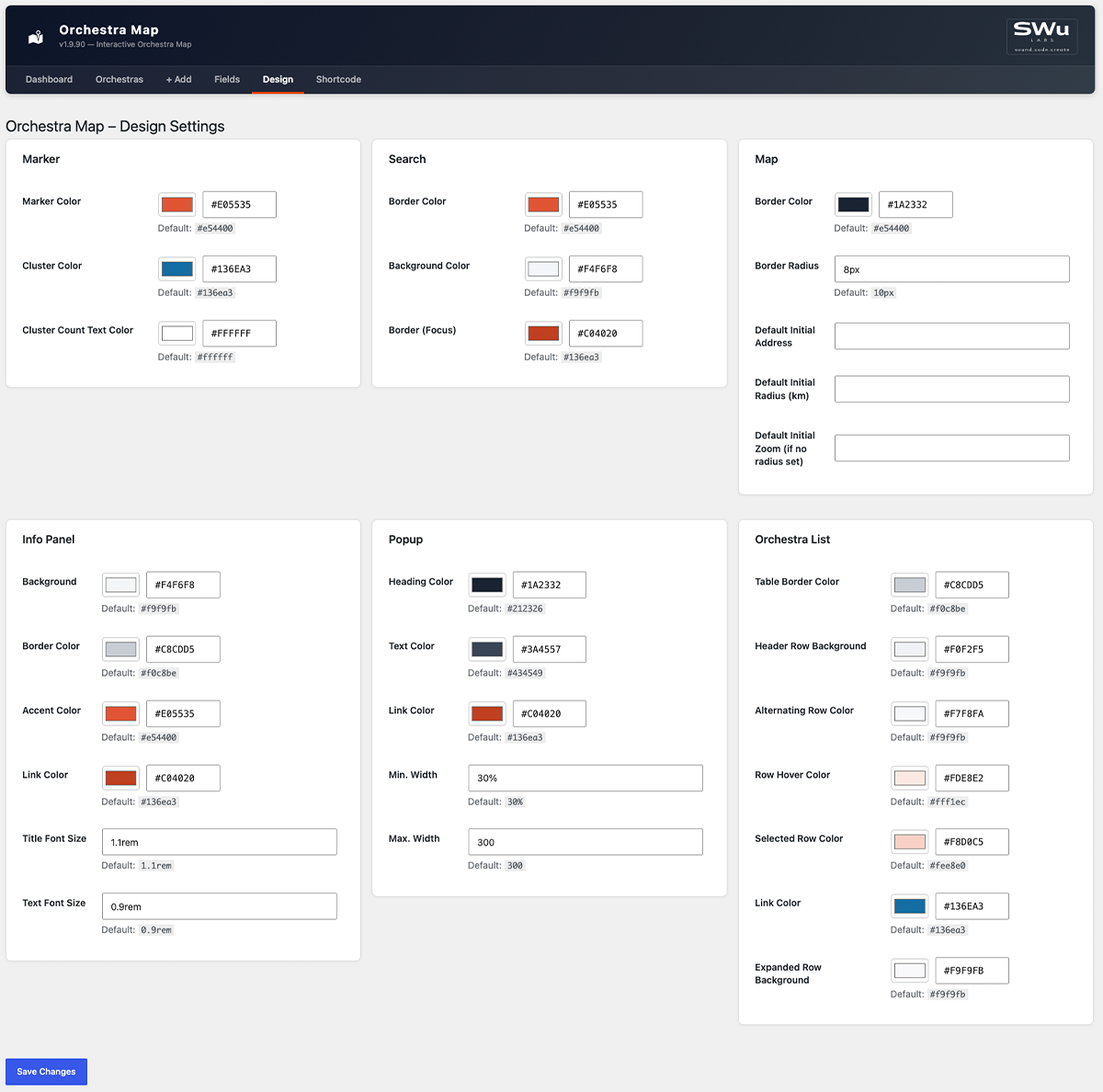
- Design settings – customise map colors, fonts and sizes in the Design settings page
- Geocoding – converts addresses to coordinates automatically via OpenStreetMap Nominatim (free, no API key required)
- Shortcode reference – full attribute documentation for all shortcodes, right in the admin
Pro add-on
The Orchestra Map Pro add-on (sold separately at swulabs.com) extends the free plugin with:
- Import & Export (CSV / Excel)
Shortcode reference
Site-wide defaults (colors, initial map view, which fields show where) are configured on the Design and Fields admin pages. The attributes below only override those defaults for a single shortcode instance – see the in-plugin “Shortcode” admin page for the full reference.
[orchestra_map]
Attribute
Default
Description
height
600px
Map height (any CSS value)
lat
51.1657
Initial map center latitude
lng
10.4515
Initial map center longitude
zoom
6
Initial zoom level
address
(none)
Initial map center as an address, auto-geocoded and cached (overrides lat/lng)
radius_km
(none)
Fit the initial view to this radius in kilometers (overrides zoom)
search
yes
Show integrated search (yes/no)
search_position
top
Search position (top/bottom)
[orchestra_list] – displays a filterable table of all geocoded orchestras.
[orchestra_search] – standalone search input; communicates with the map and list via the custom DOM events om:filter and om:select.
Credits
This plugin bundles the following open-source libraries:
- Leaflet – BSD-2-Clause License, Copyright (c) 2010–2023 Vladimir Agafonkin
- Leaflet.markercluster – MIT License, Copyright (c) 2012 David Leaver
- Geocoding via OpenStreetMap Nominatim – usage subject to the Nominatim Usage Policy
- Map tiles via OpenStreetMap – © OpenStreetMap contributors, data licensed under the Open Database License (ODbL), tile usage subject to the Tile Usage Policy
Installation
- Upload the
orchestra-mapfolder to/wp-content/plugins/. - Activate the plugin via Plugins → Installed Plugins.
- Go to Orchestra Map → + Add and create your first entry.
- Use the geocoding button in the orchestra list to convert addresses to coordinates.
- Insert
[orchestra_map]into any page or block.
Frequently asked questions
Does this plugin require an API key?
No. Geocoding uses OpenStreetMap Nominatim, which is free and requires no registration.
Does this plugin send data to external servers?
Two kinds. Geocoding sends the address fields (street, ZIP, city, country) of an orchestra entry to the OpenStreetMap Nominatim API (nominatim.openstreetmap.org) to retrieve geographic coordinates — always initiated by an admin action, never automatically in the background. Subject to the Nominatim Usage Policy. Separately, every visitor viewing the [orchestra_map] shortcode loads map tiles directly from the OpenStreetMap tile server (tile.openstreetmap.org) in their own browser — no orchestra data is sent, only standard map tile requests. Subject to the Tile Usage Policy. High-traffic sites…
How many orchestras can I add?
There is no hard limit. The plugin stores data in a custom database table.
Can I import from Excel or CSV?
Import and Export are available in the Orchestra Map Pro add-on.
Can I customise the map colors and fonts?
Yes. The free Design settings page lets you customise marker, search, map, info panel, popup and list colors and sizes.
Can I add custom data fields?
Yes. The free Fields settings page lets you add, reorder and label your own custom data fields.
Is the plugin compatible with Full-Site Editing (FSE) themes?
Yes. The shortcodes work in both classic and block-based themes.
Changelog
Update recommended: fixes custom fields being editable without a valid Orchestra Map Pro license.
1.9.90
- Fix: One constant (
GEOCODING_FIELD_KEYS) didn’t carry the plugin’s naming prefix, per WP.org review feedback – renamed toORCHESTRA_MAP_GEOCODING_FIELD_KEYS. - Change: All internal CSS classes, IDs, CSS custom properties and custom DOM events switched from the
om-prefix toorchestra-map-(e.g.om-card→orchestra-map-card, eventom:filter→orchestra-map:filter), to avoid the short, generic prefix colliding with other plugins/themes on the same page.
1.9.89
- Fix: Saving the Fields settings page while a venue-group field’s “Field” checkbox was off (making its shared “Title” checkbox disabled) silently reset that Title flag to off, discarding the previously saved value instead of preserving it.
- Fix: Adding a custom field with a key that already existed silently added nothing while still showing “Field settings saved.” – now shows a clear “already exists” error instead.
- Fix: A pasted non-breaking space, zero-width space, or byte-order-mark in a Label field could pass as “non-empty” while rendering blank; detecting a blank label now strips these too, not just plain ASCII whitespace.
- Change: The default Cluster Color is now a shade of blue matching the plugin’s usual accent color, instead of Leaflet’s default green, so it’s consistent with the rest of the built-in color palette.
- Feature: The Design settings page’s Marker section now has a “Cluster Count Text Color” field, for the number shown inside each cluster bubble – defaults to white, since it wasn’t previously configurable and the darker default cluster background made the old (unstyled) text hard to read.
1.9.88
- Fix: The Orchestra List’s “Alternating Row Color” (zebra striping) never actually showed – each row’s hidden expanded-row sibling in the page threw off the even/odd counting the striping relied on, so it only ever matched hidden rows. Rows are now striped explicitly instead of relying on position, so this works correctly.
1.9.87
- Feature: The Orchestra List’s own link color and its expanded (accordion) row background are now independently configurable on the Design settings page (“Link Color”, “Expanded Row Background” under Orchestra List), instead of silently reusing the Info Panel’s colors. Changing the Info Panel’s background/link color on the Design page no longer affects the list view at all.
1.9.86
- Fix: The new cluster color (1.9.84) made the cluster bubbles fully solid, losing the lighter-ring-around-a-darker-circle “halo” the default green/yellow/orange clusters had – restored with the custom color, so clusters still visually read as “grouped” at a glance.
1.9.85
- Fix: Clearing a color or dimension field on the Design settings page (e.g. Border Radius) and saving crashed with a hard error page instead of a normal validation message. Clearing a field now resets it to its default instead.
- Feature: Every field on the Design settings page now shows its default value underneath, so it’s clear what a field resets to (or started as).
For older versions see changelog.txt.
Screenshots
For developers
Is this your plugin? Show off the numbers.
Add a live badge to your site, docs or GitHub README. It updates on its own — no account needed.
Best Orchestra Map alternatives
All directory plugins →





FAQ
Orchestra Map: quick answers
Straight answers, pulled from live WordPress.org data.
Live data from WordPress.org · checked Oct 21, 2026
Is Orchestra Map free?
Yes. Orchestra Map is free to download and use from the official WordPress.org plugin directory.
Is Orchestra Map safe to use in 2026?
Orchestra Map works, but test it on a staging site before relying on it in 2026. Was last updated 2 months ago, and scores 55/100 on our health check.
How many websites use Orchestra Map?
Orchestra Map is active on <10 WordPress websites and has been downloaded 169 times since it launched in August 2026. It was downloaded 73 times in the last 30 days.
Does Orchestra Map work with WordPress 7.1?
Orchestra Map is officially tested up to WordPress 7.0.7, while the latest release is 7.1.3. It may still work, but try it on a staging site first.
What PHP version does Orchestra Map need?
Orchestra Map requires PHP 8.0 or higher. Most hosts run PHP 8.x today, so it works on any modern WordPress hosting.
When was Orchestra Map last updated?
The latest version, 1.9.90, was released on August 26, 2026 (2 months ago).
Who makes Orchestra Map?
Orchestra Map is developed and maintained by SWu Labs.
What are the best alternatives to Orchestra Map?
The most popular alternatives to Orchestra Map are Directorist: AI-Powered Bus… (20K+ installs), GeoDirectory (10K+ installs) and HivePress (10K+ installs).
Powered by PageForge
Want thousands of pages that rank like these? Build them in an afternoon.
This directory runs on the same engine as PageForge. Turn any spreadsheet, CSV or API into thousands of fast, SEO-ready WordPress pages — with schema, internal links and AI-written copy baked in.
- CSV, Google Sheets & API data sources
- AI content, schema & internal links per page
- Works with Elementor, Gutenberg, Yoast & Rank Math
- Free on WordPress.org — no credit card


